To avoid these ads, REGISTER NOW!

The Everything 3D Printer Thread

To avoid these ads, REGISTER NOW!

goneracin

Active member
Joined
Apr 21, 2024
Messages
41
Location
Thomson GA
has anyone seen or used the Creality Hi bed slinger.
the auroratech review looks pretty good, and id prefer not using the bambu deal, but the a1 combo is option 2. I cant bring myself to spend almost 3 times as much on the prusa mk4s for a hobby situation.
 

Citation

Well-known member
Joined
Jan 20, 2016
Messages
3,209
Location
Indy
has anyone seen or used the Creality Hi bed slinger.
the auroratech review looks pretty good, and id prefer not using the bambu deal, but the a1 combo is option 2. I cant bring myself to spend almost 3 times as much on the prusa mk4s for a hobby situation.
Are you looking for multi material? Do you care about a 250mm vs 220mm build plate?
 

goneracin

Active member
Joined
Apr 21, 2024
Messages
41
Location
Thomson GA
There is an upgrade kit to run the Creality CFS system on the K1 series printers.

CFS for K1

I'm running 2 CFS units for 8 Colors on a K1 Max, works great!
so the adapter and cfs are roughly 400
for 600, i can get the creality hi combo with cfs
and then i get to mess with 2 printers and can multitask
i think ill just get the hi combo and have the ability to mess with different printers and multiple materials (the k1 is enclosed so i can run other materials)
and its a good excuse for getting another toy....lol
ill adapt a heater to the cfs so i can heat while printing like my creality pi
 

Spire

Well-known member
Joined
Apr 5, 2006
Messages
125
Location
Kenai, Alaska
To your point, I actually have 2 K1 Max units, each with the upgrade kit to run CFS units.

I can run each printer with its own CFS or gang the CFS units to one printer.

BTW, there is an Android app that lets you make RFID tags for the CFS units to read filament types and colors.

Filament management is so much improved with the CFS attached. No more manual filament loading. Great system.

Once you get the HI with CFS, buy just the $60.00 upgrade kit for the K1, you will want to run the CFS, even if you aren't changing colors mid print.

Installing the CFS kit does not mean you cant just run a single filament just like normal. Creality Print handles the single filament or CFS choices.
 
Last edited:

goneracin

Active member
Joined
Apr 21, 2024
Messages
41
Location
Thomson GA
To your point, I actually have 2 K1 Max units, each with the upgrade kit to run CFS units.

I can run each printer with its own CFS or gang the CFS units to one printer.

BTW, there is an Android app that lets you make RFID tags for the CFS units to read filament types and colors.

Filament management is so much improved with the CFS attached. No more manual filament loading. Great system.

Once you get the HI with CFS, buy just the $60.00 upgrade kit for the K1, you will want to run the CFS, even if you aren't changing colors mid print.

Installing the CFS kit does not mean you cant just run a single filament just like normal. Creality Print handles the single filament or CFS choices.
good plan
I typically leave my filament in my creality drier and hate to change filaments...lol so i normally print everything in the color that is loaded until its gone.
 

Bob Heine

ALLIANCE MEMBER
Joined
Oct 24, 2009
Messages
10,703
Location
Boca Raton, Florida
I'm already thinking up V3 which could incorporate a slot-in feature for lights that you only need occasionally. Use case for those would be for buffing the hull of the boat, when you want wall mounted lights to ensure an even finish.
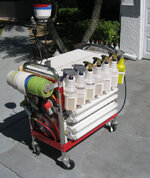
@Bessy, I permanently mounted some fluorescent fixtures to my 1-drawer cart. I can move the light to wherever I need it most.
Swiss Army Cart.jpg
 

JackOfDiamonds

Well-known member
Joined
Jul 31, 2020
Messages
706
Location
Idaho (USA)
How should I ground the custom printer I'm building? This is my plan
  • AC earth wire tied to the printer frame.​
  • DC - output from the PSU also tied to the printer frame, preferably at the same point.​
  • No need to tie signal ground from the PCB to the frame, because it's already connected to the DC-.​
  • AGND is isolated and only used for thermistors.​
  • Heatbed is grounded to the frame if it's metal and AC​

But I also heard that the hotend is supposed to be grounded because extruding plastic creates static charge. This makes sense but I don't know how to do it...a lot of toolhead designs are plastic and the hotend just screws into plastic and I don't see any way they are grounded. I guess a V6-type hotend has the thermistor capsule clamped in the hotend, and that goes back to the PCB PWM pin, but I think the case of those thermistors is isolated from the wires so that's not a ground path either.
 

JackOfDiamonds

Well-known member
Joined
Jul 31, 2020
Messages
706
Location
Idaho (USA)
I decided not to ground the printer frame at all. The only thing attached to the building ground is the 120V PSU, so the metal case of the PSU is grounded.

The DC minus rail is not specifically attached to anything. From what I can tell most printers are like this. I have a separate Analog Ground wire from the control board that's used only for thermistors. The high-power "ground" loads from hotend and hotbed have their own PWM pins on the negative side. And other misc "ground" loads like for the endstops or LCD are attached back to the board with a "regular ground" wire. I measured the board's GND is up to 80mV above actual PSU earth potential.

1754673651762.png

1754673608723.png
 

Firebrick43

Well-known member
Joined
May 12, 2015
Messages
13,973
Location
West central Indiana
One for X, and one for Y!

I couldn't figure out how to do it with just one.
Two side rails for x and one cross rail for y is all that’s needed.

You have twice as much weight and friction there as necessary and it’s going to be very detrimental to printing fast with good quality.

IMG_1388.jpeg
 
Last edited:

Jehannum

Well-known member
Joined
May 3, 2012
Messages
1,347
Location
Albuquerque, NM
Printing up a belt cover for my Rockwell 21-100 mill, not because I'm missing one, but because I don't have 3 phase power, and I need a spot to mount my VFD, and up there next to the motor seems as good a spot as any.

21-100 sidepanel.png
 
To avoid these ads, REGISTER NOW!

loganb

ALLIANCE MEMBER
Joined
Dec 29, 2011
Messages
5,495
Location
Omaha, NE

Good...I feel better...I only got 1 lol.

Had built the cart up and texting with my brother who is also a degenerate printer like us though he has a side hustle printing some HAM radio stuff so his make money...mine just make random stuff. I asked if he bought one yet...he confirmed...so said why not and hit order on the cart.

Will sell the P1 when this arrives...leaving me with an A1, H2S and the Voron in need of repairs.
 

draco_1967

Well-known member
Joined
Jan 3, 2021
Messages
205
Location
Utah
Time to start saving some more pennies. This is exactly what I've been waiting for! Not that I need a large format printer, but it is high on the want list. I can still print small stuff on a big printer...
There are some prints that are nice to not have to break into smaller pieces and peg/glue together.
 

loganb

ALLIANCE MEMBER
Joined
Dec 29, 2011
Messages
5,495
Location
Omaha, NE
This is an interesting release from Bambu...props to them for sharing it ahead of time....no regret on ordering the H2S this morning:


In short....color change with dramatically reduced "poops" or waste
 

XJSuperman

Well-known member
Joined
Jan 26, 2018
Messages
3,086
Location
Central Iowa
I read your link, but I must be missing something. Can you outline the difference between the H2D and this new C model please? Both are larger than the P and X1 models and both have dual heads right?
 

loganb

ALLIANCE MEMBER
Joined
Dec 29, 2011
Messages
5,495
Location
Omaha, NE
I read your link, but I must be missing something. Can you outline the difference between the H2D and this new C model please? Both are larger than the P and X1 models and both have dual heads right?

So the H series as I understand it are all the same "platform" and have the same rough build volume of 320 x 325 x 325 mm. The X/P/A series all have 256mm envelopes so H is significantly larger

S model is single extruder
D is dual extruder
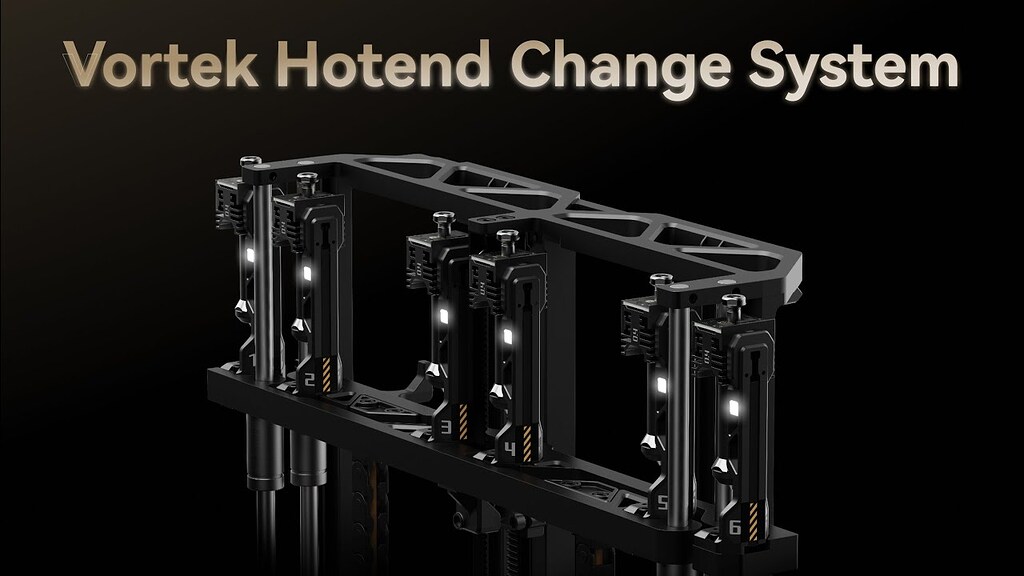
C is Cingular or changeable nozzle where it has a single extruder but fancy new tech that allows to swap the nozzle only to minimize the color change waste(should be nothing) while not being as big and bulky as multi tool heads or multi extruder designs
 

XJSuperman

Well-known member
Joined
Jan 26, 2018
Messages
3,086
Location
Central Iowa
So the H series as I understand it are all the same "platform" and have the same rough build volume of 320 x 325 x 325 mm. The X/P/A series all have 256mm envelopes so H is significantly larger

S model is single extruder
D is dual extruder
C is Cingular or changeable nozzle where it has a single extruder but fancy new tech that allows to swap the nozzle only to minimize the color change waste(should be nothing) while not being as big and bulky as multi tool heads or multi extruder designs
The website shows minor size differences with the HS and HD machines. Both are larger than the others but apparently not the same if the website descriptions are to be believed.
Is the C faster than the D then? I am not seeing the benefit of it over the D at the moment. A guy like me doesn't need the laser and all that ****, just a larger footprint and quick/wasteless color changes would be nice. I do see benefits for other use-cases.
 

niget2002

Well-known member
Joined
Oct 2, 2012
Messages
11,114
Location
Josephine, TX
The website shows minor size differences with the HS and HD machines. Both are larger than the others but apparently not the same if the website descriptions are to be believed.
Is the C faster than the D then? I am not seeing the benefit of it over the D at the moment. A guy like me doesn't need the laser and all that ****, just a larger footprint and quick/wasteless color changes would be nice. I do see benefits for other use-cases.
The build volume between the HS and HD are technically the same. Where the HD is 'smaller' is that the Dual head system takes up extra space, meaning a single nozzle can't go the full width of the bed. You lose a little print volume in the Y axis because of this. I don't know whether they have special logic so that if you load the same filament in both nozzles if it's smart enough to print the full width. You'd just lose the ability to switch colors on the full width.

I ordered some more GT2 belt for my printer and it came in this last week. I may try to get my larger printer up and running this weekend. It'd be nice to have the faster printer working again.
 

jeepxj

Well-known member
Joined
Mar 2, 2008
Messages
17,831
The website shows minor size differences with the HS and HD machines. Both are larger than the others but apparently not the same if the website descriptions are to be believed.
Is the C faster than the D then? I am not seeing the benefit of it over the D at the moment. A guy like me doesn't need the laser and all that ****, just a larger footprint and quick/wasteless color changes would be nice. I do see benefits for other use-cases.

they are the same. its the dual vs single nozzle changing the bed size slightly.

the C isnt even out yet. it will have the new nozzle change system.
 

loganb

ALLIANCE MEMBER
Joined
Dec 29, 2011
Messages
5,495
Location
Omaha, NE
The website shows minor size differences with the HS and HD machines. Both are larger than the others but apparently not the same if the website descriptions are to be believed.
Is the C faster than the D then? I am not seeing the benefit of it over the D at the moment. A guy like me doesn't need the laser and all that ****, just a larger footprint and quick/wasteless color changes would be nice. I do see benefits for other use-cases.

The C is still phantomware so to speak as it's not actually coming out till later this year or early next year so can't compare anything as to what's faster etc just yet

But compared to the H2D, if you're printing 2 color or two materials the D will be faster as it's not changing anything....just activating the other nozzle and extruder and away it goes.

Compared to the Prusa XL with 5 tool heads, the C should be faster and theoretically should be cheaper as it should be far simpler as it only duplicates nozzles, not the entire tool head. But they have to prove out the fancy inductive heating and wireless data and repeatability of the nozzle position without making the consumables stupid expensive.
 

loganb

ALLIANCE MEMBER
Joined
Dec 29, 2011
Messages
5,495
Location
Omaha, NE
I assume the C is the quick answer to the snapmaker kickstarter possibly?

I personally don't think Bambu cares about Snapmaker. Their U1 is kinda a cross between a Prusa XL and a Bambu but their reputation for device success at launch is well...subpar. On the flipside is Bambu who appears to have been ready to ship product ordered at launch as I've got tracking numbers for my order this morning.

Couple videos from people who are knowledgable and I trust to give their unbiased opinion:


sh944

ALLIANCE MEMBER
Joined
Jan 1, 2014
Messages
291
Location
Linwood, KS
@loganb How much for the P1? I need to get a relatively inexpensive printer to one of my employees and you’re close enough that I can run up and grab it. Plus, I believe we have a mutual friend (initials “RW”) that we could swap stories about…. Lol
 

loganb

ALLIANCE MEMBER
Joined
Dec 29, 2011
Messages
5,495
Location
Omaha, NE
@loganb How much for the P1? I need to get a relatively inexpensive printer to one of my employees and you’re close enough that I can run up and grab it. Plus, I believe we have a mutual friend (initials “RW”) that we could swap stories about…. Lol

Well hell...that would've been fun!

I sold it on Marketplace today....700 hours on it(bought Nov of '23 so that's not a ton of usage but it's 1 of 3 machines) along with assorted spare parts/nozzles for $650. Actually went to a local 3D printing store opening up here this weekend and he'll have it for sale. He won't make much/any on the machine but with all the spare parts and to help get some inventory in the new retail front he picked it up. Couple other buyers were interested as well so I'd say that $500 to $650 range is probably fair for a P1S with the AMS and low to moderate hours. Condition, hours and accessories will swing that price.

What does the employee need to print? If it's just PLA and PETG...the Bambu A1 is a solid machine(still got one) and $450 usually gets one new. You've got a Microcenter in OP so you could likely get it in store immediately. If doing a lot of PETG, the P1S with the enclosed AMS is nice as it keeps the filament drier....PETG is more picky about that. If there is a need for ABS/ASA or other higher temp stuff you'll really need the enclosure of the P1S/X1 or similar machines.

I would also have no problem with a Prusa CoreOne in terms of it working and being highly reliable....but it's 30% or so more than a P1S with AMS...but has a larger print area....so tradeoffs. I can't speak personally to the Qidi or Crealitys or Snapmaker etc brands but there a lot of pretty good, enclosed cabinet machines in that $750-ish range...depends on what the needs are
 
To avoid these ads, REGISTER NOW!
Top Bottom