To avoid these ads, REGISTER NOW!

The Everything 3D Printer Thread

To avoid these ads, REGISTER NOW!

PelicanPines

ALLIANCE MEMBER
Joined
Apr 30, 2014
Messages
38,104
Location
New Jersey, USA, Earth, My own reality
7072.jpg

Printed it in PETG today. Needs a few changes but I'm liking the setup so far.

I don't like the surface finish from the bambu textured plate... I Want this to match the OEM plastics. Any suggestions? Should I just get a smooth plate?
Smooth plate... or... 3D print the entire CONSOLE yourself.
 

sh944

ALLIANCE MEMBER
Joined
Jan 1, 2014
Messages
291
Location
Linwood, KS
You might just try sanding it with 320 or 400 grit, and if it needs anything more, hit it with a light dusting of satin spray paint in the correct color.
 

Citation

Well-known member
Joined
Jan 20, 2016
Messages
3,209
Location
Indy
I did a home improvement 3D project over the weekend. The short version is I wanted to add a second AC/heat vent to the drop ceiling in the basement. The upside is I had a few heat ducts to work with. The 1935 house had what I suspect was a largely heat rises based duct system with very large, custom sized duct work branching out from the furnace. A few of the ducts to the 2nd floor have been capped due to various renovations over the years and the addition of a 2nd floor HVAC. Great, all I need to do is figure out how to get a non-standard rectangular duct to attach to a round ceiling vent (got to match the other one). The local big box store didn't seem to have the right combination of random parts and I wasn't really interested in fabricating the right sized adapters.

I ended up cadding up a strange adapter that went from a horizontal 12x5 duct to an 8" ceiling vent located partially under the duct. One of my strong preferences was to not cut up any of the existing old duct work, just attach to it. With 17 hrs of printing, a ceiling vent and some foil tape I have a new vent. I used PLA because that is what I have. The air temperatures are very unlikely to be hot enough to cause creep issues. I designed with the idea that I would use foil tape to close some gaps since the exact duct position vs the ceiling wasn't easy to establish in CAD. Having done the job I can think of lots of things I could have done better in my part design but sometimes done is sufficient. It was nice having a 300x300 bed. A 250 or 220 bed would have required spliting the print into far more than I already had to.
 

Firebrick43

Well-known member
Joined
May 12, 2015
Messages
13,975
Location
West central Indiana

WhoWhatNow

Well-known member
Joined
Feb 22, 2011
Messages
1,884
Location
Collegeville, PA
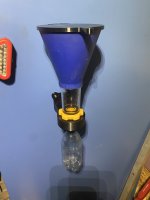
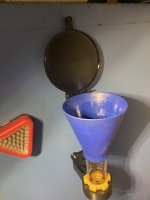
IMG_1626.jpegWell I tried some cup magnets and they are much better. I made the pockets to hold them more shallow so they stuck out 0.100” so they don’t loose any strength if slightly recessed and you can use them again else where if desired as the are retained by a countersunk head 3mm screw.

https://www.amazon.com/LOVIMAG-Neod...g-Cabinet/dp/B0D93KCN54/?tag=atomicindus08-20

IMG_1628.jpeg

IMG_1630.jpeg
IMG_1629.jpeg
That is awesome. Have you posted the files anywhere? I would like to print a few for my funnels.
 

Firebrick43

Well-known member
Joined
May 12, 2015
Messages
13,975
Location
West central Indiana
That is awesome. Have you posted the files anywhere? I would like to print a few for my funnels.
Not yet. I would like to design a variation for typical funnel instead of addition to the vehicle specific funnel above and modify the lid hinge slightly.

Or maybe I should start a print farm and sell them so I can buy a Tesla.
 

ER70S-2

Well-known member
Joined
Jan 2, 2015
Messages
796
My new H2D is printing test pieces about 0.005" undersized. Can I tighten that up, and how? I'm primarily concerned with X and Y dimensions right now because I have to print some templates for a project.
 

mike93lx

ALLIANCE MEMBER
Joined
Dec 9, 2013
Messages
37,358
Location
Richmond, VA
My new H2D is printing test pieces about 0.005" undersized. Can I tighten that up, and how? I'm primarily concerned with X and Y dimensions right now because I have to print some templates for a project.
Is it shrinkage?

Can a 3d printer really do better than 0.005" anyway?
 
To avoid these ads, REGISTER NOW!

ER70S-2

Well-known member
Joined
Jan 2, 2015
Messages
796
Is it shrinkage?

Can a 3d printer really do better than 0.005" anyway?
My Prusa was always less than 0.005", so I'm sure it's possible with this machine. I'm just wondering the best ways to dial in a Bambu since I'm new to them. I can scale the prints for a quick fix, but I'd rather do it the correct way.
 

coldh2o

Well-known member
Joined
May 21, 2013
Messages
1,414
Location
Ontario, Canada
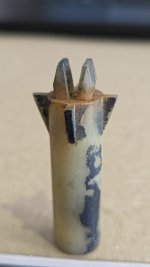
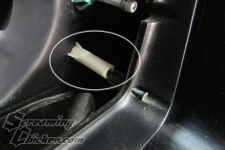
Looking for some advice here... I'm trying to reproduce a "headlight bezel nut" for a 79 Trans Am.

8933.jpg

The model came out well, all dimensions are really close. Problem is, the tabs on the end of the unit break off (which is also a problem with the OEM piece). It's like the bond between the top surface of the cylinder and the tab is not strong enough.

8934.jpg
Maybe because it's printed standing upright, and the top of the cylinder is a top surface? I'm going to try printing on it's side, so cylinder and tabs are on continuous layers, if that makes sense. But takes a lot of supports and not very efficient.

I am printing with PETG on a Bambu P1S. I know nylon would be better, but don't have any and the interwebs say nylon is hard to work with. I don't have a filament dryer.

Thanks for any advice, the users on this thread are very knowledgeable.
 
Last edited:

Citation

Well-known member
Joined
Jan 20, 2016
Messages
3,209
Location
Indy
Absolutely try to print that on it's side. You want the layer lines to follow from the base to the snap feature. Also, keep in mind you don't need to make your part the same shape as the original. A square part or even a bigger part will can also work.

Another thing to think about is creating some relief channels around those snap feature. I might have to sketch that to make the idea clear. Basically the slicer will treat the base around the snap and the snap itself as a single surface. However, sometimes it's important to trick the slicer into running layers deeper into a solid block. A while back I tried to create a model similar to this
where fine threads support a center part of the model. The slicer failed because it would stop the extrusion just as the thread came to the wall. I needed the slicer to carry the thread into the wall a few mm. I tricked the slicer into doing that by cutting a 0.1mm wide, 4mm deep "moat" around the string where it entered the wall. The slicer now saw that the thread needed to go into the wall. Problem solved.

In your case I would suggest experimenting with creating either a similar 0.1mm, 4mm deep wall just so the layers that create the snaps have more support or plan B. B would be make the gap large enough that the snaps are truly free (say 0.5mm). That will give them a bit more flex (longer cantilever).
 

loganb

ALLIANCE MEMBER
Joined
Dec 29, 2011
Messages
5,496
Location
Omaha, NE
Looking for some advice here... I'm trying to reproduce a "headlight bezel nut" for a 79 Trans Am.

8933.jpg

The model came out well, all dimensions are really close. Problem is, the tabs on the end of the unit break off (which is also a problem with the OEM piece). It's like the bond between the top surface of the cylinder and the tab is not strong enough.

8934.jpg
Maybe because it's printed standing upright, and the top of the cylinder is a top surface? I'm going to try printing on it's side, so cylinder and tabs are on continuous layers, if that makes sense. But takes a lot of supports and not very efficient.

I am printing with PETG on a Bambu P1S. I know nylon would be better, but don't have any and the interwebs say nylon is hard to work with. I don't have a filament dryer.

Thanks for any advice, the users on this thread are very knowledgeable.

You can also print it on an angle. Try a couple variations with it at 30 to 45 degrees and supports turned on. Can play with the rotation of it to get the layers the way it seems to work best at the transition from the body to the clips.

Other option would be making it a two piece assembly. Print the main body standing up as you did, but have a pocket or recess in it to allow you to print the "clip assy" separate with it laying flat, then you can insert/glue/attach the two pieces. This would keep your layer lines in the orientation you want on the clip for maximum strength and durability
 

mikegt4

Well-known member
Joined
Sep 12, 2005
Messages
3,262
Location
sw ohio
I ordered a Elegoo Centauri Carbon at the end of November, received it on Dec. 5. It sat for a couple of weeks with the holidays and having to make space for it. I set it up and ran the initial startup procedure, it made all the right noises and the head and table moved without any problem. I got green check marks on the first 4 items in the display but it sat on "input shaping" for an hour. I have run the startup program about a dozen times with no change, it always freezes at the same point even if I wait for several hours. I searched online, very little info out there concerning setup problems. I confirmed that the table belt had the correct tension, the table or head was not hitting anything and that the plate was properly in the slight recess in the table, all things that others had problems with. I sent an email to the Elegoo Support Center days ago, all that I have gotten back was an acknowledgement that they had received my email.

Any suggestions as to what to try next?

I think that the warranty period is rapidly approaching if not already past. When my box arrived I noted that one corner had received an impact (crumpled cardboard) I took some photos before I took it in the house then opened the box but didn't see any damage, they use some thick foam all around the printer. Both the table and head all move easily and smoothly through their entire designed range of motion, no binding at all.

Interestingly enough, when I worked at an aerospace company I did some 3D printing when it was in it's infancy back in the 1980's . It was resin printing with a 150mm cube capacity. I never imagined that every house could have a printer on the kitchen table in the future. We were in a small windowless and locked building, everything was on a need to know basis.
 

Attachments

  • IMG_20251205_143823935.jpg
    IMG_20251205_143823935.jpg
    853.6 KB · Views: 17

Citation

Well-known member
Joined
Jan 20, 2016
Messages
3,209
Location
Indy
Looking for some advice here... I'm trying to reproduce a "headlight bezel nut" for a 79 Trans Am.

8933.jpg

The model came out well, all dimensions are really close. Problem is, the tabs on the end of the unit break off (which is also a problem with the OEM piece). It's like the bond between the top surface of the cylinder and the tab is not strong enough.

8934.jpg
Maybe because it's printed standing upright, and the top of the cylinder is a top surface? I'm going to try printing on it's side, so cylinder and tabs are on continuous layers, if that makes sense. But takes a lot of supports and not very efficient.

I am printing with PETG on a Bambu P1S. I know nylon would be better, but don't have any and the interwebs say nylon is hard to work with. I don't have a filament dryer.

Thanks for any advice, the users on this thread are very knowledgeable.
1767500515682.png
OK, looking for your terms I found this picture. It looks like the way that part is supposed to work is kind of like a wall anchor where the tabs spread out and lock when the screw goes through. Making something that works in 3D printed plastic is certainly possible but I would not copy the original part design. I would take advantage of the fact that you can make this in shapes that may not have made sense for GM's molding and assembly processes of the time.
Also, looking at the part it appears to have 2 jobs. 1 is to act as a spacer to keep the bezel the right distance from the support part. The second is to give that long screw something to bit into. In that way it really is acting like a wall anchor. This would let you make a very simple 3D part and use a common wall anchor to basically act like a threaded boss in the car body
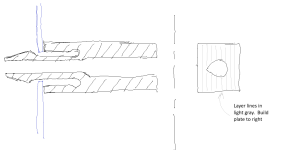
(hopefully this MS Paint drawing gets the idea across)
1767501323139.png
The idea of the spacer is it just needs a central hole and some sort of base that doesn't rest on the wall anchor.
 

Citation

Well-known member
Joined
Jan 20, 2016
Messages
3,209
Location
Indy
The more complex idea would be to CAD something similar to the GM part but with longer flex arms. This would require more detailed CAD work as some features might be harder to model. Note that I didn't add any of the round inside of the snap arms. Also, there is no harm in making the snap arms on the longer side and making the base bigger.
Anyway, the idea here is you have longer snap arms that extend into the part. I've draw this in midplane cross section. The idea is to print the part as if you were looking down on it so the midplane cross section is parallel to the print bed. An issue with that is you want the bulk of the part (the height off the print bed) to be bigger than the opening in the body. I would make the part so the flex arms are full height right up to the point where they go into the body. That will minimize the support material you will need.
1767502638312.png
1767501830062.png
 

Jehannum

Well-known member
Joined
May 3, 2012
Messages
1,348
Location
Albuquerque, NM
I ordered a Elegoo Centauri Carbon at the end of November, received it on Dec. 5. It sat for a couple of weeks with the holidays and having to make space for it. I set it up and ran the initial startup procedure, it made all the right noises and the head and table moved without any problem. I got green check marks on the first 4 items in the display but it sat on "input shaping" for an hour. I have run the startup program about a dozen times with no change, it always freezes at the same point even if I wait for several hours. I searched online, very little info out there concerning setup problems. I confirmed that the table belt had the correct tension, the table or head was not hitting anything and that the plate was properly in the slight recess in the table, all things that others had problems with. I sent an email to the Elegoo Support Center days ago, all that I have gotten back was an acknowledgement that they had received my email.

Any suggestions as to what to try next?

I think that the warranty period is rapidly approaching if not already past. When my box arrived I noted that one corner had received an impact (crumpled cardboard) I took some photos before I took it in the house then opened the box but didn't see any damage, they use some thick foam all around the printer. Both the table and head all move easily and smoothly through their entire designed range of motion, no binding at all.

Interestingly enough, when I worked at an aerospace company I did some 3D printing when it was in it's infancy back in the 1980's . It was resin printing with a 150mm cube capacity. I never imagined that every house could have a printer on the kitchen table in the future. We were in a small windowless and locked building, everything was on a need to know basis.
Seems the elegoo subreddit is aware of the "stuck input shaping" issue:

https://www.reddit.com/r/elegoo/comments/1kziuw2
Regardless, their tech support is usually pretty good.
 

Citation

Well-known member
Joined
Jan 20, 2016
Messages
3,209
Location
Indy
The more complex idea would be to CAD something similar to the GM part but with longer flex arms. This would require more detailed CAD work as some features might be harder to model. Note that I didn't add any of the round inside of the snap arms. Also, there is no harm in making the snap arms on the longer side and making the base bigger.
Anyway, the idea here is you have longer snap arms that extend into the part. I've draw this in midplane cross section. The idea is to print the part as if you were looking down on it so the midplane cross section is parallel to the print bed. An issue with that is you want the bulk of the part (the height off the print bed) to be bigger than the opening in the body. I would make the part so the flex arms are full height right up to the point where they go into the body. That will minimize the support material you will need.
OK, variation on that design: These wall anchor things need the space between the tabs to be wider than the screw where it goes into the anchor but narrower where it exits so the screw body pushes the arms outward. Rather than dealing with a tapered shape inside the arms, just set the arms at an angle. At their base they have clearance for the screw shaft. Perhaps half way up they make contact. When the arms are expanded you still want interference with the screw so the threads will bite. The dashed lines are where the hole in buried in the part would extend from the base of the arms.
1767535016436.png
 

coldh2o

Well-known member
Joined
May 21, 2013
Messages
1,414
Location
Ontario, Canada
You can also print it on an angle...
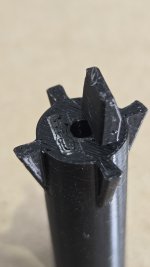
Tried 30 and 45 degrees but it didn't make the tabs much stronger. Laid the part over 90 degrees and as expected the layer orientation made the part significantly stronger. Required supports, and printing a round part in that orientation resulted in it being not quite round and some finish issues.

20260104_083332.jpg

Given it's a hidden part not on a concours-level restoration, this would be sufficient. As would the suggestions to do a different shape, size, etc. However, I'm a retired civil engineer (eek) and this exercise is more about improving my CAD and 3D printing skills, so let's continue.

... In your case I would suggest experimenting with creating either a similar 0.1mm, 4mm deep wall just so the layers that create the snaps have more support or plan B. B would be make the gap large enough that the snaps are truly free (say 0.5mm). That will give them a bit more flex (longer cantilever).

The more complex idea would be to CAD something similar to the GM part but with longer flex arms...

I tried fooling the slicer with a thin moat, it didn't make a noticeable difference. I think the base of the tabs are just too small, and the sharp corner at the tab/base interface introduce a stress point. A fillet would help, but then the part wouldn't sit flush.

Next try was the suggestion of longer flex arms "buried" in the part. Success! The tabs have some nice flex, and the part looks very similar to the original. I could now also add some fillets to the bottom of the tabs, that may have helped a bit too.
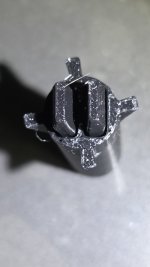
20260104_082356.jpg

Looks a little rough in close-up, but don't forget this part is only 12mm diameter, and the tabs are 2mm wide. Can't get much better with a 0.4 nozzle (and again, it will only ever matter to me).

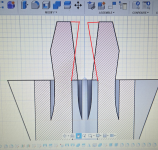
Here's a section of the CAD drawing. There are remnants of various iterations in there that I'm sure could be cleaned up/optimized if I was better at Fusion, but it works for me.

20260104_084125.jpg

I've got some translucent white PETG coming which hopefully will look a bit more like the original. Otherwise, this project is ready for production (x 16).

Thanks all for the advice, it was very useful and I've learned a lot.
 

jeepxj

Well-known member
Joined
Mar 2, 2008
Messages
17,831
you could put 1.5mm carbon rods in there and glue um in. will take some tweaking to get tension correct.


mike93lx

ALLIANCE MEMBER
Joined
Dec 9, 2013
Messages
37,358
Location
Richmond, VA
Been busy. Cheek rest, bag rider, **** pad spacer and height adjustment. I found each online, but they all required modification. The height adjustment did not work at all (way too tight) and since I only had an stl, I designed it basically from scratch.

The arca rail worked as-is but none of the mlok screws that I got on ebay were long enough so I had to buy new ones locally. I wanted black oxide, but stainless will do.

I also made a little spacer to clip into a recess in the chassis and hold a weight bar securely

My 2017 Lenovo laptop is not loving all the fusion work but it's holding on

7085.jpg
7086.jpg
7087.jpg
 

mikegt4

Well-known member
Joined
Sep 12, 2005
Messages
3,262
Location
sw ohio
Seems the elegoo subreddit is aware of the "stuck input shaping" issue:

https://www.reddit.com/r/elegoo/comments/1kziuw2
Regardless, their tech support is usually pretty good.

I finally got a response from tech support this morning, they requested a video showing the movement of the table and head during the setup procedure. Both move smoothly and without any binding or physical interference.

My grandson came over last night and spotted something that may be responsible for the problem. When the box arrived I noticed that there was shipping damage to one corner (see photo in my first post), I looked for damage after opening the box and didn't see any. I am in my mid 70's and don't see all that well anymore, details in particular. My grandson found a crack on the frame at the same corner as the damage to the box. Of course now it has been a month since I received it so most likely Egegoo will say too bad for you.
 

Attachments

  • IMG_20260104_111814271_HDR.jpg
    IMG_20260104_111814271_HDR.jpg
    383.2 KB · Views: 27

Citation

Well-known member
Joined
Jan 20, 2016
Messages
3,209
Location
Indy
Tried 30 and 45 degrees but it didn't make the tabs much stronger. Laid the part over 90 degrees and as expected the layer orientation made the part significantly stronger. Required supports, and printing a round part in that orientation resulted in it being not quite round and some finish issues.

20260104_083332.jpg

Given it's a hidden part not on a concours-level restoration, this would be sufficient. As would the suggestions to do a different shape, size, etc. However, I'm a retired civil engineer (eek) and this exercise is more about improving my CAD and 3D printing skills, so let's continue.


I tried fooling the slicer with a thin moat, it didn't make a noticeable difference. I think the base of the tabs are just too small, and the sharp corner at the tab/base interface introduce a stress point. A fillet would help, but then the part wouldn't sit flush.

Next try was the suggestion of longer flex arms "buried" in the part. Success! The tabs have some nice flex, and the part looks very similar to the original. I could now also add some fillets to the bottom of the tabs, that may have helped a bit too.

20260104_082356.jpg

Looks a little rough in close-up, but don't forget this part is only 12mm diameter, and the tabs are 2mm wide. Can't get much better with a 0.4 nozzle (and again, it will only ever matter to me).

Here's a section of the CAD drawing. There are remnants of various iterations in there that I'm sure could be cleaned up/optimized if I was better at Fusion, but it works for me.

20260104_084125.jpg

I've got some translucent white PETG coming which hopefully will look a bit more like the original. Otherwise, this project is ready for production (x 16).

Thanks all for the advice, it was very useful and I've learned a lot.
If what you have works - stop now, enjoy beer.

However, if you think it could use further refinement I would suggest changing the insides of the tabs just a bit.
1767556156281.png
Make the part of the tabs that are closest together the ends of the tabs. The sharp edge just as the tabs exit the body of the part try to really force the flex arms outward. Doing that further out will make the stress in the part more even.

BTW, since plastic can stress relax/crack, I would also check any parts you make after they have some time in the heat/cold. This is where minimizing internal stresses can really matter.
 
To avoid these ads, REGISTER NOW!
Top Bottom