Old tool guy
Well-known member
- Joined
- Apr 13, 2023
- Messages
- 3,155
Nice, but where is the bolt head?
.
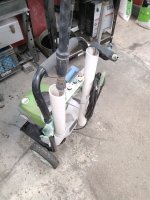
The bolts are carriage bolts inside the tube. I grabbed them with a flexible finger tool down the tube and started the nuts. Then the square boss seated in the square hole, and there ya go.And what is that blue duckbill thingie?
I’ll email you an update sometime tomorrow.Worked great. A couple of comments, and i think it’s done. Some of this you might already have incorporated. The wand holder needs to be deep, more than just a half circle. And i think there needs to be a gusset between the two main elements. Except for the location of the bolt holes, the rest is not critical.


I could see $43, but not $200.This popped up on my feed the other day, https://store.3dmakerpro.com/produc...1r8kq8g99c6gewScJaODGmUsi3yrdFE4aAhvOEALw_wcB. No clue if it works or not but if it does seems like it could be very helpful for things like trying to reverse engineer and improve or change things like the wand holder.
$43 for a 3d scanner? I wouldn't want to fight through using that.I could see $43, but not $200.
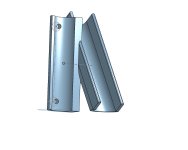
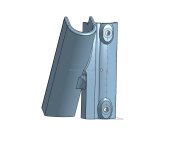
I considered extending the webbing all the way to the bottom. I didn’t follow through because:I would suggest you add a web between the two sections (orange hatching) and extend the bottoms of the wand holder so they are flat with the rest of the bottom. The webbing is simply to make the mating of the two sections stronger. The extensions on the wand holder are so you have those flat on the print bed. Currently they would require support since they are at a rather shallow angle. A smaller thing is the screw holes might need to be run through with a drill. Not a big deal but unless you make the tops of the holes slightly teardrop shaped, the tops sometimes sag since that's a bridge in the print job.
When you print this I would suggest 3-4 wall and a more dense infill. I wouldn't expect PLA to be a good long term fix for this part since PLA plastic creeps under load and doesn't like UV light. ASA or PETG are better options (be sure to print those where you don't have to share the air).
Not anywhere I can seeAlso possibly there is an issue with wear on the x axis linear rods and the steppers are loosing steps as a result. Can you see amp loads on a bambu steeper drivers in the software when moving the axis manually?
Yes, three. One was bought new, the other two were bought used (including this one) but they all have comparable time on themWith the machine off clean the rods and then manually move x and y axis and see if you feel any spots that are difficult to move through. Did you have more than one of them? You could use the other to compare the feel to
Bambu Lab P1 series printer Maintenance Recommendation
wiki.bambulab.com


...Why not?Why the extra ams?
Curious. Was it because the ams is failure prone and you want a spare on hand? Or is it because you want to have more colors connected?...Why not?
Curious. Was it because the ams is failure prone and you want a spare on hand? Or is it because you want to have more colors connected?

You can also make the top of the rectangle the work plane, then set the triangle down on it. Then use the alignment tool for x-y alignment. Then you can join them. And then you can reset the work plane back to its original settings. Sounds hard, it's not. There's plenty of videos on it. It's like 12 clicks.Need help with tinkercad please. Trying to merge these two shapes into one. How do i get them to align? I have tried the align tool, but it only works vertically (moves the triangle down to the same bottom plane) can’t get it to merge or align the bottom of the triangle with the too of the rectangle. I have tried to start with a parallelogram but can’t get that to work either.
![]()
I am switching over to Orca splicer due to the fact that I am going to get another printer to try and might as well be familar with it. I like it in some ways better than Cura that I have always used.
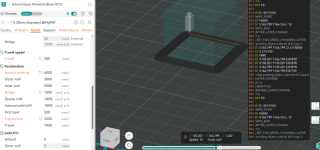
I have everything running but I have one issue that I am tearing what little hair I have left out.
I can set my outer wall speeds higher (and acceleration) and no matter what, it wont change the speeds? It runs at have the speed of the base layer even though the speed numbers are higher, the acceleration is higher, and even the (F) feed numbers in the Gcode is higher? The limits in the machine ability tab are 20000 acceleration, well above what I am trying to run (6000)
Any Ideas what is throttling it back so much?
Feeds
Base/brim
Outer wall
![]()
Its something in the slicer. I have the same speed, accel, and jerk values in cura and it doesn't throttle it back. Moving to a larger model runs the right speed. I need to dig into it but there appears to be some minimum layer time or something holding it back, I didn't expect a 20mm x 20mm cube to be throttled back like that.Acceleration is limited by the torque of the motors. That may be a function of the design of the motors, or it may be the controller’s current handling ability, or the controller’s ability to rapidly generate steps. It doesn't matter what numbers you put in slicer, if the controller can only do one amp, you are only going to get so much force and so much acceleration. Acceleration can also be limited if there is two much drag on the system. You only get so much force and any used to overcome resistance, reduces acceleration.
Normally you don’t hit the physical capability limits, you hit the limit of the controller to be able to process the kinematics and react appropriately. You end up with overshoot and ringing because the system can't deal with the momentum of all the mass at the head.
For speed, there are a couple of reasons. You may not be able to reach the top speed due to the acceleration. There is also a max flow rate setting in the material settings tab. It is a function of the material, nozzle diameter, and heater capacity. Slicer will never let you move faster than you can deposit material. Simple analogy, a brick layer may be capable and asked to lay 5 bricks a minute. However, if his helper is only delivering one brick a minute. His moving down the line without material is a waste of time, energy, and leave gaps in the wall. As a result, the fastest he is ever going to go is one brick a minute.
Its something in the slicer. I have the same speed, accel, and jerk values in cura and it doesn't throttle it back. Moving to a larger model runs the right speed. I need to dig into it but there appears to be some minimum layer time or something holding it back, I didn't expect a 20mm x 20mm cube to be throttled back like that.
I am having issues still with making crappy lifting corners in ORCA however, although much of the other features have slightly better surface finish compared to the same part in CURA
On another note, I decided to get a Elegoo Centuari Carbon 2 as a second printer and may get a few more if I like it. Supposed to be here tomorrow.
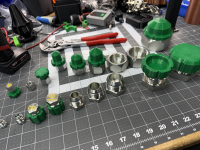
I figured out how to get AI to make me printable threads in any size I want.
Do share.
I was thinking more what AI did you use and what did you ask it?I need a custom thread profile that following standards with no over hangs more than 60 degrees for metric sizes X- Y for fusion 360.
thats what i asked it. claudeI was thinking more what AI did you use and what did you ask it?
Oh the world we live in. I was just going to respond
"I'm quite certain he just gave you his prompt word for word, all that's missing is the chosen agent/model."
Did it dump out a F360 model then? Was the model usable parametrically or doesn't matter- you have parts printed/ing and I'm stuck in 2022?

Its something in the slicer. I have the same speed, accel, and jerk values in cura and it doesn't throttle it back. Moving to a larger model runs the right speed. I need to dig into it but there appears to be some minimum layer time or something holding it back, I didn't expect a 20mm x 20mm cube to be throttled back like that
That is where it was. I kept looking for minimum layer time but its under the min/max fan speed settings. Thank youNot in front of my computer right now but I believe the minimum layer time setting is in the filament/material setting. Switch to ABS and reslice and see what the print time estimate is