To avoid these ads, REGISTER NOW!

The Everything 3D Printer Thread

To avoid these ads, REGISTER NOW!

kaymccampbell

Well-known member
Joined
Feb 27, 2015
Messages
29,410
Location
Upstate New York
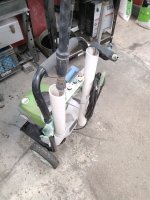
Nice, but where is the bolt head?
.

And what is that blue duckbill thingie?
The bolts are carriage bolts inside the tube. I grabbed them with a flexible finger tool down the tube and started the nuts. Then the square boss seated in the square hole, and there ya go.

The duckbill thing is a Ryobi foam cannon. Cheap and good. Makes an amazing amount of suds. I may have modified it a bit. I do that to most things I own. Not much survives contact with me unchanged.
 

Yankeefarmer

Well-known member
Joined
Jul 25, 2011
Messages
1,169
Location
Connecticut
Worked great. A couple of comments, and i think it’s done. Some of this you might already have incorporated. The wand holder needs to be deep, more than just a half circle. And i think there needs to be a gusset between the two main elements. Except for the location of the bolt holes, the rest is not critical.
I’ll email you an update sometime tomorrow.
 

Yankeefarmer

Well-known member
Joined
Jul 25, 2011
Messages
1,169
Location
Connecticut
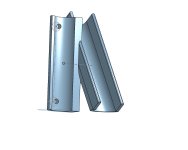
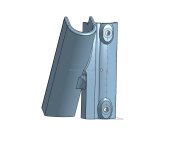
For the benefit of forum members who have been following this little project, below are two pics of the maybe-final iteration of the model. The funny shape of the mounting bosses is an attempt to avoid the need for supports for printing them. For anyone who has an OnShape account, you can make a copy of the CAD file by searching the publicly accessible area for GJProject.

I’m also posting this to encourage comment/critiques, etc. for the benefit of the GJ community. I’m old enough to no longer have F’s to give and won’t be **** hurt by anything anyone writes. This has been a fun quick project.
IMG_1319.jpegIMG_1318.jpeg
 

Citation

Well-known member
Joined
Jan 20, 2016
Messages
3,209
Location
Indy
I would suggest you add a web between the two sections (orange hatching) and extend the bottoms of the wand holder so they are flat with the rest of the bottom. The webbing is simply to make the mating of the two sections stronger. The extensions on the wand holder are so you have those flat on the print bed. Currently they would require support since they are at a rather shallow angle. A smaller thing is the screw holes might need to be run through with a drill. Not a big deal but unless you make the tops of the holes slightly teardrop shaped, the tops sometimes sag since that's a bridge in the print job.

When you print this I would suggest 3-4 wall and a more dense infill. I wouldn't expect PLA to be a good long term fix for this part since PLA plastic creeps under load and doesn't like UV light. ASA or PETG are better options (be sure to print those where you don't have to share the air).
1779631241652.png
 

kaymccampbell

Well-known member
Joined
Feb 27, 2015
Messages
29,410
Location
Upstate New York

Yankeefarmer

Well-known member
Joined
Jul 25, 2011
Messages
1,169
Location
Connecticut
I would suggest you add a web between the two sections (orange hatching) and extend the bottoms of the wand holder so they are flat with the rest of the bottom. The webbing is simply to make the mating of the two sections stronger. The extensions on the wand holder are so you have those flat on the print bed. Currently they would require support since they are at a rather shallow angle. A smaller thing is the screw holes might need to be run through with a drill. Not a big deal but unless you make the tops of the holes slightly teardrop shaped, the tops sometimes sag since that's a bridge in the print job.

When you print this I would suggest 3-4 wall and a more dense infill. I wouldn't expect PLA to be a good long term fix for this part since PLA plastic creeps under load and doesn't like UV light. ASA or PETG are better options (be sure to print those where you don't have to share the air).
I considered extending the webbing all the way to the bottom. I didn’t follow through because:
-Laziness is my only defense against OCD behavior
-I wanted to leave that as an option for the paid upgrade version of the model :ROFLMAO:
-That portion of the wand holder shouldn’t be carrying any real load unless the bottom of the wand is kicked
-If it does fail due to lack of that reinforcement, the part will still support the wand.
I will happily add that if @Old tool guy wants it.

I have read, and my experience confirms, that you can print overhangs at 45 degrees without adding supports. That’s why I carried the wand side down to the build plate. (Actually, within the model, I extruded that shape symmetrically from the vertical centerline of the part, then sliced the bottom off using the plane defined by the bottom face of the portion that fastens to the pressure washer frame.)

I completely agree with the pointers about adding walls and higher density infill. I like to use gyroid infill for parts requiring additional strength.

I have gotten to the point that I only print with PETG (or ASA if it will live outdoors). Odor/vapors isn’t a factor for me because most of the time I’m not in the shop when the printer is printing. Nowadays, I pretty much only use PLA as an interface between supports and the printed part for clean support removal.
 

mike93lx

ALLIANCE MEMBER
Joined
Dec 9, 2013
Messages
37,353
Location
Richmond, VA
One of my P1S's (1500 hrs on the clock) seems to be losing its place frequently. The head will collide (it actually bent the nozzle), ithe cover knocks off and on two occasions, it's made some nasty grinding noises.

I've run manual calibrations and I'll get a good print or two and then it goes wonky.

I'm wondering if I need to replace the belts and inspect the stepper motor gears?

Any suggestions?
 

Firebrick43

Well-known member
Joined
May 12, 2015
Messages
13,973
Location
West central Indiana
Also possibly there is an issue with wear on the x axis linear rods and the steppers are loosing steps as a result. Can you see amp loads on a bambu steeper drivers in the software when moving the axis manually?
 

mike93lx

ALLIANCE MEMBER
Joined
Dec 9, 2013
Messages
37,353
Location
Richmond, VA
The belts seem tight and I can't see any damage, but there is a lot that can't be seen from the front. Feeling like I'm going to have to take it apart
 

mike93lx

ALLIANCE MEMBER
Joined
Dec 9, 2013
Messages
37,353
Location
Richmond, VA
With the machine off clean the rods and then manually move x and y axis and see if you feel any spots that are difficult to move through. Did you have more than one of them? You could use the other to compare the feel to

Yes, three. One was bought new, the other two were bought used (including this one) but they all have comparable time on them
 

Firebrick43

Well-known member
Joined
May 12, 2015
Messages
13,973
Location
West central Indiana
I am switching over to Orca splicer due to the fact that I am going to get another printer to try and might as well be familar with it. I like it in some ways better than Cura that I have always used.

I have everything running but I have one issue that I am tearing what little hair I have left out.

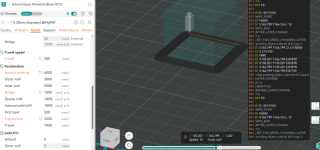
I can set my outer wall speeds higher (and acceleration) and no matter what, it wont change the speeds? It runs at have the speed of the base layer even though the speed numbers are higher, the acceleration is higher, and even the (F) feed numbers in the Gcode is higher? The limits in the machine ability tab are 20000 acceleration, well above what I am trying to run (6000)

Any Ideas what is throttling it back so much?

Feeds

Screenshot 2026-05-25 190028.png
Base/brim
Screenshot 2026-05-25 184810.png

Outer wall
Screenshot 2026-05-25 184606.png
 

Rccrawlerguy

Well-known member
Joined
Dec 11, 2011
Messages
249
After several years of having bottom of the barrel printers ( and junk "Kits") I got tired of it. I want a machine that I can turn on and it just works. I bought one of the X2d'with AMS, and an extra AMS. I have too many projects piling up to keep fiddling with printers.
 
To avoid these ads, REGISTER NOW!

Yankeefarmer

Well-known member
Joined
Jul 25, 2011
Messages
1,169
Location
Connecticut
It’d be very convenient to have a second AMS. It seems like I’m always swapping out one spool because I’m going to print with a different color or material. The AMS has a bunch of desiccant in printed holders and in-the-spool holders and so serves a dry box for my most commonly used filaments.
 

Rccrawlerguy

Well-known member
Joined
Dec 11, 2011
Messages
249
Curious. Was it because the ams is failure prone and you want a spare on hand? Or is it because you want to have more colors connected?

Sure, with one AMS, you can have up to 5 filaments. I figured that if I'm going to dive in.. Might as well go deep. Why not? Now I can do 9. Got the printer setup last night and already made several prints with multicolor. That is just awesome. I don't know why I waited so long.

I have a spare bedroom that I started remodeling into a den/workspace( just hobby, nothing dirty) I bought some of the metal type modular shelving. I'm going to make it work for 3d printer tables. Also want to make myself a work table.

Edit: With my old printers ( TronXY x5sa, it was a b!tch to get the first layer, but after that, it was a rock. And The Comgrow T300, is finicky about first layers too. ) The X2d, just worked. I have only had one problem so far, I got a poop bin from MakerWorld. It said supports weren't needed, but when I printed it, it kept dropping( or layers falling ?) on an overhang. the print came out ok, a little ugly, but its a garbage can.
 
Last edited:

Old tool guy

Well-known member
Joined
Apr 13, 2023
Messages
3,155
Need help with tinkercad please. Trying to merge these two shapes into one. How do i get them to align? I have tried the align tool, but it only works vertically (moves the triangle down to the same bottom plane) can’t get it to merge or align the bottom of the triangle with the too of the rectangle. I have tried to start with a parallelogram but can’t get that to work either.

IMG_9688.jpeg
 

Cruzan80

Well-known member
Joined
Jul 22, 2015
Messages
4,155
Location
Denver, CO
Align will only make the same surfaces parallel. Use that to make them both at the same level vertically, then grab the black cone to raise the triangle to the correct height (once the numbers appear, you can click on them and type in the height of the green box).

You can also align them left/right and front/back at the same time.
 

kaymccampbell

Well-known member
Joined
Feb 27, 2015
Messages
29,410
Location
Upstate New York
Need help with tinkercad please. Trying to merge these two shapes into one. How do i get them to align? I have tried the align tool, but it only works vertically (moves the triangle down to the same bottom plane) can’t get it to merge or align the bottom of the triangle with the too of the rectangle. I have tried to start with a parallelogram but can’t get that to work either.

IMG_9688.jpeg
You can also make the top of the rectangle the work plane, then set the triangle down on it. Then use the alignment tool for x-y alignment. Then you can join them. And then you can reset the work plane back to its original settings. Sounds hard, it's not. There's plenty of videos on it. It's like 12 clicks.
 

gte718p

Well-known member
Joined
Mar 12, 2009
Messages
3,950
I am switching over to Orca splicer due to the fact that I am going to get another printer to try and might as well be familar with it. I like it in some ways better than Cura that I have always used.

I have everything running but I have one issue that I am tearing what little hair I have left out.

I can set my outer wall speeds higher (and acceleration) and no matter what, it wont change the speeds? It runs at have the speed of the base layer even though the speed numbers are higher, the acceleration is higher, and even the (F) feed numbers in the Gcode is higher? The limits in the machine ability tab are 20000 acceleration, well above what I am trying to run (6000)

Any Ideas what is throttling it back so much?

Feeds

Screenshot 2026-05-25 190028.png
Base/brim
Screenshot 2026-05-25 184810.png

Outer wall
Screenshot 2026-05-25 184606.png

Acceleration is limited by the torque of the motors. That may be a function of the design of the motors, or it may be the controller’s current handling ability, or the controller’s ability to rapidly generate steps. It doesn't matter what numbers you put in slicer, if the controller can only do one amp, you are only going to get so much force and so much acceleration. Acceleration can also be limited if there is two much drag on the system. You only get so much force and any used to overcome resistance, reduces acceleration.

Normally you don’t hit the physical capability limits, you hit the limit of the controller to be able to process the kinematics and react appropriately. You end up with overshoot and ringing because the system can't deal with the momentum of all the mass at the head.

For speed, there are a couple of reasons. You may not be able to reach the top speed due to the acceleration. There is also a max flow rate setting in the material settings tab. It is a function of the material, nozzle diameter, and heater capacity. Slicer will never let you move faster than you can deposit material. Simple analogy, a brick layer may be capable and asked to lay 5 bricks a minute. However, if his helper is only delivering one brick a minute. His moving down the line without material is a waste of time, energy, and leave gaps in the wall. As a result, the fastest he is ever going to go is one brick a minute.
 

Firebrick43

Well-known member
Joined
May 12, 2015
Messages
13,973
Location
West central Indiana
Acceleration is limited by the torque of the motors. That may be a function of the design of the motors, or it may be the controller’s current handling ability, or the controller’s ability to rapidly generate steps. It doesn't matter what numbers you put in slicer, if the controller can only do one amp, you are only going to get so much force and so much acceleration. Acceleration can also be limited if there is two much drag on the system. You only get so much force and any used to overcome resistance, reduces acceleration.

Normally you don’t hit the physical capability limits, you hit the limit of the controller to be able to process the kinematics and react appropriately. You end up with overshoot and ringing because the system can't deal with the momentum of all the mass at the head.

For speed, there are a couple of reasons. You may not be able to reach the top speed due to the acceleration. There is also a max flow rate setting in the material settings tab. It is a function of the material, nozzle diameter, and heater capacity. Slicer will never let you move faster than you can deposit material. Simple analogy, a brick layer may be capable and asked to lay 5 bricks a minute. However, if his helper is only delivering one brick a minute. His moving down the line without material is a waste of time, energy, and leave gaps in the wall. As a result, the fastest he is ever going to go is one brick a minute.
Its something in the slicer. I have the same speed, accel, and jerk values in cura and it doesn't throttle it back. Moving to a larger model runs the right speed. I need to dig into it but there appears to be some minimum layer time or something holding it back, I didn't expect a 20mm x 20mm cube to be throttled back like that.

I am having issues still with making crappy lifting corners in ORCA however, although much of the other features have slightly better surface finish compared to the same part in CURA

On another note, I decided to get a Elegoo Centuari Carbon 2 as a second printer and may get a few more if I like it. Supposed to be here tomorrow.
 

gte718p

Well-known member
Joined
Mar 12, 2009
Messages
3,950
Its something in the slicer. I have the same speed, accel, and jerk values in cura and it doesn't throttle it back. Moving to a larger model runs the right speed. I need to dig into it but there appears to be some minimum layer time or something holding it back, I didn't expect a 20mm x 20mm cube to be throttled back like that.

I am having issues still with making crappy lifting corners in ORCA however, although much of the other features have slightly better surface finish compared to the same part in CURA

On another note, I decided to get a Elegoo Centuari Carbon 2 as a second printer and may get a few more if I like it. Supposed to be here tomorrow.

I didn't pay attention to how small your part was. Min layer time would absolutely also do it. Time=Distance/Speed. Slicer is going to slow everything down to make it work.

I think Slic3r which Orca, Prusa, and Bambu are based on does a better job with mathing then Cura and as a result does a better job holding all the constraints resulting in better part. By default Cura skips come of the calcs. As a result it can be much fast on big parts, but I have had problems with it not enforcing the flow rate correctly.

Another option for speed problems in Orca, is overrides. I'm more familiar with Bambu's layout, but you can set override based on filament for just about every setting. If you have a speed or a flow rate overide, it will trump any other setting and limit you.
 
Last edited:

customh

Well-known member
Joined
Feb 18, 2013
Messages
562
Location
East Bethel, MN
Oh the world we live in. I was just going to respond

"I'm quite certain he just gave you his prompt word for word, all that's missing is the chosen agent/model."

Did it dump out a F360 model then? Was the model usable parametrically or doesn't matter- you have parts printed/ing and I'm stuck in 2022?
 

jeepxj

Well-known member
Joined
Mar 2, 2008
Messages
17,831
Oh the world we live in. I was just going to respond

"I'm quite certain he just gave you his prompt word for word, all that's missing is the chosen agent/model."

Did it dump out a F360 model then? Was the model usable parametrically or doesn't matter- you have parts printed/ing and I'm stuck in 2022?

it took a bit more prompting but ended up outputin XML files. you put them into the thread folder for fusion 360. and away we go.

gave me plenty of classes to work with.
1780175418839.png
 

loganb

ALLIANCE MEMBER
Joined
Dec 29, 2011
Messages
5,495
Location
Omaha, NE
Its something in the slicer. I have the same speed, accel, and jerk values in cura and it doesn't throttle it back. Moving to a larger model runs the right speed. I need to dig into it but there appears to be some minimum layer time or something holding it back, I didn't expect a 20mm x 20mm cube to be throttled back like that

Not in front of my computer right now but I believe the minimum layer time setting is in the filament/material setting. Switch to ABS and reslice and see what the print time estimate is
 

Firebrick43

Well-known member
Joined
May 12, 2015
Messages
13,973
Location
West central Indiana
Well my Elegoo carbon 2 came about 2:30pm and I had my 11 and 13 year old sons unpack and set up the printer, and here at 6pm I have run several test prints and a poop can mount already. I am just blown away how easy these new class of machines are to get going out of the box and how well tuned they are.

Only god knows how much time I had spent tuning my railcore. The CC2 just worked out of the box. Only bad thing so is you can’t upload or manage files while it’s printing like I could with my Duet 2 controller on the railcore. It’s hard to see black petg in the camera as well in the shadow of the print head. The white benchy was very visible in the camera.

IMG_1744.jpeg

IMG_1745.jpeg
IMG_1746.jpeg
 
To avoid these ads, REGISTER NOW!
Top Bottom