To avoid these ads, REGISTER NOW!

The Everything 3D Printer Thread

Cruzan80

Well-known member
Joined
Jul 22, 2015
Messages
4,199
Location
Denver, CO
I am a huge fan of Craftware. Free, using 1.14 (tried new version and still buggy). Roll of filament is $15, largest print I have done is a 9" tall minion, almost 5" radius for belly, and it was still under half a roll. Time is relative, mine are tuned in well enough that I can run them overnight with no issues. So unless I need it NOW, no real worries.

Going to put my insights in later, have been running two MakerBot clones since Nov '16 for work (tech teacher).

Sent from my Moto G (5) Plus using Tapatalk
 
To avoid these ads, REGISTER NOW!
OP
B

BoilermakerFan

Well-known member
Joined
Apr 17, 2006
Messages
2,188
Location
Indianapolis, Indiana
I wired up my new hot end tonight...

20180303_222026.jpg


And then I powered it up. It holds 215degC on the hotend beautifully stable for hours, but as soon as I raised it to even 217degC... it went out of control, fluctuating between 210 and 257. :mad: So now I have to try a different firmware to see if a better PID tune for the hot end helps or if the crappy MK8 is just limited to 215.

20180303_222149.jpg


I'm going to calibrate the extruder tomorrow and relevel the bed, then I'll try another print with the new eSun PLA I picked up.

My other gripe with the GeeeTech i3 clone is this:

The extruder motor is almost touching a screw when the X-axis is fully over to the right (200mm positive travel):

20180303_223525.jpg


But the actual hot end is nowhere near the edge of the print bed edge:

20180303_223345.jpg


There is no way to get that distance back even with offsets since it's a mechanical limitation and I do not see an means to physically move the entire print bed to the left. For 95% of what I intend to print with this machine it's probably not a big deal, but it just really annoys me. Yet another reason to toss the GT i3 frame and replace it with a CoreXY setup to utilize as much of the existing hardware as possible.
 
Last edited:

Miss the Pontiacs

Well-known member
Joined
Nov 7, 2016
Messages
16,441
Location
Saskatchewan Canada
Okay guys let’s say I want to build the item below. Will the printers you have allow me to use multi colours. Chrome = Grey. Red is nonnegotiable then could I place the little cross back to gray.
 

Attachments

  • F37E0A84-95F4-4403-A669-E23A5F1A08FC.jpg
    F37E0A84-95F4-4403-A669-E23A5F1A08FC.jpg
    7.2 KB · Views: 156
OP
B

BoilermakerFan

Well-known member
Joined
Apr 17, 2006
Messages
2,188
Location
Indianapolis, Indiana
Okay guys let’s say I want to build the item below. Will the printers you have allow me to use multi colours. Chrome = Grey. Red is nonnegotiable then could I place the little cross back to gray.

It can be done, but you need multiple extruders for the different colors. If it's just two colors, than a dual extruder setup is pretty easy. Even my crappy GT has the available option to run two extruders. If you want 3 or more colors in one print then it gets a lot trickier. The Genuine Prusa i3 MK3 has a multi-filament extruder upgrade option for $400 IIRC. The Diamond extruders I shared earlier can do 3 or 5 filaments with a single hotend heater. They would either blend the colors or you have to set up a purge spot on the print bed where the printer would go to extrude material until the next color ran true. You would have to edit the Gcode to do that. I'm not aware of any program that will set it up automatically for you. I run Simplify3D and it might detect the multi-color automatically, but I haven't gotten that far into it yet.

Metallic Silver PLA
 
Last edited:
OP
B

BoilermakerFan

Well-known member
Joined
Apr 17, 2006
Messages
2,188
Location
Indianapolis, Indiana
You have got a hell of a lot further than I have. Good info but I did ask for some schooling and you are sharing your knowledge. Thanks fellas.

No problem. I've been researching the multiple filament extruders lately so I can print in multi color on one of my DIY built machines in the future when I get around to building it after I get some real time hands-on with printing.

And I edited my last post, there is a metallic silver PLA.
 

Miss the Pontiacs

Well-known member
Joined
Nov 7, 2016
Messages
16,441
Location
Saskatchewan Canada
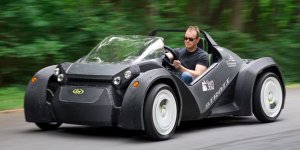
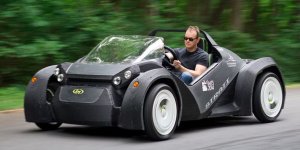
Maybe one of you guys could whip me up a Strati Roadster. Oh never mind the Strati and make me one of these.
 

Attachments

  • 1593C6B7-EE87-4B6A-B04E-CBD0ACDA00F7.jpeg
    1593C6B7-EE87-4B6A-B04E-CBD0ACDA00F7.jpeg
    57.3 KB · Views: 206
  • 7A042896-0CFC-4F8D-A56E-0983B8BB1D17.jpg
    7A042896-0CFC-4F8D-A56E-0983B8BB1D17.jpg
    80.5 KB · Views: 206

Miss the Pontiacs

Well-known member
Joined
Nov 7, 2016
Messages
16,441
Location
Saskatchewan Canada
Never thought about it but maybe you have never heard of the Strati. Well the body has been printed and the power side is electric.

Strati (automobile)

Overall view of Strati[1]
Strati is an electric car developed by Local Motors and manufactured in collaboration with Cincinnati Incorporated and Oak Ridge National Laboratory.[2] It is the world's first electric car to heavily utilize 3D-printing during the production process.[3] The car was manufactured using a Large Scale 3D Printer developed by ORNL and Cincinnati Inc. The car took just 44 hours to print during the 2014 International Manufacturing Technology Show in Chicago, Illinois. The printing was followed by three days of milling and assembling, with the completed car first test-driven on September 13, 2014. Strati is claimed to be the world's first 3D-Printed electric car.[1][4]

Contents
Design Edit

In April 2014, Local Motors organized the 3D Printed Car Design Challenge crowdsourcing to assist in the production of a full-body 3D-printed car. Seven finalists were selected from more than 200 submissions. In June 2014, Local Motors announced that the challenge was won by Michele Anoé of Italy, who was awarded the $5,000 prize.[5] After the contest, Local Motors took the design and made several modifications so that the car could be manufactured through 3D-Printing.

Specifications Edit

The two-seat Strati is considered to be a "neighborhood" electric car. Depending on the configuration of the battery packs, the range of the car can be 100 to 120 mi (160 to 190 km) with top speeds of 40 mph (64 km/h). The car is not designed to be used on highways, as it does not meet the required safety test requirements. Production is planned by the end of 2015, with prices between $18,000 and $30,000.[6]


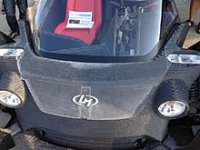
Front view with steering details exposed


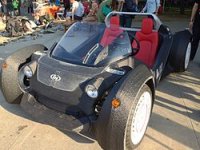
Passenger side


Rear view

Manufacturing Edit


Details of the printed body of a Strati[7]
Following the design competition, Local Motors handed off the design to the engineers at ORNL who perfected the process of Large Scale 3D Printing such that the Local Motors design could actually be manufactured. ORNL worked with Cincinnati Incorporated to develop the printer that would allow for the printing of the entire car. With the printer, ORNL and Cincinnati Inc. manufactured all body parts of the car and allowed for easy mounting of the mechanical parts, such as the electric motors and batteries.

Strati is printed from thermoplastic using a big area additive manufacturing (BAAM)[8] machine (a large FDM 3D-printer). This material is fully recyclable, which can be chopped and reprocessed to be used in printing another car. After the car is printed, the mechanical and electrical parts such as battery, motors, and suspension are manually assembled.[6]

The printing process has been improved by ORNL since July 2014, bringing the printing time of 140 hours down to less than 45 hours in September. Since IMTS, ORNL has brought the printing time of the Strati to less than 24 hours and is continuing their research efforts with the hope of printing the car in less than 10 hours.

The world's first title Edit

Disputes exist over the title of the world's first 3D-printed car. In 2010, a hybrid car "Urbee"[9] was 3D-printed using an additive manufacturing process for the entire body.[10] Local Motors claimed that Urbee's manufacturer only 3D-printed the panels and other exterior parts, but used standard parts for the internal structure. For Strati, the company claimed that 3D printing was used for all except the parts that are "mechanically involved". Strati claims to be the world's first 3D-printed electric car.[1][3]
 

Attachments

  • BEFD88AA-2A9A-4902-8F5D-8EB84AF7BB14.jpeg
    BEFD88AA-2A9A-4902-8F5D-8EB84AF7BB14.jpeg
    24.4 KB · Views: 244
  • DD6137FB-5196-4483-B314-58072B9B6A9F.jpeg
    DD6137FB-5196-4483-B314-58072B9B6A9F.jpeg
    23.9 KB · Views: 193
  • F0AE7766-4D4D-426A-97DA-4CBB7EC5AC38.jpeg
    F0AE7766-4D4D-426A-97DA-4CBB7EC5AC38.jpeg
    22.8 KB · Views: 198
  • 79031A25-843E-4C94-BDD0-501238AF6725.jpeg
    79031A25-843E-4C94-BDD0-501238AF6725.jpeg
    29.8 KB · Views: 208
  • D87457CF-7C76-425D-8895-EC2F92CA25BD.jpeg
    D87457CF-7C76-425D-8895-EC2F92CA25BD.jpeg
    57.3 KB · Views: 205
Last edited:

zr52002

Well-known member
Joined
Jan 5, 2007
Messages
82
If I were to build one, I’d probably put the machine on a locking drawer slide so it could be pulled out of the cabinet when in use and put away when not. The assembly assembly would move as one pull out assembly inside another cabinet...hm, neat idea.

Sent from my iPhone using Tapatalk Pro


I wouldn't plan on printing with it pulled out. The printer moving around at full print speed causes a lot of vibration, and vibration = noise. A lot of guys put the, on a concrete paver to kill the vibration and quiet them down.
 

Miss the Pontiacs

Well-known member
Joined
Nov 7, 2016
Messages
16,441
Location
Saskatchewan Canada
I didn’t realize the RV is completed.

World’s first 3D-printed camper made in Saskatoon

Saskatoon group finishes 3D-printed camper
A Saskatoon group has finished what's being billed as the world's first 3D-printed camper. Ashley Fields takes a tour inside the project.

Saskatoon group finishes 3D-printed camper

A Saskatoon group has finished what's being billed as the world's first 3D-printed camper. Ashley Fields takes a tour inside the RV.

Published Friday, February 23, 2018 6:31PM CST
Last Updated Friday, February 23, 2018 6:54PM CST
After about nine days, a Saskatoon team has officially made the world’s first 3D-printed camper.
The idea came to Randy Janes, a Saskatoon man with more than a decade of experience in the RV industry, two years ago. He said printing the camper would help solve some issues in the camper industry.
“People invest a lot of money in their RV. And you know, within five, 10, 15 years, three quarters of that investment is either rotted or molded away,” said Janes.
PHOTOS
Randy Janes
Randy Janes, owner of Wave of the Future 3D and co-owner of Create Cafe, poses in front of what's being dubbed the first 3D-printed camper in the world. It was printed in Saskatoon. (Ashley Field/CTV Saskatoon)
3D-printed camper
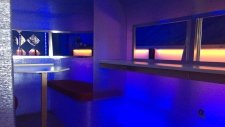
The interior of what's being dubbed as the world's first 3D-printed camper -- printed in Saskatoon -- is shown here. (Ashley Field/CTV Saskatoon)
“With my structure you wouldn’t get any of that.”
The camper was printed at Create Café using the same plastic used to make pop bottles. It’s printed into one solid piece, making it air tight and much more resistant to water. Since it’s 3D-printed, there’s more flexibility with personal preference and design.
“So even if they want to change the windows, the appliances, the shape, they can pick and choose and customize pretty much 100 per cent, which is unheard of in the RV industry,” said Janes.
The camper also broke the record for largest single indoor 3D-print. Janes hopes to have the campers on the market by the end of 2018.
 

Attachments

  • 1F086127-F273-4FC7-AB9E-341A510B43A4.jpeg
    1F086127-F273-4FC7-AB9E-341A510B43A4.jpeg
    25.9 KB · Views: 256
  • ABC58DE8-A3BA-42EA-B81D-B3AE4970923D.jpeg
    ABC58DE8-A3BA-42EA-B81D-B3AE4970923D.jpeg
    21.8 KB · Views: 242

Miss the Pontiacs

Well-known member
Joined
Nov 7, 2016
Messages
16,441
Location
Saskatchewan Canada
It says 4 metres so I also think that is a little over the top. 10’ from ground to roof seem more like it. But it appears you should be able stand upright in the trailer from the pic. Possibly the 4 metres was the max height before they got printing and then dialed it back. I have never physically seen it so who knows maybe it is 4 metres tall.
 

PCMusicGuy

Well-known member
Joined
Feb 15, 2009
Messages
851
Location
Houston, TX
I've only done a simple print so far. I wasn't paying $40 at the dealer for a replacement.
 

Attachments

  • C6ConsoleLatch.jpg
    C6ConsoleLatch.jpg
    57.3 KB · Views: 241
  • 20180111_083204.jpg
    20180111_083204.jpg
    97.1 KB · Views: 311
  • 20180111_084242.jpg
    20180111_084242.jpg
    88.9 KB · Views: 297
OP
B

BoilermakerFan

Well-known member
Joined
Apr 17, 2006
Messages
2,188
Location
Indianapolis, Indiana
Well, I'm just about ready to scrap the crappiest 3D printer ever, rob it of any parts I can use and build a new printer. I'm quickly realizing the GeeeTech i3 Pro B is an assembly of junk.

On Sunday I tried to use the MK4duo firmware. No luck. Tried the current Marlin posted and it didn't work at all. The current Arduino IDE isn't even compatible with the GT2560 board in the GT. Finally got the old 1.0.1 version to work. Then downloaded the old firmware. Tried to get the extruder calibrated and nothing. No plastic coming out at all.

Today at lunch I took the extruder apart and found the problem. A 20mm long piece was stuck above the hot end heat break. I have the new filament loaded down to the hot end now so I'll try another print tomorrow, i was too tired to mess with it tonight.

20180305_213400.jpg


The little piece of old filament must have been stuck above the feed tube down to the hot end so my new filament was never going to make it in to the hot end. At least now I know the path is clear and the filament is all the way down into the hotend.

If it still doesn't work I'm going to have the plastic parts for the new printer printed by a third party and have them shipped to me.

Here is the new printer that's at the top of my short list. It's called the Eustathios Spider V2 and it is based on the Ultimaker format for X&Y gantry so it's not as sensitive to belt tension as CoreXY machines are:

Screen%20Shot%2003-08-15%20at%2004.13%20PM.PNG


And the link to the site with all the files as well as description, updates, or upgrades for anyone interested. There is a nice set of files for a BondTech BMG extruder and E3D hotend under the Community Mods tab too:

Eustathios-Spider-V2

I haven't decided if I'll use the Azteeg X5 Mini V3 control board or spring for the Duet WiFi which has a much faster processor and better expansion capabilities... I may just go with the X5 Mini to get it running since the firmware setup is available, then try to switch to the Duet later...
 

RonRock

Well-known member
Joined
Oct 6, 2007
Messages
1,171
Location
Iowa, USA
Do people share their designs? Is that even possible with different software and firmware with the different printers?
 

bimmer1980

Well-known member
Joined
Feb 5, 2009
Messages
2,104
Location
York, PA
A lot of the files are exported from the CAD software as a .stl file. That is the basic file type for doing 3D prints...

I have done a couple of prints from Shapeways. I'm going to be getting a couple more on order this week....

At this point, I can't quite justify a 3D printer, but I can see one at some point.....

My brother got a basic chinese one for less than $300, but it has taken quite a bit of dinking around.... My 12 yo nephew got a $800 one for his birthday and I helped him make his first prints. that one was printing within an hour of us pulling it out of the box and plugging it in.... Surface finish was pretty decent with PLA and even ABS. Settings were easy to work with and make parts.... ( can't remember the name of the 3D printer right now....)
 
To avoid these ads, REGISTER NOW!

PCMusicGuy

Well-known member
Joined
Feb 15, 2009
Messages
851
Location
Houston, TX
Tell us more. Show us what it connects to show a pic doing its job. Was it time consuming to program into the printer. How do you do the programming.

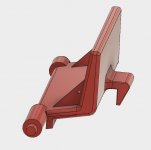
It's the latch for the center console on my 2007 Corvette. The modeling was done in Fusion 360, exported to an STL file, brought into Simplify 3D, and printed in red ABS on a PowerSpec 3D Pro printer. Infill is about 30% and it takes just under 50 minutes to print and probably around $0.10 in filament. Once you have the model, importing it into a slicer and generating the gcode for it is usually pretty quick. For example, once I had the STL file, I imported it into Simplify 3D, told it it add the support material, and had it generate the code in less than minute. You save that to the SD card, put it in the 3D printer and hit start. Most of them really are that easy. They do need to time to heat up the extruder or print bed depending on material but you can usually preheat these things like an oven.

 
Last edited:

lilscorpion

Well-known member
Joined
Mar 15, 2010
Messages
3,599
Location
Colorado
It's the latch for the center console on my 2007 Corvette.

No that’s cool! Exactly why I think it would be cool to have such a capability.

I want a switch panel for between my visors in my Jeep and I’d like the design to be flowy and modern...that’ll be where I’m headed. Sweet, thanks for sharing.

Matt


Sent from my iPhone using Tapatalk Pro
 

Miss the Pontiacs

Well-known member
Joined
Nov 7, 2016
Messages
16,441
Location
Saskatchewan Canada
It's the latch for the center console on my 2007 Corvette. The modeling was done in Fusion 360, exported to an STL file, brought into Simplify 3D, and printed in red ABS on a PowerSpec 3D Pro printer. Infill is about 30% and it takes just under 50 minutes to print and probably around $0.10 in filament. Once you have the model, importing it into a slicer and generating the gcode for it is usually pretty quick. For example, once I had the STL file, I imported it into Simplify 3D, told it it add the support material, and had it generate the code in less than minute. You save that to the SD card, put it in the 3D printer and hit start. Most of them really are that easy. They do need to time to heat up the extruder or print bed depending on material but you can usually preheat these things like an oven.


Thanks PC the video is icing on the cake good job.

Boiler keep sledding we are pulling for ya. Good pics
 

PCMusicGuy

Well-known member
Joined
Feb 15, 2009
Messages
851
Location
Houston, TX
Thanks. My next project will be the floor seat track covers. I keep cracking them. I'll share when I make some real progress on them.
 
OP
B

BoilermakerFan

Well-known member
Joined
Apr 17, 2006
Messages
2,188
Location
Indianapolis, Indiana
Boiler keep sledding we are pulling for ya. Good pics

Thanks man.

Well... I have no issues sharing my struggles and follies...

Meet 3Dbenchy:

3D-printed_3DBenchy.JPG


This is one of the standard 3D printer test subjects. Sure, I could try to just print a X,Y,Z cube, but... that's SO BORING.

Instead, I'm just going for it!

If you will recall my first attempt in red, it was a disaster that didn't even finish...

So I do consider this an improvement :lol: You might have to squint your eyes really tightly to see a resemblance.

20180306_174250.jpg


After this print I did ramp up the extruder % and updated the steps/mm from 93 to 200 in hopes of at least getting a consistent extruder output, even if it made more of a solid blob. Alas, I had to run an errand and unplugged the AC adapter from my P51 in case the idiot dogs ran through the dining room and caught the wire. My Mac has the sweet magnetic adapter on the side, so if the dogs catch the cord, it just pulls free. My new ThinkPad has a large, traditional plug in the back of the laptop, so if they caught the wire, they would pull the P51 off the table and I would be forced to bury two dogs in the backyard. Anyway, my laptop went to sleep while I was gone so the print stopped. I didn't bother finishing it. It was a little better, but still a stringy mess instead of being a proper solid model.

I've pretty much determined that the OEM extruder on the GT i3 Pro B *****. I really don't know how anyone gets this thing to make good prints. Maybe mine just has a week or failing stepper motor or the extruder spring is ****. I don't know, but on mine it's really just 100% ****.

Now it's time to decide the next step. Do I buy a new upgraded complete extruder/hot end from Prusa and replace the Z-axis threaded rods with ball screws and hope that those two changes get it printing good enough to make the new parts I need, do I flip the ******* on CL, or do I just scrap it as is? Part of me is torn. I would like to get this thing actually printing good parts so I can print the things I need for the new machine, then donate it to my son's school. But this GT i3 is a 12V printer and my new machine will be 24V, so if I buy the hot end/extruder upgrade, the hot end will be of no use to me.

I also really won't have any time or funds to spend on the new machine until after April, at which time I won't have a home for the new machine until after the basement is completely refinished after it's waterproofed.

So that's where I'm at right now... :dunno:
 

Miss the Pontiacs

Well-known member
Joined
Nov 7, 2016
Messages
16,441
Location
Saskatchewan Canada
Boiler, you have had a break through.:rocker: I’m confident you are well on your way. I like your green tug, I’m green with envy. Keep us up to date. When you do one of those Pontiac emblems send one to me for a critique.:beer:
 

plc268

Well-known member
Joined
Jul 10, 2016
Messages
87
I got hooked into 3d printing hard over the last year and a half. I had probably been contemplating getting into it before that, but I kept wanting something that didn't look like a hobby kit (basically any i3/i3 clone). Had my eyes deadset on an ultimaker 2, but in the end couldn't justify the $2400 it was and the wait time they had.

I ended up getting a Prusa i3 mk2 last year, and now I'm hooked. And now I also have an mk3 as well. They're great printers, but they do break down and aren't foolproof.

Honestly the best printer you could get if you're just getting into 3d printing is a CR10. They print very well, and with a few upgrades, they're just as good as some of the high priced machines.
 
OP
B

BoilermakerFan

Well-known member
Joined
Apr 17, 2006
Messages
2,188
Location
Indianapolis, Indiana
Damn... That's the worst benchie evar!

Sent from my SM-G955F using Tapatalk

What? You don't like the lightweight, low filament use version? :headscrat

Boiler, you have had a break through.:rocker: I’m confident you are well on your way. I like your green tug, I’m green with envy. Keep us up to date. When you do one of those Pontiac emblems send one to me for a critique.:beer:

Unfortunately, I didn't print the green one... that is what it is supposed to look like! The blue on is my hot mess. :lol:
 
OP
B

BoilermakerFan

Well-known member
Joined
Apr 17, 2006
Messages
2,188
Location
Indianapolis, Indiana
Honestly the best printer you could get if you're just getting into 3d printing is a CR10. They print very well, and with a few upgrades, they're just as good as some of the high priced machines.

Yeah, I'm looking at the CR 10S as an interim printer before I build my big one from scratch. The only things I don't like about it is the fact it is still a 2560 MEGA chip based machine and the stepper drivers are mounted to the PCB without sockets for upgraded aftermarket drivers.

I am going to go ahead and get the Genuine Prusa extruder upgrade and try a couple last things on my GT i3 before I completely give up on it... First, I'll try Cura for the control/slicer over S3D and second is to try Repetier-Firmware on my GT2560 board. Guys who have had printing issues on machines run with S3D have had success switching to Cura or running Repetier over Marlin. Cura will be the easier to test, so it will be first. If the extruder/hot end upgrade and Cura doesn't at least get it printing, I'll try the Repetier-Firmware too. If it's still **** after all 3 changes, then it's getting scrapped and I'll find a new interim toy. That may be the CR 10S, which I can then upgrade or at least try with the Duet WiFi board before I use the Duet on my scratch built machine.
 

RonRock

Well-known member
Joined
Oct 6, 2007
Messages
1,171
Location
Iowa, USA
So I took a quick look at the CR 10S and FT-5 R2. They seem to be priced the same, from a quick look anyway. Might be able to find better prices IDK. But they are quite different in build. Is one better than the other? I'll guess that it depends on what one wants to print, but as a complete beginner in this interest it's hard to tell.

Where do you learn to build your own?

I'm almost mad that I even read about this!
 

plc268

Well-known member
Joined
Jul 10, 2016
Messages
87
Yeah, I'm looking at the CR 10S as an interim printer before I build my big one from scratch. The only things I don't like about it is the fact it is still a 2560 MEGA chip based machine and the stepper drivers are mounted to the PCB without sockets for upgraded aftermarket drivers.

I am going to go ahead and get the Genuine Prusa extruder upgrade and try a couple last things on my GT i3 before I completely give up on it... First, I'll try Cura for the control/slicer over S3D and second is to try Repetier-Firmware on my GT2560 board. Guys who have had printing issues on machines run with S3D have had success switching to Cura or running Repetier over Marlin. Cura will be the easier to test, so it will be first. If the extruder/hot end upgrade and Cura doesn't at least get it printing, I'll try the Repetier-Firmware too. If it's still **** after all 3 changes, then it's getting scrapped and I'll find a new interim toy. That may be the CR 10S, which I can then upgrade or at least try with the Duet WiFi board before I use the Duet on my scratch built machine.


I've been "working" on building a D-bot myself. By "working," I mean it's been sitting in my garage. Lol. One of these days I'll finish it. I bought a duet wifi and 7" screen for it.

Also I'm a little confused by " Genuine Prusa extruder upgrade". Are you talking about the hot end itself, or the actual extruder? A lot of people mix these terms up and use them interchangeably.

For reference:
Extruder: Drive mechanism that pushes the filament into the hotend
Hotend: Melts the filament and extrudes the plastic.

I know the CR10 comes with a bowden tube style extruder. The main benefits of that is that there's less moving mass on the Y-axis of the printer since the motor for the extruder is mounted seperate from the moving components. The prusa i3 mk2 and mk3 both use direct drive extruders, where there's another motor mounted on the moving y-axis and directly forces filament into the hotend. The advantage here is that it's a shorter path and allows you to more reliably print flexible filaments.

As far as the hotend, the only hotends I run are e3dv6 hotends. The official ones aren't cheap, but I bought a few knockoffs that run just as well, if not better.

Also a Duet or any 32bit controller board is overkill for i3 style machines. They start becoming necessary on delta and corexy machines when you start printing fast simply because their movement is more complex.

So I took a quick look at the CR 10S and FT-5 R2. They seem to be priced the same, from a quick look anyway. Might be able to find better prices IDK. But they are quite different in build. Is one better than the other? I'll guess that it depends on what one wants to print, but as a complete beginner in this interest it's hard to tell.

Where do you learn to build your own?

I'm almost mad that I even read about this!

I don't have any experience with the FT-5 personally. And while the FT-5 has better components for movement, part of the reason for similar prices is that the FT-5 is a kit that you have to build, and the CR-10 is mostly assembled out of the box.

I think for a true beginner, a CR-10 is better out of the box, and you'll be up and running faster. You can upgrade it by printing parts and buying better components. It's reviewed well, and by most accounts prints well.

The FT-5 will have you building it from scratch. This can be a good experience as well, as you learn how your printer works and goes together. Do your research though, reviews aren't as favorable on these, but that's about all I know.
 
Last edited:
OP
B

BoilermakerFan

Well-known member
Joined
Apr 17, 2006
Messages
2,188
Location
Indianapolis, Indiana
So I took a quick look at the CR 10S and FT-5 R2. They seem to be priced the same, from a quick look anyway. Might be able to find better prices IDK. But they are quite different in build. Is one better than the other? I'll guess that it depends on what one wants to print, but as a complete beginner in this interest it's hard to tell.

Where do you learn to build your own?

I'm almost mad that I even read about this!

It's a really tough call... All the negative comments on the FT-5 were primarily focused on the melamine parts which are now gone. The CR 10S is a much easier printer to get up and running, but it would be more work to enclose later (separate cabinet) to properly run ABS and Nylon. The main complaint I see regarding the FT-5 is the quality of the lead screws, but those can be upgraded and there are several options for new carriers to mount different extruders/hot ends. The same is true for the CR 10S, there are direct drive setups available to print on Thingiverse. Both printers have great support groups so any issues should be able to be resolved through GoogleFu or joining and posting.

I'm in the same boat... torn between the two. They are two different machines and kind of go down different paths when you start to upgrade. Personally, I think the FT-5 would cost a little more to upgrade but it will be better suited to ABS and Nylons. The CR10S can be "upgraded" to get more build height pretty easily if you want to print more taller objects faster.

SO, are starting to see what the actual answer is? BOTH. Start with the CR10S if you have no experience with coding/Gcode/CNC, etc. Get the CR10S unboxed, dial in the settings (from Google or YouTube reviews), and start printing. Then print a E3D V6 hot end holder and new fan shrouds to upgrade the CR10S hot end. Then buy the FT-5 R2 and use the CR10S to print the Titan Aero or BondTech BMG/E3D V6 extruder setups for the FT-5. Then print more upgrades...


I started my DIY build path on Google, then YouTube, then back to Google. That led me to the support groups for the D-Bots and Eustathios Spider. The Spider is the more expensive machine and difficult to build but will be a faster printer. So I'm leaning towards a D-Bot for my first scratch DIY build.

The FT-5 uses 20mm square extrusion, the CR10S uses 20x40m. The D-Bots usually use 20x40, so there may be a good amount of hardware and parts that can be scavenged off a CR10S to convert/upgrade to a D-Bot later. The FT-5 lends itself to a Eustathios conversion... Or you can really go off the deep end and look into designing your own frame to take advantage of the best of both styles... scratch building is definitely a DEEP rabbit hole. But it's more of a descending grade and not a free fall into an abyss.

That said, I now realize why so many of the guys who are really active on support groups or YouTube have a minimum of 3 machines... who knew the bred and multiplied?


I've been "working" on building a D-bot myself. By "working," I mean it's been sitting in my garage. Lol. One of these days I'll finish it. I bought a duet wifi and 7" screen for it.

Also I'm a little confused by " Genuine Prusa extruder upgrade". Are you talking about the hot end itself, or the actual extruder? A lot of people mix these terms up and use them interchangeably.

For reference:
Extruder: Drive mechanism that pushes the filament into the hotend
Hotend: Melts the filament and extrudes the plastic.

I know the CR10 comes with a bowden tube style extruder. The main benefits of that is that there's less moving mass on the Y-axis of the printer since the motor for the extruder is mounted seperate from the moving components. The prusa i3 mk2 and mk3 both use direct drive extruders, where there's another motor mounted on the moving y-axis and directly forces filament into the hotend. The advantage here is that it's a shorter path and allows you to more reliably print flexible filaments.

As far as the hotend, the only hotends I run are e3dv6 hotends. The official ones aren't cheap, but I bought a few knockoffs that run just as well, if not better.

Also a Duet or any 32bit controller board is overkill for i3 style machines. They start becoming necessary on delta and corexy machines when you start printing fast simply because their movement is more complex.

That's pretty much what I want, the Duet WiFi and 7" TFT, then I'd add the X5 expansion board for s second Diamond hot end assembly for additional filaments...

I meant both... I need a new DD setup, the extruder and hot end. The hot end upgrade on Prusa is out of stock. But the MK2.5 upgrade kit gets me the rest of the parts and the sweet MK52 hot bed:

MK2.5 Upgrade kit

I plan on switching to the E3D V6 style hot end too. I know the 32-bit is overkill for an i3, but I was referring to the CR-10 or FT-5 for the Duet before the D-Bot/Spider build...
 
Last edited:
OP
B

BoilermakerFan

Well-known member
Joined
Apr 17, 2006
Messages
2,188
Location
Indianapolis, Indiana
I'm almost mad that I even read about this!

:D Well, whatever you do, don't blame lilscorpion... even though it was his Tooling (Re)Organization thread that kicked off this thread... in his defense, there were two others that were the primary enablers in his thread. I won't name names, you can read his thread and see who they are. :lol:

I've been wanting a 3D printer for a while, but hadn't realized how much they had improved and come down in price the past couple years. Then the Tooling (Re)Organization thread caught my attention and somebody tripped me down a new rabbit hole. From there I got my GT i3 Pro B for free from a friend. As much as I hate this machine, we're still friends because he did warn me about it with a good 30 minute rant on his frustrations with it. He's normally not a quitter, so I knew I was facing an uphill battle. But dammit, it's just a collection of parts, bits, and bytes; right? How hard can it be? Now I know how Richard Hammond felt when they put him in the F1 car on Top Gear. ;)

I've spent the better part of the last 3 weeks online at night researching 3D printers, software, firmware, and watching YouTube videos. And I don't see an end to this research in the near future. Not that it's work or frustrating, quite the opposite. I just keep finding more stuff to learn about, new machines to investigate, cool upgrades, parts to print, etc. I have to stop and reel myself in. I'm going down this path to print prototype parts for motorcycles... though filling the house with crazy vases would be fun, it's just more **** to dust around and clutter on the shelves...
 

850xpeps

Well-known member
Joined
Aug 6, 2017
Messages
1,365
So I took a quick look at the CR 10S and FT-5 R2. They seem to be priced the same, from a quick look anyway. Might be able to find better prices IDK. But they are quite different in build. Is one better than the other? I'll guess that it depends on what one wants to print, but as a complete beginner in this interest it's hard to tell.

Where do you learn to build your own?

I'm almost mad that I even read about this!


I feel the same way. Your not alone..... I’m just hanging around and reading. With every page and reply I get closer to buying myself a printer lol
 
OP
B

BoilermakerFan

Well-known member
Joined
Apr 17, 2006
Messages
2,188
Location
Indianapolis, Indiana
This is my additional comments on the CR10S vs. FT-5 debate...

How good are you guys at DIY'ing electronics? If you're not afraid of soldering, editing firmware code, and wiring things up, then the FT-5 won't be a problem for you at all.

If you think you want to eventually print really strong parts in ABS or Nylon, the FT-5 gets the nod only because it is much easier to enclose the entire printer frame. The CR10S would have to be put into a cabinet to enclose it.

If you want to print flexible filaments, then the FT-5 will be a little better off the bat, but the CR10S can be modded to handle flexibles just fine with a BondTech extruder upgrade.

The FT-5 design is inherently a little stronger, but to get the most out of it, you will eventually have to replace some parts with better components.

If you will happy primarily printing PLA+ or PETG for parts, then the CR10S gets the nod for ease of setup. It's literally just bolting two assemblies together; tightening all of the screws/bolts, especially on the stepper couplers; preparing the print bed; checking the glass to make sure it's not warped or bowed; plugging in cables; and making sure the voltage switch is set the correct voltage for your country. The biggest complaint of the CR10S is the glass print bed. Many have had them arrived broken, bowed, or warped. Worst case you have to get a new piece of plate glass or a mirror cut.

The FT-5 is more work to build and setup, but you can ensure it's all square and good to go as you progress through the build. IIRC, the FT-5 manual isn't the greatest, but there are a LOT of assembly videos on YouTube.

Once you have either printer assembled, there are plenty of upgrade parts available to print from Thingiverse... but the FT-5 has a really sweet set of upgrades available from 713maker.com. I mean REALLY sweet. And a waiting list to go with them. Lilscorpion and I are both on the waiting list.


Again, these are just point IMHO. I don't really think one is better than the other, they have different advantages depending on needs or desires.

If I end up with a CR10S, I'm planning to upgrade the Y-axis slides to match those from the larger 4S and 5S cousins with the V-wheels in 2040 extrusion just to make the axis more robust, stable and smoother.
 
OP
B

BoilermakerFan

Well-known member
Joined
Apr 17, 2006
Messages
2,188
Location
Indianapolis, Indiana
I mentioned that I had purchased a spool of eSun PLA from my local computer store a couple weeks back... it is the blue material from my fantastic failed 3Dbenchy above. Anyway, I have known the owner of my LCS for 18 years and he has given me some fantastic deals over the years. In his store they have a genuine Prusa i3 MK2 printer and I was playing with it while waiting to check out. The sales guy said they don't use it anymore and the owner was probably going to put it up on eBay.

I reached out to the owner to see what he wanted for it outright. He said it's not in inventory and he paid for it personally so I don't have to run the sale through the store. He said they did install a couple small upgrades and an OctoPrint board. Then he told me what he wanted for it. I didn't give him a chance to back out! He said he was happy with what he asked and I'm happy to take it off his hands. I pick it up tomorrow afternoon or Friday. I was going to spend more on the upgrade kits from Prusa for the GT i3 than what I'm getting the entire used printer for.

Oh, did I mention the this Prusa actually prints out good parts? So now my plan is to use the new Prusa to print out parts to upgrade the GT carriage, extruder, and hot end as well as some other upgrades for the GT so that I can get the GT printing correctly. Why bother? Well, I'm going to donate the GT i3 Pro B (and ALL the spare parts/nozzles I received) to my son's middle school. They get another 3D printer and I get a nice tax write off that covers what I have in the Prusa, GT, and probably more than half of the parts needed for a scratch build. I believe that's a WIN-WIN-WIN...


As long as I get the ****** GT printing correctly. The technology teacher is a long-time family friend of ours so I don't want to give her the same level of frustration I've had or my buddy before me. But I feel confident that with an upgraded carriage, extruder, and hot end it will print as it should. Then I'll fix the Z-axis wobble before donating it.
 
To avoid these ads, REGISTER NOW!
Top Bottom