To avoid these ads, REGISTER NOW!

The Everything 3D Printer Thread

To avoid these ads, REGISTER NOW!

850xpeps

Well-known member
Joined
Aug 6, 2017
Messages
1,365
From what I'm reading about printing PETG is that its all about finding the sweet spot between speed and flow. If the flow seems good, you may need to slow down the travel speed a little.
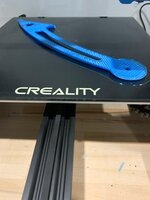


I’m not sure how to figure out if I have one dialed in or not lol I have the speed dialed down for the first layer to 20mm/a I believe
 

850xpeps

Well-known member
Joined
Aug 6, 2017
Messages
1,365
ad7316420675b25b474103685f923131.jpg

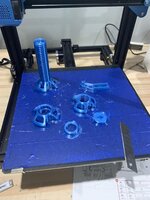
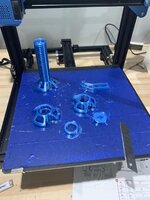
I’m getting the petg to print now a little better. But I’ve still had to abort after 4 hours on 2 prints because the small round end lifts off the bed. Like it’s warping. 245 extruder temp and 85 bed for first layer and 80 after that. I turn extruder fan off for first few layers then on to 35%.
 

Attachments

  • ad7316420675b25b474103685f923131.jpg
    ad7316420675b25b474103685f923131.jpg
    22.4 KB · Views: 14

arnoldcp

Member
Joined
Jan 27, 2015
Messages
17
I have started printing almost exclusively in PETG for some projects for my car. I will say it gets a tad blobby when extruding on a Bowden tube setup but other than that it has been nearly as forgiving as PLA.

I had a lot of problems with PETG on glass same issue you describe. I struggled for awhile and then Overture filament included a "build surface" with a spool of filament I bought. It was essentially buildtak, worked great. I took the glass bed off and haven't gone back.

Sent from my Pixel 3a XL using Tapatalk
 

850xpeps

Well-known member
Joined
Aug 6, 2017
Messages
1,365
I have started printing almost exclusively in PETG for some projects for my car. I will say it gets a tad blobby when extruding on a Bowden tube setup but other than that it has been nearly as forgiving as PLA.

I had a lot of problems with PETG on glass same issue you describe. I struggled for awhile and then Overture filament included a "build surface" with a spool of filament I bought. It was essentially buildtak, worked great. I took the glass bed off and haven't gone back.

Sent from my Pixel 3a XL using Tapatalk


The piece I’m making is larger then the overture piece they include with their rolls. But I have a couple. I wonder if it can be placed on the glass without damaging the glass? It looks to have a removable peel and stick layer.
Your thinking the price should stick tot he overtire better? I was thinking about putting blue painters tape on glass. But all the reading I’ve found says petg shouldn’t have an issue with sticking. In fact it can be the other way.


Have you tried a direct drive? Wonder if that would help? I am not getting much blobbing anymore. A tiny bit of stringing but almost non existence.
 

arnoldcp

Member
Joined
Jan 27, 2015
Messages
17
So, yes I should have clarified I moved back to the ender 3 build Tak style surface after seeing what overture included. Blue painter tape is also an option though I haven't tried it.

I have a pro that I converted to DD and it's been excellent. I haven't been printing with the pro much because I am waiting for the SKR E3 to show up from China...I foolishly disassembled it just prior to this pandemic...

Sent from my Pixel 3a XL using Tapatalk
 

850xpeps

Well-known member
Joined
Aug 6, 2017
Messages
1,365
I’ve got a direct drive coming that I ordered when I ordered the printer.

Maybe I’ll try laying some blue painters tape on my glass bed. I don’t want to try hairspray as I’ve read petg can stick bad enough to damage the glass.

Would the lifting of the same end both times have something to do with bed temp or warping? I’m just not sure why it’s lifting.
 

WoodsTruck

Well-known member
Joined
Jan 12, 2013
Messages
1,018
I have lifting issues on some projects with the PETG. I was using a raft on every print and throwing away a lot of material so I started trying the brim. I did try painters tape but the hot bed caused the tape to just peel off.
 

850xpeps

Well-known member
Joined
Aug 6, 2017
Messages
1,365
I am using brim on the last 2. I layed down blue painters tape. 84552eebec41a423541b111410c9ca6a.jpg
See how it makes out this time.
 

Attachments

  • 84552eebec41a423541b111410c9ca6a.jpg
    84552eebec41a423541b111410c9ca6a.jpg
    28.8 KB · Views: 14

850xpeps

Well-known member
Joined
Aug 6, 2017
Messages
1,365
I have lifting issues on some projects with the PETG. I was using a raft on every print and throwing away a lot of material so I started trying the brim. I did try painters tape but the hot bed caused the tape to just peel off.


How hot are you running the bed? The tape seems to be staying down so far.
 

arnoldcp

Member
Joined
Jan 27, 2015
Messages
17
A couple questions.

What temperature are you printing at, I know the ender 3 hot end design tops out at about 245 before you start to soften the PTFE. Ideally you would want to run about 255-260.

Have you checked your e-steps? With PETG specifically, you may want to. You may find that while you are able to extrude okay and the overall surface doesn't look bad, the printer is ever so slightly under extruding. It's because our printers can't quite get up to the higher temps without an all metal hot end. To compensate just adjust your flow rate.

This is why I believe many of us with Enders have issues with blobs. Our temps are just barely good enough and we end up with residual pressure in the Bowden tube because the flow is not quite as healthy as it should be.

Just FYI, Matter Hackers claims that blue painters tape is basically THE best surface for PETG.

Sent from my Pixel 3a XL using Tapatalk
 

850xpeps

Well-known member
Joined
Aug 6, 2017
Messages
1,365
I’m new to printing so bare with me. I’m running 245. My printer is a cr10 v2. Not sure how that compares to the ender.

What do you mean by e-steps?
My flow is set to 100 percent. I believe I was getting .61mm wide when I measured a strip. Maybe none of this makes sense lol trying to learn.
 

850xpeps

Well-known member
Joined
Aug 6, 2017
Messages
1,365
Can’t seem to catch luck on this print. Was at about 50% and the power went out. Been out for 45 min now. Not sure how it will take to resuming the print. If it will bond or not.
 

pwhittle

Well-known member
Joined
May 9, 2011
Messages
252
Location
Woodstock, GA
I get perfect dimensionally correct prints on my new. Ender 3 with PLA. I have tried printing with ABS, and I am struggling to find the correct settings to make it print as well as PLA.

I have added the Creality Enclosure and let it heat up well before I start the print.i am using the Creality glass plate and hairspray to promote adhesion.

The ABS prints end up being rounded on the bottoms or coming unstuck during printing.

What have you guys found that worked ?

Thanks in advance.


Sent from my iPad using The Garage Journal mobile app
 

blare

Well-known member
Joined
Oct 31, 2010
Messages
53
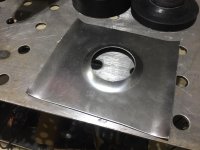
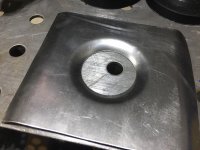
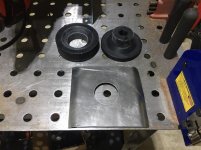
Figured I'd share two of my recent projects. Everything is printed off a slightly modified ANET A8 that I have had for about three years. Sometimes it works sometimes it doesn't, but I have enjoyed the process of learning the ins/outs of the machine. By far my favorite mod is a BLTouch Z probe combined with the Marlin UBL code. Minimizes setup for prints and consistency on the first layers.

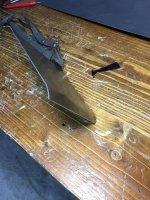
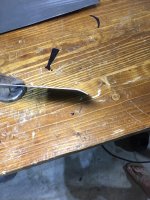
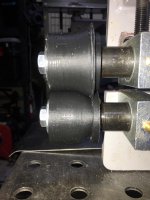
I recently got into sheet metal work and tried my hand at designing a radius bead roll die set and dimple die flare for my pipe sized hydraulic knockouts. Designed myself in Fusion360 then printed with 6 walls and 40% infill.

The bead roll dies worked well until the bottom inside flange broke off. I'll probably increase the flange size and increase the infill. For the dimple dies all I needed to do was sand the parts down so they had a smooth fit.
 

Attachments

  • IMG_2236.jpg
    IMG_2236.jpg
    148.6 KB · Views: 121
  • IMG_2252.jpg
    IMG_2252.jpg
    142.6 KB · Views: 116
  • IMG_2242.jpg
    IMG_2242.jpg
    140.4 KB · Views: 113
  • IMG_2240.jpg
    IMG_2240.jpg
    130.1 KB · Views: 115
  • IMG_2238.jpg
    IMG_2238.jpg
    84.6 KB · Views: 127
  • IMG_2253.jpg
    IMG_2253.jpg
    145.7 KB · Views: 115
  • IMG_2248.jpg
    IMG_2248.jpg
    148.5 KB · Views: 121
Last edited:

WoodsTruck

Well-known member
Joined
Jan 12, 2013
Messages
1,018
What filament are you using for the bead roller and dimple dies?

Been tempted to print some dimple dies but didn't know if they would be strong enough.
 

850xpeps

Well-known member
Joined
Aug 6, 2017
Messages
1,365
What filament are you using for the bead roller and dimple dies?

Been tempted to print some dimple dies but didn't know if they would be strong enough.


X2 that looks interesting. Would have thought you’d need 100% infill too.

It looks like maybe abs?
 

blare

Well-known member
Joined
Oct 31, 2010
Messages
53
What filament are you using for the bead roller and dimple dies?

Been tempted to print some dimple dies but didn't know if they would be strong enough.

Overture PLA. I had many failed printing attempts prior to this and got tired of wasting filament so I reduced fill my planned fill from 60% down to 40% so I could get a fitment test. The bead roller dies definitely need to be stronger, but I probably use the dimple die until they start show damage.

I'd like to do ABS, but I still haven't finished my enclosure and the printer is the basement since its still pretty cold in the garage (Ohio).
 
OP
B

BoilermakerFan

Well-known member
Joined
Apr 17, 2006
Messages
2,188
Location
Indianapolis, Indiana
The number of perimeters or walls has a huge influence on strength, maybe even more so than infill %. My son's science fair experiments showed us that...

And PLA does an amazing job under compression loads so PLA should be plenty for dimple dies. Kick your perimeters up to 5 or 7 and run 40% 3D honeycomb. Also, run the extruder a little hotter to get better layer adhesion.


For the guys fighting with PETG, I had the same issues for almost a year. I ended up running on the high side for temps and using a LOT of Aqua Net hairspray. I sprayed a base coating on my bed, then heated the bed to 80degC. And sprayed again. Then heated the bed up to 90degC for the first 3 layers with a small brim. I drop the bed temp down to 85 degC for layers 3 to 30 or so. Then I drop it down to 80degC for the remaining layers. I forget my exact extruder temp, but was the max recommended for my PETG for the first 5 layers, then i dropped it 5degC for the remaining layers.

I haven't finished reassembling my printer yet. I did get the bracket drilled and it's ready to install along with all of the old electronics.

My Biqu order is still stuck in China... a full month from when it "shipped."
 

850xpeps

Well-known member
Joined
Aug 6, 2017
Messages
1,365
I finally got the print to stick. The painters tape worked great. I didn’t wanna try sprays because I read the petg will stick so good it’ll wreck the glass.

85 bed temp to start the down to 80 and 245 extruder temp the whole way. I only let the fan get to 33%. Had some very minor stringing.
 
To avoid these ads, REGISTER NOW!

850xpeps

Well-known member
Joined
Aug 6, 2017
Messages
1,365
The number of perimeters or walls has a huge influence on strength, maybe even more so than infill %. My son's science fair experiments showed us that...

And PLA does an amazing job under compression loads so PLA should be plenty for dimple dies. Kick your perimeters up to 5 or 7 and run 40% 3D honeycomb. Also, run the extruder a little hotter to get better layer adhesion.


For the guys fighting with PETG, I had the same issues for almost a year. I ended up running on the high side for temps and using a LOT of Aqua Net hairspray. I sprayed a base coating on my bed, then heated the bed to 80degC. And sprayed again. Then heated the bed up to 90degC for the first 3 layers with a small brim. I drop the bed temp down to 85 degC for layers 3 to 30 or so. Then I drop it down to 80degC for the remaining layers. I forget my exact extruder temp, but was the max recommended for my PETG for the first 5 layers, then i dropped it 5degC for the remaining layers.

I haven't finished reassembling my printer yet. I did get the bracket drilled and it's ready to install along with all of the old electronics.

My Biqu order is still stuck in China... a full month from when it "shipped."


You think honeycomb is strongest? Or just for certain parts?

What was petg printing speed?
 

alberto

Well-known member
Joined
May 28, 2007
Messages
756
Here's a totally noob question. Tell me to pound sand if it's too simplistic, or we need to create a separate discussion so as not to derail this thread. I know almost nothing about 3D printing.

I have about 30 digital pictures taken a few years ago, a few with dimensions of an item that I would like to replicate via 3D printing. Can a skilled person take these pictures and create a 3D file out of it? It's an original car battery case, so it's a pretty simple design overall, but it has some texture and other details that are important to have in the reproduction. I basically want to create a box so I can put in a normal modern battery but have it look identical to the vintage version when it is installed.

Can it be done off of the pictures? How close can they get to the original? Would it be able to pic up textures and other markings that are probably as small as 0.5mm (or maybe less) to about 2mm deep?

Once you have the cad file, when you go to print, what tolerances can the 3D printer keep (0.5mm, 1mm?).

Thanks for any help.
 

banjopete

Well-known member
Joined
Oct 5, 2014
Messages
300
Location
Edmonton, Alberta, Canada
Short answer is yes, you could do this pretty easily. Millimetre precision is for sure doable but trial and error is sometimes needed to get an absolute dimension. I'm usually aiming for tenths of mm's It varies by printer and material used.

Simple geometries and known dimensions should be short work for anyone to draft as well. Lots of options for you. It's perfect for car parts. Hard to believe you'd need something that precise for a battery mount but hole locations etc sure. Let's see it?

Sent from my SM-G960W using The Garage Journal mobile app
 

alberto

Well-known member
Joined
May 28, 2007
Messages
756
Short answer is yes, you could do this pretty easily. Millimetre precision is for sure doable but trial and error is sometimes needed to get an absolute dimension. I'm usually aiming for tenths of mm's It varies by printer and material used.

Simple geometries and known dimensions should be short work for anyone to draft as well. Lots of options for you. It's perfect for car parts. Hard to believe you'd need something that precise for a battery mount but hole locations etc sure. Let's see it?[/URL]

Thank you for the response. My worry about precision is whether it can reproduce the texture on the battery. Here's a close up of the texture and detail I'd like to capture.
 

Attachments

  • P1060305.jpg
    P1060305.jpg
    83.8 KB · Views: 165

850xpeps

Well-known member
Joined
Aug 6, 2017
Messages
1,365
9103db7e469d924346f9a12aed7be0d1.jpg

Petg stuck real good. Still getting some fine hairs and lumps where it moves to another piece
 

Attachments

  • 9103db7e469d924346f9a12aed7be0d1.jpg
    9103db7e469d924346f9a12aed7be0d1.jpg
    193.6 KB · Views: 10

arnoldcp

Member
Joined
Jan 27, 2015
Messages
17
9103db7e469d924346f9a12aed7be0d1.jpg

Petg stuck real good. Still getting some fine hairs and lumps where it moves to another piece
Unfortunately, that is kind of the norm for PETG. You can try adjustment of combing and you said you have direct drive coming which will help.

Sent from my Pixel 3a XL using Tapatalk
 

Attachments

  • 9103db7e469d924346f9a12aed7be0d1.jpg
    9103db7e469d924346f9a12aed7be0d1.jpg
    193.6 KB · Views: 7

850xpeps

Well-known member
Joined
Aug 6, 2017
Messages
1,365
3321bc4c91b176e053b39681e90ad300.jpge39936a90ccbcf378e361d32486d4a56.jpg

Had to abort the wife print. Not sure why was missing in spots. I was on the fence about installing the direct drive. But maybe I should when I get it. I knocked the infill down to 65 and started to print this skinnier piece first. It’s looking nice.
 

Attachments

  • e39936a90ccbcf378e361d32486d4a56.jpg
    e39936a90ccbcf378e361d32486d4a56.jpg
    224.2 KB · Views: 7
  • 3321bc4c91b176e053b39681e90ad300.jpg
    3321bc4c91b176e053b39681e90ad300.jpg
    35.4 KB · Views: 13

banjopete

Well-known member
Joined
Oct 5, 2014
Messages
300
Location
Edmonton, Alberta, Canada
Thank you for the response. My worry about precision is whether it can reproduce the texture on the battery. Here's a close up of the texture and detail I'd like to capture.

You could get texture like that if you wanted to sure. Getting the look exactly the same may be a challenge but the printer would do the job for sure.
 

alberto

Well-known member
Joined
May 28, 2007
Messages
756
You could get texture like that if you wanted to sure. Getting the look exactly the same may be a challenge but the printer would do the job for sure.

Thank you, that is encouraging. I need to find a person/place/outfit that can do this work. Any recommendations? Internet based would be fine, although I'd probably prefer local (San Diego0 as I imagine it would cut down time going back and forth.
 

BB Sig

Well-known member
Joined
May 16, 2018
Messages
139
Location
Florida
Ordered an Ender 3 Pro yesterday. Supposed to ship on the 18th. Bought some of the recommended upgrades. Looking forward to getting it!

Barry
North Florida
 

banjopete

Well-known member
Joined
Oct 5, 2014
Messages
300
Location
Edmonton, Alberta, Canada
Thank you, that is encouraging. I need to find a person/place/outfit that can do this work. Any recommendations? Internet based would be fine, although I'd probably prefer local (San Diego0 as I imagine it would cut down time going back and forth.
Maybe try and find a makerspace group. There are lots of online print places, not sure how it would work if you didnt supply them an stl file to work with. Fusion360 isn't all that tough to learn though if you have a little time, basic shapes arent too challenging to create.

Sent from my SM-G960W using The Garage Journal mobile app
 

motorcycle79

Well-known member
Joined
Jun 26, 2011
Messages
471
Location
wisconsin
My son just got a any cubic mega s from school. Was supposed to have a metals class but got switched to cad after the virus. We are both going to learn together. I’m worried,not that Computer minded. I have big dreams of garage things to make. Lol
 

bdbecker

ALLIANCE MEMBER
Joined
Nov 18, 2015
Messages
5,542
Location
Iowa
Somewhat related to this thread - if anyone is looking for a good, free 2D CAD software, I just discovered nanoCAD yesterday. Its basically AutoCAD without the ribbon.

https://nanocad.com/products/nanoCAD/

I nursed my free version of Draftsight to the very end before making the switch to LibreCAD, but have not been able to get comfortable with it. As soon as I installed and opened nanoCAD yesterday, I knew it was a winner. The only issue with the free version I've found so far is that wont open DWG files saved in AutoCAD 2018 format - you've got to buy the $180 "Plus" version to do that.

Another thing worth pointing out - for $290/year, you can get the "Pro" package which gives you an Inventor style 3D modelling program. I'm pretty tempted to spend the money and give this a shot. I'm used to working in Inventor and while I don't mind Fusion 360, it has some nuances that have frustrated me.

-----

My son just got a any cubic mega s from school. Was supposed to have a metals class but got switched to cad after the virus. We are both going to learn together. I’m worried,not that Computer minded. I have big dreams of garage things to make. Lol

That'll be great father-son time! CAD can be a bit of a learning curve, but the advantage you have is a set of lessons and exercises to work with. A lot of people just start poking buttons and eventually figure it out, a lesson plan should help you get up and running way more quickly. The actual computer/software side of 3D printing is not as intense as you'd think. If you can get on a PC and navigate to Garage Journal, you'll be able to sort out the CAD and slicer software.
 
Last edited:

slim01

Member
Joined
Feb 6, 2010
Messages
23
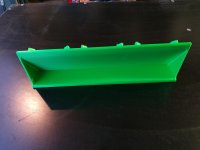
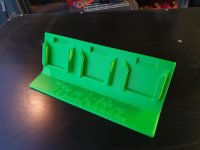
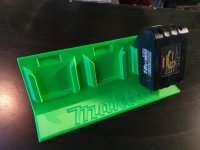
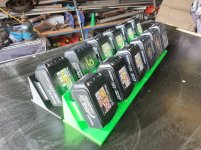
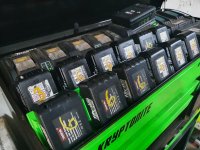
Made these battery holders to tidy the toolbox up a bit and keep dust and sparks from the terminals. The finish isnt perfect but is fine for the shed. Ive used black Sunlu PLA+ and Silk green eSun PLA, 0.6 nozzle and 0.3 layer height to print and Fusion 360 to design.
 

Attachments

  • 20200522_173644.jpg
    20200522_173644.jpg
    91.1 KB · Views: 103
  • 20200522_173624.jpg
    20200522_173624.jpg
    95.7 KB · Views: 122
  • 20200523_141937.jpg
    20200523_141937.jpg
    104 KB · Views: 109
  • 20200522_173705.jpg
    20200522_173705.jpg
    133.3 KB · Views: 126
  • 20200523_134215.jpg
    20200523_134215.jpg
    156.7 KB · Views: 151
  • 20200523_141843.jpg
    20200523_141843.jpg
    155 KB · Views: 139

WoodsTruck

Well-known member
Joined
Jan 12, 2013
Messages
1,018
Nice job on the battery holders.

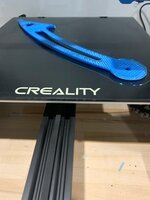
Quick question. I'm going to be printing some speaker mounts for 4" speakers to be surface mounted to a kick panel in a Toyota pickup. The "tube" will be about 1.5" tall and the bottom will be screwed to the kick panel using nutserts. The speaker end needs to accommodate an attachment method. Ideally I would just run some heavy threaded screws into some pre-printed holes. I'm afraid the plastic will simply crack if I put too much pressure on the screw. I'm planning to use PETG. Any suggestions?
 

arnoldcp

Member
Joined
Jan 27, 2015
Messages
17
Those battery holders look excellent! That is also an impressive number of matching batteries.

If I were to do this I think I would have a multitude of shapes and sizes within just my Ridgid line up and it would still look disorganized.

Sent from my Pixel 3a XL using Tapatalk
 

arnoldcp

Member
Joined
Jan 27, 2015
Messages
17
Nice job on the battery holders.

Quick question. I'm going to be printing some speaker mounts for 4" speakers to be surface mounted to a kick panel in a Toyota pickup. The "tube" will be about 1.5" tall and the bottom will be screwed to the kick panel using nutserts. The speaker end needs to accommodate an attachment method. Ideally I would just run some heavy threaded screws into some pre-printed holes. I'm afraid the plastic will simply crack if I put too much pressure on the screw. I'm planning to use PETG. Any suggestions?
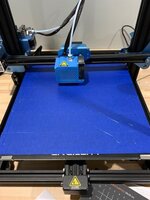
I think you should be fine, PETG has some pretty decent flex to it.

To ensure success I would just increase the number of perimeters around your holes.

If you are using sheet metal screws you are probably good to go and won't need to do anything special.

If you are going to use machine screws and you have a tap the right size, thread them with that. If you dont have a tap I will often just use the Dremel to cut a makeshift tap that works well enough in the plastic.

Sent from my Pixel 3a XL using Tapatalk
 

BB Sig

Well-known member
Joined
May 16, 2018
Messages
139
Location
Florida
Ended up getting an Anet A 8 Plus due to getting shifting delivery dates on the Ender 3. I'll be doing a Facebook Live build if anyone is interested tomorrow. PM me for the info before noon.

Barry
North Florida
 
To avoid these ads, REGISTER NOW!
Top Bottom