To avoid these ads, REGISTER NOW!

The Everything 3D Printer Thread

To avoid these ads, REGISTER NOW!

cycle61

Well-known member
Joined
Apr 5, 2020
Messages
500
Location
Middle of Oregon
Out of stock. I ordered one last month, but it got snagged off the porch while I was out of town.

Working on my first PTEG print. Had to tune the first layer quite a bit with the different base sheet. Not perfect, but going to let it run and see what morning brings.
 

Attachments

  • PXL_20220115_045223744.jpg
    PXL_20220115_045223744.jpg
    255.2 KB · Views: 177
Last edited:

Outlander

Well-known member
Joined
Jul 30, 2010
Messages
5,154
Location
Quebec, Canada
During recent workshop re-organization I moved my 3D printer. I got the dreaded undervoltage warning in Octopi, which could be due to changing power bars, wiring or an aging power supply. I bought a new power supply, and since I used a different power bar in a different outlet I'll watch carefully.

I've added monitoring to my other RPIs, using the TIG Stack (Telegraf, InfluxDB, Grafana). I might need to modify the Grafana dashboard ( https://grafana.com/grafana/dashboards/10578 ) to include under-voltage warnings.

For those that are so inclined, this is "atom" my electronics development workstation (RPI4-4GB, dual monitor with Arduino IDE etc.). He's kind of sleeping in this morning :cool:
1642253827225.png

As for room temperature and humidity, I watch using Cayenne (DHT11 temp/humidity sensor running on an ESP8266 microcontroller). This needs to be upgraded to a DHT22, which is more precise (I've noticed issues with other DHT11's I have in my ecosystem).

1642254153421.png

Shop organization still underway, but it's getting there. I'm considering an enclosure for temp,humidity and dust control.
1642254346699.png

Yes, I will deal with rusty saw on the pegboard. I need to research on the other forums and do all the saws my Dad and Uncle left me!

Oh, I noticed a comment above relating to pre-heating. My workflow includes a preheat cycle (manual) every time I print to try to start at the same baseline every time.
 

niget2002

Well-known member
Joined
Oct 2, 2012
Messages
11,112
Location
Josephine, TX
During recent workshop re-organization I moved my 3D printer. I got the dreaded undervoltage warning in Octopi, which could be due to changing power bars, wiring or an aging power supply. I bought a new power supply, and since I used a different power bar in a different outlet I'll watch carefully.

I've added monitoring to my other RPIs, using the TIG Stack (Telegraf, InfluxDB, Grafana). I might need to modify the Grafana dashboard ( https://grafana.com/grafana/dashboards/10578 ) to include under-voltage warnings.

For those that are so inclined, this is "atom" my electronics development workstation (RPI4-4GB, dual monitor with Arduino IDE etc.). He's kind of sleeping in this morning :cool:
1642253827225.png

As for room temperature and humidity, I watch using Cayenne (DHT11 temp/humidity sensor running on an ESP8266 microcontroller). This needs to be upgraded to a DHT22, which is more precise (I've noticed issues with other DHT11's I have in my ecosystem).

1642254153421.png

Shop organization still underway, but it's getting there. I'm considering an enclosure for temp,humidity and dust control.
1642254346699.png

Yes, I will deal with rusty saw on the pegboard. I need to research on the other forums and do all the saws my Dad and Uncle left me!

Oh, I noticed a comment above relating to pre-heating. My workflow includes a preheat cycle (manual) every time I print to try to start at the same baseline every time.
I use ELG for all my data collecting. I run them out of containers so I can easily spin up a new stack when needed.
 

kaymccampbell

Well-known member
Joined
Feb 27, 2015
Messages
29,402
Location
Upstate New York
During recent workshop re-organization I moved my 3D printer. I got the dreaded undervoltage warning in Octopi, which could be due to changing power bars, wiring or an aging power supply. I bought a new power supply, and since I used a different power bar in a different outlet I'll watch carefully.

I've added monitoring to my other RPIs, using the TIG Stack (Telegraf, InfluxDB, Grafana). I might need to modify the Grafana dashboard ( https://grafana.com/grafana/dashboards/10578 ) to include under-voltage warnings.

For those that are so inclined, this is "atom" my electronics development workstation (RPI4-4GB, dual monitor with Arduino IDE etc.). He's kind of sleeping in this morning :cool:
1642253827225.png

As for room temperature and humidity, I watch using Cayenne (DHT11 temp/humidity sensor running on an ESP8266 microcontroller). This needs to be upgraded to a DHT22, which is more precise (I've noticed issues with other DHT11's I have in my ecosystem).

1642254153421.png

Shop organization still underway, but it's getting there. I'm considering an enclosure for temp,humidity and dust control.
1642254346699.png

Yes, I will deal with rusty saw on the pegboard. I need to research on the other forums and do all the saws my Dad and Uncle left me!

Oh, I noticed a comment above relating to pre-heating. My workflow includes a preheat cycle (manual) every time I print to try to start at the same baseline every time.
What is the little box hanging off the printer on the top right?
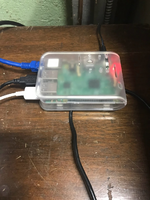
Also, what's in the little transparent box to the right of the printer?
 

Outlander

Well-known member
Joined
Jul 30, 2010
Messages
5,154
Location
Quebec, Canada
What is the little box hanging off the printer on the top right?
Also, what's in the little transparent box to the right of the printer?
@kaymccampbell

This is a microcontroller (ESP8266 NodeMCU) with a DHT11 temperature and humidity sensor - see example here ==> https://www.instructables.com/Interface-DHT11-Humidity-Sensor-Using-NodeMCU/

I run some code (developed using Arduino development environment) that captures the data and sends it to the cloud (see dashboard above) using Cayenne ==> https://developers.mydevices.com/cayenne/features/ It was my first foray into IoT.

For thread relevance, I secured the board to the aluminum extrusion with a 3D printed holder and 3D printed t-nuts. Examples:
https://www.thingiverse.com/thing:3050607
https://www.thingiverse.com/thing:2830716

I like the microcontroller's flashing blue light - it tells me it's on, and it is oddly satisfying :cool:


1642333625593.png


To the right is my Raspberry Pi 3B+ running OctoPrint ==> https://octoprint.org/ where I control the interaction with my printer. It is popular and easy to use. Includes lots of plug-ins and lots of community support. The USB camera attached provides live streaming during the print process.

Here is a picture, shh...printer is asleep :)

1642334002393.png

The RPI3B+
1642334043367.png

I wanted to use an ethernet connection so I had some location limitations as I had to wire a jack and attach it to the wall and run it to my patch panel on the other end of the workshop.

In case that is of interest to anyone, my partially completed homelab with:
- patch panel where all household ethernet jacks are terminated
- Netgear gigabit managed switch
- Synology DS200j NAS (4 TB raid), with external USB hub for additional connectivity
- RPI 2B running Pi-hole for ad blocking (new, not fully deployed)
- Dell T1700 Ubuntu server (new, still deciding what to serve from it, but I will probably move Grafana and InfluxDB there etc.)
- KVM switch in case I need to connect to the T1700 or the Pi-hole
- UPS, with USB connection to the NAS so it gracefully shut down in caser I lose power
- Bell modem, connected to the UPS as well so I can work if power is out (my office laptop is also on a UPS since I work from home 100%

1642334591149.png

I still have cable management to complete, and a few other ideas in the never ending saga.


Finally, a revised picture of the 3D printer to replace the embarrassing picture of the rusty saw. I was ashamed. Saws were cleaned with WD-40 and fine steel wool, and replaced on the pegboard in a more organized fashion.

1642334726121.png


Happy Sunday, everyone !
 

Poolshark314

Well-known member
Joined
Jul 5, 2021
Messages
658
Location
MD
During recent workshop re-organization I moved my 3D printer. I got the dreaded undervoltage warning in Octopi, which could be due to changing power bars, wiring or an aging power supply. I bought a new power supply, and since I used a different power bar in a different outlet I'll watch carefully.

I've added monitoring to my other RPIs, using the TIG Stack (Telegraf, InfluxDB, Grafana). I might need to modify the Grafana dashboard ( https://grafana.com/grafana/dashboards/10578 ) to include under-voltage warnings.

For those that are so inclined, this is "atom" my electronics development workstation (RPI4-4GB, dual monitor with Arduino IDE etc.). He's kind of sleeping in this morning :cool:
1642253827225.png

As for room temperature and humidity, I watch using Cayenne (DHT11 temp/humidity sensor running on an ESP8266 microcontroller). This needs to be upgraded to a DHT22, which is more precise (I've noticed issues with other DHT11's I have in my ecosystem).

1642254153421.png

Shop organization still underway, but it's getting there. I'm considering an enclosure for temp,humidity and dust control.
1642254346699.png

Yes, I will deal with rusty saw on the pegboard. I need to research on the other forums and do all the saws my Dad and Uncle left me!

Oh, I noticed a comment above relating to pre-heating. My workflow includes a preheat cycle (manual) every time I print to try to start at the same baseline every time.
You likely know this already, but sometimes the undervoltage problem can be caused by OctoPrint detecting voltage coming over the power pin on the USB port used for the data connection. If you haven't yet, may want to try putting a little strip on electrical tape over the power pin on the USB cable
 

Grimpala

Well-known member
Joined
Jul 16, 2012
Messages
1,404
Quick lazy question, we're 38 pages deep and it's a simple question. Would different slicing software make a printer perform substantially differently? I have a Voxel IIIP and am using their proprietary software, just wondering if there is something better out there.
 

Poolshark314

Well-known member
Joined
Jul 5, 2021
Messages
658
Location
MD
Quick lazy question, we're 38 pages deep and it's a simple question. Would different slicing software make a printer perform substantially differently? I have a Voxel IIIP and am using their proprietary software, just wondering if there is something better out there.
Depends on the issue. Some slicers that different routes during prints, and some address issues differently than others. There are also slicer-specific features that could certainly impact the print. There are plenty of free slicers out there to try out, Cura and SuperSlicer are probably the 2 biggest names.
 

vpd66

Well-known member
Joined
Mar 1, 2010
Messages
709
Location
Central Wisconsin
I have an Ender 3 and was using Cura for about a year and half. One day I decided to download Prusaslicer and give it a try. I never went back to Cura. Prusaslicer just seems to work smoother then Cura. The print quality was about the same. Cura just seemed to have some oddities. I believe Cura is a Chinese program and I think some things just don't translate correctly and it makes it seem odd to me.
 

bj383ss

Well-known member
Joined
Sep 29, 2011
Messages
3,166
Location
TX
I have an Ender 3 and was using Cura for about a year and half. One day I decided to download Prusaslicer and give it a try. I never went back to Cura. Prusaslicer just seems to work smoother then Cura. The print quality was about the same. Cura just seemed to have some oddities. I believe Cura is a Chinese program and I think some things just don't translate correctly and it makes it seem odd to me.
I started with Prusa and then switched to Cura and I like it much better. I guess it just depends on what you like.

Bret
 

draco_1967

Well-known member
Joined
Jan 3, 2021
Messages
205
Location
Utah
I go back and forth between Cura and Prusaslicer depending on what I'm doing (printing on an Ender 3 V2). Prusa hasn't had an option for tree supports, which are so much better than regular supports in most cases. I think the latest Prusa release has tree supports now, but I haven't tried them out.
 
To avoid these ads, REGISTER NOW!

Outlander

Well-known member
Joined
Jul 30, 2010
Messages
5,154
Location
Quebec, Canada
You likely know this already, but sometimes the undervoltage problem can be caused by OctoPrint detecting voltage coming over the power pin on the USB port used for the data connection. If you haven't yet, may want to try putting a little strip on electrical tape over the power pin on the USB cable
I already taped the power pin. In fact, the last time I got the warning the printer was actually powered off. The only change I can think of was the power bar, which made me wonder.

@Grimpala I use Cura but play with PrusaSlicer just to compare. I do see print time estimate differences, but I have not yet done side by side testing with actual prints.
 

vpd66

Well-known member
Joined
Mar 1, 2010
Messages
709
Location
Central Wisconsin
Please elaborate. Do the command names seem odd to you? What things are you referring to?
Ultimaker is a Dutch company, btw.
Some of the features such has scaling, rotation, and the names of the categories of what your looking for don't seem to go along with the function. Trying to find retraction to adjust the settings always gave me grief. It just seems like Prusaslicer is laided out a little better and easier to navigate. Prusaslicer is definitely faster at slicing.
 

Bessy

Well-known member
Joined
Dec 18, 2012
Messages
992
Location
Ontario, Canada
I'm going to go out on a limb and say no, on account of the type of plastics used, and the fact that the finished product has layer. I expect there's a chance it may hold for a time, but it's likely that the plastic would eventually break down.
 

Cruzan80

Well-known member
Joined
Jul 22, 2015
Messages
4,155
Location
Denver, CO
Possibly. The bigger issue is getting a hollow tank, depending on how "flat" the top is and needing hot plastic to drape ("bridge") over it. As well as getting someone to model it correctly.
 

kaymccampbell

Well-known member
Joined
Feb 27, 2015
Messages
29,402
Location
Upstate New York
I bet it would still leak, or fall off, when the engine vibrations delaminated it.
But it still might be fun to try if you can get the plastic. Gas tanks are typically made of high density polyethylene, polypropylene, or recycled polyethylene.
 

penright

ALLIANCE MEMBER
Joined
Dec 27, 2016
Messages
618
Location
SW of Mustang, OK
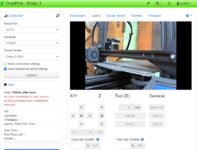
This may only be me, my printer sits in my office at work and therefore I do not have access to lock the DHCP address. Before this plugin, I would use Nmap to find it and it was not fun. Now just look at the screen. I just wanted to share it if anyone else is in the same boat. :)

1643211699396.png
 

vwpieces

Well-known member
Joined
Apr 28, 2020
Messages
5,925
Location
Hills, PA
been over a year since I turned this thing on.
Took some learning but I got it to spit out a Thing.
Only took 19 hours.
Only one fail on first layer. Got out the goo stick and it held second go.
20220126_104531.jpg

20220126_105805.jpg
 

nicholam77

Well-known member
Joined
Dec 18, 2016
Messages
2,655
Location
Minneapolis, MN
@penright that is a pretty neat trick.

FYI if you are on a Mac, or have Bonjour installed on Windows or Linux, you should be able use the hostname octopi.local to connect. I don't use static addressing and I've had no issues with that, but I am Mac-based.

See below for installing Bonjour to Windows:


You can also change the hostname to something other than octopi.local if you like during the initial setup when you image the pi:


Outlander

Well-known member
Joined
Jul 30, 2010
Messages
5,154
Location
Quebec, Canada
This may only be me, my printer sits in my office at work and therefore I do not have access to lock the DHCP address. Before this plugin, I would use Nmap to find it and it was not fun. Now just look at the screen. I just wanted to share it if anyone else is in the same boat. :)

1643211699396.png
Interesting! I actually added lines of code to my microcontrollers (Arduino, Esp8266 etc.) so I can see what is running on them. Code displays hostname, ip address, filename, Arduino version to the LCD (if it has one) and the serial port - so I can read it in the IDE when I restart the microcontroller.

Being on a single LAN (for now), I also use Angry IP Scanner. Helps me keep an eye on what's on the network and the IP addresses.

I'll look into the plug-in. Thanks!
 

Grimpala

Well-known member
Joined
Jul 16, 2012
Messages
1,404
LOVE THIS! Is this available as a parametric design somewhere?
I drew them in AutoCAD. I can send the .DGW's or the .STL's if someone would like to play around with them. Or I can make other labels if needed. Pretty simple to draw/extrude.

The magnets are cheap .1" x .4" magnets from Amazon.
 

Grimpala

Well-known member
Joined
Jul 16, 2012
Messages
1,404
I drew them in AutoCAD. I can send the .DGW's or the .STL's if someone would like to play around with them. Or I can make other labels if needed. Pretty simple to draw/extrude.

The magnets are cheap .1" x .4" magnets from Amazon.
In all honesty a good sheet magnet, cut with something like a Cricut would look better to me, but a 3D printer is all I have at my disposal at the moment.
 
To avoid these ads, REGISTER NOW!
Top Bottom