To avoid these ads, REGISTER NOW!

The Everything 3D Printer Thread

bugnut

ALLIANCE MEMBER
Joined
Jul 14, 2012
Messages
3,834
Location
Central Ohio
To avoid these ads, REGISTER NOW!

HPRifleman

Member Emeritus
Joined
Nov 18, 2019
Messages
767
Location
Wayne, IL
I learned CAD way before I bought a printer, mostly from these tutorials by a high school shop teacher:


You'll want to do the ones for Fusion 360, not the architectural software. They provide a nice easy introduction. Alternately, there's thousands of tutorials on Youtube for Fusion 360.

Other than that, operating a 3D printer is a whole separate skill set from designing. There's a mechanical side to it, like making sure things are square, various calibrations, etc, and an electronics side to it. You most likely won't need to mess with the electronics or firmware as a beginner though. Also, printers can range from kit plans you build yourself, to the cheap Chinese ones at the low end, to commercial models. Obviously they also vary in how much tinkering they need to keep running.
That's an interesting point. The thinking might be that spending more money on a printer would lead to less tinkering. I don't know how much of that is true for the DIY printers but it doesn't apply at the higher end.

Our printer at work is a six-figure machine and it needs more maintenance than I think is warranted. Occasional errors, interrupted print jobs, parts that aren't fully cured. Almost every job I run gets started in the afternoon and is intended to run overnight. It's frustrating when I come in in the morning expecting to have good parts. But I instead find a partially finished job with some error message because a sensor circuit board went bad or something. That pushes everything out another day provided we can even fix the problem. Sometimes we have to get a factory technician in the building which delays things even more.

At some point we will have to replace this machine and ease of maintenance will probably be #2 on my must-have list for a new one.

So those of you who are dealing with machine problems on your personal printers, take heart because they don't get much better in the commercial world.
 

Black300zx

Well-known member
Joined
Apr 8, 2019
Messages
781
Location
Elkton, Md
That's an interesting point. The thinking might be that spending more money on a printer would lead to less tinkering. I don't know how much of that is true for the DIY printers but it doesn't apply at the higher end.

Our printer at work is a six-figure machine and it needs more maintenance than I think is warranted. Occasional errors, interrupted print jobs, parts that aren't fully cured. Almost every job I run gets started in the afternoon and is intended to run overnight. It's frustrating when I come in in the morning expecting to have good parts. But I instead find a partially finished job with some error message because a sensor circuit board went bad or something. That pushes everything out another day provided we can even fix the problem. Sometimes we have to get a factory technician in the building which delays things even more.

At some point we will have to replace this machine and ease of maintenance will probably be #2 on my must-have list for a new one.

So those of you who are dealing with machine problems on your personal printers, take heart because they don't get much better in the commercial world.
I've experienced the same thing at work. Cost vs. reliability isn't a linear relationship. At the low end of the cost spectrum, when part quality is being compromised for lower product cost, spending more might yield better reliability. Once you get to a certain price point, the increased cost reflects more cutting edge technology and increased complexity, which is often less reliable. If you were to translate this to the automotive world, it would be like comparing a late 90s kia, Honda, and Ferrari. Spending a bit more on the honda yields better reliability, but spending 10x more on the Ferrari gets you cutting edge technology at the expense of reliability.
 

Black300zx

Well-known member
Joined
Apr 8, 2019
Messages
781
Location
Elkton, Md
Would you be willing to share or sell the STL? I have the same track system and a rocket light taking up space on my work bench . . .
Finally set it up


The last iteration I printed still was a big snug when inserting the light into the holder, so I tweaked the entrance a bit in the model that's posted to remove the material that was rubbing. Let me know how it works out for you.
 

86turbodsl

Well-known member
Joined
Jul 1, 2005
Messages
6,553
Location
Michigan
So how hard is it for a guy with very little computer knowledge to get in to 3D printers? Would love to have one but afraid that I would struggle with the learning curve for designing items. I can sketch something in 3D easily bit have no clue how to do it with software.
Sounds like the guy i bought my second hand ender 3 from. Bought some upgrades for it, finally got tired of scratching his head and sold to me.
 

PCMusicGuy

Well-known member
Joined
Feb 15, 2009
Messages
851
Location
Houston, TX
Finally set it up


The last iteration I printed still was a big snug when inserting the light into the holder, so I tweaked the entrance a bit in the model that's posted to remove the material that was rubbing. Let me know how it works out for you.
Thank you sir!
 

Black300zx

Well-known member
Joined
Apr 8, 2019
Messages
781
Location
Elkton, Md
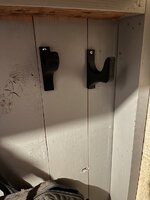
Whipped up a couple more FastTrack mounts for my specific use cases. On my one wall I have a wall-mounted fishing rod rack, and the tips of the rods stick a couple feet above my rail and flap around. I wanted a way to pull them tight against the wall. I made two mirror-image clips for a bungee cord to hook onto, and a middle one to hold the cord against the track. Not bad for a first cut proof-of-concept, but I'll do some tweaking and post files once I'm happy. Main problem is that you can't get your finger underneath to pop them back off.

Second - I have a number of items which would benefit from a FastTrack clip with a small loop to hang from. This mirror image pair will hang my wife's ski bag to get it up off the floor. Pretty happy with these so far.
 

Attachments

  • 20230130_132744.jpg
    20230130_132744.jpg
    435 KB · Views: 70
  • 20230130_132738.jpg
    20230130_132738.jpg
    388.5 KB · Views: 46
Last edited:

Black300zx

Well-known member
Joined
Apr 8, 2019
Messages
781
Location
Elkton, Md
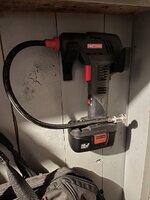
Sorry to spam everyone, but a bit more FastTrack action, as I'm trying to clean up the wall alongside my bandsaw/drillpress. I love my M12 underhood light, but I've found that 9 times out of 10, I use it just as a large stick light without the mount, so I wanted to be able to hang both independently so that I'm not constantly unclipping it.

And so another mount was born. I designed the first rev to join with #8 woodscrews, but I'm going to tweak it to add recesses for #8 nuts. I'll probably use the "base" clip from this mount any my Rocketlight mount as the building block for a bunch more custom mounts.

(Yes, I ran out of black filament mid-build)
 

Attachments

  • 2023-01-31 07_03_44-Solid Edge 2020 - Assembly - [FastTrack_M12_UnderhoodLight.asm].png
    2023-01-31 07_03_44-Solid Edge 2020 - Assembly - [FastTrack_M12_UnderhoodLight.asm].png
    84.2 KB · Views: 60
  • 20230131_070001.jpg
    20230131_070001.jpg
    720.4 KB · Views: 58
  • 20230131_065839 (1).jpg
    20230131_065839 (1).jpg
    756.7 KB · Views: 119
Last edited:

joel_400

Well-known member
Joined
Oct 16, 2022
Messages
405
Location
Nw ohio
I've tried to search and haven't come up with what I'm looking for so figured I would try to ask...I'm pondering getting into 3d printing. What would be the best bang for my buck starter printer. I'm sure everybody has opinions on this. Looking for ease of setup, decent quality, and reliability mostly. I don't want to get overwhelmed right off the bat. Also what programs do you guys use to draw/design parts? Would a cheapo Amazon machine create decent enough parts for a starter machine? Not looking to manufacture a bunch of stuff at the moment just looking to get a start and make sure I enjoy it first then maybe move up from there. Any info would be greatly appreciated!
Thank you
Joel
 

kaymccampbell

Well-known member
Joined
Feb 27, 2015
Messages
29,405
Location
Upstate New York
I've had near flawless production from an ender 3 pro. And a Monoprice mini. I design in FreeCAD and slice with Cura. YMMV.
Ender 3 pros are going for about $240 on Crapazon.
 

Poolshark314

Well-known member
Joined
Jul 5, 2021
Messages
658
Location
MD
Sorry to spam everyone, but a bit more FastTrack action, as I'm trying to clean up the wall alongside my bandsaw/drillpress. I love my M12 underhood light, but I've found that 9 times out of 10, I use it just as a large stick light without the mount, so I wanted to be able to hang both independently so that I'm not constantly unclipping it.

And so another mount was born. I designed the first rev to join with #8 woodscrews, but I'm going to tweak it to add recesses for #8 nuts. I'll probably use the "base" clip from this mount any my Rocketlight mount as the building block for a bunch more custom mounts.

(Yes, I ran out of black filament mid-build)
I have been thinking I will make a mount that snaps in for using my underhood light on the bottom side of the 4-post lift

I've tried to search and haven't come up with what I'm looking for so figured I would try to ask...I'm pondering getting into 3d printing. What would be the best bang for my buck starter printer. I'm sure everybody has opinions on this. Looking for ease of setup, decent quality, and reliability mostly. I don't want to get overwhelmed right off the bat. Also what programs do you guys use to draw/design parts? Would a cheapo Amazon machine create decent enough parts for a starter machine? Not looking to manufacture a bunch of stuff at the moment just looking to get a start and make sure I enjoy it first then maybe move up from there. Any info would be greatly appreciated!
Thank you
Joel
If you are in proximity to a MicroCenter, I would highly recommend you wait for a deal on the Ender 3 Pro. They regularly go on sale for $99 after a $100 new customer coupon over text message. The Ender 3 Pro has no bells and whistles, but you will absolutely have a better understanding of how to properly print when you have it up and running consistently. There is no better bang for buck than a $99 Ender 3 Pro in my opinion
 

whitesco

Well-known member
Joined
Aug 1, 2022
Messages
399
Location
Pittsburgh, PA (ish)
I bought an Ender 3 V2 during Covid to play around with. I've been pretty happy with it, but my expectations were fairly low. I've only used PLA so far, seems like the least expensive to learn with. I've had pretty good luck printing .stl models I've sourced online from Thingiverse and others. I'm no so good with designing/modeling my own. I don't have a CAD background which would have helped, I'm sure so instead I've created some basic stuff using Tinkercad, including modifying the previously mentioned files from other sources. Recently started trying to use OpenSCAD to play around with some of the 'parametric' files available out there with varied success. It may be my own impatience, lack of attention to detail, or apparent inability to work with intangible objects but I do a fair bit of trial and error at the expense of wasted filament.

On the other hand, I've been able to print quite a few little things to organize the toolbox and whatnot so that's something.
 

joel_400

Well-known member
Joined
Oct 16, 2022
Messages
405
Location
Nw ohio
I've never used a 3d printer. I have had some cad classes, but that was 20 years ago! I'm sure everything I learned back then is very obsolete. I had a good understanding of it then so I'm sure I could relearn that part easy enough. The last program I learned was Mastercam, which you would draw the part, then it would generate g code for the milling machine. I do have a basic understanding of how the g code stuff works as we had to in order to get into the Mastercam part of the class I had.
Joel
 

Black300zx

Well-known member
Joined
Apr 8, 2019
Messages
781
Location
Elkton, Md
I've never used a 3d printer. I have had some cad classes, but that was 20 years ago! I'm sure everything I learned back then is very obsolete. I had a good understanding of it then so I'm sure I could relearn that part easy enough. The last program I learned was Mastercam, which you would draw the part, then it would generate g code for the milling machine. I do have a basic understanding of how the g code stuff works as we had to in order to get into the Mastercam part of the class I had.
Joel
The slicer software packages do all of the gcode creation automatically, so you really don't need to worry about it.
 
To avoid these ads, REGISTER NOW!

purplezr2

Well-known member
Joined
Jun 1, 2010
Messages
5,290
Location
Central MN
I've never used a 3d printer. I have had some cad classes, but that was 20 years ago! I'm sure everything I learned back then is very obsolete. I had a good understanding of it then so I'm sure I could relearn that part easy enough. The last program I learned was Mastercam, which you would draw the part, then it would generate g code for the milling machine. I do have a basic understanding of how the g code stuff works as we had to in order to get into the Mastercam part of the class I had.
Joel
Basically how it works today, you a CAD program to make a STL file and have a program process it into G code parameter for the printer to utilize.
 

Cruzan80

Well-known member
Joined
Jul 22, 2015
Messages
4,158
Location
Denver, CO
Joel, at times on here I have posted a couple of the lessons I use to teach it to 7th and 8th graders. I highly recommend OnShape for CAD creation (best intersection of free and featured), though obviously others have their preferences. Somewhere I posted the "Why" for my selection, but biggest reason is that all the rendering/heavy lifting is off-site, meaning I can do parametric CAD on my phone.
 

joel_400

Well-known member
Joined
Oct 16, 2022
Messages
405
Location
Nw ohio
Thank you guys for the input! I've tried to download the Freecad program a number of times and could never get it to actually work. I'm open to anything thats free, if it works. I'll have to keep checking online stuff to find something. I will definitely check out the Onshape as well. Thanks agian!
Joel
 

Cruzan80

Well-known member
Joined
Jul 22, 2015
Messages
4,158
Location
Denver, CO
If you have any issues, or need some "starter" projects just to get your feet wet, let me know. I have some assignments the students use, but the Learning Center they have set up is pretty good as well.
 

kaymccampbell

Well-known member
Joined
Feb 27, 2015
Messages
29,405
Location
Upstate New York
Thank you guys for the input! I've tried to download the Freecad program a number of times and could never get it to actually work. I'm open to anything thats free, if it works. I'll have to keep checking online stuff to find something. I will definitely check out the Onshape as well. Thanks agian!
Joel
Are you running Linux? My FreeCAD is an appimage, so no install required.
 

joel_400

Well-known member
Joined
Oct 16, 2022
Messages
405
Location
Nw ohio
Not sure what lunix even is...I'm new to this stuff. I downloaded the windows version. It loaded into the computer but then when I click the icon to open it goes through some stuff for about 30 seconds on the screen then just goes right back to the home screen.
Joel
 

LeonardY

Well-known member
Joined
Apr 16, 2011
Messages
5,020
Location
Southern California
Thank you guys for the input! I've tried to download the Freecad program a number of times and could never get it to actually work. I'm open to anything thats free, if it works. I'll have to keep checking online stuff to find something. I will definitely check out the Onshape as well. Thanks agian!
Joel
I like Formz. I've been using it for 20+ years. I have the professional version. There a free version. There are less features but it's a good solid program.

http://www.formz.com/fzsite1219/products/formz/formz_free.html

They have a lot of training videos to get you started.
 

86turbodsl

Well-known member
Joined
Jul 1, 2005
Messages
6,553
Location
Michigan
I have been thinking I will make a mount that snaps in for using my underhood light on the bottom side of the 4-post lift


If you are in proximity to a MicroCenter, I would highly recommend you wait for a deal on the Ender 3 Pro. They regularly go on sale for $99 after a $100 new customer coupon over text message. The Ender 3 Pro has no bells and whistles, but you will absolutely have a better understanding of how to properly print when you have it up and running consistently. There is no better bang for buck than a $99 Ender 3 Pro in my opinion
In addition to that, there's SO many Ender 3/Pro out there, there's a ton of printable and cheap upgrades for the thing to keep you entertained for a long long time. Along with the ton of videos and articles on it.
 

harley jim

Well-known member
Joined
Dec 6, 2013
Messages
11,385
Location
Cleveland Tn..........out in the sticks
So how hard is it for a guy with very little computer knowledge to get in to 3D printers? Would love to have one but afraid that I would struggle with the learning curve for designing items. I can sketch something in 3D easily bit have no clue how to do it with software.
I'm probably the newest rookie on here, so I dont know much. But just a suggestion, you can download the design software and find out if you like it or not before you buy a printer. Design something and send the file to someone who has a printer and let them print it, jmho, Jim.
 

Eggman

Well-known member
Joined
Dec 29, 2010
Messages
82
Location
St. Louis
I chatted with Prusa support and sent them links to my videos. They said that no linear bearings will ever be completely quiet or smooth. As long as the prints look good, I'm fine with it. We shall see.
May have already been adressed, but anyone who says linear bearings will never be completely quiet or smooth , has no idea what they are talking about. Everytime the bearing ratchets, it will show up in your print.
 

AndyL

Well-known member
Joined
Feb 22, 2012
Messages
1,371
Location
Vancouver
I'm probably the newest rookie on here, so I dont know much. But just a suggestion, you can download the design software and find out if you like it or not before you buy a printer. Design something and send the file to someone who has a printer and let them print it, jmho, Jim.
And they're all very different for how you navigate; solidworks vs fusion vs dassault vs blender vs freecad vs the list goes on; get hands on model a couple things just for practice - chances are you'll find a interface / way of thinking that makes more sense to you along the way.

I learned autocad way back in the msdos era in school - and it still floats around in the back of my head - thus I find autodesk products way easier than solidworks; freecad I just can't, blender to me is art program big ol nope.
 

joel_400

Well-known member
Joined
Oct 16, 2022
Messages
405
Location
Nw ohio
I'm probably the newest rookie on here, so I dont know much. But just a suggestion, you can download the design software and find out if you like it or not before you buy a printer. Design something and send the file to someone who has a printer and let them print it, jmho, Jim.
That was kin of my opinion as well. I'd like to get my feet wet with the design program I choose before diving in and getting a printer. I have a project in mind, but want to know I can make the design before spending more money on the printer than what it could cost to buy the parts I need. We have 5 vintage crane sinks in our house and need 5 handles for the faucets. The only place I've found them online they are 75 dollars each...so technically its around the same price to buy the printer as it would be the knobs! Plus if I ever need more I can make more. After the initial batch the rest are pretty much paid for!
Joel
 

ER70S-2

Well-known member
Joined
Jan 2, 2015
Messages
796
May have already been adressed, but anyone who says linear bearings will never be completely quiet or smooth , has no idea what they are talking about. Everytime the bearing ratchets, it will show up in your print.

I have about 31 days of print time on it at this point. Nothing was done to the bearings and the prints look perfect. I'm not convinced that different or smoother bearings will increase print quality. I'd like to try different bearings just for fun, but there is no proof out there that anything works better than the Misumi bearings that ship with the printer.
 

Rccrawlerguy

Well-known member
Joined
Dec 11, 2011
Messages
249
Damn you guys... Showing off all of your projects. You're making me jealous over here. I've been wanting to get a printer for a while, finally pulled the trigger. I ordered a Tronxy X5SA. Its a 400mm x400mm x 400mm machine. I didnt get any upgrades for it yet. Figured I would atleast getting it up and running. I do want to add the 2in-1 out extruder. Only thing I ordered for it so far was some corner brackets. A couple videos I watched suggested adding them for extra rigidity.
 

ArcReactorKC

Well-known member
Joined
Jun 1, 2019
Messages
2,237
Location
Out in the county NE of KCMO
I have about 31 days of print time on it at this point. Nothing was done to the bearings and the prints look perfect. I'm not convinced that different or smoother bearings will increase print quality. I'd like to try different bearings just for fun, but there is no proof out there that anything works better than the Misumi bearings that ship with the printer.
In all of my different printer designs, from rods with printed bearings to the rods with igus, and my newest machines with rollers or linear rails I haven't seen a quality difference until the speed starts getting turned up. Although the difference in noise from the machine and maintenance is tremendous. If I turn my old anet a8 machine down to 25mm/s and fine tune the jerk/acceleration values for that speed it will print phenomenal quality akin to my newest corexy with linear rails at >100mm/s. Even with a stiff frame and the best igus bearings on the market a linear rod machine starts to show it's friction issues at speed.

For the hobbyist that isn't trying to push the speed envelope then I really don't see the need or want for the expense.
 

rollinlower

Well-known member
Joined
Oct 17, 2017
Messages
174
Location
Rogersville TN
I have been thinking I will make a mount that snaps in for using my underhood light on the bottom side of the 4-post lift


If you are in proximity to a MicroCenter, I would highly recommend you wait for a deal on the Ender 3 Pro. They regularly go on sale for $99 after a $100 new customer coupon over text message. The Ender 3 Pro has no bells and whistles, but you will absolutely have a better understanding of how to properly print when you have it up and running consistently. There is no better bang for buck than a $99 Ender 3 Pro in my opinion
love my 3 pro's especially if you like tinkering and upgrading
 
To avoid these ads, REGISTER NOW!
Top Bottom