
You are using an out of date browser. It may not display this or other websites correctly.
You should upgrade or use an alternative browser.
You should upgrade or use an alternative browser.
The modern/digital fabrication thread
- Thread starter slodat
- Start date

86turbodsl
Well-known member
Nice. Holy smokes i love my 3d mouse. What keyboard is that?
User interface portion of the new workstation is complete. Just waiting on Dell to ship the computer.
A GJ member is coming to the shop today to work on a 3D scanning project. Should be a fun day!
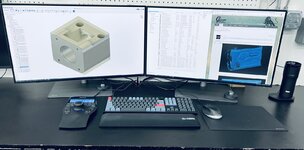
Keychron Q6. It is awesome! Base is made of billet aluminum. I love it!
86turbodsl
Well-known member
Love it! Not the price though... 
brandonsmash
Well-known member
- Joined
- Sep 8, 2016
- Messages
- 215
These are SUPER impressive projects. What's the rough cost to get started with something like this? I
That’s a really open question.. which aspect are you asking about? There are folks with only a 3D printer doing truly impressive work. It's not so much about what tools you have.. it's more about what you do with them. There's a free hobbyist license for Fusion360. That's the program I use for 3D design and all of the toolpaths. There are 3D scanners that are more budget friendly. There's folks making wildly impressive parts with desktop CNC machines..
kaymccampbell
Well-known member
That is really not that bad for what is basically a bespoke keyboard. A Logitech will set you back half that, for a much lesser device.Love it! Not the price though...
86turbodsl
Well-known member
I get it, but for $200 i would probably get parts off one of the many github open source keyboard projects and make it EXACTLY to my specs.That is really not that bad for what is basically a bespoke keyboard. A Logitech will set you back half that, for a much lesser device.
86turbodsl
Well-known member
i think if i was in your situation i would feel exactly the same.You can buy the parts from Keychron and make them however you want. It is the open source firmware and all that. I don't want to spend my time building a keyboard. I will say I am very happy with the purchase!
You can buy the parts from Keychron and make them however you want. It is the open source firmware and all that. I don't want to spend my time building a keyboard. I will say I am very happy with the purchase!
Joys another thing I never knew I needed, but after seeing it, I really want one. Oh well, when the brown switches come back in stock, one will be heading my way.
Funny you mention the 3D Connexion mouse. It started acting up the other day. I have several of their products. TI used their smaller wireless CAD mouse with my work laptop. It had a weird scrolling issue. When I contacted them about it, they were great. After a little troubleshooting, they replaced it. Now my SpaceMouse Enterprise is acting up. Same process again. They are replacing. If you use their products, I highly recommend registering with them.Nice. Holy smokes i love my 3d mouse. What keyboard is that?
86turbodsl
Well-known member
I bought mine used. Work won't pay. It works flawlessly, but only cost $40.
christopher
Well-known member
- Joined
- Sep 13, 2022
- Messages
- 64
sweet!Dell Precision 5820
Intel (R) Core (TM) i9-10980XE 3.0GHz,(4.8GHz Turbo, 18C, 24.75MB Cache, HT, (165W), DDR4-2933 Non-ECC)
128GB DDR4-2933
1tb NVMe drive
8tb 7200 hd
Nvidia RTX A5000, 24GB, 4DP
Dual BenQ PD3220U 32 inch displays
christopher
Well-known member
- Joined
- Sep 13, 2022
- Messages
- 64
That there will take care of business - relatively quietly too, by the look of it. Nice!Starting a simple little project with the Faro Arm
This will require the Water Jet and Press Brake.

christopher
Well-known member
- Joined
- Sep 13, 2022
- Messages
- 64
I have the cadmouse and the enterprise version of the navigator - very awesome stuff. Hard to do anything in solidworks now without it. One improvement I would make to the enterprise space nav setup is to illuminate the buttons with an adjustable brightness LED (maybe red) as I work in very low light a lot.Funny you mention the 3D Connexion mouse. It started acting up the other day. I have several of their products. TI used their smaller wireless CAD mouse with my work laptop. It had a weird scrolling issue. When I contacted them about it, they were great. After a little troubleshooting, they replaced it. Now my SpaceMouse Enterprise is acting up. Same process again. They are replacing. If you use their products, I highly recommend registering with them.
MadeByMiller
Well-known member
I have the cadmouse and the basic wireless puck space mouse. The space mouse is awesome, can't imagine life without it. The cadmouse is good, I like the ergos and the extra programmable buttons, but for some reason the scrolling is just terrible. I've tried adjusting settings, but no matter what, when I am quickly scrolling often times it will actually start going the opposite direction. So if I'm scrolling up or zooming in quickly, it will suddenly stop and then start going the opposite way, scrolling down or zooming out. It's quite annoying. Have you faced such a problem with yours?I have the cadmouse and the enterprise version of the navigator - very awesome stuff. Hard to do anything in solidworks now without it. One improvement I would make to the enterprise space nav setup is to illuminate the buttons with an adjustable brightness LED (maybe red) as I work in very low light a lot.
Sounds maybe like we have the same cadmouse problem @slodat ?
christopher
Well-known member
- Joined
- Sep 13, 2022
- Messages
- 64
The issue I run into with the cadmouse, is if I scroll fast, I end up pushing the wheel down accidentally. This is actually a button, and it starts the auto-scroll feature, which needs to have the wheel 'clicked' again to turn off.I have the cadmouse and the basic wireless puck space mouse. The space mouse is awesome, can't imagine life without it. The cadmouse is good, I like the ergos and the extra programmable buttons, but for some reason the scrolling is just terrible. I've tried adjusting settings, but no matter what, when I am quickly scrolling often times it will actually start going the opposite direction. So if I'm scrolling up or zooming in quickly, it will suddenly stop and then start going the opposite way, scrolling down or zooming out. It's quite annoying. Have you faced such a problem with yours?
Sounds maybe like we have the same cadmouse problem @slodat ?
MadeByMiller
Well-known member
This is not my problem, but thank you for the response. When I scroll quickly sometimes it will not even move the page right away, it will kind of wiggle the page and then randomly move a direction. It's been like this since new, so I've just got used to it and dealt with it, but perhaps I should be contacting 3D connexion.The issue I run into with the cadmouse, is if I scroll fast, I end up pushing the wheel down accidentally. This is actually a button, and it starts the auto-scroll feature, which needs to have the wheel 'clicked' again to turn off.
cycle61
Well-known member
Sounds like an issue with the encoder. These will usually use two pickups, which will be offset slightly so the software can read each pulsed signal and determine which direction the thing is spinning. I'd definitely be contacting the manufacturer.
macgyver37
Well-known member
I am getting fairly serious in wanting a 3d scanner but I'd like to know what all the hoops or hurdles you need to jump through to reverse engineer something. I have no problem taking a drawing or model from a customer and making a part from it, but I am unsure of how to go from scanned data to something I can put tool path on.
So, I assume there is some software to convert the data to something useable?
So, I assume there is some software to convert the data to something useable?
I would skip the budget priced ($1k) scanners. They are useful for what they are, but they don't compare to the $**,000 scanners.
Once you complete the scan, you have a point cloud. On my Einscan HX, their included software has some tools to turn that into a mesh. I bought their reverse engineering bundle, which adds Geomagic Essentials. GE is used to establish XYZ planes, manipulate the mesh, and it can be used to create some parametric modeling. I haven't done much modeling in GE because it's very different than what I'm used to. Instead, I import the mesh into Fusion 360 and use the mesh as reference to create clean geometry. This workflow has worked well for me.
Geomagic makes a software package called Design X that makes the reverse engineering process of scan to solid model a LOT easier and faster. This software has a $20k price tag. For the stuff I'm doing, I've been happy with the workflow described above. For the price range, I highly recommend the Einscan HX. I bought mine from Vision Miner and they have been great.
Once you complete the scan, you have a point cloud. On my Einscan HX, their included software has some tools to turn that into a mesh. I bought their reverse engineering bundle, which adds Geomagic Essentials. GE is used to establish XYZ planes, manipulate the mesh, and it can be used to create some parametric modeling. I haven't done much modeling in GE because it's very different than what I'm used to. Instead, I import the mesh into Fusion 360 and use the mesh as reference to create clean geometry. This workflow has worked well for me.
Geomagic makes a software package called Design X that makes the reverse engineering process of scan to solid model a LOT easier and faster. This software has a $20k price tag. For the stuff I'm doing, I've been happy with the workflow described above. For the price range, I highly recommend the Einscan HX. I bought mine from Vision Miner and they have been great.
Last edited:
Andrew S
Well-known member
Slodat 3D scanned some parts for me last year, and I couldn't be happier with the results. If you're comfortable in CAD, it won't take you long to use the scanned data and line up some planes to get a usable model quickly.
Quite a bit of activity relevant to this thread in the shop lately. I'm working on some reverse engineering today. This stuff is... tricky. The scanner creates a point cloud of data. It's final output is a mesh. The mesh is then manipulated in Geomagic Essentials. GE helps with reducing unnecessary polygons, getting the origin right if it wasn't done in the scanner software, and cleaning up the mesh.

After that, the mesh is used as a reference to create real geometry in a model that's usable by the CAD program (Fusion 360 in my case). Getting from the mesh to the model is not trivial. As I've mentioned before, there's a software called Design X that is the industry standard for this. It's $20k for a license. Because of this, I don't have a Design X license
Enter Quick Surface. I've read about it a few times over the 18 months I've had the scanner. I met a guy online today and our conversation led to what I needed to know. I'm now the proud owner of a license. I probably won't get it until Monday, but I did it. I have quite a bit of reverse engineering work in the coming month, so now was the time. Quick Surface has reverse engineering and modeling features that will make it pay for itself in a matter of a couple of projects.
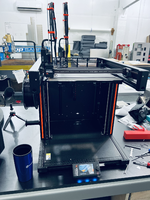
Lastly, the Prusa XL 3d printer arrived. After a small issue was resolved, it has been up and running. I'm currently printing my production part on it to see how it turns out. The XL is a LOT slower than the X1C. We shall see how the part turns out. Speed isn't everything, and having another printer making the parts still helps get the parts made.
After that, the mesh is used as a reference to create real geometry in a model that's usable by the CAD program (Fusion 360 in my case). Getting from the mesh to the model is not trivial. As I've mentioned before, there's a software called Design X that is the industry standard for this. It's $20k for a license. Because of this, I don't have a Design X license
Enter Quick Surface. I've read about it a few times over the 18 months I've had the scanner. I met a guy online today and our conversation led to what I needed to know. I'm now the proud owner of a license. I probably won't get it until Monday, but I did it. I have quite a bit of reverse engineering work in the coming month, so now was the time. Quick Surface has reverse engineering and modeling features that will make it pay for itself in a matter of a couple of projects.
Lastly, the Prusa XL 3d printer arrived. After a small issue was resolved, it has been up and running. I'm currently printing my production part on it to see how it turns out. The XL is a LOT slower than the X1C. We shall see how the part turns out. Speed isn't everything, and having another printer making the parts still helps get the parts made.
Last edited:
Post still in progress... These take some time..
I got an opportunity to work with a guy that's really experienced with reverse engineering (RE) using the same scanner I have (Einscan HX), Geomagic Essentials (GE), Quick Surface (QS), and Fusion 360. He spent a couple of hours with me this morning in a Teams meeting filling in some gaps and helping get me going with the reverse engineering capabilities of Quick Surface. This is really helpful because I can start to dial in my workflow. The good news is the parts I'm starting with are simple with respect to features. Not much in the way of organic surfaces.
Once the scan is saved as an .stl, it's brought in to GE. With the addition of Quick Surface to the workflow, the only thing I need to do in GE is decimate the mesh. This reduces the triangle count.
Before decimation just shy of 20M triangles:
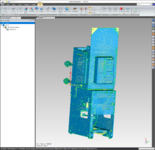
I selected to reduce to 5%, ~1M triangles. It took about 4 minutes on the high horsepower CAD workstation.

After decimation, the mesh is rebuilt.

Now we save that mesh .stl and move over to Quick Surface.

This is how the mesh comes into QS. It has no relationship to the real world (origin). QS has incredible RE features. One is called Extract Primitives.

Here I've selected a flat surface to create what will become the XZ plane. The heatmap (colors) show how close the plane is to the scan data in the mesh. Do this two more times for the YZ and XY planes.


These three planes are then used to create the alignment to the real world/origin.

Now the mesh is aligned to the origin. This means when this is imported into Fusion the origin goes with it. And, the origin is based upon the scan data.
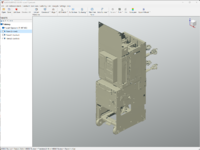
Similar process to create a plane on the part I want to model.

I got an opportunity to work with a guy that's really experienced with reverse engineering (RE) using the same scanner I have (Einscan HX), Geomagic Essentials (GE), Quick Surface (QS), and Fusion 360. He spent a couple of hours with me this morning in a Teams meeting filling in some gaps and helping get me going with the reverse engineering capabilities of Quick Surface. This is really helpful because I can start to dial in my workflow. The good news is the parts I'm starting with are simple with respect to features. Not much in the way of organic surfaces.
Once the scan is saved as an .stl, it's brought in to GE. With the addition of Quick Surface to the workflow, the only thing I need to do in GE is decimate the mesh. This reduces the triangle count.
Before decimation just shy of 20M triangles:
I selected to reduce to 5%, ~1M triangles. It took about 4 minutes on the high horsepower CAD workstation.
After decimation, the mesh is rebuilt.
Now we save that mesh .stl and move over to Quick Surface.
This is how the mesh comes into QS. It has no relationship to the real world (origin). QS has incredible RE features. One is called Extract Primitives.
Here I've selected a flat surface to create what will become the XZ plane. The heatmap (colors) show how close the plane is to the scan data in the mesh. Do this two more times for the YZ and XY planes.
These three planes are then used to create the alignment to the real world/origin.
Now the mesh is aligned to the origin. This means when this is imported into Fusion the origin goes with it. And, the origin is based upon the scan data.
Similar process to create a plane on the part I want to model.
Last edited:
cycle61
Well-known member
Now you just need a really big 3D printer.

This plane then allows us to create a sketch:

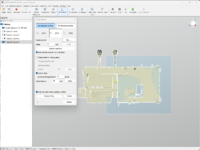


Now we have a sketch that can be extruded. This is a solid and can then be imported into Fusion as a step file.
As is the case with all CAD type programs, there's a very steep learning curve. I just sent my new support guy a message because I'm stuck
Now we have a sketch that can be extruded. This is a solid and can then be imported into Fusion as a step file.
As is the case with all CAD type programs, there's a very steep learning curve. I just sent my new support guy a message because I'm stuck
I ordered the big Modix last spring. Once I talked to folks that owned them, I cancelled the order. They have a lot of problems and are definitely something that requires constant fiddling. It's also why they are in the $20k range and BIgRep is in the $90k range. BigRep is reliable out of the box from what I've heard from folks that have them. Side note: there is no longer a US rep for Modix.Now you just need a really big 3D printer.
I'm glad I stumbled onto this thread. I've been forcing myself to learn Fusion360 and get better at it.
I'm really looking into Einstar scanner. I'm just a hobbyist so the HX is a bit steep for what I would use it for, but for what I want to use the scanner for it should work alright.
I'm really looking into Einstar scanner. I'm just a hobbyist so the HX is a bit steep for what I would use it for, but for what I want to use the scanner for it should work alright.
cycle61
Well-known member
That's why you hire a concerned looking kid in skinny jeans to babysit the machine for you.They have a lot of problems and are definitely something that requires constant fiddling.
Cross posting from my shop thread.. Unexpected, awesome upgrade came along. Sold the Einscan HX for a great price and was fortunate enough to be able to get the new Shining 3D Freescan Combo scanner. It's a metrology grade 3D scanner with some incredible new capabilities. Namely, it can scan deep into a hole, and has impressive inspection capabilities. It is also a lot faster because it has more laser lines doing the work. The HX went to a friend that's really excited to put it to work on his projects. I have a big reverse engineering project this coming week where I'll put the new scanner to work.
In preparing for this project, I decided to make the pentagon (ish) markers I've had in my head for a long while. Last year when I got the scanner I downloaded an .stl of a similar six sided marker. I wanted it to be five sided, and a pocket for a magnet. A few minutes in Fusion...

Quick test print on the X1C.


I went through a few iterations before I settled on this one. Told the Bambu slicer to fill the plate with copies.

Both printers are running a full plate. Five hours about $5 in ABS filament later and I'll have 102 of them.
These are really handy. They are easily removed (vs sticking markers directly to what's being scanned), they dramatically increase the number of markers (more markers mean the scanner doesn't lose tracking as much or at all), and they can be used on things that are magnetic, or not by just setting them in/on/around the scan specimen.
In preparing for this project, I decided to make the pentagon (ish) markers I've had in my head for a long while. Last year when I got the scanner I downloaded an .stl of a similar six sided marker. I wanted it to be five sided, and a pocket for a magnet. A few minutes in Fusion...
Quick test print on the X1C.
I went through a few iterations before I settled on this one. Told the Bambu slicer to fill the plate with copies.
Both printers are running a full plate. Five hours about $5 in ABS filament later and I'll have 102 of them.
These are really handy. They are easily removed (vs sticking markers directly to what's being scanned), they dramatically increase the number of markers (more markers mean the scanner doesn't lose tracking as much or at all), and they can be used on things that are magnetic, or not by just setting them in/on/around the scan specimen.
Made some progress on the RE stuff with Quick Surface (QS). The sketch from the previous posts was then used to extrude a solid. It is the outline in this screenshot:
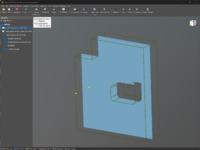
Then a best fit plane is made on each side of this part on the scan. Those two planes are used to trim the extruded solid. This results in the blue part above. That is the side plate we are modeling, using the scan data as a reference.
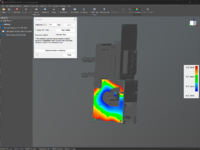
The photo above is a heatmap comparing the modeled part to the scan data.
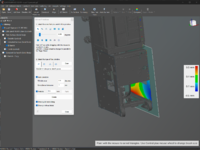
This shows the heatmap comparing the inside cutting plane to the scan data. The new scanner will do a much better job at getting this inside data.
Then a best fit plane is made on each side of this part on the scan. Those two planes are used to trim the extruded solid. This results in the blue part above. That is the side plate we are modeling, using the scan data as a reference.
The photo above is a heatmap comparing the modeled part to the scan data.
This shows the heatmap comparing the inside cutting plane to the scan data. The new scanner will do a much better job at getting this inside data.
At the client's shop doing some reverse engineering with the new Shining 3D Freescan Combo. The new scanner is really nice. It has three laser modes: 26 line laser, 7 line laser HD, and single line laser. The single line is how it gets into deep bores and features. The first step is placing and scanning the markers. The marker file is then used in the laser scan mode. The markers:
View attachment 1934442
The scan (you can see the three modes on the left):
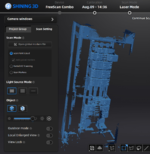
The scan is meshed and then opened in Quick Surface (QS):
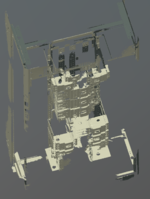
This is what we are working on:

We'll focus on the corner post in the left of that image:
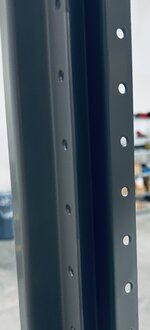
Similar to last time I posted about this, the mesh is cut with a plane, and the mesh data is used as reference data on that plane to create a sketch:

The white dots are the scan data, the blue is the sketch. I just trace over the scan data using the tools in the sketch screen. I used a caliper to measure the material thickness. It's bang on 2mm. The offset tool is used to offset the outer lines, close the ends and we have the above sketch. The sketch is then extruded.

This is the extrusion with everything else hidden. Here the modeled corner post is with the reference sketch visible:

This alone is really powerful. To me, the REAL impact is the comparison tool.
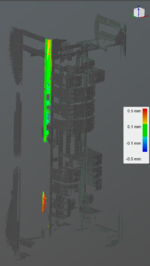
This shows a heat map comparing the new solid body to the scan data. All that green at the top means we have a good model. It's within 0.1mm of the scan data. I didn't spend the time or energy to scan the whole post. I got the outside profile, and that's enough because it's a straight extrusion of that profile, at the material's thickness.
View attachment 1934442
The scan (you can see the three modes on the left):
The scan is meshed and then opened in Quick Surface (QS):
This is what we are working on:
We'll focus on the corner post in the left of that image:
Similar to last time I posted about this, the mesh is cut with a plane, and the mesh data is used as reference data on that plane to create a sketch:
The white dots are the scan data, the blue is the sketch. I just trace over the scan data using the tools in the sketch screen. I used a caliper to measure the material thickness. It's bang on 2mm. The offset tool is used to offset the outer lines, close the ends and we have the above sketch. The sketch is then extruded.
This is the extrusion with everything else hidden. Here the modeled corner post is with the reference sketch visible:
This alone is really powerful. To me, the REAL impact is the comparison tool.
This shows a heat map comparing the new solid body to the scan data. All that green at the top means we have a good model. It's within 0.1mm of the scan data. I didn't spend the time or energy to scan the whole post. I got the outside profile, and that's enough because it's a straight extrusion of that profile, at the material's thickness.
MadeByMiller
Well-known member
Hey Steven, that's great! Thanks for sharing. It looks like the scanner did well with what appears to be a somewhat reflective coating on some of the components. Do you manually clean up the point cloud and create the mesh in the or do you use an automated generator for that? Can you share what you plan on using this scan data for? When you're tracing the mesh slice is there an option similar to Fusion where it will have an arc or a spline follow the mesh data for more complex objects?
On the sample above, I did zero cleanup in the scanner software. Just made the mesh, limited to 20M triangles. That big mesh was brought straight into QS.Hey Steven, that's great! Thanks for sharing. It looks like the scanner did well with what appears to be a somewhat reflective coating on some of the components. Do you manually clean up the point cloud and create the mesh in the or do you use an automated generator for that?
The client is making their own gear that will be compatible with distribution breakers from many/most manufacturers. I'm helping with the design on their modular gear. Currently, reverse engineering how each manufacturer does it, so we can come up with a modular/universal design. I will then make the prototype and will have some on-going manufacturing of some of the components. They have a shop they work with that can do the bigger parts in big quantities for really good prices. I'm able to make the smaller and smaller batch parts at a competitive price. Everyone eats in that scenario.Can you share what you plan on using this scan data for?
It approaches surfaces differently. I haven't gotten into it much yet, but from what I know at this point QS makes it much easier. More to follow when I get to that point.When you're tracing the mesh slice is there an option similar to Fusion where it will have an arc or a spline follow the mesh data for more complex objects?
More scanning today. To give an idea of why I bought a really powerful computer for scanning.. this is the resource monitor for processing the markers only:
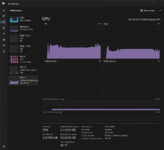
Generating point cloud data. This scan is about 15% of the overall specimen.
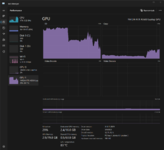
Aligning two scans:

The resulting aligned scans:

One of the things I figured out with scanning is I need to use a lot more markers. A lot more! Once I did that, things went much faster.

This was an experiment while I sorted out how many was enough/too many.
Generating point cloud data. This scan is about 15% of the overall specimen.
Aligning two scans:
The resulting aligned scans:
One of the things I figured out with scanning is I need to use a lot more markers. A lot more! Once I did that, things went much faster.
This was an experiment while I sorted out how many was enough/too many.
@cycle61 called with a need/idea for a new tool for the testing he's doing today. The conversational sketch on the dry erase board:

Concept in Fusion:
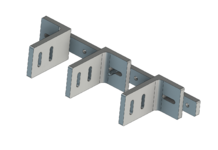
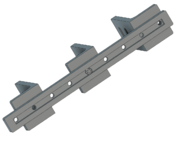
Variation on the L:

All three parts are printing on the 3d printer. 1.5 hours from phone call to printers starting. All will be in hand in 3 hours to evaluate.
Cool stuff!
Concept in Fusion:
Variation on the L:
All three parts are printing on the 3d printer. 1.5 hours from phone call to printers starting. All will be in hand in 3 hours to evaluate.
Cool stuff!