To avoid these ads, REGISTER NOW!

Below 265 SQ/FT Tiny Tokyo Shop

All workspaces below 265 squarefeet.
To avoid these ads, REGISTER NOW!
OP
B

Bakafish

Well-known member
Joined
Feb 7, 2017
Messages
477
Location
Tokyo
I said I would detail the validation of the two Haimer 3D taster units I recently picked up, and I just finished so here is how I approached it. The first thing I needed to do is make sure I had a good reference spindle. I detailed rebuilding the spindle for my Proxxon mini-mill, but to be honest the Chinese ER16 collet holder really let me down accuracy wise, so it really wasn't appropriate to use it to dial these in. Amongst the many many boxes of 'potentially useful **** I bought because it looks neato' I have a System 3R EDM drill spindle made in Sweden that I bought because it came with a full set of super high precision ER16 collets that were worth far more than the price the whole thing was selling for. It isn't designed to deal with any real forces (Electrical Discharge Machining is a contactless process) but I suspected it might be a very accurate way to confirm the operation and calibrate the Haimers.

3R_Runout.jpeg

So the first step was to validate the runout of the spindle. I removed the little DC motor assembly and the drive belt and checked the inner taper of the ER16 spindle with one of my Mitutoyo micron accurate dial test indicators. Much to my pleasure, the spindle had no visible runout, a far better result than what the Proxxon could manage.

The next step was to get the spindle fixtured so I could confirm the deflection and probe runout. As I mentioned before, the Haimer's are designed to indicate '0' when the spindle centerline is directly over the edge that you are measuring. To do that the probe tip is a 4mm sphere and the dial indicates -2mm when in the rest position, so you need to deflect the probe tip 2mm to find that location. The first question I needed to answer was, if I move the probe exactly 2mm does the device read zero?

deflection_test.jpeg

There's a number of ways to do this, but I just picked up a Newport precision crossed roller bearing stainless XY stage and decided it would be useful for this. XY stages are one of those things I also mbuy, because they seem like they will come in handy, so it was nice to actually have a use for one. I may have to deep dive them at some point as there's a lot more to the different methods they use to constrain their motion that really is important for where they are used. In this case the cross roller bearings were overkill, and rather than reading off of the Starrett micrometer heads I just set up a Mitutoyo digital dial indicator to read out the amount of travel. I used the micrometer head to move the stage until I could see it contact the probe, then zeroed the digital indicator that was also contacting the stage, then just moved it until the Haimer read zero and confirmed that the dial indicator was within a few microns of 2mm. The Big Daishawa unit was off by ~10 microns, and although I had set the -2mm offset a few weeks ago, I could see the needle was just a little bit off at rest, so I need to go back and get that last little bit. The Haimer branded unit that was way out of whack when I originally got it was consistently within 2 microns after I worked on it, which given my less than ideal setup seems quite acceptable.

align_probe.jpeg

The last step was to ensure that the probe tip is aligned with the centerline of the instrument shank. This is done with 4 set screws acting on a kind of flexure on the top of the device. The manual gives the procedure, I just loosened the four screws then worked on the front and rear first. I just looked at the whole deviation (about 60 microns with everything loose) and targeted the middle of that deviation by rotating it back and forth and making small adjustments. Once I had that axis pretty well set, I worked on the left and right sides. It went pretty quickly, and wasn't much trouble on either unit. Since everything was mounted to the same sturdy Mitutoyo stand it was pretty stable and I could get it dialed in to where the indicator didn't move at all when rotating the unit.

I need to make some sort of box to store these in for safe keeping, maybe 3D printed, I have a lot of things that could be better packaged if I had a system. My obsessiveness demands laser cut Kaizen foam (which despite what you might think is totally unavailable here in Japan) or some sort of molded foam casting system, but perfect always gets in the way of good enough with me, and I should just print some plastic.
 
OP
B

Bakafish

Well-known member
Joined
Feb 7, 2017
Messages
477
Location
Tokyo
I used mine today and thought the exact same thing. You need to get out of my head. :ROFLMAO:
I started to design for it today.
Great job on the adjustments.
I made a basic 3D model for the Haimer if you want it. It is concatenated with the image below, you should be able to download the image and run unzip on it to extract the STEP file. Let me know if it doesn't work for you.

Haimer_Model.jpg
 

LeonardY

Well-known member
Joined
Apr 16, 2011
Messages
5,020
Location
Southern California
I made a basic 3D model for the Haimer if you want it. It is concatenated with the image below, you should be able to download the image and run unzip on it to extract the STEP file. Let me know if it doesn't work for you.

Haimer_Model.jpg
Awesome, Thanks. I haven't seen the attachment done this way before. Works perfectly.
1680467448639.png
 

zanyad

ALLIANCE MEMBER
Joined
Apr 26, 2018
Messages
2,755
Location
NE Ohio
I made a basic 3D model for the Haimer if you want it. It is concatenated with the image below, you should be able to download the image and run unzip on it to extract the STEP file. Let me know if it doesn't work for you.
Neat trick! Can you share how you did it?
 
OP
B

Bakafish

Well-known member
Joined
Feb 7, 2017
Messages
477
Location
Tokyo
Neat trick! Can you share how you did it?
You concatenate a zip archive with a valid image file using cat (Windows users can achieve the same thing, but don't ask me how):

cat image.jpg archive.zip >> combined.jpg

Since the image header gives the length of an image file, most interpreters will just ignore the archive, and the unzip utility will complain about the image data, but it is robust enough to identify a valid archive included in the file and will extract it. I use it for embedding pdf's or 3d files on forums that don't properly support or allow upload of those formats.
 

zanyad

ALLIANCE MEMBER
Joined
Apr 26, 2018
Messages
2,755
Location
NE Ohio
You concatenate a zip archive with a valid image file using cat (Windows users can achieve the same thing, but don't ask me how):

cat image.jpg archive.zip >> combined.jpg

Since the image header gives the length of an image file, most interpreters will just ignore the archive, and the unzip utility will complain about the image data, but it is robust enough to identify a valid archive included in the file and will extract it. I use it for embedding pdf's or 3d files on forums that don't properly support or allow upload of those formats.
Quick Google --> PowerShell supports cat out-of-the-box. Another suggestion is the type command-line command. Lastly, I've had good results with Cygwin (replicates Linux environment on Windows, with POSIX API functionality).
 

MadeByMiller

Well-known member
Joined
Dec 29, 2018
Messages
1,230
Location
Rapid City, SD
I feel dumb, when I save the photo it just shows up as a photo with no way of extracting anything? I even tried a few online file extractor sites to no avail.
 

LeonardY

Well-known member
Joined
Apr 16, 2011
Messages
5,020
Location
Southern California
I feel dumb, when I save the photo it just shows up as a photo with no way of extracting anything? I even tried a few online file extractor sites to no avail.
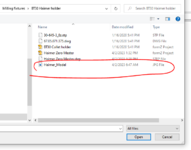
Open WINZIP or WINRAR App first then OPEN an archive. Navigate to where the file is located. Select All Files
1680563727690.png
Open the JPEG
1680563832427.png
And there is the model in the archive file.
1680563906376.png
 

MadeByMiller

Well-known member
Joined
Dec 29, 2018
Messages
1,230
Location
Rapid City, SD
Open WINZIP or WINRAR App first then OPEN an archive. Navigate to where the file is located. Select All Files
1680563727690.png
Open the JPEG
1680563832427.png
And there is the model in the archive file.
1680563906376.png
Thank you very much! I downloaded WinRAR and it worked just as you showed. Thank you @Bakafish for sharing and introducing me to this file sharing method, I had no idea!
 

GeddyT

ALLIANCE MEMBER
Joined
Jun 17, 2015
Messages
1,239
Location
Bellingham, WA
I've been slowly working my way through this thread for what has to be about a year now. It's dense in a way that I love, so didn't want to rush through it. Whenever I tell people about Garage Journal, this is one of the threads I always describe. I only wish that I'd been following along in real time so I could have commented on some things when it would have mattered.

Anyway, thanks for the awesome read, @Bakafish!
 
OP
B

Bakafish

Well-known member
Joined
Feb 7, 2017
Messages
477
Location
Tokyo
Every time I decide on a big print I feel compelled to go through and update everything. Octoprint, Cura and of course compile the latest version of Marlin firmware for the printer. This round was less tedious than usual, fewer technical difficulties, but that Bambu Carbon might be tempting if they offer it cheap enough over here. The Prusa 4 doesn't look like a bad machine, but the Porsche 911 had some iterations that didn't quite live up to the legend, and similarly this version feels underwhelming.

Trusco_boxes.jpeg

Anyway, over here a couple manufacturers make these little standardized, domestically made steel boxes in a wide variety of shapes, sizes and colors. They are stackable, and are sized to work together and nest into bigger toolboxes for the most part, and are sturdy and a good value at $5-10 each. I figured it was time to model the two sizes I usually use and make a 3D printed insert to safely ensconce the Haimer twins. Below is a render of what I hope to make.

Haimer_Render2.jpeg

I designed a plastic insert after modeling the basic shape of the Haimer, there was no nice 3D model available which surprised me as I'd expect that advanced CAM systems would require one for collision avoidance. I made the insert so it can support the longer probes, and there is room to put a spare probe in the factory case in there as well. It was a tight fit to get the two devices in a single box, but that's one of the things I love about modeling stuff, I just sometimes wish I could print the models faster to reduce the inevitable iteration loop when I want to change something. It does make me work harder on the design in order to try and get it right the first time.

Anyway, the 20 hour print has started, it will likely need a filament change, I'm hopeful it won't be in the middle of the night, but you know how that goes...
 

GeddyT

ALLIANCE MEMBER
Joined
Jun 17, 2015
Messages
1,239
Location
Bellingham, WA
It's too late now, but it looks like Haimer offers free CAD downloads if you register with an account. I thought I'd be clever and skip that by finding a solid model at McMaster-Carr, but that's weirdly one of the few products they sell that doesn't have a CAD model.
 
OP
B

Bakafish

Well-known member
Joined
Feb 7, 2017
Messages
477
Location
Tokyo
It's too late now, but it looks like Haimer offers free CAD downloads if you register with an account. I thought I'd be clever and skip that by finding a solid model at McMaster-Carr, but that's weirdly one of the few products they sell that doesn't have a CAD model.
I am registered, and unfortunately they only offer those files for their tooling, not on the 3D Taster units.
 

LeonardY

Well-known member
Joined
Apr 16, 2011
Messages
5,020
Location
Southern California
1680702905884.pngNice design. Nice render. What software are you using?

Anyway, over here a couple manufacturers make these little standardized, domestically made steel boxes in a wide variety of shapes, sizes and colors.
That's something that I miss about Japan. There are others things too. There are a ton of different storage boxes. I know Amazon has them but they aren't that cheap.
I decided to go old school to store my Haimer. I have a a ton of hardwood scraps. I'll make a nice finger jointed box.

I just sometimes wish I could print the models faster to reduce the inevitable iteration loop when I want to change something. It does make me work harder on the design in order to try and get it right the first time.
Have tried using an 0.6 nozzle? There can be a good time savings with that.
I watched this and might get some for my printer.

I'd be interested to hear what you think.
 
OP
B

Bakafish

Well-known member
Joined
Feb 7, 2017
Messages
477
Location
Tokyo
Nice design. Nice render. What software are you using?

Just Fusion 360 and the built in textures and local rendering. It was a really foreign experience to learn Fusion, I was brought up on classic 2D stuff that worked very differently. It still can be off putting, but it really gets out of my way most of the time and lets me make what I want to make. The more I use it, the better I like it.

That's something that I miss about Japan. There are others things too. There are a ton of different storage boxes. I know Amazon has them but they aren't that cheap.
I decided to go old school to store my Haimer. I have a a ton of hardwood scraps. I'll make a nice finger jointed box.

That's the way I should have done it, but I'm in paralysis with any real shop work. The season has changed, so I have little excuse at this point.

Have tried using an 0.6 nozzle? There can be a good time savings with that.
I watched this and might get some for my printer.

I did try a 0.6mm and had a lot of trouble getting a working profile. But at the time I had made a million simultaneous changes and I had a deadline to meet, so I reverted as much as possible. I'll try it again at some point. I've got to increase speeds too, I run super slow recently as I was trying to eliminate issues created when I changed print heads to the Sprint.

I'd be interested to hear what you think.
 

LeonardY

Well-known member
Joined
Apr 16, 2011
Messages
5,020
Location
Southern California
I was brought up on classic 2D stuff that worked very differently. It still can be off putting, but it really gets out of my way most of the time and lets me make what I want to make. The more I use it, the better I like it.
So was I. I started with AutoCAD 3.0 in a little design shop in Redwood City CA. My first professional job. My boss said to me, "I'm going on vacation for two weeks. I don't have a lot of work for you. Why don't you learn AutoCAD." I was panicked. I spent the next two weeks doing the manual and a tutorial book.

I learned 3D modeling the same way, in a panic.

You're going to find it impossible to go back to 2D design after a while.
 
To avoid these ads, REGISTER NOW!
OP
B

Bakafish

Well-known member
Joined
Feb 7, 2017
Messages
477
Location
Tokyo
So was I. I started with AutoCAD 3.0 in a little design shop in Redwood City CA. My first professional job. My boss said to me, "I'm going on vacation for two weeks. I don't have a lot of work for you. Why don't you learn AutoCAD." I was panicked. I spent the next two weeks doing the manual and a tutorial book.

I learned 3D modeling the same way, in a panic.

You're going to find it impossible to go back to 2D design after a while.
I've always been a Mac guy, and although I used VersaCAD and AutoCAD, I really disliked the way they worked. I'm embarrassed to say I spent years using MacDraw on my Macintosh II, and squeezed a lot more out of it than it was intended for. I used Vectorworks, but despite it working in a familiar way compared to the brainf&#k that is Fusion360, I had a really hard time getting it to do things as intuitively and with as little friction.

I'm sure I'm not using Fusion the way it's intended, and big projects timelines get so unruly that I often find it easier to just pull out components and start over, but I just love being able to build things before I build them. That's always the way I've done, just mentally building something over and over, simulating what could go wrong and how to simplify or work around issues. All that used to be 90% in my head and 10% on the computer as it was so much more tedious to try and iterate on a machine. Now I can just start building it, leaving my brain to work on the details and easily implement them in the design as I go. It drives my wife mad that I ponder so long, but the builds go so much smoother :cool:
 

LeonardY

Well-known member
Joined
Apr 16, 2011
Messages
5,020
Location
Southern California
I've always been a Mac guy
I was too. I used to have AutoCAD for the MAC. It just never worked.
Ironic story. When I was at the design firm in Redwood City. I designed the chassis for the MAC SE on a HP computer.

It drives my wife mad that I ponder so long, but the builds go so much smoother
Oh, we definitely are from the same tribe. :LOL:
 

zeug

Well-known member
Joined
Nov 29, 2009
Messages
191
Location
Colorado Springs
When I was at the design firm in Redwood City, I designed the chassis for the MAC SE on a HP computer.
Mac user here too. Was stuck with PCs in the defense world until I started consulting. I just love hearing little ironies like this above. Makes me smile.
 
OP
B

Bakafish

Well-known member
Joined
Feb 7, 2017
Messages
477
Location
Tokyo
The print completed without drama, and despite the filament spool being threadbare, Cura's weight estimate was correct and it lasted through the night. It gave me the opportunity to try out the new Noga CR-1100 ceramic bladed plastic deburring tool. It does what it's supposed to do, it cuts clean even at a very negative rake angle.

Noga_Plastic.jpeg

Then I cut a couple rectangles of adhesive backed neoprene rubber to fit in the recesses I had designed into the box insert. These pockets were designed to allow the rubber to cradle the tool so it doesn't actually contact the plastic tray.

pads.jpeg

Then I added a strip in the lid that creates the 3rd contact point, and some 3M VHB double sided tape to fix the tray in the box. The extra stylus in the factory box fits in snugly and the lid closes with minimal pressure and holds the two units in place with zero play. I honestly couldn't have hoped for a better fit, I was hoping it would be in the ballpark, but it all worked out perfectly.

Haimer_Case.jpeg

Thanks for all the encouragement, this is the sort of thing I usually think about a lot but never do as the amount of effort is questionable for the end result. But having people who can possibly appreciate it makes doing it worthwhile. Makes me wonder about the unseen world of fanatical devotion that is hiding out there unappreciated, we're lucky we can show off our humble efforts to such kindred spirits.
 

LeonardY

Well-known member
Joined
Apr 16, 2011
Messages
5,020
Location
Southern California
this is the sort of thing I usually think about a lot but never do as the amount of effort is questionable for the end result.
As usual you have hit the nail on the head. It's hard to justify the time for infrastructure projects. But protecting two valuable and precision instruments is a must.
You did a fantastic job. I am in awe of your ability to troubleshoot, repair and bring back to life something that someone else didn't think was worth the time.
I must follow humbly in your footsteps and protect my Haimer.
 
OP
B

Bakafish

Well-known member
Joined
Feb 7, 2017
Messages
477
Location
Tokyo
So the next project (out of a million) that I've been mulling over is based on a piece of surplus equipment that I picked up out of curiosity.

mag_rail.jpeg

What you are looking at is part of a linear servo motor. A linear servo is basically like if you deconstructed and flattened a normal motor, this part is a 714x120mm plate that bolts to the static part of the machine, and the complex motor and encoder sections move over the top of it with a small air gap. They are the ultimate in motion control, merging ridiculous acceleration with high precision they are way out of the realm of hobbyists like myself, so there wasn't a lot of info about how these work and I couldn't imagine it wouldn't be useful somehow. My favorite surplus store was selling a couple of the rails without the motor section for about $20ea, and I thought it might be a cheap precision surface or possibly magnetic and good as a cool tool holder. Motors can be induction based where they generate the magnetic fields using current or they can use permanent magnets which are much more costly for the same amount of power, so I wasn't really sure what I was going to get. The documentation was unclear on the matter.

When it arrived the first thing I noticed was these thin rectangular plates attached to the inner cardboard packing material. The unit didn't turn out to be magnetic, it was SUPER F&CKING MAGNETIC! These plates were used to short circuit the magnetic fields during shipping so it didn't kill somebody, removing them creates a magnetic hazzard. So yes it is flat, but my idea of using them as a cheap precision base plate for linear rails is out of the question, and to use it as a tool holder, some creativity will be required.
 
OP
B

Bakafish

Well-known member
Joined
Feb 7, 2017
Messages
477
Location
Tokyo
We definitely need a picture of one of these linear widgets unwrapped.
linear1.jpeg

A little closer, it isn't the most interesting looking thing. Just a flat metal plate. If you look closely, you can see the way they skew the magnetic field domains to reduce cogging as the motor section moves across it.
 
OP
B

Bakafish

Well-known member
Joined
Feb 7, 2017
Messages
477
Location
Tokyo
Could you use it as a magnetic chuck?
I have a permanent magnetic style grinding chuck and the ability to disable the magnetic field is key. Getting a workpiece safely mounted and positioned would be impossible if you couldn't turn the thing off. Short of building some sort of giant Gauss rifle the utility of repurposing this thing seems pretty limited and I won't be buying the remaining ones.

The challenge I have with this unit is to ensure there is enough physical spacing to render it safe. It is scary strong, to the point I have to remove my watch to even handle it as I already gave myself a bad pinch with the milanese loop wristband. So I will have to encase it so that my tools have enough space that the strong magnetic fields are dampened. Thanks to the thin cross section of the magnet the field gradient is very dramatic, about a centimeter from the surface the attraction becomes manageable, but woe to anything that gets in between a steel object and that plate inside of the heart of the field.

So what I'm mulling over is what that spacer looks like, and what it is made of. Obviously something as simple as slapping a board on the front would work. But it leaves a lot of engineering on the table, I have magnetic tool holders and they work, but the tools are kind of haphazard and not always easy to access when packed optimally. So adding some depth and angled facets to the surface so that the handles of pliers are tilted for easier access and so the spacing is automatically held a little more regular is appealing. This sort of complex topography is a sirens call to 3D printing, but I'm not crazy about a big plastic thing as it just doesn't strike me as aesthetically pleasing. I have a bunch of German black MDF scraps that would look a lot better, but I don't have a CNC yet to make a complex topology, so I have to think about what can be done with what I have on hand if I go that route[r].
 
Last edited:

LeonardY

Well-known member
Joined
Apr 16, 2011
Messages
5,020
Location
Southern California
This sort of complex topography is a sirens call to 3D printing, but I'm not crazy about a big plastic thing as it just doesn't strike me as aesthetically pleasing. I have a bunch of German black MDF scraps that would look a lot better, but I don't have a CNC yet to make a complex topology, so I have to think about what can be done with what I have on hand if I go that route[r].
You could make templates for the router with the 3D printer. That will allow you to make the complex shapes without the CNC.
 
OP
B

Bakafish

Well-known member
Joined
Feb 7, 2017
Messages
477
Location
Tokyo
You could make templates for the router with the 3D printer. That will allow you to make the complex shapes without the CNC.
Yeah I've done plenty of that before, it's a very handy solution. Good for repeating patterns and basic profiles, but really limited for complex surfaces. With the 3D printed solution (or a CNC) I could literally make custom pockets for each tool. With hand tools it will need to be something more generic and simple.
 
OP
B

Bakafish

Well-known member
Joined
Feb 7, 2017
Messages
477
Location
Tokyo
So I have some ideas about the big magnet, but need to preempt it for a long delayed project, the bath threshold. One of my crazier projects was to replace the unit bath in my house (documented in earlier posts) and the biggest changes I had to make were around getting the floor level at a natural height. As is common with unit bathrooms over here, the original unit had all the plumbing under the floor but above the floor height. Combined with a very low ceiling height, you had to step up about a foot into a claustrophobic little box. There was a rail thin window in the corner that barely let any light in, it was awful. Anyway, I replaced it all, and the new one has been great, I'm knocking on wood now because it has been absolutely perfect, no leaks, good drainage, warm and bright.

But the washroom that it adjoins has yet to come under the knife, and the wonderful matching floor height made the threshold a bit of a challenge.

Bath_Threshold.jpeg

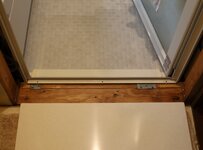
The clearance between the door trim lip and the floor joists is only 10mm and there are two galvanized brackets that are part of the steel support structure of the unit. I could use wood there, but I never felt good about that, figuring that any painted surface would wear out and it is high moisture. I really wanted to use some kind of solid surface (Corian) but that stuff is uncommon and expensive over here, and although it seems to be very machinable, I don't have any experience with it. So expensive and challenging, what's not to love?

I ordered some color samples and found a good match and showed my wife, and she gave a very unusual for her, lukewarm response. It wasn't what I expected, and it took the wind out of my sails for a few months. But I tried to present her the alternatives (the main one being status quo for another 6-7 years :) ) and she gave me her tepid approval. So I ordered a $200 slab of Korean made solid surface and it came a couple of days later. Since I needed to do a lot of machining on it to get it to clear all the brackets and screws, I ordered the largest piece at that price point, so I needed to cut it down to size. Fortunately due to my need as a 'catch them all' completionist, I had a Corian blade for my track saw.
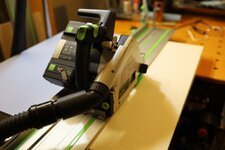
fes_cut.jpeg

I got to admit, it feels strange going at a slab of something that feels like marble with a circular saw, but it cut it easily. A lot of fluffy dust everywhere even with extraction. Next steps will be cutting the clearance pockets and other reliefs. I printed a test piece on the Ender to make sure everything would fit, which I think is a great use of the tech. The Ender is such a polished turd at this point, I can't stop tinkering with the damn thing. I added a second Z motor and lead screw to clean up the Z layer quality and got a Creality Sonic Pad which is a little tablet that runs Klipper (and provides motion shaping to speed up the printing.) Now when I look at the thing, all I can see is that it needs linear rails, which is ridiculous. But I have some... god help me. Anyway, I'll try and detail the remaining steps of this threshold piece.

I also still want to detail motion stages, little units that provide precision motion in various axis. I fortuitously picked up a couple more precision units very cheaply that give some very interesting motions. They seem way more useful than they probably are, but I'm sure they will come in handy at some point. They are really cute though.
 
OP
B

Bakafish

Well-known member
Joined
Feb 7, 2017
Messages
477
Location
Tokyo
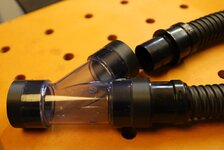
So after cutting the piece I needed off of the larger panel (I plan to use the other part for the entry threshold of the washroom when I tile it so they match) I realized that it creates a lot of fluffy dust. One of my million side projects was making a Y adaptor for my JDM Makita vacuum so that I could use dual dust collection with my Incra based router table. Keeping things simple, I bought a transparent PVC plumbing Y and designed and printed inserts that were modeled to use the bayonet style connectors Makita uses here in Japan. I'm pretty sure the Makita vacuums over there are mostly different, but over here there is quite a ecosystem of hoses and adaptors, of which I have far more than one would need.

hose_y.jpeg

The parts had all been printed and tested, I had already glued the fittings into the Y, the hold up was that I needed to cut one of my hoses into two shorter lengths and using the extra end parts I got from Makita service make a little stubby length for the router's dust collector, and a longer length that mounts to the Incra fence (again with a custom printed hose adaptor.) I just couldn't decide which hose to cut... It's been like a year of paralysis over a hose...

So having made the life changing decision of which precious corrugated child to sacrifice to the dust gods, (it was Tom... have a drink in his honor) I set up the table to do the initial step cut to provide a relief for the metal flashing that surrounds the door. The Table (detailed previously in this thread) was shimmed so that it is parallel to the table and perpendicular to the fence, and despite being used as a shelf for the last year or more still checked out as in trim. I made two passes since the bit was 12mm and I needed a 21mm relief. I've got to say, the Incra is really a nice product. The precision of the system really inspires confidence. I zeroed it out to the edge of the router bit, dialed in a 10mm cut, then measured it with my calipers and it was spot on.

thresh_step.jpeg

I use a iGaging unit for the height, but it is so plasticy that it is unpleasant to use. If I had a cast Iron table it would be a bit better as the magnets would have something to purchase on, but with my Aluminum and wood table it can't stand on its own and requires me to hold it in place while adjusting. It also has such a ridiculously large offset it can't be used with the trim routers. I fear another project has been enqueued.

The solid surface cut effortlessly on the big router, but the next task was to make the clearance for the Simpson fasteners I used to anchor the bathroom brackets. In retrospect I should have just used the factory screws, at least for these top ones, as the heads sticking out are the main reason this has been such a difficult project, but I wanted the damn thing to be strong, so I'll just have to work around it.

thresh_groove.jpeg

I used the Makita cordless trim router for this and was not disappointed. This was an 8mm depth of cut, and I really would have been better off doing it in two 4mm passes, but since the depth was a ***** to calibrate I just dove in there. The stuff is very grabby if you are too aggressive, and although I didn't **** anything up, later cuts at less aggressive depths were a lot more comfortable. I used blocking to make sure I hit the right dimensions and the router wouldn't take off, I wouldn't try and freehand this stuff.

thresh_pockets.jpeg

The last step was pocketing out space for the plates. As I mentioned in the last post, I had printed out essentially a section of this beforehand with the pocket and grooves to make sure it would fit before machining everything out. After making the pockets (again using blocking to constrain the extremities and just carefully 'conventional cutting' to deal with the grabby nature of the material) I found that the lip that fits under the door flashing was just a little bit long. The Incra fence is split into two sections which allows you to offset them to each other, essentially creating a jointer out of it.

incra_join.jpeg

It uses graduated wedges so you can dial in sub millimeter offsets, I just took a little bit over a half a millimeter off and it finally slipped into place. Overall the solid surface stuff is pretty great to work with, it cuts cleanly and can be machined with precision. I'm really hoping the weak spots I've made with these reliefs won't cause it to crack somewhere down the line, supporting it properly will be key I think.

The next steps are drilling the three clearance holes so the screws for the door flange can secure it to the floor, and to 3D print some wedges that will mount underneath it so that I can create a slight slope to match the floor heights as I made the unit bath floor a little bit lower than the washroom just in case the washing machine or sink ever sprang a leak it would help contain the flooding. I have some 2-part epoxy grout adhesive that will really hold it in place, but it would make removal/repair a pretty destructive procedure. But it's probably the right thing to do. More updates soon.
 

nicholam77

Well-known member
Joined
Dec 18, 2016
Messages
2,655
Location
Minneapolis, MN
Nice work with all the 3D printed designs! That tool case especially looks nice!

The Ender is such a polished turd at this point, I can't stop tinkering with the damn thing. I added a second Z motor and lead screw to clean up the Z layer quality and got a Creality Sonic Pad which is a little tablet that runs Klipper (and provides motion shaping to speed up the printing.) Now when I look at the thing, all I can see is that it needs linear rails, which is ridiculous. But I have some... god help me.

:ROFLMAO:

Btw I've been meaning to ask, did the Sprite Extruder end up working out for you on your Ender 3? Noticeable improvements with the Sonic Pad or just speed?

Some fiddly work to fit that threshold, but it will look great. I had no idea you could take a router to Corian, but I guess that makes sense. Your Incra router table looks amazing. My home built one works fine for some things, but anything that requires accurate depth or distance from the fence is a no go.
 
OP
B

Bakafish

Well-known member
Joined
Feb 7, 2017
Messages
477
Location
Tokyo
Nice work with all the 3D printed designs! That tool case especially looks nice!

Thanks!

:ROFLMAO:

Btw I've been meaning to ask, did the Sprite Extruder end up working out for you on your Ender 3? Noticeable improvements with the Sonic Pad or just speed?

The Sprint works well, no complaints. The main reason I wanted to switch to Klipper is the little thin client Octoprint server that I had running off of a USB drive went down and rather than trying to rebuild it (it lacks any useful storage interfaces internally, no Sata) and recompiling Marlin every 6 months is tedious. I also wanted to use input shaping (that Marlin now supports, but has no sensor support, so more tedium printing test parts to tune it) and I wanted to cut down print times that I had set pretty slow.

Some fiddly work to fit that threshold, but it will look great. I had no idea you could take a router to Corian, but I guess that makes sense.

Yeah, it feels wrong, but it works great. The stuff is expensive, and I feel it is somewhat artificially so. It is very difficult to access the adhesives and order it as a direct consumer. Buying it on the used/surplus market was too risky as far as getting a good color match, there are a million different variants of white and a lot of them are a terrible match. I needed a wider than standard sheet as well. But I finally got to work with it, and it's something I've known about for more than 30 years, when I first saw it used as an enclosure material in the ultra high end Wilson Audio speakers. I'll use it again I'm sure.

Your Incra router table looks amazing. My home built one works fine for some things, but anything that requires accurate depth or distance from the fence is a no go.

I need to do more of the box joints and fancy dovetails with it. But it's a really enjoyable product, I think it would suit a table saw as well. Tools that inspire confidence are a joy to use.
 

RickP

Well-known member
Joined
Jan 15, 2013
Messages
1,547
Location
Annapolis, MD
Machining that solid surface material is a great trick -- looks good!
I'm really hoping the weak spots I've made with these reliefs won't cause it to crack somewhere down the line, supporting it properly will be key I think.
I've had thresholds crack before, due to a lack of perfectly flat support under them. You might try spreading epoxy or a similar material as a bed on the floor joint, and then using mold release or wax paper to keep it from sticking to the threshold material. Ardex is often used as an underlayment bed, but it's sometimes hard to find. Alternatively, West System has a product called G/Flex that is quite a bit less brittle than regular epoxy.
 
OP
B

Bakafish

Well-known member
Joined
Feb 7, 2017
Messages
477
Location
Tokyo
Machining that solid surface material is a great trick -- looks good!

I've had thresholds crack before, due to a lack of perfectly flat support under them. You might try spreading epoxy or a similar material as a bed on the floor joint, and then using mold release or wax paper to keep it from sticking to the threshold material. Ardex is often used as an underlayment bed, but it's sometimes hard to find. Alternatively, West System has a product called G/Flex that is quite a bit less brittle than regular epoxy.
I wish I could get West System products over here. The epoxy grout/tile adhesive I have is good stuff, but really permanent. I like the idea of isolating the plate so it can be replaced if something happens to it. I'm 3D printing some support/guides that will keep the angle consistent and keep it from over squishing the grout.
 

LeonardY

Well-known member
Joined
Apr 16, 2011
Messages
5,020
Location
Southern California
The Incra fence is split into two sections which allows you to offset them to each other, essentially creating a jointer out of it.

incra_join.jpeg
I have the same fence. More proof we are from the same tribe.
I need to do more of the box joints and fancy dovetails with it. But it's a really enjoyable product, I think it would suit a table saw as well.
Thanks for the reminder. I need to do some box joints. I was going to do it on my Leigh dovetail jig. But the Incra will be a better choice.
I mounted mine on my cabinet saw for a short time. I found it cumbersome. It also requiredifferent additional space around the saw. That I don't really have.
 
To avoid these ads, REGISTER NOW!
Top Bottom