LeonardY
Well-known member
We are from the same tribe.This sort of thing hits me harder than it should
Fantastic repair.

We are from the same tribe.This sort of thing hits me harder than it should


I used mine today and thought the exact same thing. You need to get out of my head.I need to make some sort of box to store these in for safe keeping, maybe 3D printed

I made a basic 3D model for the Haimer if you want it. It is concatenated with the image below, you should be able to download the image and run unzip on it to extract the STEP file. Let me know if it doesn't work for you.I used mine today and thought the exact same thing. You need to get out of my head.
I started to design for it today.
Great job on the adjustments.

Awesome, Thanks. I haven't seen the attachment done this way before. Works perfectly.I made a basic 3D model for the Haimer if you want it. It is concatenated with the image below, you should be able to download the image and run unzip on it to extract the STEP file. Let me know if it doesn't work for you.

Neat trick! Can you share how you did it?I made a basic 3D model for the Haimer if you want it. It is concatenated with the image below, you should be able to download the image and run unzip on it to extract the STEP file. Let me know if it doesn't work for you.
You concatenate a zip archive with a valid image file using cat (Windows users can achieve the same thing, but don't ask me how):Neat trick! Can you share how you did it?
cat image.jpg archive.zip >> combined.jpgFYI - This forum allows ZIP files.I use it for embedding pdf's or 3d files on forums that don't properly support or allow upload of those formats.
Quick Google --> PowerShell supportsYou concatenate a zip archive with a valid image file using cat (Windows users can achieve the same thing, but don't ask me how):
cat image.jpg archive.zip >> combined.jpg
Since the image header gives the length of an image file, most interpreters will just ignore the archive, and the unzip utility will complain about the image data, but it is robust enough to identify a valid archive included in the file and will extract it. I use it for embedding pdf's or 3d files on forums that don't properly support or allow upload of those formats.
cat out-of-the-box. Another suggestion is the type command-line command. Lastly, I've had good results with Cygwin (replicates Linux environment on Windows, with POSIX API functionality).Open WINZIP or WINRAR App first then OPEN an archive. Navigate to where the file is located. Select All FilesI feel dumb, when I save the photo it just shows up as a photo with no way of extracting anything? I even tried a few online file extractor sites to no avail.

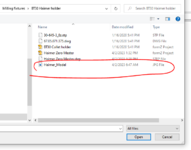

Thank you very much! I downloaded WinRAR and it worked just as you showed. Thank you @Bakafish for sharing and introducing me to this file sharing method, I had no idea!Open WINZIP or WINRAR App first then OPEN an archive. Navigate to where the file is located. Select All Files
Open the JPEG
And there is the model in the archive file.


I am registered, and unfortunately they only offer those files for their tooling, not on the 3D Taster units.It's too late now, but it looks like Haimer offers free CAD downloads if you register with an account. I thought I'd be clever and skip that by finding a solid model at McMaster-Carr, but that's weirdly one of the few products they sell that doesn't have a CAD model.
 Nice design. Nice render. What software are you using?
That's something that I miss about Japan. There are others things too. There are a ton of different storage boxes. I know Amazon has them but they aren't that cheap.Anyway, over here a couple manufacturers make these little standardized, domestically made steel boxes in a wide variety of shapes, sizes and colors.
Have tried using an 0.6 nozzle? There can be a good time savings with that.I just sometimes wish I could print the models faster to reduce the inevitable iteration loop when I want to change something. It does make me work harder on the design in order to try and get it right the first time.
Nice design. Nice render. What software are you using?
That's something that I miss about Japan. There are others things too. There are a ton of different storage boxes. I know Amazon has them but they aren't that cheap.
I decided to go old school to store my Haimer. I have a a ton of hardwood scraps. I'll make a nice finger jointed box.
Have tried using an 0.6 nozzle? There can be a good time savings with that.
I watched this and might get some for my printer.
I'd be interested to hear what you think.
So was I. I started with AutoCAD 3.0 in a little design shop in Redwood City CA. My first professional job. My boss said to me, "I'm going on vacation for two weeks. I don't have a lot of work for you. Why don't you learn AutoCAD." I was panicked. I spent the next two weeks doing the manual and a tutorial book.I was brought up on classic 2D stuff that worked very differently. It still can be off putting, but it really gets out of my way most of the time and lets me make what I want to make. The more I use it, the better I like it.
I've always been a Mac guy, and although I used VersaCAD and AutoCAD, I really disliked the way they worked. I'm embarrassed to say I spent years using MacDraw on my Macintosh II, and squeezed a lot more out of it than it was intended for. I used Vectorworks, but despite it working in a familiar way compared to the brainf&#k that is Fusion360, I had a really hard time getting it to do things as intuitively and with as little friction.So was I. I started with AutoCAD 3.0 in a little design shop in Redwood City CA. My first professional job. My boss said to me, "I'm going on vacation for two weeks. I don't have a lot of work for you. Why don't you learn AutoCAD." I was panicked. I spent the next two weeks doing the manual and a tutorial book.
I learned 3D modeling the same way, in a panic.
You're going to find it impossible to go back to 2D design after a while.
I was too. I used to have AutoCAD for the MAC. It just never worked.I've always been a Mac guy
Oh, we definitely are from the same tribe.It drives my wife mad that I ponder so long, but the builds go so much smoother
Mac user here too. Was stuck with PCs in the defense world until I started consulting. I just love hearing little ironies like this above. Makes me smile.When I was at the design firm in Redwood City, I designed the chassis for the MAC SE on a HP computer.

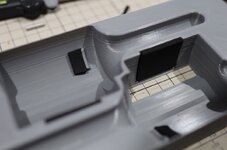

As usual you have hit the nail on the head. It's hard to justify the time for infrastructure projects. But protecting two valuable and precision instruments is a must.this is the sort of thing I usually think about a lot but never do as the amount of effort is questionable for the end result.
We all know you are going to outclass me with your woody boxI must follow humbly in your footsteps and protect my Haimer.
I can't wait to see your take. 
We definitely need a picture of one of these linear widgets unwrapped.

I have a permanent magnetic style grinding chuck and the ability to disable the magnetic field is key. Getting a workpiece safely mounted and positioned would be impossible if you couldn't turn the thing off. Short of building some sort of giant Gauss rifle the utility of repurposing this thing seems pretty limited and I won't be buying the remaining ones.Could you use it as a magnetic chuck?
You could make templates for the router with the 3D printer. That will allow you to make the complex shapes without the CNC.This sort of complex topography is a sirens call to 3D printing, but I'm not crazy about a big plastic thing as it just doesn't strike me as aesthetically pleasing. I have a bunch of German black MDF scraps that would look a lot better, but I don't have a CNC yet to make a complex topology, so I have to think about what can be done with what I have on hand if I go that route[r].
Yeah I've done plenty of that before, it's a very handy solution. Good for repeating patterns and basic profiles, but really limited for complex surfaces. With the 3D printed solution (or a CNC) I could literally make custom pockets for each tool. With hand tools it will need to be something more generic and simple.You could make templates for the router with the 3D printer. That will allow you to make the complex shapes without the CNC.
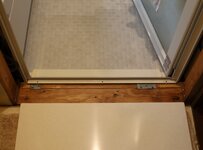 ) and she gave me her tepid approval. So I ordered a $200 slab of Korean made solid surface and it came a couple of days later. Since I needed to do a lot of machining on it to get it to clear all the brackets and screws, I ordered the largest piece at that price point, so I needed to cut it down to size. Fortunately due to my need as a 'catch them all' completionist, I had a Corian blade for my track saw.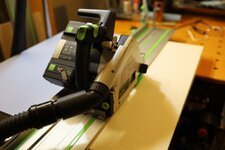


The Ender is such a polished turd at this point, I can't stop tinkering with the damn thing. I added a second Z motor and lead screw to clean up the Z layer quality and got a Creality Sonic Pad which is a little tablet that runs Klipper (and provides motion shaping to speed up the printing.) Now when I look at the thing, all I can see is that it needs linear rails, which is ridiculous. But I have some... god help me.
Nice work with all the 3D printed designs! That tool case especially looks nice!
Btw I've been meaning to ask, did the Sprite Extruder end up working out for you on your Ender 3? Noticeable improvements with the Sonic Pad or just speed?
Some fiddly work to fit that threshold, but it will look great. I had no idea you could take a router to Corian, but I guess that makes sense.
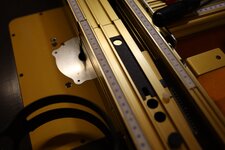
Your Incra router table looks amazing. My home built one works fine for some things, but anything that requires accurate depth or distance from the fence is a no go.
I've had thresholds crack before, due to a lack of perfectly flat support under them. You might try spreading epoxy or a similar material as a bed on the floor joint, and then using mold release or wax paper to keep it from sticking to the threshold material. Ardex is often used as an underlayment bed, but it's sometimes hard to find. Alternatively, West System has a product called G/Flex that is quite a bit less brittle than regular epoxy.I'm really hoping the weak spots I've made with these reliefs won't cause it to crack somewhere down the line, supporting it properly will be key I think.
I wish I could get West System products over here. The epoxy grout/tile adhesive I have is good stuff, but really permanent. I like the idea of isolating the plate so it can be replaced if something happens to it. I'm 3D printing some support/guides that will keep the angle consistent and keep it from over squishing the grout.Machining that solid surface material is a great trick -- looks good!
I've had thresholds crack before, due to a lack of perfectly flat support under them. You might try spreading epoxy or a similar material as a bed on the floor joint, and then using mold release or wax paper to keep it from sticking to the threshold material. Ardex is often used as an underlayment bed, but it's sometimes hard to find. Alternatively, West System has a product called G/Flex that is quite a bit less brittle than regular epoxy.
I have the same fence. More proof we are from the same tribe.The Incra fence is split into two sections which allows you to offset them to each other, essentially creating a jointer out of it.

Thanks for the reminder. I need to do some box joints. I was going to do it on my Leigh dovetail jig. But the Incra will be a better choice.I need to do more of the box joints and fancy dovetails with it. But it's a really enjoyable product, I think it would suit a table saw as well.