To avoid these ads, REGISTER NOW!

V3 Bug/Suggestion Box

larry4406

Well-known member
Joined
Jan 27, 2006
Messages
19,076
Location
Northern Virginia
My filter setting wont stick. I keep removing the ''unread threads only''filter, but it keeps coming back when I click new threads.
When your done reading the forum/had your fill, hit “mark forums read” at the top of the page. When you come back, select what’s new and your right where you left off.
 
To avoid these ads, REGISTER NOW!

InDaRed2

Well-known member
Joined
Sep 21, 2015
Messages
319
Location
MO
Humm... Subforum should act the same way. On iOS it does anyway... I just gave back my Android test phone damnit. You don't have a pagination on the bottom?
Sorry if I wasn't clear. I meant in any sub forum, be able to go to a certain page of a thread (not subforum pages), not just the first or last post as it's currently set up now. On the desktop site you can click on like page 1, 2...9,last page, for a specific thread.

Mobile site you can only click the "thread title" (that gets you to the first post) or last reply "X minutes ago" (that jumps you too the very end of the thread). See my screenshot I posted above.
 

InDaRed2

Well-known member
Joined
Sep 21, 2015
Messages
319
Location
MO
And actually now that I've tried it, I like the desktop site better viewing on a phone. Any way to set the view to desktop site instead of mobile when on a phone? I can set it in my browser settings but then have to change it back to mobile fit other sites..
 

Old Man Roger

Well-known member
Joined
Apr 6, 2017
Messages
17,451
Location
Palm Coast Florida
And actually now that I've tried it, I like the desktop site better viewing on a phone. Any way to set the view to desktop site instead of mobile when on a phone? I can set it in my browser settings but then have to change it back to mobile fit other sites..
On an Iphone you just click on the ''AA'' next to where is says Garage Journal at the top of your screen, then just click on ''Request Desktop View''
 

Old Man Roger

Well-known member
Joined
Apr 6, 2017
Messages
17,451
Location
Palm Coast Florida
Holy hell... I got something right today.

As of now, you have UNLIMITED time to edit your posts... However, you can only edit 3 times per 24 hour period.

Super easy implementation because Xenforo rules. I didn't even have to use the plug-in from those forum assholes.
I edit more than that just correcting my spelling in each post. Seriously.
 

InDaRed2

Well-known member
Joined
Sep 21, 2015
Messages
319
Location
MO
On an Iphone you just click on the ''AA'' next to where is says Garage Journal at the top of your screen, then just click on ''Request Desktop View''
I'm on Android and can change it to desktop but it changes it for every site, not just this one.
 

mike93lx

ALLIANCE MEMBER
Joined
Dec 9, 2013
Messages
37,427
Location
Richmond, VA
Holy hell... I got something right today.

As of now, you have UNLIMITED time to edit your posts... However, you can only edit 3 times per 24 hour period.

Super easy implementation because Xenforo rules. I didn't even have to use the plug-in from those forum assholes.
Nice to get a break!
 

mike93lx

ALLIANCE MEMBER
Joined
Dec 9, 2013
Messages
37,427
Location
Richmond, VA
Ryan,

I hit the pink “Build it now for free” button and I’m still waiting for the six, bikini clad construction professional ladies to arrive with a tractor trailer full of materials and build build my garage.

Can you look into that before I wake up?


“Talk is cheap. Whiskey costs money.”
I fully support this change with one add.

My wife needs to be away before they show up. So a 12 HR call ahead will be needed
 

InDaRed2

Well-known member
Joined
Sep 21, 2015
Messages
319
Location
MO
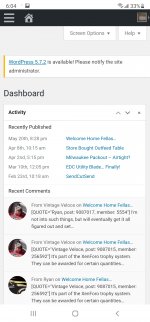
Sorry to keep posting Ryan but noticed this dashboard pop up on the top of the main home page on mobile view. Not sure if it should be there? It opens up some admin looking thing.

Screenshot_20210524-180250_Samsung Internet.jpg Screenshot_20210524-180417_Samsung Internet.jpg
 

Old Man Roger

Well-known member
Joined
Apr 6, 2017
Messages
17,451
Location
Palm Coast Florida
Holy hell... I got something right today.

As of now, you have UNLIMITED time to edit your posts... However, you can only edit 3 times per 24 hour period.

Super easy implementation because Xenforo rules. I didn't even have to use the plug-in from those forum assholes.

I edit more than that just correcting my spelling in each post. Seriously.

Can you make it 3 different posts per 24 hours instead of 3 different edits in 24 hours?

That doesn't even really work. Put it back the way it was..lol Seriously.
Can you make it so the original editing capability remains? I think it was something like you could edit your posts for 30 minutes or something like that?
 

BlakeTheCarGuy

ALLIANCE MEMBER
Joined
Oct 10, 2018
Messages
9,333
Location
Roanoke Virginia
I noticed the buttons have gotten smaller. I actually like that because now in Free Parking where the ad is you can use the one at the top of the page instead of having to scroll all the way to the bottom. Thanks for that.
 

akalian

Well-known member
Joined
Apr 27, 2016
Messages
355
Location
St. George Utah
I've got a question regarding uploading PDF files.
This thread, post #22

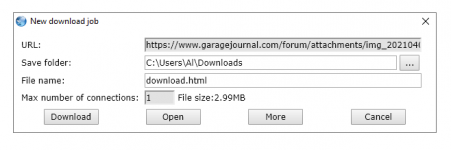
I first tried to upload a PDF and after I saved it, then checked the post and tried to download it, all I got was a file called "Download.html" and I thought (??) but downloaded it anyway, and then clicked on the download and nothing happened.

Then I uploaded the files to my Google Drive, copied the link into the description and it showed this link:
https://drive.google.com/file/d/1CaH2YArz0yNCuQJTUNK104O14pGYIWyX/view?usp=sharing

OK, that worked fine, no problem. Then I realized I wanted to upload another PDF so I uploaded it to Google Drive and got the link as I always do and when it got posted it came up like this:
and it showed this image below.

Pretty neat, so I copied the at the end of the link, and pasted it into the first link. Then when I saved the message, it didn't change the first link to like the cool looking link even though I replaced the front and end from the cool looking link
View attachment 1228445

So my question is two fold. How come when I upload a PDF file, the download link in the post is "Download.html" and it doesn't show the PDF I uploaded. And second is, how come the forum software inserted the
 
OP
R

Ryan

Administrator
Staff member
Joined
Jan 26, 2006
Messages
5,707
Location
Texas/Hawaii
Can you make it 3 different posts per 24 hours instead of 3 different edits in 24 hours?

You are gonna have to work on your spelling homie... Cuz I'm done on that front. Sorry.


Sorry to keep posting Ryan but noticed this dashboard pop up on the top of the main home page on mobile view. Not sure if it should be there? It opens up some admin looking thing.

Screenshot_20210524-180250_Samsung Internet.jpg Screenshot_20210524-180417_Samsung Internet.jpg

That's strange. Not sure why you would get that... You still getting it?

I've got a question regarding uploading PDF files.
This thread, post #22

I first tried to upload a PDF and after I saved it, then checked the post and tried to download it, all I got was a file called "Download.html" and I thought (??) but downloaded it anyway, and then clicked on the download and nothing happened.

Then I uploaded the files to my Google Drive, copied the link into the description and it showed this link:
https://drive.google.com/file/d/1CaH2YArz0yNCuQJTUNK104O14pGYIWyX/view?usp=sharing

OK, that worked fine, no problem. Then I realized I wanted to upload another PDF so I uploaded it to Google Drive and got the link as I always do and when it got posted it came up like this:
and it showed this image below.

Pretty neat, so I copied the at the end of the link, and pasted it into the first link. Then when I saved the message, it didn't change the first link to like the cool looking link even though I replaced the front and end from the cool looking link
View attachment 1228445

So my question is two fold. How come when I upload a PDF file, the download link in the post is "Download.html" and it doesn't show the PDF I uploaded. And second is, how come the forum software inserted the

I haven't messed with attachments yet... so not sure what the rights are on that front. I will work on that now.
 
OP
R

Ryan

Administrator
Staff member
Joined
Jan 26, 2006
Messages
5,707
Location
Texas/Hawaii
I've got a question regarding uploading PDF files.
This thread, post #22

I first tried to upload a PDF and after I saved it, then checked the post and tried to download it, all I got was a file called "Download.html" and I thought (??) but downloaded it anyway, and then clicked on the download and nothing happened.

Then I uploaded the files to my Google Drive, copied the link into the description and it showed this link:
https://drive.google.com/file/d/1CaH2YArz0yNCuQJTUNK104O14pGYIWyX/view?usp=sharing

OK, that worked fine, no problem. Then I realized I wanted to upload another PDF so I uploaded it to Google Drive and got the link as I always do and when it got posted it came up like this:
and it showed this image below.

Pretty neat, so I copied the at the end of the link, and pasted it into the first link. Then when I saved the message, it didn't change the first link to like the cool looking link even though I replaced the front and end from the cool looking link
View attachment 1228445

So my question is two fold. How come when I upload a PDF file, the download link in the post is "Download.html" and it doesn't show the PDF I uploaded. And second is, how come the forum software inserted the

OK... PDF rights have been set. You can test it here:

PDF Test

Do NOT right click "save as"

Instead, just click... and it will download as a .pdf.
 

Old Man Roger

Well-known member
Joined
Apr 6, 2017
Messages
17,451
Location
Palm Coast Florida
You are gonna have to work on your spelling homie... Cuz I'm done on that front. Sorry.
letz knot macke any rashed decissens..lol Seriously though, this is going to affect a lot of people, way more than just the classified people. Sleep on it a few days, and consider giving people a few minutes to edit their posts. Like every other forum in the world.:sneaky:
 
OP
R

Ryan

Administrator
Staff member
Joined
Jan 26, 2006
Messages
5,707
Location
Texas/Hawaii
letz knot macke any rashed decissens..lol Seriously though, this is going to affect a lot of people, way more than just the classified people. Sleep on it a few days, and consider giving people a few minutes to edit their posts. Like every other forum in the world.:sneaky:

Dude... you need to gather your thoughts... and then post. That way, you don't have like 5 posts in a row.

And this isn't like any other forum in the world. :)

Tell ya what though. I will increase it to 15 per hour.
 
To avoid these ads, REGISTER NOW!

Old Man Roger

Well-known member
Joined
Apr 6, 2017
Messages
17,451
Location
Palm Coast Florida
Dude... you need to gather your thoughts... and then post. That way, you don't have like 5 posts in a row.

And this isn't like any other forum in the world. :)

Tell ya what though. I will increase it to 15 per hour.
That should do it, as long as I don’t have a lot of coffee.:coffee:
 

InDaRed2

Well-known member
Joined
Sep 21, 2015
Messages
319
Location
MO
What happens if you click on the hamburger menu in the top right hand side of screen...

Looks like Wordpress is treating you like a regular user... but you shouldn't be able to see that.
Hamburger icon? Here's a better view in desktop mode. (still viewing on Android phone)
Screenshot_20210524-192433_Samsung Internet.jpg
 

akalian

Well-known member
Joined
Apr 27, 2016
Messages
355
Location
St. George Utah
OK... PDF rights have been set. You can test it here:

PDF Test

Do NOT right click "save as"

Instead, just click... and it will download as a .pdf.Ryah:
I did as you said, no change
1621909082626.png

Edit:
Well, it's not the forum software, it's the browser I'm using. Slimjet is a clone of Chrome and has served me well, but when I tried the link in FireFox, WaterFox (a Firefox clone) it worked as expected. So for some reason Slimjet is converting the valid forum link to something stupid.

Sorry to have bothered you, with all the stuff you have going on. I'll report back if I come up with a solution.
 
Last edited:

TwoBytes

Well-known member
Joined
Mar 14, 2014
Messages
789
Location
Canberra, 'Stralia
Humm... Subforum should act the same way. On iOS it does anyway... I just gave back my Android test phone damnit. You don't have a pagination on the bottom?
Hey Ryan, instead of an Android phone, you can just run an Android emulator on your desktop.

Android Studio includes a great emulator, is free, and available for MacOS, Windows and Linux.
 

TwoBytes

Well-known member
Joined
Mar 14, 2014
Messages
789
Location
Canberra, 'Stralia
I posted this in the "I'll miss this place R.I.P old format" thread (post #237), but it might be better here. Apologies if cross-posting the same content is verboten.

For those that don't like specific elements of the new style (the font, or text colour/size), try a browser extension that can modify it at your end.
(Technically, re-writing the CSS (Cascading Style Sheets) at the client browser)...

Stylebot is an example for Chrome, but there's plenty of options...

I love the new site the way it is, but I just had a quick play with it out of interest. It's super-easy to click on an element (like the body text) and change the font, size and colour, and it applies across all threads.

If you can't be bothered taking the time to tweak things to your own liking, have a think about how Ryan feels trying to tweak things to EVERYBODY's liking.
 

Old Man Roger

Well-known member
Joined
Apr 6, 2017
Messages
17,451
Location
Palm Coast Florida
I posted this in the "I'll miss this place R.I.P old format" thread (post #237), but it might be better here. Apologies if cross-posting the same content is verboten.

For those that don't like specific elements of the new style (the font, or text colour/size), try a browser extension that can modify it at your end.
(Technically, re-writing the CSS (Cascading Style Sheets) at the client browser)...

Stylebot is an example for Chrome, but there's plenty of options...

I love the new site the way it is, but I just had a quick play with it out of interest. It's super-easy to click on an element (like the body text) and change the font, size and colour, and it applies across all threads.

If you can't be bothered taking the time to tweak things to your own liking, have a think about how Ryan feels trying to tweak things to EVERYBODY's liking.
That’s awesome, but I needed help just finding the new post button LOL You really think I could do this?
 

shopnut

Well-known member
Joined
Feb 22, 2006
Messages
4,237
Location
Florida
Holy hell... I got something right today.

As of now, you have UNLIMITED time to edit your posts... However, you can only edit 3 times per 24 hour period.

Super easy implementation because Xenforo rules. I didn't even have to use the plug-in from those forum assholes.
Dude... you need to gather your thoughts... and then post. That way, you don't have like 5 posts in a row.

And this isn't like any other forum in the world. :)

Tell ya what though. I will increase it to 15 per hour.
Has this been increased to 15 per 24 hour period? I ask because I got the error about hitting my max post edit limit last night and I'm still getting the error this morning 8 hours later.

Hopefully you will keep unlimited editing period going forward so I can maintain my threads as months go on. 10-15 edits per 24 hour period should be fine in a regular scenario for me. But since the forum change over, I find myself editing a lot of historical content in my threads to take care of the font size issue that arose with the forum changeover. (My crazy OCD is probably shining through about now... there's a reason why my shop is called the ASYLUM, you know!!)

Since its "super easy" to implement, I would like to request that you open the editing up greatly (unlimited would be best) for the next week or two (or three) as I clean up threads. Once I get over the hump, I would be fine with much tighter limits and can work with whatever rules you set.

Thanks. Keep up the great work!


Edit: Thanks for taking care of this Ryan.

 
Last edited:

gman007

Well-known member
Joined
May 17, 2017
Messages
2,725
Location
West Michigan
Ryan
Thank you so much for the fantastic job of maintaining and now upgrading the forum. Your efforts are greatly appreciated.

There is one little feature in the new forum which is a bit annoying and that is the font. In particular the top of the letters such as t and h instead of straight are curved to the left and this makes it hard to read and annoying. Interestingly enough on my iPhone accessing the forum using Safari browser does not have this issue.

Is there anyway we can change the fonts?
Keep up the great work

Cheers
 
OP
R

Ryan

Administrator
Staff member
Joined
Jan 26, 2006
Messages
5,707
Location
Texas/Hawaii
Ryan
Thank you so much for the fantastic job of maintaining and now upgrading the forum. Your efforts are greatly appreciated.

There is one little feature in the new forum which is a bit annoying and that is the font. In particular the top of the letters such as t and h instead of straight are curved to the left and this makes it hard to read and annoying. Interestingly enough on my iPhone accessing the forum using Safari browser does not have this issue.

Is there anyway we can change the fonts?
Keep up the great work

Cheers

Not at the moment man. Sorry.
 

javyLSU

Well-known member
Joined
Jan 2, 2019
Messages
1,542
Location
New Haven, CT
Nothing new, but wanted to report that I’m also getting the lag when scrolling using Safari on Mac OS Big Sur. I view some other forums using Xenforo and haven’t run into this issue.
 
OP
R

Ryan

Administrator
Staff member
Joined
Jan 26, 2006
Messages
5,707
Location
Texas/Hawaii
Nothing new, but wanted to report that I’m also getting the lag when scrolling using Safari on Mac OS Big Sur. I view some other forums using Xenforo and haven’t run into this issue.

I'm not sure I understand why that would be happening if you aren't using some crazy browser plugin as the page is wayyyy lighter than the old site. I have three generations of iPad here and can't seem to reproduce.

What kind of machine are you on?
 

javyLSU

Well-known member
Joined
Jan 2, 2019
Messages
1,542
Location
New Haven, CT
I'm not sure I understand why that would be happening if you aren't using some crazy browser plugin as the page is wayyyy lighter than the old site. I have three generations of iPad here and can't seem to reproduce.

What kind of machine are you on?

Mid-2015 MacBook Pro. I absolutely thought it was my machine, so I closed/restarted my browser, then visited a few other forums I remember migrated to Xenforo and cannot reproduce the lag. I have zero browser extensions installed, I hate those things. I forgot to try using Chrome on that machine, I’ll try it later and report back.
 
To avoid these ads, REGISTER NOW!
Top Bottom