Extending a wireless network is not hard. What is hard is that there are too many options. Let me share my experience and setup. My situation revolves around getting the MOST coverage on a single wireless network (SSID) so that I could use my cell phone anywhere on my property.
I have a Netgear R7000 wireless router connected to my cable modem in my house. The R7000 broadcasts both 2.4Ghz and 5.0Ghz wireless networks. The SSID names are MyNetwork2.4 and MyNetwork5.0. I could have made them the same name (e.g. MyNetwork) and then just let the device (phone, TV, etc) figure out which frequency it wants to connect to but that can problematic and I do NOT suggest it.
Due to the location of my cable modem and R7000 router, which I did not want to move, coverage in certain parts of the house and outside were not good. My phone would either loose WiFi signal or it be would very weak. So I decided that I was going to buy a WiFi Extender. I could have purchased any extender however in an effort to minimize complexities, I decided to purchase the Netgear EX7000 extender because I wanted to ensure an easy and reliable setup and performance. Plus, I knew I'd be able to get FULL support from Netgear for either device if I needed.
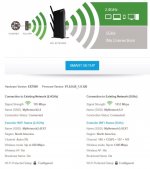
The EX7000 extender is installed on a shelf, near the ceiling, in my 2-car attached garage. It communicates to my R7000 router exclusively via wireless on both the 2.4Ghz and 5.0Ghz frequencies. The EX7000 then broadcasts two additional wireless networks. The SSID names are MyNetwork2.4EXT and MyNetwork5.0EXT. I originally configured the EX7000 to broadcast the same network names as the R7000 (MyNetwork2.4 and MyNetwork5.0) and I let the device decide if it was going to connect to either the R7000 router or the EX7000 extender. But that was not reliable and I do NOT suggest doing it. Attached is a picture of what I just described. You can ignore the "5Ghz (No Connection)" - it just represents that there are no devices connected to the 5.0Ghz frequency on the EX7000.
So now I have (4) wireless networks on my property...
1. MyNetwork2.4 (from the R7000 router)
2. MyNetwork5.0 (from the R7000 router)
3. MyNetwork2.4EXT (from the EX7000 extender)
4. MyNetwork5.0EXT (from the EX7000 extender)
...and every one, except #4, is used for various things
#1 is used by some wireless cameras that are closest to the R7000 router. Many budget smart devices (doorbells, camera, etc) are only able to connect to the 2.4Ghz frequency.
#2 is used by my computers for highest throughput. Generally, 5.0 is faster than 2.4 but 2.4 has better range than 5.0.
#3 is used by my cell phone. In all of the testing that I did in and around my house and outside, this is the network that provided the best coverage/connection for my cell phone overall. I measured dB using the Apple AirPort app on my cell phone.
Hope some of this info helps you along your way. Good luck!