To avoid these ads, REGISTER NOW!

Wifi to a detached building?

MushCreek

Well-known member
Joined
Jan 14, 2015
Messages
9,780
Location
Upstate South Carolina
My shop is about 150' from the house. Wifi gear is in the basement, so it doesn't reach far outside. I'd like internet access in the shop. The good news is that I have an empty 1" PVC conduit from the basement to the shop for just this purpose. The bad news is that I don't know what I need to make it all work. I'm a technomoron, so I don't know what I need to do. Explain to me in layman's terms exactly what I need to buy, and how to hook it up. Thanks!
 
To avoid these ads, REGISTER NOW!

carnutdallas

Well-known member
Joined
Nov 6, 2013
Messages
141
Plain English: go to Best Buy or on Amazon buy a WiFi extender. Make sure it is one that is Ethernet capable (cat-6 wire these days) plug Cat-6 wire into back of your router in basement connect that through conduit to extender in new building. Now you have extended your existing IP environment to the outbuilding.

Most extenders/repeaters have auto settings and very user friendly. The article above talks about wall plates and proper clean install. Don’t ignore or discount it. I just wanted to make task super simple. Cheers!


Sent from my iPhone using Tapatalk
 
OP
M

MushCreek

Well-known member
Joined
Jan 14, 2015
Messages
9,780
Location
Upstate South Carolina
OK, that makes sense. Is there a wireless way to connect the cable indoors to the wifi? Reason being is that I would have to take apart the basement ceiling to run it to the wifi. I should have planned ahead for this; I did when I put conduit out to the barn, but didn't think far enough ahead to make the actual connection. It's 40' from the conduit termination over to the wifi unit. I have a panel ceiling (like a dropped ceiling, only not dropped), but it's a PITA to take it all down to run the cable. I'd rather spend a bit more money if I didn't have to work so hard. I'd also have to drill through about 30 floor joists to run the cable. If I could buy a wifi receiver, I could just plug it in over where the conduit enters.
 

wanderer

Well-known member
Joined
Jan 29, 2010
Messages
2,698
Yes, there is a wireless way. But if you’re not too technically proficient with networking wires will be easier and less frustrating.
 

Showkey

"MEMBER EMERITUS"
Joined
Aug 9, 2014
Messages
8,638
Location
Wausau WI
Last edited:

nafterclifen

Well-known member
Joined
Nov 22, 2014
Messages
525
Location
Poconos, PA
Extending a wireless network is not hard. What is hard is that there are too many options. Let me share my experience and setup. My situation revolves around getting the MOST coverage on a single wireless network (SSID) so that I could use my cell phone anywhere on my property.

I have a Netgear R7000 wireless router connected to my cable modem in my house. The R7000 broadcasts both 2.4Ghz and 5.0Ghz wireless networks. The SSID names are MyNetwork2.4 and MyNetwork5.0. I could have made them the same name (e.g. MyNetwork) and then just let the device (phone, TV, etc) figure out which frequency it wants to connect to but that can problematic and I do NOT suggest it.

Due to the location of my cable modem and R7000 router, which I did not want to move, coverage in certain parts of the house and outside were not good. My phone would either loose WiFi signal or it be would very weak. So I decided that I was going to buy a WiFi Extender. I could have purchased any extender however in an effort to minimize complexities, I decided to purchase the Netgear EX7000 extender because I wanted to ensure an easy and reliable setup and performance. Plus, I knew I'd be able to get FULL support from Netgear for either device if I needed.

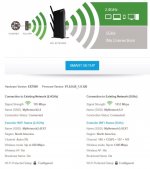
The EX7000 extender is installed on a shelf, near the ceiling, in my 2-car attached garage. It communicates to my R7000 router exclusively via wireless on both the 2.4Ghz and 5.0Ghz frequencies. The EX7000 then broadcasts two additional wireless networks. The SSID names are MyNetwork2.4EXT and MyNetwork5.0EXT. I originally configured the EX7000 to broadcast the same network names as the R7000 (MyNetwork2.4 and MyNetwork5.0) and I let the device decide if it was going to connect to either the R7000 router or the EX7000 extender. But that was not reliable and I do NOT suggest doing it. Attached is a picture of what I just described. You can ignore the "5Ghz (No Connection)" - it just represents that there are no devices connected to the 5.0Ghz frequency on the EX7000.

So now I have (4) wireless networks on my property...
1. MyNetwork2.4 (from the R7000 router)
2. MyNetwork5.0 (from the R7000 router)
3. MyNetwork2.4EXT (from the EX7000 extender)
4. MyNetwork5.0EXT (from the EX7000 extender)
...and every one, except #4, is used for various things

#1 is used by some wireless cameras that are closest to the R7000 router. Many budget smart devices (doorbells, camera, etc) are only able to connect to the 2.4Ghz frequency.

#2 is used by my computers for highest throughput. Generally, 5.0 is faster than 2.4 but 2.4 has better range than 5.0.

#3 is used by my cell phone. In all of the testing that I did in and around my house and outside, this is the network that provided the best coverage/connection for my cell phone overall. I measured dB using the Apple AirPort app on my cell phone.

Hope some of this info helps you along your way. Good luck!
 

Attachments

  • netgear.JPG
    netgear.JPG
    54.2 KB · Views: 52

dcg9381

Well-known member
Joined
Jun 20, 2018
Messages
11,759
Location
Austin, TX
Yes, there is a wireless way. But if you’re not too technically proficient with networking wires will be easier and less frustrating.

Edit: I meant to disagree with this. It's pretty easy to figure out how to terminate CAT5/6 wire, buy it pre-terminated, or have it terminated for you somewhere else.

The wireless solutions that are available work great, but require some proficiency beyond adding a connector to a wire...
 
Last edited:

Showkey

"MEMBER EMERITUS"
Joined
Aug 9, 2014
Messages
8,638
Location
Wausau WI
Yes, there is a wireless way. But if you’re not too technically proficient with networking wires will be easier and less frustrating.

I would disagree...........

Running a CAT wire 150’ is simple or less frustrating........then it still likely needs a wireless access point at the end. Multiple access points can be PIA, far more hassle.

Some of the WiFi solutions mentioned above can be done start to finish in 10 minutes or less.

Many devices like phones, iPads, security cams, tstat, streaming speakers have no wired connection options. Auto selection of 2.4 and 5 is a benefit especially if distance and signal strength is a concern.
 

19Vert64

Well-known member
Joined
Sep 14, 2013
Messages
251
Location
Ohio
62031a9e118d537f38beda46e1a440eb.png1783be6e136a34b996380e5bbe761600.png
I have the extreme in the house and express in garage connected by an Ethernet cable, once hooked up it pretty much sets itself up. Few clicks on the computer and your up and running


Sent from my iPhone using Tapatalk
 

Attachments

  • 62031a9e118d537f38beda46e1a440eb.png
    62031a9e118d537f38beda46e1a440eb.png
    1.1 MB · Views: 3
  • 1783be6e136a34b996380e5bbe761600.png
    1783be6e136a34b996380e5bbe761600.png
    1.3 MB · Views: 3

Dave Carney

Well-known member
Joined
Feb 18, 2005
Messages
318
Location
Derby, KS
I used 1 of these inside the shop looking out the window, pointed at a window in the house where the router is (about 90' away), plus a cheap router for the shop.

Ubiquiti NanoStation loco M5

Total cost for the project was under $100.
 

Keep

Well-known member
Joined
Jan 1, 2009
Messages
1,398
Location
Oshawa, Ontario
I guess everyone missed the "I have a 1 inch conduit run to the garage for this purpose".

Pull 2 wires through the conduit.

1 - is the one you use
1 - is a spare just because you must always have 2!!

In the garage buy a $20 wireless router and follow the setup instructions.

There is no need for a wireless bridge(the Ubiquiti post above), since you already thought ahead with the conduit.

A 500ft box of cat5e cable will cost less then $70 at homedepot. No real need for cat6 as your home internet wont be running over 1gb in speed anyway.

Crimp on the appropriate connectors, I am sure there is someone around you that has the proper tools and know how to terminate a couple cables for you. Or there are "toolless" Keystone jacks you can use to install the end in the wall and just use a premade network cable to plug into the router.

Plug the end at the house into your home router, plug the other end into the WAN port of the garage router and you are done.

Around $100 and you have a rock solid internet connection in your garage.

Keystone Jacks
https://www.amazon.com/dp/B07JW7F9XG/?tag=atomicindus08-20

Wireless Router
https://www.amazon.com/dp/B0756QFLXP/?tag=atomicindus08-20

Cat 5e cable
https://www.amazon.com/dp/B072C58Q12/?tag=atomicindus08-20

Damn your stuff is cheap in the US!!
 
Last edited:

muibubbles

Well-known member
Joined
Apr 24, 2009
Messages
685
Location
nj
I had the same issue a few years back. my pole barn shop is about 150-200 ft from the house with no windows. I'm pretty analog so I trenched and rand cat 6 cable to my shop. Albeit, I work full time out of my shop so I didn't want to risk not having internet. I rented a trencher from HD and was able to trench, run cable and bury the conduit in a weekend
 
OP
M

MushCreek

Well-known member
Joined
Jan 14, 2015
Messages
9,780
Location
Upstate South Carolina
Again, I HAVE a conduit and pull string in place already. I have a cable tool and know how to use it (I ran cable throughout the house). The one remaining tricky part is connecting the cable to the box in the basement, due to the hassle of accessing it. Worst case scenario I could run it exposed along the ceiling, although I just finished the basement, with drywall, panel ceiling, and floor tile. I can't run it along the floor, as there are two doorways to cross. Can you buy long white CAT5 cable? That would be much less obtrusive than the typical black against the white ceiling.
 

Specracer

Well-known member
Joined
Nov 12, 2016
Messages
271
Yes white Cat 6 exists.

Run the wire your problem will be solved, especially if you have the tools and understanding of how to terminate an RJ-45, or keystone. This will also give you the most bandwidth, repeaters reduce throughput substantially.

If you do buy a router listed above (or another), be sure to go into the settings and turn it into an access point (turning off the "routing", and the issuing of IP addresses). You do not want 2 routers on one LAN.
 
To avoid these ads, REGISTER NOW!

Showkey

"MEMBER EMERITUS"
Joined
Aug 9, 2014
Messages
8,638
Location
Wausau WI
Again, I HAVE a conduit and pull string in place already. I have a cable tool and know how to use it (I ran cable throughout the house). The one remaining tricky part is connecting the cable to the box in the basement, due to the hassle of accessing it. Worst case scenario I could run it exposed along the ceiling, although I just finished the basement, with drywall, panel ceiling, and floor tile. I can't run it along the floor, as there are two doorways to cross. Can you buy long white CAT5 cable? That would be much less obtrusive than the typical black against the white ceiling.

connect the cable indoors to the wifi? Reason being is that I would have to take apart the basement ceiling to run it to the wifi. I should have planned ahead for this; I did when I put conduit out to the barn, but didn't think far enough”

This statement lead most to WiFi vs wired solution. So you decision on wired vs WiFi is easy, based on the amount of work involved on the basement ceiling ?

That said.......my home and garage is wired and I don’t use the wire. Cable modem to WiFi router is wired and everything else is WiFi. The home was wired at the time it was built, if I was doing today I would not cat wire any rooms. Mine was done three times cable, phone and Ethernet. So there phone jacks in the bath rooms.......ya, not real useful today, not to say it was ever a good idea or money well spent back in the day.
 
Last edited:
OP
M

MushCreek

Well-known member
Joined
Jan 14, 2015
Messages
9,780
Location
Upstate South Carolina
I mostly wired the various rooms for antenna use, not cable. I only use cable in the living room; the other rooms are antenna. Of course, I could use the same wire for CATV, but I'm too cheap to rent more cable boxes.
 

MattT

Well-known member
Joined
Feb 20, 2010
Messages
3,201
Again, I HAVE a conduit and pull string in place already. I have a cable tool and know how to use it (I ran cable throughout the house). The one remaining tricky part is connecting the cable to the box in the basement, due to the hassle of accessing it. Worst case scenario I could run it exposed along the ceiling, although I just finished the basement, with drywall, panel ceiling, and floor tile. I can't run it along the floor, as there are two doorways to cross. Can you buy long white CAT5 cable? That would be much less obtrusive than the typical black against the white ceiling.

You can get white CAT cable but I haven't seen any that's rated for wet locations. The other option would be hiding the cable with crown molding. Either cut a cable slot in regular molding or you could buy this stuff.

https://www.cableorganizer.com/raceway-crown/
 

soloz2

Well-known member
Joined
Jun 30, 2012
Messages
860
Location
Western NY
A wired connection is going to be your best bet, but if you cannot do this there are wireless options. My garage is about 100' from my house, house is lath &plaster so connection is weak. I picked up an Orbi setup with 3 stations and put 2 in the house and 1 in the garage. I have coverage across my entire back yard now.


Sent from my iPhone using Tapatalk
 
Last edited:

bobpal

Active member
Joined
Nov 15, 2016
Messages
42
You could use an ethernet over power lines solution like THIS to get from your router to near where the conduit to your shop is, avoiding getting into the ceiling or running an exposed wire around the room.

All it requires is a box plugged into your router and an AC outlet near it and another box plugged into AC and the cable you are feeding to your shop.

I have used one from Netgear for many years and it works well but I lose download speed. My 100Mbps speed (via WiFi) is reduced to about 35Mbps over the AC line but the connection is very solid. I am sure that newer equipment will work better. My equipment is over 10 years old.

On the shop end, you would use a wireless access point as many have stated.

If your house and shop on the same AC panel you could use the ethernet over power lines solution all the way to the shop and avoid having to pull the CAT cable.

HERE is a set that gets good reviews and even includes the wireless access point for $100.
 

boatshoes

Well-known member
Joined
Feb 20, 2019
Messages
126
Location
Atlanta
Yep, powerline kit through the house to get near the conduit, then hardwire out to a wireless AP near the shop.
 

protegeV

Well-known member
Joined
Apr 18, 2018
Messages
13,363
Location
DFW
I keep seeing this thread title pop up and laughing about you wanting to send your wife away to the garage :lol_hitti
 
OP
M

MushCreek

Well-known member
Joined
Jan 14, 2015
Messages
9,780
Location
Upstate South Carolina
Mixed reviews on the powerline kits, with some people having trouble. One of them requires that it be on the same circuit, which of course isn't practical. I suspect that it would have to be on the same leg, not necessarily on the same circuit. My shop is on the same power as the house. Another issue that reviewers complained about was AFIC trouble. The shop isn't on AFIC, but the house circuits are.

I think I'm going to go with a good old tried-n-true wired set-up. The conduit is kind of in a 'utility room' area of the basement. There's just a short section of exposed ceiling, then it goes into a closet. I can run through the closet, then run parallel to the joists to get over to the room where the wifi is.

There's no crown molding in the basement. I have a typical dropped acoustic tile ceiling, but it's not dropped, so there's no space between it and the joists. The system I used attaches directly to the joists so you don't lose headroom. It is removable so you can access all of the wiring and plumbing overhead, but it is a PITA to take apart and put together.

Another dumb question- my incoming cable is connected to a splitter, then on to the wifi. The installer said that the signal was too strong (?), so he used a splitter to dial it back some. Can I just attach my shop cable to that splitter, or do I have to go through the cable modem? That would make life easier, but I suspect I need to be downstream of the cable modem. Or- can I install a splitter into the CATV line going to the living room? I'm not worried about blazing speed. I'm not a gamer or heavy user. I'd just like to be able to look up how-to videos on YouTube when working on the vehicles. Streaming music would be handy, too.
 

Showkey

"MEMBER EMERITUS"
Joined
Aug 9, 2014
Messages
8,638
Location
Wausau WI
I mostly wired the various rooms for antenna use, not cable. I only use cable in the living room; the other rooms are antenna. Of course, I could use the same wire for CATV, but I'm too cheap to rent more cable boxes.

There is another solution to get cable programming ( that you already pay dearly for) to each set.
If you have decent WiFi speed and bandwidth ( with cable internet that usually not a problem) ........you use the cable providers steaming app on each set. Then you don’t use their boxes, no box rent and each TV has cable programming at no extra cost.

If the older sets are not “smart TV”.......you make them smart with Amazon fire stick or RUKU or other devices they cost is about $20 per set. This app would also work if you wanted TV in the shop. The cable app also works on iPad allowing all channels to viewed on phone or iPad. The cable app is free.
 
Last edited:

dylanmitchell

Well-known member
Joined
Feb 11, 2013
Messages
166
Location
Southern California
With 1" PVC conduit from the basement to the shop for just this purpose, you can ethernet as others have said.

Simplest is to run a Cat 5e or Cat 6 patch cord from your existing basement set up to the a router in the shop. A patch cord or patch cable has connectors you'd plug one end into your basement equipment the other end into the shop equipment.

You can also use RJ-45 Jack (CAT5e or Cat6 ) wallplates. Put a jack on the basement side of the run and a jack on the shop side of the run then use a shorter patch cord to connect the devices to the wall jack.

Asus, Netgear, and others make good routers. I have an Asus RT-AC86U AC2900 dual-band Wi-Fi router one of the more stable routers and it has good coverage. The AC68U is a popular older and simpler router and less expensive.

I like Blue Jeans cable products and have ordered their stuff directly or through Amazon. Give them a call or shoot them an e-mail and they can help walk you through what you need. https://www.bluejeanscable.com/store/data-cables/index.htm There's a debate about whether ethernet cables are any different I prefer Blue Jeans cables others prefer Monoprice or other inexpensive cables.


SNB Forums has good info
https://www.snbforums.com/forums/

Cat 5e can do Gig speed and max length is 328 ft, Cat 6 can do 10 Gig speeds max lenght is 164 ft., iafter than it reverts to Cat 5e or Gig speeds. Cat 5e is plenty fast but if cost isn't much different I'd run Cat 6 for future proofing.
 

ItsNemo

Well-known member
Joined
Mar 5, 2016
Messages
4,805
Location
Canada
Extending a wireless network is not hard. What is hard is that there are too many options. Let me share my experience and setup. My situation revolves around getting the MOST coverage on a single wireless network (SSID) so that I could use my cell phone anywhere on my property.

I have a Netgear R7000 wireless router connected to my cable modem in my house. The R7000 broadcasts both 2.4Ghz and 5.0Ghz wireless networks. The SSID names are MyNetwork2.4 and MyNetwork5.0. I could have made them the same name (e.g. MyNetwork) and then just let the device (phone, TV, etc) figure out which frequency it wants to connect to but that can problematic and I do NOT suggest it.

Due to the location of my cable modem and R7000 router, which I did not want to move, coverage in certain parts of the house and outside were not good. My phone would either loose WiFi signal or it be would very weak. So I decided that I was going to buy a WiFi Extender. I could have purchased any extender however in an effort to minimize complexities, I decided to purchase the Netgear EX7000 extender because I wanted to ensure an easy and reliable setup and performance. Plus, I knew I'd be able to get FULL support from Netgear for either device if I needed.

The EX7000 extender is installed on a shelf, near the ceiling, in my 2-car attached garage. It communicates to my R7000 router exclusively via wireless on both the 2.4Ghz and 5.0Ghz frequencies. The EX7000 then broadcasts two additional wireless networks. The SSID names are MyNetwork2.4EXT and MyNetwork5.0EXT. I originally configured the EX7000 to broadcast the same network names as the R7000 (MyNetwork2.4 and MyNetwork5.0) and I let the device decide if it was going to connect to either the R7000 router or the EX7000 extender. But that was not reliable and I do NOT suggest doing it. Attached is a picture of what I just described. You can ignore the "5Ghz (No Connection)" - it just represents that there are no devices connected to the 5.0Ghz frequency on the EX7000.

So now I have (4) wireless networks on my property...
1. MyNetwork2.4 (from the R7000 router)
2. MyNetwork5.0 (from the R7000 router)
3. MyNetwork2.4EXT (from the EX7000 extender)
4. MyNetwork5.0EXT (from the EX7000 extender)
...and every one, except #4, is used for various things

#1 is used by some wireless cameras that are closest to the R7000 router. Many budget smart devices (doorbells, camera, etc) are only able to connect to the 2.4Ghz frequency.

#2 is used by my computers for highest throughput. Generally, 5.0 is faster than 2.4 but 2.4 has better range than 5.0.

#3 is used by my cell phone. In all of the testing that I did in and around my house and outside, this is the network that provided the best coverage/connection for my cell phone overall. I measured dB using the Apple AirPort app on my cell phone.

Hope some of this info helps you along your way. Good luck!

For the record, having both bands labeled the same works perfectly fine with good gear. I have mine the same on my unifi setup, all devices just roam between bands as necessary and it's FAR more stable than connecting to 5.0ghz only and then dropping signal every time you leave the room.
 

MattRMagnum

Well-known member
Joined
May 10, 2012
Messages
225
Location
PNW
As someone who fought endlessly to make my father's attempts to setup a wireless mesh function,* I would strongly discourage against doing so unless you're willing to spend time figuring out the technical know-how you need to run it properly. I would just buy a wireless access point and slap it on the end of a long cable, and call it a day.

As far as cables go, unless you want to roll the dice on the pre-made cables being long enough, I would find a local (or semi-local) company that does IT work, and see if they'll sell you plenum-rated cable by the foot, and buy like 200-300 feet off the spool, and run it yourself. Also, remember that runs have to be less than 328 feet, and I would strongly recommend not exceeding ~250ft in a single cable. Yes, it should still work for a good distance beyond that, but I've seen 275 & 300ft runs with performance and degradation issues that technically shouldn't have occurred.

I currently have cables run across several sections of my house, due to an unwillingness to go into the crawl space, and a refusal to pay the ludicrous costs I've been quoted to have ethernet run and then punched down into wall plates. For spots where the cables are visible, or cross doorways, I've been using these with great success:

https://www.amazon.com/dp/B073PTBJKN/?tag=atomicindus08-20


* I've over 10 years working in almost all aspects of IT, ftr. Every time I went over he had fiddled with the settings for one reason or another, and it stopped working, or worked poorly, or only let certain devices on, etc., etc., etc...
 

dylanmitchell

Well-known member
Joined
Feb 11, 2013
Messages
166
Location
Southern California
If you call or e-mail Anixter they may have leftover lengths you can buy. That's how I got 150 feet of Belden RG 6 for a coax run. A local contractor may be cheaper especially if they have leftover a reel that's long enough for your run. I'm terrible at terminating Cat 5e but it can be done with simple tools and some patience. Make sure you have extra length in your run so you can cut the jacks off and replace them if the wear out or get broken.
 

Keep

Well-known member
Joined
Jan 1, 2009
Messages
1,398
Location
Oshawa, Ontario
Holy cow we love making things difficult on this forum.

Buy white cat5e wire instead of the blue I posted eariler

https://www.amazon.com/dp/B072LXH82P/?tag=atomicindus08-20

You already have the tools/connectors to terminate the runs. So you do not need the keystone jacks. As for hiding the wire inside, cat5e will tuck under a baseboard quite easy.

House wire goes to a LAN port on your current router.
Garage wire goes to the WAN port on your new wifi router.

This is the simplest, most reliable way to accomplish what you are trying to do.

You do not need CAT6 unless you are planning on a 10gb run to your garage, its overkill and an extra unneeded expense.

I have been doing this for over 20 years, K.I.S.S.......
 

finn

Well-known member
Joined
Mar 27, 2005
Messages
16,253
Location
The UP, God's country
Mixed reviews on the powerline kits, with some people having trouble. One of them requires that it be on the same circuit, which of course isn't practical. I suspect that it would have to be on the same leg, not necessarily on the same circuit. My shop is on the same power as the house. Another issue that reviewers complained about was AFIC trouble. The shop isn't on AFIC, but the house circuits are.

I think I'm going to go with a good old tried-n-true wired set-up. The conduit is kind of in a 'utility room' area of the basement. There's just a short section of exposed ceiling, then it goes into a closet. I can run through the closet, then run parallel to the joists to get over to the room where the wifi is.

There's no crown molding in the basement. I have a typical dropped acoustic tile ceiling, but it's not dropped, so there's no space between it and the joists. The system I used attaches directly to the joists so you don't lose headroom. It is removable so you can access all of the wiring and plumbing overhead, but it is a PITA to take apart and put together.

Another dumb question- my incoming cable is connected to a splitter, then on to the wifi. The installer said that the signal was too strong (?), so he used a splitter to dial it back some. Can I just attach my shop cable to that splitter, or do I have to go through the cable modem? That would make life easier, but I suspect I need to be downstream of the cable modem. Or- can I install a splitter into the CATV line going to the living room? I'm not worried about blazing speed. I'm not a gamer or heavy user. I'd just like to be able to look up how-to videos on YouTube when working on the vehicles. Streaming music would be handy, too.

I doubt if they mean on the same circuit, but, rather, mean on the same leg.

I’m using the power line device to get to my garage, and rather successfully, although I only use it for surfing and music.

I did note that the device doesn’t work on all outlets. I surmise it only works on the outlets that are on the leg that the “transmitter “ is plugged into in my basement, near the router.

I later put an outdoor range extender of some sort . That works at getting signal to my metal garage also.
 
To avoid these ads, REGISTER NOW!
Top Bottom