To avoid these ads, REGISTER NOW!

Above 1200 Sq/FT Freshy Fresh - Mountain High Workshop and Storage: 48x30

Wokspaces above 1200 squarefeet.

ericm

Well-known member
Joined
Apr 17, 2016
Messages
1,963
Location
Southern Oregon
That's all configurable in the firewall/zone rules where you can allow and block traffic between VLANs, even having exceptions for certain devices. I will have to ensure the cameras VLAN can talk to the UDM to record. But the cameras won't be able to send or receive any internet traffic. In January they updated their firewall rule mgmt with a zone based system to simplify it a bit and make things like this really easy. Of course you can get into the details too and write your own firewall rules if needed.

Oh, of course. I've done a lot of networking but much was before VLANs were a thing, so I have not used them. The stuff I was reading did not mention firewall like rules that would allow traffic between VLANs, but of course it would exist.
 
To avoid these ads, REGISTER NOW!

kj_mustang

Well-known member
Joined
Feb 9, 2011
Messages
1,213
Location
Harrisonburg, VA
3 APs for the main level? Did you do a wifi site survey? How long is the whole structure? I have 2 Ubiquiti APs covering my whole house and outside. 2 floors plus the full basement and 100' outside toward my barn/garage. 1 Lite AP on the first floor ceiling of my central area foyer and 1 long range AP on the second floor ceiling of my bonus room over the attached garage on the end of my house. Its about 40' between those two units. Whole structure about 80' long by 40' wide.
 
OP
B

badonk

Well-known member
Joined
Aug 20, 2011
Messages
226
Sounds like a solid setup. I love my Ubiquiti setup. You seem to have managed to keep the nerding out to a minimum. I know I went way overboard with cameras but love the 360 property coverage and then some.

Are you going to use just the single drive in the UDM or are you going to instead use an actual NVR? The NVR would give you drive redudancy and also you would be able to put the video storage and cameras all on the same VLan and then you only have to allow the traffic for viewing/managing and not the actual camera data through the seperate VLans.

I can't believe you actually totaled up your order. I didn't want to know :ROFLMAO:
I was planning a single drive in the UDM. I know it is cutting a corner a bit. I do like the idea of truly segmenting the traffic on the VLANs, but then again with 2.5GbE connectivity throughout I'm not sure I'll have any bandwidth issues. And yeah I thought about a separate NVR and can always add it later. Their standard NVR is only $300. Seems like the biggest thing I give up with the UDM is the redundant drives (which I could have had if I bought a UDM Pro Max).
 
OP
B

badonk

Well-known member
Joined
Aug 20, 2011
Messages
226
3 APs for the main level? Did you do a wifi site survey? How long is the whole structure? I have 2 Ubiquiti APs covering my whole house and outside. 2 floors plus the full basement and 100' outside toward my barn/garage. 1 Lite AP on the first floor ceiling of my central area foyer and 1 long range AP on the second floor ceiling of my bonus room over the attached garage on the end of my house. Its about 40' between those two units. Whole structure about 80' long by 40' wide.

I used the Ubiquiti design center tool to look at coverage and build a draft plan. Then I consulted with a local Ubiquiti installer - I had less APs originally and he suggested adding more. He said that my draft plan looked like something someone might do when installing into an existing house. But when building from scratch and having ultimate flexibility, he thought more was better, particularly for 6 Ghz coverage and future proofing. Between the Ubiquiti installer and my low voltage subcontractor (who doesn't work with Ubiquiti), that's also how we ended up running fiber between the main house and the workshop. We could get coverage to the shop in other ways, but since we already were running radiant heat lines and electrical between the house and workshop, it was easy to drop a fiber line in as well.

I agree it seems like overkill. A few weeks ago, I bought some Ubiquiti gear to retrofit into my current house and replace the crappy google mesh wifi I had been using for years. Dream router 7 plus 3 access points running in a mesh config. I can't retrofit any wiring - too much of a pain in this old house. It works ok but the meshing is not the best IMO. There are no dedicated backhaul wireless antennas so you lose 50% of your bandwidth to support that. And I was hoping I'd get killer signal strength from 1 U7 Pro XG and the UDR7. But that left coverage gaps in my basement and master bedroom. So I added 2 U7 Lites and am using a powerline adapter to bridge to the basement. So far so good. Better than the Google junk I had and I can actually see what's going on and tune it to my liking.
 

cccoltsicehockey

Well-known member
Joined
Apr 3, 2014
Messages
1,411
Location
Charlotte, NC
I was planning a single drive in the UDM. I know it is cutting a corner a bit. I do like the idea of truly segmenting the traffic on the VLANs, but then again with 2.5GbE connectivity throughout I'm not sure I'll have any bandwidth issues. And yeah I thought about a separate NVR and can always add it later. Their standard NVR is only $300. Seems like the biggest thing I give up with the UDM is the redundant drives (which I could have had if I bought a UDM Pro Max).
Is it only the 3 cameras you are adding? The biggest thing I noticed is once I hit about 8 cameras on the UDMPro is that it was slow accessing footage. I have the NVRPro with 18 cameras now and I still have 3 more planned but is already struggles sometimes digging through footage.

If the NVR is on a different subnet I almost wouldn't even bother with a camera VLAN with it all being Ubiquiti.
 

cccoltsicehockey

Well-known member
Joined
Apr 3, 2014
Messages
1,411
Location
Charlotte, NC
I wondered if you had used their Design Center. I have not used it yet. Fiber between the two structures was definitely the best way to do that.
Fiber is definitely best practice between buildings in the industry. Even with being only a little risk you do not want that potential network surge path from a lightning strike.
 

kj_mustang

Well-known member
Joined
Feb 9, 2011
Messages
1,213
Location
Harrisonburg, VA
Is it only the 3 cameras you are adding? The biggest thing I noticed is once I hit about 8 cameras on the UDMPro is that it was slow accessing footage. I have the NVRPro with 18 cameras now and I still have 3 more planned but is already struggles sometimes digging through footage.
On the Pro model, what type of drives did you install, SSD? No experience with Ubiquiti NVRs but many years experience with enterprise level Axis and Hikvision systems.
 
OP
B

badonk

Well-known member
Joined
Aug 20, 2011
Messages
226
Is it only the 3 cameras you are adding? The biggest thing I noticed is once I hit about 8 cameras on the UDMPro is that it was slow accessing footage. I have the NVRPro with 18 cameras now and I still have 3 more planned but is already struggles sometimes digging through footage.

If the NVR is on a different subnet I almost wouldn't even bother with a camera VLAN with it all being Ubiquiti.

I'm at 7 cameras with no plans to increase beyond that. Good point about the retrieval speed. The UDM only has so much processing power and maybe I'm putting too much on that. Digging into the capacity calculators for 30 days I'm looking at a lot more drive space needed too. On the UDM I'd need a 16TB drive, on the NVR, I'd need 2 x 16TB (one is for fault tolerance?). I'll have space in my rack (I think I went with a 12U).
 
OP
B

badonk

Well-known member
Joined
Aug 20, 2011
Messages
226
On the Pro model, what type of drives did you install, SSD? No experience with Ubiquiti NVRs but many years experience with enterprise level Axis and Hikvision systems.
I haven't bought any drives yet - but was planning on the WD Purple or Seagate Skyhawk AI line - they are designed for surveillance recordings. The WD stuff seems to be more reliable based on published backblaze drive failure data. I would assume SSDs would increase performance quite a bit but I think capacities top out around 8TB?
 

moab11

Well-known member
Joined
Nov 22, 2015
Messages
562
Location
Thunder Bay, Ontario
Sounds like a great setup, I'm running a UDM SE with an 18TB WD drive. Definitely recommend WD for hard drives, Seagates always seem to have reliability issues. I have 8 cameras on mine right now, mix of doorbells, bullets and flex cameras. 8 4k cameras will put more of a load than HD or 2K cameras.
You should be fine on your cameras, but I do recommend as big of a drive as you can get/afford. Motion only recording sounds nice, but full time recording really comes in handy when something happens, but is too far away or just out of a motion zone to trigger the recording.

If you haven't ordered the cameras yet, the G6 series is really nice, the AI license plate detection and such makes a big difference, and the picture is much clearer than the G4 and G5 series.
 
OP
B

badonk

Well-known member
Joined
Aug 20, 2011
Messages
226
Sounds like a great setup, I'm running a UDM SE with an 18TB WD drive. Definitely recommend WD for hard drives, Seagates always seem to have reliability issues. I have 8 cameras on mine right now, mix of doorbells, bullets and flex cameras. 8 4k cameras will put more of a load than HD or 2K cameras.
You should be fine on your cameras, but I do recommend as big of a drive as you can get/afford. Motion only recording sounds nice, but full time recording really comes in handy when something happens, but is too far away or just out of a motion zone to trigger the recording.

If you haven't ordered the cameras yet, the G6 series is really nice, the AI license plate detection and such makes a big difference, and the picture is much clearer than the G4 and G5 series.
Great advice - much appreciated. The garage and workshop cameras are both 2k, the doorbell is not even 2K, and the rest (4?) are 4K. From what I can find, the SE has the same processing power as the Pro so I should be good to go without the NVR if I'm ok not having the redundancy - so I'll have to think about that. I had planned to go with three G6 Bullets and one G5 Pro for the optical zoom. But funny enough the G5 pro is the location where license plate reading could be most useful. So I'll have to reconsider that although one of each are already sitting on my desk.
 

moab11

Well-known member
Joined
Nov 22, 2015
Messages
562
Location
Thunder Bay, Ontario
You should be plenty fine for processing power, the main reason I went with the SE was for the extra POE ports, I have my cameras cabled directly to the UDM, then a 10GB DAC cable to a switch to feed the rest of the house data and wifi needs.

I haven't played with a G5 Pro, but the G4 Pros are nice cameras, you should be happy with it. You can always swap it out later, or mount it in another location.
 
OP
B

badonk

Well-known member
Joined
Aug 20, 2011
Messages
226
You should be plenty fine for processing power, the main reason I went with the SE was for the extra POE ports, I have my cameras cabled directly to the UDM, then a 10GB DAC cable to a switch to feed the rest of the house data and wifi needs.

I haven't played with a G5 Pro, but the G4 Pros are nice cameras, you should be happy with it. You can always swap it out later, or mount it in another location.
Yeah that was exactly my thinking - put the G5 Pro in another location and have optical zoom as an option even though I may not need it. Then for the place where I wanted the optical zoom, maybe throw some more money at the AI pro?

And I saved some on the Dream Machine because I have dedicated PoE switches. So I'm not planning to use any PoE on the router.
 
Last edited:

moab11

Well-known member
Joined
Nov 22, 2015
Messages
562
Location
Thunder Bay, Ontario
I haven't gotten to play with the new AI cameras yet, I'm too cheap and work doesn't need any new cameras yet.
The AI Pro does look like a great camera though, All the features of both the G6 bullet and the G5 Pro.
 

cccoltsicehockey

Well-known member
Joined
Apr 3, 2014
Messages
1,411
Location
Charlotte, NC
On the Pro model, what type of drives did you install, SSD? No experience with Ubiquiti NVRs but many years experience with enterprise level Axis and Hikvision systems.
Currently running old 2TB drives from a retired Hitachi NAS system from work. Drives have to be 15+ years old but Hitachi drives always just seem to last forever. Hoping to upgrade to 4TB drives next year. In other systems I have setup for my parents and their businesses I have used Seagate Skyhawk mostly but have used WD in one of the installs when I couldn't get the Skyhawk in time. Both have been problem free so far.

Replaced an old Hikivision system at my dad's business a few years back with Ubiquti. I have to say I much prefer the interface over the former.
 
OP
B

badonk

Well-known member
Joined
Aug 20, 2011
Messages
226
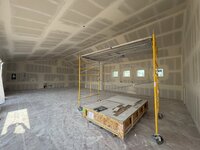
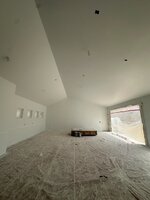
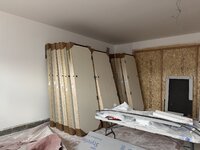
The interior of the shop gets paint next week. We are trying to get it finished so that we can use it as a staging area. Cabinet deliveries etc starting soon!

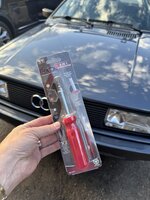
Drove the Quattro up as it turns out there’s a big get together happening nearby this weekend. Issue with my intake hose coming off leaking boost and making the car run horribly. I blame Floyd Hill. Stopped at a gas station along I70 in Dumont - a simple screwdriver was all I needed to get it sorted.

IMG_2096.jpeg

IMG_2094.jpeg

IMG_2095.jpeg
 

Nolift911

Well-known member
Joined
May 16, 2011
Messages
1,016
Location
Lansdowne, VA
Great progress - thanks for nerding out on the WiFi LAN/VLAN - setup, I'll just do what works out best from your setup. :)

Do we think that Audi is worth the spendy double sided carbon steel bit setup?
 
To avoid these ads, REGISTER NOW!
OP
B

badonk

Well-known member
Joined
Aug 20, 2011
Messages
226
I didn't go back to see if it had been mentioned before, but i was curious how deep your well is.
I think it was 440 ft...over 25 gpm of flow so very healthy. My understanding is that permitting limits the pump install to 15 gpm. We will have a water test done to know what we're dealing with and if we do any sort of water filtration, what that might be.
 
Last edited:
OP
B

badonk

Well-known member
Joined
Aug 20, 2011
Messages
226
Great progress - thanks for nerding out on the WiFi LAN/VLAN - setup, I'll just do what works out best from your setup. :)

Do we think that Audi is worth the spendy double sided carbon steel bit setup?

For the Wifi setup, the easiest thing is to do with whatever your subcontractor likes to do and recommends. We couldn't find a local sub that regularly worked with Ubiquiti gear...the typical feedback is that the subs don't like the variability of product availability from Ubiquiti. My builder bundles this work as low voltage and AV systems - including other things like alarm system and powered shades. And this isn't my main electrician although he is also doing some simple low voltage lighting control. In my case, I really want to take ownership of wifi, home automation, etc and be able to maintain it myself. So I'm insisting on Ubiquiti gear, buying and configuring it myself, the low voltage sub has seen my install plan and is putting in the structured wiring to support it.

And I'm now building a small toolkit to keep on hand in the Audi. Some of the audi guys I met up with over the weekend said shame on me for not having been better prepared. I had thought about grabbing some tools but thought it would jinx me lol. The super special carbon steel bit screwdriver above is the first piece of the toolkit. Yesterday I picked up the HF mini flex head kit that I'll pair with a small set of sockets. I want to have some pliers in the kit that could be used on hoses or clamps or other odd shaped things. I assume I should have some electrical bits in the kit as well so I'll have to work that out. Then an assortment of hose clamps, zip ties, and duct tape to be able to hack a fix together in a pinch.

The audi ran great after that but it is a 40 year old car. It was just in the shop a few weeks ago having an overdue alignment and a CIS expert get it dialed in better. Maybe they had that intake hose off and it wasn't snugged up 100%? Even so, I've never really liked the way that hose attached. I'm looking for alternatives - either a new/better hose or clamp, or both.
 
OP
B

badonk

Well-known member
Joined
Aug 20, 2011
Messages
226
Fingers crossed but we might be ahead of schedule by a month or more. The walls on the workshop are finished but it is now full of cabinets and tile. The garage has all the interior doors that need to be hung. We have tile flooring pretty much throughout. So they'll work from one end of the house to the other and quickly follow with cabinet installs and trim (doors, baseboards, etc) as each room gets flooring installed. We also have a nice list of exterior stuff to wrap up before winter starts to show up.

*trench water, electric, and fiber to the house (gas was done yesterday)
*trench water, electric, fiber, and floor heat to the shop
*finalize grading and drainage around the house
*pour concrete for outdoor patios, walkways, garage and shop aprons, retaining walls + footers
*pave remainder of driveway (asphalt)
*get correct stain on exterior wood, paint metal trim
*install chimney caps
*lay down exterior decking material and install railings
*garage doors
*solar install on shop roof
*grill area (really just a set of cinder block cabinets to mount the grill with a little storage under, throw some counter tops on it and cover it with siding like the house)

Exciting times!

IMG_4475.jpg


Cabinets waiting

IMG_4494.jpg

Drywall wrap on windows - the drywall crew we used does some great work! Nicest, by far, that I've ever had in a house let alone my workshop

IMG_2147.jpg

Doors

IMG_2149.jpg
 

gearhead1960

ALLIANCE MEMBER
Joined
Mar 21, 2019
Messages
1,845
Location
Manassas, VA, a small blot in history
@badonk I'm sorry to ask again if you had already covered the "solar install on shop roof", but my questions are:
-what exactly does this consist of?
-will you generate power so it goes into the grid and then you get a discount from the power company, or are you storing the energy yourself. If storing, how? I would assume a band of batteries?
-are you buying or leasing the panels, and if you don't mind me asking what do panels cost and the batteries, if storing?
-is this only to generate power for the shop or for the whole complex?
-how much power will this generate?
-do you have enough "good" days to make this a significant way to generate power and will it eventually pay for itself.
Sorry to pepper you with all these questions. I eventually hope to find my forever home (within the next 1-2 years) in the east and like the idea of self sufficiency, so would am interested in other people's experience. TIA
 
OP
B

badonk

Well-known member
Joined
Aug 20, 2011
Messages
226
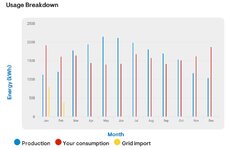
I don't think I went over the solar plan before. So buckle up, this could go long. 33 panels get it to a 14.19kW DC system, flush mounted to the workshop south facing roof. They estimated 19,534 kWH from the system annually.

Let's go through costs first. That system before any rebates incentives etc will cost ~$45K (I think this is high and could've come in less). The 30% federal tax credit expires this year so I have to have the system up and running before year end to save ~$13K. I didn't have batteries in the budget but we are at least planning to be able to add them later. My solar guy suggested I start with one powerwall 3 (or similar system) to cover the main load centers and add more batteries if that isn't enough. Google search says the first battery plus the control systems is in the $15K range - before any incentives or tax credits. Additional batteries would be around $6K each.

Mixing in costs, production and consumption, the solar contractor estimated I would spend ~$3K per year starting this year on electricity without solar (increasing to $5K by 2044 if it goes up 3.4% annually), but only $600 per year with solar. I can't find the exact breakeven on my setup but I think it is closer to 10 years. I've seen some suggest this makes most sense if you get into the 7-10 year payback period. Without the federal tax credit I'm not sure many of these systems make any sense financially but we'll see. And the above says nothing about the opportunity cost of taking $30-$45K and investing it etc. So with a 10 year time horizon my common sense meter tells me it is smarter financially to skip solar based on today's economics even though I didn't. The panels are under warranty for 25 years. The 30 year estimate has these saving me over $100K. For this to make any sense you need to be in it for the long haul. And again, a simplistic look at the magic of compounding interest - take $30K and invest it with a conservative 6% annual return you're up to $172K over 30 years.

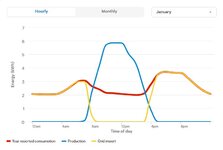
Production vs consumption and how it works with your electricity provider will vary. Annually, the diagrams below show what they predict for my install - generating more than I use annually and earning credits with the utility. But this doesn't include batteries and I clearly need to pull power from the grid at night when the panels aren't producing. And that also varies by season. When you look at the daily breakdown, batteries should/could be designed to eliminate any grid import if you have enough of them. I guess it depends on your ultimate goal of being off the grid entirely or being somewhat more self-sufficient. I have a gas line to the house with a large gas boiler for heat, a gas stove, gas grill, and gas fireplaces so being truly off grid isn't a goal for me. For me, the value of the batteries comes from acting as a backup/generator and I don't think it adds to any significant cost savings for house operating costs. Here's why...

To 'sell' excess power to the grid I think you need a utility that allows net-metering (which I have). This should work regardless of batteries - where they track the electricity sold into the grid and then you settle up monthly. On a daily basis this should net out the use at night if you are putting more into the grid during the day than you use at night. At the end of the month if you still put more into the grid than you used, you get credited on your bill at the wholesale rate. So from an economics standpoint, the batteries offset the wholesale price you receive for excess power generation and during the months (winter) you use more than you produce, those consumption costs. On a typical day, excess generated energy first goes into your batteries, then the grid. At night you pull from those batteries first, then the grid if the batteries get too low (a reserve threshold that I think I can set?).

Anyhow, a good local solar contractor should be able to pull together estimates for you and walk you through the nuances for your home and electric utility. Hopefully my overview helps get you started if you think this is the right path for you.
use vs prod.jpg

solar winter.jpg

solar summer.jpg
 

ericm

Well-known member
Joined
Apr 17, 2016
Messages
1,963
Location
Southern Oregon
How did you estimate the house's power usage? I had that same problem with my new house's solar. I tried a couple estimates and didn't get anywhere, so I took my existing house's numbers and added some. Trouble is, the two houses are totally different other than being about the same size. One is close to 40 years old with a pretty standard build for the time and has mostly gas appliances. The other is brand new, built to be tight, and all electric. I ended up with a 15kw system.

Oregon lets you assign credits to other meters on a priority basis so I can use any extra solar credits for the shop and the irrigation pump. They will probably use more than the panels provide.

One great thing is that in Oregon we'll have real 1:1 net metering- every kwh you put in to the grid gives you a full kwh credit. With that you can use the grid as a battery. We're putting in batteries anyhow because last summer the house had something like 15 outages. We get a lot of outages at our place in CA. My wife says we have power outage PTSD. So we figure if we're doing it anyhow we might as well make it handle outages.

The ROI calculators I have seem assume something like 2% annual price increases. The local CA and OR power companies have been getting double digit percentage increases the last few years, up to 22%! Whatever it is now it'll be a lot more in 10 years. In the mean time we'll be generating our own clean power.
 
OP
B

badonk

Well-known member
Joined
Aug 20, 2011
Messages
226
How did you estimate the house's power usage? I had that same problem with my new house's solar. I tried a couple estimates and didn't get anywhere, so I took my existing house's numbers and added some. Trouble is, the two houses are totally different other than being about the same size. One is close to 40 years old with a pretty standard build for the time and has mostly gas appliances. The other is brand new, built to be tight, and all electric. I ended up with a 15kw system.
They just used square footage and their experience based on typical new builds. We didn't have a HERS report to use or any actual usage of course. Since I use gas for a lot of things, our electric demand could be lower than they estimated. I'll have a 320 amp main panel at the house, then a 125 amp sub panel for the shop which I think is more than I'll need.
 
OP
B

badonk

Well-known member
Joined
Aug 20, 2011
Messages
226
@badonk Thanks for the response. Long term issue I’ve heard is what to do with obsolete panels. According to my Green Building pioneer cousin, panels are not recyclable and disposal is becoming an issue.
Yeah I've heard that too. I'd bet that something is sorted out on panel disposal over the next 25 years. Lots of panels have been installed over the last 10+ years that'll deal with that problem long before it becomes an issue for me.
 

ericm

Well-known member
Joined
Apr 17, 2016
Messages
1,963
Location
Southern Oregon
@badonk Thanks for the response. Long term issue I’ve heard is what to do with obsolete panels. According to my Green Building pioneer cousin, panels are not recyclable and disposal is becoming an issue.
There's tons of places that accept panels for recycling local to me in California. Lots on the internet too so they should be available through the country. There may not have been much a few years ago- there has to be enough material to recycle to make setting up a program worth while.

The heavy metals in 15kw of panels are likely less than that generated by burning the 55 tons of coal that would be needed to generate the same power for the life of the panels. Then there's the other air pollutants and carbon dioxide. I'll take a small recycling problem to keep from burning tons of coal or gas.
 
OP
B

badonk

Well-known member
Joined
Aug 20, 2011
Messages
226
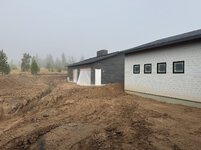
Not much progress on the shop other than trenching to get all the utility hookups done. That includes the hot and cold water lines, the radiant heat lines, and the fiber line. I couldn't even get to the shop without crawling through the trenches. The solar installation started on the roof - I'm sure that was interrupted by the trenches. Elsewhere outside we are wrapping up grading and then need to get the final asphalt down. It was pretty muddy today when I dropped by - partially due to the grading/trenching work and we've had some rain. There was a thick layer of fog that blanketed the valley when I got there. Inside the house, tile flooring and cabinet installs are underway - and I think interior trim starts next week. I also need to find out when the exterior painters will get at the siding and other exterior things that need to be finished.

IMG_2376.jpg

IMG_2368.jpg
 
OP
B

badonk

Well-known member
Joined
Aug 20, 2011
Messages
226
cool car collection. anxious to see how this all wraps up.
Anxious about it as well, lol. Lots of rain and some early snow hit this week so the site is a giant mudpit right now. We've had some landscaping start to go in but the mud is making it difficult to get retaining walls and remaining concrete pads done. And we want those done before we roll in with the first coat of asphalt (final 2" top coat will go down next spring).

Inside the house we ran into a bit of a snag with the tile flooring. I don't have exact details but somehow we received two different products that were labeled the same. The installer started putting down tile only to realize that some of them were slightly different. The supplier has sent replacement boxes of the correct tile but that took about 2 weeks to get sorted. And we have to rip up the portions that were wrong. In the meantime we moved on to getting bathroom tile installed. We probably lost about a week in the schedule. I'm sure we'll find some other surprises as we close in on completion.
 
OP
B

badonk

Well-known member
Joined
Aug 20, 2011
Messages
226
I went up yesterday to iron out a few details and walked the property with my builder. He's going to order the lifts soon and we're talking epoxy finish. For the epoxy finish I'm doing some sort of grey with black/white/grey flake for the spots under the lifts and the main garage. It hides dirt, wear/tear well while also hiding dropped bolts and washers. In the workshop area I'm going to see if we can just do a solid grey with no flake. We will also run the epoxy up the baseboards too. I still need to talk to the epoxy installer to see what they say so this could change.

For the lifts, the two-post will be a Bend Pak 10APX. For the double wide four-post I was looking at their DH-9SWX but am instead going with the Backyard Buddy / Advantage Lift side by side B-SXS-10000 for a few reasons.

1) I have a friend that has a few of the BYB double wide and I've seen them first hand. Very nicely made.
2) Doesn't require air for the safety locks. Simpler traditional mechanical locks and saves money by eliminating an extra air compressor or the need to tie into my big compressor.
3) The 9K capacity (or less!) of the Bend Pak seems a bit tight.
4) The BYB manufactures the cross beam bowing upward so that when loaded it flattens out. Seems like smart engineering to me?
5) The BYB costs a bit more but they include some nice extras - 8 drip trays, rubber wheel chocks, wheel stops, and aluminum center walkway.

So the lifts won't be color matched. Oh well.

Aspens have turned - looking great
house entry.jpg

Yogi left some tracks
bear tracks.jpg
 

Xti04

Well-known member
Joined
Nov 11, 2016
Messages
2,325
If you buy2 or more lifts from advantage your second lift is half price. Or at least they used to be. So you could get a 10k two post half price. I have really enjoyed my Advantage 10k lift so far.
 
OP
B

badonk

Well-known member
Joined
Aug 20, 2011
Messages
226
If you buy2 or more lifts from advantage your second lift is half price. Or at least they used to be. So you could get a 10k two post half price. I have really enjoyed my Advantage 10k lift so far.
I'll have to take another look at their clear floor 2 post lifts. When I was last comparing them I was looking at the AL-SC10, comparing width between columns, lift height, minimum clearance, arm configurations, etc. That lift doesn't seem to be available any more - the 10K lift on their site is ALI certified but is also backordered. And then they have a few 12K lifts that I'd need to take a closer look at if they are doing the 1/2 off 2nd lift deal.
 

cccoltsicehockey

Well-known member
Joined
Apr 3, 2014
Messages
1,411
Location
Charlotte, NC
Going with non-matching lifts wasn't something I was wanting to do either, but there are two new stackers on my list now due to pricing. I can't decide if I want a double stacker or not. What made you go that vs two separate? I think I will likely end up going with two separate as of now.

If you buy2 or more lifts from advantage your second lift is half price. Or at least they used to be. So you could get a 10k two post half price. I have really enjoyed my Advantage 10k lift so far.
I have never heard of this deal. This could be interesting when I need to add two 4 post lifts. Will have to look into this.
 

Xti04

Well-known member
Joined
Nov 11, 2016
Messages
2,325
Going with non-matching lifts wasn't something I was wanting to do either, but there are two new stackers on my list now due to pricing. I can't decide if I want a double stacker or not. What made you go that vs two separate? I think I will likely end up going with two separate as of now.


I have never heard of this deal. This could be interesting when I need to add two 4 post lifts. Will have to look into this.
They were offering this deal last year when I purchased my lift as I was going to buy a second one for one of my docs at work. He got cold feet last minute and backed out.
 
OP
B

badonk

Well-known member
Joined
Aug 20, 2011
Messages
226
Going with non-matching lifts wasn't something I was wanting to do either, but there are two new stackers on my list now due to pricing. I can't decide if I want a double stacker or not. What made you go that vs two separate? I think I will likely end up going with two separate as of now.

I went back and forth on two single lifts vs the double and ultimately thought about how I'll use it most. If I have four cars on the storage side and I need to get a car off the top deck I have to move two cars out to lower the deck. That's the downside and worst case scenario. But as I thought it through, in most cases I'll probably have three cars to work with there (at least one car will be in Denver). In that case I'll put two on the top deck and park one underneath. And underneath I'll have a huge clear floor with lots more flexibility. With two single lifts, I wouldn't have that clear floor under the two cars that are up. Also two hydraulic pumps, more hoses and hydraulic fluid, an extra 220v hookup needed, etc. Finally the double is just more space efficient width wise.
 
To avoid these ads, REGISTER NOW!
Top Bottom