To avoid these ads, REGISTER NOW!

Ideas on best wifi setup...

To avoid these ads, REGISTER NOW!

theoldwizard1

Well-known member
Joined
Feb 22, 2011
Messages
43,109
Location
SE MI
For comparison..........

Spectrum/Charter in my area supplies the modem for no cost ( well ... included) somewhere in the price. If you choose to use your own modem there no cost reduction.
You are paying for it ... somewhere !

Wait until your current contract expires.
 

aggie113

Well-known member
Joined
Jul 22, 2015
Messages
470
Location
San Antonio, TX
The caveat with regards to the Ubiquiti products is when it comes to the UniFi management software. If they have a product line that doesn't use it I can't speak to that, but the wireless products they do have that use UniFi could be a challenge for a non-IT person to setup.
Think of it as hosting a controller on your computer for the Ubiquiti hardware device(s). For a general setup that would cover 90% of regular home use you can setup your hardware using the UniFi software, send that configuration to the hardware and be good to go. If you need to make changes later you can fire up the software again (hope you remembered the login!) to do so.

If things don't work perfectly for you, it can get very difficult very quickly to resolve them for novice users. An example is an AP I setup recently had to be manually configured to connect to my UniFi system before it would allow itself to be properly adopted by it. This involved terminaling into the hardware to enter some command line inputs. Not a show stopper for me, but for a guy used to setting up DLink routers it might be.
 

wyliesdiesels

Well-known member
Joined
Aug 14, 2012
Messages
19,994
Location
Modesto, CA
..... and the best one I have had experience with is from Ubiquiti Networks. Any larger and you'll need to get into commercial/enterprise systemswhich includes high power dish transmitter/receivers between large air gaps/buildings or just run cable......

In any case, nothing comes close to the refinement in execution that exists in the Ubiquiti user interfaces. They are genuinely plug and play systems, even at their enterprise level - simple to install and configure, which is clearly one of their engineering team's top design goals. In over 10 years of using Ubiquiti components, we have had zero issues in both enterprise and residential environments.

Just an FYI, the ubiquiti unifi system IS an enterprise grade system and is marketed as such..

wyliesdiesel - I have xfinity Blast with 300 Mbps down/10 Mbps up and their monthly rental ARRIS Group, Inc. TG1682G modem/router/wifi gateway all in one device. I have internet only, no voice line.

I have same exact speed and the SB6183 works just fine. Behind that, I am using a netgear nighthawk.

Down the road, Im gonna swap it out for a peplink dual-wan nrouter
 

Showkey

"MEMBER EMERITUS"
Joined
Aug 9, 2014
Messages
8,638
Location
Wausau WI
You are paying for it ... somewhere !

Wait until your current contract expires.

Agree.....It’s ( the cost) in there some where .......been with them six years, no contract.

Already went through the One year bundle discount 5 years back. The cost of internet is what, what it is. Spectrum has been ok, and TDS fiber is coming to the area with 1 gig. Spectrum already went from 100 to 200 Mbps at not extra cost. Suspect they will giving away 400 Mbps upgrade soon to offset TDS offers.

But like I said.......there’s no discount if I supply a modem. They do rent routers......which is not a bargain.
 

jeepxj

Well-known member
Joined
Mar 2, 2008
Messages
17,835
Yeah i dont like the all in one gateways

The wifi strength is subpar and the features on some models is lacking

I've had really good luck with the unifi dream machine. wave 2 4x4 AP inside.

My go to for all the work from home people with issues is get a UDM. see if that fixes the issues. if it doesn't, pick-up a remote head and hardwire it to the network.
 

jeepxj

Well-known member
Joined
Mar 2, 2008
Messages
17,835
The caveat with regards to the Ubiquiti products is when it comes to the UniFi management software. If they have a product line that doesn't use it I can't speak to that, but the wireless products they do have that use UniFi could be a challenge for a non-IT person to setup.
Think of it as hosting a controller on your computer for the Ubiquiti hardware device(s). For a general setup that would cover 90% of regular home use you can setup your hardware using the UniFi software, send that configuration to the hardware and be good to go. If you need to make changes later you can fire up the software again (hope you remembered the login!) to do so.

If things don't work perfectly for you, it can get very difficult very quickly to resolve them for novice users. An example is an AP I setup recently had to be manually configured to connect to my UniFi system before it would allow itself to be properly adopted by it. This involved terminaling into the hardware to enter some command line inputs. Not a show stopper for me, but for a guy used to setting up DLink routers it might be.

dream machine comes with all that built in. setup via bluetooth on the app is about 5 screens.
 

wyliesdiesels

Well-known member
Joined
Aug 14, 2012
Messages
19,994
Location
Modesto, CA
They suite me and my "customers" just fine, even when they are "only" DOCSIS 3.0 !

your customers dont have the needs that my customers have. I end up having to install a security appliance/router with the needed features and then setting up "IP pass-through" to hand off all un-firewalled traffic to the new router.

And DOCSIS 3.0 has nothing to do with the features that the gateway may or may not have. DOCSIS is the connection protocol/standard used for the connection between the cable modem and the CMTS in the headend. once again, you are adding confusion to the thread...
 

wyliesdiesels

Well-known member
Joined
Aug 14, 2012
Messages
19,994
Location
Modesto, CA
The caveat with regards to the Ubiquiti products is when it comes to the UniFi management software. If they have a product line that doesn't use it I can't speak to that, but the wireless products they do have that use UniFi could be a challenge for a non-IT person to setup.
Think of it as hosting a controller on your computer for the Ubiquiti hardware device(s). For a general setup that would cover 90% of regular home use you can setup your hardware using the UniFi software, send that configuration to the hardware and be good to go. If you need to make changes later you can fire up the software again (hope you remembered the login!) to do so.

If things don't work perfectly for you, it can get very difficult very quickly to resolve them for novice users. An example is an AP I setup recently had to be manually configured to connect to my UniFi system before it would allow itself to be properly adopted by it. This involved terminaling into the hardware to enter some command line inputs. Not a show stopper for me, but for a guy used to setting up DLink routers it might be.

A better setup is via the cloud key dongle. no computer needed.

Also, having the dongle makes it easier for someone else to remotely log in and manage it or change things for the customer if they cant figure it out themselves

Agree.....It’s ( the cost) in there somewhere .......been with them six years, no contract.

Already went through the One year bundle discount 5 years back. The cost of internet is what, what it is. Spectrum has been ok, and TDS fiber is coming to the area with 1 gig. Spectrum already went from 100 to 200 Mbps at not extra cost. Suspect they will giving away 400 Mbps upgrade soon to offset TDS offers.

But like I said.......there’s no discount if I supply a modem. They do rent routers......which is not a bargain.

this is why comcast is way better. They charge $10-$15 for gateway rentals.

Also, thats great charter works good for you. My customers in the next town over have terrible experiences with charter. It goes down all the time including the hosted VOIP service which ends up costing my customers money since they cant answer the phones when they go down...
 

aggie113

Well-known member
Joined
Jul 22, 2015
Messages
470
Location
San Antonio, TX
A better setup is via the cloud key dongle. no computer needed.

Also, having the dongle makes it easier for someone else to remotely log in and manage it or change things for the customer if they cant figure it out themselves

Sure, but that adds to the cost of the setup, running java software is free. And for a single AP (that uses UniFi) it wouldn't make sense to bother with the dongle. I decided against it as well and setup a docker instance on my Synology NAS to run a UniFi setup.
 

Mesozoic

Well-known member
Joined
Oct 8, 2012
Messages
213
Location
Tucson, AZ
It's true, once you step into the realm of Unifi, it's got an enterprise feel to it. However, their Amplifi products are definitely worth looking at, especially if ease of use is a priority.

https://amplifi.com/
 

pizza

Well-known member
Joined
Dec 4, 2019
Messages
1,739
Location
Midwest, USA
Sure, but that adds to the cost of the setup, running java software is free. And for a single AP (that uses UniFi) it wouldn't make sense to bother with the dongle. I decided against it as well and setup a docker instance on my Synology NAS to run a UniFi setup.

for a single unifi AP, imo it usually doesn't make sense to run a controller at all!

you can use standalone mode: https://help.ui.com/hc/en-us/articl...ng-up-a-UniFi-Access-Point-in-Standalone-Mode

i'm not a super expert on all unifi devices because i own a limited number of them, but the process is something like:

  1. install the unifi app on your phone
  2. get the AP into adoption mode by holding down the hw reset button
  3. get the AP and phone on a network with a DHCP server just for initial setup purposes (plug the AP in via ethernet, maybe the phone can connect to a different AP via wifi)
  4. open the unifi app and adopt the AP in standalone mode

from there, you can configure basic settings on the AP -- ssid, security options, channels, tx power, etc. probably anything a normal user would need.

once you have wireless network configured on that AP, you can just power it up anywhere and connect your phone to it wirelessly to configure it further.

i do that initial setup at home and then bring a standalone AP or two with me when i go to my summer house or to a friend's cabin or whatever and we want to extend the network.

for a normal home user who doesn't want to be burdened with running a controller, maybe this would be an acceptable option. i have no idea if you can config something like a USG in standalone mode though. never tried.
 
OP
D

DelayedZ

Well-known member
Joined
Sep 22, 2012
Messages
251
Location
New Jersey
What did you spend on it?

couldve bought one on amazon for cheaper

https://www.amazon.com/dp/B07N7QK8Z5/?tag=atomicindus08-20

The modem you need depends on your speed.

I have an Arris SB6183 that i bought used on craigslist for $25 and it has worked flawlessly for 2yrs. Good for up to 600Mbps and I just upgraded to 300Mbps/10Mbps and may change to 600Mbps so i can get 15Mbps upload...

https://www.amazon.com/dp/B00MA5U1FW/?tag=atomicindus08-20


I purchased a Netgear CM1000v2, got it for $140.00, had a Best Buy gift card. It's a Docsis 3.1. I saw some cheaper online but I already had a SBG6900AC and I wanted to make sure it was an improvement. So we'll see.
 
Last edited:

larry4406

Well-known member
Joined
Jan 27, 2006
Messages
19,076
Location
Northern Virginia
I am still reading up on the Orbi systems based on Denwood's and Git's recommendations. The IT guy at work uses Eero's.

Netgear sure has a bewildering range of systems - RBK43 AC2200, RBK50 AC3000, RBK852 Wifi-6, etc :willy_nil:willy_nil:willy_nil:eyecrazy::eyecrazy:

Costco has the RBK753S-100NAS at $499.99
Best Buy has the RBK43S-100NAS at $349.99 (this is more in my price point as I will need to buy a modem as well to go off rent from Xfinity)

Some of the reviews of these Orbi systems bemoan that one can't set up different SSID's for the 2.4 and 5 GHz radios. Why would one want to be able to do this? Is this really a negative? This seems to be the only negative recurring review I have seen.

Bear with me as I am not a computer geek. Our family as an assortment of Samsung tablets, Samsung phones, Apple Iphone, Ipad, Samsung TV's, HP wireless printers, and desk top computer.

Our home is a 2000 SF ranch style on one level on 3 acres. Existing gateway is in the middle of the home and coverage on the far end is poor. My barn is about 300' away and wifi is marginal there.
 

wyliesdiesels

Well-known member
Joined
Aug 14, 2012
Messages
19,994
Location
Modesto, CA
I am still reading up on the Orbi systems based on Denwood's and Git's recommendations. The IT guy at work uses Eero's.

Netgear sure has a bewildering range of systems - RBK43 AC2200, RBK50 AC3000, RBK852 Wifi-6, etc :willy_nil:willy_nil:willy_nil:eyecrazy::eyecrazy:

Costco has the RBK753S-100NAS at $499.99
Best Buy has the RBK43S-100NAS at $349.99 (this is more in my price point as I will need to buy a modem as well to go off rent from Xfinity)

Some of the reviews of these Orbi systems bemoan that one can't set up different SSID's for the 2.4 and 5 GHz radios. Why would one want to be able to do this? Is this really a negative? This seems to be the only negative recurring review I have seen.

Bear with me as I am not a computer geek. Our family as an assortment of Samsung tablets, Samsung phones, Apple Iphone, Ipad, Samsung TV's, HP wireless printers, and desk top computer.

Our home is a 2000 SF ranch style on one level on 3 acres. Existing gateway is in the middle of the home and coverage on the far end is poor. My barn is about 300' away and wifi is marginal there.

Thats a big negative IMP(professional)O and personal experience

2.4Ghz and 5Ghz do not travel through the air at the same distance. 2.4Ghz will go farther and pass through materials easier than 5Ghz will.

2.4Ghz however will not have the same bandwidth as 5Ghz which is way faster.

I like to have 2 or more different SSIDs- 1 per frequency (and 1 addl per Freq if guest network is in use). This way i can connect to the SSID that will work better in my location.

If both freq share the same SSID, you wont know which Freq youre connected to AND as you travel throughout the building, your signal could drop out unless your WiFi equipment handles seamless handoff between the frequencies...

Every client that i have setup WiFi networks for has requested dual SSIDs...
 

jeepxj

Well-known member
Joined
Mar 2, 2008
Messages
17,835
I am still reading up on the Orbi systems based on Denwood's and Git's recommendations. The IT guy at work uses Eero's.

Netgear sure has a bewildering range of systems - RBK43 AC2200, RBK50 AC3000, RBK852 Wifi-6, etc :willy_nil:willy_nil:willy_nil:eyecrazy::eyecrazy:

Costco has the RBK753S-100NAS at $499.99
Best Buy has the RBK43S-100NAS at $349.99 (this is more in my price point as I will need to buy a modem as well to go off rent from Xfinity)

Some of the reviews of these Orbi systems bemoan that one can't set up different SSID's for the 2.4 and 5 GHz radios. Why would one want to be able to do this? Is this really a negative? This seems to be the only negative recurring review I have seen.

Bear with me as I am not a computer geek. Our family as an assortment of Samsung tablets, Samsung phones, Apple Iphone, Ipad, Samsung TV's, HP wireless printers, and desk top computer.

Our home is a 2000 SF ranch style on one level on 3 acres. Existing gateway is in the middle of the home and coverage on the far end is poor. My barn is about 300' away and wifi is marginal there.

What I would do if you were a customer of mine:

put a dream machine in the ranch in the same location as your current gateway. see if that fixes the wifi in the house. It very well could be ok on its own.
if the wifi at the ends isn't good enough I'd move the dream machine to one side of the ranch and hard wire via the attic to the other side. Ceiling mount a nanoHD.

depending on the barn line of sight i would use the attic to get to an external mounted AC loco or litebeam setup. another nanoHD or flexHD in the shop for wifi there

budget wise for the "best" way:

dream machine: 300
nanoHD1: 180
AClocos/Litebeams: 160
NanoHD2/FlexHD(for shop):180


optional cost savings method: instead of dream machine and nanoHD/FlexHD's you can just buy 3 AC lites at $85 a pop. 2 in the house and 1 in the shop. still need the bridge from house to shop.
That would put you at a bit over $400. Probably good enough for your general use TBH.

as far as 2.4/5 together or seperate i've done it both ways. my personal preference is seperate. takes minimal effort to change later either way.
 

Git

Well-known member
Joined
May 18, 2008
Messages
6,894
Location
S Cal
Best Buy has the RBK43S-100NAS at $349.99 (this is more in my price point as I will need to buy a modem as well to go off rent from Xfinity)

I just looked at my Orbi and I currently have 27 devices connected on WIFI. Of those 27, 13 of them are on the 2.4g band. Most of them are IoT devices - a wireless printer, a couple of thermostats, Rachio sprinkler controller, one Roku, and a couple of Amazon Echos. How much bandwidth do you think those devices use in a day? I would hazard a guess, not very much.

I never felt the need to have separate SSIDS, but your situation is probably different and you have your own devices to deal with. That is why I suggested you buy something from Costco. You can play around with it, even for several months, if it does not work to your satisfaction - just return in. Costco even pays return shipping and will send UPS to your door (at least in my area) to pick it up for a full refund.

A lot of people like Unifi on this forum, and are quick to recommend it, same thing with Snap-On, but in the end, it is money out of YOUR pocket, not theirs.

dream machine: 300
nanoHD1: 180
AClocos/Litebeams: 160
NanoHD2/FlexHD(for shop):180

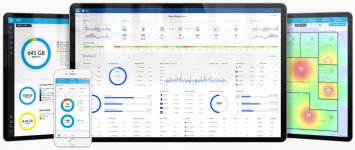
$650 total, plus tax. Personally, I don't want my home internet to be my hobby, and I could care less about looking at a 'unified interface' so I can see what is using how much bandwidth. But I get it, some people like that kind of thing. Me, I just want my internet to work

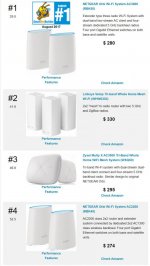
If I was in your shoes, I think I would pick up an Orbi 2 Pack from Costco when it comes back in stock and try it out.

attachment.php


If this kind of thing your after, then if the Orbi doesn't work out, go Unifi
attachment.php
 

Attachments

  • Orbi 2.jpg
    Orbi 2.jpg
    90.1 KB · Views: 151
  • unifi-xg-stadium-feature-software01.jpg
    unifi-xg-stadium-feature-software01.jpg
    128.6 KB · Views: 154

jeepxj

Well-known member
Joined
Mar 2, 2008
Messages
17,835
I just looked at my Orbi and I currently have 27 devices connected on WIFI. Of those 27, 13 of them are on the 2.4g band. Most of them are IoT devices - a wireless printer, a couple of thermostats, Rachio sprinkler controller, one Roku, and a couple of Amazon Echos. How much bandwidth do you think those devices use in a day? I would hazard a guess, not very much.

I never felt the need to have separate SSIDS, but your situation is probably different and you have your own devices to deal with. That is why I suggested you buy something from Costco. You can play around with it, even for several months, if it does not work to your satisfaction - just return in. Costco even pays return shipping and will send UPS to your door (at least in my area) to pick it up for a full refund.

A lot of people like Unifi on this forum, and are quick to recommend it, same thing with Snap-On, but in the end, it is money out of YOUR pocket, not theirs.

dream machine: 300
nanoHD1: 180
AClocos/Litebeams: 160
NanoHD2/FlexHD(for shop):180

$650 total, plus tax. Personally, I don't want my home internet to be my hobby, and I could care less about looking at a 'unified interface' so I can see what is using how much bandwidth. But I get it, some people like that kind of thing. Me, I just want my internet to work

If I was in your shoes, I think I would pick up an Orbi 2 Pack from Costco when it comes back in stock and try it out.

attachment.php


If this kind of thing your after, then if the Orbi doesn't work out, go Unifi
attachment.php

2 of these are cheaper and a better value than orbi's. unifi fan boy stuff aside. set them up as standalone and you're done.
https://store.ui.com/collections/wireless/products/unifi-ac-lite

edit: i do agree most people dont want home internet to be a hobby. they want it to just work.
 
Last edited:

Git

Well-known member
Joined
May 18, 2008
Messages
6,894
Location
S Cal
I agree with you about the Access Points. If you already have a decent router or are using something like pfSense, those would be a great way to go. The only negative is they are hardwired versus the Orbi which you can place anywhere as long as you have power and the satellite is in range of the main unit.
 

jeepxj

Well-known member
Joined
Mar 2, 2008
Messages
17,835
I agree with you about the Access Points. If you already have a decent router or are using something like pfSense, those would be a great way to go. The only negative is they are hardwired versus the Orbi which you can place anywhere as long as you have power and the satellite is in range of the main unit.

also the amazon rental program is good for 30 days vs costcos 90 day. I have a set of APs and some 100' cables I let people try out before making the big plunge into hard wiring a set in.

its a smallish rancher so mesh backhaul might work. those ac lites will allow for mesh backhaul as well BTW. given its a rancher i'd do the attic time to pull hardline back. Not a lot of effort in a rancher to make good stable wifi compared to 3-4 story vertical townhouses.


even the crapper cable company provided routers are good enough for most home users. esp when you take the wifi load off of them.
 
To avoid these ads, REGISTER NOW!

Mesozoic

Well-known member
Joined
Oct 8, 2012
Messages
213
Location
Tucson, AZ
I must be the only one running Ubiquiti's Amplifi HD system. It's not enterprise equipment, but easily handles our 5000 sq ft of interior living space, including the garage and exterior Wifi cameras without any issue. Mesh points can be added to back haul signal into dead areas with ease and you can configure the back haul frequency between 2.4 for longer range or 5 GHz for performance. I would recommend it if you're not looking to mess with routing tables, address objects, and other enterprise grade tasks.
 

Denwood

Well-known member
Joined
Sep 22, 2014
Messages
4,183
Location
Thunder Bay, Ontario, Canada
You'll find more recommendations towards Orbi for residential mesh as they have a third, dedicated backhaul frequency and are reviewed amongst the fastest systems out there. It is nice to have both 2.4Ghz and 5Ghz bands available for clients, as you'll always get more range in "dark" corners with 2.4Ghz. The ubiquity wifi generation is a bit slow at AC1300 class. Nice price point though.
 
Last edited:

PeteW

Well-known member
Joined
Aug 8, 2008
Messages
81
Location
Minneapolis, MN
In my opinion, the best (not crazy overkill) wifi setup would be Ruckus Wireless. You should be able to get by with a single R510. I'd add H510's or a second R510 if you have dead spots. Ruckus Unleashed will allow the access points to work together to force client handoffs and apply band steering (selecting best band between 2.4 & 5 Ghz both setup with same SSID).
Channelfly and Beamflex are industry leading and, again in my professional opinion, can't be beat.

I say all of this after more than a decade in the Integrated Systems space pressing networks and wifi systems to their limits. I've installed everything under the sun (ubiquity, MikroTik, Aruba, Cisco, Meraki, Ruckus, All Consumer Only Brands, Engenius, Package, Luxul, etc. etc. etc.)
 

Mesozoic

Well-known member
Joined
Oct 8, 2012
Messages
213
Location
Tucson, AZ
You'll find more recommendations towards Orbi for residential mesh as they have a third, dedicated backhaul frequency and are reviewed amongst the fastest systems out there. It is nice to have both 2.4Ghz and 5Ghz bands available for clients, as you'll always get more range in "dark" corners with 2.4Ghz. The ubiquity wifi generation is a bit slow at AC1300 class. Nice price point though.

If you need more speed then you would opt for the Amplifi Alien with tri-band radios and 8x8 antennae. I'm perfectly happy with my Amplifi HD, however... especially at the pricepoint of $200 for the router and 2 mesh points included.

https://amplifi.com/alien
 

jeepxj

Well-known member
Joined
Mar 2, 2008
Messages
17,835
In my opinion, the best (not crazy overkill) wifi setup would be Ruckus Wireless. You should be able to get by with a single R510. I'd add H510's or a second R510 if you have dead spots. Ruckus Unleashed will allow the access points to work together to force client handoffs and apply band steering (selecting best band between 2.4 & 5 Ghz both setup with same SSID).
Channelfly and Beamflex are industry leading and, again in my professional opinion, can't be beat.

I say all of this after more than a decade in the Integrated Systems space pressing networks and wifi systems to their limits. I've installed everything under the sun (ubiquity, MikroTik, Aruba, Cisco, Meraki, Ruckus, All Consumer Only Brands, Engenius, Package, Luxul, etc. etc. etc.)

ruckus is #2 for me. the only hang up i have for res install is their units are ugly as sin.
 

Git

Well-known member
Joined
May 18, 2008
Messages
6,894
Location
S Cal
I have a 24 port Ruckus POE switch that I picked up off of eBay for a decent price (actually it's a Brocade ICX6450). This type of stuff, in my opinion, is just too complicated for the average Joe trying to get decent WIFI in his house. If I didn't have someone who talked me through it (updating the firmware and installing the license files, etc) I don't think I could have done it on my own. Cisco console cable, tftpd64, weird *** commands - I hope I don't have to mess with it again...
 

jeepxj

Well-known member
Joined
Mar 2, 2008
Messages
17,835
I have a 24 port Ruckus POE switch that I picked up off of eBay for a decent price (actually it's a Brocade ICX6450). This type of stuff, in my opinion, is just too complicated for the average Joe trying to get decent WIFI in his house. If I didn't have someone who talked me through it (updating the firmware and installing the license files, etc) I don't think I could have done it on my own. Cisco console cable, tftpd64, weird *** commands - I hope I don't have to mess with it again...

yea dont do that for avg joe.
 

kwoody51

Well-known member
Joined
Jan 19, 2010
Messages
215
Location
Twin Cities, MN
Question for all the network gurus....

I have cat 6 to every room in my house so can add in wired access points anyplace I want.

What’s the ‘best’ WiFi using wired access points?

Best, to me = best value vs total performance as all cost. Don’t want to drop $500 on this.

Best I can tell I could use an off the shelf mesh system and use ethernet for the backhaul. Is there a less expensive way?

Right now I’m using 3 Apple airport extremes. 1 as the controller and 2 in bridge mode wired back to the controller. This is working well, mostly, but having some bandwidth issues when wife, kids and I are all trying to video conference. I’m in the process of setting my work PC to be hardwired... but do want the flexibility of good WiFi.

Everything in my house that isn’t mobile and has an Ethernet port is hardwired :)

Thanks!
 

Attachments

  • 11194779-F214-4F28-990B-BD03E1CC07A6.jpeg
    11194779-F214-4F28-990B-BD03E1CC07A6.jpeg
    107.2 KB · Views: 16
Last edited:

Git

Well-known member
Joined
May 18, 2008
Messages
6,894
Location
S Cal
I am certainly not an 'expert' but it would be a shame not to use all that cabling you installed.

If I was you, I think I would look into something like jeepxj proposed in post 96

Using some hard wired Unifi access points for the WIFI along with your existing router to keep costs down. If you have an old computer laying around or something you could repurpose I would look into installing pfSense as the router/firewall instead. The software is completely free, well supported and there are tons of YouTube video tutorials out there. I have a home server with several virtual machines running - PLEX, Blue Iris, etc so it worked out well to create a VM just for pfSense, but is a little on the geek side :)

I think the 'easiest' way to get up and running is with something like the Orbi system. You just plug the satellites in and as long as they are in range your good to go since they have a dedicated channel for the wireless backhaul

I really like the Lawrence Technology videos on pfSense - if your interested:
 

kwoody51

Well-known member
Joined
Jan 19, 2010
Messages
215
Location
Twin Cities, MN
I am certainly not an 'expert' but it would be a shame not to use all that cabling you installed.

If I was you, I think I would look into something like jeepxj proposed in post 96

Using some hard wired Unifi access points for the WIFI along with your existing router to keep costs down. If you have an old computer laying around or something you could repurpose I would look into installing pfSense as the router/firewall instead. The software is completely free, well supported and there are tons of YouTube video tutorials out there. I have a home server with several virtual machines running - PLEX, Blue Iris, etc so it worked out well to create a VM just for pfSense, but is a little on the geek side :)

I think the 'easiest' way to get up and running is with something like the Orbi system. You just plug the satellites in and as long as they are in range your good to go since they have a dedicated channel for the wireless backhaul

I really like the Lawrence Technology videos on pfSense - if your interested:


Totally newb question....

With using UniFi, or any other access points, can I just wire in to any location in the house, set them up on bridge mode and be good to go? All this still using my current Airport extreme as the router?

Candidly the Apple setup was pretty idiot proof. I just plugged it all in and the setup wizard did it all. I know a 'little' more now than when I set all this up but by no means looking to get a minor in networking :)
 

Git

Well-known member
Joined
May 18, 2008
Messages
6,894
Location
S Cal
I can try to answer your question until one of the real experts comes along :)

I have looked at using the UniFi access points primarily because it uses a wired backhaul which is always (in my mind) going to be better than a wireless backhaul, even compared to something like the ORBI mesh system, and especially if you already have the cables in place.

With that being said, the majority of the UniFi access points appear to be designed to work best when mounted in one plane. For example - the round/donut shaped ones are designed to be mounted horizontally for the best coverage, usually on the ceiling or if you can't do that, underneath a shelf or something similar. They do make a wall mount access point, but one of the problems I have is your locking yourself in. The Wall Mount isn't really designed to sit on a table somewhere and how many people have cat6 running to the ceiling of their room and besides, most of our main rooms have ceiling fans mounted there. So you lose some flexibility.

Bridge mode is usually for routers to disable functions you don't need - DHCP, etc. The Unifi access points are just that, access points but they do need to be configured. It looks like you need to download the software from their website either for you computer or phone. And it looks like if you have any custom type configurations running, the software needs to be running all the time - that is where the Cloud Key or whatever it is called comes in. It is basically a micro computer that runs 24/7 and the latest version runs around $180.

So, ya, if you had an older router that was still serviceable, you should be able to set it up in bridge mode using your hard wired connections and the router would hand out ip address and take care of all the routing
 

Denwood

Well-known member
Joined
Sep 22, 2014
Messages
4,183
Location
Thunder Bay, Ontario, Canada
Kwood, there is a ton of misinformation out there, but Tim over at Smallnetbuilder does a really good job of clearing the hype and doing very thorough tests:

https://www.smallnetbuilder.com/tools/rankers/wifi-system/view

Anyone who does this stuff for a living will agree that wired backhaul is always preferable if you can do it!! You have provided three bits of information:

1. You have lots of LAN drops.
2. You have issues if everyone is video conferencing at the same time.
3. You are looking for economy.

I'd just grab a few of these:TP-Link Omada AC1750 for $100 including POE injectors.

The ubiquiti AC-Pro APs are great, but more spendy and a slight PITA to set up for home use.

You can use the same SID and password across them, or make them separate so your kids use a different access point than you. Ultimately I've been underwhelmed by mesh hand off behavior, automatic band steering, etc. so at the very least I just use cheap APs at home and have separate SIDs for 2.4 and 5.0 Ghz. This is the most predictable for performance.

Apparently I'm not making up the "seamless roaming" issues either :) This is a rather tech-heavy read but it does illustrate why separate SIDs etc. can make home performanc ea lot more predictable: https://www.smallnetbuilder.com/wir.../33195-wi-fi-roaming-secrets-revealed?start=0

I really consider home APs almost a consumable so don't spend too heavily on them. My minimum is AC1750 with at least 1 x gigabit port for wired access points.
 
Last edited:

Git

Well-known member
Joined
May 18, 2008
Messages
6,894
Location
S Cal

Attachments

  • Tri -  1169.jpg
    Tri - 1169.jpg
    61.5 KB · Views: 112

pizza

Well-known member
Joined
Dec 4, 2019
Messages
1,739
Location
Midwest, USA
This is working well, mostly, but having some bandwidth issues when wife, kids and I are all trying to video conference.

kwoody51,

how do you know it's a wifi issue? what if your internet itself just isn't fast enough to accommodate your needs? i'd look into that first if you don't know the answer.

With using UniFi, or any other access points, can I just wire in to any location in the house, set them up on bridge mode and be good to go? All this still using my current Airport extreme as the router?

as others have said, just set them all up with the same ssid and pw.
whether you have separate ssids for 2.4 and 5 GHz is up to you.

but one more thing to note: since you're having performance issues, you should look into what channels are being used. you should absolutely manually configure your APs to only use non-overlapping channels, and adjacent APs should be on separate channels. google for info on how to do this. but for example, for 2.4 GHz, you should only use channels 1, 6, and 11:

7VDe8lw.png


you should also check out your network environment using an app like this:

https://play.google.com/store/apps/details?id=com.farproc.wifi.analyzer

it will show you what channels the APs around you are using. you can use it to help choose your channels. for example, for 2.4 GHz... if your neighbor is using channel 1, and you have two APs, you should have your APs use 6 and 11. you should never use channels other than those, and if you have neighbors right in your *** (apartment building situation), you should try to get your neighbors to also only use those channels.

The ubiquiti AC-Pro APs are great, but more spendy and a slight PITA to set up for home use.

doesn't matter to me which APs people use, but are you familiar with standalone mode for unifi?

https://www.garagejournal.com/forum/showthread.php?p=8686351#post8686351

pretty easy. you can config them from you phone without setting up a controller.
 

kwoody51

Well-known member
Joined
Jan 19, 2010
Messages
215
Location
Twin Cities, MN
Pizza - Reconfigured AP to have 1,6 and 11 on the 2.4ghz channel. thanks for that advice.

As for question on am I running out of bandwidth... I hate to admit it but I don't know, how can I test this? I have ~200Mbs from my ISP and typically get close to 175Mbps confirmed by speedtest.net

Thanks for the help!
 

jeepxj

Well-known member
Joined
Mar 2, 2008
Messages
17,835
Totally newb question....

With using UniFi, or any other access points, can I just wire in to any location in the house, set them up on bridge mode and be good to go? All this still using my current Airport extreme as the router?

Candidly the Apple setup was pretty idiot proof. I just plugged it all in and the setup wizard did it all. I know a 'little' more now than when I set all this up but by no means looking to get a minor in networking :)

standalone setups work great.

you set them up via an app on your phone. take about 2 minutes.
 

jeepxj

Well-known member
Joined
Mar 2, 2008
Messages
17,835
Pizza - Reconfigured AP to have 1,6 and 11 on the 2.4ghz channel. thanks for that advice.

As for question on am I running out of bandwidth... I hate to admit it but I don't know, how can I test this? I have ~200Mbs from my ISP and typically get close to 175Mbps confirmed by speedtest.net

Thanks for the help!

connect laptop directly to modem. see speed there. then plug network in normally and connect over wifi. see speed. under 10% difference? you're fine. not much worth tweaking.
 

kwoody51

Well-known member
Joined
Jan 19, 2010
Messages
215
Location
Twin Cities, MN
connect laptop directly to modem. see speed there. then plug network in normally and connect over wifi. see speed. under 10% difference? you're fine. not much worth tweaking.

It’s less than 10% difference hardwired vs WiFi. Have my Apple TV hardwired and can run Speedtest on that.
 

jeepxj

Well-known member
Joined
Mar 2, 2008
Messages
17,835
It’s less than 10% difference hardwired vs WiFi. Have my Apple TV hardwired and can run Speedtest on that.

i wouldnt make much fuss about it personally. 90/10 rule.

10% effort gets you 90% the way to perfect.

you ready to become a network god to get the remaining 10%? :eyecrazy: youre not going to noticable a reasonable difference in internet life with that remaining 10% IMO
 
To avoid these ads, REGISTER NOW!
Top Bottom