To avoid these ads, REGISTER NOW!

Between 485 & 705 SQ/FT 3rd time's a charm with a 3 car workshop

Workspaces between 485 and 705 squarefeet.
OP
L

loganb

ALLIANCE MEMBER
Joined
Dec 29, 2011
Messages
5,532
Location
Omaha, NE
Now that you've got two, I have some suggestions: How about label holders to ID the different grits in the slots? Or including label text on the print itself?

Yup, a tab for a label is up after I figure out where they're going!


That mobile drafting bench is turning out pretty neat. What's its role? Just a general surface? Assembly? To @madison069 's point earlier, it seems like that floating bench top would have a good opportunity to hang some oft-used tools right at the station, like the small clamps you were talking about, maybe a small drill or two, nailers, could even 3D print some storage for consumables like glue or tape if that's in the cards for how the work surface will be used. I'm interested to see what you do with it — with how open it is around the base there's lots of room to store other stuff besides the compressor, like tool boxes or power tool's in cases (sander perhaps?) at the station you'd be using it (if that's true).

Rough current plan is sanding, possibly routing, some assy where the height adjustability would be beneficial. I am thinking that the sander and related items will find a new home on it. Right now the plan for the base is a power strip, that compressor and then probably in the nearer than I thought future a battery power station big enough to run things for a couple hours if I want to be able to move around and not be tethered with cords. I'm already struggling with wanting to move it up/down when it's not plugged in, so I need to toss my meter on it and figure out power draw on it and the compressor so I can determine how big of a battery station I need.


Awesome video, I hadn't seen that one, or his channel! I've seen other DIY vac clamps emulating the Festool VacSys etc, but this seems like a great implementation. Sometimes I feel like I've reached the end of YouTube's algorithm, so it's always exciting to see a new woodworking channel.

I'm with you....I'm finding I learn more out of some older channels or video's then I do from the latest video from some of the more popular current content creaters
 
To avoid these ads, REGISTER NOW!

Trapps

ALLIANCE MEMBER
Joined
Feb 10, 2017
Messages
2,002
Location
The Detroit Zoo
...

20230822_214148.jpg

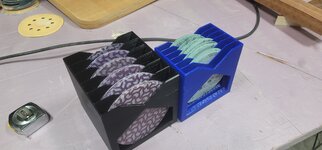
And the larger sandpaper holder got done...the larger slot is far more gracious to remove sheets from...so another one is printing overnight
This photo causes me stress. I could see not being able to cleanly pull a single sheet from the blue unit. My initial thought was pull the whole stack, peel one off, put the stack back. WIll the black unit allow a single to be pulled cleanly? Obviously easier than the blue, but still...is the increased volume trade off worth it?

Either way, this is one of those instances where 3D printing really looks appealing to me. Then I go read the 3d thread and got lost in a whole new language. I haven't even figured out English yet.

Nice work, Logan!!!
 
OP
L

loganb

ALLIANCE MEMBER
Joined
Dec 29, 2011
Messages
5,532
Location
Omaha, NE
This photo causes me stress. I could see not being able to cleanly pull a single sheet from the blue unit. My initial thought was pull the whole stack, peel one off, put the stack back. WIll the black unit allow a single to be pulled cleanly? Obviously easier than the blue, but still...is the increased volume trade off worth it?

Either way, this is one of those instances where 3D printing really looks appealing to me. Then I go read the 3d thread and got lost in a whole new language. I haven't even figured out English yet.

Nice work, Logan!!!

Thanks sir!

I'll try and get some better pictures later....I've now got (2) black ones and the blue one...each with a different brand of paper.....wee bit of overkill.

And I'm confident you'd have 0 issues figuring out 3D printing. Buy a used Prusa mk3 on Facebook Marketplace(500 ish in my area) or a new Bambu X1C or Prusa Mk4(900 to 1.5k depending on options)....you'll be off and running fast! Winter is cold in Michigan...good time to stay in and learn new things! The best thing for me about them is when I have my $h!t togther is sending something to the printer at night, then having it done in the morning, or vice versa before i start the workday...hit print and have something done by supper time. Gives me something to hopefully show progress on with 15 or 20 minutes of garage time in the evenings
 

nicholam77

Well-known member
Joined
Dec 18, 2016
Messages
2,659
Location
Minneapolis, MN
Winter is cold in Michigan...good time to stay in and learn new things!

I basically did this for a whole winter... it's a good winter hobby.

@Trapps I second that you can handle it. The slicing software is complex, but almost every popular printer has a preset profile, and there are very few variables you really need to change from print-to-print. It's not hard. It's quite simple to just download models off the internet and press go, and that alone will probably entertain you for some time.

As for the machine itself, I still find $900-$1500 very steep. By all accounts the printers Logan mentioned are well-loved and reliable and feature-rich. I feel like the Mk3 is a good compromise between cost and reliability and features.

But it's not the only way to go, especially if you just want to try it out or not sure you'll like it. Even my Ender 3 S1 has been pretty much plug-'n'-play, save a QC issue with the bed. And with PLA, I feel like parts are coming out at least 90-95% as good as what I see coming off the Prusas.

Plus there's a community on here to help you if you get stuck... just doing myGJ due diligence to spend someone else's money :ROFLMAO:
 
OP
L

loganb

ALLIANCE MEMBER
Joined
Dec 29, 2011
Messages
5,532
Location
Omaha, NE
Sandpaper holders loaded up

20230824_183708.jpg

Still too tight with the 1" slot to get a single piece of without pulling the entire stack when about 7 or more disc's are in the stack. The serious grit in the left also have enough of a bend in them they don't lay flat which isn't helping. Will give it a try before I make another round with a different slot size

And quick "needed to make something" project...trying to get a few of the more commonly used clamps to have a home on one of the benches

Chunk of mahogany I glued up the other day then put 2 grooves in with the still setup dado stack

20230824_221118.jpg

20230824_221121.jpg

And where it will go....right over the top of where my son had been coloring with chalk it appears

20230824_221132.jpg


Groove size also works to hold bessey type parallel cabinet clamps, so hoping to get a pair of those, half dozen F style clamps and some quick grips as well
 
Last edited:
OP
L

loganb

ALLIANCE MEMBER
Joined
Dec 29, 2011
Messages
5,532
Location
Omaha, NE
So....anyone have recommendations for great movies to test home theater systems?

Wife was at a conference for her professional organization yesterday and apparently won the top door price which is a rather expensive Sonos home theater system with soundbar, sub, satellite speakers etc....definitely the most expensive thing we've ever won and she's pretty excited about it! Me...well we actually sit down and watch a movie on the big TV in the basement 1x a month probably....but it feels shameful to put it on the living room TV that gets Saturday morning Elmo and Daniel Tiger....so yeah....

Apparently it comes with free professional installation as well...but that feels wrong to not setup myself :) Supposed to pick it up today

So...what should we watch to really try it out? We've got Amazon Prime, HBO and The Mouse(Disney) for streaming plus a host of DVD's.....any recommendations for good movies(bonus points if recent and we haven't seen) to try out a new sound system?

Bringing this back to the garage.....it may see a sound upgrade if I roll the existing soundbar to it...but have to check the streaming device out there to see if it'll play nice with it as the streaming is more important to me than the soundbar...though the subwoofer would be cool in the garage :D
 

Boostingaz

Well-known member
Joined
May 21, 2018
Messages
3,682
Location
Indiana

I am ashamed to admit that our surround sounds doesn't get used much. We don't really watch "movies". The kids aren't at that stage yet where movies with "real" people can keep their focus. Gabby cat, pupconstruction and Dinoranch don't really have great sound haha.

That being said, since we don't use it a ton I stole and moved the sub to the garage. So much more dynamic, I love music and it makes a huge difference. As the kids get older I'll probably just buy a new sub for the house so I can keep this.
 

OutlawDrifter

Well-known member
Joined
Jan 20, 2015
Messages
3,876
Location
KS
While I don't get to watch as many movies as I did in my youth, sound is VERY important in a movie(to me at least, especially now with my decaying hearing).

I saw Top Gun: Maverick in the theater for that very reason...sounds awesome on my home setup also. Any of the late model war movies have amazing sound. Most of the Marvel stuff is decent. I agree with Boostingaz's sites recommendation of Ford vs. Ferrari during the race scenes(and it's just an amazing movie anyways).

Damnit, now I want to upgrade the shop audio again and add a projector :LOL: 🤷‍♂️
 
OP
L

loganb

ALLIANCE MEMBER
Joined
Dec 29, 2011
Messages
5,532
Location
Omaha, NE
We have some of those....going to have to look at this closer...thanks!

I am ashamed to admit that our surround sounds doesn't get used much. We don't really watch "movies". The kids aren't at that stage yet where movies with "real" people can keep their focus. Gabby cat, pupconstruction and Dinoranch don't really have great sound haha.

Bingo....and I know the words to the Disney movies of Frozen, Moana and Encanto well enough the last thing I want is them in even more clear and crisp sound!

That being said, since we don't use it a ton I stole and moved the sub to the garage. So much more dynamic, I love music and it makes a huge difference. As the kids get older I'll probably just buy a new sub for the house so I can keep this.

Hum....going to have to look at this closer.....
 

nicholam77

Well-known member
Joined
Dec 18, 2016
Messages
2,659
Location
Minneapolis, MN
Gabby cat, pupconstruction and Dinoranch don't really have great sound haha.

Hard disagree. DJ Catnip's "Find Your Groove" low-key slaps, and it slaps pretty hard if I'm honest. And it's encoded Dolby Digital. :ROFLMAO:


@loganb that is an awesome prize you lucky SOB! Definitely put it on the bigger TV.

In my experience Netflix has the most 5.1, Atmos, and Spatial Audio titles, and they often encode their 5.1 in Dolby Digital Plus, which is slightly higher quality.

Almost all of HBO's newer shows, and their Max Original titles, will be 5.1

On Disney, I'd recommend any Star Wars titles (like Mandalorian), which are even better if your TV can do Dolby Vision HDR.

As far as films, it depends on what you're trying to test. Dialogue clarity? Bass and SFX? Music? A ton of that is going to depend on the actual film's mix. Some good suggestions in @Boostingaz list

This is not a family movie, and I'm not even sure it's the best example for "tests", but Drive (2011) has some great music and car / SFX sequences.

Agree with Ford v. Ferrari and Top Gun: Maverick.

Even if you use it once a month, it will be all that more special experience.

Edit: In my mind I was thinking Ron Howard's "Rush (2013)", not Ford v. Ferrari, which I haven't seen, but I'm sure that's also good
 
Last edited:
OP
L

loganb

ALLIANCE MEMBER
Joined
Dec 29, 2011
Messages
5,532
Location
Omaha, NE
Little 3D printed productivity plus a review of tree's....ok not that kind

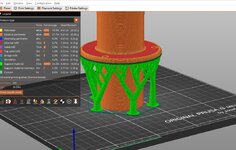
As a reminder...3D printing needs some sort of support, so overhangs can be a challenge and often require "supports" which are sacrifical elements that provide that supported surface for the part profile to be printed on. There are several different ways, but one type that's gained traction due to time and material savings, while also just looking cool are "organic supports" or "tree supports".

This example part is a 2" OD dust collection adapter...but has a wide flange in the middle to cover up a hole and provide attachment for where it passes thru a tabletop

With the "standard" support which are shown in the green material:

grid support.jpg


Almost half the print time is taken up printing that support material...which is then thrown away

A slightly modified version of this that the slicer program I use calls "Snug" improves on time and material:

snug support.jpg

Cutting 24 minutes out of the print...so not a big savings as it's still 2 hours to print supports that will then be tossed

But the cool tree supports....

tree support.jpg

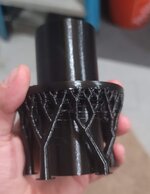
Those cut the time from original 2.5 hours to 53 minutes but even better reduce the material used by 80%...in this case the value of that material was now 35 cents...much better!

Finished part after the 3.5 hour print:

tree.jpg

And where it goes:

20230825_184030.jpg
 
Last edited:
OP
L

loganb

ALLIANCE MEMBER
Joined
Dec 29, 2011
Messages
5,532
Location
Omaha, NE
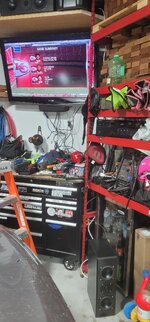
This audio visual cable mess inspired by @Boostingaz lol.

The new Sonos system allowed a roll down of stuff and spurred me to pull the old home theater receiver with custom built speakers out for the garage


20230826_145234.jpg

Discovering that the Roku streambar doesn't allow audio output to another system...so coupled with that and a rather ancient flatscreen without some of the now standard features like HDMI ARC and CEC to make controlling components easy....not sure what next step will be. Trying to avoid buying another streaming device....so may see if I can swap the Roku on the big TV(with the new Sonos) with this streambar one and keep the audio running thru the Sonos. Otherwise I think we've got an unused Fire stick somewhere
 

Boostingaz

Well-known member
Joined
May 21, 2018
Messages
3,682
Location
Indiana
I don't know about all that noise haha.

I just have a smart TV hooked to a receiver.......and run Pandora. That's really all I care about. I'm not sure what your trying to watching there.....tennis.....lol.
 
OP
L

loganb

ALLIANCE MEMBER
Joined
Dec 29, 2011
Messages
5,532
Location
Omaha, NE
I don't know about all that noise haha.

I just have a smart TV hooked to a receiver.......and run Pandora. That's really all I care about. I'm not sure what your trying to watching there.....tennis.....lol.

To be honest...I wasn't watching "tennis"...was just using it as a source to try and test the audio!

Your TV makes me want to get the ethernet cable ran to the garage ASAP.....

I cheated....there is like a 10' run where thanks to a bit of an odd layout that I could drill thru the garage wall along the bottom and come out directly in the basement mechanical room where my network gear/switches/router is....so hardwiring was actually really easy. Had it not been that easy....still wouldn't regret doing it. I'm a firm believer in the camp of if the equipment doesn't move...it should be hard wired. Actually need to run a couple more drops out there....

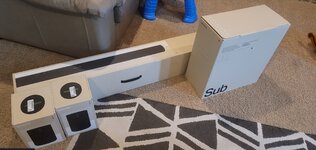
Speaking of media/audio stuff....this was the haul the wife won:

speakers.jpg

It's at least working...and sounds far better than before....but I've now got a flat screen TV mount, soundbar mount and hidden wiring kit on order to help clean up the install. TV is a 60" but will mount things so if an 80" somehow finds its way to me during Black Friday that it'll drop right in.....


This then spurred a rolldown of the soundbar/sub that was on the basement TV to move to the living room which now requires a wall mount and some painting, prompted an unused set of speakers/receiver/sub to get rolled to the garage....so typical GJ style overkill or corporate scope creep way of life
 
To avoid these ads, REGISTER NOW!
OP
L

loganb

ALLIANCE MEMBER
Joined
Dec 29, 2011
Messages
5,532
Location
Omaha, NE
The Sonos stuff is really nice stuff. That was a good score!

Yeah...it's kinda fun I will admit. Wife had it in her last retail showroom job in Chicago so she was excited to have it again....I'm afraid it may make me buy a single unit for upstairs...but so far we're doing ok and I just make Alexa and her much less "pristine" singing voice tell me the news and then play music while I'm cooking.

I did end up having to get a different Roku streaming device for the garage(ironically a much cheaper one) because the fancy soundbar one wouldn't allow to output to a different sound system...so I guess I could set that up in the kitchen and push tunes to it....using Alexa as a voice assistant so I don't have to stop scrolling Instagram or being on here on mobile to tell Spotify to start a playlist....man 1st world problems ****
 
Last edited:

madison069

Well-known member
Joined
Nov 5, 2010
Messages
4,171
Location
Monroeville, PA
I cheated....there is like a 10' run where thanks to a bit of an odd layout that I could drill thru the garage wall along the bottom and come out directly in the basement mechanical room where my network gear/switches/router is....so hardwiring was actually really easy. Had it not been that easy....still wouldn't regret doing it. I'm a firm believer in the camp of if the equipment doesn't move...it should be hard wired. Actually need to run a couple more drops out there....
I wish it was that easy for me. But i think I'm going to tackle it this weekend since the weather is nice. Hardest part is gonna be drilling a hole through the brick wall to the room with the router in the house. Just maybe, I'll have enough room to push it through the existing hole that has the fiber optic going through. Then just hang it on the side of the house to the garage. Needed to get in the attic of the garage anyway so perfect timing actually.
 
OP
L

loganb

ALLIANCE MEMBER
Joined
Dec 29, 2011
Messages
5,532
Location
Omaha, NE
I wish it was that easy for me. But i think I'm going to tackle it this weekend since the weather is nice. Hardest part is gonna be drilling a hole through the brick wall to the room with the router in the house. Just maybe, I'll have enough room to push it through the existing hole that has the fiber optic going through. Then just hang it on the side of the house to the garage. Needed to get in the attic of the garage anyway so perfect timing actually.

If you're doing it...pull 2 wires if you can! The marginal cost of that 2nd wire is almost nothing....and guarantees that you won't ever need it but if you don't pull that 2nd wire at the same time Murphy's Law says you'll be needing it.
 

madison069

Well-known member
Joined
Nov 5, 2010
Messages
4,171
Location
Monroeville, PA
If you're doing it...pull 2 wires if you can! The marginal cost of that 2nd wire is almost nothing....and guarantees that you won't ever need it but if you don't pull that 2nd wire at the same time Murphy's Law says you'll be needing it.
Good point, but i think i only order enough for one run. It's close to 160ft and it's gonna be in the air between the house and garage. My plan was to use the existing RG6 cable between the buildings as a support for the new ethernet cable. We will see how that pans out. Oh and I got a flood light thats staying on during the day so I need to fix it too. It's up at the same height as the wires. Since I'm there, might as well syndrome be kicking in hard for this project.
 
OP
L

loganb

ALLIANCE MEMBER
Joined
Dec 29, 2011
Messages
5,532
Location
Omaha, NE
Good point, but i think i only order enough for one run. It's close to 160ft and it's gonna be in the air between the house and garage. My plan was to use the existing RG6 cable between the buildings as a support for the new ethernet cable. We will see how that pans out. Oh and I got a flood light thats staying on during the day so I need to fix it too. It's up at the same height as the wires. Since I'm there, might as well syndrome be kicking in hard for this project.

Are you using the RG6 right now for cable to the TV?

I ask as there are MOCA adapters which allow you to use coax cabling for ethernet, basically it's a box on each end...internet in via Cat5/6 cable at source, goes out over Coax, on other end is another adapter where Coax goes in, then you have ethernet RJ45 jack to plug into for the wired source at the end to feed a device, switch, wifi access point etc. I'm not aware of any that allow both TV/cable & ethernet signals together on the same conductor at the same time though....so unless someone else has one of those this only works if you don't use the RG6 for cable feed today.
 

nicholam77

Well-known member
Joined
Dec 18, 2016
Messages
2,659
Location
Minneapolis, MN
I'm a firm believer in the camp of if the equipment doesn't move...it should be hard wired.

Not always the most convenient to install, but 100% agree!

I'm afraid it may make me buy a single unit for upstairs...but so far we're doing ok and I just make Alexa and her much less "pristine" singing voice tell me the news and then play music while I'm cooking.

Keep your eye out for used Sonos One's. They have onboard Alexa and Google Assistant (only one active at a time), and are perfect for casual listening like bedroom / bathroom / kitchen. I've seen some great Craigslist deals on used Sonos.

The home theater setup you got is sweet, but IMO the biggest reason to go Sonos is the multi-room capabilities. And for that you need more speakers 😁

If you don't need a built-in voice assistant, the IKEA versions are cheaper than the Ones, and are just as good.

I wish it was that easy for me. But i think I'm going to tackle it this weekend since the weather is nice. Hardest part is gonna be drilling a hole through the brick wall to the room with the router in the house. Just maybe, I'll have enough room to push it through the existing hole that has the fiber optic going through.

I just did this at my house and it took a full day of effort, but was worth it. I also used my fiber optic junction box as an in-point to the house, but I didn't have to go through brick :ROFLMAO:

Not sure how big the existing hole is, but if you cut off the ethernet clip maybe you could squeeze bare cable through? And then re-crimp a new connector?

If you're doing it...pull 2 wires if you can! The marginal cost of that 2nd wire is almost nothing....and guarantees that you won't ever need it but if you don't pull that 2nd wire at the same time Murphy's Law says you'll be needing it.

This is a great thought, but an unmanaged 5-8 port Gigabit switch costs next to nothing these days. Could easily add that in the garage to service a handful of hardwired clients. Pretty much every device in my network is behind a switch... sometimes a few switches... and speeds are plenty adequate. Just another idea!

@loganb I just tried tree supports (Cura) for the first time on a few prints, and I don't know if I'll ever go back. They worked awesome.
 
OP
L

loganb

ALLIANCE MEMBER
Joined
Dec 29, 2011
Messages
5,532
Location
Omaha, NE
Keep your eye out for used Sonos One's. They have onboard Alexa and Google Assistant (only one active at a time), and are perfect for casual listening like bedroom / bathroom / kitchen. I've seen some great Craigslist deals on used Sonos.

The home theater setup you got is sweet, but IMO the biggest reason to go Sonos is the multi-room capabilities. And for that you need more speakers 😁

Hum....added to the search list lol...thanks!

This is a great thought, but an unmanaged 5-8 port Gigabit switch costs next to nothing these days. Could easily add that in the garage to service a handful of hardwired clients. Pretty much every device in my network is behind a switch... sometimes a few switches... and speeds are plenty adequate. Just another idea!

I didn't explain it well(or really at all), intent for pulling the 2nd wire is more to protect against physical wiring failure then due to needing the 2nd port for a device. I've got several of the little 4 port switches in various places to add connections, but will still try and pull 2 lines when possible to provide insurance against a failed cable...either immediately or down the road.

@loganb I just tried tree supports (Cura) for the first time on a few prints, and I don't know if I'll ever go back. They worked awesome.

Nice! I need to do a bit more tuning on my separation/gap to make them easy to remove...but they're definitely my default support now!
 

madison069

Well-known member
Joined
Nov 5, 2010
Messages
4,171
Location
Monroeville, PA
Are you using the RG6 right now for cable to the TV?

I ask as there are MOCA adapters which allow you to use coax cabling for ethernet, basically it's a box on each end...internet in via Cat5/6 cable at source, goes out over Coax, on other end is another adapter where Coax goes in, then you have ethernet RJ45 jack to plug into for the wired source at the end to feed a device, switch, wifi access point etc. I'm not aware of any that allow both TV/cable & ethernet signals together on the same conductor at the same time though....so unless someone else has one of those this only works if you don't use the RG6 for cable feed today.
The RG6 is a dead cable. From what I gather, it was never used when the garage was built but they installed it. Then down the line someone cut the RG6 short and just left it in the hole. This cable though has the clamp loop deal that attached to the side of the house and keeps the cable tight between the building. So, I was going to utilize that cable as a support. I already tried several wifi extenders but going through two brick walls has proven to be too much for most wifi extenders. I am also going to set up a TV in the garage, so I wanted to run a hard wire to ensure I don't have any signal issues during storms and such. So, I'm just going to get off my *** and get the ethernet cable installed maybe tomorrow since I get off work at 11am for the weekend holiday.
 

madison069

Well-known member
Joined
Nov 5, 2010
Messages
4,171
Location
Monroeville, PA
I just did this at my house and it took a full day of effort, but was worth it. I also used my fiber optic junction box as an in-point to the house, but I didn't have to go through brick :ROFLMAO:

Not sure how big the existing hole is, but if you cut off the ethernet clip maybe you could squeeze bare cable through? And then re-crimp a new connector?

I purchased a 200 ft roll of cat6 cable to do this project with no ends on it. During lunch today I started looking at what I had to work with at the wall where it's to go in place with the fiber optic cable. Well, one thing led to another and I took a wooden dowel rod and put it through the hole with the fiber optic cable and confirmed it made it to the inside of the house. THen I taped the CAT6 to the rod and just pushed the cat6 into the hole and used the rod as a guider as the cable entered the wall. Would ya know it, the cable made it through the wall with no issues!

Now to remove the junk cable off the side of my house and get the cat6 up in place tomorrow and run it all the way to the garage.
 

nicholam77

Well-known member
Joined
Dec 18, 2016
Messages
2,659
Location
Minneapolis, MN
I didn't explain it well(or really at all), intent for pulling the 2nd wire is more to protect against physical wiring failure then due to needing the 2nd port for a device. I've got several of the little 4 port switches in various places to add connections, but will still try and pull 2 lines when possible to provide insurance against a failed cable...either immediately or down the road.

Ah, gotcha, yes that makes sense and is a good idea!
 

Boostingaz

Well-known member
Joined
May 21, 2018
Messages
3,682
Location
Indiana
@loganb

What switches are you using. I have hardwire to every room but some TVs are still on WiFi as I've used all the available ports on my router.

I was looking at this one?

TP-Link TL-SG2008P | Jetstream 8 Port Gigabit Smart Managed PoE Switch | 4 PoE+ Port @62W | Omada SDN Integrated | PoE Recovery | IPv6 | Static Routing | L2/L3/L4 QoS |Limited Lifetime Protection https://www.amazon.com/dp/B08J9ZQ7HC/?tag=atomicindus08-20
 
OP
L

loganb

ALLIANCE MEMBER
Joined
Dec 29, 2011
Messages
5,532
Location
Omaha, NE
@loganb

What switches are you using. I have hardwire to every room but some TVs are still on WiFi as I've used all the available ports on my router.

I was looking at this one?

TP-Link TL-SG2008P | Jetstream 8 Port Gigabit Smart Managed PoE Switch | 4 PoE+ Port @62W | Omada SDN Integrated | PoE Recovery | IPv6 | Static Routing | L2/L3/L4 QoS |Limited Lifetime Protection https://www.amazon.com/dp/B08J9ZQ7HC/?tag=atomicindus08-20

I have one of those for powering a couple security cameras which are Power Over Ethernet(PoE), but for just basic use of smart devices you probably don't need PoE and can use something like this:


nicholam77

Well-known member
Joined
Dec 18, 2016
Messages
2,659
Location
Minneapolis, MN
@Boostingaz I know you asked Logan the question, but if you're just trying to hardwire a TV, that switch you linked is massive overkill. You don't need PoE, a managed web browser interface, QoS, Static Routing, or any of those features which are going to drive up the price.

I actually have that exact TP-Link 5-Port Gigabit model Logan linked (the $15 one) and it works great. But really any name brand "unmanaged" switch will work fine. Gigabit is even overkill for current streaming TV bandwidths, but the price difference isn't significant anymore so I'd go for that. 5-port to save money unless you have more than 5 devices than that to connect in the same area. It's literally plug and play, couldn't be easier.
 
OP
L

loganb

ALLIANCE MEMBER
Joined
Dec 29, 2011
Messages
5,532
Location
Omaha, NE
@Boostingaz I know you asked Logan the question, but if you're just trying to hardwire a TV, that switch you linked is massive overkill. You don't need PoE, a managed web browser interface, QoS, Static Routing, or any of those features which are going to drive up the price.

I actually have that exact TP-Link 5-Port Gigabit model Logan linked (the $15 one) and it works great. But really any name brand "unmanaged" switch will work fine. Gigabit is even overkill for current streaming TV bandwidths, but the price difference isn't significant anymore so I'd go for that. 5-port to save money unless you have more than 5 devices than that to connect in the same area. It's literally plug and play, couldn't be easier.

It feels a bit like we're going against the GJ Ethos of overkill by not recommending that switch...but totally agree....it's excessive overkill even by GJ standards and extra cash on beer and plywood seems like a better usage :)
 

Boostingaz

Well-known member
Joined
May 21, 2018
Messages
3,682
Location
Indiana
@loganb and @nicholam77

Perfect, thanks guys!

I only have 3 locations right now that need switched to corded.

I have poe cameras that I still need to install lol.

I have this package sitting in my office with an upgraded 6TB hard drive.


madison069

Well-known member
Joined
Nov 5, 2010
Messages
4,171
Location
Monroeville, PA
Probably overkill also, but I got this one coming tomorrow. I just finished hanging the cat6 along the house, in the air, and into the attic of the garage. Just need to find a place for the router and punch the wire through the ceiling close to the router. Then I can crimp my connections on both end and then test my line. Crossing fingers for a successful execution cause I wasn’t a fan of setting up the ladder two stories high to run the wires on the house.
IMG_6835.png
 

Boostingaz

Well-known member
Joined
May 21, 2018
Messages
3,682
Location
Indiana
Probably overkill also, but I got this one coming tomorrow. I just finished hanging the cat6 along the house, in the air, and into the attic of the garage. Just need to find a place for the router and punch the wire through the ceiling close to the router. Then I can crimp my connections on both end and then test my line. Crossing fingers for a successful execution cause I wasn’t a fan of setting up the ladder two stories high to run the wires on the house.
IMG_6835.png

I have this one and have been super happy with it thus far. It was recommended by my Internet company. I got it for cheaper at Costco.

TP-Link AC4000 Tri-Band WiFi Router (Archer C4000) -MU-MIMO, VPN Server, 1.8GHz CPU, Gigabit Ports, Beamforming, Link Aggregation https://www.amazon.com/dp/B0BJSTBWGB/?tag=atomicindus08-20

I also have a few of these:

TP-Link AC1750 WiFi Extender (RE450), PCMag Editor's Choice, Up to 1750Mbps, Dual Band WiFi Repeater, Internet Booster, Extend WiFi Range further https://www.amazon.com/dp/B010S6SG3S/?tag=atomicindus08-20
 

slodat

ALLIANCE MEMBER
Joined
Feb 6, 2010
Messages
3,682
Location
Central-ish, WA
I purchased a 200 ft roll of cat6 cable to do this project with no ends on it. During lunch today I started looking at what I had to work with at the wall where it's to go in place with the fiber optic cable. Well, one thing led to another and I took a wooden dowel rod and put it through the hole with the fiber optic cable and confirmed it made it to the inside of the house. THen I taped the CAT6 to the rod and just pushed the cat6 into the hole and used the rod as a guider as the cable entered the wall. Would ya know it, the cable made it through the wall with no issues!

Now to remove the junk cable off the side of my house and get the cat6 up in place tomorrow and run it all the way to the garage.
Ubiquiti makes wireless point to point setups that are amazing. You could get rid of the coax all together. I have a building a block away with obstructions in the line of site and the network is awesome.

edit: just finished reading and I see that you already ran the Ethernet cable.

As far as wifi extenders and all that, I recently switched all of my network gear (routers, switches, wifi) to Ubiquiti UniFi stuff. I have a seamless mesh wifi at two different properties with the same SSID. It’s seamless and works amazingly well. Happy to help if anyone is interested.
 

madison069

Well-known member
Joined
Nov 5, 2010
Messages
4,171
Location
Monroeville, PA
Ubiquiti makes wireless point to point setups that are amazing. You could get rid of the coax all together. I have a building a block away with obstructions in the line of site and the network is awesome.

edit: just finished reading and I see that you already ran the Ethernet cable.

As far as wifi extenders and all that, I recently switched all of my network gear (routers, switches, wifi) to Ubiquiti UniFi stuff. I have a seamless mesh wifi at two different properties with the same SSID. It’s seamless and works amazingly well. Happy to help if anyone is interested.
I'll have to look into the Ubiquiti UniFi stuff. It's possible I will be using it in the future at another place.
 
To avoid these ads, REGISTER NOW!
Top Bottom