To avoid these ads, REGISTER NOW!

Between 485 & 705 SQ/FT 3rd time's a charm with a 3 car workshop

Workspaces between 485 and 705 squarefeet.
OP
L

loganb

ALLIANCE MEMBER
Joined
Dec 29, 2011
Messages
5,538
Location
Omaha, NE
Merry Christmas to all! Not a white one here but that's OK. Living room is a mess from today's activities, wife and I are tired, but kids are asleep and I've got a book to read and a drink that needs a refill while we try and relax

20241225_202017.jpg
 
To avoid these ads, REGISTER NOW!

jar944

Well-known member
Joined
Jul 26, 2010
Messages
5,927
Location
Northern VA
Got to put the new M12 stubby impact to work

20241224_163314.jpg

Family member called with nail in a sidewall in a parking lot and they're not physically able to change it themselves and too late to drive it to a shop. So stubby, floorjack and a couple blocks for tire chocks and off I went. Easy swap then rewarded myself with a new set of impact 3/8 drive metric deep well sockets

My mom (while driving with my MIL) got a flat leaving the hospital last week. Would have been a perfect time use my new mid tq. It was slightly worse than a nail, a entire brake pad went into the tire, with just the tip sticking out. I left the hospital to change it but amazingly AAA had a truck there and gone in under the 15 minutes it took me to make it drive there.
 
OP
L

loganb

ALLIANCE MEMBER
Joined
Dec 29, 2011
Messages
5,538
Location
Omaha, NE
My mom (while driving with my MIL) got a flat leaving the hospital last week. Would have been a perfect time use my new mid tq. It was slightly worse than a nail, a entire brake pad went into the tire, with just the tip sticking out. I left the hospital to change it but amazingly AAA had a truck there and gone in under the 15 minutes it took me to make it drive there.

That was a fast response time by AAA! Several of the major hospitals here are within a stones throw of each other and I did hear when we had our son in the NICU that AAA tried to keep a truck in that area as there were a fair amount of calls and a lot of them were from out of towners so they were more appreciative of the support. 500+ ft lbs or available torque is a a wee bit of overkill for what I was doing....but not so much that it's not going in the tool bag for when we leave tonight or tomorrow morning :)

Which restaurant?

Oh, and happy birthday!

Martin

We were originally going to do one of the standby steakhouse options of The Drover, Gorat's or Brother Sebastian's but those are all a longer drive and with ice didn't want to deal with that. A local restauranter who owns a couple highly regarded local places (Pacific Eating House and Twisted Cork) opened a new place called Pine & Black Bistro off Hwy 370 and 84th which was a much shorter drive so we took the chance, will definitely go back. Also helped it was probably half the price of the other listed places! And thanks Martin!

Happy New Year Logan! All the best in 2025!
Same to you and the misses! Look forward to catching up on your progress!

Had high hopes for a bit of progress this week....not sure that's going to happen. Between recovery from sneaking in a outpatient procedure the other day(already hit out of pocket max so might as well right?) and then some other stuff happening....haven't been as productive as I was hoping. But alas...I've gotten a bit done.

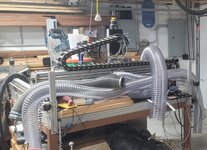
I'm working to try and get some progress in the goal of getting both the laser and CNC running. The laser hasn't really seen any use in this place....CNC was bought as a project from a coworker and I've made some progress and it will move under it's own power....but still needs a lot of work and a bit of a redesign.

I had planned to start on the laser as it should be the shorter putt to get working....but that required all garage time and not fully up for that yet so moved over to CNC

As a refresher....CNC is an open source build with aluminum extrusion frame, THK type rails and ballscrews/steppers for motion. Coworker was putting it together for his side business and realized it was too small, so bought an Avid and I bought this as is. Outside framework is 5' x 5' so it'll have a slightly over 4' x 4' work envelope. As you can see, right now it's got a heavy case of flat surface disease:

cnc1.jpg

I've got plans to fairly well "redo" the x and y axis setup and working to get that modeled up, but as that's ongoing, starting from the foundation up and that means I need to fix the racking in the wood base. Prior owner made a pretty nice mahogany framework/base with a shelf for storage underneath...but it's got too much "wobbling" for my taste. So gusset plating all the corner joints hoping this will improve things. Could've cut and glued some plywood or mahogany to match here....but 3D printer was easy. Printed in PETG, about $2/piece in plastic there and around 15 minutes of CAD time, takes (2) hours to print a pair as they're sized to roughly max out the bed size. I won't know till I get (4) installed all in the same orientation if it makes a big improvement...but my highly calibrated and repeatable arm push test registered an improvement with 1 installed.....or I was just overly optimistic

bracket2.jpg

bracket1.jpg

We've got a couple days away visiting family this weekend, but going to keep "poking away" at some of these little projects while I work thru the CAD work to redo the structure on the machine. SendCutSend will likely get an order for some cut out aluminum plate with a bunch of holes in it....but as I get to a point where the CAD is something that's actually recognizable I'll get it shared
 
Last edited:
OP
L

loganb

ALLIANCE MEMBER
Joined
Dec 29, 2011
Messages
5,538
Location
Omaha, NE
As the lost days between Christmas and New Years come to an end and we face with both dread and delight the slight return to "normalcy" which is kids at school(well kids club for the older once since kindergarten doesn't start back till Tuesday). Having the kids at home is fun, but we all need to get back to whatever "normal" is....

Until then....what's going on?

I've been spending more time reviewing 3D scanners and bit the bullet and bought a Creality Otter, supposed to show up Friday or Saturday. This is fully a toy but would like to be learn it and the usage of the generated files well enough to do something "more" with it....what that is....who knows? More to come on this....I have a sneaking suspicion I'm going to be learning another software package to make better use of the "meshes" it creates when it scans things...Blender, Fusion360....both....time will tell

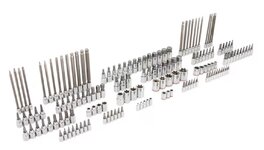
Lowes had a sale the other day with some socket and wrench sets on deep discounts and I picked up the Kobalt speciality driver set. Maybe a third of what it has I already own, but for $49 for the set it was hard to pass up. This means new tool holders....my socket drawer is already a mess so going to start working on improving that a bit...

The new set:

socket set.jpg
And the initial set of sockets to work on

desk.jpg

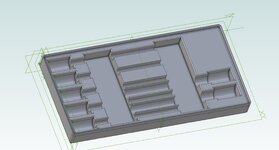
Gridfinity based on a 3 x 6 base generated with the Fusion360 Gridfinity plugin. This is for the 3/8" drive metric hex drive sockets...it's not done but wanting to see how it fits so the progress so far gets sent to the printer overnight, looks to be a 3 hr print. Haven't taken a close look at the standard/imperial set yet but there are a couple fewer drivers so hoping I can use the same model and just change the lettering that is still to be added

socket hex driver progress.jpg

And in something for @nicholam77, the starting components for a Home Assistant setup are on the way....not sure how quickly that's going to take shape....but the initial pieces show up Monday
 
OP
L

loganb

ALLIANCE MEMBER
Joined
Dec 29, 2011
Messages
5,538
Location
Omaha, NE
Successful prototype/progress print. Few tweaks to make, most important will be the height of the tray as I intend to stack the metric and standard trays on top of each other on the toolbox. Right now the sockets are a bit proud and will prevent them from stacking well

20250102_063921.jpg
 
Last edited:

Bob Heine

ALLIANCE MEMBER
Joined
Oct 24, 2009
Messages
10,706
Location
Boca Raton, Florida
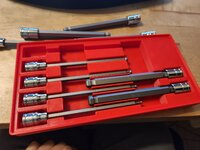
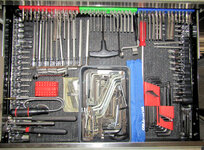
Logan, you have entered a dangerous zone. Over a half-dozen decades I have acquired a lot of hex and specialty wrenches. Last week I gathered most of the right angle collection that came with tools, furniture or who knows where. They used to be scattered everywhere but I started stashing them in a cardboard box back in the last century. They outgrew the box so now they are in a plastic tray many layers deep and 99% have no size identification. The sets like yours are arranged around the tray like warriors' spears keeping them at bay and hopefully preventing them from mating. On the top of the pile in the tray are five garbage disposal wrenches but I thought I was on my sixth disposer. Not five minutes after I took the photo I found the sixth in a kitchen drawer next to the cabinet that houses our newest one. Of all the hex bits in that drawer the Harbor Freight SAE and Metric bits in the red holders are the most frequently used.
Hex Bit Drawer.jpg
Don't ask me why I have my magnets on a stick in that drawer because I have no idea -- I'm just comforted remembering they are in there.
There used to be a set of plastic handled (probably HF) hex wrenches in the drawer that took up way too much space. They are resting in a plastic tray while I look for the sheet metal stand they came in. If I don't find it I'll buy two a new sets with stands and give these to someone I hate love .
Handled Hex Bits.jpg
 

nicholam77

Well-known member
Joined
Dec 18, 2016
Messages
2,659
Location
Minneapolis, MN
Happy New Year Logan. Great continuation of all your projects. Love the 3d printed hex organizers. Do you publish your models anywhere?

I really want to get the fireplace(gas log with a low voltage switch for the gas valve) but haven't found a cheap enough alexa/google home compatible relay and a bit skittish on voice activated control on the fireplace.

Now that you've got a Home Assistant install on the horizon, I'd seriously consider a Zigbee or Zwave antenna, and pair devices through Home Assistant and then exposing them to other services like Alexa.

Zigbee sensors are plentiful and are often cheap.

Unfortunately Alexa and Google Home voice services are not super easy to configure with Home Assistant without their paid Nabu Casa subscription. To control Home Assistant devices directly. However, I believe there are ways around this. I don't use voice commands personally so it's no big deal to me, but if you rely on them and end up liking Home Assistant, their subscription may be worth it. It also gives you easy remote access. There are plenty of free solutions to that, too, (I use the Cloudflare Tunnel integration) but one thing at a time.

For example the passage/entryway off the garage into the house is a bit dark and when entering at night can be stumbly, especially with little kids sometimes leading the way. But replacing the switch with a motion sensor that is right in the path of the door swing so as soon as the door starts to open the lights come on, but only between 5pm and midnight and at 50% brightness has made coming into the house more civilized when lights just work.

Awesome! Automations like that are so convenient and actually improve quality of life.

Arrival lights are tricky, but magical. Mine include some form of geofencing and a Home/Away status. Otherwise you run into the scenario where you're leaving the house after 5pm and the motion sensor fires and turns the lights on when you don't want it to.

Changing the 5pm time restriction to "sunset" with an offset of your choosing would account for different times of the year.

One of the common complaints/gripes I hear about HA is on documentation, or lack of accurate/current documentation. Any places you'd suggest to start my learning journey?

There is actually a Wiki, and a decent amount of documentation. The Home Assistant website itself is a good place to start. The problem, as you stated, is it can be outdated or inaccurate for more advanced topics. That's because for better and for worse, Home Assistant development moves at a fast pace. But considering the scope of the project, it's not that bad.

For anything I can't figure out, I post on the community forums, Google, or ask Chat GPT (any of which can also give bad info). But eventually I've always figured it out.

I don't know what you bought for hardware, but depending on that, the first thing would be to review some installation videos. Just find something current for the type of hardware and installation you're doing. I would watch a few.

Smart Home Solver is a great channel for automation ideas, and recently came out with an up-to-date Home Assistant overview for beginners that might help give you the broad strokes.

Everything Smart Home is a good resource and has lot's of overviews that are current, like best practices for beginners.

Home Automation Guy is another.

Honestly I don't think there's one great resource that explains it. It's going to be an adventure. But I believe in you!

And also feel free to send me a PM if you get stuck with something! I'm deep in it at this point!
 

Trapps

ALLIANCE MEMBER
Joined
Feb 10, 2017
Messages
2,002
Location
The Detroit Zoo
Happy New Year Logan. Great continuation of all your projects. Love the 3d printed hex organizers. Do you publish your models anywhere?


Now that you've got a Home Assistant install on the horizon, I'd seriously consider a Zigbee or Zwave antenna, and pair devices through Home Assistant and then exposing them to other services like Alexa.

Zigbee sensors are plentiful and are often cheap.

Unfortunately Alexa and Google Home voice services are not super easy to configure with Home Assistant without their paid Nabu Casa subscription. To control Home Assistant devices directly. However, I believe there are ways around this. I don't use voice commands personally so it's no big deal to me, but if you rely on them and end up liking Home Assistant, their subscription may be worth it. It also gives you easy remote access. There are plenty of free solutions to that, too, (I use the Cloudflare Tunnel integration) but one thing at a time.


Awesome! Automations like that are so convenient and actually improve quality of life.

Arrival lights are tricky, but magical. Mine include some form of geofencing and a Home/Away status. Otherwise you run into the scenario where you're leaving the house after 5pm and the motion sensor fires and turns the lights on when you don't want it to.

Changing the 5pm time restriction to "sunset" with an offset of your choosing would account for different times of the year.


There is actually a Wiki, and a decent amount of documentation. The Home Assistant website itself is a good place to start. The problem, as you stated, is it can be outdated or inaccurate for more advanced topics. That's because for better and for worse, Home Assistant development moves at a fast pace. But considering the scope of the project, it's not that bad.

For anything I can't figure out, I post on the community forums, Google, or ask Chat GPT (any of which can also give bad info). But eventually I've always figured it out.

I don't know what you bought for hardware, but depending on that, the first thing would be to review some installation videos. Just find something current for the type of hardware and installation you're doing. I would watch a few.

Smart Home Solver is a great channel for automation ideas, and recently came out with an up-to-date Home Assistant overview for beginners that might help give you the broad strokes.

Everything Smart Home is a good resource and has lot's of overviews that are current, like best practices for beginners.

Home Automation Guy is another.

Honestly I don't think there's one great resource that explains it. It's going to be an adventure. But I believe in you!

And also feel free to send me a PM if you get stuck with something! I'm deep in it at this point!
Apparently I need a bunch HA hardware to go with my new, as yet unacquired, 3d printer. Also, five or more links in one post exceeds my personal rabbit hole Bandwidth. Eff it, I'll clean the shop tomorrow...I've got my surfboard, where do I catch this zwave?
 
OP
L

loganb

ALLIANCE MEMBER
Joined
Dec 29, 2011
Messages
5,538
Location
Omaha, NE
Happy New Year Logan. Great continuation of all your projects. Love the 3d printed hex organizers. Do you publish your models anywhere?

I'll push it to Makerworld and Printables when I get there....I have to do some more significant rework on it due to a modeling error on my part so going to be a bit before I get it finished

Now that you've got a Home Assistant install on the horizon, I'd seriously consider a Zigbee or Zwave antenna, and pair devices through Home Assistant and then exposing them to other services like Alexa.

Zigbee sensors are plentiful and are often cheap.

I've got a Zigbee coordinator coming with the mini PC for the system, along with a couple of plug in outlets and some door contact sensors to start playing with. Eventually I'll expect I end up with some Zwave stuff as well

Unfortunately Alexa and Google Home voice services are not super easy to configure with Home Assistant without their paid Nabu Casa subscription. To control Home Assistant devices directly. However, I believe there are ways around this. I don't use voice commands personally so it's no big deal to me, but if you rely on them and end up liking Home Assistant, their subscription may be worth it. It also gives you easy remote access. There are plenty of free solutions to that, too, (I use the Cloudflare Tunnel integration) but one thing at a time.

I end up using voice in the kitchen pretty often via Alexa...so thanks for the heads up on this as that will definitely be something I want to figure out....or I just leave the Alexa controls on those applicable light switches working and have it in tandem?


Arrival lights are tricky, but magical. Mine include some form of geofencing and a Home/Away status. Otherwise you run into the scenario where you're leaving the house after 5pm and the motion sensor fires and turns the lights on when you don't want it to.

Changing the 5pm time restriction to "sunset" with an offset of your choosing would account for different times of the year.

This is what I had in my head with geofencing based off phone location and time of day to trigger light actions....now to find out how to actually get it done! The current one that causes us the most headache is turning off the garage lights after the wife's car leaves. The lights are on Kasa switches so the ability to remotely control is there, and with either the MyQ app or a contact sensor on the door should be able to do that automatically. Risk is if I'm in the garage doing something it then shuts it off on me....so might have to pair a motion sensor with that one or logic to not turn the light off if the state of the garage lights was already on when the walk door into the garage was opened

There is actually a Wiki, and a decent amount of documentation. The Home Assistant website itself is a good place to start. The problem, as you stated, is it can be outdated or inaccurate for more advanced topics. That's because for better and for worse, Home Assistant development moves at a fast pace. But considering the scope of the project, it's not that bad.

For anything I can't figure out, I post on the community forums, Google, or ask Chat GPT (any of which can also give bad info). But eventually I've always figured it out.

I don't know what you bought for hardware, but depending on that, the first thing would be to review some installation videos. Just find something current for the type of hardware and installation you're doing. I would watch a few.

Smart Home Solver is a great channel for automation ideas, and recently came out with an up-to-date Home Assistant overview for beginners that might help give you the broad strokes.

Everything Smart Home is a good resource and has lot's of overviews that are current, like best practices for beginners.

Home Automation Guy is another.

Honestly I don't think there's one great resource that explains it. It's going to be an adventure. But I believe in you!

And also feel free to send me a PM if you get stuck with something! I'm deep in it at this point!

Thanks sir! I've been reviewing some stuff on the Everything Smart Home already and seemed like a very nice resource and great walkthroughs
 

nicholam77

Well-known member
Joined
Dec 18, 2016
Messages
2,659
Location
Minneapolis, MN
I've got a Zigbee coordinator coming with the mini PC for the system, along with a couple of plug in outlets and some door contact sensors to start playing with. Eventually I'll expect I end up with some Zwave stuff as well

Nice! Mini PC is the way to go. I can't speak to Zigbee or Zwave sticks because all my devices of those types are paired with my Hubitat, which serves as the radios / coordinator for those, and then Hubitat is bridged into Home Assistant. I've been tempted to eliminate Hubitat entirely, but my Zwave / Zigbee networks seem stable so I don't want to poke the bear.

What coordinator did you get? If it's being plugged directly into the HA mini PC, it's advisable to get a USB extension cable (maybe 3'-5') to help with interference. Otherwise, I've heard great things about the SMLight ethernet coordinators that can be plugged in anywhere with ethernet.

With Zigbee it's ideal to have the coordinator in a relatively central location.

YMMV but when it comes to Zigbee battery sensors I've really been preferring those that use AA or AAA batteries vs. coin cell batteries, they seem to last way longer. I've had great experience with the Third Reality line of products (contact, motion, etc).

I end up using voice in the kitchen pretty often via Alexa...so thanks for the heads up on this as that will definitely be something I want to figure out....or I just leave the Alexa controls on those applicable light switches working and have it in tandem?

If the devices you're controlling via voice (Kasa, perhaps?) are compatible with Alexa (which I assume they are if you're currently using it with them!), then there is no issue with exposing them to Alexa natively as well as Home Assistant simultaneously. That would be the easiest approach. And maybe cherry pick which devices need to be exposed to Alexa.

Otherwise, the Home Assistant subscription is $65/year, which gets you remote access, easy Alexa + Google config, and supports the devs.

This is what I had in my head with geofencing based off phone location and time of day to trigger light actions....now to find out how to actually get it done!
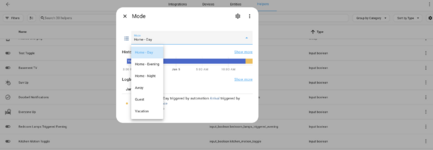
Most people do this with 'Home Modes'. A lot of platforms have that concept, at least a Home and Away, but in Home Assistant it's up to you to implement. There are many 'helper' virtual devices you can create (can be as simple as a boolean toggle aka virtual switch, or a selectable dropdown menu of states, or even plain text input stored values, counters, schedules, etc) to use as conditions within automations. Personally I use a dropdown helper called an "input select" that let's you set up an array of options, only one of which is active at a time. Those options are my home modes, which include Home Day, Home Evening, Home Night, Away, Guest, and Vacation.

Screenshot 2025-01-05 at 2.37.03 PM.png

They are set in part by geofencing of our phones. Again, many ways to skin the cat here. The Home Assistant mobile app can do it via GPS, but some people prefer to use other methods such as WiFi SSD connectivity, or 3rd party geofencing tools. Personally I use the native iPhone geofencing and use Siri Shortcuts to trigger a Home Assistant virtual presence device to change state for each phone when it leaves the geofence bubble.

When you're ready, I can give you detailed information on how to set something like that up, if you want.

The current one that causes us the most headache is turning off the garage lights after the wife's car leaves. The lights are on Kasa switches so the ability to remotely control is there, and with either the MyQ app or a contact sensor on the door should be able to do that automatically. Risk is if I'm in the garage doing something it then shuts it off on me....so might have to pair a motion sensor with that one or logic to not turn the light off if the state of the garage lights was already on when the walk door into the garage was opened

In tricky situations like that, the more you can simplify, the better. A simple motion sensor might be all you need. Motion active = turn lights on (whether it's you, your wife, kids entering the garage, doesn't matter). Motion inactive for a period of time = turn lights off. Lights turn off whether she leaves, you leave, anyone leaves. You could set a liberal timeout like 15-20min for that to happen. If motion becomes active again within that period (you're still in the garage), the timer resets.

There are probably ways to overcomplicate it, but in my experience the least amount of triggers and conditions to get to the end goal results in more reliable automations.

Don't be afraid to ask this forum for home assistant questions... some of us love it!

100%! There are a few of us at least! 🤣

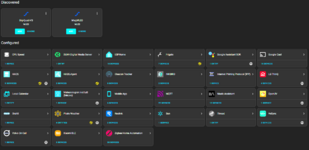
Now I need to look up some of your integrations haha. I have a good amount of devices but most of my integrations are pretty mainstream.

Screenshot 2025-01-05 at 2.10.56 PM.png
 
OP
L

loganb

ALLIANCE MEMBER
Joined
Dec 29, 2011
Messages
5,538
Location
Omaha, NE
Looks like late night sleep challenges may have a new rabbit hole to go down:

nicksfault.jpg

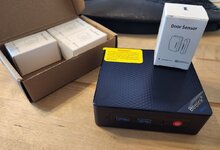
The coordinator/antenna thingy is still in transit but the box is here so I can at least start that learning curve and have lots I can do with bringing over existing Lutron/Kasa switches etc before investigating new things

For those unsure of what this is but confident it's not woodworking or cars and fairly confident it's not 3d printing related...you're right. The base "mini pc" and first sensors for the home automation project
 

nicholam77

Well-known member
Joined
Dec 18, 2016
Messages
2,659
Location
Minneapolis, MN
Nice, that mini PC is overkill (in a good way!). Especially if you install HA bare metal and nothing else.

I see you already found the Third Reality sensors. I have those on my laundry machines and they have been perfect.

Lutron + TP-link is a perfect place to start for adding devices.

Keep in mind once you get the Zigbee coordinator, there can be a bit of an art to a solid Zigbee network. I'd read up on that a bit, but as mentioned some quick points are keep the coordinator in a central location if possible, use a USB extension cable to get some separation from the mini PC, and make sure you have some mains powered "repeater" devices as you get farther away from the coordinator (like smart plugs). Home Assistant has two Zigbee integrations to choose from, ZHA and Zigbee2Mqtt... I can't offer advice on that other than you should maybe read up on the differences. Good luck!
 
OP
L

loganb

ALLIANCE MEMBER
Joined
Dec 29, 2011
Messages
5,538
Location
Omaha, NE
Nice, that mini PC is overkill (in a good way!). Especially if you install HA bare metal and nothing else.

At this point I'm planning to install with Proxmox instead of baremetal install. I don't know what else I may run on it, I don't need a Plex server, but I do have BlueIris running the existing cameras on a desktop so that could move to this new homelab type box. Adblocker would be nice....sure there are other things I can find down the road

So between kids sickness, bunch of other personal **** taking up time and mental bandwidth, work, house, winter duldrums etc.....motivation, time and energy have all been difficult to find. But with 1 kid at a birthday party and the not fully recovered yet one taking a nap, I decided that why not I'd go ahead and start forging ahead on another project when I haven't finished the last half a dozen and have a mountain of work I'm behind on...whatever!

That was quickly sidetracked by a mini PC that won't even boot


Beelink S12 mini PC from Amazon....cleared CMOS, drained batteries, all the tricks online that worked from others....nothing. So back to Amazon it goes via Kohls dropoff and a replacement is ordered of a different brand with fewer online complaints I could find....few more bucks but hopefully it's worth it

So back to maybe working on a project I've already started for the next hour instead of working on the new and shiny....how boring
 
OP
L

loganb

ALLIANCE MEMBER
Joined
Dec 29, 2011
Messages
5,538
Location
Omaha, NE
Home automation, eh? Hmm.

original-34-2658183793.png

"Unlock the refrigerator, HAL." "Sorry Logan....you've had several beers already....I sense your blood/alcohol level rising....locking all vehicles for 4 hours....."

Darn...can't go anywhere this afternoon....shucks lol

Speaking of refrigerator I think my garage one is on the way out....not staying cold....just what I need is another justification in my mind to look at Facebook marketplace
 

slik560

Well-known member
Joined
Oct 5, 2009
Messages
787
Location
Kansas, USA
ONE time I got away with replacing just the cold control in a Kenmore fridge that was in the garage. I doubt if the newer ones allow you to do anything....except buy a new one.
 
To avoid these ads, REGISTER NOW!

iced98lx

ALLIANCE MEMBER
Joined
Oct 28, 2013
Messages
1,066
Location
South Eastern SD
At this point I'm planning to install with Proxmox instead of baremetal install. I don't know what else I may run on it, I don't need a Plex server, but I do have BlueIris running the existing cameras on a desktop so that could move to this new homelab type box. Adblocker would be nice....sure there are other things I can find down the road
Check out all the options before you stick with Proxmox - consider VM vs Containers.

Home assistant does very well on it's own device or VM with HAOS the way it looks. I took the docker container route as I knew I could easily migrate them from host to host and haven't regretted it yet.

HAOS makes installing all sorts of things easy since it is itself essentially a hypervisor.
 

nicholam77

Well-known member
Joined
Dec 18, 2016
Messages
2,659
Location
Minneapolis, MN
@loganb bummer about the mini pc! I’m sure whatever replacement you have coming will be great.

FWIW I’m using a used Lenovo ThinkCentre M73 I got on eBay for $56 shipped. Core i5, 8gb ram, 128gb SSD came with it. For Home Assistant alone it’s been fantastic.

My co-worker did the Proxmox thing. Seems to be a popular route. I just didn’t know what else I would run, am unfamiliar with VMs or docker, and wanted my Home Assistant to be overpowered and future-proofed.

FYI like @iced98lx said you can install “add-ons” in Home Assistant itself. I know very little about the whole docker and/or VM thing, but I assume these are the type of things one might set up in Proxmox or similar. The main add-on I am running is Adguard ad blocker, and all my DNS traffic routes through the Home Assistant machine.
 
OP
L

loganb

ALLIANCE MEMBER
Joined
Dec 29, 2011
Messages
5,538
Location
Omaha, NE
Check out all the options before you stick with Proxmox - consider VM vs Containers.

Home assistant does very well on it's own device or VM with HAOS the way it looks. I took the docker container route as I knew I could easily migrate them from host to host and haven't regretted it yet.

HAOS makes installing all sorts of things easy since it is itself essentially a hypervisor.

@loganb bummer about the mini pc! I’m sure whatever replacement you have coming will be great.

FWIW I’m using a used Lenovo ThinkCentre M73 I got on eBay for $56 shipped. Core i5, 8gb ram, 128gb SSD came with it. For Home Assistant alone it’s been fantastic.

My co-worker did the Proxmox thing. Seems to be a popular route. I just didn’t know what else I would run, am unfamiliar with VMs or docker, and wanted my Home Assistant to be overpowered and future-proofed.

FYI like @iced98lx said you can install “add-ons” in Home Assistant itself. I know very little about the whole docker and/or VM thing, but I assume these are the type of things one might set up in Proxmox or similar. The main add-on I am running is Adguard ad blocker, and all my DNS traffic routes through the Home Assistant machine.


thanks for chiming in and offering feedback guys!

I was planning on Proxmox as migrating the BlueIris camera server to this machine is something I'd like to do down the road and BlueIris has to be run on Windows so a VM is required there. From some web reading most things I found said that it was easier to do in Prox so was going that route which also happens to be the overkill route from everything I've read. The camera requirements aren't that high, long term it's probably only 8 cameras if I get there and most of them with reduced streaming quality and only recording on motion and we don't regularly pull up and review footage(if we're gone or something happens etc)

When I think about it honestly.....the BI server just fine as it is right now so there isn't a pressing need to move it...just be nice to get it off that desktop that is used for other things. But it wouldn't be a top priority and I'd much rather get an adblocker going before I tackle moving BI....after I get some of the automation stuff done....more to think about....
 

iced98lx

ALLIANCE MEMBER
Joined
Oct 28, 2013
Messages
1,066
Location
South Eastern SD
thanks for chiming in and offering feedback guys!

When I think about it honestly.....the BI server just fine as it is right now so there isn't a pressing need to move it...just be nice to get it off that desktop that is used for other things. But it wouldn't be a top priority and I'd much rather get an adblocker going before I tackle moving BI....after I get some of the automation stuff done....more to think about....
Before you commit to something that needs a windows machine... as a former BI licensee... take a look at frigate (https://frigate.video/)

It can run as an "add on" to HAOS, has deep, meaningful integration with HA and will use the built in graphics of an intel chip for AI detection acceleration. I use a USB Coral device, but the GPU driven detection is really taking off, negating the need for a TPU.

I jumped from BI to Synology Surveillance station (completely fine, would continue to use if it had better AI detection etc) and then to Frigate. If I were buying all new hardware right now it'd be a toss up between Frigate and just unifi stuff (Their cameras and DVR have gotten fantastic, including support for 3rd party cams) but no one is net-newing very often.

Anyway, I know a move of a NVR is a lot of extra work you didn't sign up for but might be worth checking it out!

I think I have mentioned in the past, I ended up on TrueNas simply because storage and backup (Plex media included) was one of our primary drivers. The app system in their scale OS resembled a bit the apps available in synology store which I was used to, so it seemed like a fit. I didn't spend much time with proxmox simply because nearly all the NAS OS's I looked at (Truenas Scale, Unraid) had support for VM's and Container execution.

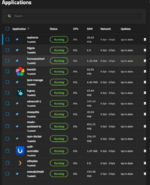
Like anything, upsides and downsides, the K3s implementation of Containers in Truenas scale has been replaced by strait docker, which, is great, but makes migrating for me a PITA. The OS is super stable and there aren't any apps out there that don't have docker instructions for the most part. That said I'm running individual groups of containers for all these things:

1736706118248.png

The ones with icons (immich, logseq, unifi, plex) are "managed" packages by truenas where I don't much with mutch to keep them running, the rest are just container images running in K3s, same as they would be in dockage, portainer etc.

The one thing that really turned me off of VM's was trying to share hardware resources. I do have a NVIDIA gpu in this system being used by frigate, plex and immich, that seemed like it was going to be much harder with VM seperation. That said, if you go one VM for HAOS it all just.... works and you get VM level backup/restore etc.

All that to say, good luck, don't install HAOS bare metal imho, put it in a VM on proxmox if that is how you want to go, or do something specifically meant to deal with containers (portainer, dockage etc).
 
OP
L

loganb

ALLIANCE MEMBER
Joined
Dec 29, 2011
Messages
5,538
Location
Omaha, NE
Before you commit to something that needs a windows machine... as a former BI licensee... take a look at frigate (https://frigate.video/)

It can run as an "add on" to HAOS, has deep, meaningful integration with HA and will use the built in graphics of an intel chip for AI detection acceleration. I use a USB Coral device, but the GPU driven detection is really taking off, negating the need for a TPU.

I jumped from BI to Synology Surveillance station (completely fine, would continue to use if it had better AI detection etc) and then to Frigate. If I were buying all new hardware right now it'd be a toss up between Frigate and just unifi stuff (Their cameras and DVR have gotten fantastic, including support for 3rd party cams) but no one is net-newing very often.

Anyway, I know a move of a NVR is a lot of extra work you didn't sign up for but might be worth checking it out!

I think I have mentioned in the past, I ended up on TrueNas simply because storage and backup (Plex media included) was one of our primary drivers. The app system in their scale OS resembled a bit the apps available in synology store which I was used to, so it seemed like a fit. I didn't spend much time with proxmox simply because nearly all the NAS OS's I looked at (Truenas Scale, Unraid) had support for VM's and Container execution.

Like anything, upsides and downsides, the K3s implementation of Containers in Truenas scale has been replaced by strait docker, which, is great, but makes migrating for me a PITA. The OS is super stable and there aren't any apps out there that don't have docker instructions for the most part. That said I'm running individual groups of containers for all these things:

1736706118248.png

The ones with icons (immich, logseq, unifi, plex) are "managed" packages by truenas where I don't much with mutch to keep them running, the rest are just container images running in K3s, same as they would be in dockage, portainer etc.

The one thing that really turned me off of VM's was trying to share hardware resources. I do have a NVIDIA gpu in this system being used by frigate, plex and immich, that seemed like it was going to be much harder with VM seperation. That said, if you go one VM for HAOS it all just.... works and you get VM level backup/restore etc.

All that to say, good luck, don't install HAOS bare metal imho, put it in a VM on proxmox if that is how you want to go, or do something specifically meant to deal with containers (portainer, dockage etc).

Greatly appreciate the time to post and share all this! Some good things I should be considering!

The comment about just doing cameras in Ubiquiti just opened up another rabbit hole I hadn't considered but really should.

I've already got the Dream Machine Pro which has the NVR hdd bay which is open.....and I only have 2 cameras installed right now...both in kids rooms as none of the exterior ones have gotten put up...mostly due to lack of motivation to run the POE into the soffits etc. Don't have a doorbell camera yet either....again same issue as current doorbell is just wireless and getting juice/data there is a pain. Changing the host/server for the kids camera is pretty painless as they're PoE cameras today, so it's just plug in new and configure and could be running and learning on it pretty quickly while I figure out plan for a broader install.....in my head I'm thinking probably 3 outdoor cameras and a doorbell unit would get me most of what I'd want. I looked at their cameras a couple years ago and wasn't impressed with the pricing, looks like it's come way down as long as I don't want the built in AI integration stuff which for what I'm doing shouldn't matter

However...there are some changes coming here(yes foreshadowing, no details yet) that is going to make some of those cameras more beneficial to have and should be pushed higher up on the growing home project list....hum
 

madison069

Well-known member
Joined
Nov 5, 2010
Messages
4,171
Location
Monroeville, PA
Home automation, something that has crossed my mind, but I put it off due to cost and time.

What is your overall goal with installing the home automation? I know if I was to install a fully automated system in the house, my non-tech wife will be pushed to the edge of a break down. But I have thought about just making the shop automated so I can check on things in the garage without going into the garage.
 
OP
L

loganb

ALLIANCE MEMBER
Joined
Dec 29, 2011
Messages
5,538
Location
Omaha, NE
What is your overall goal with installing the home automation?

This is a stellar question and something I've been thinking about for awhile

I think first off...it's convenience. I'd like to get rid of some of the repetitive/annoyance things that I have to do consistently based on some event or condition happening. I've been trying to make a running document to list out some of the common annoyances/headaches I've been thinking about or just "cool automations" I found elsewhere. Couple initial ones:

Problem: Kitchen is dark and scary from Nov-ish thru March when I go down around 6 or 6:15 to start the morning routine
Current solution: With new smart light switch, a schedule runs that M-F at 6 the kitchen lights come on at 50% brightness, but if I'm away, sick, just plain lazy and buying coffee and don't go down till the kids are ready for breakfast the lights were a waste
Future State Goal: Kitchen lights come on based on motion detected(with a motion sensor that's in the mail) coming down the hallway/stairs and it's within say sunrise + 1 hour or somethin

Benefit with future state is that using that same sensor, I can detect motion and trigger that light or others to come on as required instead of just a fixed time schedule. So lights could come on at a low level automatically in the middle of the night based on motion coming down the stairs regardless of what time it is. Just have to work on sensor placement/setup so that it's triggering when someone is coming down the stairs vs my daughter getting out of bed and going to the bathroom

Garage Lights have a similar problem with when we leave the garage, plan to use motion from either a motion sensor or a security camera to trigger lights to come on/off.

Some others:
Turning on bathroom exhaust fans based on a change in humidity in that room(and then turning it back off)
Speeding up the air purifier/air cleaner on the main floor when either the stove or cooktop turn on is another.
Putting moisture detectors under sinks, at water heater, under dishwasher etc and shutting off water supply when they trigger

One I saw the other day online I filed away in the "cool" list was that if a noisemaker/white noise machine etc in a kids room was on during daytime hours, change the volume on the smart doorbell to a lower level(muted, 30% or whatever one wanted). I'm probably soon to the point where disturbing kids naps isn't as concerning(sad day) but there are probably other instances where a similar type of action is desired.

So it's a variety of things...mostly convenience but there is some peace of mind benefits there down the road if I get some type of water shutoff integration and camera integration. I'm also going to admit there is the "cause it's techy cool gadgets" factor

I do have similar concerns with the rest of the house....the wife is very competent with tech, but she doesn't want to screw with this type of of stuff. She's already the defacto "computer person" in her 15 person office so when she comes home she doesn't want light switches to not work cause I'm screwing with them. She does like the motion sensors and some of the schedules/voice ability now with the newer switches so that's a plus. I've also frequently got inlaws with us, so whatever I do need to be seamless regardless of user and it can't prevent the normal operation of a device etc.
 
OP
L

loganb

ALLIANCE MEMBER
Joined
Dec 29, 2011
Messages
5,538
Location
Omaha, NE
All this automation talk, I'm just happy to have a digital thermostat in the house/shop and steering wheel controls for the stereo in my Tundra :LOL:

I've read 1984, watched the Terminator movies, etc...John Connor would not approve ;)

LOL

Some times a simpler time would be nice....but when they work all the damn gadgets make life easier....as long as they work. The rest of the time I want to throw them out the window :)
 

Boostingaz

Well-known member
Joined
May 21, 2018
Messages
3,685
Location
Indiana
Need any more POE cameras and a 16 channel NVR with a 6TB HD? I've got 8 cameras. Everything is brand new in the box never opened. Sounds like to much work at this point in time. I was more optimistic when I spent $2,100 on it all 🤣. It's this kit with the NVR hard drive upgrades.

71da6ee7-84fd-4ee4-b6da-37f7bf3fc5ca-1_all_14767.jpg
71da6ee7-84fd-4ee4-b6da-37f7bf3fc5ca-1_all_14766.png
 
OP
L

loganb

ALLIANCE MEMBER
Joined
Dec 29, 2011
Messages
5,538
Location
Omaha, NE
Need any more POE cameras and a 16 channel NVR with a 6TB HD? I've got 8 cameras. Everything is brand new in the box never opened. Sounds like to much work at this point in time. I was more optimistic when I spent $2,100 on it all 🤣. It's this kit with the NVR hard drive upgrades.

71da6ee7-84fd-4ee4-b6da-37f7bf3fc5ca-1_all_14767.jpg
71da6ee7-84fd-4ee4-b6da-37f7bf3fc5ca-1_all_14766.png

Ironically this showed up today

20250114_172327.jpg

Going the route of ubiquiti for cameras and hdd got here first. New doorbell camera and a indoor PoE camera to go into garage to learn with shows up later this week. The existing system for kids rooms will run simultaneously while I learn the new system before I kick it over.
 
OP
L

loganb

ALLIANCE MEMBER
Joined
Dec 29, 2011
Messages
5,538
Location
Omaha, NE
8 TB, sheesh! Are you gonna keep your recordings forever?! 🤣

I have a WD Purple in my old Amcrest NVR and I just recently heard it making some suspicious noises. It was set to overwrite recordings and lasted 7-8 yrs probably.

Lol yeah....it's way too big

However manuf recommendation was a 7200 rpm drive and 8tb was the smallest option in their purple series that offered 7200 rpm, all the smaller sizes were 5400 rpm. I expect the 5400 would have been fine for the smaller qty of data and in this situation were hdd failure is an annoyance not a critical event would have saved a few bucks....overkill strikes again
 

Xti04

Well-known member
Joined
Nov 11, 2016
Messages
2,319
Our home automation goes about as far as motion switches for closets and some Kasa switches that echo can turn on. I find it wild all the stuff you guys setup! Full motion turning on and off lights throughout the house would be my ideal setup.
 

Boostingaz

Well-known member
Joined
May 21, 2018
Messages
3,685
Location
Indiana
Lol yeah....it's way too big

However manuf recommendation was a 7200 rpm drive and 8tb was the smallest option in their purple series that offered 7200 rpm, all the smaller sizes were 5400 rpm. I expect the 5400 would have been fine for the smaller qty of data and in this situation were hdd failure is an annoyance not a critical event would have saved a few bucks....overkill strikes again

I think when I ordered mine the company quoted me that 6TB would store about 40-45 days before it would start to auto rewrite from oldest to newest. I felt that was enough time to "notice" and review/find even an odd ball issue and or watch long vacations worth of shenanigans by the neighbors (best friends) as there is no telling what he would do. I would likely have a HD full of daily full moons if you catch my drift haha.
 

RickP

Well-known member
Joined
Jan 15, 2013
Messages
1,549
Location
Annapolis, MD
I do have similar concerns with the rest of the house....the wife is very competent with tech, but she doesn't want to screw with this type of of stuff. She's already the defacto "computer person" in her 15 person office so when she comes home she doesn't want light switches to not work cause I'm screwing with them. She does like the motion sensors and some of the schedules/voice ability now with the newer switches so that's a plus.
This was the main driver for our smart lights -- my wife likes the automation, but doesn't want to think about it. So we just keep it simple: several schedules for lights on/off, and then multiple lights tied to one switch for outdoor lighting.

I'd like to do some more automation, especially in my workshop, so I'm watching what you do for ideas.
 

nicholam77

Well-known member
Joined
Dec 18, 2016
Messages
2,659
Location
Minneapolis, MN
Home automation, something that has crossed my mind, but I put it off due to cost and time.

What is your overall goal with installing the home automation? I know if I was to install a fully automated system in the house, my non-tech wife will be pushed to the edge of a break down. But I have thought about just making the shop automated so I can check on things in the garage without going into the garage.

I think Logan gave you a great answer but wanted to chime in two things since I've been meddling in this stuff for ~ 8 yrs:

1/ You're right about cost and time

2/ If done well, you're wife (or anyone) shouldn't have a breakdown

Having a few smart bulbs and an Alexa ≠ fully automated. And automation is a key concept for smart homes to not be a PITA. Automations... happen in the background. As long as they are reasonably constructed and agreed upon by your wife / parter / family / significant other, they shouldn't have to think about it whatsoever... they just reap the benefits. Second, is always, always have a physical control, so anyone can interact with the device. This goes for lights and thermostats especially, but really anything that is important should also be able to be controlled without an app, without voice, in the normal 'dumb' way.

I have a non-techy wife and a 3 yr old and 6 yr old. The kids don't even know the 'smart home' layer exists. My wife is quick to complain when something isn't working, and refuses to use any sort of app or voice control. But she has come to appreciate, and even rely on, many of the conveniences and automations I have set up (which is around 100!). Also, guests don't need to know anything when they are present.

Another great way to get someone on board is to ask what they would like to be automated.

Making it all work smoothly goes back to point #1.

I'll also add that you don't need to go all in. Even automating one or two lights can be beneficial. I have a Lutron occupancy light switch in my laundry room (essentially a dumb motion switch) on a 5min timeout, and it's one of our best implements.

🍻

Just have to work on sensor placement/setup so that it's triggering when someone is coming down the stairs vs my daughter getting out of bed and going to the bathroom


I would place the motion sensor in the room to be triggered (the kitchen) if possible vs. the stairs. I don't know you're exact layout, though.

If you do run into a tough scenario, you could look at some of the new mmWave sensors that can define multiple zones similar to a security camera. They are more $$$, but can do some magical things compared to a regular PIR motion sensor, such as instead of turning on the office lights when you walk in the room, you could have your desk lamp turn on when you sit at your desk. More specificity.
 

madison069

Well-known member
Joined
Nov 5, 2010
Messages
4,171
Location
Monroeville, PA
Currently, I have a couple of motion sensor lights switches in the current home and an automated thermostat in the other house.

My goal with the other house to add a newer thermostat, motion light, humidity regulators in the bathrooms, and possibly sensors for windows and doors more for me being hard of hearing, and cameras. Then in the garage I would want door sensors, door locks, garage door control, air compressor on/off setup, lights, thermostat, cameras, and maybe humidity regulator depending on how I can remove the moisture in the garage.

I wouldn't think the system would have to be complicated but I'm not up and up on what's out there currently.

So, I'll be watching your thread Loganb to see how your setup goes and what you are going through. :giggle:
 
To avoid these ads, REGISTER NOW!
Top Bottom