
You are using an out of date browser. It may not display this or other websites correctly.
You should upgrade or use an alternative browser.
You should upgrade or use an alternative browser.
Above 1200 Sq/FT Eastern Washington Workshop
- Thread starter slodat
- Start date
Wokspaces above 1200 squarefeet.
Jayman17
Well-known member
For now!!Also, I control the electricity!

rmack898
Well-known member
Are you sure?Also, I control the electricity!
Open the pod bay door HAL
RickP
Well-known member
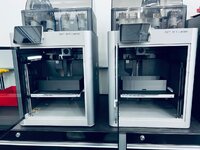
The new printers look like they're doing well, cranking out ABS parts quickly.
After you've caught up on filling new orders, have you considered printing some field replaceable trays for any of the original orders that used PLA?
After you've caught up on filling new orders, have you considered printing some field replaceable trays for any of the original orders that used PLA?
The PLA parts have been replaced with ABS. I was making them out of PETG prior to the X1C’s arrival in the shop. Thankfully it wasn’t a big deal to take care of.
Haas Tooling has a big sale going. Some really good deals. I was able to pick up a few nice to have things.

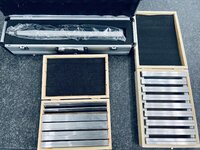
Top is a CAT40 test bar. It was about $75. Parallels were around $85 for both sets.
As I was tidying up the shop yesterday I had some fun with tge XL. The dry erase board markers are magnetic. The magnets don’t like to stay attached to the magnets. A few minutes in Fusion, some time on the printer..
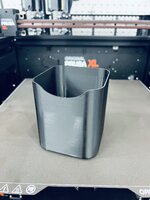
A little double sided tape..
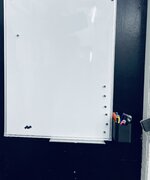

Minor annoyance, and fun little project.
Haas Tooling has a big sale going. Some really good deals. I was able to pick up a few nice to have things.
Top is a CAT40 test bar. It was about $75. Parallels were around $85 for both sets.
As I was tidying up the shop yesterday I had some fun with tge XL. The dry erase board markers are magnetic. The magnets don’t like to stay attached to the magnets. A few minutes in Fusion, some time on the printer..
A little double sided tape..
Minor annoyance, and fun little project.
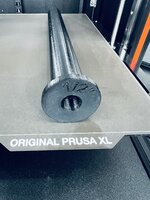
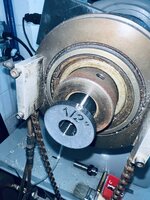
Printed this 11” long version of the spindle liner for the CNC Accuslide lathe on the XL. The bed adhesion even after the bed had cooked was quite impressive. Filament is Prusament PETG that’s been open for almost four years. No doubt my high desert climate helped the filament.

Picked up a full load of material yesterday.

Getting close to the capacity of the F150. Doesn’t look like much in the photo. Two sheets of 11ga HRPO, a sheet of GPO3, and sixteen sticks of material all cut in half. That 4” bar of 6061 is kinda heavy!
Picked up a full load of material yesterday.
Getting close to the capacity of the F150. Doesn’t look like much in the photo. Two sheets of 11ga HRPO, a sheet of GPO3, and sixteen sticks of material all cut in half. That 4” bar of 6061 is kinda heavy!
Last edited:
Finallygotit
ALLIANCE MEMBER
Does the material supplier charge too much to deliver? I think that having them deliver might be cheaper than an F250. That is unless they don't deliver to your neck of the woods.

Dan - great question. When I was at the aluminum supplier I asked the same question, because I was wondering. I had already asked the steel and plastics distributors about delivery. I went to three suppliers yesterday. The steel supplier charges $360, aluminum supplier uses a courier service that charges $30/100# ($30 x 15 = $450), and the GPO3 would have cost almost $1000 according to them to LTL the 4' x 8' sheet. It will be quite a while before it makes financial sense to have these materials delivered. I was also able to take care of some other client related work while in town.Does the material supplier charge too much to deliver? I think that having them deliver might be cheaper than an F250. That is unless they don't deliver to your neck of the woods.
Quick google search shows the F250 is only good for another 900 or so pounds in the bed. And, I was wrong about the F150 only being good for one ton in the bed. It's over 3000 pounds. I've got room to go!
Unexpected, awesome upgrade came along. Sold the Einscan HX for a great price and was fortunate enough to be able to get the new Shining 3D Freescan Combo scanner. It's a metrology grade 3D scanner with some incredible new capabilities. Namely, it can scan deep into a hole, and has impressive inspection capabilities. It is also a lot faster because it has more laser lines doing the work. The HX went to a friend that's really excited to put it to work on his projects. I have a big reverse engineering project this coming week where I'll put the new scanner to work.
In preparing for this project, I decided to make the pentagon (ish) markers I've had in my head for a long while. Last year when I got the scanner I downloaded an .stl of a similar six sided marker. I wanted it to be five sided, and a pocket for a magnet. A few minutes in Fusion...

Quick test print on the X1C.


I went through a few iterations before I settled on this one. Told the Bambu slicer to fill the plate with copies.

Both printers are running a full plate. Five hours about $5 in ABS filament later and I'll have 102 of them.
These are really handy. They are easily removed (vs sticking markers directly to what's being scanned), they dramatically increase the number of markers (more markers mean the scanner doesn't lose tracking as much or at all), and they can be used on things that are magnetic, or not by just setting them in/on/around the scan specimen.
In preparing for this project, I decided to make the pentagon (ish) markers I've had in my head for a long while. Last year when I got the scanner I downloaded an .stl of a similar six sided marker. I wanted it to be five sided, and a pocket for a magnet. A few minutes in Fusion...
Quick test print on the X1C.
I went through a few iterations before I settled on this one. Told the Bambu slicer to fill the plate with copies.
Both printers are running a full plate. Five hours about $5 in ABS filament later and I'll have 102 of them.
These are really handy. They are easily removed (vs sticking markers directly to what's being scanned), they dramatically increase the number of markers (more markers mean the scanner doesn't lose tracking as much or at all), and they can be used on things that are magnetic, or not by just setting them in/on/around the scan specimen.
Last edited:
Finallygotit
ALLIANCE MEMBER
Nice!!
I've been posting some of the more detailed reverse engineering stuff in the Modern/Digital Fabrication thread. I'm never sure if I should cross post or not.. what say ye?
rmack898
Well-known member
By all means go ahead and cross post
Finallygotit
ALLIANCE MEMBER
Cross post!! Please
cycle61
Well-known member
+3 cross post plz
This is a satisfying photo:
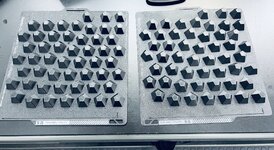

The XL did a great job on these.
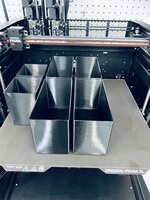
End result:

Still a lot of time to get all the magnets pressed in and the markers on six sides.
I’ve been working on some sheet metal parts the last few days. This photo sums up a big part of this work:
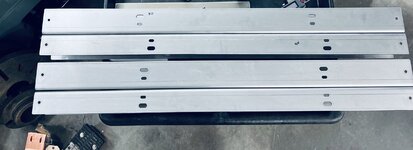
Thankfully I haven’t made this kind of mistake too often. It’s always a trick when the engineer that makes the shop drawing uses different datums. Keeps me sharp I suppose.
The XL did a great job on these.
End result:
Still a lot of time to get all the magnets pressed in and the markers on six sides.
I’ve been working on some sheet metal parts the last few days. This photo sums up a big part of this work:
Thankfully I haven’t made this kind of mistake too often. It’s always a trick when the engineer that makes the shop drawing uses different datums. Keeps me sharp I suppose.
RickP
Well-known member
Markers and bins look good -- you're keeping those printers busy and they appear to be earning their keep!
Bummer about the drawing datums. After you fix the CNC code, I hope the replacement parts will be pretty easy to crank out.
Bummer about the drawing datums. After you fix the CNC code, I hope the replacement parts will be pretty easy to crank out.
MadeByMiller
Well-known member
The magnetic markers are a great idea! I just used some of those sticker markers yesterday on a small part and they were surprisingly annoying to remove when I was done.
macgyver37
Well-known member
Thankfully I haven’t made this kind of mistake too often. It’s always a trick when the engineer that makes the shop drawing uses different datums. Keeps me sharp I suppose.
I make alot of parts for a customer where I will get 10+ drawings that all look identical but with different dimensions, then he will throw 1 in there that is the same type of part but the print looks totally different with different origins and with dimensions called out differently, like hole to hole vs all from one end, etc. Sometimes even a different tolerance level. Not a big deal until I am in a hurry and trying to keep it all straight. I have good customers and things go well most of the time, but there are sometimes where I think they could help themselves out by maintaining consistency of info.
At the client's shop doing some reverse engineering with the new Shining 3D Freescan Combo. The new scanner is really nice. It has three laser modes: 26 line laser, 7 line laser HD, and single line laser. The single line is how it gets into deep bores and features. The first step is placing and scanning the markers. The marker file is then used in the laser scan mode. The markers:

The scan (you can see the three modes on the left):
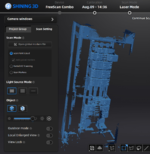
The scan is meshed and then opened in Quick Surface (QS):
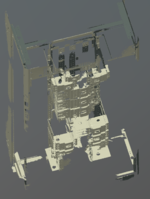
This is what we are working on:

We'll focus on the corner post in the left of that image:
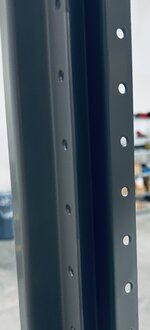
Similar to last time I posted about this, the mesh is cut with a plane, and the mesh data is used as reference data on that plane to create a sketch:

The white dots are the scan data, the blue is the sketch. I just trace over the scan data using the tools in the sketch screen. I used a caliper to measure the material thickness. It's bang on 2mm. The offset tool is used to offset the outer lines, close the ends and we have the above sketch. The sketch is then extruded.

This is the extrusion with everything else hidden. Here the modeled corner post is with the reference sketch visible:

This alone is really powerful. To me, the REAL impact is the comparison tool.
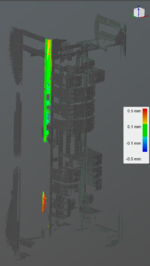
This shows a heat map comparing the new solid body to the scan data. All that green at the top means we have a good model. It's within 0.1mm of the scan data. I didn't spend the time or energy to scan the whole post. I got the outside profile, and that's enough because it's a straight extrusion of that profile, at the material's thickness.
The scan (you can see the three modes on the left):
The scan is meshed and then opened in Quick Surface (QS):
This is what we are working on:
We'll focus on the corner post in the left of that image:
Similar to last time I posted about this, the mesh is cut with a plane, and the mesh data is used as reference data on that plane to create a sketch:
The white dots are the scan data, the blue is the sketch. I just trace over the scan data using the tools in the sketch screen. I used a caliper to measure the material thickness. It's bang on 2mm. The offset tool is used to offset the outer lines, close the ends and we have the above sketch. The sketch is then extruded.
This is the extrusion with everything else hidden. Here the modeled corner post is with the reference sketch visible:
This alone is really powerful. To me, the REAL impact is the comparison tool.
This shows a heat map comparing the new solid body to the scan data. All that green at the top means we have a good model. It's within 0.1mm of the scan data. I didn't spend the time or energy to scan the whole post. I got the outside profile, and that's enough because it's a straight extrusion of that profile, at the material's thickness.
Last edited:
At the client's shop doing some reverse engineering with the new Shining 3D Freescan Combo. The new scanner is really nice. It has three laser modes: 26 line laser, 7 line laser HD, and single line laser. The single line is how it gets into deep bores and features. The first step is placing and scanning the markers. The marker file is then used in the laser scan mode. The markers:
View attachment 1934442
The scan (you can see the three modes on the left):
The scan is meshed and then opened in Quick Surface (QS):
This is what we are working on:
We'll focus on the corner post in the left of that image:
Similar to last time I posted about this, the mesh is cut with a plane, and the mesh data is used as reference data on that plane to create a sketch:
The white dots are the scan data, the blue is the sketch. I just trace over the scan data using the tools in the sketch screen. I used a caliper to measure the material thickness. It's bang on 2mm. The offset tool is used to offset the outer lines, close the ends and we have the above sketch. The sketch is then extruded.
This is the extrusion with everything else hidden. Here the modeled corner post is with the reference sketch visible:
This alone is really powerful. To me, the REAL impact is the comparison tool.
This shows a heat map comparing the new solid body to the scan data. All that green at the top means we have a good model. It's within 0.1mm of the scan data. I didn't spend the time or energy to scan the whole post. I got the outside profile, and that's enough because it's a straight extrusion of that profile, at the material's thickness.
I have to say, it has been a pleasure following your journey, from the start, to where we are at right now. I am just a bit jealous, as I wish I could attack new projects and talents like you have! Thanks for sharing with us! Lots of hard work in this path you have shown us. Thanks again!
Thank you for the kind words of encouragement. I continue to be drawn to the GJ community. I really appreciate and enjoy the conversations, and all the things I’ve learned here. Again, thank you for following a long and contributing to the conversation!I have to say, it has been a pleasure following your journey, from the start, to where we are at right now. I am just a bit jealous, as I wish I could attack new projects and talents like you have! Thanks for sharing with us! Lots of hard work in this path you have shown us. Thanks again!
Full disclosure: this project was thrown at me, and I don’t really know what I’m doing. I’m absolutely learning as I go. I love it!
Finallygotit
ALLIANCE MEMBER
Steven, I am amazed at what today's scanning technology can pick up. Nice work as always! And I will be following along as always.
Austin- I avoid using the sticker markers directly whenever I can. They are a huge pain in the ***. The magnets are great. I use the inexpensive, not very strong tape/craft style magnets. Not the rare earth. I buy 200 1/2" dot magnets for about $10 on Amazon. I have 200 made up and I ordered another 600. It takes a LOT of markers to scan large objects.The magnetic markers are a great idea! I just used some of those sticker markers yesterday on a small part and they were surprisingly annoying to remove when I was done.
The "pentagon" 3d printed markers are even better. They take a while to assemble with the pressed in magnet and six markers to apply. They REALLY help because they get markers out in 3d space. The laser scanners have to have enough (4) markers visible to maintain tracking. I'm really happy with the design I came up with. The new scanner works with Einscan's 3mm and 6mm markers. I'm going to make a much smaller pentagon style for the 3mm markers as well. As crazy as it sounds, I have about 100 of the 6mm pentagons, and 200 flat magnet markers in the gear I'm scanning and it's not enough. I'm going to make up the other 100 of the pentagons tonight in hopes it speeds things up tomorrow. Losing tracking wastes quite a bit of time while scanning.
That's exactly what I was dealing with last weekend. It will definitely keep you on your toes when reading drawings. The time waste is the hard part for me. I don't sweat a little bit of material waste. I recently scrapped what would be about 4 sheets of material because of a dumb datum reading error. That hurts a little more. Agree 100% with you that the customer (their 3rd party engineer in my case) could really help themselves (and the process) by being consistent with this stuff.I make alot of parts for a customer where I will get 10+ drawings that all look identical but with different dimensions, then he will throw 1 in there that is the same type of part but the print looks totally different with different origins and with dimensions called out differently, like hole to hole vs all from one end, etc. Sometimes even a different tolerance level. Not a big deal until I am in a hurry and trying to keep it all straight. I have good customers and things go well most of the time, but there are sometimes where I think they could help themselves out by maintaining consistency of info.
Dan- the scanner technology is absolutely amazing! Learning how to do it is some of the most difficult learning I've done in a long while. As I start to get the hang of it... I'm hooked! SO much fun.Steven, I am amazed at what today's scanning technology can pick up. Nice work as always! And I will be following along as always.
More scanning today. To give an idea of why I bought a really powerful computer for scanning.. this is the resource monitor for processing the markers only:
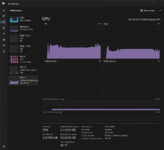
Generating point cloud data. This scan is about 15% of the overall specimen.
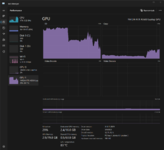
Aligning two scans:

The resulting aligned scans:

Generating point cloud data. This scan is about 15% of the overall specimen.
Aligning two scans:
The resulting aligned scans:
GeddyT
Well-known member
Yeah, but can it run Crysis?...
GeddyT
Well-known member
What is that?
Sorry, I was just conducting an experiment to see how many nerds are on Garage Journal. It's a PC gaming meme that dates all the way back to 2007. I probably can't explain it better than knowyourmemes.com.
I saw the kind of GPU horsepower required to pull off your scans, thought of this old meme, had a chuckle, and wondered if anyone else would chuckle too.
Bob Heine
ALLIANCE MEMBER
Steven, I missed that train as well. It certainly should have clicked for me, working at IBM on OS/2 software documentation. One of my departments helped video game companies get their games to run on OS/2. Spent a good part of my 4 years at America Online documenting the API for game companies so they could develop multi-player online games. As a consultant I had to have multiple PCs at home that would run Windows 3.1, Windows 95 and a Mac running the current Mac-OS. My laptop was running OS/2 so I spent a whole lot of time keeping all of them updated and running. Last thing on my mind was building a PC powerful enough to run games.Games never clicked for me.
Lots of great stuff going on in the shop. One of the things I offer my client is taking care of the fastener bill of materials. I hand counted a bunch of small washers and that quickly became the last time I wanted to do that! Enter this guy:
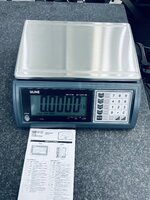
It's a counting scale and it works great! Takes no time to accurately put the order together, and eliminates waste. The final piece to the hardware puzzle arrives tomorrow: a nice label printer to label each bag with all the pertinent info. Things will go out looking professional, and square away. Just the way I like it.
Because I have this hardware thing, I wanted some bins that have a slot for the same labels. At this point you know what's next:
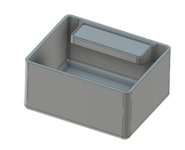
A few minor iterations and we have this:

Once I know the labels fit correctly, I'll make up enough to organize the hardware I have on hand.
A client has me assembling job site trailers for his company. Pretty fun project, and should be able to turn them around quickly. Definitely not wanting to get into the trailer upfitting business. But, these are for a good customer and it all makes sense. The first trailer:

It's really nice. All aluminum with some nice features and upgrades. More to follow on the trailer.
Update on the used Hurco I talked about a while back. I decided to pass on it. It's a huge machine, and if it was reliable it would have been a great addition to the shop. I didn't want to go through the work and cost of getting it here and then have a project or worse. I'll be fine with the mills I have for quite a while.
It's not all bad though. While it's still early in the conversation, there is a conversation about adding this guy to the shop:

12kW 5' x 10' fiber laser. It's all a dream at this point, but it's too fun to daydream about it and not share! This particular "space saver" machine's enclosure collapses back to expose the table for loading and unloading like this:

Time will tell. It's really exciting just talking about it at this point!
It's a counting scale and it works great! Takes no time to accurately put the order together, and eliminates waste. The final piece to the hardware puzzle arrives tomorrow: a nice label printer to label each bag with all the pertinent info. Things will go out looking professional, and square away. Just the way I like it.
Because I have this hardware thing, I wanted some bins that have a slot for the same labels. At this point you know what's next:
A few minor iterations and we have this:
Once I know the labels fit correctly, I'll make up enough to organize the hardware I have on hand.
A client has me assembling job site trailers for his company. Pretty fun project, and should be able to turn them around quickly. Definitely not wanting to get into the trailer upfitting business. But, these are for a good customer and it all makes sense. The first trailer:
It's really nice. All aluminum with some nice features and upgrades. More to follow on the trailer.
Update on the used Hurco I talked about a while back. I decided to pass on it. It's a huge machine, and if it was reliable it would have been a great addition to the shop. I didn't want to go through the work and cost of getting it here and then have a project or worse. I'll be fine with the mills I have for quite a while.
It's not all bad though. While it's still early in the conversation, there is a conversation about adding this guy to the shop:
12kW 5' x 10' fiber laser. It's all a dream at this point, but it's too fun to daydream about it and not share! This particular "space saver" machine's enclosure collapses back to expose the table for loading and unloading like this:
Time will tell. It's really exciting just talking about it at this point!
GeddyT
Well-known member
"Space Saver!" I just laughed hard enough that it hurt my hamstrings, so you owe me... That's a space filler of the awesome variety. And I don't know why you would think a Hurco would be a project. Never heard of that. Since an hour ago.
Did you have print supports for the overhanging label tray on that bin?
Did you have print supports for the overhanging label tray on that bin?
Compared to pretty much any other machine in its class, it’s small at 9’ x 20’.
I have never used supports and I didn’t on this one. It’s a little fuzzy on the bottom side but it doesn’t detract from the appearance at all.
The Hurco I was looking at had the same issue yours does and I know I don’t have the bandwidth to repair it.
I have never used supports and I didn’t on this one. It’s a little fuzzy on the bottom side but it doesn’t detract from the appearance at all.
The Hurco I was looking at had the same issue yours does and I know I don’t have the bandwidth to repair it.
GeddyT
Well-known member
The Hurco I was looking at had the same issue yours does and I know I don’t have the bandwidth to repair it.
Tell me about it. I'm on day two of trying to get the cabinet lights working. Way bigger project than anticipated.
That print is pretty amazing for not using any supports.
ptt49er
Well-known member
A CNC laser would be an awesome addition! They are incredible tools!
The mydpi.com label printer arrived today. It comes with a license of their Label Live software. The software has a nice data import from .csv feature that is really slick. All in all this is a nice solution. Many years ago in a former (professional) life I developed a point of sale system. That involved a lot of fiddling with these thermal printers. I’m really impressed with this setup.
I’ve been sourcing fasteners from McMaster while I get a feel for what I need to have on hand. It took little effort to include their part number on the labels. I was able to use the same .csv for the bin labels.

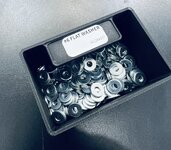
I updated the bins to the size of the labels. I had them too wide for some reason.
This is what the packaged hardware looks like:


The workflow is really quick and I'm confident things are right.
I’ve been sourcing fasteners from McMaster while I get a feel for what I need to have on hand. It took little effort to include their part number on the labels. I was able to use the same .csv for the bin labels.
I updated the bins to the size of the labels. I had them too wide for some reason.
This is what the packaged hardware looks like:
The workflow is really quick and I'm confident things are right.
Last edited: