I'm not sure if you mentioned what speed you are trying to print at, or what speed you previously printed at but you will likely need more heat to print at 160mm/min versus 50mm/min if that's the case. You are pushing over 3x as much filament through the hotend as you did before...
The stringing is really rough there and is negating really any ability to read those completely accurately. Was your machine stringy before the extruder change? For what its worth I've put a ton of the cheapo amazon red metal extruders on a bunch of printers. They are cheap, and a little rough around the edges but for the speed capability of a bed slinger they seem to be fine.
Hello everyone, I just set up my first printer and I'm starting the setup of a laptop to use with it. I dont have a clue of what I'm doing but I want to learn, and several people have said this is the thread to watch and learn from, so I'm here and have been reading everything, I have an Ender3 and I'm going to install fusion 360 on the laptop, Jim.
Been watching this thread for a while, i have an Ender3 i haven't setup yet. I'm a very experienced CAD guy, using Creo daily. Does anyone have any experience using Octoprint or equivalent? I'm not going to do the sd card shuffle. I picked up a few old HP thin clients i want to deploy one of them for remote control. I have no experience on the slicing and printer side of things, but general knowledge of cnc i do have.
Welcome to the Madness Jim.Hello everyone, I just set up my first printer and I'm starting the setup of a laptop to use with it. I dont have a clue of what I'm doing but I want to learn, and several people have said this is the thread to watch and learn from, so I'm here and have been reading everything, I have an Ender3 and I'm going to install fusion 360 on the laptop, Jim.

How big are you talking? I may have some pictures somewhere, I have printed some RC models for some local guys.Grandson has his eye on a larger RC truck, anyone printing parts?
Actually, I’d done a test cube when I’d first set up the printer.I like these for calibration on my Creality CR-6 SE. https://www.thingiverse.com/thing:1278865
Try printing one really slowly, they only take 10 minutes or so.


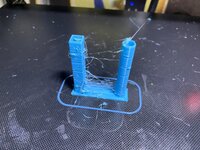
Next to the one I printed before I added the new extruder…
I use that same red one, no issues. Perhaps your cooling fan is cooling your nozzle too much and that's why you had no clicking....are you running a silicone cover?Actually, I’d done a test cube when I’d first set up the printer.
This was the result, that looked good to me…
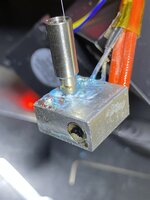
So, after messing with the this extrusion issue for hours, I decided to swap the Red unit, for the Silver “Official Creality All Metal” extruder, that just arrived.
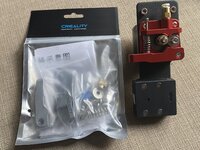
I wasted a no time fitting it…
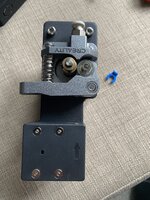
And the results were obvious…. Visually and audibly. No clicking, just prints.
Here is the Cube I just printed.
Next to the one I printed before I added the new extruder…
I don’t think it’s perfect, and I would welcome input.
Edit:
Ah, Looks like the part cooling fan was not switched on...
So clearly there is/was something wrong with the Red Version… I don’t know what it is, but the results speak for themselves.
I will be returning it.
Buyer beware.
I will run that same flow tower, and post results.


Yes, running a sock.I use that same red one, no issues. Perhaps your cooling fan is cooling your nozzle too much and that's why you had no clicking....are you running a silicone cover?

1/10th scaleHow big are you talking? I may have some pictures somewhere, I have printed some RC models for some local guys.
Are you looking for shells? I can do up to 13ish inches, depending on orientation of things. Anything else should be no problem to print.1/10th scale
Yup, that's one of the features I really like. It self inspects and makes adjustments on the fly.
It prompted to install updates on the first power up. It's running the latest stuff. I'm very impressed with it so far. I need to get it dialed in running Overture PETG and I'll be quite happy with it.Yup, that's one of the features I really like. It self inspects and makes adjustments on the fly.
If you haven't already have the printer check for updates. There was one that came out mid Decmeber so your's may not be running it.
Are you looking for shells? I can do up to 13ish inches, depending on orientation of things. Anything else should be no problem to print.
Not body shells, wondering about suspension parts. I have the complete parts breakdown but haven't looked at prices.
Maybe post some screen shots of your slicer settingsThat Bambu printer looks gorgeous.
What do they cost?
Yes, running a sock.
That cube looked ok, So I decided to try a print I’ve been waiting to print for a while.
Makita battery charger wall mount.
Set it off about 5pm last night.
I checked it, and it seemed to be going ok, there was no clicking from the extruder, but I did notice some brown patches and little stringy bits of the blue Meta PLA that looked burnt as it laid down the base.
But when I got up this morning, it was finished printing, and this is what greeted me…
I guess I’m at a loss at this point.
I will check my extruder calibration again this morning, and report back.
Maybe I messed something up in Cura….
Edit:
I didn’t spot til just now that it looks like there was a X shift too. Weird.
Anyones you have adjustedWhich ones?
Oh, ok. I think mine did an update as well after connecting to the WiFi but couldn't remember. Funny you say that about the PETG because since the last update it seems ABS and TPU print fine with the default setting but the PETG I have doesn't seem as happy with the default settings. Since I had ABS in the same color I just switched to it after the first small part acted up.It prompted to install updates on the first power up. It's running the latest stuff. I'm very impressed with it so far. I need to get it dialed in running Overture PETG and I'll be quite happy with it.
The AMS screwed up when a roll of filament ran out. I had to disconnect a few PTFE tube connections to remove the filament. Not a big deal and it didn't scrap the in progress print. Hopefully the run out piece is reliable.
Awesome! Hopefully you have as much good luck as slodat and I have with it.My Bambu arrived on Thursday, very impressed so far although I have had limited time to play due to business commitments. I hope to start catching up here next week…
It took me considerable trial and error to get results i could live with running PETG in the Prusa. The only real trouble I’m having with it in the X1 is the 5% gyroid infill. It’s.. soft. I don’t know how else to describe it.Oh, ok. I think mine did an update as well after connecting to the WiFi but couldn't remember. Funny you say that about the PETG because since the last update it seems ABS and TPU print fine with the default setting but the PETG I have doesn't seem as happy with the default settings. Since I had ABS in the same color I just switched to it after the first small part acted up.
Interesting about the PTFE tube. I ran out once in a print as well, I think it did have to tell the AMS to unload the filament and pulled it out after disconnecting the PTFE tube that goes from the AMS to the printer.
I think I mentioned it before but head the warnings on the FAQ and don't trying to print TPU through the AMS. Trust me, don't do it... I got lucky and was able to get it out without issue but others had to take the AMS apart to get all the filament out.
Agree! Your posts are why I bought the X1.Awesome! Hopefully you have as much good luck as slodat and I have with it.
I should have gotten a referral fee or something LOL
Anyones you have adjusted


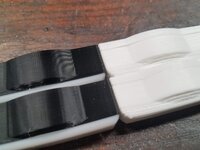
You may need to adjust settings for the new brand of filament, or you may need to dry the filamentSo I spent a couple days scratching my head with some really bad lamination quality on a set of parts. These are replacement slider bushings for the seats on my boat which are no longer available from Grady White. I made myself a set about 3 weeks ago which printed flawlessly with the PLA filament that was included with my Ender3 Max Neo. They fit "good enough" but I wanted to make a few minor refinements before offering sets up to others who need these parts.
I finally realized that my issues started when I switched over to a fresh spool of filament because the original spool didn't have enough left. I switched back to the remainder of the original filament, printed about the first 20% of it, then loaded up a spool of black PLA that I had been using for everything else. Boom - perfect prints again.
The white spool of Overture PLA was brand new in a vacuum sealed container. Did I just somehow get a bad spool of filament? The all white parts have some terrible delamination with laminations literally separating if I gripped them about as firmly as I'd hold a pencil. The white/black hybrid parts started off with a different spool of white PLA and then changed to black. These parts are the quality I'm used to. Both printed with the exact same gcode file.
Same brand, purchased and opened at the same time and stored right next to each other. I'll play around with temps a bit to see if I can't get that spool working rightYou may need to adjust settings for the new brand of filament, or you may need to dry the filament