To avoid these ads, REGISTER NOW!

The Everything 3D Printer Thread

To avoid these ads, REGISTER NOW!

kppolich

Well-known member
Joined
Apr 7, 2020
Messages
344
Location
Eastern Iowa
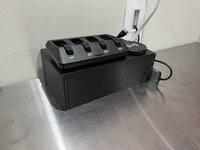
On the printer today for the better part of 7 hours will be a new charging station for my cycling workshop in our basement.
The old one was from Sharper Image and didn't really fit my needs anymore with its size, shape, or general device storage when thing are charing or not in use.

So I started with a box and lid I grabbed off of Printables and customized it to my dimensions to hold the power strip in the orientation I wanted and customized the lid for the cleanest cable routing I could come up with for the (4) USB's that will come out of the top.

The main things that will be plugged in on top are:
1.) My SRAM AXS 4 Port battery charger for cycling derailleurs, uses a USB-C
2.) (3) USB charging cords for cycling light and Garmin computer charging
3.) One small wireless charging pad

On the inside is a small power strip with 3 USB ports and 2 120A outlets where I have an Anker USB-c plug for charing my MacBook.
On the side I will use a command strip to mount my USB-C dongle like I do today that runs to a few TV's I use for indoor cycling training via HDMI and also has USB-C charging.

On the back I'm leaving 2 larger (1-1/2") holes to run power cables into as I'm not 100% set on where it will ultimately live on the workbench.

-KP
 

Attachments

  • 73047888457__D4EE0F73-98AA-4328-AFCD-17540DA554F3.jpeg
    73047888457__D4EE0F73-98AA-4328-AFCD-17540DA554F3.jpeg
    671.4 KB · Views: 113
  • IMG_9994.jpeg
    IMG_9994.jpeg
    671.6 KB · Views: 82
  • 73047873303__688519D3-B53B-4351-B3B9-152F93D5BEA9.jpeg
    73047873303__688519D3-B53B-4351-B3B9-152F93D5BEA9.jpeg
    597.9 KB · Views: 57
  • Screenshot 2024-02-24 at 8.44.23 AM.png
    Screenshot 2024-02-24 at 8.44.23 AM.png
    356.7 KB · Views: 60

jeepxj

Well-known member
Joined
Mar 2, 2008
Messages
17,831
That *****!
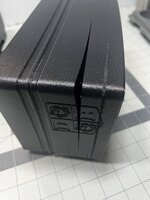
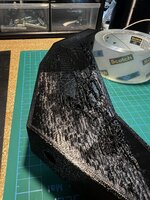
The little bit of testing I've done, keep the enclosure as warm as possible and make sure the filament is good and dry. The end result still seems to be on the brittle side, may have to try some more nozzle temp.

pre heated the P1S at 100c bed time for 15 minutes prior to print. it was over a 1 day print tho. so that time just is too much i think.


printed fine on PETG.
 

cycle61

Well-known member
Joined
Apr 5, 2020
Messages
500
Location
Middle of Oregon
On the printer today for the better part of 7 hours will be a new charging station for my cycling workshop in our basement.
The old one was from Sharper Image and didn't really fit my needs anymore with its size, shape, or general device storage when thing are charing or not in use.

So I started with a box and lid I grabbed off of Printables and customized it to my dimensions to hold the power strip in the orientation I wanted and customized the lid for the cleanest cable routing I could come up with for the (4) USB's that will come out of the top.

The main things that will be plugged in on top are:
1.) My SRAM AXS 4 Port battery charger for cycling derailleurs, uses a USB-C
2.) (3) USB charging cords for cycling light and Garmin computer charging
3.) One small wireless charging pad

On the inside is a small power strip with 3 USB ports and 2 120A outlets where I have an Anker USB-c plug for charing my MacBook.
On the side I will use a command strip to mount my USB-C dongle like I do today that runs to a few TV's I use for indoor cycling training via HDMI and also has USB-C charging.

On the back I'm leaving 2 larger (1-1/2") holes to run power cables into as I'm not 100% set on where it will ultimately live on the workbench.

-KP

Haven't seen a trainer setup with dual monitors like that before. Details?
 

kppolich

Well-known member
Joined
Apr 7, 2020
Messages
344
Location
Eastern Iowa
Haven't seen a trainer setup with dual monitors like that before. Details?
Yeah its nice to have 1 screen for Zwift or TrainerRoad down low and a second screen right above it for Apple TV to run
The bottom screen has an HDMI that runs through the wall to the low voltage pass thru on the workbench.

On the workbench I have my M2 MacBook Air running Zwift or TrainerRoad to the lower TV.
The upper TV has an Apple TV mounted behind it (using a 3D printed mount). There I usually have YouTube/netflix/hbo going
Then a floor drying fan on a smart outlet that I can turn on when I'm warmed up and need some air in my face.

Picked up both of those Vizio 32" LCD's for $50 each off FB Marketplace and they are perfect for what they need to do.

The whole area doubles as a little standing desk on some days too. Have the drywall and insulation in the garage to finish this space off. Probably go with a drop ceiling or something as it is nice to have access to the HVAC/plumbing.


cycle61

Well-known member
Joined
Apr 5, 2020
Messages
500
Location
Middle of Oregon
Nice. I’m about to get a Zwift hub, pretty tired of my existing Walmart special iFIT studio bike. Planning to run the app on my Apple TV box, don’t know yet if I’m going to set it up in the garage or upstairs in the foyer that serves as our gym right now.
 

LeonardY

Well-known member
Joined
Apr 16, 2011
Messages
5,022
Location
Southern California
I wanted to calibrate my QIDI X-Max. Searched the internet for information on changing e-steps. Not much luck for my printer.

I sent an email Friday night to QIDI support asking if they could help. I got an email back a few hours later with a STL file of a 30 mm cube. They said to print it and send back the measurements and my firmware version.
Saturday, Printed it, measured it and sent them back the information. The cube dimensions were X-30.04, Y-29.78, Z-30.01
Woke up Sunday morning to a another email with a firmware update. With instructions to update, level and print the cube.
Then send the dimensions of the cube. X-30.00 Y-30.01, Z30.01
I'd say that's pretty much perfect.

They obviously set up the e-steps for me. I'm really happy with the support I get from them.
 

Poolshark314

Well-known member
Joined
Jul 5, 2021
Messages
658
Location
MD
I wanted to calibrate my QIDI X-Max. Searched the internet for information on changing e-steps. Not much luck for my printer.

I sent an email Friday night to QIDI support asking if they could help. I got an email back a few hours later with a STL file of a 30 mm cube. They said to print it and send back the measurements and my firmware version.
Saturday, Printed it, measured it and sent them back the information. The cube dimensions were X-30.04, Y-29.78, Z-30.01
Woke up Sunday morning to a another email with a firmware update. With instructions to update, level and print the cube.
Then send the dimensions of the cube. X-30.00 Y-30.01, Z30.01
I'd say that's pretty much perfect.

They obviously set up the e-steps for me. I'm really happy with the support I get from them.
That's pretty good support, but I could see that being pretty frustrating to not be able to have control over those things and waiting on support to answer me before I can proceed with printing
 

LeonardY

Well-known member
Joined
Apr 16, 2011
Messages
5,022
Location
Southern California
That's pretty good support, but I could see that being pretty frustrating to not be able to have control over those things and waiting on support to answer me before I can proceed with printing
I'm retired so I have no deadlines. And this was my desire to dial the machine in. But I get what you're saying.

I went through a problem and had to do some trouble shooting with them. I was sending emails and getting responses within a few hours. And that was at all hours of the day. It's pretty impressive because they are on the opposite side of the world.

I can always count on them to respond within eight hours. Worst case twenty four hours. I've had companies in my own state not respond for several days.
 
Last edited:

Black300zx

Well-known member
Joined
Apr 8, 2019
Messages
781
Location
Elkton, Md
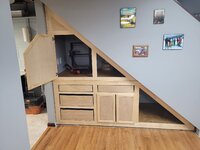
Few weeks ago my wife and I looked at the pile of junk that was collected under our basement stair case. She says "can you put some doors or something there to hide the clutter?"

Challenge accepted! Out comes the tape measure, graph paper and pencil. Managed to get plently of storage, PLUS a dedicated home for my Ender3 Max 😎

Still needs a few drawer fronts attached and stain, but I couldn't resist "moving in"

20240227_185535.jpg
 

sh944

ALLIANCE MEMBER
Joined
Jan 1, 2014
Messages
291
Location
Linwood, KS
My home machine is a Qidi X-Plus, it’s been darn near flawless for three years and the only time I had an issue (bad main board) they responded within about two hours from my initial email and after helping troubleshoot the issue, they had a replacement board to me in two days. I am also impressed with them.

Having said that, I’ll still go Bambu for my next home unit, the two X1Cs at my office are spoiling me.
 
To avoid these ads, REGISTER NOW!

Citation

Well-known member
Joined
Jan 20, 2016
Messages
3,209
Location
Indy
My home machine is a Qidi X-Plus, it’s been darn near flawless for three years and the only time I had an issue (bad main board) they responded within about two hours from my initial email and after helping troubleshoot the issue, they had a replacement board to me in two days. I am also impressed with them.

Having said that, I’ll still go Bambu for my next home unit, the two X1Cs at my office are spoiling me.
There is one of those X-plus machines on eBay for an attractive price. I've been tempted. The problem is the seller said the power supply is bad. It it's actually the power supply that's an easy fix. My concern is the main board might actually be the issue. I don't need this at all, it would be a project purchase but worth it if the machine prints nicely and/or can be fixed cheap.

How is the machine in general?
 

ArcReactorKC

Well-known member
Joined
Jun 1, 2019
Messages
2,237
Location
Out in the county NE of KCMO
Few weeks ago my wife and I looked at the pile of junk that was collected under our basement stair case. She says "can you put some doors or something there to hide the clutter?"

Challenge accepted! Out comes the tape measure, graph paper and pencil. Managed to get plently of storage, PLUS a dedicated home for my Ender3 Max 😎

Still needs a few drawer fronts attached and stain, but I couldn't resist "moving in"

20240227_185535.jpg
That space looks real perfect for an X1C or P1S
 

sh944

ALLIANCE MEMBER
Joined
Jan 1, 2014
Messages
291
Location
Linwood, KS
There is one of those X-plus machines on eBay for an attractive price. I've been tempted. The problem is the seller said the power supply is bad. It it's actually the power supply that's an easy fix. My concern is the main board might actually be the issue. I don't need this at all, it would be a project purchase but worth it if the machine prints nicely and/or can be fixed cheap.

How is the machine in general?


I've used it quite a bit over the time that I've had it and been impressed. I haven't spent a ton of time working with adjusting slicer settings, and I have stayed with the Qidi slicer software when using this machine, mostly because its dead reliable and I have no issues with it either. I am running the high temp head and Qidi build plate on it, almost always with ASA filament and I only have adhesion problems if its a large print that gets close to edges of the plate, which a glue stick resolves easily. I try to keep the firmware and software versions current. I occasionally do a "fast level" using the Qidi "calibration tool" (a thin sheet of plastic that sets the spacing between the build plate and nozzle) and I don't have print failures too often.

I haven't stressed about print quality on the Qidi much as the stuff I print at home rarely needs me to be that fussy and that typically slows the print jobs way down on it, the parts that I want better print quality on usually just go to one of the Bambu's at the office since they are already set up that way and they print MUCH faster.

Build quality of the Qidi is very good, imo and its componentized so working on it would be simple. Set up when I got it was pretty just open the box and turn it on. I didn't spend any time leveling the bed or have to adjust anything aside from doing a fast level on it. If its just a power supply, that's super easy to deal with. I wouldn't be surprised if Qidi wouldn't give you help with it if you contacted them, even if you weren't the original purchaser, altho I wouldn't guaranty that.
 
Last edited:

moab11

Well-known member
Joined
Nov 22, 2015
Messages
553
Location
Thunder Bay, Ontario
2024-02-28 09.29.07.jpg2024-02-28 09.27.29.jpg


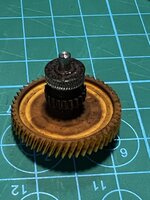
just seems dirty. nothing of note.
That does seem very dirty, but you said you also have a lot of hours on it at very high speeds.
I do wish there was an easy way to see how many hours are on the machine, like an hour meter. Would make it easier to track how long things last or need cleaning.
 

jeepxj

Well-known member
Joined
Mar 2, 2008
Messages
17,831
That does seem very dirty, but you said you also have a lot of hours on it at very high speeds.
I do wish there was an easy way to see how many hours are on the machine, like an hour meter. Would make it easier to track how long things last or need cleaning.

the prusa's had an hour meter in their firmware that was nice.

I think i need to get this stood up for my farm:
1709143039919.png

1709143054947.png
 

MadeByMiller

Well-known member
Joined
Dec 29, 2018
Messages
1,230
Location
Rapid City, SD
I do wish there was an easy way to see how many hours are on the machine, like an hour meter. Would make it easier to track how long things last or need cleaning.

the prusa's had an hour meter in their firmware that was nice

This exists guys. On the X1C you tap the hex icon, go in the General tab, and then tap Device Info. The hours will be displayed at the top of the screen. For the P series, apparently it's in the menu under Device, Settings.
 

MadeByMiller

Well-known member
Joined
Dec 29, 2018
Messages
1,230
Location
Rapid City, SD
looks like i got that one july 1? 5800 hours ago.

dang i gotta work on my efficiency.
That's remarkable! Good for you man. My oldest machine has only 1075 hours and I got it just shy of a year ago. Honestly I can't believe you aren't having more machine issues at that number of hours. I anticipated getting 3000 hours out of my X1C's before they were basically worn out.
 

jeepxj

Well-known member
Joined
Mar 2, 2008
Messages
17,831
That's remarkable! Good for you man. My oldest machine has only 1075 hours and I got it just shy of a year ago. Honestly I can't believe you aren't having more machine issues at that number of hours. I anticipated getting 3000 hours out of my X1C's before they were basically worn out.

I cannot tell the difference between this machine and my newest machine that is a week or two old part output wise. im kinda surprised honestly.
 

MadeByMiller

Well-known member
Joined
Dec 29, 2018
Messages
1,230
Location
Rapid City, SD
I cannot tell the difference between this machine and my newest machine that is a week or two old part output wise. im kinda surprised honestly.
That's very encouraging. Really shows the value of these Bambu machines, ridiculously cheap for what you get. The build quality and components are obviously made to last.
 

jeepxj

Well-known member
Joined
Mar 2, 2008
Messages
17,831
That's very encouraging. Really shows the value of these Bambu machines, ridiculously cheap for what you get. The build quality and components are obviously made to last.

i wipe down the carbon rods with a papertowel.

and apply:
https://www.amazon.com/gp/product/B0081JE0OO/?tag=atomicindus08-20 to the lead screws.

nothing more.

for 600 bucks the P1P is a beast. i like the P1S and will only buy those from now on. and the .6 CHT e3d nozzle. that is the magic combo for production with me.
 

sh944

ALLIANCE MEMBER
Joined
Jan 1, 2014
Messages
291
Location
Linwood, KS
i wipe down the carbon rods with a papertowel.

and apply:
https://www.amazon.com/gp/product/B0081JE0OO/?tag=atomicindus08-20 to the lead screws.

nothing more.

for 600 bucks the P1P is a beast. i like the P1S and will only buy those from now on. and the .6 CHT e3d nozzle. that is the magic combo for production with me.
I will say that I think the X1C is the better deal, as that enclosure gives you better temp control, which is important with certain filaments. The open enclosure is a problem for serious work, imo.

[EDIT] Sorry was thinking P1P, not P1S... nevermind...
 

not-required

Well-known member
Joined
Mar 6, 2011
Messages
545
Location
Maui, Hawaii
First time finding this thread. I have 2 vorons, a v2.4 and a v0. I also have 2 enders, an ender 3, and an ender 5 plus. V0 needs a rebuild and update, it keeps shredding belts, the ender 3 is in pieces because I'm relocating the electronics outside of the enclosure and the v2.4 was down for over a year, I got it going again about a month ago and it's been printing amazing.
 

Attachments

  • 20240127_164430.jpg
    20240127_164430.jpg
    794.2 KB · Views: 64
  • 20240127_164412.jpg
    20240127_164412.jpg
    652.5 KB · Views: 62
  • 20240201_185858.jpg
    20240201_185858.jpg
    560.7 KB · Views: 61
  • 20240204_124306.jpg
    20240204_124306.jpg
    534.7 KB · Views: 59
  • 20240212_185815.jpg
    20240212_185815.jpg
    453.7 KB · Views: 62

jeepxj

Well-known member
Joined
Mar 2, 2008
Messages
17,831
I will say that I think the X1C is the better deal, as that enclosure gives you better temp control, which is important with certain filaments. The open enclosure is a problem for serious work, imo.

[EDIT] Sorry was thinking P1P, not P1S... nevermind...
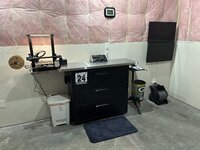
yup. i have 2 P1Ps and 3 P1Ss

the oldest P1P has an enclosure on it from https://voxelpla.com/products/vision-enclosure-kit-for-bambu-lab-p1p-3d-printer

the other p1P i just use the box it came in from to manage temps.

as the fleet expands I will most likely sell off the oldest P1P and use the other P1P as my machine for prototyping. standardizing to P1S for production.

what do i need to do is spend a sunday and organize since this thing seems to be scaling. I need real part numbers that correlate, organized drawings, and build plates to reflect all that.

currently this is one of 4 production 3mf's I have.
1709157070090.png
 
To avoid these ads, REGISTER NOW!
Top Bottom