To avoid these ads, REGISTER NOW!

The Everything 3D Printer Thread

niget2002

Well-known member
Joined
Oct 2, 2012
Messages
11,115
Location
Josephine, TX
Well here's a fresh example:
Mini clip: a sunglasses holder that goes on your car visor. I stopped it after a few minutes and could see what was happening.
Bambu petg basic black. Bambu default process and filament settings.
It has been in the dryer for a few hours at a time, RH read 38% when I pulled it out to try it. I think I will try and start it tomorrow morning before work and see how it looks when I get home. I just didn't want to leave it run while I was gone all day. The filament had not really gotten below 38 in any of the drying runs so I figured that was about as good as it gets.
Stringy, breaking and balling up.
20240514_194140.jpg20240514_194051.jpg
Screenshot_20240514_195017_Bambu Handy.jpg
I get that when my nozzle is clogged. Try cleaning or replacing it.

Edit: nevermind. Should have kept reading :)

Glad you got it working.
 
To avoid these ads, REGISTER NOW!

niget2002

Well-known member
Joined
Oct 2, 2012
Messages
11,115
Location
Josephine, TX
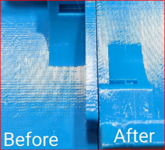
Since I got my printer (Sidewinder X1) it has always shown these stepper motor patterns on shiny filament. These are what Prusa is calling "VFA" or "vertical fine artifacts" and they are caused by the stepper motor vibration / cogging (the printer also has other artifacts like ringing, but that's another story...) These VFA's are on every shiny print and correspond perfectly to the stepper motor frequencies. In my opinion, these are endemic to all normal printers, and can be seen on practically all prints if you just print shiny filament and use the right lighting. They are impossible to feel, so it means they are only a few thousanths at most, and don't impact function, but unforunately 90% of my printing is on shiny PETG and I'm just tired of seeing them. They appear to be endemic to all cartesion 3Dprinters, but only show up if you use shiny filament and your printer is otherwise tuned well.

There was a big effort to address these on the Prusa Mk3 with no sure fix, and they have been newly addressed on the Mk4 by Prusa using the most advanced Trinamic drivers and trying different waveform patterns (apparently the latest Trinamic drivers contain multiple alternate waveforms for tuning) with some results. My printer already has Trinamic 2100 drivers with StealthChop, which tells me that I probably can't address these with stepper drivers, and need to do something different. The problem seems to be there are only about 5 full steps per mm, which is "just enough" resolution for 3D printing, and although running 16x microstepping and StealthChop smooth things out a lot, apparently not enough.

I was curious if gearing down the axis would help, so I put in a 3:1 gear reduction on the X axis that simply bolts on in place of the factory stepper. The same belt and mount is used, only needing to update steps/mm in firmware (no need to reflash firmware). This takes the axis to 15 full steps per mm. It did help, as you can see below, and I think I'll do the Y axis next. The downside is I had to reduce my travel move speed from 200mm/s to 80mm/s for reliable operation, although I think I can tune this back higher. And, there is a real chance the higher stepper speeds will introduce new resonances due to the higher RPMs it is now running, although time will tell. This is also working my 8bit board harder, since the stepping frequency is now tripled and soon will be 6x-ed, although I normally print slow like 20-40mm/s anyway, since PETG prints better slow IME.

1715706186476.png1715706229549.png

1715706309602.png1715706349910.png

1715708238797.png

1715706391998.png
This is why I built a corexy machine.
 

jeepxj

Well-known member
Joined
Mar 2, 2008
Messages
17,831
Sounds good, thanks for the help, EVERYONE, honestly. Yeah, I agree the chamfer would have been better, and honestly not necessary at all, but this wasn't my part file, and it is not for me. A friend wants it to put his spices in on his smoker. That's the file he sent, albeit with some serious re-scaling to get within sizing constraints. I should have just whipped my own up and been done with it, but that's what he wanted. We know what to change next time to simplify the process.

being such a small part you could run some supports for that fillet. it'll keep the strings away at the expense of post processing time.
 

AffableCurmudgeon

Well-known member
Joined
Jan 26, 2009
Messages
1,906
Location
Triad Area NC
Hopefully, now I can use PETG with more success.

I have found that first layer adhesion is important with PETG (and with other materials as well), but with PETG, you have to dial in the temperature for the filament that you are using. The PETG tower would be a good way to figure out the optimum temp for your filament. There are a lot of examples on the web. this is one: https://www.thingiverse.com/thing:2493504
 

Cc_windsurfer

Well-known member
Joined
May 1, 2015
Messages
257
Location
SB, ca
I dial in petg extrusion temperatures by doing break tests on towers. Too low a temperature results in poor adhesion between layers and low interlayer break test results despite decent print quality. With many filaments you may need to sacrifice a tiny bit in print quality to achieve good structure. Also, most white filaments ****.
 

Drunkonunleaded

Well-known member
Joined
Apr 14, 2019
Messages
339
Location
Detroit Rock City
Nothing too groundbreaking, but this is the first time I’ve printed in anything other than black. 99% of my prints are brackets or something else mundane. I needed some midget wrench organizers, and this stl seemed to fit the bill.

I’d like to remix this to include a magnet in the bottom. Sad to say, I’ve never modified an existing design before. It’s been either my own from scratch or printing an off the shelf file.

I’m guessing that I can do the remix in Tinkercad.
 

Attachments

  • IMG_8943.jpeg
    IMG_8943.jpeg
    1 MB · Views: 106

JackOfDiamonds

Well-known member
Joined
Jul 31, 2020
Messages
706
Location
Idaho (USA)
This is why I built a corexy machine.
I'm thinking about building one myself but I don't know that they are fundamentally any different in this regard. They tend to use the same 20t pulleys as Cartesian printers. But it's hard to find quality benchmarks. Corexy printers tend to benchmark their speed.
 

niget2002

Well-known member
Joined
Oct 2, 2012
Messages
11,115
Location
Josephine, TX
I'm thinking about building one myself but I don't know that they are fundamentally any different in this regard. They tend to use the same 20t pulleys as Cartesian printers. But it's hard to find quality benchmarks. Corexy printers tend to benchmark their speed.
The difference is that a coreXY is relying on TWO steppers to go in the X and Y direction. So the Teeth tend to average out across the part.
 

Drunkonunleaded

Well-known member
Joined
Apr 14, 2019
Messages
339
Location
Detroit Rock City
Looking for a filament recommendation. PLA in both blue and hiviz.

I've tried a few blues, but nothing has gotten me close to what I would consider a "traditional" (cobalt?) blue. Same goes for flo/hiviz yellow. The Creality flo yellow (shown above) is a little too transparent for my tastes. That wrench organizer looks particularily bad because I printed with only a 20% infill.
 

Drunkonunleaded

Well-known member
Joined
Apr 14, 2019
Messages
339
Location
Detroit Rock City
If they still make Inland Egyptian Blue, that was dead on for "primary color" blue. Inland is Microcenters home brand, this color in particular always was super well behaved for me.

Looking at filamentcolors.xyz (great resource, btw) that looks like it will fit the bill. Hatchbox true blue being a close second.

Still need to find the right flo yellow, but this is a good start. Thanks a ton!
 

JackOfDiamonds

Well-known member
Joined
Jul 31, 2020
Messages
706
Location
Idaho (USA)
The difference is that a coreXY is relying on TWO steppers to go in the X and Y direction. So the Teeth tend to average out across the part.

Sorry but that doesn't make sense. Cartesian printers also use both motors for practically all moves. And CoreXY printers use only a single motor for diagonal moves. Essentially CoreXY is just a cartesian printer rotated 45 degrees, with super long belts. Maybe the long belts absorb some of the VFAs, but if that were the case, it would come at the expense of more ringing and other problems.
 

niget2002

Well-known member
Joined
Oct 2, 2012
Messages
11,115
Location
Josephine, TX
Sorry but that doesn't make sense. Cartesian printers also use both motors for practically all moves. And CoreXY printers use only a single motor for diagonal moves. Essentially CoreXY is just a cartesian printer rotated 45 degrees, with super long belts. Maybe the long belts absorb some of the VFAs, but if that were the case, it would come at the expense of more ringing and other problems.
Maybe I miss understood, but I thought ringing typically showed up when traveling along a straight line either in the x or y direction. Or, at least, that's when I see it most. Since corexy has two sets of belts traveling in those directions, the number of teeth is higher, shrinking the spacing in the ringing and making it less noticeable. When traveling at a 45, you'd see it still.

Edit: quick Google search... Looks like the less ringing has more to do with less mass moving around than how the steppers operate. So, I guess I did miss read that somewhere. Oops.

Whatever the reason, my corexy produces nicer prints than my Cartesian does
 

Cc_windsurfer

Well-known member
Joined
May 1, 2015
Messages
257
Location
SB, ca
Got my first failure of PETG. long bracket printed thin drooped with a full 46oz drink in it over a weekend in the sun. replacing with an ASA.
Asa stands up the heat and sun better than petg, but tends to be brittle and break easily when shock loaded (dropped). Structural things that work great in petg may need to have thicker walls when printed in asa.
 

niget2002

Well-known member
Joined
Oct 2, 2012
Messages
11,115
Location
Josephine, TX
Tested some 1/4-20 heat inserts for the first time today. Took some trial and error to get the tolerance correct.

I just got the little heater that goes in the end of my soldering iron. It worked well and I think it'll work great on the upcoming design I need it for.

The parts are going to be printed in ASA as they're going into the kayak.
 

gpiggaz

Well-known member
Joined
Mar 14, 2010
Messages
2,548
Location
Tucson, AZ & Edmonds, WA
Fresh off of my success with the JDs' garage 3D printed CNC plasma cutter, I've embarked on making the V1-Engineering Lowrider CNC Router- again almost all 3D printed parts. If successful, I'll have quite the collection of CNC machines- Printers, plasma cutter and now Router- which apparently makes a swell pen plotter too.
 
To avoid these ads, REGISTER NOW!

niget2002

Well-known member
Joined
Oct 2, 2012
Messages
11,115
Location
Josephine, TX
Fresh off of my success with the JDs' garage 3D printed CNC plasma cutter, I've embarked on making the V1-Engineering Lowrider CNC Router- again almost all 3D printed parts. If successful, I'll have quite the collection of CNC machines- Printers, plasma cutter and now Router- which apparently makes a swell pen plotter too.
Nice. I have his MP3DPv4 printer and MPCNC machines. They've both served me well so far. I've been tempted to replace the MPCNC with a LowRider that has a 2'x4' cut size to do 1/4 plywood sheet stuff.
 

macs_rock

Well-known member
Joined
Mar 13, 2011
Messages
189
Location
Idaho
Finally bit the bullet and ordered a Qidi Q1 Pro, should arrive this weekend. I chose it because of the low price, good feedback I've seen on customer support, and the heated chamber. I plan to print various car parts so being able to handle ABS/ASA, nylon, and PC were important to me. Seems like they've fixed a number of the nitpicks that reviewers had on the first revision, so I'm excited to see what shows up.

I showed my wife all the various organizers and bins and such that are available out there, and now I'm worried I'll end up having to buy another one so I get a chance to use it.
 

macs_rock

Well-known member
Joined
Mar 13, 2011
Messages
189
Location
Idaho
The Qidi Q1 arrived yesterday and delivered on its promise of simple setup and fast printing. Printed a near perfect (to my eyes at least) Benchy in 20 minutes. I'm gonna do some more testing on it tonight and then hopefully start printing some functional goodies. Going to start with some drawer pulls and handles for a credenza I bought.
 

slowtwitch73

Well-known member
Joined
Apr 18, 2019
Messages
5,876
Location
Hellgate
Hey guys.. I'm sure this has been answered numerous times, but here it goes again..

What's the best program to design a small part.. free and beginner friendly?

It's for a 24th scale RC truck wheel.. so about half dollar diameter, 1/2" or so thick.. a small cylinder essentially
with a hex on the back side.

Thanks.
 

Cruzan80

Well-known member
Joined
Jul 22, 2015
Messages
4,169
Location
Denver, CO
Easiest to get into? TinkerCAD. Parametric CAD (Fusion 360, OnShape, SOLIDWORKS, etc) could totally do this too, but with a slightly steeper learning curve. TinkerCAD is like playing with clay-blocks (pull a cylinder and a hex-shapes cylinder out from the toolbox, size them correctly, drag them where you want in relation to each other, merge them together).
 

jeepxj

Well-known member
Joined
Mar 2, 2008
Messages
17,831
Hey guys.. I'm sure this has been answered numerous times, but here it goes again..

What's the best program to design a small part.. free and beginner friendly?

It's for a 24th scale RC truck wheel.. so about half dollar diameter, 1/2" or so thick.. a small cylinder essentially
with a hex on the back side.

Thanks.

just one off? dimensions? can knock that out in not a lot of time at all for ya.
 

slowtwitch73

Well-known member
Joined
Apr 18, 2019
Messages
5,876
Location
Hellgate
just one off? dimensions? can knock that out in not a lot of time at all for ya.
Appreciated.. we need 4 of them.. trying to make it a teachable moment and get the kid exposed to CAD or at least a CAD like program. If he wants 'em, he can design 'em and print them off at the library.
 

niget2002

Well-known member
Joined
Oct 2, 2012
Messages
11,115
Location
Josephine, TX
Appreciated.. we need 4 of them.. trying to make it a teachable moment and get the kid exposed to CAD or at least a CAD like program. If he wants 'em, he can design 'em and print them off at the library.
I'm teaching my kid fusion 360. But I already know the program.

I'd maybe try on shape as I've heard it's good for first time users.
 

Cruzan80

Well-known member
Joined
Jul 22, 2015
Messages
4,169
Location
Denver, CO
Slowtwitch, I am happy to send some basic tutorial videos I made for teaching my students (OnShape). Walks them thru both some basic shapes, as well as slightly more complicated setup (90deg LB Conduit box). This was taught to 7th graders.
 
To avoid these ads, REGISTER NOW!
Top Bottom