To avoid these ads, REGISTER NOW!

The Everything 3D Printer Thread

Jeff

Well-known member
Joined
Dec 10, 2009
Messages
2,706
Location
Sonova Beach
I’ve had a 3D printer now for a few weeks so naturally I’ve been printing like mad and decided to catch up on this thread and now it’s about scanners? I now want…You guys are killing me!!
I would wait. There's so much to learn with your printer. I've had mine 6 months and printed a boat load of stuff. I'm still confused with certain types of layers, ironing, and AMS coloring.
 
To avoid these ads, REGISTER NOW!

loganb

ALLIANCE MEMBER
Joined
Dec 29, 2011
Messages
5,494
Location
Omaha, NE
I’ve had a 3D printer now for a few weeks so naturally I’ve been printing like mad and decided to catch up on this thread and now it’s about scanners? I now want…You guys are killing me!!

I'd wait a bit as well....it's not like you're short on projects or new things to work on/setup lol.

The scanners are getting better from what I've been watching, but the consumer/prosumer aren't yet at that "easy button" point where you scan something and it just works. I'm expecting lot of "learning" and "experience" to be gained on getting a workable mesh/model to then do something with...I'll post my experience somewhere around here, probably my build thread and the Digital Fabrication thread that slodat started
 

JackOfDiamonds

Well-known member
Joined
Jul 31, 2020
Messages
706
Location
Idaho (USA)
Does anyone know what's up with the .model file type? What actually is it? I'm finding lots of models on Printables that are only available as .model, and it doesn't seem to work in Cura.
 

Jeff

Well-known member
Joined
Dec 10, 2009
Messages
2,706
Location
Sonova Beach
Does anyone know what's up with the .model file type? What actually is it? I'm finding lots of models on Printables that are only available as .model, and it doesn't seem to work in Cura.
Found something...

A MODEL file is a 3D model created by Dassault Systemes CATIA, a 3D CAD and CAM program. It contains a representation of a mechanical structure or part of a structure.
 

kaymccampbell

Well-known member
Joined
Feb 27, 2015
Messages
29,405
Location
Upstate New York
Found something...

A MODEL file is a 3D model created by Dassault Systemes CATIA, a 3D CAD and CAM program. It contains a representation of a mechanical structure or part of a structure.
Not cranking you, cause I know you're just the messenger, but that's as data free as any other proprietary file description. I used to spend much of my career breaking proprietary data structures, and I totally hate those folks, except for the tiny bit of me that loved cracking their designs for my own evil purposes.
 

aquinob

Well-known member
Joined
Oct 7, 2014
Messages
234
Location
Portsmouth, VA
Finally broke down and bought a printer last week after Christmas. Prior to the printer, I got a CNC about a year ago and really just started making some things with it in the last few months. I did some online looking and it became apparent to me that BambuLabs was leading the way in the tech and user friendly experience. My P1S was delivered on Monday and I've been able to print some parts for the CNC as well as a big old Delta bandsaw. So far I've been using the Bambu Studio app but I'll play around with some others when I get more experience with it.
 

Cruzan80

Well-known member
Joined
Jul 22, 2015
Messages
4,154
Location
Denver, CO
Anyone a Lvl 7 or higher on MakerWorld? Wanted to send a message to a user, asking if he could make/change something, but apparently you have to be a certain level before you can message. Happy to take this to PM if someone can help. Appreciate it!
 

olds70supreme

Well-known member
Joined
Mar 7, 2008
Messages
694
Hello, I've been working on a new center console that I will be printing in three pieces. This is the first & largest piece and I'm getting close to being ready to print but...
  1. How do you add texture to the outer surface? Is that in the CAD program or in the slicer? FWIW I'm using FreeCad.
  2. I was curious so I sliced the file as-is, and it is showing nearly 13 hours of print time. I've only had my printer for a few weeks and am not familiar with the print settings and so far all of the small parts I've printed were using whatever the slicer spit out. What could or should I do to optimize this?
Thanks.
 

Attachments

  • Front Section V1.png
    Front Section V1.png
    229.2 KB · Views: 17
  • Front Section V1 Slice.png
    Front Section V1 Slice.png
    1.2 MB · Views: 17

ER70S-2

Well-known member
Joined
Jan 2, 2015
Messages
796
Hello, I've been working on a new center console that I will be printing in three pieces. This is the first & largest piece and I'm getting close to being ready to print but...
  1. How do you add texture to the outer surface? Is that in the CAD program or in the slicer? FWIW I'm using FreeCad.
  2. I was curious so I sliced the file as-is, and it is showing nearly 13 hours of print time. I've only had my printer for a few weeks and am not familiar with the print settings and so far all of the small parts I've printed were using whatever the slicer spit out. What could or should I do to optimize this?
Thanks.
What slicer are you using? Prusa slicer has something called fuzzy skin which puts a texture on sides. I assume most slicers have a similar option.
 

loganb

ALLIANCE MEMBER
Joined
Dec 29, 2011
Messages
5,494
Location
Omaha, NE
Anyone a Lvl 7 or higher on MakerWorld? Wanted to send a message to a user, asking if he could make/change something, but apparently you have to be a certain level before you can message. Happy to take this to PM if someone can help. Appreciate it!

Feel free to PM me and I may be able to assist, apparently I'm a Lvl 9 on Makerworld
 

loganb

ALLIANCE MEMBER
Joined
Dec 29, 2011
Messages
5,494
Location
Omaha, NE
Hello, I've been working on a new center console that I will be printing in three pieces. This is the first & largest piece and I'm getting close to being ready to print but...
  1. How do you add texture to the outer surface? Is that in the CAD program or in the slicer? FWIW I'm using FreeCad.
  2. I was curious so I sliced the file as-is, and it is showing nearly 13 hours of print time. I've only had my printer for a few weeks and am not familiar with the print settings and so far all of the small parts I've printed were using whatever the slicer spit out. What could or should I do to optimize this?
Thanks.

Fuzzy skin mode is in the Slicer. Looks like you're using BambuSlicer or a fork/derivative of it....it should be in the "Other" Tab under the "Special Mode" subheading

Also looks like your slicer is configured for PLA-CF, I don't see a location in your profile but be aware that the interior temps of a car in the sun during the summer in the majority of the US will be a high enough temp to get PLA to start to deform. ASA or ABS or at a minimum PETG would be recommended for automotive interior components with a higher resistance to heat. PLA can definitely be used to get fit/function right...just be aware if it's parked outside in the sun for a couple hours with 85 or 90 degree or higher ambient temp it will warp.

As for ways to speed it up on that large of a part:

Review impacts to print time by moving to Tree Supports instead of Grid

Also instead of supports you could chamfer that interior corner in the cupholder looking area so you may be able to get away from supports entirely...this is also dependent on what material you use. Some materials are better at bridging then others

For a part that large, I'd be looking at a .6 nozzle if you have it so you could run .3 or .35 layer lines

Review qty of wall loops and infill %....off the cuff for a first print on something like that...I'd be starting with probably 3 loops and 10% infill
 

lilscorpion

Well-known member
Joined
Mar 15, 2010
Messages
3,599
Location
Colorado
I'd wait a bit as well....it's not like you're short on projects or new things to work on/setup lol.

The scanners are getting better from what I've been watching, but the consumer/prosumer aren't yet at that "easy button" point where you scan something and it just works. I'm expecting lot of "learning" and "experience" to be gained on getting a workable mesh/model to then do something with...I'll post my experience somewhere around here, probably my build thread and the Digital Fabrication thread that slodat started
Yeah, I got a lot of irons, for sure. I have time to wait and be patient. I do like the idea of being able to scan something, turn it into a model, modify it, and then ….make. Would be so handy. I’ll watch and learn. Best way to start anyway.
 
Last edited:

lilscorpion

Well-known member
Joined
Mar 15, 2010
Messages
3,599
Location
Colorado
I would wait. There's so much to learn with your printer. I've had mine 6 months and printed a boat load of stuff. I'm still confused with certain types of layers, ironing, and AMS coloring.
There’s quite a bit to it. Thus far I’ve been trying to figure out the nuances of different filaments. Got the Bambu PETG figured out, had to tweak the nozzle temp from their default in the slider and I was off and running. The I got some PETG from iiidmax and it was totally different. To get it to lay down as well as the Bambu stuff I’m running 280 nozzle temp and in sport mode. Seems an awful lot like speed and feeds for cutters on the CNC…

There’s a cooking component I’m not yet sure I grasp but I think that I could back off the nozzle temp if I okay with cooling. HeH.

Also…it’s SLOW with one printer and more than 80 drawers. But gotta start somewhere I guess.

image.jpg

Oh and one more thing - the gridfinity half bin. Brilliant! As it would turn out, just about every drawer I have is off by a half bin in lost dimensions. Guess it’s a metric va imperial thing and my tapes are all imperial. 🤣

image.jpg
 
Last edited:

loganb

ALLIANCE MEMBER
Joined
Dec 29, 2011
Messages
5,494
Location
Omaha, NE
There’s quite a bit to it. Thus far I’ve been trying to figure out the nuances of different filaments. Got the Bambu PETG figured out, had to tweak the nozzle temp from their default in the slider and I was off and running. The I got some PETG from iiidmax and it was totally different. To get it to lay down as well as the Bambu stuff I’m running 280 nozzle temp and in sport mode. Seems an awful lot like speed and feeds for cutters on the CNC…

There’s a cooking component I’m not yet sure I grasp but I think that I could back off the nozzle temp if I okay with cooling. HeH.

Also…it’s SLOW with one printer and more than 80 drawers. But gotta start somewhere I guess.

image.jpg

Oh and one more thing - the gridfinity half bin. Brilliant! As it would turn out, just about every drawer I have is off by a half bin in lost dimensions. Guess it’s a metric va imperial thing and my tapes are all imperial. 🤣

image.jpg

That's looking awesome!
 
To avoid these ads, REGISTER NOW!

olds70supreme

Well-known member
Joined
Mar 7, 2008
Messages
694
What slicer are you using?
Orca, which I believe is an open-source version of the Bambu slicer.

Also looks like your slicer is configured for PLA-CF
Yes, good catch.
Also instead of supports you could chamfer that interior corner in the cupholder looking area so you may be able to get away from supports entirely...this is also dependent on what material you use. Some materials are better at bridging then others

For a part that large, I'd be looking at a .6 nozzle if you have it so you could run .3 or .35 layer lines

Review qty of wall loops and infill %....off the cuff for a first print on something like that...I'd be starting with probably 3 loops and 10% infill
Thanks, I'll look into these options.
 

lilscorpion

Well-known member
Joined
Mar 15, 2010
Messages
3,599
Location
Colorado
Ok, help…I’m printing the wiper upgrade for my X1C out of Bambu PETG HF.

For reference: https://makerworld.com/models/437463

Having trouble getting the profile of an underhand to work out. I’ve done 3 prints and all of the top sides are perfect and look like this.

IMG_5167.jpeg

Here’s the underhand on the first one. Used default settings more or less with PLA Cf as the support material in default as well. Tried 2 with same settings just to make sure the first failure wasn’t a fluke.

Type: normal (auto)
Style: Default (regular grid)

First -
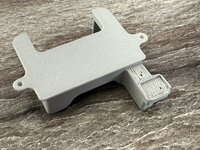
IMG_5168.jpeg

Second:

IMG_5169.jpeg

It might be ok if the walls of the small feature were intact. I tried (pure guess) to change the support strategy and used

Type: Tree (auto)
Style: Tree Strong

I wouldn’t say it made a lick of difference. Might in fact be worse.

IMG_5170.jpeg

Any ideas how to give that piece better support (assuming that’s the issue)? Almost like I need to figure out how to treat that as a first layer vs layer 60 or whatever.
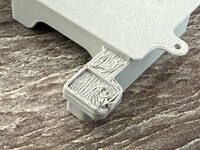
IMG_5171.jpeg

TIA
 
Last edited:

XJSuperman

Well-known member
Joined
Jan 26, 2018
Messages
3,086
Location
Central Iowa
Ok, help…I’m printing the wiper upgrade for my X1C out of Bambu PETG HF.

For reference: https://makerworld.com/models/437463

Having trouble getting the profile of an underhand to work out. I’ve done 3 prints and all of the top sides are perfect and look like this.
...
Any ideas how to give that piece better support (assuming that’s the issue)? Almost like I need to figure out how to treat that as a first layer vs layer 60 or whatever.

TIA
I'd need to see more of your settings, but I'd start by doublechecking your support settings. Uncheck remove small overhangs, z distance between support and part, and I would consider bottom shell layer count.
 

Farmall450

Well-known member
Joined
Dec 23, 2011
Messages
13,354
Location
Marengo, Illinois
Ok, help…I’m printing the wiper upgrade for my X1C out of Bambu PETG HF.

For reference: https://makerworld.com/models/437463

Having trouble getting the profile of an underhand to work out. I’ve done 3 prints and all of the top sides are perfect and look like this.

IMG_5167.jpeg

Here’s the underhand on the first one. Used default settings more or less with PLA Cf as the support material in default as well. Tried 2 with same settings just to make sure the first failure wasn’t a fluke.

Type: normal (auto)
Style: Default (regular grid)

First -

IMG_5168.jpeg

Second:

IMG_5169.jpeg

It might be ok if the walls of the small feature were intact. I tried (pure guess) to change the support strategy and used

Type: Tree (auto)
Style: Tree Strong

I wouldn’t say it made a lick of difference. Might in fact be worse.

IMG_5170.jpeg

Any ideas how to give that piece better support (assuming that’s the issue)? Almost like I need to figure out how to treat that as a first layer vs layer 60 or whatever.

IMG_5171.jpeg

TIA
Did you enable support on the build plate?
 

Poolshark314

Well-known member
Joined
Jul 5, 2021
Messages
658
Location
MD
Ok, help…I’m printing the wiper upgrade for my X1C out of Bambu PETG HF.

For reference: https://makerworld.com/models/437463

Having trouble getting the profile of an underhand to work out. I’ve done 3 prints and all of the top sides are perfect and look like this.

IMG_5167.jpeg

Here’s the underhand on the first one. Used default settings more or less with PLA Cf as the support material in default as well. Tried 2 with same settings just to make sure the first failure wasn’t a fluke.

Type: normal (auto)
Style: Default (regular grid)

First -

IMG_5168.jpeg

Second:

IMG_5169.jpeg

It might be ok if the walls of the small feature were intact. I tried (pure guess) to change the support strategy and used

Type: Tree (auto)
Style: Tree Strong

I wouldn’t say it made a lick of difference. Might in fact be worse.

IMG_5170.jpeg

Any ideas how to give that piece better support (assuming that’s the issue)? Almost like I need to figure out how to treat that as a first layer vs layer 60 or whatever.

IMG_5171.jpeg

TIA
It's also entirely possible that some designs are just not very good. There are a fair amount comments on that model referring to issues printing the same section. It also appears to have gone through many iterations to get to where it is now
 

lilscorpion

Well-known member
Joined
Mar 15, 2010
Messages
3,599
Location
Colorado
It's also entirely possible that some designs are just not very good. There are a fair amount comments on that model referring to issues printing the same section. It also appears to have gone through many iterations to get to where it is now
Ding ding…so I kept reading and apparently this version doesn’t print well. Downloaded an older version and it’s perfect. Crazy
 

Poolshark314

Well-known member
Joined
Jul 5, 2021
Messages
658
Location
MD
Ding ding…so I kept reading and apparently this version doesn’t print well. Downloaded an older version and it’s perfect. Crazy
Yeah it's important to remember lots of people just post trash they design and expect you to QA it for them, or they know it's junk and just want the reward points. I like to test what I put out
 

Poolshark314

Well-known member
Joined
Jul 5, 2021
Messages
658
Location
MD
I’m learning.

They’re clean in the old version for sure.

IMG_5173.jpeg

Good to hear you got a good print!
Which version did you end up using? Also, let us know how this works. A better nozzle wiper has been on my list to look into for a while.

I've heard that putting some heat shrink over the original roller works pretty well. Haven't tried it yet though
 

moab11

Well-known member
Joined
Nov 22, 2015
Messages
553
Location
Thunder Bay, Ontario
My only real complaint is that it will often leave a little strand of filament on the side of the nozzle. It usually gets knocked off when it starts printing, so it isn't a big deal, just figured there had to be a better option than the little roller of ptfe tubing.
 

loganb

ALLIANCE MEMBER
Joined
Dec 29, 2011
Messages
5,494
Location
Omaha, NE
First time doing TPU on the A1, using purple Overture TPU from Amazon, dried for 2 days or so in a different filament dryer and printing out of a small dryer wedged in the back there. Print is a protective case for a Creality Otter 3d scanner

20250105_120545.jpg


It came out pretty well. Used .4 nozzle and normal textured PEI bedplate but added gluestick as a release agent.

20250105_190127.jpg

20250105_190418.jpg

20250105_190425.jpg
 

XJSuperman

Well-known member
Joined
Jan 26, 2018
Messages
3,086
Location
Central Iowa
Funny that we just mentioned bad profiles that have been uploaded. I printed a coin sorter over the weekend that had a crappy (rough and stringy) .24 layer profile. Swapped to one of my profiles and its much better. Its sounds pretty arrogant, but I typically assume my settings are better than other profiles until proven otherwise. I've been trying to keep a more open mind about it, but it tends to bite me. I should doublecheck and compare settings before printing. Just feels like an unnecessary step.
 

Poolshark314

Well-known member
Joined
Jul 5, 2021
Messages
658
Location
MD
Funny that we just mentioned bad profiles that have been uploaded. I printed a coin sorter over the weekend that had a crappy (rough and stringy) .24 layer profile. Swapped to one of my profiles and its much better. Its sounds pretty arrogant, but I typically assume my settings are better than other profiles until proven otherwise. I've been trying to keep a more open mind about it, but it tends to bite me. I should doublecheck and compare settings before printing. Just feels like an unnecessary step.
Yeah I tend to think similarly, but I also read through the project page for any important settings and compare the profile differences. I had someone download my Roku case, ignore my profile which intentionally did not use supports, and then give me a bad rating because he couldn't remove the supports. I specified in the page and in my profile that supports were not enabled.
 
To avoid these ads, REGISTER NOW!
Top Bottom