To avoid these ads, REGISTER NOW!

The Everything 3D Printer Thread

Jehannum

Well-known member
Joined
May 3, 2012
Messages
1,347
Location
Albuquerque, NM
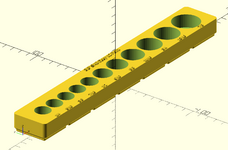
Got tired of gridfinity socket holders that almost fit what I needed, so I started rolling my own. I'm about 2/3rds of the way to a full-up parameterized setup where you just put in a list of sockets, their diameters, an overall length, their names, a desired spacing between them, and a name for the tray, and then the code just works its magic to spit out an STL. Work left to do is to get the gridfinity base to auto-size to the height (to the nearest whole grid).

The parameters supplied here are for a set of 3/8" C'man metric deep 6 point impact sockets:
socketDiameters = [18, 18, 19, 21, 22.5, 22.5, 24, 24, 26, 27];
socketNames = ["10", "11", "12", "13", "14", "15", "16", "17", "18", "19"];
binTitle = "3/8\" Metric Deep 6 Point Impact Sockets";
spacing = 1.5;
socketHeight = 67;

(units are in mm)

block.png

I got to use recursion to space the socket bodies out, which was fun (I haven't used recursion since I was in graduate school, lol).

Code:
function getSpacing(n) = n == 0 ? 0 : (spacing + socketDiameters[n] + getSpacing(n - 1));
 
Last edited:
To avoid these ads, REGISTER NOW!

Cruzan80

Well-known member
Joined
Jul 22, 2015
Messages
4,155
Location
Denver, CO
I've had dual nozzles before, and the only "killer app" for them was doing supports and main body out of different materials.

It may be an artifact of not having all the fancy shmancy AI stuff and running just straight up old Marlin (on a bed-slinger with the hot ends, axes, and bed on v-wheels and not linear rails), but it wasn't ever good enough to get me acceptable quality in same-layer extrusion in the part on the bed. The second nozzle was always just a little bit off.
I agree, and I was running things with a CoreXY. 2 nozzle prints were helpful for not having to reload tons from a single nozzle, not really 2 at the same time. Clough basically said the same, about calibrating offsets, etc, even on stuff he designed back when. However, he did point out a few different objects that just worked! Including print-in-place TPU in areas, one of which he had said he bought his Prusa XL specifically for, but couldn't get it to work. The H2D completed it first try. The Bambu seems to use an algorithm for compensating between nozzles, so it doesn't need you to do anything.

If you haven't run one, the Bambu printers take a ton of the old expectations of what "used to happen" and just break them. Routinely. They just ... work. As he said at the end, if you want a printer where the point is to do stuff to the printer, it isn't for you. But they work great as a tool to accomplish other stuff.
 

Jehannum

Well-known member
Joined
May 3, 2012
Messages
1,347
Location
Albuquerque, NM
I agree, and I was running things with a CoreXY. 2 nozzle prints were helpful for not having to reload tons from a single nozzle, not really 2 at the same time. Clough basically said the same, about calibrating offsets, etc, even on stuff he designed back when. However, he did point out a few different objects that just worked! Including print-in-place TPU in areas, one of which he had said he bought his Prusa XL specifically for, but couldn't get it to work. The H2D completed it first try. The Bambu seems to use an algorithm for compensating between nozzles, so it doesn't need you to do anything.

If you haven't run one, the Bambu printers take a ton of the old expectations of what "used to happen" and just break them. Routinely. They just ... work. As he said at the end, if you want a printer where the point is to do stuff to the printer, it isn't for you. But they work great as a tool to accomplish other stuff.
I'm about halfway between. The Creality K2 I bought is reasonably close to "just works" that I've not yet fiddled with it.

I'm not a big fan of the bambu always-connected stuff, and while the K2 is slightly locked down, it's not nearly as bad.
 

Citation

Well-known member
Joined
Jan 20, 2016
Messages
3,209
Location
Indy
I wonder about the relative merits of an IDEX system vs the BL dual on one head. I think several others have done this but the advance/retract is a significant enhancement as well as trying to save weight to keep the speed up. I can see the dual head setup having better coregistration at the expense of complexity and weight.
 

Citation

Well-known member
Joined
Jan 20, 2016
Messages
3,209
Location
Indy
I'm about halfway between. The Creality K2 I bought is reasonably close to "just works" that I've not yet fiddled with it.

I'm not a big fan of the bambu always-connected stuff, and while the K2 is slightly locked down, it's not nearly as bad.
I haven't worked with a BL printer but I do wonder in what ways they just work more than my Flashforge. I could think of cases where better default profiles would help but I didn't see a hardware gap and can think of cases where a BL would likely also fail.
 

Cruzan80

Well-known member
Joined
Jul 22, 2015
Messages
4,155
Location
Denver, CO
Depends on what age Flashforge. The "just works" is that I can count on one hand the number of print fails after operating multiple Bambus for over a year. And each time, they stopped the print and checked with me. From feed issues, to stringing, to wrong material, it just is set up to not happen.

MY guess is that the "fails"" you are thinking of, generally either don't happen, or if they do, Bambu stops and makes sure before printing and wasting a ton.

I know I sound like a Super-Fan, but these have outperformed just about anything I have worked with (Raise3D, Stratysys, etc). They are set up for an industrial user, who just wants a tool to get a job done.
 

Citation

Well-known member
Joined
Jan 20, 2016
Messages
3,209
Location
Indy
Depends on what age Flashforge. The "just works" is that I can count on one hand the number of print fails after operating multiple Bambus for over a year. And each time, they stopped the print and checked with me. From feed issues, to stringing, to wrong material, it just is set up to not happen.

MY guess is that the "fails"" you are thinking of, generally either don't happen, or if they do, Bambu stops and makes sure before printing and wasting a ton.

I know I sound like a Super-Fan, but these have outperformed just about anything I have worked with (Raise3D, Stratysys, etc). They are set up for an industrial user, who just wants a tool to get a job done.
Mine is the 5M. I have had failures due to adhesion but they were due to me pushing my luck avoiding support etc. I haven't had issues with the printer failing. That is also why I speculated that the failures I've had would have also hit a BL printer. That said, perhaps better material profiles and printer tuning (things I could do manually but haven't) could be the difference between some of my pushing it failures vs a BL success. I will say mine doesn't have a tangle sensor nor a spaghetti sensor so when such failures occur the system doesn't know it.

One of the labs at work got 2 Creality K1 maxes after the IT department said no to the BL X1C. The people in the lab have personal X1Cs and are quite happy with the K1m.
 

Cruzan80

Well-known member
Joined
Jul 22, 2015
Messages
4,155
Location
Denver, CO
Yeah, I can understand from an iT perspective why they don't like BL. Some of the interface and what it uses to "talk" back and forth over the network is harder to lock down, and they made some "squirrelly" choices.

But if you don't need to remote monitor and/or start prints that way, everything still works just fine with MicroSD. It just doesn't flash an alert for an error on your connected device, it just shows it on the screen.
 

Citation

Well-known member
Joined
Jan 20, 2016
Messages
3,209
Location
Indy
Yeah, I can understand from an iT perspective why they don't like BL. Some of the interface and what it uses to "talk" back and forth over the network is harder to lock down, and they made some "squirrelly" choices.

But if you don't need to remote monitor and/or start prints that way, everything still works just fine with MicroSD. It just doesn't flash an alert for an error on your connected device, it just shows it on the screen.
Micro SD and USB drives are also verboten at work. The K1m's operate on one of the isolated lans we have at work.
 

Cruzan80

Well-known member
Joined
Jul 22, 2015
Messages
4,155
Location
Denver, CO
Gotcha. Theoretically, the BL would work on a "Intra-Net" (router that only broadcasts local wifi, no "talking out"). Otherwise, if they required Ethernet, it is the X1E (not sure if the new H2D does Ethernet). And even then, it may need an "isolated lan", depending on IT security concerns.

And I am not saying anything bad about the Creality. If it works for them, great. But I know of view their offerings like Flashforge was originally to Makerbot...
 

Jehannum

Well-known member
Joined
May 3, 2012
Messages
1,347
Location
Albuquerque, NM
Mine is the 5M. I have had failures due to adhesion but they were due to me pushing my luck avoiding support etc. I haven't had issues with the printer failing. That is also why I speculated that the failures I've had would have also hit a BL printer. That said, perhaps better material profiles and printer tuning (things I could do manually but haven't) could be the difference between some of my pushing it failures vs a BL success. I will say mine doesn't have a tangle sensor nor a spaghetti sensor so when such failures occur the system doesn't know it.

One of the labs at work got 2 Creality K1 maxes after the IT department said no to the BL X1C. The people in the lab have personal X1Cs and are quite happy with the K1m.
We have several industrial FDM machines in labs adjacent to mine at work. I don't think I've ever seen a hobby-level machine in there though (creality or bambu), they just aren't anywhere near the same level of reliability or security.

Also like you, we're allowed nothing in the way of removable media in the building.

It's a weird bifurcated market right now, and it seems like the AI stuff (spaghetti detection) should have made its way back up, but there's a bit of snootiness in the pro market about things like that.
 

Jehannum

Well-known member
Joined
May 3, 2012
Messages
1,347
Location
Albuquerque, NM
Got tired of gridfinity socket holders that almost fit what I needed, so I started rolling my own. I'm about 2/3rds of the way to a full-up parameterized setup where you just put in a list of sockets, their diameters, an overall length, their names, a desired spacing between them, and a name for the tray, and then the code just works its magic to spit out an STL. Work left to do is to get the gridfinity base to auto-size to the height (to the nearest whole grid).

The parameters supplied here are for a set of 3/8" C'man metric deep 6 point impact sockets:
socketDiameters = [18, 18, 19, 21, 22.5, 22.5, 24, 24, 26, 27];
socketNames = ["10", "11", "12", "13", "14", "15", "16", "17", "18", "19"];
binTitle = "3/8\" Metric Deep 6 Point Impact Sockets";
spacing = 1.5;
socketHeight = 67;

(units are in mm)

block.png

I got to use recursion to space the socket bodies out, which was fun (I haven't used recursion since I was in graduate school, lol).

Code:
function getSpacing(n) = n == 0 ? 0 : (spacing + socketDiameters[n] + getSpacing(n - 1));
Got the code to work with the vertical orientation.

block.png

Still haven't worked out the best way to auto-resize the base plate, but I haven't really thought that hard about it.
 

Jehannum

Well-known member
Joined
May 3, 2012
Messages
1,347
Location
Albuquerque, NM

Yankeefarmer

Well-known member
Joined
Jul 25, 2011
Messages
1,169
Location
Connecticut
That *****, did the printer realize and pause the job?
Like with the tape jaming the ams, I'm starting to think I need to print some of the auto cutters that detect a jam and just cut the filament and let whatever is in the feed run out and then the printer will pause.
Yeah, I was eating lunch and was notified by Bambu Handy. Pausing the print wouldn’t let me unload filament to clear the tangle, so I ended up canceling the print and restarting. In retrospect, I probably should have just cut the filament and then reinserted it And resumed. But I was anxious to get back to my lunch before it got cold. Priorities!
 
To avoid these ads, REGISTER NOW!

lilscorpion

Well-known member
Joined
Mar 15, 2010
Messages
3,599
Location
Colorado
Got tired of gridfinity socket holders that almost fit what I needed, so I started rolling my own. I'm about 2/3rds of the way to a full-up parameterized setup where you just put in a list of sockets, their diameters, an overall length, their names, a desired spacing between them, and a name for the tray, and then the code just works its magic to spit out an STL. Work left to do is to get the gridfinity base to auto-size to the height (to the nearest whole grid).

The parameters supplied here are for a set of 3/8" C'man metric deep 6 point impact sockets:
socketDiameters = [18, 18, 19, 21, 22.5, 22.5, 24, 24, 26, 27];
socketNames = ["10", "11", "12", "13", "14", "15", "16", "17", "18", "19"];
binTitle = "3/8\" Metric Deep 6 Point Impact Sockets";
spacing = 1.5;
socketHeight = 67;

(units are in mm)

block.png

I got to use recursion to space the socket bodies out, which was fun (I haven't used recursion since I was in graduate school, lol).

Code:
function getSpacing(n) = n == 0 ? 0 : (spacing + socketDiameters[n] + getSpacing(n - 1));
Need to learn how to do this next.
 

lilscorpion

Well-known member
Joined
Mar 15, 2010
Messages
3,599
Location
Colorado
Been a rough couple days with my X1C’s. Clogged extruder I tried to remove to clear and broke off the connector on the extruder board. So machine 3 is hard down awaiting parts.

Machine 2 had an extruder fan failure 5 hours in on a 12hr print. Was able to swap in one from a spare I have and save the print. Mild imperfections in the bottom of a bin as a result of inconsistent cooling but it’s usable. Need to buy more fans. Hadn’t anticipated little parts like the fan needing to be replaced.

Noticed the tubes that rub on the glass above the bed are almost worn thru on 2 of the 3 machines, will replace them tonight.

The printers have just worked to this point. Not surprised that parts will need to be replaced just not sure which parts I need to have on hand to ensure I dont have long down times. Parts take almost 2 weeks to arrive usually. *****.
 

moab11

Well-known member
Joined
Nov 22, 2015
Messages
553
Location
Thunder Bay, Ontario
The extruder failure is an odd one, especially on an X1C with the hardened gears. The plugs on the board do ****, I broke the fan end on my first hot end swap, been leery ever since.
The PTFE tube rubbing is an issue, one that I haven't found a good fix for yet, but I'm still on the original after over 1000hrs, so it's not too bad for me.

Best way to insure you don't have any issue is to stock up on spare parts though!
 

Jehannum

Well-known member
Joined
May 3, 2012
Messages
1,347
Location
Albuquerque, NM
Been a rough couple days with my X1C’s. Clogged extruder I tried to remove to clear and broke off the connector on the extruder board. So machine 3 is hard down awaiting parts.

Machine 2 had an extruder fan failure 5 hours in on a 12hr print. Was able to swap in one from a spare I have and save the print. Mild imperfections in the bottom of a bin as a result of inconsistent cooling but it’s usable. Need to buy more fans. Hadn’t anticipated little parts like the fan needing to be replaced.

Noticed the tubes that rub on the glass above the bed are almost worn thru on 2 of the 3 machines, will replace them tonight.

The printers have just worked to this point. Not surprised that parts will need to be replaced just not sure which parts I need to have on hand to ensure I dont have long down times. Parts take almost 2 weeks to arrive usually. *****.
I didn't realize it until I pulled the thing apart, but two of the bed mounts were sheared off on my K2 Plus. I'm pretty sure they'd been that way since it came out of the box.

Creality is sending me a replacement mount, but I was able to bodge them back together.

The bed mount is a pocket and standoff in the Z-axis mount. The spring sits down in the pocket, over the standoff, and the bed screws down to the standoff with a shoulder bolt (to give it about 5mm of "bounce" between spring binding in compression and topping out at the screw head in extension). The standoffs had broken off, so I drilled out the bottom of the pocket where, countersunk the hole on the bottom, then threaded the hole in the standoff all the way through (m5x0.8), and screwed the broken bits to the mount from the bottom.

It was a peculiar failure, but I've seen it a couple times on Reddit after googling. Since then, I've gotten much better print quality, though it wasn't spectacularly bad beforehand.
 

XJSuperman

Well-known member
Joined
Jan 26, 2018
Messages
3,086
Location
Central Iowa
There are prints to hold the tubes down off the glass, and other prints to make risers to hold the glass higher. I haven't used either though, and its past time to check the tubes in mine.
 

lilscorpion

Well-known member
Joined
Mar 15, 2010
Messages
3,599
Location
Colorado
There are prints to hold the tubes down off the glass, and other prints to make risers to hold the glass higher. I haven't used either though, and its past time to check the tubes in mine.
If seen the clips, haven’t tried them yet. Honestly did’t realize glass could wear down the tube.
 

Poolshark314

Well-known member
Joined
Jul 5, 2021
Messages
658
Location
MD
There are prints to hold the tubes down off the glass, and other prints to make risers to hold the glass higher. I haven't used either though, and its past time to check the tubes in mine.

If seen the clips, haven’t tried them yet. Honestly did’t realize glass could wear down the tube.
The glass can absolutely wear the PTFE down, but honestly most of the prints I have seen cause separate jamming issues. Simply putting a ziptie around the PTFE where it rubs the glass has been perfect at keeping the PTFE off the glass
 
Last edited:

lilscorpion

Well-known member
Joined
Mar 15, 2010
Messages
3,599
Location
Colorado
Damn. Came how to a machine “ghost printing”…which is more or less it thinking it’s making parts but at some point in the print the filament stopped extruding but the machine kept going. Second time in 25 hours. Odd.
 
Last edited:

Jeff

Well-known member
Joined
Dec 10, 2009
Messages
2,706
Location
Sonova Beach
2025-03-30_d5f8fb8c0c2d3.jpg
2025-03-30_9029bc6aa5269.jpg


To avoid these ads, REGISTER NOW!
Top Bottom