lilscorpion
Well-known member
How?I added a filament sensor. This doesn't happen anymore. Great addition.

How?I added a filament sensor. This doesn't happen anymore. Great addition.
Filament sensors are usually nothing more than a switch. Either normally open or closed depending on your needs. I have a QIDI X-MAX. The filament sensor was sold as an accessory. It plugged into the MB then I had to update the firmware.How?
I got the Bigtreetech Smart filament sensor 2.0. It monitors not only filament being in the sensor but it has a roller that tracks the filament flowing through it. If the filament stops flowing when it shouldn't it throws an error. Technically, this should also trigger if the nozzle clogs.Filament sensors are usually nothing more than a switch. Either normally open or closed depending on your needs. I have a QIDI X-MAX. The filament sensor was sold as an accessory. It plugged into the MB then I had to update the firmware.
If they had not offered it. I would have made a switch and a relay to shut off the power.
There are lots of options out there.
The only problem I have had is if the filament breaks after the sensor. Then the filament is still in the sensor.
Both of my machines are 'mostly' hand built at this point. The printer I put the sensor on is running Klipper using Bigtreetech controller and hardware. The sensor I added is from bigtreetech. It took quite a bit of googling and configuration changes to get it working.How?
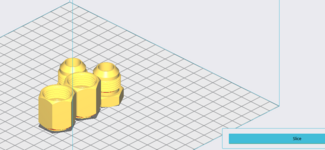


that's a great idea. I'll have to remember that.I've been working on a Case 448 restore which includes media blasting some hydraulic lines and a valve. The fittings are JIC and hard to mask off. I stole the 3D files for some caps and plugs off McMaster.com and printed some. Those went on the lines and the valve and stayed there from media blasting through finish paint.
Bambu's do have a filament sensor, but it is located before the extruder gear. Will expand on what I think happened in a bit.How?
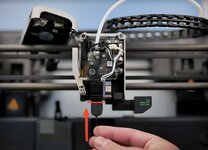
More heat?Does anyone have any suggestions on dialing in a new filament brand i just got? PETG. This is the 3rd brand of PETG i've tried, and it's tending to jam up in the extruder, i have to clean it all out and it runs fine for a while, 2-3 prints, and then it does it again.
Bro what the **** is this pictureUpgraded to 8 spool CFS for ULTIMATE POWAH.
The rear one has PETG, the front PLA.
I ran into a random post that someone had the same problem with eSun petg, that it had a lower softening temperature than other brands. I'm running a K1, and i had left the lid on, so my thought was it was getting warm in there, softening the filament in the extruder when it sat for a while, and that caused the kink.More heat?
Have you dried it before use? I know that Bambu Labs recommends drying their PETG before printing with it. I’ve used both Bambu and Sunlu PETG without issues. My machine is an X1C.Does anyone have any suggestions on dialing in a new filament brand i just got? PETG. This is the 3rd brand of PETG i've tried, and it's tending to jam up in the extruder, i have to clean it all out and it runs fine for a while, 2-3 prints, and then it does it again.
I've been working on a Case 448 restore which includes media blasting some hydraulic lines and a valve. The fittings are JIC and hard to mask off. I stole the 3D files for some caps and plugs off McMaster.com and printed some. Those went on the lines and the valve and stayed there from media blasting through finish paint.
Have not. Don't have oneHave you dried it before use? I know that Bambu Labs recommends drying their PETG before printing with it. I’ve used both Bambu and Sunlu PETG without issues. My machine is an X1C.
That’s your problem. PETG is really really finicky about humidity levels. If you’re using the AMS, print out some dessicant holders from Makerworld and grab a $15 jug of orange dessicant beads. As a bonus, get a cheap humidity/temp digital thingy and double tape it to the inner lid of the AMS, facing out so you can see it without opening. When humidity percent starts to get in the low 30s, swap in fresh orange beads.Have not. Don't have one

I'd be lying if I said I didn't run them through the 7/8-14 die and tap to clean up the thread just a bit. You also could try printing at a skewed proportion. Something like 97% in the X and Y but maintain 100% in the Z would make the plugs fit better. 103% in the X and Y with 100% in the Z should make the caps fit better. They don't have to have a hydraulic quality seal.man i cannot for the life of me get the caps to print good for JIC.
Rule #11: Always dry PETG, even when new.
It's safe to say you fall a little outside of the typical user profile hahahainstructions unclear: use many hundreds of KG a month without drying.
It's safe to say you fall a little outside of the typical user profile hahaha
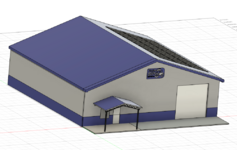
Can't wait to see progress pics of the new building!in the new facility we will have a entire printer room dehumidifier running to get humidity as low as we can. on top of the AC units
AI generated picture...Upgraded to 8 spool CFS for ULTIMATE POWAH.
The rear one has PETG, the front PLA.

Can't wait to see progress pics of the new building!
I don't have a Bambu. K1 creality.That’s your problem. PETG is really really finicky about humidity levels. If you’re using the AMS, print out some dessicant holders from Makerworld and grab a $15 jug of orange dessicant beads. As a bonus, get a cheap humidity/temp digital thingy and double tape it to the inner lid of the AMS, facing out so you can see it without opening. When humidity percent starts to get in the low 30s, swap in fresh orange beads.
If you’re not using AMS, then I’d probably recommend switching to something like Sunlu PLA+ since it works well in Bambu printers using stock generic filament presets, is good and strong, and is not nearly as picky about ambient humidity.
I have 1000's of hours printing petg on a k1.I don't have a Bambu. K1 creality.

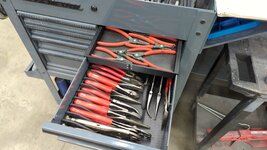
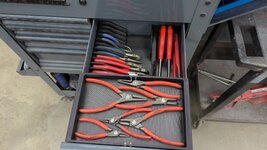

Your own design?Got tired of how messy my toolbox was so I'm starting to organize it. Figured I'd start with the plier drawer since it was the most chaotic.
I made some racks for the pliers and a sliding tray on top to squeeze out a bit more storage. My printer is too small to make the tray in one piece so it's two halves bolted together.
The tray has a magnet on the back so it won't slide forward every time you open the drawer. You gotta give it a little tug to move it forward.
For ref all the pliers under the tray. There's two different widths of the racks to account for the wider pliers vs the thinner ones. In total it can hold ~23 pliers (not counting the tray)
Yeah. I designed the tray / plier racks although the racks aren't anything ground breaking new since there's already so many out there lol. I just wanted them to be specifically designed for the pliers I have.Your own design?