To avoid these ads, REGISTER NOW!

The Everything 3D Printer Thread

jeepxj

Well-known member
Joined
Mar 2, 2008
Messages
17,831
This is to feed the filament production line, correct? Or is there a possibility of pellet feeding the printers?

Either way pneumatic conveying is the way to go as long as you go with a solution that has a reasonable noise level.

filament production lines. air is the only way to go really.

the print heads with a screw in them print very slow. good for stuff with 5mm line width. not good for .6mm nozzles.


filament lines look like:

1765917275415.png


what i really want outside lol
1765917506382.png

into:
1765917574906.png

then to machine hoppers.

1765917317068.png
 
To avoid these ads, REGISTER NOW!

KwikFab

Well-known member
Joined
Jul 27, 2024
Messages
1,167
Location
Central Valley, CA
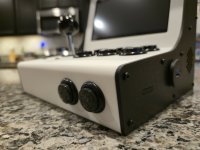
Been really busy with personal stuff so, got to working on a little project I found on Makerworld.

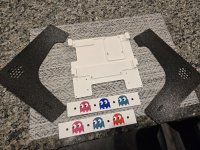
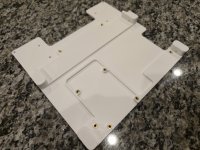
The outer enclosure is all one piece.

20251208_173247.jpg

Side panels, top panel (only one used), inner frame, and bezel (not shown).

20251208_172807.jpg

Installing the heat set inserts for install.

20251210_174145.jpg

Close-up.

20251210_184217.jpg

Raspberry Pi 3B+.

20251211_090010.jpg


Speakers, powered via USB. Did a PC test beforehand to ensure channels were in the correct position.

20251211_101645.jpg

Screen attached to the bezel, and bezel attached to the inner frame.

20251213_154450.jpg

Function check, while also ensuring Retro Pie is working.

20251213_161926.jpg

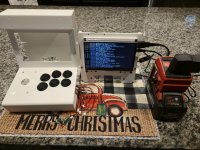
Done.

20251218_175106.jpg

20251218_175118.jpg

A few changes I made myself include adding a flush mount USB on one side for easily adding more roms, two buttons on the front to add functionality, and lastly a rear flush mount micro USB to connect/disconnect the power adapter.
 

rslaback

Well-known member
Joined
Jul 24, 2010
Messages
4,061
Location
Westcentral Wisconsin
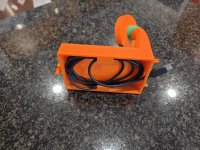
I bought a 10" circular saw at the local auction house after looking for one for quite a while. It was listed as untested because the OEM cord was so cracked that it was wrapped completely in electrical tape for all 9 feet. The cord stain relief was in 3 pieces and long since discontinued.

No worries, I've got a 3D printer and some tpu.


20251223_124859.jpg


20251223_124855.jpg
 
To avoid these ads, REGISTER NOW!

Jbullfrog

ALLIANCE MEMBER
Joined
Jan 9, 2007
Messages
2,347
Location
Avoca, Iowa
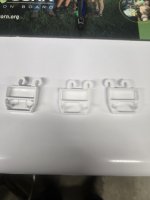
I have a 3D scanner (3d Maker Pro Seal Lite) and figured out how to scan this fridge bracket and print a set of replacements. The left is the original and the other 2 are the printed clones. I needed to do a little cutting, as there is a gap between the pins and the body, but it's my first try.
 

Attachments

  • 20251221_180732.jpg
    20251221_180732.jpg
    382.1 KB · Views: 44

burger

Well-known member
Joined
Jun 6, 2005
Messages
980
Location
Erf
I bought a 10" circular saw at the local auction house after looking for one for quite a while. It was listed as untested because the OEM cord was so cracked that it was wrapped completely in electrical tape for all 9 feet. The cord stain relief was in 3 pieces and long since discontinued.

No worries, I've got a 3D printer and some tpu.
Nice save! Betcha got it cheap!
 

ed_

Well-known member
Joined
Nov 5, 2019
Messages
183
Location
Maine
Made a little stand for my label printer.
IMG_20251224_102352_872.jpg

Growing my tiny business has been fun. I've found a niche I like and have been designing products for it and am making a sale about once every few days. I don't think I'll ever be on jeepxj's scale but if I could grow it to a few hundred profit a month I'd be happy.
 

cody1325

Well-known member
Joined
Apr 17, 2024
Messages
1,075
Location
Southwest Virginia
I've been using TPU a lot for scale model tires, and I'm doing some RC projects next month (both of which call for printed tires).

However, my results with TPU 95A have usually been garbage--whether it be on my old Flashforge Adventurer 5M or the Bambu A1. I had originally figured the issue wasn't drying it enough, and as it turns out I was right.

My Sunlu S1 Plus filament dryer (which works fine with PLA and PET-G) only goes up to 55C--and apparently the recommended drying temperature for TPU is 60-70. I've also found the S1 a little cheap.

So, what's a good one under $100 these days? Or should I spend just a bit more and get something that holds multiple rolls? I've been thinking about getting the Creality Space Pi (or Space Pi Plus--as it can take two rolls for not much more).
 
Last edited:

pcrov

Well-known member
Joined
Feb 27, 2023
Messages
375
Location
Ontario, CA
So, what's a good one under $100 these days? Or should I spend just a bit more and get something that holds multiple rolls? I've been thinking about getting the Creality Space Pi (or Space Pi Plus--as it can take two rolls for not much more).

I have two of the Space Pi Plus. Good dryer, bad touchscreen. The touchscreen works it's just annoying to use; you gotta kinda press and hold for it to register, you get a feel for it. I recommend printing this heat deflector to avoid a hotspot coming right off the heater.

Not a perfect dryer obviously but I still recommend it. Dries TPU just fine.

Edit: I just checked the TPU preset on the Space Pi Plus and it's 55 so if your S1 can get up to temp I'd try it first. Though if you do need it hotter the Space Pi Plus goes up to 65 or 70 I think.
 
Last edited:

mike93lx

ALLIANCE MEMBER
Joined
Dec 9, 2013
Messages
37,356
Location
Richmond, VA
I unboxed and setup my P1S yesterday. Little bit of a hiccup in running the first print as it didn't want to feed through the AMS, but I got it working.

Printed a Benchy and a little Axlotl wiggly toy for my daughter. Speed and quality was good, but the amount of wasted material on the Axlotl was amazing due to the second color used for the eyes. 27 grams for the final part with 21 grams of purged material.

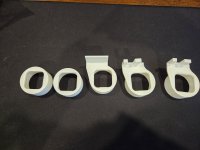
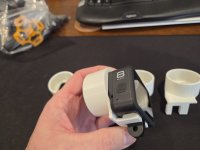
I somehow decided I wanted to mount my gopro to my spotting scope after seeing a print on thingiverse, but none of the sizing was right, so I started messing with fusion and ended up iterating my way through. First time using fusion, so it was a bit frustrating at times, but I got there. Also learned how much orientation impacts part quality and how important it is to get the print settings right. Part one took around 20 minutes with the bambu slicer and part two took over an hour using the code output from fusion

6988.jpg
6988.jpg6991.jpg


Now the problem... It's completely useless 😂

The lens on the gopro is way too wide angle and the eye relief on the scope varies enough that I can get it to focus at 20x,but it doesn't work at all by 30x, let alone 60x.

Either way, it was a fun project to start with
 
Last edited:

pcrov

Well-known member
Joined
Feb 27, 2023
Messages
375
Location
Ontario, CA
The lens on the gopro is way too wide angle and the eye relief on the scope varies enough that I can get it to focus at 20x,but it doesn't work at all by 30x, let alone 60x.

Either way, it was a fun project to start with

Incoming hobby: diy optics
 

jeepxj

Well-known member
Joined
Mar 2, 2008
Messages
17,831
Made a little stand for my label printer.
IMG_20251224_102352_872.jpg

Growing my tiny business has been fun. I've found a niche I like and have been designing products for it and am making a sale about once every few days. I don't think I'll ever be on jeepxj's scale but if I could grow it to a few hundred profit a month I'd be happy.

thats how I started. niche is where the money is.
 

LeonardY

Well-known member
Joined
Apr 16, 2011
Messages
5,020
Location
Southern California
Been awhile since I posted here.
Upgraded both the resin and the FDM printers this year.

Really just upsized my resin printer. I’ll be keeping my Elegoo Saturn. Added a Elegoo Jupiter Se.
1766793924803.png
I really like the resin pump. Cleanup is so much easier. There is almost zero splashing of resin while printing.

Bought a Qidi Q2 with the box to replace my Qidi X-Max. Gave the X-Max to a friend that 3D printer just wasn’t in the cards. He’s super happy with it. As I was.

Printing quality is near the same on the resin printers. Maybe slightly better. It doesn’t do well with really small parts. Parts don’t break loose from the FEP reliably.
Changing colors of resin requires flushing the pump. Keeping the Saturn made sense for resin changes and smaller parts.

The FDM printers was another story. The Q2 is much faster than the X-Max. The print quality is better. The print volume is less but I checked some of my larger designs and nothing came close to the max volume of the X-Max. All my designs fit easily into the Q2. The machines physical size is the differ a lot.
1766793975626.png
1766794085447.png
Haven't installed the box yet.
Hopefully this next week.
 
Last edited:

mike93lx

ALLIANCE MEMBER
Joined
Dec 9, 2013
Messages
37,356
Location
Richmond, VA
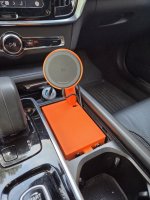
Been working on a replacement for the terrible 5w wireless charger in my car. I wanted to switch to a magnetic 15w

I'm printing it in three parts and gluing together. Any tips on how to incorporate registration marks to make alignment easier?

Ignore the green... I ran out of filament at the end of the print

7002.jpg7000.jpg
 

LeonardY

Well-known member
Joined
Apr 16, 2011
Messages
5,020
Location
Southern California
Been working on a replacement for the terrible 5w wireless charger in my car. I wanted to switch to a magnetic 15w

I'm printing it in three parts and gluing together. Any tips on how to incorporate registration marks to make alignment easier?

Ignore the green... I ran out of filament at the end of the print

7002.jpg7000.jpg
I would design the part to have a notch or flat and a corresponding one on each part. Make sure to give space for fit and glue.
 

mike93lx

ALLIANCE MEMBER
Joined
Dec 9, 2013
Messages
37,356
Location
Richmond, VA
I would design the part to have a notch or flat and a corresponding one on each part. Make sure to give space for fit and glue.
I tried doing a recess on each part and it didn't work out. The base piece curled up and the texture on both was too rough for even gel superglue to hold. What can I do to make it work better?

I'm using fusion, but I am just a feckless hack with it so far
 

WildBill

ALLIANCE MEMBER
Joined
Aug 20, 2021
Messages
1,976
Location
PNW
Been working on a replacement for the terrible 5w wireless charger in my car. I wanted to switch to a magnetic 15w

I'm printing it in three parts and gluing together. Any tips on how to incorporate registration marks to make alignment easier?

Ignore the green... I ran out of filament at the end of the print

7002.jpg7000.jpg
Most slicer programs have a tool for cutting the model in parts, when you do that there should also be an add connector button that lets you add two holes and a matching pin to align and glue the parts together. Or a snap connector and matching hole. I like using hexagon shaped pins and holes. You then can print the pins along with your other parts.
 

mike93lx

ALLIANCE MEMBER
Joined
Dec 9, 2013
Messages
37,356
Location
Richmond, VA
Most slicer programs have a tool for cutting the model in parts, when you do that there should also be an add connector button that lets you add two holes and a matching pin to align and glue the parts together. Or a snap connector and matching hole. I like using hexagon shaped pins and holes. You then can print the pins along with your other parts.
Thanks. I'll look
 

LeonardY

Well-known member
Joined
Apr 16, 2011
Messages
5,020
Location
Southern California
I tried doing a recess on each part and it didn't work out. The base piece curled up and the texture on both was too rough for even gel superglue to hold. What can I do to make it work better?

I'm using fusion, but I am just a feckless hack with it so far
You can put a hole through both parts. Then use a pin or dowel to align the parts.
 
To avoid these ads, REGISTER NOW!
Top Bottom