A geologic formation of some kind?Printed this awhile back as a test piece, anyone want to guess what it is?


You are using an out of date browser. It may not display this or other websites correctly.
You should upgrade or use an alternative browser.
You should upgrade or use an alternative browser.
The Everything 3D Printer Thread
- Thread starter BoilermakerFan
- Start date
Old trick was to coat the print area with a glue stick.Okay, what am I doing wrong here (just regular bambu PLA)? What can I do to fix this issue of the end lifting? This was the best I could get it after 4 tries. I tried rotating it to multiple different directions on the plate to see if that would help. I ended up adding the skirt around it and that helped a TON but still end up lifting on that end. I did clean the plate before each try with IPA but maybe I should be scrubbing with soap and water? Maybe my design is flawed? Maybe it should have been a different rotation but this one seemed to have the most surface area touching the plate?
This ended up working fine for its intended purpose but I have had other things do this and its usually been when it gets closer to the edge of the plate. Just curious what else I could try? Do I need a different plate, or need to use glue, or plate hotter, or not as hot, or ???

lovetap
Well-known member
bingoA geologic formation of some kind?
kaymccampbell
Well-known member
Something stuck at the LaBrea tar pits?Printed this awhile back as a test piece, anyone want to guess what it is?
You might look at your infill pattern. I had a simple rectangular part I was trying to print on my Flashforge. The part was long enough I had to print it diagonally on the bed. It was perhaps 11" long, 1" tall and maybe 1/4" wide. It was having a lot of problems with lift at one end. I realized the likely problem was the infill pattern. Normally if you print a rectangular part it will be square to the bed and the infill pattern I was using would create lines at 45* to the bed. However, since I was already at 45* to the bed the infill resulted in a long series of infill lines that were aligned with the long axis of the part. As that plastic starts to cool it shrinks just a bit. Infill shrinking isn't a huge deal so long as it doesn't line up with some major feature of your part. In my case that was exactly my problem. The top layer of the print would cool and, like a set of guitar strings, it would put tension across the top of the part. That ended up causing the part to bend as the layers built up. I don't recall if I ultimately solved my print with a change to my masking tape build plate or if I used a raft.Okay, what am I doing wrong here (just regular bambu PLA)? What can I do to fix this issue of the end lifting? This was the best I could get it after 4 tries. I tried rotating it to multiple different directions on the plate to see if that would help. I ended up adding the skirt around it and that helped a TON but still end up lifting on that end. I did clean the plate before each try with IPA but maybe I should be scrubbing with soap and water? Maybe my design is flawed? Maybe it should have been a different rotation but this one seemed to have the most surface area touching the plate?
This ended up working fine for its intended purpose but I have had other things do this and its usually been when it gets closer to the edge of the plate. Just curious what else I could try? Do I need a different plate, or need to use glue, or plate hotter, or not as hot, or ???
A few things you might try, change the orientation on the build plate, change the infill if it has long runs aligned with your part, change your build plate temp, use masking tape for better bed adhesion, use a raft under your part. BTW, masking tape/blue tape is basically my bed adhesion cheat code. It works really well. I liked having a second build plate with masking tape. I would always run a bed profile when changing build plates. It might not be needed but I felt better about doing it. Certainly the plate+tape results in a different Z-offset.
Do you know what kind? Looks like an intrusive igneous rock that's more resistant to weathering that the formation that it intruded into.bingo
lovetap
Well-known member
I do! Both the black and grey volumes are granites, the black showing the top of a larger pluton which evolved into the younger grey granite which comes to the surface in the the pimple at the top and the linear intrusion in the back. The green is an area of magmatic brecciation which includes both units. The "country rock" which everything intruded into is not shown.Do you know what kind? Looks like an intrusive igneous rock that's more resistant to weathering that the formation that it intruded into.
The volumes came from a 3d model of the system at depth based on surface exposures and drill holes.
Last edited:
kaymccampbell
Well-known member
An excellent use for 3D printing.I do! Both the black and grey volumes are granites, the black showing the top of a larger pluton which evolved into the younger grey granite which comes to the surface in the the pimple at the top and the linear intrusion in the back. The green is an area of magmatic brecciation which includes both units. The "country rock" which everything intruded into is not shown.
The volumes came from a 3d model of the system at depth based on surface exposures and drill holes.
Very cool. Do you know of any other good geologic or topographic prints?I do! Both the black and grey volumes are granites, the black showing the top of a larger pluton which evolved into the younger grey granite which comes to the surface in the the pimple at the top and the linear intrusion in the back. The green is an area of magmatic brecciation which includes both units. The "country rock" which everything intruded into is not shown.
The volumes came from a 3d model of the system at depth based on surface exposures and drill holes.
lovetap
Well-known member
Thanks. This was something I modeled for work, but I have used https://www.map2stl.com/ before for making quick topographic maps for people. If you use a color changing filament like rainbow it really makes the topography stand out.Very cool. Do you know of any other good geologic or topographic prints?
Poolshark314
Well-known member
Most lifting that occurs from the left side of an enclosed Bambu printer seems to be caused by the auxiliary fan. I have it disabled in my settings, and none of my prints lift anymore.Okay, what am I doing wrong here (just regular bambu PLA)? What can I do to fix this issue of the end lifting? This was the best I could get it after 4 tries. I tried rotating it to multiple different directions on the plate to see if that would help. I ended up adding the skirt around it and that helped a TON but still end up lifting on that end. I did clean the plate before each try with IPA but maybe I should be scrubbing with soap and water? Maybe my design is flawed? Maybe it should have been a different rotation but this one seemed to have the most surface area touching the plate?
This ended up working fine for its intended purpose but I have had other things do this and its usually been when it gets closer to the edge of the plate. Just curious what else I could try? Do I need a different plate, or need to use glue, or plate hotter, or not as hot, or ???
mike93lx
ALLIANCE MEMBER
Ironing at this resolution did not work out. Started OK, but then it was smearing. It also necessitated flipping the print, which just won't work they way I have it designedI believe ironing is the ticket. This is 0.05mm spacing and it looks pretty darn good. Except for the perimeter.
Almost makes me want to get a cnc router so I can make the part larger and cut it out...

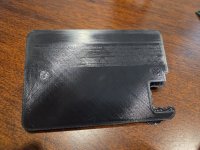
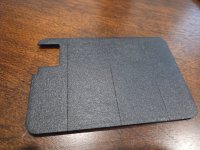
I laid down some painters tape and it worked pretty well, although the seams stand out. Still a little rougher than I want. If I had some 4" wide tape, I'd lay down two layers and try it again.
The print stuck to the tape very, very well. Removing it was difficult
I ordered a smooth plate

mike93lx
ALLIANCE MEMBER
Actually looks good in the car

Without straying into legal gray area....
Anyone printing firearm suppressors after getting the proper ATF Form 1 approval now that the paperwork is free instead of $200 a piece like it used to be?
Some resources and designs available here:
 ftn.fun
Again....paperwork has to be approved and processed before making anything, but what used to cost $200/each in paperwork is now free
Anyone printing firearm suppressors after getting the proper ATF Form 1 approval now that the paperwork is free instead of $200 a piece like it used to be?
Some resources and designs available here:
File Downloads
ftn.fun
Again....paperwork has to be approved and processed before making anything, but what used to cost $200/each in paperwork is now free
rmack898
Well-known member
Is anyone running Bambu studio on Linux?
The app seems to run OK but the connection to the printer is hit or miss. I don't think it's a printer issue as I have no connection problems when using the handy app.
The app seems to run OK but the connection to the printer is hit or miss. I don't think it's a printer issue as I have no connection problems when using the handy app.
slodat
ALLIANCE MEMBER
The issue I was having is on my first X1C. It’s nearly three years old on all original parts. I had just replaced the nozzle. It needed it. Issues continued. @MadeByMiller suggested the extruder and someone else in here suggested the PTFE tube. I just replaced both. This is what came out of it:

It was nearly worn through at the extruder connection.

The extruder gears looked pretty beat up. I have run a couple hundred of spools of filament through it, a lot of which was ABS. Running a test print now. So far looking way better than before I replaced parts.
Thank you for the troubleshooting suggestions.
It was nearly worn through at the extruder connection.
The extruder gears looked pretty beat up. I have run a couple hundred of spools of filament through it, a lot of which was ABS. Running a test print now. So far looking way better than before I replaced parts.
Thank you for the troubleshooting suggestions.

duneslider
Well-known member
Thanks for this, every time has been on the left side! I will give this a try and see if results improve.Most lifting that occurs from the left side of an enclosed Bambu printer seems to be caused by the auxiliary fan. I have it disabled in my settings, and none of my prints lift anymore.
kaymccampbell
Well-known member
I have noticed that USB connected printers will jump from one address to another after printer restarts or software restarts. My laser moves between TTYACM0 AND TTYACM1. Yes I know this is not a 3D printer, but the process is much the same.Is anyone running Bambu studio on Linux?
The app seems to run OK but the connection to the printer is hit or miss. I don't think it's a printer issue as I have no connection problems when using the handy app.
You can use udev to create a symlink. I've never been very good at symlinks, you'll need to read up.
draco_1967
Well-known member
I second the aux fan recommendation. I have it off on almost all of my profiles. It seems to do more harm than good.Thanks for this, every time has been on the left side! I will give this a try and see if results improve.
mike93lx
ALLIANCE MEMBER
Whats it's intended purpose? Evening out chamber temperature?I second the aux fan recommendation. I have it off on almost all of my profiles. It seems to do more harm than good.
I haven't encountered an issue with mine yet, but my parts have all been relatively small
duneslider
Well-known member
I don't know the purpose but I have not had issues on the majority of the prints I have done, only on things that are extending closer to the left hand side.Whats it's intended purpose? Evening out chamber temperature?
I haven't encountered an issue with mine yet, but my parts have all been relatively small
I did run one late yesterday that I was worried about and turned the fan off and it printed great. I will keep experimenting with that theory.
edit-did some googling it says the aux fan is to cool the item faster which can help with increasing printing speed and cooling layers faster which can help with overhangs and those sorts of things but it can lead to lifting on large flat items due to cooling too quickly and causing contraction.
PelicanPines
ALLIANCE MEMBER
Somewhere... I saw a thingy defusing attachment offered that you could print.I don't know the purpose but I have not had issues on the majority of the prints I have done, only on things that are extending closer to the left hand side.
I did run one late yesterday that I was worried about and turned the fan off and it printed great. I will keep experimenting with that theory.
edit-did some googling it says the aux fan is to cool the item faster which can help with increasing printing speed and cooling layers faster which can help with overhangs and those sorts of things but it can lead to lifting on large flat items due to cooling too quickly and causing contraction.
pcrov
Well-known member
Somewhere... I saw a thingy defusing attachment offered that you could print.
I wonder how many problems they let slide with "meh, we'll sell 'em the plastic to fix it."

duneslider
Well-known member
For sure, they are in the business of selling consumables! I would have been happy if the instructions said something about it (they might say something about it, I didn't read the instructions...)I wonder how many problems they let slide with "meh, we'll sell 'em the plastic to fix it."
PelicanPines
ALLIANCE MEMBER
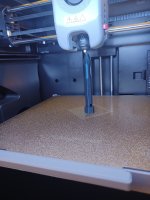
Flashforge touch screen kinda ***** with ********* response.
So they include a printable Stylus on the included USB stick.
Printing one now...
Edit: it printed. OMG... The touchscreen does not work with GJ Fat *** Sausage fingers... the Stylus is FLAWLESS with respect to poking the right response. I Highly recommend it for your ********* needs.
So they include a printable Stylus on the included USB stick.
Printing one now...
Edit: it printed. OMG... The touchscreen does not work with GJ Fat *** Sausage fingers... the Stylus is FLAWLESS with respect to poking the right response. I Highly recommend it for your ********* needs.
Last edited:
PelicanPines
ALLIANCE MEMBER
Poolshark314
Well-known member
Whats it's intended purpose? Evening out chamber temperature?
I haven't encountered an issue with mine yet, but my parts have all been relatively small
Yeah it's to help cool the item, but the positioning and accuracy of it is not great so most of the time does more harm than good. I have seen people printing diffusers to redirect the air somewhere else, but that really doesn't serve a purpose either so I just turn it off in my profilesI don't know the purpose but I have not had issues on the majority of the prints I have done, only on things that are extending closer to the left hand side.
I did run one late yesterday that I was worried about and turned the fan off and it printed great. I will keep experimenting with that theory.
edit-did some googling it says the aux fan is to cool the item faster which can help with increasing printing speed and cooling layers faster which can help with overhangs and those sorts of things but it can lead to lifting on large flat items due to cooling too quickly and causing contraction.
kaymccampbell
Well-known member
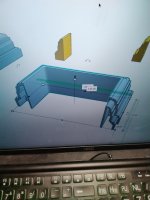
My deck post plinth halved with glue tabs. If this pans out in PLA, then it's on to PETG.

I checked the wiki and it doesn't say much about the aux fan. I think the only real use for it is if you are printing very small items. Using the aux fan will help cool the layers so you can print faster instead of slowing down the print to allow the layers to cool. That's just a guess as I have not yet tried it for very small prints. I usually turn it off for most prints.I don't know the purpose but I have not had issues on the majority of the prints I have done, only on things that are extending closer to the left hand side.
I did run one late yesterday that I was worried about and turned the fan off and it printed great. I will keep experimenting with that theory.
edit-did some googling it says the aux fan is to cool the item faster which can help with increasing printing speed and cooling layers faster which can help with overhangs and those sorts of things but it can lead to lifting on large flat items due to cooling too quickly and causing contraction.
PelicanPines
ALLIANCE MEMBER
Printing Insulin Vial holders today... (since I get a 3 month supply now)... I need to store 18 vials in the fridge. I don't like keeping them in the original box as they take up too much space. Thingiverse to the rescue. I print TWO of each size I need... and use one as the LID. Protects the vials from the wife putting lunch meat on top of my insulin.

pcrov
Well-known member
Protects the vials from the wife putting lunch meat on top of my insulin.
Gotta print one of these to go on top:
duneslider
Well-known member
My favorite is when I get pallets delivered with those cones on top and the cone is crushed and clearly had something on top of it.
67CarGuy
Well-known member

i actually designed that. lol.
but buying was cheaper
PelicanPines
ALLIANCE MEMBER
I've seen them used on film sets.i actually designed that. lol.
but buying was cheaper
kaymccampbell
Well-known member
The continuation of yesterday's drama. It needs some fettling, but doesn't totally ****.

PelicanPines
ALLIANCE MEMBER
@kaymccampbell don't hate me. Move the seam to the corners. Print two L shapes...
kaymccampbell
Well-known member
Nope. On the corner, the seam will show. In the middle, the bottom rail of the railing hides it.@kaymccampbell don't hate me. Move the seam to the corners. Print two L shapes...