To avoid these ads, REGISTER NOW!

The Everything 3D Printer Thread

will335i

Well-known member
Joined
Feb 18, 2020
Messages
497
Location
IL
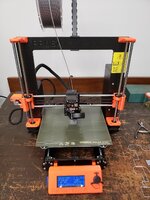
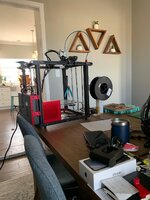
This is my Ender 5. There are many like it but this one is mine.

I am working through some printer upgrade parts right now after switching to linear rails and adding a raspberry pi. I think I am going to drive into Klipper and Fluid for it.

I have been printing a lot with PETG lately and I have been really happy with the quality of my prints. Does anyone know where I could find some hi-viz yellow PETG? I found a PLA that is the color I want, X3D Fluro Yellow, but I would really prefer PETG if it is out there.
 

Attachments

  • Ender 5.jpg
    Ender 5.jpg
    293.2 KB · Views: 147
To avoid these ads, REGISTER NOW!

Poolshark314

Well-known member
Joined
Jul 5, 2021
Messages
658
Location
MD
This is my Ender 5. There are many like it but this one is mine.

I am working through some printer upgrade parts right now after switching to linear rails and adding a raspberry pi. I think I am going to drive into Klipper and Fluid for it.

I have been printing a lot with PETG lately and I have been really happy with the quality of my prints. Does anyone know where I could find some hi-viz yellow PETG? I found a PLA that is the color I want, X3D Fluro Yellow, but I would really prefer PETG if it is out there.
Klipper and fluidd is the way to go with speed
 

bbroxter

New member
Joined
Feb 28, 2021
Messages
3
Location
Charlotte
This is my Ender 5. There are many like it but this one is mine.

I am working through some printer upgrade parts right now after switching to linear rails and adding a raspberry pi. I think I am going to drive into Klipper and Fluid for it.

I have been printing a lot with PETG lately and I have been really happy with the quality of my prints. Does anyone know where I could find some hi-viz yellow PETG? I found a PLA that is the color I want, X3D Fluro Yellow, but I would really prefer PETG if it is out there.
Printed Solid offers a PETG under their Jessie line under a neon yellow color. Have had good results with it so far


Jim_No_Garage

Well-known member
Joined
Jan 15, 2011
Messages
3,299
Location
Millington NJ
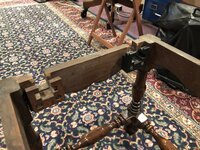
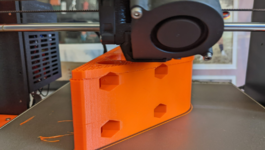
My son has been repairing and refinishing a tiny Johnson, Handley and Johnson "extending leaf" coffee table. There is a "complicated" mechanism to hold the leaf's in place when extended. The "brackets" were made of wood and 2 of the 4 were broken.

He modeled a replacement bracket in Fusion 360 and I printed in PLA. It fit perfectly so I'm printing a second copy and he will assemble it tomorrow. I call it the "espresso" table since it's really to small to call it a "coffee" table.

Cheers

Jim

Printed Bracket (2).jpeg
 

bugnut

ALLIANCE MEMBER
Joined
Jul 14, 2012
Messages
3,834
Location
Central Ohio
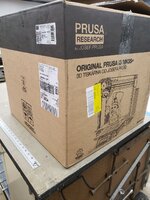
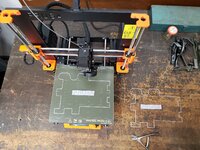
Received this a couple days back! And we are underway!!
 

Attachments

  • 20220217_120221.jpg
    20220217_120221.jpg
    359.8 KB · Views: 53
  • 20220217_120231.jpg
    20220217_120231.jpg
    277 KB · Views: 50
  • 20220218_115720.jpg
    20220218_115720.jpg
    528 KB · Views: 44
  • 20220218_115754.jpg
    20220218_115754.jpg
    239.9 KB · Views: 48
  • 20220220_113448.jpg
    20220220_113448.jpg
    371.8 KB · Views: 49
  • 20220220_131055.jpg
    20220220_131055.jpg
    269.4 KB · Views: 59
  • 20220221_115952.jpg
    20220221_115952.jpg
    345.1 KB · Views: 68

ekuhn

Well-known member
Joined
Jun 7, 2010
Messages
223
Location
08873
Anyone in Central NJ have part scanning capabilities? I can't seem to find the right sized part on thingverse. Did some sample printing with my friends father, but the ones available were all too small.

Its the latch for my cooler. Its like 4.5 x 4x5 square and 6.5 turning its to its widest.

1645625632064.png
 

ER70S-2

Well-known member
Joined
Jan 2, 2015
Messages
796
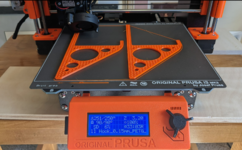
Printing a couple big heavy-duty ladder hangers today (and tomorrow, lol). We'll see how they do. Good to finally be getting solid results with PETG, it was a bit of a pain dialing it in.

What kind of problems did you have dialing in PETG? I just started printing with it and am having some issues. The most annoying thing is that I can't get a really nice looking top solid infill layer. My first layer looks really nice and uniform, but the top solid infill layer doesn't look very smooth.
 

kaymccampbell

Well-known member
Joined
Feb 27, 2015
Messages
29,405
Location
Upstate New York
What kind of problems did you have dialing in PETG? I just started printing with it and am having some issues. The most annoying thing is that I can't get a really nice looking top solid infill layer. My first layer looks really nice and uniform, but the top solid infill layer doesn't look very smooth.
What fill pattern are you using? I find gyroid offers a nicer support for the tops of prints.
 

Bodj Built

Well-known member
Joined
Feb 3, 2016
Messages
1,165
Location
Moorpark, CA
I'm having issues with PETG as well. I make sure to level the bed before, but the initial first pass around *****. It starts super thick and almost smeared, as if it's too hot. Then after maybe 6 inches it will stop being able to feed material through. The rollers just click because they can't feed any material through.
 
To avoid these ads, REGISTER NOW!

Poolshark314

Well-known member
Joined
Jul 5, 2021
Messages
658
Location
MD
I'm having issues with PETG as well. I make sure to level the bed before, but the initial first pass around *****. It starts super thick and almost smeared, as if it's too hot. Then after maybe 6 inches it will stop being able to feed material through. The rollers just click because they can't feed any material through.
I generally use a slightly larger initial layer size on PETG, usually .28. What printer do you have? Depending on your speed and temps, you may be printing too fast so it can't keep up with the feeding. If it an Ender 3 variant, the extruder handle is made of plastic and commonly cracks, which would absolutely cause a feeding issue.
 

Bodj Built

Well-known member
Joined
Feb 3, 2016
Messages
1,165
Location
Moorpark, CA
I generally use a slightly larger initial layer size on PETG, usually .28. What printer do you have? Depending on your speed and temps, you may be printing too fast so it can't keep up with the feeding. If it an Ender 3 variant, the extruder handle is made of plastic and commonly cracks, which would absolutely cause a feeding issue.

I'll give that a shot. I have a FlashForge Adventurer 3 Lite. I love it for PLA and ABS. PETG is screwing me up. I've tried printing hotter. I'll try slower as well
 

ER70S-2

Well-known member
Joined
Jan 2, 2015
Messages
796
What fill pattern are you using? I find gyroid offers a nicer support for the tops of prints.

Mostly gyroid, but the issue is not related to the infill pattern. Bridging is fine. The issue is that I can't get a perfectly smooth "surface finish" for lack of a better term. PLA prints look perfect, almost like parts that come off my Bridgeport.
 

kaymccampbell

Well-known member
Joined
Feb 27, 2015
Messages
29,405
Location
Upstate New York
Mostly gyroid, but the issue is not related to the infill pattern. Bridging is fine. The issue is that I can't get a perfectly smooth "surface finish" for lack of a better term. PLA prints look perfect, almost like parts that come off my Bridgeport.
Try slowing the print speed for the last layers.
 

ER70S-2

Well-known member
Joined
Jan 2, 2015
Messages
796
Try slowing the print speed for the last layers.

Already tried that, and it did help a little. I'm currently at 10mm/s. Slower didn't seem to help. I have found that 10mm/s is essential for my first layer. The default setting of 20mm/s causes about 40% of the first layer to ripple and lift right off of the print bed. For reference, I'm using a Prusa MK3S+ with the textured powder coated sheet.
 

cycle61

Well-known member
Joined
Apr 5, 2020
Messages
500
Location
Middle of Oregon
What kind of problems did you have dialing in PETG? I just started printing with it and am having some issues. The most annoying thing is that I can't get a really nice looking top solid infill layer. My first layer looks really nice and uniform, but the top solid infill layer doesn't look very smooth.
Late response, but I was having a ton of first layer weirdness, finally solved by moving the printer into a room with less temperature variation. I'm also getting stringing, and may try tuning the retract a bit. Seems like the nozzle is extruding a bit of extra material between passes and it gradually builds up around the nozzle until a booger catches on something or gets stuck in the print.
 

HPRifleman

Member Emeritus
Joined
Nov 18, 2019
Messages
767
Location
Wayne, IL
The utensil rack in our dishwasher has some broken plastic in the bottom. So every time a knife or the handle of a spoon or fork hits this area, it drops through and I have to lift the whole rack out and retrieve the article.

I spent all of about 5 minutes 3D modeling a new bottom and printing it along with another job I was doing. It remains to be seen how well this will hold up to the environment of a dishwasher.

The rack with the offending opening.
gj_109.JPG


A new floor with plenty of drain holes.
gj_108.JPG
 

GeoBruin

Well-known member
Joined
May 5, 2018
Messages
3,732
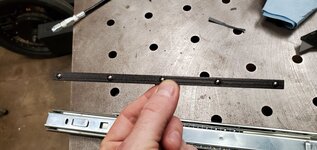
I don't have a printer but my best friend has a Prusa and I commission things from time to time. I design them and send him the stl files and he runs the prints. Recently I've done dampeners/clips for my compressor shroud, some replacement ball bearing retainers for drawer slides, and replacement end caps for US General drawer pulls.

20220201_200138.jpg20220201_194753.jpgIMG_20211227_141328_138.jpg
 

Bessy

Well-known member
Joined
Dec 18, 2012
Messages
992
Location
Ontario, Canada
A question for any Ender 3/pro/v2 owners on the forum:

In fiddling with my printer tonight, I realized that the X-axis is uneven. The right end of the gantry appears to be 3mm higher than the left side for some reason? When I put the printer together initially back in Nov/December 2021, I double-checked that both of my extrusions were cut square and equivalent in length. I have triple-checked this tonight against a tape measure and can confirm they are both well within spec that way. My questions are:
1) How might I correct (lower) the right side of the gantry?; and
2) Would it be wise to upgrade to dual-z to avoid this issue in the future, and if so, which kit(s) have others used successfully?

TIA!
 

Poolshark314

Well-known member
Joined
Jul 5, 2021
Messages
658
Location
MD
A question for any Ender 3/pro/v2 owners on the forum:

In fiddling with my printer tonight, I realized that the X-axis is uneven. The right end of the gantry appears to be 3mm higher than the left side for some reason? When I put the printer together initially back in Nov/December 2021, I double-checked that both of my extrusions were cut square and equivalent in length. I have triple-checked this tonight against a tape measure and can confirm they are both well within spec that way. My questions are:
1) How might I correct (lower) the right side of the gantry?; and
2) Would it be wise to upgrade to dual-z to avoid this issue in the future, and if so, which kit(s) have others used successfully?

TIA!
  1. Sounds like your concentric nuts have loosened on the X gantry. Trying wiggling both sides to see if there is any play, and then tighten them. Do not overtighten them to where they can't roll.
  2. Dual-Z would solve that problem, but I currently see it as routine maintenance like checking bed level
 

AndyL

Well-known member
Joined
Feb 22, 2012
Messages
1,371
Location
Vancouver
Figure this might be better place to ask...

Decided it's time to expand the printer farm again. And deal with noise/smell/safety/environment issues all in one fell swoop.

Planning to put the printers (CR10 and a couple Mars') in this:

Planning to cut the door to half height, probably run a tambour style door on top, cut down front doors on the bottom. Hide a light and carbon filter up top - I'll find room for a small dehumidifier in there somewhere. Goal really is - keep the sounds/smells of the printers out of my living space; and knock down the drafts issue with nylon prints & humidity in the print area.

Tossed an ender2 on squashball feet into my existing 32" cabinet last night to see my starting point. Well starting point is it's a huge sound amplifier. Not totally unexpected.

Looking for some input on how to modify as I build to reduce this? It is thinner steel. I'm guessing adding some bulk like dynamat/insulating foam to the sides/backs shelves etc? I'm guessing some of you have been down this path before? Looking for some ideas to throw into CAD so I've got a game plan before I start assembling / modifying.
 

Bessy

Well-known member
Joined
Dec 18, 2012
Messages
992
Location
Ontario, Canada
Figure this might be better place to ask...

Decided it's time to expand the printer farm again. And deal with noise/smell/safety/environment issues all in one fell swoop.

Planning to put the printers (CR10 and a couple Mars') in this:

Planning to cut the door to half height, probably run a tambour style door on top, cut down front doors on the bottom. Hide a light and carbon filter up top - I'll find room for a small dehumidifier in there somewhere. Goal really is - keep the sounds/smells of the printers out of my living space; and knock down the drafts issue with nylon prints & humidity in the print area.

Tossed an ender2 on squashball feet into my existing 32" cabinet last night to see my starting point. Well starting point is it's a huge sound amplifier. Not totally unexpected.

Looking for some input on how to modify as I build to reduce this? It is thinner steel. I'm guessing adding some bulk like dynamat/insulating foam to the sides/backs shelves etc? I'm guessing some of you have been down this path before? Looking for some ideas to throw into CAD so I've got a game plan before I start assembling / modifying.
Andy,

I took a look at your other thread from earlier this month, good on you for adapting the space to your and your son's needs!

Regarding your cabinet question, if you're going with a new cabinet vs modifying an existing one (and even then) I'd say you'd probably be well ahead to go scratch-built instead. $500 is a pretty pricy cabinet to chop and rebuild, even with today's material prices. I'd opt to fashion something out of 2x lumber and/or 1/2" ply. With egg crate foam (I've even heard of people using actual egg flats as sound deadening material) you can probably cut down on the noise fairly readily.

The mass (thickness) of the wood alone will probably invite far less flex compared to the sheet metal shelves in those cabinets, and with less flex, I suspect it will be significantly better in the noise department even before any major sound deadening material is added. Lastly, it may be prudent to go deeper than 18" should you opt to invest in any larger printers in the future (for instance the Ender 3v2 is just about 18" wide /20 deep). Even building the main structure out of 2x lumber, you can probably skin the sides with 1/4" to cut down on the cost some, particularly if you're going to be going with foam or some other sound deadening material.
 

AndyL

Well-known member
Joined
Feb 22, 2012
Messages
1,371
Location
Vancouver
Andy,

I took a look at your other thread from earlier this month, good on you for adapting the space to your and your son's needs!

Regarding your cabinet question, if you're going with a new cabinet vs modifying an existing one (and even then) I'd say you'd probably be well ahead to go scratch-built instead. $500 is a pretty pricy cabinet to chop and rebuild, even with today's material prices. I'd opt to fashion something out of 2x lumber and/or 1/2" ply. With egg crate foam (I've even heard of people using actual egg flats as sound deadening material) you can probably cut down on the noise fairly readily.
Yeah, but I want to keep the consistent look in the house. I'd end up with that investment alone in paint/shop supplies just to make it almost match. So end of the day - modifying one that matches from the start - makes more sense. I'm better at integrating than finishing anyway :) And having a steel "less combustible" enclosure isn't a terrible thing.

Not planning FDM upgrades, my CR10 isn't likely to change in the foreseeable future (albeit a hemera may take the place of the titan/volcano) but that won't change it's fitment. Just adding the SLA's back into the mix, and controlling the environment better than I currently am; and hiding the ancillary mess.
 

bugnut

ALLIANCE MEMBER
Joined
Jul 14, 2012
Messages
3,834
Location
Central Ohio
Spent time learning how to use sketchup and made a few trinkets. Helps out my OCD.....
 

Attachments

  • 20220225_132205.jpg
    20220225_132205.jpg
    143.3 KB · Views: 82
  • 20220302_153305.jpg
    20220302_153305.jpg
    281.1 KB · Views: 78
  • 20220225_135637.jpg
    20220225_135637.jpg
    174.5 KB · Views: 89

a_thiel24

Well-known member
Joined
Apr 16, 2016
Messages
259
Location
NW, OH
Do you have an STL for the drawer end caps?
I don't have a printer but my best friend has a Prusa and I commission things from time to time. I design them and send him the stl files and he runs the prints. Recently I've done dampeners/clips for my compressor shroud, some replacement ball bearing retainers for drawer slides, and replacement end caps for US General drawer pulls.

20220201_200138.jpg
 

penright

ALLIANCE MEMBER
Joined
Dec 27, 2016
Messages
618
Location
SW of Mustang, OK
My use case is to know if I left the valve open on my welding gas cylinder. I wanted something IOT to tie into Home Assistant. After some great suggestions, I based it on this
I started with a Zigbee window sensor. Then I used a microswitch from a broken mouse. I just solder the wires in parallel with the reed sensor. I used the idea from @svideo (linked above) of an outer and inner rotating, being captured from the bottom. So the switch was not as sensitive I had to make the slots longer. I have not tested it in the real world, but it does work on the bench. The only reason I can think of it failing in production is the Zigbee signal not making it from my shop. I currently have a routine that when I "close" the shop checks for various sensors and if one is not what I expect it will announce it over google home and flashlights. I plan on treating the gas cylinder just like a window, to make sure it is off before leaving.
More info can be found here https://www.thingiverse.com/thing:5328821

Here are a couple of pictures.
1648138040060.png
1648137956067.png
1648137991554.png
1648138016826.png

1648138124675.png
 
Last edited:

nicholam77

Well-known member
Joined
Dec 18, 2016
Messages
2,655
Location
Minneapolis, MN
I spent all of about 5 minutes 3D modeling a new bottom and printing it along with another job I was doing. It remains to be seen how well this will hold up to the environment of a dishwasher.

Any updates on how it's holding up? And material used? I have the same issue with my dishwasher...
 
To avoid these ads, REGISTER NOW!
Top Bottom