To avoid these ads, REGISTER NOW!

The Everything 3D Printer Thread

BeansBaxter

Active member
Joined
Jun 3, 2008
Messages
33
Bought a new board, and decided to get the newer 4.2.7..
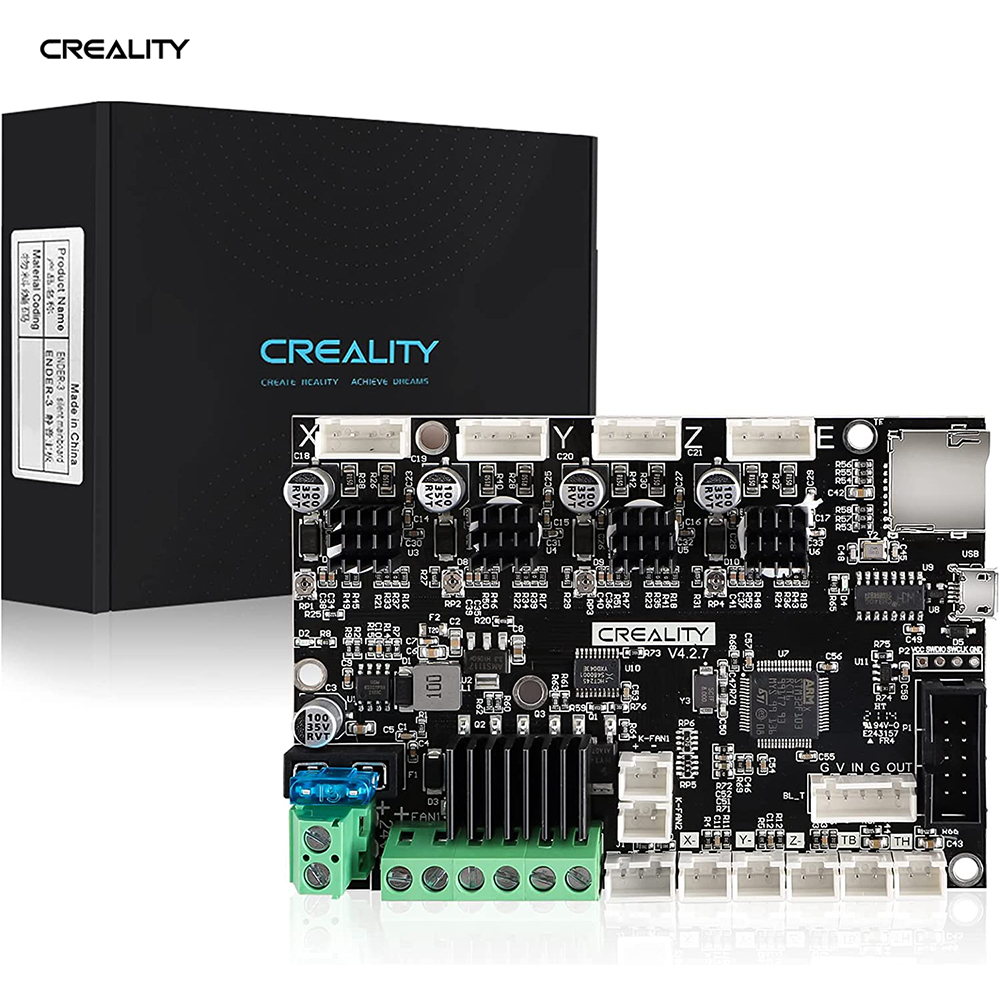
Installed it, but have not fired it up yet, because i'm completely lost on what software I need to put on the SSD card to run it...

I just dont understand what software I need to download... its confusing... They talk about Firmware, and Marlin... Im lost...
I also bought a CR Touch and Filament runout sensor...

Anyone care to explain it in simple English????
I agree it can be confusing. A couple of things to note. Firmware is the code that runs your board and makes it do things. Marlin is a specific firmware that is the most commonly used for 3D printers, including your Ender 3 V2.

In order for your printer to run, you need the right version of Marlin with the right configuration for your specific board. For common setups you can simply download the ready-to-go firmware and install it. But when you start adding features like a CR Touch you have a few possibilities:
  1. Somebody already has made a firmware version for your board with the exact options you need. In that case, you can download that specific ready-to-go firmware and install it.
  2. You have to make your own firmware by configuring Marlin and compiling it using freely-available software. This is more complicated but not to difficult to do.
Since your printer and that Creality board are extremely common I'm guessing there are several ready-to-go versions with everything you need. The trick is going to be finding it. For that I recommend checking out the Ender3 and Ender3v2 subreddits.

For a short-term solution you should be able to use the official Creality firmware for the 4.2.7 board. It won't have the CR Touch or filament runout sensor enabled but it will get you printing while you figure out the rest. It's possible the firmware labeled "Marlin-2.0.1-HW-4.2.7-mainboard-V1.1.2-compatible with BLTouch and filament detection" on that page would work for everything you need. My understanding is that firmware for BLTouch should also work with CR Touch.

The downside to these official firmware versions is that they are quite old. Marlin has improved a lot in the year and a half since these were made. For a long-term solution, I recommend learning how to compile your own firmware so you can get the latest updates and the exact features you need.
 
To avoid these ads, REGISTER NOW!

Keyblazer

Well-known member
Joined
Jul 30, 2009
Messages
1,471
Location
Irvine, CA
Thanks!
I did fire up the printer without a SS card in this morning, and it booted fine.. phew.
I checked the firmware and it says 1.0.1…
This:

4D8E12BD-9979-4025-A038-75D7AEF5E628.jpeg


If I go to the Creality support site, I see this page... and the firmware should be the #3 one down?
Reads...
Marlin-2.0.1-HW-4.2.7-mainboard-V1.1.2-compatible with BLTouch and filament detection.


I just have no clue what to do with the file!
 
Last edited:

BeansBaxter

Active member
Joined
Jun 3, 2008
Messages
33
Creality does some odd things with their firmware version numbering. I think that version corresponds to an early version of Marlin 2.0 while the current version of Marlin is 2.1.1

What you have will be good enough for now but it probably doesn't support your CR Touch or filament runout sensor.
 

BeansBaxter

Active member
Joined
Jun 3, 2008
Messages
33
If I go to the Creality support site, I see this page... and the firmware should be the #3 one down?
Reads...
Marlin-2.0.1-HW-4.2.7-mainboard-V1.1.2-compatible with BLTouch and filament detection.


I just have no clue what to do with the file!
Yes, that's the one. When you unzip it you should get a file that ends in ".bin". Copy that file to your SD card, turn off your printer, insert the SD card, then turn the printer back on. That will flash the new firmware to your board.
 

Keyblazer

Well-known member
Joined
Jul 30, 2009
Messages
1,471
Location
Irvine, CA
Ok!
I copied and pasted the Bin file to the SD card, put it in and booted the printer…
It worked!
Firmware now reads 1.1.2 and I have the Levelling option in the menu!
86896096-79A4-4E03-8030-5D21609E7F62.jpeg42F0995C-3960-45E0-8FCB-42B0CA69D8E6.jpeg
Now to install the CR touch and filament sensor!
 

AffableCurmudgeon

Well-known member
Joined
Jan 26, 2009
Messages
1,906
Location
Triad Area NC
If I go to the Creality support site, I see this page... and the firmware should be the #3 one down?
Reads...
Marlin-2.0.1-HW-4.2.7-mainboard-V1.1.2-compatible with BLTouch and filament detection.


I just have no clue what to do with the file!


For Creality Ender 3 Pro, I have had better experience with using plain old Marlin and not Creality's version of Marlin. For instance, Creality's version did not support M0 pause command. I started using regular, plain old Marlin (https://marlinfw.org/) and am very happy with it.

Compiling the bin file can be a bit complicated, especially if you want to customize a bunch of things like bed size, presets for filament types for initial heating, etc. but there are a lot of good guides on the internet that tell you how to get started. Having an up-to-date PC is a must to get Marlin compiled and customized if you want to use generic Marlin.
 

Jswain

Well-known member
Joined
Apr 26, 2013
Messages
2,449
Location
Calgary, AB

I would start here if you are looking for stock firmware
Wow, some great stuff being shared here!

I am stuck on my printer, and need some help!

I have a Creality Ender 3 v2...
My extruder quit working... I was getting no output from the board...
My board was the 4.2.2...
Bought a new board, and decided to get the newer 4.2.7..

Installed it, but have not fired it up yet, because i'm completely lost on what software I need to put on the SSD card to run it...

I just dont understand what software I need to download... its confusing... They talk about Firmware, and Marlin... Im lost...
I also bought a CR Touch and Filament runout sensor...

Anyone care to explain it in simple English????
 

pwhittle

Well-known member
Joined
May 9, 2011
Messages
252
Location
Woodstock, GA

kppolich

Well-known member
Joined
Apr 7, 2020
Messages
344
Location
Eastern Iowa
Nice job. Did you do the design? I have a similar clamp with the same problem.
I did, design is here for download/tinkering
 

gregs

Well-known member
Joined
Mar 16, 2007
Messages
1,579
I did, design is here for download/tinkering
I don’t have any experience with any cad programs. Your piece is very close to mine. Would you be interested in tweaking it if I get you the dimensions?
 

Jswain

Well-known member
Joined
Apr 26, 2013
Messages
2,449
Location
Calgary, AB
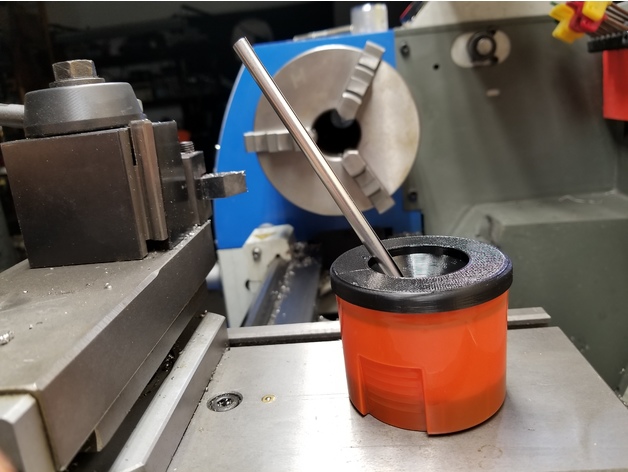
Non spill cutting oil container which utilizes the top off a rustoleum spray paint can as its base. Not my design but wanted something for the lathe table.

This guy gets the credit:
 

Attachments

  • 20221102_145336-01.jpeg
    20221102_145336-01.jpeg
    366.6 KB · Views: 73

vwpieces

Well-known member
Joined
Apr 28, 2020
Messages
5,925
Location
Hills, PA
Getting a couple Faster profiles tuned in. Happy enough considering the 11hour time reduction. Was under 3hours and 15min to clean up because the main part of getting the reliable speed was practically turning off retraction.
Solid at 160X70mm and 6mm thick. 0.4 nozzle

20221106_123825.jpg
 

vwpieces

Well-known member
Joined
Apr 28, 2020
Messages
5,925
Location
Hills, PA
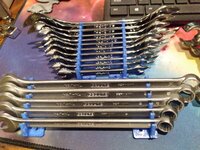
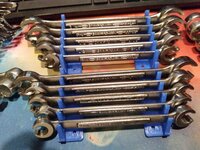
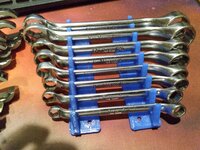
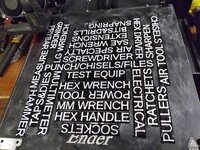
Wrench racks. Wanting to consolidate the wrenches as most of the racks I bought take up 2X the space. Each pair customized to fit the set going on it. Got the file off Thingy site and said it was customizable. While you can change a few things in parameters it still did not allow the length or number of wrenches to be changed. I got i to the editor and started changing numbers till I figured out how to make it suit my need. Yeah I broke it many times till I got it figured out.

A lil furry but didn't take all day to print, under 5hrs.
20221107_195710.jpg
20221107_203212.jpg
20221107_203034.jpg
20221107_203041.jpg
20221107_203048.jpg
 

ER70S-2

Well-known member
Joined
Jan 2, 2015
Messages
796
To avoid these ads, REGISTER NOW!

ER70S-2

Well-known member
Joined
Jan 2, 2015
Messages
796
That turned out really nice. I've never pieced several parts together yet.

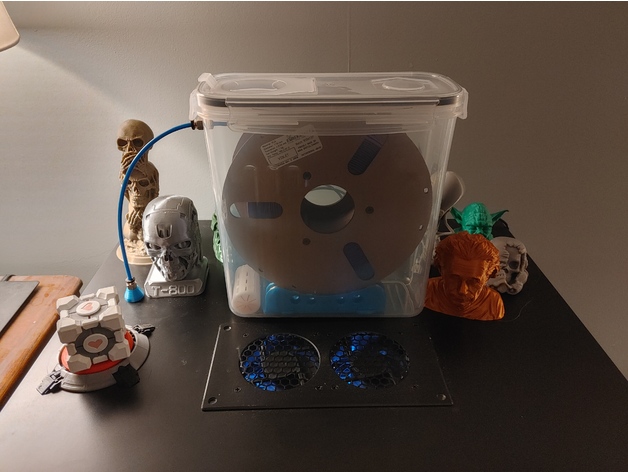
I like your dry box for your filament roll

Can we get a better pic of the dry box, please?

Thanks!

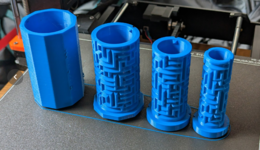
Here are the containers:

Here is the filament roller. I don't love this design because the roller width adjustment is janky and it's hard to get the side pieces that hold the bearings parallel, but they work alright. I researched these to death and I believe they're the best option for these containers. I had one spool that bound due to misalignment, so I may design my own with a better locking mechanism for the side pieces. You could also super glue the side pieces on and have a couple different ones set up for different filament roll widths.

Dry box pass through. These are cool because they have a filament cleaner cavity built in. I used a little bit of RTV instead of gaskets.

PC4-M10 fittings for Bowden tube. These thread into the pass through above.

608 bearings for the filament roller:

Bowden tube:

Color changing desiccant:

I designed my own desiccant containers for these dry boxes, but I have since just started to dump about 1/8"-1/4" of desiccant into the dry boxes loose. I dry my filament in a dehydrator prior to putting them into these dry boxes. Some rolls have been in these boxes for about 9 months and the desiccant is still orange. Most boxes have been opened and re-closed several times over those 9 months, too.
 
Last edited:

nickelTwin

Well-known member
Joined
Aug 8, 2014
Messages
294
Location
St Paul, MN
I've been thinking of adding a dry box on the printer for awhile now. Living in Minnesota humidity is not a problem in the winter, but in the summer I for sure need one here.
 

ER70S-2

Well-known member
Joined
Jan 2, 2015
Messages
796
Was there a lot of supports used in that skeleton?
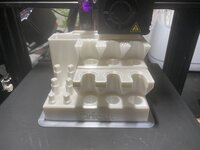
This thing was all about support material and the main thing that made it so challenging for me. There was a ton of it! I had several failed prints due to not having the support parameters dialed in perfectly. If there's anything that I learned from this print, it was how to tweak support settings. Prior to this print, I never had to mess with support settings.
 

kppolich

Well-known member
Joined
Apr 7, 2020
Messages
344
Location
Eastern Iowa
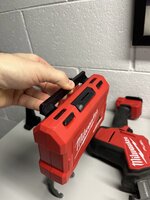
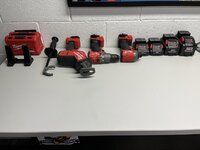
I plan on putting a little tool wall under the stairs.
Part of that will be an overhead shelf for the Milwaukee M18 stuff, so I fired up the 3D printer and got some tool mounting going.
The only filament I had on hand was black PETG, but it's probably for the best. Looking forward to a little paint, some wall control and mounting these tools. Also, kudos to the guy who designed the 7 1/4" circular saw floating mount and hammer drill handle mount.
 

Attachments

  • 69203029852__F8079213-1210-4358-93DC-7CDCD1AF8CA4 Large.jpeg
    69203029852__F8079213-1210-4358-93DC-7CDCD1AF8CA4 Large.jpeg
    169 KB · Views: 65
  • 69203030996__BFC00CC9-3713-426C-91EC-BD248A6F5CDB Large.jpeg
    69203030996__BFC00CC9-3713-426C-91EC-BD248A6F5CDB Large.jpeg
    391.5 KB · Views: 68
  • 69203031843__9066B78D-8A9F-4E34-9333-FA8731A2D16E Large.jpeg
    69203031843__9066B78D-8A9F-4E34-9333-FA8731A2D16E Large.jpeg
    200.6 KB · Views: 69
  • IMG_6605 Large.jpeg
    IMG_6605 Large.jpeg
    199.8 KB · Views: 68
  • IMG_6604 Large.jpeg
    IMG_6604 Large.jpeg
    288.2 KB · Views: 68
  • IMG_6606 Large.jpeg
    IMG_6606 Large.jpeg
    222.1 KB · Views: 69
  • IMG_6599 Large.jpeg
    IMG_6599 Large.jpeg
    250.8 KB · Views: 69
  • IMG_6600 Large.jpeg
    IMG_6600 Large.jpeg
    288.4 KB · Views: 84

usa#1

Well-known member
Joined
Jul 30, 2008
Messages
391
Saw this on slick deals. eSUN PLA+ on sale for $14.39

eSUN PLA+ 1.75mm 3D Filament 1KG--All colors - $14.39
Buy 3 Or More eSUN PLA+Filaments Get 40% Off
coupon code:e-40
https://esun3dstore.com

I ordered 4 rolls ($57.58 total; no extra charge for shipping.
 

vertguy

Well-known member
Joined
Apr 6, 2010
Messages
1,259
Location
SE WI
I picked up a used deluxe steering wheel for my C10 over the summer that was missing the internal horn parts. After going through a couple different isolators including a used and new reproduction kit and struck out finding one that was right length, I gave up for a bit. Since we are in the gloomy weather season and stuck indoors, I pulled it out of the basement this week and started going through the parts determined to find a solution.

After unsuccessfully finding any specs for the height, it hit me that I have a 3D printer now and drew up a simple single piece after taking some measurements. Nailed it on the first try and after printing 2 more isolators, the horn works as it should. Nothing fancy like the original with the connecting ring as my CAD skills are pretty basic. Every time I use it for stuff like this it re-enforces the value of having this tool available.

Original piece on the left.
 

Attachments

  • Horn isolators.JPEG
    Horn isolators.JPEG
    68.3 KB · Views: 37
  • Horn isolator printed.JPEG
    Horn isolator printed.JPEG
    63.9 KB · Views: 33
  • Horn isolators installed.JPEG
    Horn isolators installed.JPEG
    57.1 KB · Views: 30

bj383ss

Well-known member
Joined
Sep 29, 2011
Messages
3,166
Location
TX
I picked up a used deluxe steering wheel for my C10 over the summer that was missing the internal horn parts. After going through a couple different isolators including a used and new reproduction kit and struck out finding one that was right length, I gave up for a bit. Since we are in the gloomy weather season and stuck indoors, I pulled it out of the basement this week and started going through the parts determined to find a solution.

After unsuccessfully finding any specs for the height, it hit me that I have a 3D printer now and drew up a simple single piece after taking some measurements. Nailed it on the first try and after printing 2 more isolators, the horn works as it should. Nothing fancy like the original with the connecting ring as my CAD skills are pretty basic. Every time I use it for stuff like this it re-enforces the value of having this tool available.

Original piece on the left.
Nice. I have all the original parts in my and my horn still doesn't work properly. It honks when you turn left. I have tried every which way with the spring steel washers. I am about ready to toss the whole column and put a new modern tilt one.

Bret
 

Keyblazer

Well-known member
Joined
Jul 30, 2009
Messages
1,471
Location
Irvine, CA
Anyone care to educate me about this problem?

I added a Filament Runout sensor to my Ender 3 v2…
The first time it tripped, the print stopped, and maybe an hour later I noticed it…
I was surprised to note that the unit had turned itself off, and cooled…
I replaced the spool, hit resume, and the print restarted… and crashed into the print, breaking it off the build plate…

I thought it was my mistake somehow…

But I just bought a Longer LK5 Pro… which has a Filament Runout Sensor as standard.
It was printing today and the spool ran out, and it stopped. I replaced the spool immediately, before the unit cooled…
The print restarted…
And it crashed into the print…
I stopped the print because I felt it might damage something.

I assumed these sensors stop the print and the unit should restart and continue printing… but it’s not working for me….

What am I missing?
 

MadeByMiller

Well-known member
Joined
Dec 29, 2018
Messages
1,230
Location
Rapid City, SD
Anyone care to educate me about this problem?

I added a Filament Runout sensor to my Ender 3 v2…
The first time it tripped, the print stopped, and maybe an hour later I noticed it…
I was surprised to note that the unit had turned itself off, and cooled…
I replaced the spool, hit resume, and the print restarted… and crashed into the print, breaking it off the build plate…

I thought it was my mistake somehow…

But I just bought a Longer LK5 Pro… which has a Filament Runout Sensor as standard.
It was printing today and the spool ran out, and it stopped. I replaced the spool immediately, before the unit cooled…
The print restarted…
And it crashed into the print…
I stopped the print because I felt it might damage something.

I assumed these sensors stop the print and the unit should restart and continue printing… but it’s not working for me….

What am I missing?
When you say crashed, do you mean that the Z axis dropped way below the current layer height of the print after filament swap, or the nozzle is just barely clipping the part on resume?
 

MadeByMiller

Well-known member
Joined
Dec 29, 2018
Messages
1,230
Location
Rapid City, SD
Yes, in both cases the nozzle hit the print when it resumed...
The first instance is easy to write off as just the part being unstuck from the bed due to loss of heat, the second instance makes it odd. We can't assume that it's the same problem since it happened on different machines with different circumstances following the loss of filament. Can we see what the prints looked like prior to the pause? I'm wondering if maybe there's an over-extrusion problem causing the layers to be thicker/taller than actual print height. Are you running the same settings for both machines?
 

AndyL

Well-known member
Joined
Feb 22, 2012
Messages
1,371
Location
Vancouver
The first instance is easy to write off as just the part being unstuck from the bed due to loss of heat, the second instance makes it odd. We can't assume that it's the same problem since it happened on different machines with different circumstances following the loss of filament. Can we see what the prints looked like prior to the pause? I'm wondering if maybe there's an over-extrusion problem causing the layers to be thicker/taller than actual print height. Are you running the same settings for both machines?
I used to run into this on my CR10... It'd be easier on an ender because of the single lead screw configuration.

Think of where the extruder is - it's on the X axis carriage - so any downward force you're skipping the Z axis leadscrew- and that stock extruder is a pain in the **** to feed...
 
To avoid these ads, REGISTER NOW!
Top Bottom