To avoid these ads, REGISTER NOW!

The Everything 3D Printer Thread

MadeByMiller

Well-known member
Joined
Dec 29, 2018
Messages
1,230
Location
Rapid City, SD
I used to run into this on my CR10... It'd be easier on an ender because of the single lead screw configuration.

Think of where the extruder is - it's on the X axis carriage - so any downward force you're skipping the Z axis leadscrew- and that stock extruder is a pain in the **** to feed...
I considered the Z axis motor skipping but have no experience outside of my Prusa to lean on. Maybe could test this by resuming a paused print without replacing the filament?
 
To avoid these ads, REGISTER NOW!

Keyblazer

Well-known member
Joined
Jul 30, 2009
Messages
1,471
Location
Irvine, CA
Here is the print from the Longer printer.
C55FB1B0-198D-4408-938D-C627C9BE3A6D.jpeg

You can see where the nozzle ploughed in here.
7149F774-5793-4F79-9580-5034E7FD50C9.jpeg

It’s new to Me just yesterday so I’m not sure what happened.
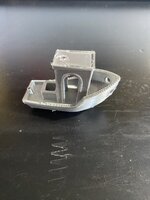
In fact, I ran a Benchy this morning and it knocked it off the bed too during the print.
58CD669F-3E33-4BF3-9B81-B92D95ACA3B0.jpeg
 

AndyL

Well-known member
Joined
Feb 22, 2012
Messages
1,371
Location
Vancouver
I've just switched to not relying on the runout sensor (and put a direct drive extruder on so the pita extruder isn't in the equation)

That seems like you have an issue in Z to find. Might check with the ender groups it's likely a common issue.
 

christopher

Well-known member
Joined
Sep 13, 2022
Messages
64
part of my work-work is designing and creating fixtures to hold our products for testing during manufacturing. This fixture holds a single-board computer plus radios. I have 6 3D printers. A Stacker S4 4-extruder beast, 2 Creality CR10-S's, 2 Creality CR10-S4's (bigger envelope), and one ofthe original Formlabs SLA printers as they came out of crowd-funding site 'Kickstarter', called the Form-1.
Here's a fixture done on the CR10-S that is in Carbon Fiber filled PETG:
(it actually holds two fixtures here, because the systems test each other in parallel)
Probably not obvious here, but closing the top part plugs in all connections, and fires up the unit as it is POE powered, and boots it over the network via tftp.
 

Attachments

  • IMG_20220512_172027.jpg
    IMG_20220512_172027.jpg
    1.1 MB · Views: 96
  • IMG_20220512_171349.jpg
    IMG_20220512_171349.jpg
    1 MB · Views: 85
  • IMG_20220512_171147.jpg
    IMG_20220512_171147.jpg
    835.2 KB · Views: 81
Last edited:

MadeByMiller

Well-known member
Joined
Dec 29, 2018
Messages
1,230
Location
Rapid City, SD
Here is the print from the Longer printer.
C55FB1B0-198D-4408-938D-C627C9BE3A6D.jpeg

You can see where the nozzle ploughed in here.
7149F774-5793-4F79-9580-5034E7FD50C9.jpeg

It’s new to Me just yesterday so I’m not sure what happened.
In fact, I ran a Benchy this morning and it knocked it off the bed too during the print.
58CD669F-3E33-4BF3-9B81-B92D95ACA3B0.jpeg
Yeah, this issue seems outside of any expertise that I may have. Based on those results, I wouldn't entirely rule out an over-extrusion issue, but the black part clearly shows the nozzle much deeper dug into the part in spots than would be over-extrusion related. I would dive into the manufacturer specific messaging boards as suggested earlier.
 

MadeByMiller

Well-known member
Joined
Dec 29, 2018
Messages
1,230
Location
Rapid City, SD
part of my work-work is designing and creating fixtures to hold our products for testing during manufacturing. This fixture holds a single-board computer plus radios. I have 6 3D printers. A Stacker S4 4-extruder beast, 2 Creality CR10-S's, 2 Creality CR10-S4's (bigger envelope), and one ofthe original Formlabs SLA printers as they came out of crowd-funding site 'Kickstarter', called the Form-1.
Here's a fixture done on the CR10-S that is in Carbon Fiber filled PETG:
(it actually holds two fixtures here, because the systems test each other in parallel)
Probably not obvious here, but closing the top part plugs in all connections, and fires up the unit as it is POE powered, and boots it over the network via tftp.
This is really cool and impressive! Great job, I'd love to see anything else you'd be willing to share, and I'd suggest that you start a thread of your own to show off your work!
 

Keyblazer

Well-known member
Joined
Jul 30, 2009
Messages
1,471
Location
Irvine, CA
Yes, beyond my current skill set too…
But here is some more info that hopefully someone here that knows what’s going on.
In an attempt to understand and show what’s going on.

Yesterday I printed some box cutter blade holders.
The parts printed on the Ender 3 are neat, tight, and functional.

D1142D5C-7C70-4377-9103-6014E5B7A021.jpeg
543A2FC4-2D83-4C25-8371-2A838093866C.jpeg

The ones coming off the new to me, Longer LK5 Pro are junk. The blade won’t fit in, let alone the blade support.
Here are the results of printing the same part, with the two different filaments on each printer.
Left parts are from the Longer, and the right from the Ender.

FB1D8660-C373-4ADC-888A-F1A381377434.jpeg

As a side note, the Ender parts pop off the plate easily and in fact I have to use a brim to keep them on, the Longer parts are a bear to remove with just a skirt!

People have mentioned “Over-Extrusion” maybe being the issue with the Longer.. but I don’t know how to fix that… is it a setting on the machine or on the slicer?
I’m using Cura.
I’m really tempted to return this Longer LK5, and get something else if it gonna be a problem child.
 

Keyblazer

Well-known member
Joined
Jul 30, 2009
Messages
1,471
Location
Irvine, CA
Thanks.
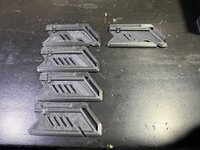
I did this test yesterday.
Part on the right is off my Ender.
Parts on the left are off the Longer.
From top down with nozzle flow adjusted.
100%
90%
80%
70%
90BA3101-5BFC-4F18-BB28-7D702390C82D.jpeg

In short, the print quality is horrible in all of them.
Not just that, but the parts are useless.. the Utility blade won’t even fit in the part, whereas the Ender part fits together perfectly.
I’m NOT impressed with it.
I’d be pleased for any input on what is wrong with this printer?
If I can’t get a resolution soon, it will go back in it box and get returned.
I’d be open to suggestions for a larger printer that will get my next projects done. 300x300x300 or larger?
 

draco_1967

Well-known member
Joined
Jan 3, 2021
Messages
205
Location
Utah
T
Thanks.
I did this test yesterday.
Part on the right is off my Ender.
Parts on the left are off the Longer.
From top down with nozzle flow adjusted.
100%
90%
80%
70%
90BA3101-5BFC-4F18-BB28-7D702390C82D.jpeg

In short, the print quality is horrible in all of them.
Not just that, but the parts are useless.. the Utility blade won’t even fit in the part, whereas the Ender part fits together perfectly.
I’m NOT impressed with it.
I’d be pleased for any input on what is wrong with this printer?
If I can’t get a resolution soon, it will go back in it box and get returned.
I’d be open to suggestions for a larger printer that will get my next projects done. 300x300x300 or larger?
This may be a dumb question, but are you using a gcode file that is sliced for that printer (and not the same file you are printing on the Ender)?

You might need to run some calibration prints to get the Longer dialed in: https://www.matterhackers.com/articles/top-ten-prints-to-calibrate-your-3d-printer
 

Keyblazer

Well-known member
Joined
Jul 30, 2009
Messages
1,471
Location
Irvine, CA
T

This may be a dumb question, but are you using a gcode file that is sliced for that printer (and not the same file you are printing on the Ender)?

You might need to run some calibration prints to get the Longer dialed in: https://www.matterhackers.com/articles/top-ten-prints-to-calibrate-your-3d-printer

Good Question...
I am a Dumb Noob...
So, I selected the new Printer in Cura... it has the Longer LK5 in the options...
Then I sliced the file with it on the LK5 bed, and outputted it to the SD card that went right into the Longer...

Did I do it right?
 

draco_1967

Well-known member
Joined
Jan 3, 2021
Messages
205
Location
Utah
Good Question...
I am a Dumb Noob...
So, I selected the new Printer in Cura... it has the Longer LK5 in the options...
Then I sliced the file with it on the LK5 bed, and outputted it to the SD card that went right into the Longer...

Did I do it right?
Yep, that sounds right. I'm still fairly new too. I just wanted to eliminate that as a possible problem.

Trying different filaments may help, but it sounds like the calibration is off. If the part dimensions are not to spec, then the travel on each axis likely needs some calibration, like you did with the extrusion.
This guide is really helpful for diagnosing and fixing common printer issues: https://www.simplify3d.com/support/print-quality-troubleshooting/
 

Keyblazer

Well-known member
Joined
Jul 30, 2009
Messages
1,471
Location
Irvine, CA
Yup, did that...
Same **** result regardless of what filament I put in the Longer...
See pic below.same filaments swapped back and forth, LH is Longer, RH is Ender.

E25BFF32-09BE-4239-AA64-D8E964AE2798.jpeg
 
Last edited:

christopher

Well-known member
Joined
Sep 13, 2022
Messages
64
Thanks.
I did this test yesterday.
Part on the right is off my Ender.
Parts on the left are off the Longer.
From top down with nozzle flow adjusted.
100%
90%
80%
70%
90BA3101-5BFC-4F18-BB28-7D702390C82D.jpeg

In short, the print quality is horrible in all of them.
Not just that, but the parts are useless.. the Utility blade won’t even fit in the part, whereas the Ender part fits together perfectly.
I’m NOT impressed with it.
I’d be pleased for any input on what is wrong with this printer?
If I can’t get a resolution soon, it will go back in it box and get returned.
I’d be open to suggestions for a larger printer that will get my next projects done. 300x300x300 or larger?
you need to calibrate the printer's extrusion, and you need to dial in the printer before printing real stuff by printing a calibration object that lets you measure if your scales are right as well as if your extruder is pushing the correct amount of filament. thingaverse has tons of calibration objects of all manner and type, and your printer vendor's site will have instructions on how to set various stored settings, like extrusion amount. Start there and get it dialed in with small throwaway objects, so you don't get frustrated and waste time trying to jump directly into the things you want to print. You should also validate nozzle temp if you have a way to do that. A laser thermometer is a good tool for that.
 

Keyblazer

Well-known member
Joined
Jul 30, 2009
Messages
1,471
Location
Irvine, CA
I did a calibration test... and it looked horrible too, and was nowhere near.
I probably invested 10 hours into the longer trying to figure out what it cant perform as my Ender does....
Rightly or wrongly, I completely lost all confidence in this printer to do a decent job....
So, today, it went back in its box and was returned... its already gone.

I ordered a Ender 5 plus to replace it, and that will be here Saturday..
I appreciate all the input!
 
To avoid these ads, REGISTER NOW!

jayz66ragtop

Well-known member
Joined
Sep 11, 2009
Messages
1,521
Location
SoCal
Been lurking here for a bit just because I didn't have much to contribute until now. Wife is a huge Rush fan and Bday was coming up. Been looking around for something to try out the printer that was not for me.

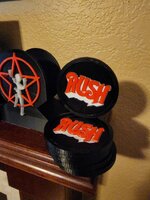
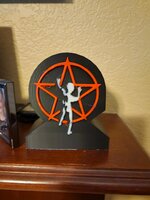
I got the coasters from Thingiverse unchanged. The holder on the other hand, was originally a solid one sided "trophy" about two inches thick and five inches tall. Took on learning Fusion 360 so I could modify it. All told I have waaaaay too many hours into it but I think it turned out fantastic. All printed in PLA only because I bought glow in the dark PLA and thought it would be cool to print the white part so it glowed. And yes, I know the holder needs to be cleaned up a little bit.

Printer - Bambu X1 Carbon with MLS

I got in on the Kickstarter for the printer and it is amazing. So simple to use for a beginner but it was EXPENSIVE compared to some of the other printers.

20221212_211020.jpg

20221212_210931.jpg

20221212_210922.jpg
 
Last edited:

kppolich

Well-known member
Joined
Apr 7, 2020
Messages
344
Location
Eastern Iowa
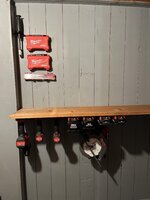
Slowly getting some things up in the room under the stairs. Need to find a better solution for the circular saw. 7 1/2 FUEL version is a bit bigger than the original plan.
 

Attachments

  • 2ysuf9c.jpg
    2ysuf9c.jpg
    309.6 KB · Views: 61

Black300zx

Well-known member
Joined
Apr 8, 2019
Messages
781
Location
Elkton, Md
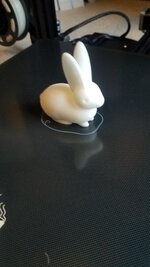
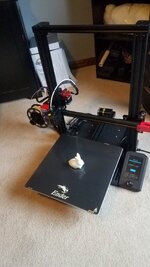
I pulled the trigger on an Ender 3 Max Neo last week and it arrived last night. Assembled, adjusted, and leveled it in about 30 minutes this morning and then printed the rabbit file that came loaded on it without a hiccup. It's much quieter than the Prusa Minis that we have at work.

Happy so far. Now to get it off the floor and give it a home
 

Attachments

  • 20221215_114104.jpg
    20221215_114104.jpg
    542.5 KB · Views: 47
  • 20221215_114057.jpg
    20221215_114057.jpg
    547.2 KB · Views: 47

Chilly178

Member
Joined
Apr 16, 2022
Messages
14
Picked up a new to me millermatic 250 and wasn't a fan of just wrapping the leads around the front handle so made up some lead hangers out of black PETG. All factory holes so I didn't have to break out the drill

Threw in a helmet holder for the bottle, should have made the hooks for it a hair longer, but it fits and works well
Could you share the file?
 

christopher

Well-known member
Joined
Sep 13, 2022
Messages
64
Been lurking here for a bit just because I didn't have much to contribute until now. Wife is a huge Rush fan and Bday was coming up. Been looking around for something to try out the printer that was not for me.

I got the coasters from Thingiverse unchanged. The holder on the other hand, was originally a solid one sided "trophy" about two inches thick and five inches tall. Took on learning Fusion 360 so I could modify it. All told I have waaaaay too many hours into it but I think it turned out fantastic. All printed in PLA only because I bought glow in the dark PLA and thought it would be cool to print the white part so it glowed. And yes, I know the holder needs to be cleaned up a little bit.

Printer - Bambu X1 Carbon with MLS

I got in on the Kickstarter for the printer and it is amazing. So simple to use for a beginner but it was EXPENSIVE compared to some of the other printers.

20221212_211020.jpg

20221212_210931.jpg

20221212_210922.jpg
How did you do the multiple colors?
 

MadeByMiller

Well-known member
Joined
Dec 29, 2018
Messages
1,230
Location
Rapid City, SD
How did you do the multiple colors?

You change the filament at specific layer numbers. Depending on your printer and firmware, it would require different commands like M600
Hope the OP doesn't mind me answering for him, but the Bambu X1 printer he has is capable of printing multiple filament colors/materials within the same layer. It's a pretty cool looking machine!
 

Cruzan80

Well-known member
Joined
Jul 22, 2015
Messages
4,154
Location
Denver, CO
Hope the OP doesn't mind me answering for him, but the Bambu X1 printer he has is capable of printing multiple filament colors/materials within the same layer. It's a pretty cool looking machine!

The biggest issue I have is getting the multi extruder files aligned correctly when making them (CAD Side) Any tips? All of the other multi-extrudes I have done are prebuilt versions that autoload together. Or is it as simple as interlocking parts in CAD, and then working the alignment in the slicer?
 

MadeByMiller

Well-known member
Joined
Dec 29, 2018
Messages
1,230
Location
Rapid City, SD
The biggest issue I have is getting the multi extruder files aligned correctly when making them (CAD Side) Any tips? All of the other multi-extrudes I have done are prebuilt versions that autoload together. Or is it as simple as interlocking parts in CAD, and then working the alignment in the slicer?
Maybe @jayz66ragtop could help you with that since he's the one who posted the parts he printed on his Bambu X1. I don't have any experience with a multi extruder printer. As far as creating an object in CAD that you want to be a single part but with multiple filament types, I would think that you can model it as a single component but with each filament type as it's own body, and then export the component with the bodies assembled into your slicer. I've done something similar in Prusaslicer, and in it you can separate the mesh by Objects or Parts to help make changes to individual parts of the mesh. Perhaps it's a similar procedure for what you're trying to do, I'm really ignorant though to it unfortunately.
 

Cruzan80

Well-known member
Joined
Jul 22, 2015
Messages
4,154
Location
Denver, CO
Thanks. Have the Cad side down (teach OnShape to.middle schoolers, and use Solidworks when I need the extra power). So Component/mulit-body/multi-part isnt an issue (can build whatever version I need). Cura is currently my slicer of choice, for a Flashforge 2-extruder printer. The las time I used both sides to extrude was loading them into Replicator G (to give an idea of how far back). Usually just use the pause at Z-height, but would be nice to know.
 

christopher

Well-known member
Joined
Sep 13, 2022
Messages
64
create an assembly of the parts in SW, all mated where you want them. Then save the assembly as .STL. This will save all the parts as separate STL files, and keep all of their relative coordinates intact. Pull them all into the slicer at once (I use Simplify 3D), but it should all work with Cura as well. To move them around the bed, you'll want to move them all in unison. Assign the files to the particular extruder you want.
 

christopher

Well-known member
Joined
Sep 13, 2022
Messages
64
bunch of hose adaptors for tools with dumb size ports. Made 2 sets for small & big shopvac hose. Also not pictured are some 2.5in couplers and an adapter for the Bauer cyclone.
20221205_074355.jpg
Here's a spherically articulating schnozzle I made in a single go with a very tiny gap between the parts. it printed fine and with a slight twist broke free and now rotates freely. When the vacuum is off, it falls slack, but when on it can be positioned anywhere it can aim and stays there. I can dig up the STL if anyone is interested. Got the hose from McMaster-Carr (I love that place!)
 

Attachments

  • IMG_20220210_234805.jpg
    IMG_20220210_234805.jpg
    717.8 KB · Views: 70

Monza Harry

Well-known member
Joined
Dec 29, 2018
Messages
1,433
Location
Windsor ON
Jay you have a keeper there with your woman, as most women I know aren't fans of one of the, if not the greatest band ever! I don't see the flaws you are referring :sleep: to I'd be proud as #e!! to show that off! Especially as a custom gift someone made for me, your spouse will be too I am sure! Looks Great! Harry (y)
 

Keyblazer

Well-known member
Joined
Jul 30, 2009
Messages
1,471
Location
Irvine, CA
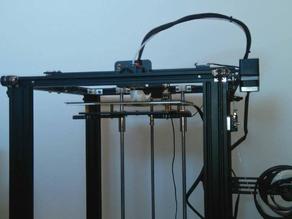
My Longer LK5 is gone, and the Ender 5 Plus arrived, and is up and running... will post in a bit..

But I ran into an issue...
None of the files I loaded onto the SD card would read...

I found out that there is an issue with newer Creality printers and reading Prints with titles longer than 15 characters..
Renamed the files and it working now...

More info here...
 

ArcReactorKC

Well-known member
Joined
Jun 1, 2019
Messages
2,237
Location
Out in the county NE of KCMO
I've been debating on buying a Bumbu, or just adding a Pallete pro 3 to my big corexy. The add on is cheaper, but I have heard much more finnicky. I've been spending countless hours fine tuning the marlin config on that machine as it is.
 

WhoWhatNow

Well-known member
Joined
Feb 22, 2011
Messages
1,884
Location
Collegeville, PA
Here's a spherically articulating schnozzle I made in a single go with a very tiny gap between the parts. it printed fine and with a slight twist broke free and now rotates freely. When the vacuum is off, it falls slack, but when on it can be positioned anywhere it can aim and stays there. I can dig up the STL if anyone is interested. Got the hose from McMaster-Carr (I love that place!)
Very nice. I would be interested in the STL. Thanks!
 

zanyad

ALLIANCE MEMBER
Joined
Apr 26, 2018
Messages
2,755
Location
NE Ohio
Here's a spherically articulating schnozzle I made in a single go with a very tiny gap between the parts. it printed fine and with a slight twist broke free and now rotates freely. When the vacuum is off, it falls slack, but when on it can be positioned anywhere it can aim and stays there. I can dig up the STL if anyone is interested. Got the hose from McMaster-Carr (I love that place!)
Very nice. I would be interested in the STL. Thanks!
Please add me to the list!
 
To avoid these ads, REGISTER NOW!
Top Bottom