To avoid these ads, REGISTER NOW!

The Everything 3D Printer Thread

To avoid these ads, REGISTER NOW!

mv213

Well-known member
Joined
Sep 29, 2014
Messages
660
Location
Dallas, OR (the OTHER "Big D")
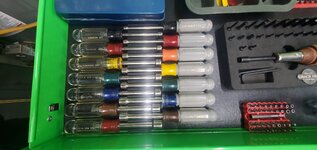
Just to follow up on my previous post about my nut driver tray... below is the current print. I did it in two pieces, tabbed it so that its both aligned and gives an additional stregth member when gluing, did some embossing plus put a mariana trench in it to make it easier to grab the tools. My only gripe at this point is that the embossing details were a bit less detailed than I wanted because I didn't bother to slow the print speed down for that part, but that got me thinking. Going forward, I think I will start just leaving a spot in the basic build and print the embossed pieces separately so that if it doesn't come out as clearly as I'd like, I can just reprint the embossed plate and insert it.

I'll post the STL file if there is any interest. Its not quite as clean as I'd like, especially compared to some of the works of art that others have posted here, but I don't do this sort of thing for a living. lol
I would like a copy please! If it’s e-mailable I’ll DM you my addy. Thanks!
 

sh944

ALLIANCE MEMBER
Joined
Jan 1, 2014
Messages
291
Location
Linwood, KS
Give me a chance over the weekend, I want to clean up a few details on it and then I will see about posting up a link where you can download it. The biggest change will be the trench, it needs to be deeper so its easier to grab individual tools.

I'm flattered that anyone wants to download it!
 

Grimpala

Well-known member
Joined
Jul 16, 2012
Messages
1,404
And since y’all are showing off your stuff, I figured I should offer up something as well. This is a tray I am building up for a set of Craftsman nut drivers I had rolling around the tray. I’m just piecing it together right now to make sure I have all the dimensions correct but will reprint it in fewer pieces and emboss the sizes on it for a final print. I wish I had a bigger printer but I am getting pretty good at splitting print jobs and rejoining them at this point. I will probably reduce the height slightly on the final version but it’s easy enough to grab the tools as-is.
I have that same set. Here is my solution.
 

Attachments

  • 20230103_151714.jpg
    20230103_151714.jpg
    343.5 KB · Views: 95
  • 20230103_151632.jpg
    20230103_151632.jpg
    471.6 KB · Views: 99

Black300zx

Well-known member
Joined
Apr 8, 2019
Messages
781
Location
Elkton, Md
Well I probably spent half of my mornings of holiday break modelling up things I needed and printing them out. Probably have 50ish of print time on the Ender 3 Max and am still thrilled with it. Only hiccup was when I moved it and forgot to re-level the bed.

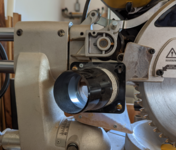
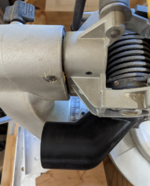
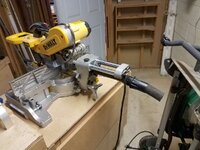
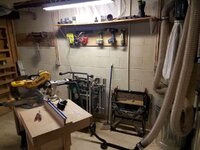
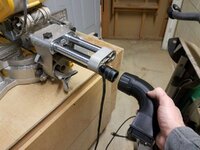
The design/print I'm happiest with is a custom dust collection port for my Dewalt DWS780. For those of you not familiar with it, the end of the dust collection port has a detent that interfaces with a proprietary quick connector for 1.5" hose (link). It probably works fine if you have a low volume/high pressure dust extractor, but the small ID tubing absolutely chokes my wall-mounted 4" HF dust collector. I disassembled the Dewalt QD, modelled up the portion that interfaces with the bearings and cam-lock mechanism, but redesigned the back end with a 90degree bend an a flare out to accept 2.5" hose. I had to iterate on the saw-end geometry 3 or 4 times, to get it to function properly with the OEM dewalt locking collar, but in the end it works really nice. This was my longest print yet at about 25 hours.

The first two photos shows the Dewalt QD adaptor (with locking collar removed) and the long length of flow-killing 1.5" hose. Second two photos show the new setup, which made a huge flow improvement from my quick hand-check :cool:
 

Attachments

  • 20230103_175913-1200.jpg
    20230103_175913-1200.jpg
    101.8 KB · Views: 81
  • 20230103_180024-1200.jpg
    20230103_180024-1200.jpg
    112.9 KB · Views: 71
  • 20230103_175747-1200.jpg
    20230103_175747-1200.jpg
    162.5 KB · Views: 62
  • 20230103_180322-1200.jpg
    20230103_180322-1200.jpg
    116.7 KB · Views: 64
  • Screenshot 2023-01-03 185936.jpg
    Screenshot 2023-01-03 185936.jpg
    76.2 KB · Views: 79

LeonardY

Well-known member
Joined
Apr 16, 2011
Messages
5,020
Location
Southern California
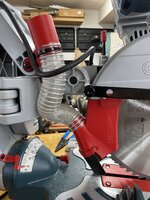
I modified my dust collection on my Dewalt chop saw a while back. Posted it in my garage thread. But figured I share here as well.
I made this years ago because the one that came with the saw didn't pick up anything.
1672791149179.png
1672791351016.png
It sits directly behind the blade and does a great job. But there were some issues.
If I cut an angle, the hose ended up over the work piece and I couldn't use the fence extension.
I modeled up another one and printed it.
1672791681073.png
1672791730948.png

1672791793543.png
It works well and the hose goes straight back.
All good...
Except for when the saw is up.
1672791926379.png
And because of the direction I printed it. It cracked along a build line.
1672792030790.png
I've got another model to address all the issues ready to be printed.
1672792593694.png
Just haven't gotten around to it yet.
 

Black300zx

Well-known member
Joined
Apr 8, 2019
Messages
781
Location
Elkton, Md
Nice work! I'm going to do some tests to see how much improved my dust collection is, but most likely I'll be doing some work to improve the geometry around the blade.
 

JonBoehman

Well-known member
Joined
Oct 7, 2011
Messages
364
Location
Philpot, Ky
LeonardY, I have the same Dewalt saw. Yes the dust collection does **** on it from the factory. I dont guess you would be interested in printing one for me for a fee would you?
 

Jswain

Well-known member
Joined
Apr 26, 2013
Messages
2,449
Location
Calgary, AB
Could you share the file?

Here you go. Large one on the top mounts easily with 2x 3/16 rivets no panel removal or drilling required(it will be tight to push them through). Two on the side I believe I used 1/4-20 x3" Philips head fasteners in the factory holes.
 
Last edited:

LeonardY

Well-known member
Joined
Apr 16, 2011
Messages
5,020
Location
Southern California
LeonardY, I have the same Dewalt saw. Yes the dust collection does **** on it from the factory. I dont guess you would be interested in printing one for me for a fee would you?
I've got print one for me first and make sure it doesn't have any more issues. I'll let you know when I'm finished.
 
To avoid these ads, REGISTER NOW!

Black300zx

Well-known member
Joined
Apr 8, 2019
Messages
781
Location
Elkton, Md
I'll have to steal that idea, although I'll make them out of wood since I can probably fabricate them by hand as quick as i could model them 😁

Plus it'll give me reason to try out my new dust collection
 

Poolshark314

Well-known member
Joined
Jul 5, 2021
Messages
658
Location
MD
I'll have to steal that idea, although I'll make them out of wood since I can probably fabricate them by hand as quick as i could model them 😁

Plus it'll give me reason to try out my new dust collection
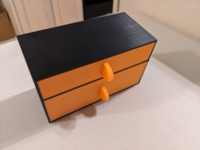
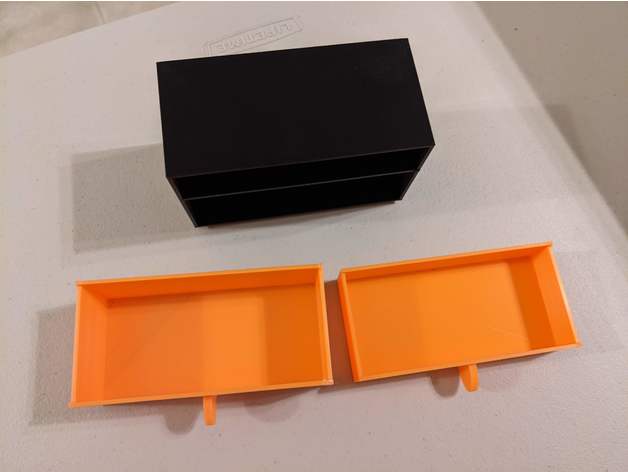
I have it listed on Thingiverse if you don't want to model them lol. As a warning, I would recommend printing the cabinet first, and measuring the inner dimensions to make sure there is appropriate clearance for the drawer as is. Can be a tight fit sometimes.
 

Keyblazer

Well-known member
Joined
Jul 30, 2009
Messages
1,471
Location
Irvine, CA
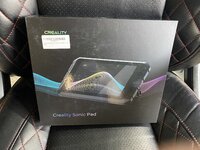
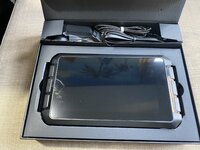
Got a Creality Sonic Pad for Christmas from Santa!
5CC37F2A-41BC-4346-8258-727660DD020B.jpeg

I was thinking it would be cool to run Klipper on my new Ender 5 Plus, make it a bit faster for the bigger prints, but my research said that the 5 plus was not supported… yet.
The Ender 3 V2 was, so I thought I’d learn how to use it on that first.
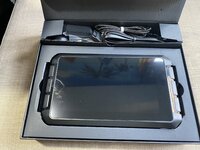
Looks cool at unboxing.
860B88C7-07E8-44DA-A565-AC8B82FC2DA0.jpeg
DCF57523-FE8A-480D-9F7F-4603C1C10480.jpeg

Today I started getting it set up.
Went thru the startup menu and there was a new software version…
And lo and behold, the Ender 5 Plus is now supported… as well as being able to run multiple printers from the Sonic Pad.
This should be interesting… if I can figure out how to set it up! 😬
 

Attachments

  • 8FD00AF7-1D1E-4D6D-90C8-4D3B81DA0454.jpeg
    8FD00AF7-1D1E-4D6D-90C8-4D3B81DA0454.jpeg
    1,021.5 KB · Views: 25
  • 48AF9FC4-A07B-4162-945D-F02A5E999EB4.jpeg
    48AF9FC4-A07B-4162-945D-F02A5E999EB4.jpeg
    930.1 KB · Views: 26

Poolshark314

Well-known member
Joined
Jul 5, 2021
Messages
658
Location
MD
Got a Creality Sonic Pad for Christmas from Santa!
5CC37F2A-41BC-4346-8258-727660DD020B.jpeg

I was thinking it would be cool to run Klipper on my new Ender 5 Plus, make it a bit faster for the bigger prints, but my research said that the 5 plus was not supported… yet.
The Ender 3 V2 was, so I thought I’d learn how to use it on that first.
Looks cool at unboxing.
860B88C7-07E8-44DA-A565-AC8B82FC2DA0.jpeg
DCF57523-FE8A-480D-9F7F-4603C1C10480.jpeg

Today I started getting it set up.
Went thru the startup menu and there was a new software version…
And lo and behold, the Ender 5 Plus is now supported… as well as being able to run multiple printers from the Sonic Pad.
This should be interesting… if I can figure out how to set it up! 😬
Didn't know you could run Klipper from a Sonic Pad. I've been using RPi, but I know those are as scarce as can be
 

Poolshark314

Well-known member
Joined
Jul 5, 2021
Messages
658
Location
MD
What is the point of the pad, quick google search and I still don't understand what it does/improves.
It is like a remote for the printer, but since it runs Klipper, it also moves some of the processing load off of the printer and onto the tablet, improving performance and making it capable of printing better at speed

It should also be able to act like a visual interface for previewing files as well as save timelapses and include a bed visualizer (if using an ABL). You can do all of those things on Klipper on RPi.
 

Poolshark314

Well-known member
Joined
Jul 5, 2021
Messages
658
Location
MD
Got it set up and running on the Ender 5 Plus yesterday.
Here are some pics of the display I took yesterday.
BBC16DAA-5949-43F6-80F7-37D50A4C503B.jpeg

2C5660FF-D916-416A-9AEF-8D12651A5BA9.jpeg
5F610E3A-214B-4FAE-AC84-851F392F7395.jpeg

Still learning how it works.
That bed visualizer is a big help. I personally try to get my beds in the .03 variance range for best results
 

Keyblazer

Well-known member
Joined
Jul 30, 2009
Messages
1,471
Location
Irvine, CA
Liking it so far, but not had a good print off it yet... not the Pads fault.
I upgraded the extruder for a Creality all metal, and Capricorn tube, and its just clicking, and grinding/breaking the filament every print.
No clue what is going on... but I'm sure its user error!
 

Poolshark314

Well-known member
Joined
Jul 5, 2021
Messages
658
Location
MD
Liking it so far, but not had a good print off it yet... not the Pads fault.
I upgraded the extruder for a Creality all metal, and Capricorn tube, and its just clicking, and grinding/breaking the filament every print.
No clue what is going on... but I'm sure its user error!
The silver aluminum extruder? Make sure that the teeth are aligned correctly on the splines and check the tension on the arm. If you tighten the screw holding the gear on the arm too much, it will not allow it to turn with the other splines on the other gear.
 

Poolshark314

Well-known member
Joined
Jul 5, 2021
Messages
658
Location
MD
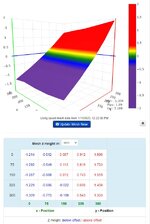
This seems fine :ROFLMAO: this is the bed on my 300x300 corexy machine. I don't really ever have to touch the bed settings on it, it is auto leveled on Marlin with a BlTouch. Even as out of wack as it is my prints still come out surprisingly dimensionally accurate.
bedlevel.jpg
So one thing I also love the ABL mesh visualizers for is, in this scenario, i'd be more than willing to bet your bed is pretty level, and your x gantry arm is the culprit. If you don't have dual z-motors, the side without the motor can get loose and "drag" behind the side that does have the motor, causing this massive imbalance.

You can more or less confirm that by leveling the bed according to that mesh, rasising z up high and then back down, and then running the visualizer again. If it still looks like it's falling off a cliff like that, or even more or less inconsistent, the pulleys on the x arm likely need attention
 

ArcReactorKC

Well-known member
Joined
Jun 1, 2019
Messages
2,237
Location
Out in the county NE of KCMO
So one thing I also love the ABL mesh visualizers for is, in this scenario, i'd be more than willing to bet your bed is pretty level, and your x gantry arm is the culprit. If you don't have dual z-motors, the side without the motor can get loose and "drag" behind the side that does have the motor, causing this massive imbalance.

You can more or less confirm that by leveling the bed according to that mesh, rasising z up high and then back down, and then running the visualizer again. If it still looks like it's falling off a cliff like that, or even more or less inconsistent, the pulleys on the x arm likely need attention
This is a custom built corexy machine the gantry is held on both sides. Every so often I run a G34 to align the z motors, but other than that I let this one eat.

I have all the parts waiting for me to have the patience to go to a 3 z motor setup with kinematic leveling. I'll also be upgrading to the newest marlin that has input shaping. But this one prints very nicely day to day so I haven't had the want to mess with it. After the new bambu gets here I'll tear it down for these mods. It is my biggest machine at the moment and easily the most reliable. Once I get the bambu it'll buy me a week or so of production to mess with the corexy.
 

Keyblazer

Well-known member
Joined
Jul 30, 2009
Messages
1,471
Location
Irvine, CA
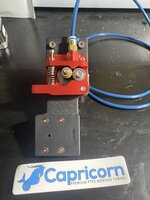
This is the Metal extruder I got.
4EB07D02-C209-4C42-BB9A-1AD81A079CA2.jpeg

Now I’m reading that the red ones are knock offs, and potentially not good.
I’ve been super happy with the Creality Direct Drive unit I put on my Ender 3 V2.

Might just get a Microswiss combo unit and be done, if that’s a good way to go.
 

Keyblazer

Well-known member
Joined
Jul 30, 2009
Messages
1,471
Location
Irvine, CA
Also working on another project…
I have found that I’m really enjoying this 3D printing thing…
Maybe it’s just me… but from day one, I was frustrated with the time it takes to print something…
So the solution, seems to be to buy more printers!😃

So I added the Ender 5 plus, to double my capacity, AND print bigger stuff too…

But now I found I was wanting to tinker… and my 2 printers are busy…

So I decided to buy a “Used” Ender 3 v2 off eBay… $120 shipped.
Seemed like a good way to start…
I ordered it Christmas Day, and was excited. All the feedback for the seller was goo, with people saying the printer arrived intact, just needed to be reassembled…
Mine arrived, and looked good…
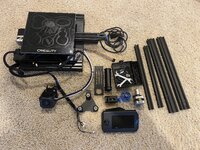
8D26440C-B9A9-49AD-AFAE-960AC64547BE.jpeg
05455608-7713-4D0A-A6D5-307003141C40.jpeg
6C40BDAD-51EA-4E4F-942C-111B85678972.jpeg

To start with… then I laid out all the pieces… and noticed I was missing the LH Z axis assembly, Z ball screw, X belt, motor and extruder.
1B5C8478-D2A3-48BC-8AE3-D9AB1FC9799B.jpeg

Was not happy.
Contacted the seller… who was responsive and has apparently shipped me the missing parts. 😊
Let’s see…

But the truth is I’m planning a lot of upgrades.
1/ Ender Extender 400 kit. Gonna leave the Z at 250 for now.
2/ Twin Z axis upgrade.
3/ Creality 10w laser module…

Hope it comes out good!
 

Jehannum

Well-known member
Joined
May 3, 2012
Messages
1,346
Location
Albuquerque, NM
I actually just gave my Ender 3 away. My CR-10 does everything the 3 did and more, plus volume, so it made no sense for me to hold onto it (and keep it at par with the CR10 wrt upgrades) when I could be on the prowl for a faster/better core-xy machine instead.

So, my friend got the E3, with its BLTouch, fixed-height glass bed (e.g. no spring mounts), E3Dv6 hot end, bullseye mount, and custom firmware compiled from vanilla marlin for it. If he asks later on, I'll probably throw in the direct-drive extruder I had planned to put on it to keep up with the CR-10.
 

jfleisher

Well-known member
Joined
Dec 13, 2010
Messages
1,065
Location
Marysville, Ohio
Liking it so far, but not had a good print off it yet... not the Pads fault.
I upgraded the extruder for a Creality all metal, and Capricorn tube, and its just clicking, and grinding/breaking the filament every print.
No clue what is going on... but I'm sure its user error!
Check your nozzle for clogs. I had a similar clicking issue and replacing the nozzle solved it.
 

Keyblazer

Well-known member
Joined
Jul 30, 2009
Messages
1,471
Location
Irvine, CA
Check your nozzle for clogs. I had a similar clicking issue and replacing the nozzle solved it.
It was one of those weird ones, where I did the Extruder, Capricorn Bowden upgrade, and changed to the 0.6 nozzle in one hit.
As a side note, I ran into an issue with the Extruder upgrade.. a common issue, where the Ender 5 came with the extruder gear pressed on... But I had another extruder motor from my Ender 3 V2 that was grub screwed on so used that motor and put the metal extruder gear on that motor.
It started clicking, stringing, and grinding thru the filament, and I had several failed prints...

Ran one of the flow tests in Cura, and it was horrible, when it actually did finish.
Assumed it was over extrusion... but when I ran the test it was extruding 92.5mm, instead of 100mm.
Adjusted the E-Steps, and now its right on the money.
Still clicking, failing.
Purged the nozzle, at 250c, removed the nozzle, cleaned and flushed the heat block, and pushed the Bowden right thru, as I saw on YouTube... the was a little PLA on the end of the bowden, but nothing crazy.
Went back to a new 0.4 nozzle, reset the prints to the 0.4, and its still the same.

Is there a calibration test I can run that will show people whats its printing that might help point me in the right direction?
 
To avoid these ads, REGISTER NOW!
Top Bottom