To avoid these ads, REGISTER NOW!

Below 265 SQ/FT Tiny Tokyo Shop

All workspaces below 265 squarefeet.
To avoid these ads, REGISTER NOW!

gte718p

Well-known member
Joined
Mar 12, 2009
Messages
3,950
I just recently upgraded from a toy printer to a real tool. I am finding Klipper and MainSail to be vastly superior and easier to configure then Marlin. The SKR Mini support it. I am going to go that way when I upgrade my old printer. The only downside I have found is it really needs a dedicated raspberry pi to fully like up to its potential. That and the 400x400 heated bed were actually the long lead time parts on my build.

I also highly recommend the BTT octopus V1.1. It is over kill in so many ways with 8 driver, four heaters, and 20 something IO. However if you think you might upgrade again in the future it is worth it.
 
OP
B

Bakafish

Well-known member
Joined
Feb 7, 2017
Messages
477
Location
Tokyo
I just recently upgraded from a toy printer to a real tool. I am finding Klipper and MainSail to be vastly superior and easier to configure then Marlin. The SKR Mini support it. I am going to go that way when I upgrade my old printer. The only downside I have found is it really needs a dedicated raspberry pi to fully like up to its potential. That and the 400x400 heated bed were actually the long lead time parts on my build.

I also highly recommend the BTT octopus V1.1. It is over kill in so many ways with 8 driver, four heaters, and 20 something IO. However if you think you might upgrade again in the future it is worth it.
Very familiar with Klipper and will use it eventually when I build a new printer. Right now it doesn't really offer me much, I'm not a speed demon, and the promise of a simpler config is going to be offset by having to relearn everything and deal with any new platform specific issues. My communication chain to this printer is already long enough, I run Octoprint remotely on a little fanless PC and don't want to complicate that with Klipper processing and a Raspberry Pi. But the Resonance Compensation (Input Shaping) Klipper offers seems like a killer feature and I look forward to messing with it down the road.

400㎟ is a big bed! My next machine will be enclosed, so even being as space efficient as possible, I'm unlikely to go beyond 250㎟. I just don't have enough room for everything, I will have to get rid of the Ender as soon as I have a working machine to replace it (another reason why I've been judicious in the mods I've made.) I can only think of one or two times when the Ender size was a limitation, and I just broke the part (a router template) into interlocking pieces which worked fine and limited the damage of a failed print.

I really like the BiQu/BTT stuff, the card I'm using from them is good and suffers no real loss of functionality from than the memory constraints. They just make configuration more tedious. I know the Octopus line well as I was following the pre-relaese version and development on the Voron forums. Their hot end would have been high on my list of options if there was local stock. Despite being very close to China, Japan doesn't make it easy to get stuff imported and I've had several shipments that never made it in the past, so I don't feel that comfortable ordering it. Not for something I need quickly anyway. They have a Canbus remote print head driver board (based on an open source design that's been floating around) that really cleans up the cabling that I'm sure I will use when the time comes.
 
Last edited:
OP
B

Bakafish

Well-known member
Joined
Feb 7, 2017
Messages
477
Location
Tokyo
My Festool rail arrived (from Germany) and the first thing that jumps out at me is that the holes are actually slightly slotted. It makes sense since the registration along the length of the rail is the critical constraint, allowing slop across the width direction will improve the ease of the pin entry and make the sled alignment less critical. The slot form isn't obvious in the pictures I've seen, it's pretty subtle, so it was a bit of a surprise and I'll need to rethink how I'd make my own.

The second observation is that, based on close examination, I suspect these holes are actually stamped from the bottom side, not machined as I previously believed. The tool markings look like linear shearing marks, and the front side has very fine handmade deburring scratches indicating the direction of the punch.

In other news, the Sous Vide holder replacement parts are machined and printed. Getting ABS-CF to print cleanly on the new setup was a lot more troublesome than I had hoped, I ended up reverting to a smaller 0.4 nozzle as I had "known good" profiles I'd been using for that. Changing too many variables at one time is asking for trouble, I'll try the larger nozzle again down the road.

Fresh off the print bed with supports and brim still in place.

abs2.jpeg

This part will bind the two aluminum components I machined to the rear portion of the existing mount (which seems to work well enough that I'm taking the risk of reusing it.) I'll detail this more later as it was somewhat involved to get all this made.

al_parts.jpeg
 

LeonardY

Well-known member
Joined
Apr 16, 2011
Messages
5,020
Location
Southern California
Changing too many variables at one time is asking for trouble
Yeah, been there. Done that. I just printed successfully in ABS. I cranked the temperature up a little higher 235C at the nozzle and 110C for the bed. I let the nozzle ooze until it stopped. The part was small and the print was only 13 minutes so I didn't worry about the a brim.
1661840239096.png
It's the top hook. The one at the bottom is original. The little plastic hooks break all the time. It's a string damper for a tennis racket.
It made my tennis coach very happy. Fixing things like this always amaze people.

Nice job on the Sous Vide holder.
 
OP
B

Bakafish

Well-known member
Joined
Feb 7, 2017
Messages
477
Location
Tokyo
I just printed successfully in ABS. I cranked the temperature up a little higher 235C at the nozzle and 110C for the bed. I let the nozzle ooze until it stopped.
One of the things that caught me out was I was initially printing too hot. Before swapping the hot-ends I did a baseline check with the original and pushed it to 240℃, which was as high as I felt safe with a Capricorn PTFE liner. It came out reasonably well, so when I tried with the new all metal one, I bumped it up to 250℃ but it was a total blobfest. The new heater, despite looking quite similar in construction, seems to be a lot more effective than the old one, and having the extra horsepower I made the mistake of twisting the throttle needlessly.

Using the very handy "Calibration Shapes" plugin for Cura, I printed an ABS temperature tower (the scripts do all the G-code edits to increment the extrusion temps) and found that 220℃ was actually the sweet spot for this filament on my machine. The retraction tower it offered likewise helped me to eliminate some surface retraction artifacts I was getting. I still have a lot of work to fine tune the profiles, especially to get the 0.6mm nozzle working, but I got the print I needed so it was a win.

Printing larger ABS without any enclosure was a fail, so I had to cobble together something short term (that I'm sure I will use for years to come.) The printer already lives in a closet between shelves, so I used cardboard, styrofoam, a lot of tape and a surplus Covid shield my wifes clinic was trashing. Ridiculously slipshod and leaky, but enough to work.

hot_box.jpeg
I hate to admit this is one of the more orderly corners of my office, I need to clean badly.

The little box on the left is a PID heater controller that I have wired to a 100v/30W utility box heater (used industrially to keep condensation out of critical wiring boxes.) I set it to keep a nice 50℃ chamber temperature, which with the help of the bed, steppers and PSU's heat output, it manages to do effectively. I didn't want to use plastic at all, this project was one of the first items I wanted to tackle with the CNC, but really would require a lot of work to make out of billet. Better to compromise and be done with it, I can always remake a better one down the road.
 

nicholam77

Well-known member
Joined
Dec 18, 2016
Messages
2,655
Location
Minneapolis, MN
Nice stuff!

For some reason I thought the Sprite motor / hot end was bigger than the Ender 3 line and the nozzle interfered with the bed or something like that. Evidently that's not true? Even with the modifications you had to do, it sounds like a nice upgrade.

I actually just installed an all-metal hot end yesterday (a cheap MicroSwiss clone). Only one print so far, but we'll see how it goes.

I've also been wanting to try a 0.6mm nozzle. Just to shorten print times since I rarely print something intricate. But I've been scared off by having to recalibrate everything. You'll have to let us know if you get it working nicely.

I'm definitely going to check out that Calibration Shapes plugin. Previously I've used the Teaching Tech website, but a Cura plugin would be more convenient.

My Festool rail arrived (from Germany) and the first thing that jumps out at me is that the holes are actually slightly slotted. It makes sense since the registration along the length of the rail is the critical constraint, allowing slop across the width direction will improve the ease of the pin entry and make the sled alignment less critical. The slot form isn't obvious in the pictures I've seen, it's pretty subtle, so it was a bit of a surprise and I'll need to rethink how I'd make my own.

This is another major reason I just bought the rail vs. tried to put holes in a Makita one. I figured if Festool decided the holes should be oblong, there's probably a reason for it. I did see a post on FOG one time (can't find it now) about someone making the slotted holes on a DIY rail in two passes, but I think they used a router and an official LR32 rail to do it.
 
OP
B

Bakafish

Well-known member
Joined
Feb 7, 2017
Messages
477
Location
Tokyo
So as I alluded, this has been one of those items on my "fix the world" list, where I see some issue that I think needs to be solved and think about it for ages, but it often just gets back burnered due to not having everything I need to resolve it. For the last couple of years, for reasons beyond just covid, I've been venturing out a lot less. One of the few places I still go (every couple of months :rolleyes:) is a small pub run by a young local couple, where the food and draft beer are excellent. The owner is a great cook, Japanese have a tendency to become fanatical with their hobbies and professions, and he's fully into making excellent food despite the humble stage. A few years ago we were talking about steaks and I told him I did Sous Vide, and he was shocked I had one at home. At the time the new generation of consumer focused units hadn't made it to Japan and like everything professional over here the cost of a system was astronomical. He was dubious that a few hundred bucks could get a working system, so I lent him mine for a few weeks and he was sold.

I imported him another one from the US, and he's been using it daily ever since, but as I said earlier, the holder just isn't engineered well and develops stress fractures. Anova was always willing to replace them, but after the first two times, making a permanent fix got put on the list. I suppose I felt responsible for recommending that unit, although I still think it's a good machine, it just needed some modifications. So I was going to mill a new holder out of billet once my CNC got finished, but the last time I visited a few weeks ago he handed me the latest casualty in several pieces and I knew I couldn't put it off anymore.

Making this with the tools I had on hand was an even bigger challenge than I thought it would be. I could have just 3D printed a monolithic part, but I suspected that it wouldn't last long term (without using some kind of advanced material or looking like some monstrosity anyway) so I would need to minimize the amount of plastic used in the key structural areas. I also worried about the hot environment of the crowded kitchen, and the Sous Vide process itself, so that pushed me to start working with ABS. I chose to leverage the clamping section from the original part, this never seemed to be a failure point and it would save me a lot of work, but it was a very complex multipart assembly, and it took a lot of work to design an augmented attachment to hold the machine. I ended up with a design that used two standard Aluminum extrusion elements, a 70mm x 5mm tube and a 40mm x 8mm bar.

an1.jpeg
Ignore that it is black, this was spoiled in the previous post anyway, just imagine this is raw aluminum.

The bar was cut so that it fit into an existing set of slots in the clamp assembly, I would extend these ears out to likewise engage with the ABS part to join the two together. It wasn't a complex shape, and it was pretty straight forward to mill with the Proxxon mini-mill. I'm getting better with manual milling and was pretty happy with the part, the tapped holes were well placed and nice and straight. It's kind of shocking how tight tolerances get when parts that small, it doesn't take much misalignment for a 4mm hole to look ridiculously off center on an 8mm surface. The tube section was more of a challenge. For one thing, the 60mm inner diameter was about a half millimeter too small to fit the entire length of the gripping area. The second issue, was that I needed to cut a hole in the side to allow the large gripper foot to clear it, and drill and tap 6 holes for the ABS module to attach with.

I had some tooling for my mini-lathe, but didn't have the right Aluminum inserts to properly bore it out. So I ordered a set overnight... and they got back ordered (still haven't shown up.) Screw it, I'll just use inserts for steel, I have some with the right aggressive geometry, the lack of coating means the Al will stick to them, but I can sacrifice a few to the machine gods (in truth you can often chemically etch away the deposits to make them like new.) But the new solid tool post I installed on the lathe was unable to reach the outside of the tube... swapped the old Compound slide back on and gave the outside a sweet rainbow diffracting finish. Sweet! Threw in the boring bar and pulled out a half a millimeter, no worries! I was dousing all these cuts in IPA, as I've found it to be a really good cutting fluid for Aluminum and requires little to no cleanup. This was going too easy, dare I use the dreaded cuttoff tool? It squeaked a bit, but damn if that didn't work a treat as well. The lathe work was complete and shockingly uneventful.

sleave_solid.jpeg
Your imagination is getting better, it doesn't appear black to you at all!

Now I just needed to drill 6 holes, the way I designed it I made sure the holes were tangential to the surface, it is easier to 3D print the tricky angles than it is to try and drill them. What I didn't expect was that the shank on my teeny-weeny, itty-bitty, cutie-wootie Albrecht chuck was too long to actually fit the part in the mini-mill and so I had to shorten it with the cutoff wheel of my angle grinder.

alb_set.jpeg
Hard to get a sense of size here despite the background being 1cm squares. I'm missing some sizes to have a complete set...

These kinds of fractal tasks make things so much more tedious, if you are ever faced with a buying decision, consideration of the work envelope should be at the top of your list. This was just a prelude, as after putting in the 6 holes, milling the opening was a nightmare.

The problem was, a cylinder isn't really an easy shape to work with on a small mill. Ideally I would clamp it in a vise on the flat ends, but then in order to clamp the vise to the table, the part is oriented in a way that positions the vise itself in the way of the limited Y travel to even reach the part, let alone mill the hole. If you orient the vise in the desirable direction along the X axis, the table is not deep enough to provide any way to clamp the vise down. :cautious: V-Blocks and clamping straps were an option, but setting it up, it looked precarious and relied too much on the parts integrity since I was making a big hole on the opposite side of where it was being gripped. As I have an ever growing collection to dip into I decided the best solution was MOAR VISES! Mounting my first vise conventionally but offset to maximise the Y travel (as otherwise it will collide with the Column) I clamped another precision vise in its jaws. This also provided me an opportunity to use one of my Nishimura Jig spring jacks to support the other end. These clever little guys have magnets in the bottom and a spring loaded plunger that allows you to lock it from the front, so it can get into tight spaces like I had here. Even with this leaning tower of visa, (got to get my dad jokes in) I still had enough Z height to just clear the part, but found that I needed to add some top straps to keep it from moving anyway.

fixturing.jpeg
I figured I needed to put in a picture to help elucidate what I was describing above, looking at it now, I'm not sure if it helps...

The Big Gator tapping guides have a nice V groove in the bottom, and they helped me keep the tap nice and straight, the 3D ABS-CF part I had printed lined up and fit snugly. I assembled all the pieces for the first time, and it just worked... every hole was exactly centered, the ABS part had to do a lot of complicated things to work right. As I mentioned the bar stock had a 'fork' that engaged with a pair of slots in the clamp piece, but there was also a shallowly angled (10°) mating surface that acted as a friction lock, I had to get that spacing perfect or the parts wouldn't align properly. So done and done, right?

No way, we barely treaded any new ground, we need to do something new. Shiny rainbow machined aluminum is sweet looking, but lives a mayfly's existence in the harsh battleground of a professional kitchen. It needed to be anodized. So I got some Hydrochloric acid, titanium wire, lead sheet, black anodizing dye, sealant and a bunch of other stuff and started reading up on how to do it.

Anodizing (and Nickel Plating) is something I've wanted to do for a long time. Once you start working with metal, one of the things that ***** is that without treatment, any handling is going to affect the surface. Cold bluing for steel is simple and it helps, but doesn't work on Aluminum which scratches just looking at it. I'm blessed with a pair of HP linear DC lab power supplies, these are the cornerstone to a good plating/anodizing process, but I had to do a lot of preparation and setup to get this done. After finally having everything on hand, I moved the power supply so it could reach the parking space and set up some of my lab gear. The Pt1000 thermocouple I modified for my Ika hot stirrer still didn't have a holder for it, I was going to use one of my indicator stands, but remembered that I had some spare Loc-Line flex hose and quickly designed and printed up an adaptor.

probe_mount.jpeg
Just a simple body with a Loc-Line compatible protrusion, the M12 threads were chased out with a tap to ensure smooth operation.

So I got the hot stirrer loaded up with the dye maintained at the ideal 55℃, made a large bath for the smaller container of acid in order to better maintain the required 20-25℃ range. Yesterday was blazing hot, so I needed to run to the convenience store to buy a couple sacks of ice to get the acid cooled down. Set up an induction cooktop to boil the parts in the sealant. Got the power supply powered up and the fish tank bubble aerator in place (to keep bubbles from sticking on the parts when the anodize), using special acid resistant hose so there were no surprises. Gloves, face shield, baking soda, garden hose, all in place.

Massive downpour starts...
 
OP
B

Bakafish

Well-known member
Joined
Feb 7, 2017
Messages
477
Location
Tokyo
California life just leaves me unprepared for this thing people refer to as weather, whatever it is, like the Spanish Inquisition I never seem to expect it. Fortunately the newly painted balcony above mostly protects the gear, although I got a good soaking. The HP power supplies are able to provide a constant current, which is optimal for good anodization (according to what I read, YMMV) and there is an industry standard set of equations using the 720 rule that helps you to properly adjust the amperage based on the total surface area your part has.

an0.png
This was late at night in quite dark conditions. The camera was unhappy.

The first part had some strange behaviour, about a half hour in to the 2 hour process the amperage dived down and the power supply switched to voltage limit mode. I had set it to 15v max as I had read that was a good value for my low acid concentration of ~10%, getting undiluted acid in Japan seems extremely difficult, you can't just get it at a car shop or Amazon. Probably a good thing, but it stymied me a bit, and I just settled for weaker acid and longer soak times. Anyway, I upped the voltage to 20v and after about an hour it started lowering the voltage and returned to constant current. This spooked me, and the nearest I could tell I may not have ramped up the current correctly, the type II anodization method seems to want a 2-3 minute ramp.

When the time was up, I rinsed the part in purified water and put it in the beaker of dye for 15 minutes. Having that dye at a perfect temperature and under constant gentle agitation really gave me a satisfying feeling, it was the least stressful part of this operation. The dye was then rinsed off and I tossed the part into the Le Cruset (only the best for my parts) sealing station.

sealing.jpeg
Seriously though, I tried to double boil this with the nickel acetate in a glass beaker, but it just wasn't working. The French have given so much to science, I figured one more sacrifice wouldn't hurt.

The resulting part turned out decent. Not perfect, there was some thinness along the bottom and one corner, again likely due to a poor ramp up, but it was as smooth and cool as a pebble. Time to put in the big part, but this time instead of a single one, I wired up 4 of the titanium M4 cap head screws I got for this project. I carefully raised the over 3 minutes by hand, and there were no abnormalities, it stayed in constant current mode the entire duration.

Other than regularly adding ice to the buffer bath surrounding the acid container it was just a repeat process. The machined surfaces didn't give it that liquid look of the smaller part, and the extra wiring left some blemishes around where the fasteners were (covered up by the ABS part in the finished product) but the pub was closing soon and I had to screw it together and surprise him with it, so I raced over there.

He was really happy with it, he didn't know I was going to make it for him. He was most impressed with the 3D printed part, it is easy to forget that most people don't really understand this stuff and so can't differentiate between what is easy and what is hard, but for me this was a good exercise in reverse templating and design, with some useful processes for future projects. It was way more work than a Sous Vide cooker really deserves, but (as long as it doesn't break) is a quite satisfying result. Hope it inspires some of you!
 

RickP

Well-known member
Joined
Jan 15, 2013
Messages
1,547
Location
Annapolis, MD
Wow, 3D printing, lathe work, milling, and anodizing used all in one tiny part! I hope your friend the chef realizes how good the quality is once the new part doesn't fail like the OEM replacements.
 
OP
B

Bakafish

Well-known member
Joined
Feb 7, 2017
Messages
477
Location
Tokyo
Wow, 3D printing, lathe work, milling, and anodizing used all in one tiny part! I hope your friend the chef realizes how good the quality is once the new part doesn't fail like the OEM replacements.
I can only hope it holds up. The ABS part seems robust, but nothing gives confidence like metal.
 
OP
B

Bakafish

Well-known member
Joined
Feb 7, 2017
Messages
477
Location
Tokyo
My longstanding JAM Vise addiction is well documented here, and while I'm cognizant that I often turn this thread into a show and tell I will yet again subject you to the latest arrival. It is something a little unique at least, hopefully of interest.

biggest_boy.jpeg

This 17.7kg (~40lbs.) chunk of the finest tool steel is the JAM HP150, although I paid a pittance for it, it sells for roughly $3000 and with a 120mm jaw width and 150mm span, is one of the largest units they make. But what makes it special is hidden inside the screw assembly, for this is a Hydraulic vise. Before I detail exactly what that means, let's go back a few steps and talk about screws.

Screws are miraculous things, useful well beyond simply attaching things, precision screws are the basis on which most of the modern world has been built. They are fundamentally an endless inclined plane providing mechanical advantage. They have their trade offs though, and so special thread forms have evolved to try and compensate and optimize the screw form to its purpose. For a vise we are primarily concerned with how much pressure the thread can exert without failing and the amount of force required to turn the screw compared to the force it is exerting. The typical thread forms used in quality vises and clamps are Acme or Trapezoidal (metric), and in rarer cases Square or Buttressed thread forms might be employed. A sure sign of a cheap or lightweight vise or clamp is the use of conventional threads (although they certainly do work, they will require more force for the same amount of clamping power and will fail under less pressure.) The main difference of these variants is to increase the cross sectional area increasing the strength of the screw thread and to reduce the face angle in order to increase the efficiency.

sq_threads.jpeg
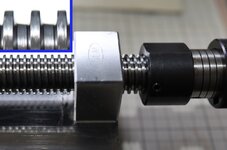
If we look carefully at these threads we can see that the thread face angles are almost perpendicular with carefully relieved root areas. This is a modified square form, and it is one of the most difficult to produce with normal threading techniques like taps and dies (although since these are ground threads, it isn't a lot harder for them to make these over a more conventional thread form.) These square threads (actually they appear to me to be a 10° Modified Metric Square Thread) are the strongest and most efficient (Machinery's Handbook 29th Ed., pg.1944) meaning that they are very good at converting the rotational torque into linear force, a higher thread angle is going to waste some of the force as the thrust vector perpendicular to the face is not as parallel to the screw axis. This efficiency becomes an important and non-intuitive factor because when we start clamping things, thread friction suddenly becomes a really critical consideration!

A short time ago, an excellent YouTuber, Jason at Fireball Tools did some real world testing on different 'off the shelf' screw threads with the same pitch, but different diameters for use in a shop built vise project he was working on, and the results were quite interesting. I won't give the results of his experiments away, but it elucidates that there are a lot of surprising variables involved in selecting the right thread form, pitch, engagement length and diameter, especially if you want it operated by hand.

So how do we cheat? We can add some clever hydraulic advantage to our system! For those who may not be familiar, hydraulics use non-compressible liquids to convey force. Since pressure is force over area, one can use pistons with different areas (one with a small face, and one with a large one) to create something akin to a fancy lever that multiplies the force we are exerting. Nothing is for free, for this to work we are trading off displacement, the large amount we need to move the smaller piston, for the smaller movement at a higher force of the bigger one. But in this case we have a hybrid of both a screw and a hydraulic piston, so the very limited amount of movement of the larger piston is not really a problem. Let's look at how they are doing this.

jam_hydro.jpeg

Hidden inside the handle, jaw and the screw are an entirely self contained hydraulic mechanism. When the handle is rotated, the screw will close the moving jaw like a normal vise until it engages with the workpiece, then when we can no longer turn it due to friction, we can engage the hydraulic system with a gentile push of the handle. Once the fine internal threads of the handle start turning, they force the smaller 'long stroke' piston inside the handle to pressurize the system. This pressure transfers force to the larger area, slower moving piston inside the moving jaw. Due to the differences in area of the two pistons this force is greatly multiplied exerting some pretty astonishing clamping power (up to almost 15kN on this model) using only gentile hand power!

I'm sure there are conventional vises of similar size that can reach similar clamping strength with a long enough bar on the screw, but rotating threads under such pressures creates all sorts of problems and forces (including possibly messing with the vises position) and is much more likely to cause wear or damage. The hydraulic force in this vise is completely linear and the threads are not forced to slide when under such high pressures.

Hope this was worth the read!
 

mybigwarwagon

Well-known member
Joined
Nov 4, 2009
Messages
4,428
Location
Vale, Nc
Wow. You explained something technical, and I actually understood it. Impressive. You may have a good career teaching rednecks.


Cool vice too.
 

RickP

Well-known member
Joined
Jan 15, 2013
Messages
1,547
Location
Annapolis, MD
I'd never looked at precision vises until recently, and I've never even heard of hydraulics within a screw mechanism. Very nice design! I'll bet you were able to pick that one up at a truly "you ****" price - - nice job scanning the online listings!
 
OP
B

Bakafish

Well-known member
Joined
Feb 7, 2017
Messages
477
Location
Tokyo
While on the subject of threads, a friend of mine was machining outer threads on his home built 4-axis CNC and ran into an issue that often crops up in such situations, how do you know when they are finished? When you are cutting threads with a die, you kind of rely on it to get things right. Split dies allow you to tune the fit, adjusting the small set screw to slightly widen or narrow the gap to adjust the tightness of the threads. But when you are cutting the threads with a tool, even when using a DRO (Digital Read Out that tells you exactly how much you are moving) it is still really easy to get things wrong because of the threads geometry. If you have the nut or the other threaded part, you can try to test fit it, but often this isn't convenient, or even possible as the part you are working on cannot be moved once you start making the cuts. A tail stock may be in the way, or the mating part is far too big to position for a trial fit.

Because of the way the thread helix spirals around the body, you can't just use a pair of calipers, or a micrometer, even if they had a sharp edge that could fit into the base of the groove, because the opposite side is going to make your measurement a little out of perpendicular, and the root of the thread isn't a particularly useful reference anyway as it is a non-contact surface if things are done correctly. The pitch diameter, which falls at the midpoint of the major and minor diameters of the thread is typically used as the critical measurement.

So I told him, (short of dedicated instruments) the traditional way to measure a thread is to use a set of thread wires, 3 stiff wires that are precision sized for each different thread pitch, that fit into the threads and provide a reference surface that a micrometer can then measure. By using that measurement with the accompanying chart you can then determine where you are. If that sounds fiddly and like you need a bunch of specialized wires, you'd be correct. To use them properly, two of them go on one side next to each other in adjacent threads, and the other goes on the opposite side, in the thread that falls in the center of the other two. Then you have to position the micrometer so that it is directly over all three wires, and that they are parallel to each other to ensure that you are getting a true measurement. It's a job that seemingly requires four hands, and is pretty easy to get wrong, but when done correctly is extremely precise.

threads.jpeg
Mitutoyo makes little wire holders to help manage some of the arduous manipulation, but it still looks like a nightmare. The lower diagram shows the wire placement and the micrometer anvils, and why the wire diameter is so critical in establishing the correct contact points at the pitch diameter of the thread.

Predictably, although he found the solution intriguing, he didn't like that answer as he was in the middle of cutting. I pointed out that as he was going to cut the other part as well, then he just needed to adjust that part to fit. Serendipity, being who she is, presented the other way this is traditionally done, a very old specialized micrometer someone was selling appeared in my daily search feed, priced fairly cheaply, but in rough shape and possibly missing irreplaceable parts. I sent a picture to my friend so he could see the other way it is done, but the price kept getting lower and lower to the point I couldn't pass it up.

thread_mic.jpeg

This is a replaceable anvil thread micrometer, made by Sonoike, a company long since absorbed by Amada and possibly Mitutoyo, it was one of the original precision machinery makers of Japan. There are dedicated micrometers that are designed to measure a specific pitch, but these replaceable anvils allow a single tool to measure a variety of threads. This picture is after I gently disassembled it, cleaned it and did some basic maintenance and reconstruction.

The anvils are clearly marked on their shanks, so I wasn't fussed about the damaged labels, and despite the empty holes, I suspect they were never filled from the factory for this model. As far as age, there is so little documentation out there for this sort of thing, and I'm poorly equipped to find even that. But one thing is that it has anvils for both Metric and Whitworth (🇬🇧) threads, which I suspect reaches back to the dual occupation of American and British forces after WWII, and astonishingly resulted in the currently bifurcated standards of 60hz electricity in Western Japan and 50hz here in the East. I suspect this tool is from the 1950's.

This method it uses to measure the threads relies on a precision ground dual V block anvil on one side, and a carefully made conical anvil on the other. Much like the wires, these two anvils are designed to contact the threads at their pitch diameter, and one pair of anvils only cover a short range of pitches. The cones and V-blocks for the Whitworth are at a different angle to accommodate that threads unique 55° thread angle. But the design allows for direct reading of the measurement (you use the anvils themselves to zero out the micrometer prior to taking the measurement) and it only requires 3 hands instead of 4 :p After cleaning it up, I took a reading off of a new M10 bolt I had on my desk and it gave a very believable measurement, I expect the device is still quite usable.

Mitutoyo still manufactures the descendants of this tool, in both analog and digital form, along with specialized units designed to measure gears which present similar challenges. Based on the design of the Mitutoyo anvils (sold separately as a kit) I suspect that they acquired Sonoike's metrology business at some point in the past, and I believe I can use their anvil sets in my tool if I ever really need to measure US standard or extremely coarse metric threads some day.

I'm sure it doesn't seem like it, but I've barely scratched the surface about threads. I still feel bad that I chose not to go into any depth about thread pitches or some of the other fundamental aspects and interesting thread forms. I'm by no means authoritative on the subject, I often find myself vexed by them, especially over here where the Japanese have their own nomenclature for existing threads and far more of the british style just to complicate things further. Pipe threads are some of the worst... but that's all I will subject you to for now.
 
Last edited:
OP
B

Bakafish

Well-known member
Joined
Feb 7, 2017
Messages
477
Location
Tokyo
I'd never looked at precision vises until recently, and I've never even heard of hydraulics within a screw mechanism. Very nice design! I'll bet you were able to pick that one up at a truly "you ****" price - - nice job scanning the online listings!
Yeah, it was one of those times where I hit the buy button before I even looked at all the pictures. I honestly expected them to tell me they were off by a decimal place and cancel the sale, but it showed up the next day in even better shape than it looked in their photos. As good as my finds are, there are still serious concessions I have to make compared to being in the states, so I suspect it all evens out in the end.
 
To avoid these ads, REGISTER NOW!

RickP

Well-known member
Joined
Jan 15, 2013
Messages
1,547
Location
Annapolis, MD
I'm sure it doesn't seem like it, but I've barely scratched the surface about threads. I still feel bad that I chose not to go into any depth about thread pitches or some of the other fundamental aspects and interesting thread forms. I'm by no means authoritative on the subject, I often find myself vexed by them, especially over here where the Japanese have their own nomenclature for existing threads and far more of the british style just to complicate things further. Pipe threads are some of the worst... but that's all I will subject you to for now.
Nice score on the thread micrometer! I've also gone down the threading rabbit hole periodically while working on my tractor. It's from China, and they also have a weird combination of British Whitworth and Japanese threads that occasionally pop up amongst the mostly metric stuff. Since the "industrial revolution" happened so much later in the Far East, I'm not surprised they copied existing standards from other countries -- I just wish they'd picked one country and stuck with it!
 

Chrisb62

Well-known member
Joined
Jul 30, 2019
Messages
1,091
Location
southwest fl
As I often read your thread and am amazed at the depth of your research. But reading that thread wires was the only way to measure threads, I was ready to call bull....until I scrolled down lower. I am a Journeyman tool & die maker schooled in the old way (ages me don't it), who now is a CNC programmer in a toolroom, I am very familiar with thread micrometers and they are definitely the way to measure threads.
Thank you for all the information you present to all.
 
OP
B

Bakafish

Well-known member
Joined
Feb 7, 2017
Messages
477
Location
Tokyo
As I often read your thread and am amazed at the depth of your research. But reading that thread wires was the only way to measure threads, I was ready to call bull....until I scrolled down lower. I am a Journeyman tool & die maker schooled in the old way (ages me don't it), who now is a CNC programmer, I am very familiar with thread micrometers and they are definitely the way to measure threads.
Thank you for all the information you present to all.
I don't research nearly well enough to pontificate the way I do, but I think the complexity of some of the most superficially trivial things helps me appreciate the world a little better, and I try to share what I think I know. I'm sure I'm missing other ways to do it (obviously ring gauges), and internal threads must be a nightmare to check, other than plug gauges I've got no idea how it's done.
 
OP
B

Bakafish

Well-known member
Joined
Feb 7, 2017
Messages
477
Location
Tokyo
It's hard to believe, but prior to discovering this site, and @sakurama 's epic thread, I was oblivious to the serious condition called Festoolitis. Seriously though, I had no idea about the brand, always having been a Makita man. My gateway unit was their track saw, but I quickly added their aggressive Rotex 150 sander and a Domino joiner. I really like the sander, but one issue is that 150mm sanding discs are really uncommon here in Japan, and although I've managed to obtain and stockpile a cache of them, I find myself hesitating to use it as often as I should out of concern that they will be difficult or expensive to replace.

A few weeks ago a Rotex 125 set came up for auction with a low starting bid, and I threw it on my watchlist. A few days later I was wondering what happened to it, and realized that it had a 'buy it now' price of about $100 that I had totally missed (I honestly didn't catch it because that's clearly a ridiculously low price. It just didn't register.) My heart sunk that I missed out on that steal, and I tried not to think about it. The RO 125 is one of the most common items for sale over here, and they regularly show up, but go for ~$600 for a good condition complete set, and $200-300 for a hammered tool without a case. But a good unit (no case or accessories) showed up on the reasonable side of a few hundred so I took a chance on it.

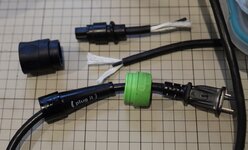
The condition is good, it is much smaller and lighter than the big Rotex 150, and I can see using it a bit more freely than it's big brother, but the 'Plug-It' cord it came was damaged and taped up inelegantly. The cords for Festool come in multiple types, here in Japan they are ungrounded as we have GFI on all outlets, but they still come in two wire gauges and have a keyway in the 'Plug-It' quick connector to prevent using the lighter weight cord on the heavy duty tools (you can of course use the big cord on the small tools though.) The design issue is that because the connector securely locks to the tool, it often tears the insulation jacket around the strain relief area from getting pulled on or tripped over. These proprietary power cords are not cheap, and although I have a couple, it was definitely worth while to repair it.

plugit1.jpeg

I cut the cord at the damaged area, and removed about 100mm of cord length to get to clean wire. This cord is 18ga, with cotton packing which I left long so that it would help with the strain relief. You can see here that I have already disassembled the plug. It's not at all obvious that this can come apart, but the trick is to gently pry the green locking ring from the black shell, and it should give you access. Mine has a rubber O ring, I've seen some with steel clip rings, I expect there are a number of different variants.

The wires terminate into a molded fitting, so a splice is required. I chose to use **** connectors as I feel that they are likely to be more reliable than soldering, a properly crimped connector is stronger than the wire itself, which is what we are looking for here.

plugit2.jpeg

Reassembly of these things are always a bit of a puzzle, the shrink tube and parts all need to be in place before you crimp so you need to really think about the order and length of everything. I chose to use heat shrink tubing for insulation as I need to keep this joint as close to the original cord diameter as possible, but it is a lot more fiddly than tape. In order for the **** connectors to be completely covered by the heat shrink, I needed to sneak a little bit of the tube length under the cord's outer insulation to keep it out of the way while crimping, then I could pull it down over the crimped **** connectors afterwards. Then the first layer of hot glue lined heat shrink that was cut to the length of the missing outer shell, and the glue bonded all those cotton strands. Lastly, a (not shown) final layer of shrink tube was slipped over the splice and it extended well past the the end of the rubber strain relief once that was in place. Silicon spray helped make the strain reliever slide easily over the slightly thickened repair. Since I had a 'Megger' high voltage insulation tester, I confirmed that it was safe and now have a nice factory looking cord.
 
Last edited:
OP
B

Bakafish

Well-known member
Joined
Feb 7, 2017
Messages
477
Location
Tokyo
Today I present to you, the fascinating Optical Flat.

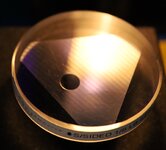
Flat1.jpeg

This example is is an ~80mm LapMaster single sided 1/8th wavelength unit (meaning it is flat to 1/8th of ~580nm across its entire surface.) In the picture above you can actually just make out some colorful fringes in normal light, but ideally you want to use a monochromatic light source. Forgive me for nerdsplaining if you already know all this, but the fringes are created by the light constructively and destructively interacting as it is reflected back on itself. Kind of like how noise canceling headphones work, a waveform of the same frequency, but opposite phase cancels out the sound. When the tiny air gap between the glass and the reflective surface is a multiple of the frequency of the light itself it either amplifies or dampens the light, creating the fringes seen.

Why would anyone want to do that, and what does this piece of glass have to do with anything? Well the glass of an optical flat has been ground to an extreme amount of flatness and using the light and these fringe patterns, one can determine the flatness and contours of a secondary reflective surface with extreme accuracy. Knowing the frequency of light (He is mostly 587.6nm) you can actually calculate the distance between two bands, and if the flat is properly seated the number of bands across the object can indicate the overall flatness.

As mentioned above, to get the best results requires using a monochromatic light source, typically low pressure sodium or helium, powered by a ballasted high voltage supply. Other than low pressure Sodium, these light sources are not really monochromatic, they actually have several frequencies of light they emit due to the different electron band gaps, but an overwhelming amount of output is usually at one frequency making it essentially monochromatic for our purposes. Secondary filters can be used in professional settings to get even cleaner results. Partially due to advancements in solid state lighting, and the limited use of such things, these lights have become a lot harder to find than the optical flats themselves, and I've been searching for some time.

Helium.jpeg

Today's the day! I finally got a hit for an Electro Technic Products experimental light source here in Japan with a helium tube for a reasonable price. There are some people using laser diodes and ping pong balls as a diffuser, but I have enough projects and just wanted to have something that worked.

Our test subject today is a Mitutoyo base plate that is included in their square gauge block accessory set, these square gauge blocks are not as common (especially over here) so I've been able to build up quite a collection as they are not as desirable, but they can be really useful as they can be fastened together thanks to having a hole through their center (also super useful for calibrating depth gauges!) This unit was shiny and a similar size to the flat, so a good first light candidate.

Flat2.jpeg

What you want to see is nice straight lines, from edge to edge, and honestly the fewer bands the closer the fit between the optical flat and the surface to be measured. I didn't attempt to optimize the fringe count, and I didn't make a lot of effort to get a good photo either. The light needs a diffuser and to be better positioned for photography as the picture induced some curvature to the lines that actually isn't there, I was in a rush to get some shots and pack everything away before I broke something. As with many things this looks much better in real life.

So other than verifying that your Mitutoyo accessories are properly made (a waste of time, of course they are!) what's the use for this? Well, hand lapping has come into vogue again in the YouTube community, and along with scraping for flatness the idea of lapping in some of my harder surfaced items is really appealing. This equipment allows one to do so and be assured that you have achieved the desired results. It's also just kind of neat.
 

Half-fast eddie

Well-known member
Joined
Jul 10, 2021
Messages
1,479
Location
Virginia
Is the face of the glass vulnerable to scratching? How do you clean both surfaces before setting the glass down? The stripes in the picture … do you measure the distance between them to determine flatness?
 
OP
B

Bakafish

Well-known member
Joined
Feb 7, 2017
Messages
477
Location
Tokyo
Is the face of the glass vulnerable to scratching?
Yes, this was a used unit, so the previous owner wasn't as careful as you should be, but it really doesn't affect the function.

How do you clean both surfaces before setting the glass down?
Alcohol is specified by LapMasters for cleaning the lens.

The stripes in the picture … do you measure the distance between them to determine flatness?
The actual distance between the lines isn't that important other than the farther apart they are, the closer the two surfaces are to each other. There is always a kind of air gap, and careful positioning can allow you to position the flat in such a way that you could calculate the deviation from flatness, but most of the useful information is revealed in the curvature and behavior of the lines when pressure is applied which gives a map of the surface topology.

In other words a concave surface might produce a kind of bullseye pattern, and based on the number of fringe rings you could accurately calculate the depth of the depression relative to the edge of the object. On a truly flat surface like the block I was measuring, all you would be counting is the straight fringes produced by the wedge of air between the two surfaces. Again, manipulation of the device may disclose a particle or burr causing excess separation, but it's not really the main focus.

When lapping you are generally trying to remove concavity or convexity which show up as curved lines. The surface in these pictures is essentially a large precision gauge block with a very flat surface, and the lines were as straight as it gets. I linked to how to interpret the fringes in the original post, it's pretty fascinating.
 
OP
B

Bakafish

Well-known member
Joined
Feb 7, 2017
Messages
477
Location
Tokyo
Photography is one of those things that I've always been wary of. It is chock full of science, and art and presents an overwhelming rabbit hole of granular configuration, expensive technology and mythos. It is also one of those things that my brain is convinced isn't really necessary to permanently store, which means I have to relearn all the tedious depth stop, focal length and exposure stuff every decade where I once again venture to dip my toes in the deep end. I have a memory that effortlessly can store things it recognizes as useful (occasionally I agree with it, but there are a lot more facts about monotremes than I think is really necessary), but has as good a chance of retaining some things as an eel has of traversing the Himalayas.

Anyway, thanks to Japan's tax system and my wife's indefatigable work, I came into possession of a Canon EOS Rp last year, and I bought a 35mm Macro lens for it. I've been using it for most of the recent shots, it's likely easy to see as the lens has a short depth of field that mercifully blurs the chaos of the room behind my shots. But one of the downsides is that in order to focus across the entire item, I'm either forced to take photos where all the details are in the same focal plane (meaning clinical overhead shots) or I can't really use the Macro and just rely on taking a shot farther back and cropping it.

On YouTube I noticed that some of the guys doing microscopy were taking multiple shots with different focus settings and stitching them together. I started poking around and discovered that (despite having kind of crappy utilities and support) Canon actually has focus bracketing built in to the camera's OS, and a useful little utility that increments over that stack of photos and creates a single macro shot that is in focus across the whole photo. Pardon the exposure and framing, I'm still working on getting this right:

HP_Module.jpeg

This is one of the constituent frames showing how narrow the focal plane is in reality:

HP_Module_Frame.jpeg

This device has a bit of an odd and uncertain story behind it. When I was quite young I dropped out of school to work selling electronics in a small shop in the northern bay area of California. It happened to be close to the Hewlett Packard microwave division, and many of my best customers were from there. One day a man came in, and he was acting quite oddly, I honestly didn't recognize him, but once the other customers had left he rushed over to me and presented me with this small gold plated box. He said he couldn't tell me what it was, that it cost hundreds of thousands of dollars to develop it, and that he was supposed to have destroyed it that day (presumably for security reasons, I think he said something about satellites) and couldn't bring himself to do it after all the work he put into it. We had apparently had a long conversation about the use of Gallium Arsenide in semiconductors, a conversation that was totally plausible, but I'm ashamed to admit I didn't at all recall, and he said that if I were to pry off the lid I would find such devices inside. He made me promise not to tell anyone who I got it from, which I was secretly amused by, as again I had no recollection of who he was. Hopefully 40 years later any statute of limitations has passed, if this really is anything of importance. This is the first time I've shared it and the story, I figured it would make an interesting test subject for a macro.
 

RickP

Well-known member
Joined
Jan 15, 2013
Messages
1,547
Location
Annapolis, MD
That Canon stitching utility is amazing -- it looks like one photo!

Cool story -- I wonder how many hours that HP employee put into that device.
Ever thought about using it for anything?
 
OP
B

Bakafish

Well-known member
Joined
Feb 7, 2017
Messages
477
Location
Tokyo
That Canon stitching utility is amazing -- it looks like one photo!

I forgot to mention that was made of 64 different shots. I tethered the camera to my Mac and was able to remotely set up and trigger the Camera that stored them all locally on my computer, which made it a lot easier to do.

Cool story -- I wonder how many hours that HP employee put into that device.
Ever thought about using it for anything?
There's a very good microwave engineer on YouTube, TheSignalPath who I'm pretty sure could reverse engineer it if I sent it to him (and it was worth his time to bother.) But it is some sort of amplifier or signal splitter and I doubt it is as interesting as it looks, and part of me is happier not knowing.
 

LeonardY

Well-known member
Joined
Apr 16, 2011
Messages
5,020
Location
Southern California
When I was quite young I dropped out of school to work selling electronics in a small shop in the northern bay area of California.
I used to frequent all of those shops in the late 70's and early 80's. Who knows we could have already met. I would buy bits and bobbles that just looked neat. I would make models from the parts. There was one place that I would go to all the time. I think it was called San Carlos Surplus. I would come to the counter with a bunch of stuff and the sales guy would take pity on me. He would say "That looks like 2 dollars worth of stuff." He would also spend the time and tell what something was from or used for.
I used to work at Monterey Bay Aquarium and would chat with David Packard after meetings. His daughter, Julie Packard was the director of the aquarium. She would come over, smile and tell her dad to stop bothering me. He had so many great stories. Such a wonderful man. Julie was great too.
 
OP
B

Bakafish

Well-known member
Joined
Feb 7, 2017
Messages
477
Location
Tokyo
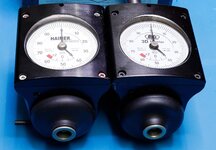
A while back I went on a long discourse about multi-axis indicator probes and hight setters. I've collected a number of different Big Daishawa devices, and one of my good compatriots here @LeonardY brought up the Haimer style of probe, which is a premium device that offers several advantages over a simple contact probe when used manually. The key advantage of the Haimer design is that it compensates for the probe tip and length so it shows when the spindle is exactly on center. With the electric probes I discussed before, you need to remember to subtract half of the probe tip diameter, not a big deal if it is automated by a CNC since it will automatically compensate, but when used manually is fertile ground for bozo crashes. The electric probes also do not tell you if you have overshot, because they are basically binary devices, they will show when the probe is moved from the rest position, but not by how much. A CNC will typically make several approaches at different speeds to zero in on that contact, but doing so manually on a machine that may have some backlash or imprecise manual controls can become tedious. So a Haimer is something that I've wanted to pick up, assuming the price was reasonable.

Haimers.jpeg

A few days ago a seller listed this pair of indicators, the Haimer was listed as "Junk" and the OEM "Big Daishawa" version was working, but out of calibration. They were cheap enough to take a chance, my theory being worst case I could hopefully make a working unit out of the two. When they arrived I did a quick exam of the units. The Junk part had play between when the probe (not pictured here, the probes are fragile ceramic and sacrificial to protect the device so I keep them detached and separately boxed) so when you pressed the probe there was several millimeters of slop before the dial engaged. The other unit worked properly, but was not at the -2mm (zero position) when at rest so it would need some recalibration.

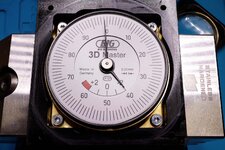
Haimer_Face.jpeg

Opening up the face of the unit (the 4 screws on the front) revealed that the dail section was a single subcomponent, and removing it revealed that it was actuated by a single pin that engaged with a small block which moved up and down and was linked to the probe deflection. The slop that the device was experiencing was due to the clockwork module slipping out of position causing a gap between the pin and the block when the unit was at rest. The clockwork has its own spring and this needs to be preloaded against the block until it reads -2mm (half the diameter of the 4mm ball of the probe.) There were a pair of opposing set screws located on the left upper and lower corners that control the vertical position of that dail unit, and this is how the pre-load and rest position is calibrated, the photo above is the working unit showing the ~0.02mm of miscalibration before I dialed it in to exactly zero.

Another issue with the 'junk' Haimer was that the plastic dail lens was quite scratched up, a few minutes with a plastic polishing kit cleared that up quite nicely and the centering screws were worn and one had a stripped hex head. At the top of the unit there are 4 set screws that are essentially captured and accessed by 4 small holes. They allow you to adjust the eccentricity of the probe tip to perfectly center it to the spindle axis, I need to set up one of my more precise spindles to align these two units, and I will also confirm that they are properly indicating at that time. Replacing those set screws requires the removal of the top shank unit since the access holes are only big enough for the allen wrench to adjust them. The top is held to the unit with 8 screws and is tightly fit into the body with an O ring seal and also provides an internal seat for the probe's preload spring. Be prepared for that to fly out when you open it!

Two of the grub screws came out without any trouble, but one of the remaining ones was overtightened and quite stuck, and the other had the stripped out head. I've found that the best way to deal with damaged hex heads is to use a Torx bit, I think it has a bit of taper that helps engage a wallowed out socket. Using a T8 Torx bit I was able to remove the remaining screws, and replaced all 4 with fresh flat point M4x8mm units. The rubber dust boots were removed and cleaned, and some Mitutoyo Metrol micrometer oil was put on the probe ball socket located under the boots in order to ensure low stiction.

So assuming these will dial in and operate as consistently as they appear, I think another successful gamble. I found a couple new Haimer replacement probes at auction for $30 each, the junk unit didn't come with one, and I'm hoping I don't crash my way into poverty once I start using these.
 

LeonardY

Well-known member
Joined
Apr 16, 2011
Messages
5,020
Location
Southern California
A while back I went on a long discourse about multi-axis indicator probes and hight setters. I've collected a number of different Big Daishawa devices, and one of my good compatriots here @LeonardY brought up the Haimer style of probe, which is a premium device that offers several advantages over a simple contact probe when used manually. The key advantage of the Haimer design is that it compensates for the probe tip and length so it shows when the spindle is exactly on center. With the electric probes I discussed before, you need to remember to subtract half of the probe tip diameter, not a big deal if it is automated by a CNC since it will automatically compensate, but when used manually is fertile ground for bozo crashes. The electric probes also do not tell you if you have overshot, because they are basically binary devices, they will show when the probe is moved from the rest position, but not by how much. A CNC will typically make several approaches at different speeds to zero in on that contact, but doing so manually on a machine that may have some backlash or imprecise manual controls can become tedious. So a Haimer is something that I've wanted to pick up, assuming the price was reasonable.

Haimers.jpeg

A few days ago a seller listed this pair of indicators, the Haimer was listed as "Junk" and the OEM "Big Daishawa" version was working, but out of calibration. They were cheap enough to take a chance, my theory being worst case I could hopefully make a working unit out of the two. When they arrived I did a quick exam of the units. The Junk part had play between when the probe (not pictured here, the probes are fragile ceramic and sacrificial to protect the device so I keep them detached and separately boxed) so when you pressed the probe there was several millimeters of slop before the dial engaged. The other unit worked properly, but was not at the -2mm (zero position) when at rest so it would need some recalibration.

Haimer_Face.jpeg

Opening up the face of the unit (the 4 screws on the front) revealed that the dail section was a single subcomponent, and removing it revealed that it was actuated by a single pin that engaged with a small block which moved up and down and was linked to the probe deflection. The slop that the device was experiencing was due to the clockwork module slipping out of position causing a gap between the pin and the block when the unit was at rest. The clockwork has its own spring and this needs to be preloaded against the block until it reads -2mm (half the diameter of the 4mm ball of the probe.) There were a pair of opposing set screws located on the left upper and lower corners that control the vertical position of that dail unit, and this is how the pre-load and rest position is calibrated, the photo above is the working unit showing the ~0.02mm of miscalibration before I dialed it in to exactly zero.

Another issue with the 'junk' Haimer was that the plastic dail lens was quite scratched up, a few minutes with a plastic polishing kit cleared that up quite nicely and the centering screws were worn and one had a stripped hex head. At the top of the unit there are 4 set screws that are essentially captured and accessed by 4 small holes. They allow you to adjust the eccentricity of the probe tip to perfectly center it to the spindle axis, I need to set up one of my more precise spindles to align these two units, and I will also confirm that they are properly indicating at that time. Replacing those set screws requires the removal of the top shank unit since the access holes are only big enough for the allen wrench to adjust them. The top is held to the unit with 8 screws and is tightly fit into the body with an O ring seal and also provides an internal seat for the probe's preload spring. Be prepared for that to fly out when you open it!

Two of the grub screws came out without any trouble, but one of the remaining ones was overtightened and quite stuck, and the other had the stripped out head. I've found that the best way to deal with damaged hex heads is to use a Torx bit, I think it has a bit of taper that helps engage a wallowed out socket. Using a T8 Torx bit I was able to remove the remaining screws, and replaced all 4 with fresh flat point M4x8mm units. The rubber dust boots were removed and cleaned, and some Mitutoyo Metrol micrometer oil was put on the probe ball socket located under the boots in order to ensure low stiction.

So assuming these will dial in and operate as consistently as they appear, I think another successful gamble. I found a couple new Haimer replacement probes at auction for $30 each, the junk unit didn't come with one, and I'm hoping I don't crash my way into poverty once I start using these.
That's great. Glad you got one and were able to make it functional.

Don't remember if i ever covered this. I had made a holder for the mine that would fit in my quick change. It wasn't perfectly concentric. but I knew I could make up for minor differences with the grub screws you replaced. I pushed the screws to limits of their adjustment range. What I found was they would back out. I was constantly re-centering it. I thought there was a problem with unit and sent it back to be re-calibrated. They didn't find a problem with it. I mounted it back in a quick change holder (Not the one I made. Adjusted it and it held. So a word of caution. If you are really pushing any of the grub screws, it is likely to back out. I did confirm this with Haimer.

I found this on making cheap replacements of the Haimer tips.


It's interesting concept. I've thought about trying it with my broken tip. Since breaking my tip. I am very cautious. I do my setup and immediately put it back in it's box then back in the drawer. Never leave it out on the bench.
 
Last edited:
OP
B

Bakafish

Well-known member
Joined
Feb 7, 2017
Messages
477
Location
Tokyo
What I found was they would back out.

I noticed that the 8mm screws left a lot of the threaded hole empty, that a longer screw (12-16mm) with more engagement was certainly possible. Not sure if a longer screw would help, maybe a bit of low strength loctite will be in order. I'm going to try and document the truing, not that it should be particularly complex or interesting, but it gives me an excuse to pull out some of my other toys.
 

LeonardY

Well-known member
Joined
Apr 16, 2011
Messages
5,020
Location
Southern California
I noticed that the 8mm screws left a lot of the threaded hole empty, that a longer screw (12-16mm) with more engagement was certainly possible. Not sure if a longer screw would help, maybe a bit of low strength loctite will be in order. I'm going to try and document the truing, not that it should be particularly complex or interesting, but it gives me an excuse to pull out some of my other toys.
Longer screws might help. I would be afraid to put loctite. There is a definitely a limit to how far you can crank on the screws to adjust it. Wonder if that's how the one grub screw was stripped on yours.
 
OP
B

Bakafish

Well-known member
Joined
Feb 7, 2017
Messages
477
Location
Tokyo
Longer screws might help. I would be afraid to put loctite. There is a definitely a limit to how far you can crank on the screws to adjust it. Wonder if that's how the one grub screw was stripped on yours.
There are loctite formulations that are really taylored for this application, and are quite reversible (I use 222) and I think worry free. I did consider that they may have limited the amount of thread engagement (screw length) as a mechanical fuse to limit the force the set screw could apply, but as I'm not a gorilla I would be careful how much I was cranking this anyway. The part that stripped out on the screws was actually the hex socket, which I think must be the weakest link, which is why I was second guessing the length as the protective measure. One of those cases where I'd love to talk to the engineer behind it, but afraid the answer would be, "8mm was cheaper, it works, what is the problem with it?"
 
OP
B

Bakafish

Well-known member
Joined
Feb 7, 2017
Messages
477
Location
Tokyo
One of my original purchases that kicked off my metrology 'collection' was a Mitutoyo granite block square. I bought it assuming the price of ~$50 was good (I think it was) and at the time I had no reference surface, so I thought it could be used as a little surface plate (kind of awkward for that, but the infected do what we have to to convince ourselves of utility...)

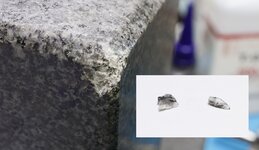
I just love the look and feel of granite, and the fact it doesn't rust makes it a less stressful material for me as most of my stuff just gets packed away. Last weekend, a largish (450x250) Mitutoyo square was listed at auction for about $250, but I was going to be away skiing in Hokkaido (★★★★☆) so I wouldn't be able to camp it. I threw an auto-bid on it and was happy to find I was the only bidder, but being remote I wasn't able to encourage the seller to package it carefully. When it arrived I was disappointed to find that one of the (non-critical) corners of the otherwise pristine square had been chipped 😔 and I recovered a few fragments from the box.
chips.jpeg


This sort of thing hits me harder than it should, and after sending a restrained complaint to the shipper, I immediately started thinking about how to repair the damage. As this was a non-critical surface, and on the back side as well, I didn't want to go overboard. I collected a bit of baking soda out of the refrigerator and overnight ordered some Loctite 380 (Black Max over in the US.) By doing a layer a day, and embedding the chips I recovered, I was able to stabilize and build up the area enough that I could then use the Nakanishi Evo with a right angle head and a set of sanding discs to reshape the corner close enough to the original that it wouldn't haunt me. Shortly after finishing the repair, the vendor credited me %20 bringing the cost down to under $200, so I think it worked out okay.

square_repair_1.jpegsquare_repair_2.jpeg

This bigger square had a hand made sheet that mapped it's accuracy included in the box, it wasn't the original calibration or something from a lab, it was clearly from the original owner who was compensating for any errors, but if I choose to trust it, it showed it was under 2 microns out across the length. The two reference surfaces on it seem pristine with the subtle silky frost that differentiates them from the highly polished surfaces of the rest of the instrument.

sibling_squares.jpeg

Long lost siblings reunited.
 
To avoid these ads, REGISTER NOW!
Top Bottom