To avoid these ads, REGISTER NOW!

V3 Bug/Suggestion Box

To avoid these ads, REGISTER NOW!

drivesitfar

Well-known member
Joined
Oct 23, 2013
Messages
36,005
Location
Pacific Northwest
Ryan: for some reason some threads in my WATCH list go to new posts and some go to first post on threads i've been posting on since your upgrade.

also when I post on my Iphone 8+ (safari mode) I'm not able to edit spelling or other errors I missed when I posted so I have to edit on my laptop. maybe the edit feature only works with TAPATALK? i've never loaded it and probably won't on my phone so i'll just try to proof read a bit better before posting on my cell if that's the case cause I rarely load an new app these days.

I can work around it until you (or I) figure it out and thought I'd mention it.

great job making the switch and yes there are some things a lot of us old guys will have to re learn, but maybe it will keep us from getting dementia
 
OP
R

Ryan

Administrator
Staff member
Joined
Jan 26, 2006
Messages
5,710
Location
Texas/Hawaii
Ryan: for some reason some threads in my WATCH list go to new posts and some go to first post on threads i've been posting on since your upgrade.

also when I post on my Iphone 8+ (safari mode) I'm not able to edit spelling or other errors I missed when I posted so I have to edit on my laptop. maybe the edit feature only works with TAPATALK? i've never loaded it and probably won't on my phone so i'll just try to proof read a bit better before posting on my cell if that's the case cause I rarely load an new app these days.

I can work around it until you (or I) figure it out and thought I'd mention it.

great job making the switch and yes there are some things a lot of us old guys will have to re learn, but maybe it will keep us from getting dementia

as for new post things… that will clear itself up once your cookies normalize.

as for editing, you should be able to do that from your phone. I can.

we no longer support tapatalk.
 

rharman

Well-known member
Joined
Apr 22, 2012
Messages
8,765
Location
SoCal
I may be overlooking some option but....

My previous "go to" was the link for threads with new posts in the past 24 hours. Now, the new posts link seems to be limited to 7 pages and that's it - regardless of timeframe.

Is there, or can there be, a link or way to find all threads with new posts in the past 24/48 hours (sometimes I miss a day).

Thanks.
 
Last edited:

HWgeek

Active member
Joined
Apr 25, 2008
Messages
37
Started this weekend, on iPhone Xr with the up to date GJ app, it won't let me log into GJ.
Was working fine all last week. I double checked that I was entering my password correctly and can do so via the web on either a computer or on the phone. But not on the GJ app.

Attached is the error, however it scrolls down for multiple screens worth, hopefully this top part has enough of a clue on whats going on?
 

Attachments

  • Screenshot 2021-05-31 at 9.48.37 AM.jpg
    Screenshot 2021-05-31 at 9.48.37 AM.jpg
    195.9 KB · Views: 9
OP
R

Ryan

Administrator
Staff member
Joined
Jan 26, 2006
Messages
5,710
Location
Texas/Hawaii
Started this weekend, on iPhone Xr with the up to date GJ app, it won't let me log into GJ.
Was working fine all last week. I double checked that I was entering my password correctly and can do so via the web on either a computer or on the phone. But not on the GJ app.

Attached is the error, however it scrolls down for multiple screens worth, hopefully this top part has enough of a clue on whats going on?

Here ya go:


FrankLee

Well-known member
Joined
Sep 13, 2010
Messages
3,570
Location
seMI, 48317
Low priority....

I miss the actual thread reply counts and view counts. Now they are rounded numbers to the nearest(?) K or M. In Vb, the thread reply count was a link to display who replied and their count. Is this an option in Xf?

In Vb, I would periodically see Who's Online and display 200 lines and sortable by field. My bookmark still works, but only displays 20 lines of data times 70 pages. https://www.garagejournal.com/forum/online.php?order=desc&sort=time&pp=200&page=1 Any changeable parameters?
 

Cardboard Man

Well-known member
Joined
Aug 30, 2008
Messages
810
Location
NJ
First i'd like to say that this is my favorite forum, and that I appreciate all the work that you, Ryan and all the moderators do to keep it like it is. I know that the migration to the new platform hasn't been easy, but overall it was necessary and executed with a minimum of disruption, and least for us general users.

I know there was some upset during the early hours about the font, which turned out to be a hiccup that was corected quickly, and effectively. After using this new version for about a week however, I have concluded that it's still a bit hard to read and I couldn't immediately figure out why, so I did some testing. For me it's a contrast issue, that is, the font is a dark gray as opposed to black against the page. I switched to bold size 22 font and it seems to be a lot clearer and easier to read. I know that maybe it's just me with somewhat older eyes (use 2x readers all the time now) but this is a huge improvement in user satisfaction. Unfortunately this will revert back to stock after I make this post.

Is there a way possible that the user can select the font size and contrast in the user preferences where it will stay that way permanently? In the early hours there was a choice to do just that, but it was removed when the font was fixed. Can that option or something similar be offered?

Thanks again for all your good work.
 

Strouty

Well-known member
Joined
Mar 21, 2010
Messages
38,214
Location
Southern Maine
Pics from a phone? Sometimes phones have issues with the Meta data and portrait vs landscape.

Ive thoroughly tested the site in that regard and it hasn’t failed yet.
I am running into the same issue (iphone) I found that I had to "edit" the picture by rotating it 360 degrees in the photos software (on my phone, not GJ) and that seems to have solved the issue (an annoying resolution though).

I am also seeing that when people quote things that have pictures GJ reverts the images to attachment links instead of keeping the image, this is not so good, especially when quoting to ask about an image specifically.

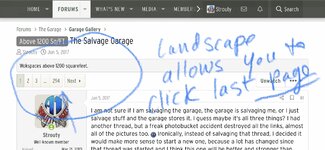
Lastly, I am still having issues with clicking a thread and going to the first page (oldest posts) rather than the last page (newest/unread posts) on threads that I read all the time. Even my own thread will randomly do this and it is not isolated to desktop or phone.
 
OP
R

Ryan

Administrator
Staff member
Joined
Jan 26, 2006
Messages
5,710
Location
Texas/Hawaii
I am running into the same issue (iphone) I found that I had to "edit" the picture by rotating it 360 degrees in the photos software (on my phone, not GJ) and that seems to have solved the issue (an annoying resolution though).

I am also seeing that when people quote things that have pictures GJ reverts the images to attachment links instead of keeping the image, this is not so good, especially when quoting to ask about an image specifically.

Lastly, I am still having issues with clicking a thread and going to the first page (oldest posts) rather than the last page (newest/unread posts) on threads that I read all the time. Even my own thread will randomly do this and it is not isolated to desktop or phone.

I can’t reproduce the first post thing on any of my test devices. So, it’s hard to work on.

I am working on an image fix.
 

Strouty

Well-known member
Joined
Mar 21, 2010
Messages
38,214
Location
Southern Maine
I can’t reproduce the first post thing on any of my test devices. So, it’s hard to work on.

I am working on an image fix.
Can you add a button to the top of the threads that says "Unread" or something? maybe have that be the first thing, then the page numbers? On the phone it is not intuitive and you end up scrolling to the bottom of the page to get to the last page number option.
 

Strouty

Well-known member
Joined
Mar 21, 2010
Messages
38,214
Location
Southern Maine
Here is what I see, just did it to me on my own thread again. Landscape format offers the option, but if there was a button that fit normal orientation that would be cool.
 

Attachments

  • D8A62FA6-BE7F-424B-9FB0-3E38B7F7904D.jpeg
    D8A62FA6-BE7F-424B-9FB0-3E38B7F7904D.jpeg
    516.3 KB · Views: 9
  • 9BEBD0FE-D581-4317-AF80-722951299D1A.jpeg
    9BEBD0FE-D581-4317-AF80-722951299D1A.jpeg
    325.4 KB · Views: 9
  • 0B83A1B2-DE4F-4846-A17D-1B4EEC444D86.jpeg
    0B83A1B2-DE4F-4846-A17D-1B4EEC444D86.jpeg
    244.4 KB · Views: 10

Old Man Roger

Well-known member
Joined
Apr 6, 2017
Messages
17,460
Location
Palm Coast Florida
The most irritating thing is the tool bar for New post,Find threads, Watched, Searched forums, Mark forums read, all disappear as soon as you scroll down.

You have to scroll back to the top for those buttons to come back. It ***** LOL
 

Private Lugnutz

Well-known member
Joined
Mar 30, 2012
Messages
30,519
Location
The Authentic Jersey Shore
Lastly, I am still having issues with clicking a thread and going to the first page (oldest posts) rather than the last page (newest/unread posts) on threads that I read all the time.
I think you're describing the same issue I pointed out in the Fellas thread, and Ryan agreed that it seems counterintuitive, but said it's something organic to Xenforo. If there are no new posts and you revisit a thread to reread something, it will take you to page 1 post 1. Even your own threads.
 

Old Man Roger

Well-known member
Joined
Apr 6, 2017
Messages
17,460
Location
Palm Coast Florida
This might be on my end, but pages with a lot of pics are loading slow. I start reading a post, and then a picture loads, and I have to scroll to find the post I was reading, then another picture loads, and I have to scroll back to the post.
 

tthornto

Well-known member
Joined
Mar 11, 2011
Messages
743
Nice work Ryan, I like it overall but the back/forward button don't work anymore. I got used to using the back button to navigate out of a thread and back to the thread list. I just get a Black page with a red X in it now. If it's just me it might be due to the new proxy server at work... This is in Chrome version 90.
 
To avoid these ads, REGISTER NOW!

BlakeTheCarGuy

ALLIANCE MEMBER
Joined
Oct 10, 2018
Messages
9,339
Location
Roanoke Virginia
I’m having the issue of some pictures turning sideways when trying to post. So that why in some of my posts they are sideways. I’m on Safari from my iPhone 12 Pro.
 

Old Man Roger

Well-known member
Joined
Apr 6, 2017
Messages
17,460
Location
Palm Coast Florida
I have to agree with some other members also.
Clicking on the thread title should bring you to the first post In that thread. Clicking on the red ”new”button should bring you to new posts in that thread. Clicking on the last page should bring you to the last post.
 

larry4406

Well-known member
Joined
Jan 27, 2006
Messages
19,101
Location
Northern Virginia
I have to agree with some other members also.
Clicking on the thread title should bring you to the first post In that thread. Clicking on the red ”new”button should bring you to new posts in that thread. Clicking on the last page should bring you to the last post.
Another forum I frequent https://forum.e-bodies.org/ does exactly what Old Man Roger says - click thread title and you jump to Post 1 while the red "new" button takes you to where you left off. That forum says it uses Simple Machines® Forum (SMF) software. I think its a nice feature.
 

Private Lugnutz

Well-known member
Joined
Mar 30, 2012
Messages
30,519
Location
The Authentic Jersey Shore
I'm confused by what you guys are suggesting. Could be me being dense.

Except for separating the thread title from the [NEW!] button, that is exactly how it works right now, no?

If you click on a thread with a red [NEW!] button - indicating there are posts you have not read, it will take you to the new posts. In essence, this is just like clicking on the red [NEW!] button. In fact, if you place your cursor on the red [NEW!] button and ignore that it's part of the thread title, it's exactly like you're clicking on the red [NEW!] button.

If you click on a thread title that you're all caught up on, no new posts, and therefore, no red [NEW!] button, it will take you to page 1, post 1.

Personally, I find that part annoying and completely counterintuitive. If I am opening a thread I have already read, with no new posts, it's almost always to re-read something more recent, not from weeks or months or years ago. I would rather it take me to the end of the thread again, not page 1 post 1. I can scroll back if I have to. And if it's really something old I am looking for, I will search or use the page numbers. And if for some reason I want to re-read post 1, I click on page 1. I actually made that comment to Ryan in a different feedback thread. It is apparently something Ryan can't change.

The only thing you can't do now is go to page 1 post 1 in a thread that has a red [NEW!] button, because it has new posts. And that seems totally logical to me.

Are you asking for a way to go to page 1 post 1 in a thread with [NEW!] posts (instead of to the new posts) from the forum view, without being inside the thread?
 

Old Man Roger

Well-known member
Joined
Apr 6, 2017
Messages
17,460
Location
Palm Coast Florida
For me, there is no difference clicking on the title or the red button, even if it’s a thread I’ve never been in.

It almost seems as if the site thinks I’ve been in every single thread. Threads I’ve never read have a red new button.

If I click on the title of a thread I’ve never been in, it should bring me to post number one, but it doesn’t.

Ryan suggested I clear my cookies and log out to fix the problem, that hasn’t worked.

I love the feature of the red new button, for threads I have read, but clicking on a new thread and being sent to the middle of the thread or the end of the thread doesn’t make much sense.

I don’t know if it ever was like this, but if it’s a multiple page thread that I have read with no new post, clicking on the last page should bring me to the last post.
 

Old Man Roger

Well-known member
Joined
Apr 6, 2017
Messages
17,460
Location
Palm Coast Florida
I just checked to see what would happen if I clicked on the title of a thread I have been in. If there are no new posts, and the red new button is gone, it does bring me to the first post.

I clicked on three separate threads I had not been in before, and it brought me to post number 38 one time, post number 1 one time, and somewhere on the second page one time.
 
OP
R

Ryan

Administrator
Staff member
Joined
Jan 26, 2006
Messages
5,710
Location
Texas/Hawaii
Hey guys. I’m not changing the standard click configuration. At least for now.
 

VR6ix

Well-known member
Joined
Mar 24, 2013
Messages
355
Location
Onterrible, Canuckistan
What about sub-script & super-script font functions? N2O The font size option only does so much. I'm sure at least 3 users would find this handy 🤓
 

Old Man Roger

Well-known member
Joined
Apr 6, 2017
Messages
17,460
Location
Palm Coast Florida
For me, there is no difference clicking on the title or the red button, even if it’s a thread I’ve never been in.

It almost seems as if the site thinks I’ve been in every single thread. Threads I’ve never read have a red new button.

If I click on the title of a thread I’ve never been in, it should bring me to post number one, but it doesn’t.

Ryan suggested I clear my cookies and log out to fix the problem, that hasn’t worked.

I love the feature of the red new button, for threads I have read, but clicking on a new thread and being sent to the middle of the thread or the end of the thread doesn’t make much sense.

I don’t know if it ever was like this, but if it’s a multiple page thread that I have read with no new post, clicking on the last page should bring me to the last post.

I just checked to see what would happen if I clicked on the title of a thread I have been in. If there are no new posts, and the red new button is gone, it does bring me to the first post.

I clicked on three separate threads I had not been in before, and it brought me to post number 38 one time, post number 1 one time, and somewhere on the second page one time.

oh, it does.
No, it really doesn’t. I’m not making this up lol
 
To avoid these ads, REGISTER NOW!
Top Bottom