To avoid these ads, REGISTER NOW!

V3 Bug/Suggestion Box

OP
R

Ryan

Administrator
Staff member
Joined
Jan 26, 2006
Messages
5,700
Location
Texas/Hawaii
My phone, my laptop, my iPad, my PC, multiple different operating systems all have the same problem?

beats me… I’m guessing caching issue or user error. It would be expected to have that behavior after we first launched, but your cookies should be clear by now.

I can’t really fix what I can’t reproduce on any browser or machine.
 
To avoid these ads, REGISTER NOW!

Old Man Roger

Well-known member
Joined
Apr 6, 2017
Messages
17,427
Location
Palm Coast Florida
beats me… I’m guessing caching issue or user error. It would be expected to have that behavior after we first launched, but your cookies should be clear by now.

I can’t really fix what I can’t reproduce on any browser or machine.
Now you’re being insulting. It’s not very difficult to click on a thread title. User error, ppfftt.
 

laser3kw

Well-known member
Joined
Nov 17, 2012
Messages
7,276
Location
northen IL
some one suggested, within a post, that a nice feature would be to allow rotation of photos inserted in a post. I guess some phones notoriously rotate photos 90° and make them nauseating to look at.
 

laser3kw

Well-known member
Joined
Nov 17, 2012
Messages
7,276
Location
northen IL
Is the "PM" - private message system still working? If it is, how does it present itself so we know someone has contacted us?
thanks
 

CHRIII

Well-known member
Joined
Jun 12, 2020
Messages
231
Location
NE TN
Ryan,

It would be handy to have the Thread Name displayed somewhere when viewing the thread. I currently have to move the mouse to the browser tab to remind myself what thread I'm viewing. Low priority, at best.

Thanks
 

VR6ix

Well-known member
Joined
Mar 24, 2013
Messages
355
Location
Onterrible, Canuckistan
#1... sweet! I just copied-pasted a screen shot from MS Paint into a reply 🍻
#2... I misspelled a word in the quick reply, it had the red squiggle line under it, went to fix it and the entire paragraph freaked out.

1622764750793.png
 

rlitman

Well-known member
Joined
Oct 18, 2010
Messages
24,581
Location
Long Island
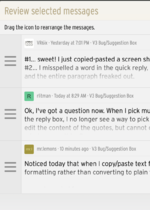
Ok, I've got a question now. When I pick multiple messages to quote, and insert the quotes into the reply box, I no longer see a way to pick the order that the quotes appear in the box. I can edit the content of the quotes, but cannot cut out the code from the quote itself. Am I just missing something?
 

mr.lemons

Well-known member
Joined
Oct 24, 2017
Messages
2,191
Location
UK
Noticed today that when I copy/paste text from another website, the forum keeps some formatting rather than converting to plain text. Not sure if this is intentional.

example copied from amazon.
rftuyjrtuyjkfrtuyjktfugyj.jpg

Minor annoyance, have to press one more key. :rolleyes:
 
OP
R

Ryan

Administrator
Staff member
Joined
Jan 26, 2006
Messages
5,700
Location
Texas/Hawaii
Noticed today that when I copy/paste text from another website, the forum keeps some formatting rather than converting to plain text. Not sure if this is intentional.

example copied from amazon.
rftuyjrtuyjkfrtuyjktfugyj.jpg

Minor annoyance, have to press one more key. :rolleyes:

If you don't like this functionality, you can remove the formatting with this button:

1622828256613.png
 
OP
R

Ryan

Administrator
Staff member
Joined
Jan 26, 2006
Messages
5,700
Location
Texas/Hawaii
Ok, I've got a question now. When I pick multiple messages to quote, and insert the quotes into the reply box, I no longer see a way to pick the order that the quotes appear in the box. I can edit the content of the quotes, but cannot cut out the code from the quote itself. Am I just missing something?

To move the quotes around, you can drag them:

1622828310890.png
 

mr.lemons

Well-known member
Joined
Oct 24, 2017
Messages
2,191
Location
UK
If you don't like this functionality, you can remove the formatting with this button:

1622828256613.png
I think that only works on formatting applied from the other buttons. Doesn't seem to work on copied text.
 
OP
R

Ryan

Administrator
Staff member
Joined
Jan 26, 2006
Messages
5,700
Location
Texas/Hawaii
some one suggested, within a post, that a nice feature would be to allow rotation of photos inserted in a post. I guess some phones notoriously rotate photos 90° and make them nauseating to look at.

this has been implemented… sort of… you gotta do it while posting or editing.
 
To avoid these ads, REGISTER NOW!

Old Man Roger

Well-known member
Joined
Apr 6, 2017
Messages
17,427
Location
Palm Coast Florida
Ok, maybe poor internet and it didn't load properly...l swear it disappeared for a few.

Doesn't matter, it's there now.
You know when I was posting a thread earlier, I thought it was missing too. I didn’t see it in the list when I clicked on “forums” but then when I clicked on ”post new thread”it was there.
 
OP
R

Ryan

Administrator
Staff member
Joined
Jan 26, 2006
Messages
5,700
Location
Texas/Hawaii
I am working on some automated processes to fight against political posts, spam, etc... at the moment... It's possible that one of my scripts took it off the list... Not sure why it would do that, but possible.
 

NUTTSGT

Super Moderator
Staff member
Joined
Sep 14, 2009
Messages
50,866
Location
Northern Central Ohio
I am working on some automated processes to fight against political posts, spam, etc... at the moment... It's possible that one of my scripts took it off the list... Not sure why it would do that, but possible.
No big deal, just wanted to check and if anything, make you aware if there was an issue.
 

Strouty

Well-known member
Joined
Mar 21, 2010
Messages
38,211
Location
Southern Maine
Ryan, the “jump to new” button is nice, but it goes away if you subscribe to a thread, then whenever you go to the thread and their are no “new posts” it keeps you on the first page. This is really annoying when I go to my own threads to add a post, what should be a quick thing turns into a multi step process.

9DC069EA-807E-478E-908F-5FEBA0156582.jpegF6EBCE93-7829-4766-ACCA-56F58282F6F9.jpeg
 

Strouty

Well-known member
Joined
Mar 21, 2010
Messages
38,211
Location
Southern Maine
Another thing, can you have an automatic double space inserted between attachments? It is near impossible to get them separated and I usually like to add a bit of text or at least a break between images.
 

harley jim

Well-known member
Joined
Dec 6, 2013
Messages
11,399
Location
Cleveland Tn..........out in the sticks
Mike,
I have logged out cleared cookies and mine still lands me wherever it wants to. Usually close to the beginning, everytime I open my thread it starts me at post 1, every time. Ryan said it needed time to populate the cookies,
 
OP
R

Ryan

Administrator
Staff member
Joined
Jan 26, 2006
Messages
5,700
Location
Texas/Hawaii
I have logged out cleared cookies and mine still lands me wherever it wants to. Usually close to the beginning, everytime I open my thread it starts me at post 1, every time. Ryan said it needed time to populate the cookies,

If you have no unread posts on your thread, it should take you to post 1 by design. I don’t like that… at all… and hope to change it.

However, if you have new posts on the thread, clicking the title should take you to the first unread.
 

Old Man Roger

Well-known member
Joined
Apr 6, 2017
Messages
17,427
Location
Palm Coast Florida
I don’t know if this is new, but when I use my iPad in the vertical position, the tool bar that is usually between the Quick Jack ad, and the Garage Journal banner, disappears.

I mostly use it in the horizontal position, but I figured you might wanna know.
 

stillnostrebor

Well-known member
Joined
Apr 1, 2019
Messages
619
Location
SW Missouri
Desktop with windows 10pro, in chrome...

If I click the back button about one time in ten I get this;

www.garagejournal.com_forum_forums_free-parking.16_.png

The only way to escape is to go back one more step and then reselect the page I was in from the forum tree. I can't go forward again and get a reload of the page. Clearing the cache did not help.

Not a big deal at all, but seemed noteworthy. I've had this for the last four or five days.
 
OP
R

Ryan

Administrator
Staff member
Joined
Jan 26, 2006
Messages
5,700
Location
Texas/Hawaii
Desktop with windows 10pro, in chrome...

If I click the back button about one time in ten I get this;

www.garagejournal.com_forum_forums_free-parking.16_.png

The only way to escape is to go back one more step and then reselect the page I was in from the forum tree. I can't go forward again and get a reload of the page. Clearing the cache did not help.

Not a big deal at all, but seemed noteworthy. I've had this for the last four or five days.

This is a known bug in Chrome.
 

CHRIII

Well-known member
Joined
Jun 12, 2020
Messages
231
Location
NE TN
Ryan,

Going into some threads I've previously read to the end I am sent to the first page. Clicking on the 'Jump to new' I'm not being taken to the 'new' post but to a earlier post (which I've already read) that shows the new tag at top right. Backing up one page and clicking on the 'Jump to new' again I am taken to the real 'new' post. At this point, previous posts no longer have the new tag.

This does not happen frequently, but often enough I thought you might be interested.
 

drivesitfar

Well-known member
Joined
Oct 23, 2013
Messages
35,998
Location
Pacific Northwest
Ryan: there is a banner on the bottom of the page asking for permission to enable push notifications. what am I (we) giving permission for and why?

I know you are working on it, but I still get first page first post when clicking on threads I'm watching and have been posting on for years. also is there a way you can put the pages at the top instead of JUMP TO NEW? any setting available to get more posts per page like before when you could check a box asking for 100 posts per page?

I never used TAPA TALK on my cell phones and I guess I'm glad I didn't since it sounds like it's one of the reasons you did this change?
 

yatg

Well-known member
Joined
Aug 16, 2019
Messages
2,755
Location
Southern Oregon
Any option to turn off the hover thread title preview or make the delay longer. Its bad enough with one thread, but sometimes the preview from another thread doesn't close right away.
 

Attachments

  • threadpreview.JPG
    threadpreview.JPG
    88.6 KB · Views: 4

akasrick

Well-known member
Joined
Apr 10, 2017
Messages
794
Location
south jersey
Any option to turn off the hover thread title preview or make the delay longer. Its bad enough with one thread, but sometimes the preview from another thread doesn't close right away.
It seems to be turn off automatically here if I point into the body of the messages (move the mouse down between the messages). If I point up into the message box
edit
it takes its time.
the message box stays till I move the pointer out of it.
edit


akasrick
 
Last edited:

LB-1911

ALLIANCE MEMBER
Joined
Sep 24, 2011
Messages
5,742
Location
Northwestern Il.
Unable to log in using tapatalk. Login/register buttons simply don’t work.
The plug has been pulled -
 
To avoid these ads, REGISTER NOW!
Top Bottom