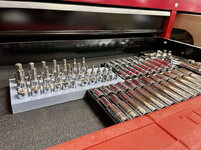
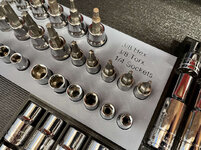
This one's for the 3d printing nerds. If you're not a 3d printing nerd — read at your own risk, you might get bored to death. Austin (
@MadeByMiller ) , I'm going to just go ahead and give you permission to gloat about Prusa's superiority before even jumping in.

To anyone following along with my 1st layer drama on the new S1 printer, I spent some time this weekend trying to troubleshoot it.
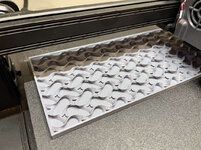
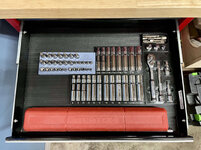
The peculiar thing is, with small prints I never noticed any issues, and certainly everything beyond the 1st layers was coming out great. With this larger socket tray I've been trying to print, I think the issues have been several things:
1/ Possibly bad or old filament. Both the white and black Overture PLA I've had for a long time, and didn't properly stored it, so maybe it had too much moisture, I don't know. It's pretty dry in my basement but it's a possibility.
2/ Incorrect Z-offset on some of my attempts (too squished)
3/ ABL Mesh not actually being used
4/ Warped build plate
Number one is self-explanatory, and thanks to
@loganb 's encouragement I made a trip on my toboggan to Microcenter to get some new PLA filament, and a USB C cable to get Octoprint going.

Number two I've tried to dial in based off of
@MadeByMiller 's guide, but I think numbers three and four are playing into that, too.
By default with Cura, there is no starting gcode command to do a bed probe OR load a previously saved ABL mesh. And in Marlin,
G28 (Auto Home) cancels any use of automatic bed leveling, and of course
G28 is part of the starting gcode. Personally I don't love the idea of doing a bed probe every single print (I may come around on that), so I chose to recall a previously saved mesh by adding this line after the
G28:
That loads the most recently saved ABL mesh, and feathers it out for 10 layers.
I thought that's all I had to do, but here's where I went wrong. After doing the Leveling process through the printer menu, I never stored the configuration (saved it to EEPROM). I'm sure at some point I turned the printer off, and because the mesh was only in RAM, it was discarded on the power cycle. So I'm pretty sure at least some of these attempts the printer had no mesh to go off of.
Once I figured that out I ran a new mesh, saved it to EEPROM this time, and then in addition to the
M420 S1 Z10 line after the
G28, I also added an
M501 command at the very beginning of my starting gcode, which should force load all settings from EEPROM. Not sure this is necessary but just wanted to be sure.
I ran another print (same model — base layer of the socket tray), and I confirmed the mesh was being used as I could feel and see the Z-roller move slightly especially on the left side of the model.
Coincidentally, that's the part of the model that was coming out worse than ever:

I think the filament was under-extruding here, or my Z-offset was too far away at that part, but as you can see the Z-offset is giving different results from one side to the other.
After this monstrosity, I did a manual level again to make sure things weren't totally out of whack (piece of paper in center and 4 corners). And what I found was if I got the 4 corners pretty good, then the center, and especially the left center of the bed, was way too tight. So that right there tells me the bed is probably warped. In any case I make a new mesh, recalibrate the Z-offset going off the center, and ran another file:
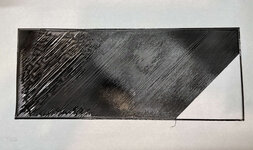
This one was so bad I just canceled it.
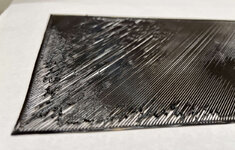

Even the perimeters / walls were not squished together well.
My next idea was to run the print
without the ABL mesh active. To see if somehow the mesh was messing things up. So I manually leveled the corners with paper again. And edited my starting gcode in Cura to
remove that
M420 S1 Z10 line. I also switched to the white filament so I could see things better.

Similar issue in the upper left corner, but overall the rest of it seemed better, even if far from perfect. That upper left corner the nozzle must have been way too close at that point because the walls / perimeters barely even laid down.
So this all happened before the Microcenter trip. After, armed with new filament and the USB cable, I figured my next move was to do some basic tuning and calibration. I loaded up the new filament.
First was a PID autotune of the hot end and the bed heater.

After that I measured the E-steps. However they came out to 100.02mm extruded when 100mm was asked for, so I didn't modify anything.
I did go ahead and tighten the extruder tension bolt a few turns. I have no idea how to tell the correct tension, it seems to be feeding ok, but I figured it couldn't hurt.
Then I installed and configured the Octoprint Bed Visualizer plugin and tried to load a mesh. But the printer kept disconnecting the serial connection upon Auto Home and giving me this error:

Some Google Fu and another 30min lost, apparently it doesn't like it if there is no mesh already saved? Even though it's about to go through the process again? I don't really understand why, but I ran a Leveling on the printer and tried again, and sure enough now it let the Bed Visualizer plugin proceed to do it again.
And holy $h!t
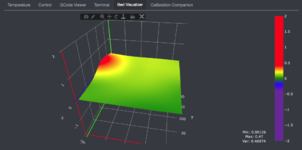
I seem to have a high spot right where that corner of the print is oriented.

It's 0.47mm above the zero point, which seems like a TON to me?! This is my first time doing this, but it seems odd it's so pronounced and localized to that one area, when the rest of the plate seems fairly good.
I saved this latest mesh, and for the first time, uploaded and started my print from Octoprint instead of the SD card.
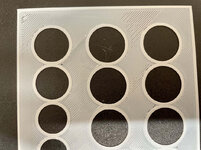
The perimeters went down better so far. And while it still struggled in that area of the print, the majority of it came out ok. And by the 2nd layer (depicted below) everything was looking excellent.


So I think this new filament is a good baseline. Obviously if layer 2 looks perfect it's not an extrusion issue in general.
I think for smaller models in the center of the build plate it's much less of an issue than a big tray like this that encompasses both the "bulge" and the lower areas.
Going forward I can think of a few possible ideas to make it better:
1/ Buy a replacement build plate (~$40-50 on Aliexpress) and hope it's flatter
2/ clip my glass Carborundum plate from the 3v2 on top of it, and either see how much it conforms to the base plate or possibly shim it withe some pieces of paper if necessary, hoping this is flatter overall (it was quite flat for my 3v2)
3/ Cura has "Intitial Layer Height" and "Initial Layer Flow" settings that I may try to use to compensate and make sure enough filament gets put down to create an even layer
4/ Chuck this POS in the trash and buy a Prusa!
If anyone has any suggestions or comments I'm all ears.


 . Sent my wife and the baby upstairs as soon as she tested positive, and I stayed downstairs with her to take care of her. We all still ended up catching it though regardless. It was pretty mild for everyone except me. I was very tired/low energy and had a bad headache for almost 2 weeks.
 I used one for a year at my last employer, I get it working to 95% but my workflow and the mac was not compatible.