To avoid these ads, REGISTER NOW!

Between 265 & 485 SQ/FT Nick's Two-Car Detached Vdub Garage

Workspaces sized between 265 and 485 squarefeet.

bj383ss

Well-known member
Joined
Sep 29, 2011
Messages
3,166
Location
TX
I love all this stuff you guys are talking about but ya'll lost me at the top of the page. :ROFLMAO: I did buy and install a new LED ceiling fixture in my office/Lego room this morning. It is dimmable so I need to get a switch for it. Maybe I will get one that is wifi so my lazy **** can turn the ceiling light on when I am ready to get off the computer and start Legos. :unsure:

Bret
 
To avoid these ads, REGISTER NOW!
OP
N

nicholam77

Well-known member
Joined
Dec 18, 2016
Messages
2,671
Location
Minneapolis, MN
And predictably, Covid came for me. :mad: First two days have been pretty rough, but feeling a little better this morning. Since I'm just laying around I thought I'd do some GJ replies.


Wow Nick, that's really impressive what you've implemented in your home automation. I love the nerdy sentiment and I think I can appreciate the utility even from my seat in my "dumb" house. I'm not sure if you realize it, but what you're doing with this automation is out of the ordinary and I'm willing to bet you could have a successful business setting up similar systems in folks' homes. I know that seeing what you and @Denwood have done with the automation systems in your homes has made me think about implementing it in my own, but I would be I admit that it is a daunting proposition to learn and apply.

P.S. I like to imagine that your Vacation Mode automation includes an entire scene of cardboard figures and mannequins dancing in front of the windows a la Home Alone ha

Thanks! It's definitely nerdy, and I believe the utility is there, but it's not lost on me that it's a luxury convenience. At this point I don't have to touch that many light switches in my house and the lighting is always the way I like it for a given room / time of day. Whether that's worth the cost of entry and the tinkering involved is probably an individual question.

I've seen your 3D model renders... trust me if you can do 3D modeling, or 3D printing for that matter, you could easily handle the home automation hobby. It's not as daunting as it looks. I've always felt comfortable with computers, but I'm mostly just good at following instructions, and most of this stuff is really well documented thanks to smart home forums and YouTube.

I do realize that Hubitat, WebCoRE, etc, is above and beyond what the average person is willing to tolerate. I just wanted to show a fraction of what's possible with a more enthusiast setup. I 100% agree with Dennis that running a business setting up smart homes for people would be difficult as an individual. It's really a DIY / tinkerer space, and there is so much fragmentation with products, compatibility, protocols, etc that it's not really a set-it-and-forget-it endeavor. Things need to be repaired, tweaked, and troubleshooted regularly.

I LOL'd at the Home Alone reference... that would be pretty funny!

Nick, ah, I get it. You have the NFC tag on the device, and when your phone is near, the scan triggers an event. I've done zero with NFC devices (other then security token programming for 2 factor at work) and this application sounds intriguing.

Yes, exactly. NFC tags can have data written to them, but the way I'm using them is just the scan triggers an event via the phone.

What's so intriguing about them to me is they are inconspicuous, cheap, don't need batteries, and can do different things for different users. My walls are painted white and they just blend in. Got a bag of 50 tags for $15 on Amazon.

As Reed pointed out in his Smart Home Solver video, you could even put them places like your car, to quick scan and trigger your thermostat when leaving work. Lot's of creative uses.

I also like what you've done with presence..something I stopping automating around due to reliability with Smarthings with "Home" and "Away" modes. For me it's in the category of "nice to have" vs need to have with automation, but this is one of the best bits with regard to Homekit and Hubitat integration for me anyway. Certainly, to do home/away stuff reliably you need rock solid presence for all family members.

Yeah, this one took some cracking. My phone has been rock solid, for some reason my wife's is not 100% firing the Shortcut to update presence.

It's definitely a "nice to have", but my main reason for wanting it is my insistence that my coming home lights come on automatically, when the door is opened. I could have a button, but it feels cooler to have it happen on its own. And my wife is way less likely to activate the "Goodbye" scene with the physical switch, so having that trigger when all phones are gone is a nice backup to shut everything down.

I love all this stuff you guys are talking about but ya'll lost me at the top of the page. :ROFLMAO: I did buy and install a new LED ceiling fixture in my office/Lego room this morning. It is dimmable so I need to get a switch for it. Maybe I will get one that is wifi so my lazy **** can turn the ceiling light on when I am ready to get off the computer and start Legos. :unsure:

Bret

"ALEXA!!! Turn on my Lego light!"

— "I'm sorry, I did not find a device called Lego light" :ROFLMAO:

I don't blame you Bret, it probably seems like a foreign language!

🍻
 

Denwood

Well-known member
Joined
Sep 22, 2014
Messages
4,191
Location
Thunder Bay, Ontario, Canada
Nick, NFC in the car is a nice way to deal with presence! If the phone is in a car, that person is likely away.

What is the effective/reliable range on your NFC tags? With the two factor authentication tokens I program, the token needs to be touching the phone along the top or it does not work, perhaps by design.

Bret,( @bj383ss ) it seems like a foreign language I suspect to all of us at the start. Even after years playing with this stuff, I was still scratching my head at first getting the Hubitat going. I rely on the internet and forums particularly a lot to get up to speed, or add information to the collection so others can use it.
 

Mr. Roboto

Well-known member
Joined
Dec 11, 2012
Messages
2,160
Location
New Hampshire
Hey Nick,

That’s a bummer on the water intrusion from the roof. Did the insurance company say they would cover any of that? The damage didn’t look too bad, but that’s one of my biggest fears as a homeowner. Water *****! The smallest little trickle can cause all sorts of damage in a short time. I am also an avid roof raker as well haha. When I put my new roof on, I had them do 6 feet of ice and water shield instead of the usual 3 feet on all the edges and valleys to also help with this.

How is your daughter/your household feeling? I’m sorry to hear that she got Covid! I hope it’s minor for her and any other of you guys that may catch it.

EDIT: I missed your last post before I replied. Sorry to hear you’ve got it to. Get better soon!

Also, I’m impressed with your home automation. I really love that stuff and started down the rabbit hole with lighting. It was fun setting it all up, creating schedules that would auto adjust based on when sunrise/sunset was. Set up some geofencing with our phones when we would come and go. Added in Alexa voice commands that also worked in conjunction with my blink camera and an echo show I had on my nightstand. But it seemed that inevitably, something would always “break” and stop working. And it was never straightforward to fix. I threw in the towel about 6 months ago and removed it all in a fit of rage when we had a power outage that I couldn’t seem to recover from. I still have my outdoor lighting set up with Wemo switches that run on a schedule but that’s it haha. I think the next time I have an Issue with those, I’m going to remove those wall switches with regular old 7 day programmable digital timers. It was a fun adventure but I felt like it was over my head! Seems like you’ve got it nailed down though.
 
Last edited:

loganb

ALLIANCE MEMBER
Joined
Dec 29, 2011
Messages
5,550
Location
Omaha, NE
And predictably, Covid came for me. :mad: First two days have been pretty rough, but feeling a little better this morning. Since I'm just laying around I thought I'd do some GJ replies.

Ugh, sorry to hear this...we had it in November and was fortunately mild but yeah still no fun. Hope you at least get a day or two away from work to catch up on whatever you're up to...which with Covid may be mid-day naps but I know how rare those can be for parents!
 

Denwood

Well-known member
Joined
Sep 22, 2014
Messages
4,191
Location
Thunder Bay, Ontario, Canada
Nick, I missed that Covid comment..hope all is well :) ?

@Mr. Roboto , it's unfortunate that your experience went that way. Automation can be a time ****, particularly if your hardware mix is not ideal. There are still quite a few variables out there that can cause issues. Hub issues, hub firmware updates, platform changes (like SmartThings just did), zigbee mesh, zwave mesh, device batteries, and device routing issues. It's by no means always plug and play as the industry marketing might suggest.

One thing that just works is HUE lighting, their hub, and their motion sensors. I hear the same for Lutron lighting. I had some GE link lights that were so problematic that I had to pull every one of them. If a light is on a physical switch, and it's part of a zigbee route, then turning it off can cause issues. You have none of these issues with HUE...they just work, always, regardless of being on manual switches. You're 100% correct in that at times, you need to roll up your sleeves and get into logs if weird stuff is going on. What is true though is that the industry is getting better with respect to reliability and your experience can be great if you use "recommended" hardware.
 
OP
N

nicholam77

Well-known member
Joined
Dec 18, 2016
Messages
2,671
Location
Minneapolis, MN
Nick, I missed that Covid comment..hope all is well :) ?
Ugh, sorry to hear this...we had it in November and was fortunately mild but yeah still no fun. Hope you at least get a day or two away from work to catch up on whatever you're up to...which with Covid may be mid-day naps but I know how rare those can be for parents!
How is your daughter/your household feeling? I’m sorry to hear that she got Covid! I hope it’s minor for her and any other of you guys that may catch it.

EDIT: I missed your last post before I replied. Sorry to hear you’ve got it to. Get better soon!

Thanks, guys. Daughter had two days of high fever and no energy, after that she rebounded. No other symptoms, so not too bad.

I'm on day 3 and I feel the best I have so far right now. Day 1 was bad, got hit like a freight train. Fever, chills, body aches, migraine, cramps, no appetite, basically everything hurt. That lasted in severity for 24 hours, I didn't sleep the first night at all, it was too uncomfortable. 2nd day more of the same but less intense and not all the things at once. Today still some chills and aches, low grade fever, congestion and cough have ramped up though.

I feel like I've lost my taste bit. Not completely but especially the top of my tongue is pretty blah with food.

It's so weird how for some it is asymptomatic or "just a mild cold" and for others it totally *****. I feel like I'm starting to round the corner (I hope!) but yeah, the first 24-36 hours were pretty miserable.

It's been 6 days since my daughter's positive test, we've been masking and staying separate in the house which is a PITA in and of itself. But my wife and boy are still free and clear so I guess it's worth it.


That’s a bummer on the water intrusion from the roof. Did the insurance company say they would cover any of that? The damage didn’t look too bad, but that’s one of my biggest fears as a homeowner. Water *****! The smallest little trickle can cause all sorts of damage in a short time. I am also an avid roof raker as well haha. When I put my new roof on, I had them do 6 feet of ice and water shield instead of the usual 3 feet on all the edges and valleys to also help with this.

The insurance company did offer to cover the ice dam removal. Our deductible is $1,500 though so doesn't do any good unless they find damage. The adjuster was supposed to come inspect on Friday, but she never showed up :rolleyes: and we were in Covid territory at that point anyways so I haven't circled back. It's probably all dry up there by now anyways, I don't think that much water got in. When I feel up to it I'll probably go take another look but it's not the easiest location to get to.

Also, I’m impressed with your home automation. I really love that stuff and started down the rabbit hole with lighting. It was fun setting it all up, creating schedules that would auto adjust based on when sunrise/sunset was. Set up some geofencing with our phones when we would come and go. Added in Alexa voice commands that also worked in conjunction with my blink camera and an echo show I had on my nightstand. But it seemed that inevitably, something would always “break” and stop working. And it was never straightforward to fix. I threw in the towel about 6 months ago and removed it all in a fit of rage when we had a power outage that I couldn’t seem to recover from. I still have my outdoor lighting set up with Wemo switches that run on a schedule but that’s it haha. I think the next time I have an Issue with those, I’m going to remove those wall switches with regular old 7 day programmable digital timers. It was a fun adventure but I felt like it was over my head! Seems like you’ve got it nailed down though.

Thanks! I've had those same experiences and frustrations before (with SmartThings). I think probably anyone who's dabbled in smart home stuff, has at some point, struggled with reliability. In fact, I used to run a roll-your-own security system with SmartThings including keypads and a siren, and let me tell you my wife did NOT enjoy when the siren went off and all the lights turned on in the house in the middle of the night for no reason. As you can probably guess, that got scrapped, as well as a lot of other automations especially when the kids were born.

I think what Dennis @Denwood replied is spot on. There is no escaping some periodic failures and troubleshooting. In fact just this morning I had some issues with Hubitat and scenes firing slowly. There are some things you can do to minimize it, though.

1/ Use devices and/or hub with local control instead of cloud devices. Cloud devices add lag, create reliability issues, and have an internet dependency. Most local-only hubs are a bit more on the "enthusiast" side, like Hubitat, Home Assistant, Homeseer, etc, and not saying everything will run smoothly all the time with those either, but I think overall they should be more consistent.

2/ Use high-quality products that have a good track record. Again, Dennis has great recommendations with HUE and Lutron. Not the cheapest out there, but they just work. I don't have Lutron myself, but my HUE products have been bullet proof ever since I got them over 5 years ago. Also, HUE and Lutron both are very friendly when it comes to integrating, they work with almost everything. It should be noted that neither of these lighting systems rely on the internet, in fact neither of them are even WiFi-based (HUE is Zigbee and Lutron is proprietary "RF Clear Connect"). Which I count as a positive. I think WiFi devices can be ok, but only if your WiFI network is reliable with good coverage.

3/ Keep automations simple and use dumb devices where possible. I have a Honeywell 7 day programmable controlling the front door lights and it's awesome. No real need to have that automated beyond sunset/sunrise, so no need to introduce WiFi or a different protocol and point of failure.

There's still a lot of dust to settle, maybe in 5 yrs it will be time to jump back in :ROFLMAO:

Thanks for checking in

🍻
 

ricketycricket

Well-known member
Joined
Jan 28, 2019
Messages
57
Location
Saint Louis
I hope the tourney gets to happen.The Twin Cities has had 48 inches of snow this year and due to that there is a huge amount of slush under the snow, the lakes are just not building ice this year.I live 40 miles northeast of St Paul we have probably 12 lakes in a 10 mile radius and nobody is driving much less putting permanent ice houses out yet.If they can get the snow off they will need to flood the rinks heavily, if not they'll look like the city streets here(6 inches of rutty ice).Heed the waitress's advice at Matts to let the burger cool a bit .I still have a scar on my forearm from the molten cheese of my buddies burger when it squirted out.
It did indeed happen however we were pushed back 4 hours and had to play two games that were barely lit by two lights. They did their best but you were spot on. It was rough skating out there. Every rink had peaks and valleys in addition to the ruts and water filled holes. It did a number on my legs but we still had a blast!

@nicholam77 you were right about not having enough time to check everything out. We went to Matt's, Tom's Watch Bar, Mac's Industrial, Fulton Brewing, Inbound Brew, and about a dozen others I can't seem to remember. The final night we ended up in some weird split bar downtown with a DJ on one side and karaoke on the other. The name has since escaped me but somehow we were in the middle of a big fight between two groups of college guys. It was a wild time but I am definitely looking forward to going back next winter! We will have to check some more off the list next year. I really liked the city and all of the outdoor rinks. I can't wait to go back next year!

Sorry for cluttering up the thread. Just thought I would report back haha
 

Mr. Roboto

Well-known member
Joined
Dec 11, 2012
Messages
2,160
Location
New Hampshire
Glad to hear you're over the worst of it. My daughter caught it a year ago right after xmas. Sent my wife and the baby upstairs as soon as she tested positive, and I stayed downstairs with her to take care of her. We all still ended up catching it though regardless. It was pretty mild for everyone except me. I was very tired/low energy and had a bad headache for almost 2 weeks.

Denwood/Nick interesting to hear both of your perspectives on the home automaton. I first started with it to make my life easier, and it just made things more complicated instead. You're probably right though, I wasn't using the best hardware at the time. Maybe I'll give it another shot in 5 years like you suggested, after they iron out some more of the kinks.... and when I have some more time to dedicate to setting it up/optimizing the system.
 
OP
N

nicholam77

Well-known member
Joined
Dec 18, 2016
Messages
2,671
Location
Minneapolis, MN
@nicholam77 you were right about not having enough time to check everything out. We went to Matt's, Tom's Watch Bar, Mac's Industrial, Fulton Brewing, Inbound Brew, and about a dozen others I can't seem to remember. The final night we ended up in some weird split bar downtown with a DJ on one side and karaoke on the other. The name has since escaped me but somehow we were in the middle of a big fight between two groups of college guys. It was a wild time but I am definitely looking forward to going back next winter! We will have to check some more off the list next year. I really liked the city and all of the outdoor rinks. I can't wait to go back next year!

Sorry for cluttering up the thread. Just thought I would report back haha

Excellent! Glad it worked out and at least it was warm for ya! I'm sorry I never PM'd you some recommendations, I forgot and then got distracted with the whole family sick again. But it sounds like you found some fun.

Did you survive the Juicy Lucy? Didn't burn the roof of your mouth? :ROFLMAO:

Sounds like you spent a good amount of time downtown. Glad you tried some MN beers, in my opinion we have a lot to offer, not just in quantity (apparently there are over 80 microbreweries in the metro area) but in taste. Fulton has been around awhile.

If you had fun in the middle of winter, you should really come back someday in the summer or fall. It's a completely different vibe.

Glad to hear you're over the worst of it. My daughter caught it a year ago right after xmas. Sent my wife and the baby upstairs as soon as she tested positive, and I stayed downstairs with her to take care of her. We all still ended up catching it though regardless. It was pretty mild for everyone except me. I was very tired/low energy and had a bad headache for almost 2 weeks.

Denwood/Nick interesting to hear both of your perspectives on the home automaton. I first started with it to make my life easier, and it just made things more complicated instead. You're probably right though, I wasn't using the best hardware at the time. Maybe I'll give it another shot in 5 years like you suggested, after they iron out some more of the kinks.... and when I have some more time to dedicate to setting it up/optimizing the system.

Thanks, man. I'm on the up-and-up now. Just tired.

Re: home automation, the hardware and protocols you choose can help streamline things, but I'll be honest I'm still trying to work out a few kinks with my Hubitat installation. It's kind of just part of the deal! I agree though if it doesn't work most of the time, it's more headache than it's worth.
 
OP
N

nicholam77

Well-known member
Joined
Dec 18, 2016
Messages
2,671
Location
Minneapolis, MN
Sonos Node.js Server

I completed another home automation project.

I have a few Sonos speakers (stereo pair of One's in the kitchen, and a stereo pair of IKEA Symfonisk's I got a screamin' Craigslist deal on this year in the living room). I love having music playing in the house, especially when I'm home alone.

With SmartThings, Sonos was "officially" supported, and I had a few automations set up to start a radio station on certain events like in the morning and when I arrived home. Functionality was limited to that, though.

Hubitat advertises "official" support as well, but I've found a number of issues with their integration.

1/ Both speakers in the stereo pair show up as separate devices, instead of the stereo pair showing up as a single room, e.g. "Kitchen", like it does in the Sonos app or other apps like Spotify. Worse, they are named the same, and one is the "controller" and one is the "slave". In automations like sending a track to the speaker to play, you need to specify the "controller" or it won't work. This is just messy.

2/ There is no way to group or ungroup rooms. I like to have music playing everywhere, and there is no way to send a command to "play on all speakers" and make sure they are all grouped.

3/ There is no way to send a Text-To-Speech announcement to all speakers

4/ Text-To-Speech announcements will break the group if there is a group, and they also won't restore what was playing after the announcement. This makes them totally worthless.

5/ No support for playing Sonos Favorites. Even SmartThings could do this.

Apparently the Hubitat integration has been like this for a long time, and I'm not sure how they can say they "officially" support Sonos with such a bad implementation.


Now for the fix.

WARNING — this is going to be kind of techy, if that's not your cup of tea you might want to just quit while you're ahead :ROFLMAO:

I found this really cool GitHub project called node-sonos-http-api. It's a Node.js server that converts HTTP requests into UPnP commands to control your Sonos system on your local network.

This is borderline beyond my understanding, but for those non-techy readers this is the simplest way I can sum it up. A Node.js server is just a program that runs javascript on your computer and makes it available on your network. That javascript code is what sends the UPnP commands to the Sonos speakers (UPnP is a protocol for controlling media players). The server also can accept input in the form of HTTP requests (a URL that you'd enter in any standard web browser).

This means you can enter a simple plain text URL, and control a ton of different things. Play, pause, group, set volume, start a preset, set the track, skip, shuffle, etc.

I installed the Node.js server on my Mac, so it can even leverage the Mac's built in Text-To-Speech engine to make voice announcements!

It's all completely local, and super fast.

An example of the URL commands needed to start playing a local radio station "89.3 The Current" in my kitchen, and then set the volume to '10':

HTTP:
http://localhost:5005/kitchen/favorite/the current
http://localhost:5005/kitchen/volume/10

(localhost would be replaced my Mac's IP address, and the spaces need to be filled with %20's, but you get the idea).

WebCoRE (Hubitat rules engine) can make HTTP requests, so adding these commands into automations is super easy!

On top of that, the server can make use of a "presets" text file in json format, where you can predefine any number of speakers, volumes, content to be playing, etc.

JSON:
{
  "all": {
    "players": [
      {
        "roomName": "Kitchen",
        "volume": 10
      }
        {
        "roomName": "Living Room",
        "volume": 10
      }
    ],
    "pauseOthers": true,
        "favorite": The Current
    "uri": "x-rincon-stream:RINCON_000XXXXXXXXXX01400"
  }
}

And then that can be called with the name of the preset:

HTTP:
http://localhost:5005/preset/all

So that example would start my radio station playing on both the Kitchen and Living Room, and set both of their volumes to '10'.

I am super excited about this. Not only will it make including Sonos in my automations much more reliable and fine-tuned, but now I can play around with some Text-To-Speech notifications as well.
 
OP
N

nicholam77

Well-known member
Joined
Dec 18, 2016
Messages
2,671
Location
Minneapolis, MN
Have I scared everyone off with that Node.js and JSON gibberish? :ROFLMAO:

I'll give one more example I implemented yesterday. As I've mentioned I mostly work from home, and my office is in the basement. I already have the kitchen lights set to turn off after 30min without motion — I figured maybe I could do a similar thing for music.

I often have the radio playing on Sonos all day. Even when I'm not in the kitchen. Sorry @Denwood I'm probably not being the most efficient with electricity here. I often run upstairs to get water, food, etc, and I like the music to be playing.

So my idea was to reduce the volume by 50% if no one has been in the kitchen for 30min. And then if motion is detected again, the volume bumps back up. I presume this will save some electricity, but it also has a really cool feeling when you walk in the room and the music fades louder. It's hard to describe without experiencing but I like it!
 

Denwood

Well-known member
Joined
Sep 22, 2014
Messages
4,191
Location
Thunder Bay, Ontario, Canada
Now you are getting fancy pants :) I can tell you are a like a kid with a new Tonka in his sandbox..ha. So you define all your presets via node.js on the MAC, then call them from Hubitat/Webcore. Did you explore Sonos integration via Homekit?

I seem to recall that you might be able to access security cams this way too?? Let me know if you figure anything out in this department on the Amcrest cams.

My daughter has a pair of IKEA Symphon's in her room, and I finally figured out that ya, you can only "speak" from Hubitat on one. Honestly, I use it more to torment her (you can send messages from the driver interface in Hubitat) when she's late and we're waiting for her. Volume 100%, "You're Late"...repeat. Bad Dad.

In any case, it sounds like you've cracked an egg there with respect to controlling them. I'm surprised someone has not tweaked on this via Hubitat.
 
OP
N

nicholam77

Well-known member
Joined
Dec 18, 2016
Messages
2,671
Location
Minneapolis, MN
Now you are getting fancy pants :) I can tell you are a like a kid with a new Tonka in his sandbox..ha. So you define all your presets via node.js on the MAC, then call them from Hubitat/Webcore. Did you explore Sonos integration via Homekit?

Ha! Yes, the presets file is just a way to set up a Sonos "scene" so to speak, and be able to call it with a single HTTP command. But yeah, that's exactly how it works. Or you can just give the individual on-the-fly HTTP commands. Of course Rule Machine can make HTTP requests, too.

As far as Homekit, if you're talking about Homekit's native Sonos integration, it's really limited. It will let you add a Sonos speaker that's capable of Airplay 2 to the Home app, and it will display what it's streaming as long as the source is AirPlay 2. If it's just playing through Sonos, it will show nothing. That's about it. No advanced functionality whatsoever.

You could do something like create a virtual button or switch in Hubitat and expose that to HomeKit, and set up a WebCoRE or Rule Machine rule that executes the TTS command when the button or switch is pressed. That way you could have an easy attractive button in the Home app to annoy you're daughter :ROFLMAO:

I seem to recall that you might be able to access security cams this way too?? Let me know if you figure anything out in this department on the Amcrest cams.

You might be right, I haven't really looked into this. My single Amcrest cam is just a security backup that records to an NVR. I never look at the thing. Only reason I might check it is if I have reason to believe something suspicious happened at the front door. For casual viewing I have the Nest doorbell. I don't have a strong need to integrate either into Hubitat.

My daughter has a pair of IKEA Symphon's in her room, and I finally figured out that ya, you can only "speak" from Hubitat on one. Honestly, I use it more to torment her (you can send messages from the driver interface in Hubitat) when she's late and we're waiting for her. Volume 100%, "You're Late"...repeat. Bad Dad.

In any case, it sounds like you've cracked an egg there with respect to controlling them. I'm surprised someone has not tweaked on this via Hubitat.

Very funny! The Symfonisks are great little speakers! Well, if you have a spare computer to run the Node.js server, it's pretty easy to set up and works great.

Tbh I'm surprised I didn't know of it before now, since it's not specific to Hubitat or anything. Coulda been using it with SmartThings all this time!
 

Denwood

Well-known member
Joined
Sep 22, 2014
Messages
4,191
Location
Thunder Bay, Ontario, Canada
This apparently works for Amcrest cams and doorbells. Works great with my cams to get images captured from the cameras (on motion triggered by the cam itself) to a Hubitat dashboard. You can install the "Hubitat_dahua" and "image_Server" apps via Hubitat's Package Manager.


patlun

Well-known member
Joined
Apr 12, 2015
Messages
241
Location
Värmland, Sweden
Have I scared everyone off with that Node.js and JSON gibberish? :ROFLMAO:

No, but that speak about macs made me slowly back out from the room... That is scary stuff, way to complicated to use for a simple Linux/Unix guy like me :evil: I used one for a year at my last employer, I get it working to 95% but my workflow and the mac was not compatible.

The automations are interesting for me as a programmer. Pretty neat i must say. I looked into home automation some years ago and wrote some perl programs for that. From that I went over to Home Assistant for a while, but become tired of running things myself.

So I become bored and bought an Animus Heart to do these things instead. It does what I will, but is not as flexible as some of the systems out there. Adding a new device is pretty easy, I can create scenarios for it and then forget it. And it have a API to use the day I get some ideas I must implement myself.

Now I become curious to see if there is some "necessary" integrations for my Blue Sound, yes there is! Rabbit hole! Thanks! Here I was thinking that looking into the Arduino platform was enough for now
 
OP
N

nicholam77

Well-known member
Joined
Dec 18, 2016
Messages
2,671
Location
Minneapolis, MN
No, but that speak about macs made me slowly back out from the room... That is scary stuff, way to complicated to use for a simple Linux/Unix guy like me :evil: I used one for a year at my last employer, I get it working to 95% but my workflow and the mac was not compatible.

I figured you'd be right at home considering MacOS's Unix underpinnings :ROFLMAO:

You must really hate Windows then :ROFLMAO:

The automations are interesting for me as a programmer. Pretty neat i must say. I looked into home automation some years ago and wrote some perl programs for that. From that I went over to Home Assistant for a while, but become tired of running things myself.

So I become bored and bought an Animus Heart to do these things instead. It does what I will, but is not as flexible as some of the systems out there. Adding a new device is pretty easy, I can create scenarios for it and then forget it. And it have a API to use the day I get some ideas I must implement myself.

Now I become curious to see if there is some "necessary" integrations for my Blue Sound, yes there is! Rabbit hole! Thanks! Here I was thinking that looking into the Arduino platform was enough for now

That is very cool, Patrik. The Animus Heart looks similar to Hubitat in some ways. Looks like a nice app they have.

I gave Home Assistant a short go as well for a month or two, and there was a lot to like about it. It's made leaps and bounds over the past year even, there's a chance I might dip my toes back in at some point.

Well aren't you fancy with the Blue Sound!

Thanks for sharing your setup 🍻
 
OP
N

nicholam77

Well-known member
Joined
Dec 18, 2016
Messages
2,671
Location
Minneapolis, MN
This apparently works for Amcrest cams and doorbells. Works great with my cams to get images captured from the cameras (on motion triggered by the cam itself) to a Hubitat dashboard. You can install the "Hubitat_dahua" and "image_Server" apps via Hubitat's Package Manager.

Nice! Like I said I don't have an immediate need, but nice to know it's there!
 

patlun

Well-known member
Joined
Apr 12, 2015
Messages
241
Location
Värmland, Sweden
I figured you'd be right at home considering MacOS's Unix underpinnings :ROFLMAO:

You must really hate Windows then :ROFLMAO:

Apple or the BSD they uses are not that compatible with other UNIXEes when running the command line, beside that Apple have their own keyboard and ways to do things. It works but for an old dog like me it is hard to relearn things. Windows actually works like expected for me, but well it is Windows :lol_hitti

That is very cool, Patrik. The Animus Heart looks similar to Hubitat in some ways. Looks like a nice app they have.

I gave Home Assistant a short go as well for a month or two, and there was a lot to like about it. It's made leaps and bounds over the past year even, there's a chance I might dip my toes back in at some point.

Well aren't you fancy with the Blue Sound!

Thanks for sharing your setup 🍻
At the moment I mostly using that fancy thing as a radio for my main Hifi (Hegel H160 amplifier, Bower & Wilkins speakers and a Cambridge CXC CD transport) and it also provides sound to the kitchen. When I find some good speakers it will also give me sound in my shop.

I have been reading about Hubitat, it seems to be more polished and the community page and documentation feels really good. Maybe I will play with it in the future. Before that I will look into using Arduino and 1-wire for some local and autonomous automation, like controlling the radiators in the shop. I see it as a way to learn some new skills, so I am looking forward to making lots of mistakes.
 
OP
N

nicholam77

Well-known member
Joined
Dec 18, 2016
Messages
2,671
Location
Minneapolis, MN
At the moment I mostly using that fancy thing as a radio for my main Hifi (Hegel H160 amplifier, Bower & Wilkins speakers and a Cambridge CXC CD transport) and it also provides sound to the kitchen. When I find some good speakers it will also give me sound in my shop.

Awesome!!

I have been reading about Hubitat, it seems to be more polished and the community page and documentation feels really good. Maybe I will play with it in the future. Before that I will look into using Arduino and 1-wire for some local and autonomous automation, like controlling the radiators in the shop. I see it as a way to learn some new skills, so I am looking forward to making lots of mistakes.

Arduino is way beyond me. If you have those DIY techy skills, it opens up even more options for home automation. But probably requires more tinkering.


Some random bits.

I've been fine tuning my Hubitat automations. Inevitably, stuff comes up. For example we were at the in-laws cabin this weekend, and when I'd unplug my phone in the morning the main floor lights back home would come on. :ROFLMAO:

I solve for this with "Modes", which are just another way to restrict automations. They can be anything you want, but only one can be active on the hub at a time. I have Modes set up for Home - Day, Home - Evening, Home - Night, Away, Guest, and Vacation. I quickly wrote an automation before we left to enable the Vacation Mode with a virtual switch, and added a restriction to my morning lights automation to only run when not in Guest or Vacation Modes. Or so I thought. Turns out I programmed it to only run in those Modes. :ROFLMAO: My Hubitat is only available on the local network so I wasn't able to see what I did wrong until we got back.

The Sonos HTTP API has been working perfectly. But I ran into an issue with my motion sensor volume automation. It worked great if I actually left the room, or came upstairs for a few minutes. But if I stayed in the kitchen, every time the motion sensor was activated the volume would set to 10 (the motion sensor cool down is about 1 min, so this happens very frequently). Not the behavior I want if I'm in the room — I want to be able to manually set the speaker volume to whatever I want without it auto-correcting.

I solved this with a "variable". A variable is basically a made up text string that gets a value. In this case I used a Boolean variable, so that value can only be True or False. The new automation code goes something like this:

sonos-volume-automation.png

By adding the variable, the Set Volume To 10 part only happens there's been 30 min of inactivity, not every time the motion sensor triggers.

Even if you glossed over the code, the point I'm trying to continue to illustrate is even fairly simple automations have "gotchas". It's hard to make something with no brains, like a house, truly smart. But these advanced rules engines like WebCoRE that can do variables, expressions, etc are really the only way.


Speaking of that kitchen motion sensor, I've had it sitting on the window sill above the sink:

IMG-9987.jpg

This is an ideal position because it picks up motion from both entrances to the kitchen. But it's a little close to the water, and stands out against the darker trim.

So I 3d printed this bracket (not my design) and mounted under the cabinet with a 3M command strip:

IMG-9983.jpg
IMG-9985.jpg

The nice thing about this design is the motion sensor can easily be removed for battery changes.

And from normal standing height it's now concealed from view.

Btw @MadeByMiller I think I've dialed in my Z Offset better. Thanks for your guidance on that.


Inspired by @slodat recent 3d printer shop organization and the 3d printer thread I've started working on another tool tray for some random extra sockets I have.

fusion013023.jpg

Kind of tedious, I'm sure I'm doing it the hard way, but hey at least I'm trying!

Now only if I had a Bambu X1 so I could print multi-color labels. 😁


Between the holidays, the Flu, and Covid, I feel like my entire January has been wasted. It's very cold right now (in the negatives), but I'm itching to get into a larger project soon. I'm not sure what yet. In the meantime I'll probably keep tinkering with some 3d prints.

🍻
 
To avoid these ads, REGISTER NOW!
OP
N

nicholam77

Well-known member
Joined
Dec 18, 2016
Messages
2,671
Location
Minneapolis, MN
Maybe this was a feature? Keeps people from thinking you were not home :cool:

Ha! Yeah I actually do have that set up as well, but the vacation lighting comes on in the evening for a bit when the sun is down.

I'm just here to shame you for uploading a Fusion sketch screenshot that is not fully defined.

:ROFLMAO:

Trust me I have very little idea what I'm doing, I just hack my way through this stuff. I've watched a lot of YouTube but it's been awhile and I've forgotten 80% of it. This was a WIP drawing, but I assume you mean because the drawing is not all black I need more constraints or something? Please enlighten me! What should I do to make it fully defined?

Also I spoke too soon about the Z Offset. I had printed a flat square and live-adjusted the Z up and down to where I thought I had it dialed in. But then I went to print a few layers of the socket tool tray to check the hole clearances:

IMG-9996.jpg

And some parts of it seemed squished (blobs and ribs), and some parts of it seemed to have gaps between the layer lines.

IMG-9991.jpg
IMG-9995.jpg

The first two layers were rough in places, smooth in places, and blobby/raised in places. But not uniform. It sort of smoothed out by layer 3 which is all I printed.

I really am not understanding this. Before I had tried to dial in the Z Offset I did a new bed probe mesh. I have
Code:
M420 S1 ; Recall and save last ABL mesh
after the G28 in my starting G-Code in Cura, so to my understanding it should be using the most recent saved mesh.

All I know is I never had these problems with the 3v2, it was easy to just level the 4 corners with paper. No messing about with probe or Z Offset.
 

MadeByMiller

Well-known member
Joined
Dec 29, 2018
Messages
1,230
Location
Rapid City, SD
Ha! Yeah I actually do have that set up as well, but the vacation lighting comes on in the evening for a bit when the sun is down.


:ROFLMAO:

Trust me I have very little idea what I'm doing, I just hack my way through this stuff. I've watched a lot of YouTube but it's been awhile and I've forgotten 80% of it. This was a WIP drawing, but I assume you mean because the drawing is not all black I need more constraints or something? Please enlighten me! What should I do to make it fully defined?

Also I spoke too soon about the Z Offset. I had printed a flat square and live-adjusted the Z up and down to where I thought I had it dialed in. But then I went to print a few layers of the socket tool tray to check the hole clearances:

IMG-9996.jpg

And some parts of it seemed squished (blobs and ribs), and some parts of it seemed to have gaps between the layer lines.

IMG-9991.jpg
IMG-9995.jpg

The first two layers were rough in places, smooth in places, and blobby/raised in places. But not uniform. It sort of smoothed out by layer 3 which is all I printed.

I really am not understanding this. Before I had tried to dial in the Z Offset I did a new bed probe mesh. I have
Code:
M420 S1 ; Recall and save last ABL mesh
after the G28 in my starting G-Code in Cura, so to my understanding it should be using the most recent saved mesh.

All I know is I never had these problems with the 3v2, it was easy to just level the 4 corners with paper. No messing about with probe or Z Offset.
Yes, that is what I mean by not fully defined. From what I can tell there are a couple of places that need constraints.
Sketch Notes.png

The purple dot is highlighting the point that needs the yellow highlighted coincident constraint added between it and your construction line. The red dot is the reason that your construction line is not fully constrained, you have the right side with the perpendicular and coincident constraint added to your vertical line, but the left side there is a problem because the point is dimensioned from the bottom horizontal line, but is missing another constraint. It could be a couple of things, but I would try adding a coincident constraint between the left vertical line and the end point of your construction line. Lastly, it looks like your camera is in perspective mode based on the origin. I recommend going into the Display Settings I have highlighted with the orange dot at the bottom of your viewport and then changing the Camera from Perspective to Orthographic.

As far as your first layer woes...yeah cool Ender, man. I would be surprised if your bed is that far off flat and causing those problems, but I also have never editing my g-code for a bed level mesh, it creates a new mesh for every print. Kind of seems like more of an extruding problem to me. Over extruded where it's blobby and under extruded where there is space between them. Is your filament feeding smoothly?
 

mikev12345

Member
Joined
Jul 30, 2021
Messages
7
Hey Nick,
Are you running Octoprint? Do you have a bed level visualization? The issue with ABL is if your uprights need to be 90 degrees to the base. If not it can lead to some twist in your X axis which can throw off you z offset because your probe is not in the same plane as the nozzle. This is further amplified by x axis sag. Overall it can be pretty frustrating but I always like to keep in context the level of accuracy we are working with. We are talking about a fraction of a mm.
 
OP
N

nicholam77

Well-known member
Joined
Dec 18, 2016
Messages
2,671
Location
Minneapolis, MN
The purple dot is highlighting the point that needs the yellow highlighted coincident constraint added between it and your construction line. The red dot is the reason that your construction line is not fully constrained, you have the right side with the perpendicular and coincident constraint added to your vertical line, but the left side there is a problem because the point is dimensioned from the bottom horizontal line, but is missing another constraint. It could be a couple of things, but I would try adding a coincident constraint between the left vertical line and the end point of your construction line. Lastly, it looks like your camera is in perspective mode based on the origin. I recommend going into the Display Settings I have highlighted with the orange dot at the bottom of your viewport and then changing the Camera from Perspective to Orthographic.

Thanks. No matter what I did, I couldn't get it fully defined without deleting and redrawing that construction line... same as I had it before. Doing that made every circle on that line no longer have the coincident constraint, so I added it back to each, one by one. Also... in the original, why would just that one circle not have the coincident constraint? I created them all the same way, same setup as the other rows and those seemed to be ok. Even if I sometimes have a basic idea of what's needed, I'm often confused at why the software behaves the way it does.

As far as your first layer woes...yeah cool Ender, man. I would be surprised if your bed is that far off flat and causing those problems, but I also have never editing my g-code for a bed level mesh, it creates a new mesh for every print. Kind of seems like more of an extruding problem to me. Over extruded where it's blobby and under extruded where there is space between them. Is your filament feeding smoothly?

The filament seems to be feeding smoothly, but I don't know if I'd really be able to feel that sort of difference with my fingers.

I'm sure Prusa Slicer comes all set up for their printers, but since I'm using Cura and Creality is not an Ultimaker product it's a little more ambiguous. There are presets for the Ender 3 series. But by default the starting gcode doesn't include any sort of ABL mesh commands. So even if you run a bed level on the printer, it doesn't "load" and use that for the print, unless you add that command into the starting gcode after the axis homing.

The M420 S1 is supposed to load the last saved mesh, I think. I could use some different commands (G29?) to have it do a probe before every print, but that seems highly unnecessary to me.

I agree that it feels more like an extrusion problem. The weird thing is everything else about my prints are turning out pretty dang nice.

After reading through your experiences with 3D printing, I'm sticking to what I told my brother in law the other day.

"3D printers are like boats. The best one is you friend's."

Thanks @loganb for being that friend. :lol:

:ROFLMAO: I feel the same way some days

Hey Nick,
Are you running Octoprint? Do you have a bed level visualization? The issue with ABL is if your uprights need to be 90 degrees to the base. If not it can lead to some twist in your X axis which can throw off you z offset because your probe is not in the same plane as the nozzle. This is further amplified by x axis sag. Overall it can be pretty frustrating but I always like to keep in context the level of accuracy we are working with. We are talking about a fraction of a mm.

I do have Octoprint set up, but I haven't used it with the new S1 printer yet because I don't have a USB A --> USB C cable. I used Octoprint exclusively with my 3v2, but that didn't have a bed probe so I've never played about with a bed level visualization.

Interesting point about the gantry columns. It seemed pretty square when I assembled it.
 

loganb

ALLIANCE MEMBER
Joined
Dec 29, 2011
Messages
5,550
Location
Omaha, NE
Thanks. No matter what I did, I couldn't get it fully defined without deleting and redrawing that construction line...

Stop being so logical and design/dimension in Imperial then make the mental conversions to metric for printing and "does this fit" and "how much filament is this"....lol

I'm glad I can turn on dual dimension units in CAD, because for the things/systems that need to be designed in metric I really struggle with visualizing it like I'm used to in "american" I mean Imperial units

I do have Octoprint set up, but I haven't used it with the new S1 printer yet because I don't have a USB A --> USB C cable.

Don't you have a Micro Center close by? Take a quick run out on the toboggan or snowshoes and go get it!
 

MadeByMiller

Well-known member
Joined
Dec 29, 2018
Messages
1,230
Location
Rapid City, SD
Thanks. No matter what I did, I couldn't get it fully defined without deleting and redrawing that construction line... same as I had it before. Doing that made every circle on that line no longer have the coincident constraint, so I added it back to each, one by one. Also... in the original, why would just that one circle not have the coincident constraint? I created them all the same way, same setup as the other rows and those seemed to be ok. Even if I sometimes have a basic idea of what's needed, I'm often confused at why the software behaves the way it does.


The filament seems to be feeding smoothly, but I don't know if I'd really be able to feel that sort of difference with my fingers.

I'm sure Prusa Slicer comes all set up for their printers, but since I'm using Cura and Creality is not an Ultimaker product it's a little more ambiguous. There are presets for the Ender 3 series. But by default the starting gcode doesn't include any sort of ABL mesh commands. So even if you run a bed level on the printer, it doesn't "load" and use that for the print, unless you add that command into the starting gcode after the axis homing.

The M420 S1 is supposed to load the last saved mesh, I think. I could use some different commands (G29?) to have it do a probe before every print, but that seems highly unnecessary to me.

I agree that it feels more like an extrusion problem. The weird thing is everything else about my prints are turning out pretty dang nice.


:ROFLMAO: I feel the same way some days


I do have Octoprint set up, but I haven't used it with the new S1 printer yet because I don't have a USB A --> USB C cable. I used Octoprint exclusively with my 3v2, but that didn't have a bed probe so I've never played about with a bed level visualization.

Interesting point about the gantry columns. It seemed pretty square when I assembled it.
Like I said, there were a couple of reasons why that construction line wasn't defined and it definitely had to do with the left end point of the line. It's hard to say why without actually being able to manipulate the sketch myself. The circle not being coincident to the line - again, hard to say exactly without watching over your shoulder as you sketched it. The software will almost always do exactly what you input, and in this case I'd say it certainly was not an error on Fusion's behalf...

I'm definitely curious what your issue is on the printer. You can always try loading up a different spool of filament and see if that helps. Maybe it's an extruder drive gear tension issue, maybe it's a hotend problem (is the hotend temp consistent while printing?), but no doubt that brand name isn't helping you any - just saying.
 

MadeByMiller

Well-known member
Joined
Dec 29, 2018
Messages
1,230
Location
Rapid City, SD
IKEA Alex boxes + Nozzle Clogs

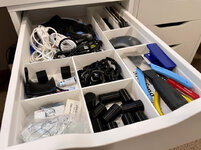
After clearing the hot end clog from having my retractions set too high, I thought everything was working as it should with the 3d printer. As a little tester project, I printed some organizational boxes for the IKEA Alex drawer units that are the base cabinets of my office desk, to store some of the printer accessories and organize the drawers a little better.

IMG-9405.jpg

Turned out fine, but I noticed the first layer was under-extruded:

IMG-9403.jpg

I gave E-steps a quick check since I hadn't recalibrated with the new hot end. It wasn't off by much (97mm extruded instead of 100mm), but I saved the corrected value anyways. Next box, first layer looked good.

And so I printed a bunch of these.

IMG-9406.jpg

They were from a Thingiverse file, but I ended up just using the measurements and designing additional sizes in Fusion360, with extra compartments, etc.

IKEA-Alex-Box-95x200-divider-3-X-v1.png
IKEA-Alex-Box-100x100-terminal-assortment-v1.png
Some of these larger boxes were 5 hr prints.

IMG-9417.jpg
IMG-9418.jpg

As you can see everything was going fine, until on the 7th or 8th box, I got the dreaded extruder clicking at the beginning of the print. Filament was barely coming out and made a crispy mess on the print bed.

Figuring it was another blockage, I took the hot end apart, but everything looked good as far as I could tell. So I put it back together and extruded some filament manually. It seemed to be coming out ok. Started another print.

SAME THING. Extruder clicking and slipping. :mad:

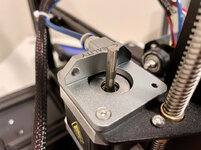
So I took the extruder arm off to check the gear. Looked pretty clean?

IMG-9413.jpg

The gear has a little wear in the middle but it's barely noticeable to the naked eye.

IMG-9414.jpg

I mean maybe that's the problem but it doesn't look bad to me.

When reassembling, I adjusted the gear height so the filament would contact a "fresh" section.

Same thing, extruder slips. I also played with the tension of the release arm and that didn't change the results, either.

So now I don't know what to do. Order a new extruder gear, perhaps a hardened steel one? Try a dual-gear metal extruder? Take the printer apart and make sure the voltage is good on the new motherboard to the extruder motor? Play around with slicer settings (temperature etc)? Not only on the GJ boards here, but at my work too I know multiple people with Ender 3v2's or the Ender 3 Pro. They have not had constant issues. It just seems like it shouldn't be... this hard.

The micro center near me as the Ender 3 S1 for $279 right now. Seems like a smokin' deal and I'm so tempted to just get that and Craigslist the 3v2. I'd sort of feel like a cop out, and I don't know that it will fix all my problems, but it would be a fresh start and it has some serious upgrades like the direct drive dual-gear extruder, powered dual-z axis, and CR-touch auto leveling. What I do know is I'm tired of having to fix something every couple of prints. It's literally been 3x prints, problem, 3x prints, problem, for the longest time.

Thanks for listening to my rant.

🍻
Are you still using this spool of white filament??
 
OP
N

nicholam77

Well-known member
Joined
Dec 18, 2016
Messages
2,671
Location
Minneapolis, MN
Stop being so logical and design/dimension in Imperial then make the mental conversions to metric for printing and "does this fit" and "how much filament is this"....lol

Ha! I'm the same, with greater distances my brain gets confused. But for smaller objects that I'd 3d print I find it much easier to design in metric from the beginning. Plus I'm normally taking part dimensions (like the sockets) with a caliper, so it doesn't take much brain power. Having a Fastcap dual-scale tape measure helps, too.

I know this is bold, but I might be switching to metric for cabinets, too! o_O

Don't you have a Micro Center close by? Take a quick run out on the toboggan or snowshoes and go get it!

Nicely done, I laughed out loud at that. :ROFLMAO: Yes Micro Center is 10min from me, it's where I bought both the printers. I actually need to go there and grab some filament because they gave me a coupon with the S1 anyways.

The software will almost always do exactly what you input, and in this case I'd say it certainly was not an error on Fusion's behalf...

Oh I have no doubt it's me. It's just not always evident to a newbie why something won't do what I expect.

I'm definitely curious what your issue is on the printer. You can always try loading up a different spool of filament and see if that helps. Maybe it's an extruder drive gear tension issue, maybe it's a hotend problem (is the hotend temp consistent while printing?), but no doubt that brand name isn't helping you any - just saying.

Me, too. I know you're not a fan of Creality but the reality is this printer is well-reviewed overall, and many people use Creality printers with acceptable, even great, results. Some without ever getting into the nitty gritty. Obviously there's some sort of issue, but I'm confident it can be solved.

I haven't done any tuning on this machine yet. Every YouTube video would have you believe it works great out of the box, and for the most part it does. I didn't want to immediately start messing with stuff. But I could check the E-steps, do a PID autotune, try loosening or tightening the extruder gear tension, etc.

Are you still using this spool of white filament??

Yes... that test fit layer was the old white filament. I had just used it for that little motion sensor mount, which came out perfect.

However I had the same 1st layer issues with the new green filament I got (brand new, different brand than the white stuff). And also the black PLA I have. The white PLA might be old but it's not just that one that it happens with.

In fact I switched to the black when I started printing the tray for real last night:

IMG-0008.jpg

Of course my dumb@$$ did something stupid, I tried to test fit a socket quickly while it was printing, and the print head collided and layer shifted about 6 hrs in. :mad: I think I was going to run out of filament before it finished, anyways. But now at least I know they all fit.

1st layer and subsequent few had the same issues with this black Overture PLA.
 

loganb

ALLIANCE MEMBER
Joined
Dec 29, 2011
Messages
5,550
Location
Omaha, NE
Nicely done, I laughed out loud at that. :ROFLMAO:

My wife has some family in Chaska and they said over the weekend it was the earliest in the winter the city has ever had to start hauling snow off their residential street with loaders and dumptruck because they couldn't plow/push it up anymore. Streets were 1 lane, piles already 4-ish ft' tall and encroached a similar distance into the street.....

Far different then here where you have to look hard to find snow and it only shows up on the shady side of fences and houses!

IMG-0008.jpg

Of course my dumb@$$ did something stupid, I tried to test fit a socket quickly while it was printing, and the print head collided and layer shifted about 6 hrs in. :mad: I think I was going to run out of filament before it finished, anyways. But now at least I know they all fit.

If it makes you feel better I've done this too! But hey it's not a total waste as you verified before it finished there weren't any design issues!
 
OP
N

nicholam77

Well-known member
Joined
Dec 18, 2016
Messages
2,671
Location
Minneapolis, MN
My wife has some family in Chaska and they said over the weekend it was the earliest in the winter the city has ever had to start hauling snow off their residential street with loaders and dumptruck because they couldn't plow/push it up anymore. Streets were 1 lane, piles already 4-ish ft' tall and encroached a similar distance into the street.....

Yeah, that's an accurate description. They recently restricted parking to one side only in Minneapolis proper because of the "one lane" effect. To top it off a lot of people in Minneapolis street park so it's almost impossible for the plows to take care of it, which results in "ice ruts" that basically put your car on rails like a roller coaster, usually in the smack dab middle of the street. I live in a 1st ring suburb where it's a little better but yeah, we've gotten a lot of snow this year! A lot of roads that have seen less plowing are still compacted with ice. The funniest is seeing snow in parking lots piled as high as a 1 story building, or being hauled off in big dump trucks.

If it makes you feel better I've done this too! But hey it's not a total waste as you verified before it finished there weren't any design issues!

It makes me feel a little bit better :)
 
OP
N

nicholam77

Well-known member
Joined
Dec 18, 2016
Messages
2,671
Location
Minneapolis, MN
This one's for the 3d printing nerds. If you're not a 3d printing nerd — read at your own risk, you might get bored to death. Austin (@MadeByMiller ) , I'm going to just go ahead and give you permission to gloat about Prusa's superiority before even jumping in. :ROFLMAO:

To anyone following along with my 1st layer drama on the new S1 printer, I spent some time this weekend trying to troubleshoot it.

The peculiar thing is, with small prints I never noticed any issues, and certainly everything beyond the 1st layers was coming out great. With this larger socket tray I've been trying to print, I think the issues have been several things:

1/ Possibly bad or old filament. Both the white and black Overture PLA I've had for a long time, and didn't properly stored it, so maybe it had too much moisture, I don't know. It's pretty dry in my basement but it's a possibility.

2/ Incorrect Z-offset on some of my attempts (too squished)

3/ ABL Mesh not actually being used

4/ Warped build plate

Number one is self-explanatory, and thanks to @loganb 's encouragement I made a trip on my toboggan to Microcenter to get some new PLA filament, and a USB C cable to get Octoprint going.

IMG-0045.jpg

Number two I've tried to dial in based off of @MadeByMiller 's guide, but I think numbers three and four are playing into that, too.

By default with Cura, there is no starting gcode command to do a bed probe OR load a previously saved ABL mesh. And in Marlin, G28 (Auto Home) cancels any use of automatic bed leveling, and of course G28 is part of the starting gcode. Personally I don't love the idea of doing a bed probe every single print (I may come around on that), so I chose to recall a previously saved mesh by adding this line after the G28:

Code:
M420 S1 Z10

That loads the most recently saved ABL mesh, and feathers it out for 10 layers.

I thought that's all I had to do, but here's where I went wrong. After doing the Leveling process through the printer menu, I never stored the configuration (saved it to EEPROM). I'm sure at some point I turned the printer off, and because the mesh was only in RAM, it was discarded on the power cycle. So I'm pretty sure at least some of these attempts the printer had no mesh to go off of.

Once I figured that out I ran a new mesh, saved it to EEPROM this time, and then in addition to the M420 S1 Z10 line after the G28, I also added an M501 command at the very beginning of my starting gcode, which should force load all settings from EEPROM. Not sure this is necessary but just wanted to be sure.

I ran another print (same model — base layer of the socket tray), and I confirmed the mesh was being used as I could feel and see the Z-roller move slightly especially on the left side of the model.

Coincidentally, that's the part of the model that was coming out worse than ever:

IMG-0053.jpg

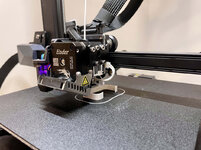
I think the filament was under-extruding here, or my Z-offset was too far away at that part, but as you can see the Z-offset is giving different results from one side to the other.

After this monstrosity, I did a manual level again to make sure things weren't totally out of whack (piece of paper in center and 4 corners). And what I found was if I got the 4 corners pretty good, then the center, and especially the left center of the bed, was way too tight. So that right there tells me the bed is probably warped. In any case I make a new mesh, recalibrate the Z-offset going off the center, and ran another file:
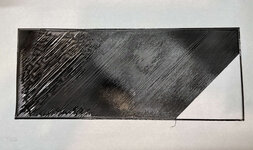
IMG-0050.jpg

This one was so bad I just canceled it.
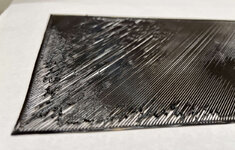
IMG-0051.jpg
IMG-0052.jpg

Even the perimeters / walls were not squished together well.

My next idea was to run the print without the ABL mesh active. To see if somehow the mesh was messing things up. So I manually leveled the corners with paper again. And edited my starting gcode in Cura to remove that M420 S1 Z10 line. I also switched to the white filament so I could see things better.

IMG-0046.jpg

Similar issue in the upper left corner, but overall the rest of it seemed better, even if far from perfect. That upper left corner the nozzle must have been way too close at that point because the walls / perimeters barely even laid down.

So this all happened before the Microcenter trip. After, armed with new filament and the USB cable, I figured my next move was to do some basic tuning and calibration. I loaded up the new filament.

First was a PID autotune of the hot end and the bed heater.

PID-autotune.png

After that I measured the E-steps. However they came out to 100.02mm extruded when 100mm was asked for, so I didn't modify anything.

I did go ahead and tighten the extruder tension bolt a few turns. I have no idea how to tell the correct tension, it seems to be feeding ok, but I figured it couldn't hurt.

Then I installed and configured the Octoprint Bed Visualizer plugin and tried to load a mesh. But the printer kept disconnecting the serial connection upon Auto Home and giving me this error:

bed-leveling-error.png

Some Google Fu and another 30min lost, apparently it doesn't like it if there is no mesh already saved? Even though it's about to go through the process again? I don't really understand why, but I ran a Leveling on the printer and tried again, and sure enough now it let the Bed Visualizer plugin proceed to do it again.

And holy $h!t
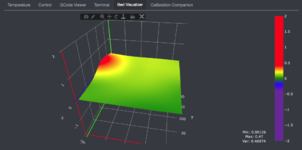
mesh-top.png

I seem to have a high spot right where that corner of the print is oriented.

mesh-profile-copy.jpg

It's 0.47mm above the zero point, which seems like a TON to me?! This is my first time doing this, but it seems odd it's so pronounced and localized to that one area, when the rest of the plate seems fairly good.

I saved this latest mesh, and for the first time, uploaded and started my print from Octoprint instead of the SD card.

The perimeters went down better so far. And while it still struggled in that area of the print, the majority of it came out ok. And by the 2nd layer (depicted below) everything was looking excellent.

IMG-0056.jpg
IMG-0057.jpg

So I think this new filament is a good baseline. Obviously if layer 2 looks perfect it's not an extrusion issue in general.

I think for smaller models in the center of the build plate it's much less of an issue than a big tray like this that encompasses both the "bulge" and the lower areas.

Going forward I can think of a few possible ideas to make it better:

1/ Buy a replacement build plate (~$40-50 on Aliexpress) and hope it's flatter

2/ clip my glass Carborundum plate from the 3v2 on top of it, and either see how much it conforms to the base plate or possibly shim it withe some pieces of paper if necessary, hoping this is flatter overall (it was quite flat for my 3v2)

3/ Cura has "Intitial Layer Height" and "Initial Layer Flow" settings that I may try to use to compensate and make sure enough filament gets put down to create an even layer

4/ Chuck this POS in the trash and buy a Prusa! :ROFLMAO:

If anyone has any suggestions or comments I'm all ears.

🍻
 

MadeByMiller

Well-known member
Joined
Dec 29, 2018
Messages
1,230
Location
Rapid City, SD
This one's for the 3d printing nerds. If you're not a 3d printing nerd — read at your own risk, you might get bored to death. Austin (@MadeByMiller ) , I'm going to just go ahead and give you permission to gloat about Prusa's superiority before even jumping in. :ROFLMAO:


4/ Chuck this POS in the trash and buy a Prusa! :ROFLMAO:
Oh, hi there! You said it best...

That's quite an interesting Bed Visualizer result having that localized high spot. I don't know the construction of your printer, but is it possible that something was assembled incorrectly beneath the bed causing it to push up there? The first layer issues certainly are making sense now, I just did not expect your bed to be that bad, but I should have not ruled out that possibility from an Ender...

Do share how you finally resolve the issue, but for now it appears as though you would be just fine to slice whatever you're printing as much towards the front/right as possible for best results.
 

patlun

Well-known member
Joined
Apr 12, 2015
Messages
241
Location
Värmland, Sweden
Now I am curious because it almost looks like the manual leveling screw in that corner is higher than the other, but no the bed most be warped. I would try with a known flat surface like glass just to see if bed is the problem.
 
OP
N

nicholam77

Well-known member
Joined
Dec 18, 2016
Messages
2,671
Location
Minneapolis, MN
That's quite an interesting Bed Visualizer result having that localized high spot. I don't know the construction of your printer, but is it possible that something was assembled incorrectly beneath the bed causing it to push up there? The first layer issues certainly are making sense now, I just did not expect your bed to be that bad, but I should have not ruled out that possibility from an Ender...

Agreed. Although it lines up with what I'm physically seeing with the nozzle scraping that area if the rest is manually leveled ok. And obviously matches the biggest problem area of the print. So it seems the probe is accurate.

There is nothing in the assembly I can tell that would affect it. The Y-carriage is an H shape, and in each corner is a screw and leveling spring/wheel combo. It's the same on both sides. My guess is it's just a manufacturing defect.

Do share how you finally resolve the issue, but for now it appears as though you would be just fine to slice whatever you're printing as much towards the front/right as possible for best results.

Normally I never move anything from centered in Cura, but that's a great idea to use the front corner. I could have even rotated this 90° and used the right side of the bed with better results I'm sure. Kinda stupid that I have to do that but I bet I could accomplish most prints that way without issue. I will play with some of the other stuff I mentioned, too.

Now I am curious because it almost looks like the manual leveling screw in that corner is higher than the other, but no the bed most be warped. I would try with a known flat surface like glass just to see if bed is the problem.

It's definitely warped, that's the only explanation I can see. Even the upper left corner right next to the bulge is noticeably lower. I have a glass bed plate I can use, part of me wonders if when clipped down it will bend and conform to the warped build plate a bit, but it might reduce the overall effect. I'll need to do some tests!
 
OP
N

nicholam77

Well-known member
Joined
Dec 18, 2016
Messages
2,671
Location
Minneapolis, MN
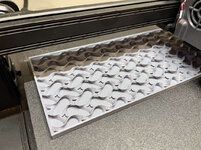
So the 9 hr print finished successfully.

IMG-0059.jpg

I only did 5% gyroid infill, looks like everything laying down nice and clean.

Finished:

IMG-0064.jpg

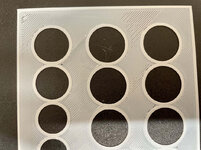
The top layer and all the skin layers turned out nice. Everything is flat and smooth to the touch. I do have some little pinhole gaps in between a few of the socket holes, and around the recessed lettering, but I'm not sure if that's from the slicing or what. Not a big deal for this use case.

IMG-0072.jpg

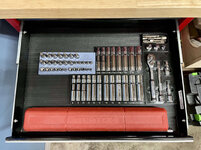
Now just need to move my car and everything out of the way so I can access the drawer. :ROFLMAO:

IMG-0073.jpg

IMG-0075.jpg
IMG-0076.jpg

IMG-0077.jpg

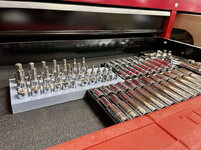
I wish I had planned out the shapes of these trays so they line up a little better, but it gets the job done.

I have to say I like the gray more than the black, I wish I had done that for everything.

Obviously I'm not a huge wrench-er and don't have a big socket collection. I have a few more small trays to do of odds and ends, but at least most of what I own is now easy to see and has a home.
 
To avoid these ads, REGISTER NOW!
Top Bottom