DP#152 - Part 19.8, Assembling the Motor
Because I detest panel screws so much, my first step is to drill (#36) and tap (6-32) the switch-side end frame for machine screws to reattach the model number badge. Then, I ran a tap through all other tapped holes to clean them out.
Then
, I enlarged the holes in the badge to 5/32" for 6-32 x 1/4" button head socket screws. It's easy with a step bit by hand.
Next, install the badge.
Tip: When installing rectangular badges with two screws, bend the badge slightly concave between the screws and slightly convex on the ends. This ensures a flat installation.
About the stator and terminal bar wiring...
My swag is that the blue and yellow wires are attached to the start windings and the black and red wires are attached to the run windings.
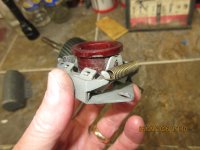
There are two clusters of three terminals. The three terminals in each cluster are connected to each other. I found it puzzling as to why the blue and yellow spade connectors were installed perpendicular to the end frame and required sharp bends to be routed to the stator. I moved the blue and yellow connectors to the parallel spades (last photo). My new cord will utilize the threaded posts with ring terminals.
The next step was to reattach the terminal bar to the switch-side end frame.
Then, stand the stator on end, align the thru-bolt holes in the end frame with the slots in the stator and tap the end frame onto to the stator case.
Back to the rotor assembly...
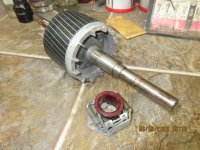
Install the retaining ring onto the pulley shaft.
Then, install the steel cup washer. Verify that the tab is
not sitting on the ear of the snap ring (I did that once). Then, install the rubber washer and the fiber washer. It's possible that the thicknesses of the fiber washers are different on each side. Because rotor spacing is critical, install the washers on the same side in which they were removed.
Note: In the photo below, I installed the fiber washer before the rubber washer. This was incorrect. I only discovered this during the the power-on test when I could hear the fan slightly rubbing on something. Ihad to dismantle and reassemble correctly. I don't know wtf I was thinking.
Repeat retaining ring and washer installation on the other end of the rotor.
Next, set the stator/end-frame assembly on its side, apply a drop of oil on the shaft near the washers and slide in the governor side of rotor assembly. There is a rubber washer inside the end frame. You will need to align the washer with the pulley shaft.
Next, set the motor upright. A jig or blocking will be required. Apply a drop of oil to the rotor shaft.
Slide the fan-side end frame onto the rotor shaft. Orient the oil port to align with the oil port on the switch-side end frame. Align the thru-holes with the stator slot and the thru-holes in the switch-side end frame. a flashlight is helpful to set the alignment. Tap the end frame onto the stator.
Lay the motor on its side and insert the thru-bolts. I insert the bolts from the switch side so the extended threads will be pointing down when the motor is installed on a drill press. Install and tighten the nuts.
Next, add oil to the oil ports. I usually apply about 8 drops in each side. Then, insert the oil plugs.
Next, insert the motor into the cradle base. Loosely assemble the clamps and install one on each side. Adjust the motor in the cradle and tighten the clamp screws.
The cord...
Set the cord next to the terminal opening and mark the insulation where the ground will reach the screw hole. Crimp on a strain relief hog ring on the mark. Trim the outer casing of the cord near the hog ring; about 1/4".
Trim the ground wire only long enough to reach the ground screw hole and attach a ring terminal. Install a short piece of shrink tube.
Repeat for the hot and neutral wires. Note that the hot wire goes to the copper terminal post and the neutral wire to the silver terminal post. Install nuts and ground screw.
Plug in the cord and test. Let it run for a minute, Look for smoke, smell for overheating, feel for heat and listen for the click during shutdown.
Lastly, install the screws and cover plate. Install the shaft guard.