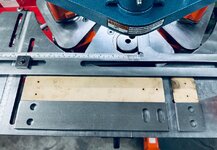
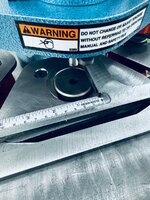
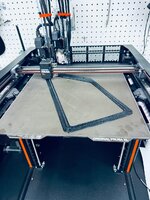
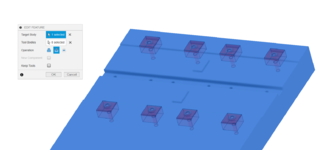
Do you have to machine the actual pallets yourself? A better way to ask, if you have the time (because I've been seeing things like this in just about every YouTube video I watch and wondering if I'm missing out): What's the complete workflow from nothing to making chips?
This is how I plan to do things. Being self taught I’m continuously learning the hard way (from experience?). That’s my disclaimer. It’s important to note: a lot of folks have duplicates of the same pallet so one can be unloaded/reloaded while the other runs. Initially I don’t plan to have duplicates. For now it’s about density, longer cycle times, and moving as many parts to the VMC as I’m able to. It’s enclosed, has flood coolant, more tools, and everything is faster/more powerful. The longer cycles will have less time per part. Once I have a feel for where demand is, I can see about duplicate pallets to keep the spindle turning.
I have four parts that can use the same OP1 workholding. Three or four should be able to use the OP2. Not sure about the fourth yet. If this works the way I’m hoping I’ll have multiples of these most likely.
This is what I see the workflow being today for a given part. Design and then machine pallet. Prove out the CAM for the parts. Run all the OP1/OP2 that I’m able to in pallets in the VMC. That’s the overview. Obviously there’s a lot in there. I’ve found work holding to be the most time consuming and most difficult machining I’ve done so far. There’s just a ton of fiddling. As I learn lessons, there’s less.
I plan to buy pallets. It’s a no brainer to me: they come ready to use. I bought several of Pierson’s largest 10x16. Mostly because my parts are not tiny and I’m trying to use as much of the work envelope as I can.
Back to making the pallets. I’m doing my best to leverage all of Fusion’s features that can and hopefully will make this modular and easier. I have all the fixture clamps and their associated pockets modeled. I can then drop them in a new pallet setup and pattern. It looks like this is a good approach. I’ve accepted I could and may very well scrap a pallet or two. Or part of it’s useful area.
Here's how I've approached this so far.. First I modeled the machine table. Then I brought in Pierson's step file of the PPS base and pallet. I made an assembly of the table with the bases in the location that gives them the most equal travel. That's saved as a separate file in Fusion.
I saw a video with a cool trick for making the Mitee Bite clamp pockets. Essentially, you make a negative of the pocket and add it to a file with the clamp. Then you can drop that into a new design and pattern it around. It's going well so far. What I've come up with is a folder of setup items that are the fixturing components:

Then the CAM Fusion file starts looking like this:
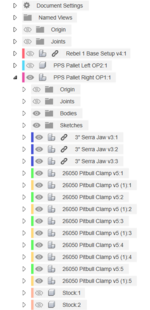
Once I have the 3" Serra Jaw file sorted out, I'll break the link. Then I can do anything job specific and it not change the base configuration. Also, when you use combine with a linked component you don't have the option to not save the tools. This adds clutter to the design in my opinion. So, I break the link for that reason as well.
This is the pitbull clamp and associated pocket as a component:

And a wireframe to help illustrate what I'm doing:

I want the clamp to be able to be low on the stock, and the stock is in a pocket below the top plane of the pallet. Having the pocket modeled to the top edge of the clamp makes it easy when I go to combine the pocket with the pallet to cut the pocket it out - when I want the pocket lower in the pallet. Hope that makes sense.
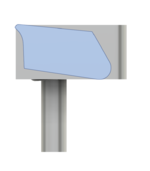
This gives an idea of what I'm getting at:

This is very much a work in progress in its infancy. I am going to use Mitee Bite's backer strips for the Pitbull clamps. This adds 0.025" to the pocket depth and back wall.

I don't have that fully modeled yet, and I will. Also, it's obvious the Serra strip on the left of the part isn't making contact. I need to make some adjustments there.
So, once these "setup" component models are dialed in, modeling the pallet should go pretty quick in theory. I haven't started OP2 yet. I plan to use the Uniforce clamps for OP2.
Again, I can't recommend Haas tooling highly enough! They only cary a few of the Mitee Bite items. Their pricing is really good in general. They offer 5% off for being in their club thing. It also gets you free overnight shipping. They also offer 10% off for buying any mix of 10 clamping fixture items. And, I had a 20% off coupon. These all stack. All told, I got just over 1/3 off on the order. Placed it yesterday, and it's already here this morning.
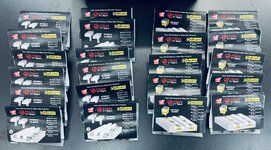
I had to source the backer plates and some Talon grips elsewhere. I also ordered some of the previously mentioned Serra strips from the manufacturer, Anderson Manufacturing. I can't recommend these enough for OP1 stuff. I use their jaws in the vises for all OP1 work and they've never let me down. And, they only need 0.06" to hold on to.
Feel free to ask any questions. Typing this up has helped me identify several things I need to address. Happy to share what I'm learning.
edit: went ahead and modeled the backer plate.