To avoid these ads, REGISTER NOW!

Above 1200 Sq/FT Eastern Washington Workshop

Wokspaces above 1200 squarefeet.

RickP

Well-known member
Joined
Jan 15, 2013
Messages
1,547
Location
Annapolis, MD
I'm glad you went with the courier -- your time is worth WAY more than what it cost!
For the heavy stuff, it sounds like you need to pick up other things in the city occasionally anyway, so driving there with your truck might be the better option.

Your increased productivity with the new machines/workflow is impressive.
 
To avoid these ads, REGISTER NOW!
OP
S

slodat

ALLIANCE MEMBER
Joined
Feb 6, 2010
Messages
3,679
Location
Central-ish, WA
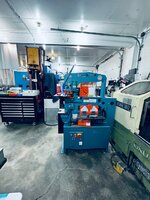
As expected it was a jam packed week in the shop. The ironworker showed up as planned. This last mile trucking company is great to work with. I have a good relationship with my driver. He’s a good guy and is happy to give me a call to make sure I’m at the shop before he arrives.

For this one, I asked him to back up the driveway. I’ve done this before and it made a lot of sense with the ironworker.

IMG_5058.jpeg

IMG_5059.jpeg

This put the machine right on the shop floor.
IMG_5060.jpeg

I lifted it with the forklift and it was off the pallet, on to the floor. Pallet jack makes quick work of moving stuff like this. I’m getting tight on space. The placement reflects that.

IMG_5061.jpeg

IMG_5062.jpeg

I was about to do some rearranging when I got it to this spot. I realized this would work really well for now. It’s a bit on the tight side with small walkways, and it works for now. Mostly because I’m not doing things like running the Okuma and the ironworker at the same time.

View from the bandsaw.

IMG_5063.jpeg

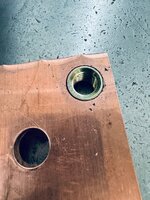
The reason for the ironworker is primarily copper bus fabrication. I have a project this weekend that involves pem nuts in copper bus. Plan was the mill the holes with the milling machine. I gave it a go with the ironworker.

IMG_5073.jpeg

IMG_5072.jpeg

IMG_5071.jpeg

It worked great! I did a bit of a torture test with the big impact. The hole was on size and they pressed in like they are supposed to!

Overall the Scotchman is a very nice machine. Well built, thought out, and it’s clear it will be a pleasure to use.
 
Last edited:
OP
S

slodat

ALLIANCE MEMBER
Joined
Feb 6, 2010
Messages
3,679
Location
Central-ish, WA
I'm glad you went with the courier -- your time is worth WAY more than what it cost!
For the heavy stuff, it sounds like you need to pick up other things in the city occasionally anyway, so driving there with your truck might be the better option.

Your increased productivity with the new machines/workflow is impressive.
Thank you for the encouragement! The courier was such a game changer this week. All these little changes and it really feels like a working, functioning business. I’m really happy with it all.

The productivity and workflow improvements are an absolute requirement in order to make schedule and keep my clients happy. Thank you for following along in my journey and contributing to the conversation!
 
OP
S

slodat

ALLIANCE MEMBER
Joined
Feb 6, 2010
Messages
3,679
Location
Central-ish, WA
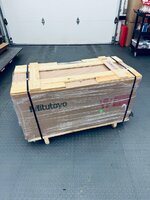
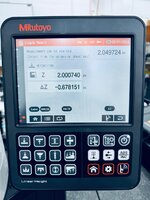
Keep in mind I bought all the stuff I’m posting about over a couple of months. Not all in one day. Just happened they all came this week. Next up is the Mitutoyo linear height gage. This one is definitely an attempt to level up without going completely overboard. From a purely height gage perspective it’s definitely a lot more tool than I need. From a somewhat of a 2D CMM like capability, this is a very small fraction of what a real CMM (coordinate measuring machine) would cost. The lower cost units are near six figures by the time they are delivered. I took advantage of a Black Friday deal. That was the thing that compelled me to go ahead and buy when I did.

I will be using it to aid in inspecting my parts. It has already helped with dialing in some toolpaths. The resolution and accuracy are impressive to say the least.

Shipping was delayed because of the winter storms. It took 17 days to get here from Chicago.

IMG_5070.jpeg

Looks like I forgot to take an overall photo.. here it is on the surface plate with the dust cover in place.

IMG_5144.jpeg

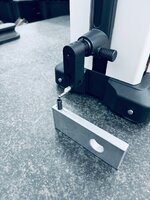
The probe is motorized. This aids in repeatable measurements. It also is why it’s like a 2D CMM. It can do bore measurements for example.

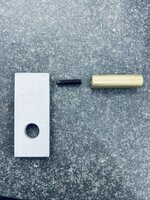
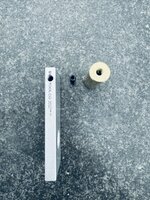
First thing I did was take a look at a threading toolpath I’m working on. I measured the height of the block and then the end of the set screw.
IMG_5104.jpeg

IMG_5106.jpeg

My 2” part is two inches! The delta is how much the set screw sits proud of the hole. Adjusted the toolpath to thread another 0.1”.

IMG_5108.jpeg

IMG_5109.jpeg

Here we see the result. YES! There are absolutely much less inspection equipment required to make these measurements. I would of course use a caliper at the machine. This was a chance to check out the new tool ;)
 
OP
S

slodat

ALLIANCE MEMBER
Joined
Feb 6, 2010
Messages
3,679
Location
Central-ish, WA
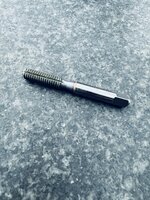
More on the threading.. I finally tried a roll (form) tap. As the name implies, it’s a form tool instead of a cutting tool(tap). The hole is bigger, and the tap forms the threads. No flutes.

IMG_5138.jpeg

You can see the slit that runs up the tap. This allows air and coolant to escape, avoiding a hydraulic issue. The threads turn out really nice.

IMG_5137.jpeg
(I screwed up the engraving on this part.)

Up to now, this brass pin had male threads. It was always the plan to change to this set screw assembly.

IMG_5134.jpeg

IMG_5135.jpeg

IMG_5136.jpeg

Significantly better mechanical connection.
 
OP
S

slodat

ALLIANCE MEMBER
Joined
Feb 6, 2010
Messages
3,679
Location
Central-ish, WA
Next up is support equipment for coolant. For now that’s only the Rebel 1 mill. In the future I’ll get flood coolant going on the Okuma. In the longer term, new machines coming in the shop will (hopefully) be enclosed with flood coolant.

Coolant can get expensive. It’s mixed about 12.5 (water) to 1 (coolant). A 5 gallon pail of the Hangsterfers that I’m using is around $200. Comparatively, the Kool Mist 77 that I use in the Fog Busters on the other two mills is an ounce or two per gallon of water. A gallon is about $35 if I recall correctly. All of that to say, maintaining coolant from a financial standpoint makes sense.

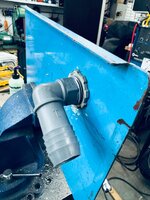
Coolant also introduces new challenges to the shop. The oil in the machine collects in the coolant. This tramp oil floats on the surface of the coolant when the machine isn’t running. This then creates an environment for bacteria to grow. Which stinks. So… a coalescer can be setup to remove the tramp oil. I went with the NexJen at the suggestion of a friend (thank you Joe!). A submersible pump draws from the surface of the coolant via this pickup.
IMG_5143.jpeg

It’s in the right rear corner. That is pumped up to this contraption.
IMG_5141.jpeg

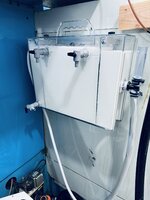
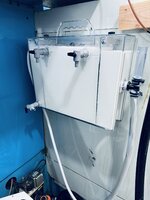
Coolant and oil flow in the upper left. The middle section collects the oil at the top. Oil free coolant flows bottom to top of the right. Out to return to the coolant tank. The return is at the far end of the tank. This also helps aerate the tank to help with the bacteria growth. It’s setup to run on a timer at night.

This is after running for a while last night.
IMG_5148.jpeg

The other issue with coolant is fine chips in the coolant and maintaining the coolant tank. It sounds like getting a few years of use from coolant is a good service life. In order to do so, I’ll want to be able to remove it from the tank to give the tank a cleaning periodically. Enter the Freddy:

IMG_5124.jpeg

These are made in England. I know several guys that are very happy with theirs so I went with that recommendation. (Thanks again Joe!). Their packaging and presentation was really good.

IMG_5129.jpeg

These are things I always noticed and appreciated. Even more now that I’m making and packaging my own products.

In all it’s orange glory..
IMG_5130.jpeg

IMG_5131.jpeg

IMG_5132.jpeg

IMG_5133.jpeg

This is super fancy wet vac of sorts. The coolant can be processed through the machine to filter. For example to pump the coolant tank down into barrels for tank cleaning. It can store up to its tank capacity. And then it can pump back into the tank. It’s also great for cleaning up coolant messes on the floor, etc.

Definitely a quality of life component with the Freddy as well. Making ****** tasks tolerable makes for a better shop to work in!
 

Finallygotit

ALLIANCE MEMBER
Joined
Jul 6, 2013
Messages
4,077
Location
Tucson, AZ
1706980006728.jpeg

I'm curious to see/hear what the long term results will be for this contraption; never saw one before. The only oil scavengers I have seen in the past were those plastic discs that rotated vertically and would pick up the floating oil and then squeegee the oil off into a container.

:beer:
 
Last edited:
OP
S

slodat

ALLIANCE MEMBER
Joined
Feb 6, 2010
Messages
3,679
Location
Central-ish, WA
I thought I had the NexJen working pretty well. It ran for a few hours last night on the timer and all seemed well when I got to the shop. I wanted to run it again and see if the surface of the coolant cleaned up any more. Started it and went to breakfast. I came back to coolant everywhere. The return hose that was supplied with the unit had a few kinks from being coiled too tight to fit in the shipping box. I don't want that happening again. I got some new hose that's free of kinks and restrictions.

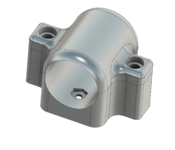
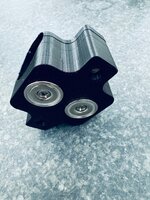
I want a way to secure the return hose so it doesn't end up draining to the floor. This is what I came up with. Another split style clamp.


1707014238936.png

1707014219447.png

The visible hex pockets are for the screw to secure the magnets on the bottom. They fit into these pockets:
1707014307584.png

In the past Pat @4 FN 27 showed how we was placing nuts in his prints by pausing on the right layer. This is my first time trying that.

1707014191420.png

I'm pretty excited to try the captured hex nuts. The magnets should stay in place with the small machine screws holding them in place.
 
OP
S

slodat

ALLIANCE MEMBER
Joined
Feb 6, 2010
Messages
3,679
Location
Central-ish, WA
Win some, lose some.. The embedded hex nut worked well. The parts all went together well. Felt good to have an idea, make it, and it all just work..

IMG_5159.jpeg

IMG_5160.jpeg

IMG_5162.jpeg

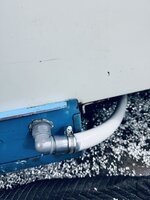
Sort of. It worked in that it all bolted together. It didn't hold the hose at all. The 1" ID clear hose is way too stiff for the little magnets. Back to the drawing board. This is what I came up with.. a 90 degree fitting.

IMG_5164.jpeg

IMG_5163.jpeg

Back on the machine:
IMG_5167.jpeg

IMG_5168.jpeg

This resulted in eliminating the hose that was included with the kit.
IMG_5165.jpeg

The kinks were restricting flow. When the return path isn't clear, the coolant spills out the top of the standpipe:
IMG_5166.jpeg

The embedded hex nuts are great. I'll be using them a lot more now that I've done it once. Super simple in the slicer to pause the print at a given layer. Drop the nuts in and continue.
 

GeddyT

ALLIANCE MEMBER
Joined
Jun 17, 2015
Messages
1,239
Location
Bellingham, WA
I've been largely offline for several weeks now, so juts playing ketchup:

Since discovering form taps, it's all I use in the machine. Less likely to break, super nice holes, and Guhring sells very nice metric cobalt form taps for about $40. Do you rigid tap on the CNC or are those hand tapped holes? Rigid tapping is probably the most satisfying part of CNC machining for me. I HATE tapping holes, and I still cringe every time the machine loads the tap into the spindle, and yet it goes smoothly every time (even when I stupidly had the spindle turned up to 150%).

Only downside to form taps is that the tap drill size is a bit more critical. Sometimes I've had to spend a bit more money on some odd size metric drill that's out to the hundredths. It's either that or accept a slightly loose fit. Worth it!

Coolant: You described exactly my thought process when choosing coolant. Unlike yours, my machine is occasional use (too occasional, unfortunately), so my top criteria when choosing coolant was resistance to going rancid. My research suggested Trim 690XT would be good for this. It's about $250 shipped for a 5-gallon bucket (got my first bucket from Amazon, no less!) and mixes at about 20:1, so a bucket was good for the whole tank plus a lot left over.

On the upside, it's true that it resists going rancid. I've gone over a month without running my machine several times, and I've never had a rancid coolant odor in the shop. I haven't noticed it making me itch or anything when it gets on me, either. Seems to do its job as a machining coolant, too. I'm happy enough with it that I bought another five gallons recently.

The downside is that I had to buy another five gallons recently. Maybe it's because of the high water to coolant ratio, but this stuff boils off like CRAZY! My theory on why it doesn't go rancid is that you boil any bacteria in the coolant every time the machine is running for longer than 20 minutes. I don't have a mist collector, so my shop gets quite tropical pretty quickly when the spindle is turning.

I've gotta run, but keep posting your wins!
 
OP
S

slodat

ALLIANCE MEMBER
Joined
Feb 6, 2010
Messages
3,679
Location
Central-ish, WA
I've been largely offline for several weeks now, so juts playing ketchup:

Since discovering form taps, it's all I use in the machine. Less likely to break, super nice holes, and Guhring sells very nice metric cobalt form taps for about $40. Do you rigid tap on the CNC or are those hand tapped holes? Rigid tapping is probably the most satisfying part of CNC machining for me. I HATE tapping holes, and I still cringe every time the machine loads the tap into the spindle, and yet it goes smoothly every time (even when I stupidly had the spindle turned up to 150%).

Only downside to form taps is that the tap drill size is a bit more critical. Sometimes I've had to spend a bit more money on some odd size metric drill that's out to the hundredths. It's either that or accept a slightly loose fit. Worth it!

Coolant: You described exactly my thought process when choosing coolant. Unlike yours, my machine is occasional use (too occasional, unfortunately), so my top criteria when choosing coolant was resistance to going rancid. My research suggested Trim 690XT would be good for this. It's about $250 shipped for a 5-gallon bucket (got my first bucket from Amazon, no less!) and mixes at about 20:1, so a bucket was good for the whole tank plus a lot left over.

On the upside, it's true that it resists going rancid. I've gone over a month without running my machine several times, and I've never had a rancid coolant odor in the shop. I haven't noticed it making me itch or anything when it gets on me, either. Seems to do its job as a machining coolant, too. I'm happy enough with it that I bought another five gallons recently.

The downside is that I had to buy another five gallons recently. Maybe it's because of the high water to coolant ratio, but this stuff boils off like CRAZY! My theory on why it doesn't go rancid is that you boil any bacteria in the coolant every time the machine is running for longer than 20 minutes. I don't have a mist collector, so my shop gets quite tropical pretty quickly when the spindle is turning.

I've gotta run, but keep posting your wins!
Tom!! Great to hear from you! I really like the form taps. Ordered the other sizes I use in the mills. I’m using the Haas form taps. I’ve been really happy with their tooling. Prices are good, free one day shipping. The online hive mind seems to think a lot of it is made by YG1. The form taps and cobalt drills look identical to the YG1 stuff.

I did the same thing- I bought metric drills to get as close to the drill size callout as I could. Worked great for these 5/16-18 holes.

My machines are very occasional use as well. The Rebel 1 will mostly run my production parts. I did order the Zebra coolant aerator. Fingers crossed I don’t end up with stinky coolant or other coolant issues.
 
OP
S

slodat

ALLIANCE MEMBER
Joined
Feb 6, 2010
Messages
3,679
Location
Central-ish, WA
I’ve heard of Blaser Swisslube. I’m using Hangsterfers S-396. Came recommended by a machinist friend. So far the coolant is great. I’m doing all I can to have it managed early. I haven’t noticed it bothering my skin. I’m almost always in nitrile gloves when handling pretty much anything. It looks like they are all in the $175-250/5 gallon pail or so range.

I did get a refractometor. It’s wild how quickly the concentration can change.
 

GeddyT

ALLIANCE MEMBER
Joined
Jun 17, 2015
Messages
1,239
Location
Bellingham, WA
I did get a refractometor. It’s wild how quickly the concentration can change.

Water has a far lower boiling point than coolant. As you use the machine, coolant concentration goes up, so usually just adding water does the trick. In even the small amount of use I've given my machine, the coolant level has twice dropped to the point that the washdown pump lost suction (flood coolant pump has a lower suction). I believe my total tank capacity is about 80 gallons, and both times I had to fill it with about 40 gallons of water to top it up. Usually by then the concentration is off the Brix scale, and adding all of this water gets it back to where I can see it on the refractometer. Both times, about a half gallon of coolant was all that was needed to bring the concentration back up to spot on.
 

SamYoung

Well-known member
Joined
Jun 4, 2020
Messages
104
Location
Massillon, Ohio
Coolant management is always such a challenge. I've never seen that style skimmer system, but the theory makes sense. Some of our machines have a similar catch system before the coolant pump. We **** out the separated oil from them regularly.

We have both the disc (don't like) and the belt (better) on various machines. We also use aquarium aerators in our tanks with breather vents on the end of the hoses to keep the coolant agitated and have found it helps greatly with separation. The circulation on your system will likely have similar affect.

Glad to hear you have a refractometer for checking concentration as proper mix is vital for life/effectiveness. So many people just guess and I don't understand why.

The biggest thing we did that has improved coolant life was actually our water supply. We switched from tap to DI water. We had a house DI system for some of our lab equipment and had spigots run over to our machining area. Coolant last significantly longer before going rancid, especially on some of our less run machines. This may depend heavily on your water supply quality as we were previously using pretty terrible well water. There are a lot of affordable spotless rinse DI water systems these days if you do find that your coolant is turning quicker than you'd like.
 
OP
S

slodat

ALLIANCE MEMBER
Joined
Feb 6, 2010
Messages
3,679
Location
Central-ish, WA
I definitely can sense the water in the air when running high MRR cycles. Lots of heat in those toolpaths. Makes sense that it turns to water vapor/steam. I'm looking into mist collectors to help with it. For now, I've been running the spray booth exhaust fan with a door open. It moves a lot of air. That's a very temporary solution. A mist collector seems to be a good solution. I think I'll make some top sheet metal for the mill as well when the time comes to install a mist collector.

It's a trip how the coolant concentration changes so quickly. I'm glad I bought the refractometer. It would be a total guess and I would guess wrong.

I have a spotless rinse DI cart that I bought in preparation for running the mill. I'm trying to cover my bases early instead of fighting known things down the line due to a lack or preparation and support equipment.
 

SamYoung

Well-known member
Joined
Jun 4, 2020
Messages
104
Location
Massillon, Ohio
Its amazing how much coolant can boil off at high MRR. We used to run a particular series of parts, the worst of which would have ~300 lbs of material removal per piece which took ~3 hrs between the 3 roughing setups. We'd do 10-20 at a time. We only ran day shift, but you'd still have to refill daily as you'd be down 15-20 gallons :oops:. Fully enclosed mill would just fill up with steam while running and it looked like you were sending up smoke signals every time you opened the doors.

I kind of miss running the mills. Engineering desk job is significantly less engaging.
 
To avoid these ads, REGISTER NOW!
OP
S

slodat

ALLIANCE MEMBER
Joined
Feb 6, 2010
Messages
3,679
Location
Central-ish, WA
I forgot to share the desk mat that Austin @MadeByMiller made for me. I was one of the lucky ones to get in on his last round of them. Turned out great!

IMG_5100.jpeg

My "desk" stared out as a long work bench. As it has evolved, it has definitely become my shop desk. Because of this, the arrangement is a bit out of the norm. The desk mat has found its home on the right of the keyboard. I love it!

IMG_5101.jpeg

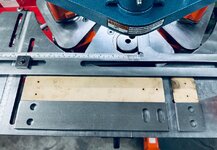
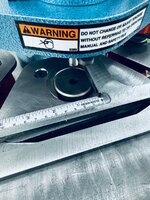
The perfect first project came through for the ironworker. Two different parts out of 1/4" x 2" cold rolled flat bar with slots and holes. I loaded up the turret with the slot and hole punch/dies.
IMG_5213.jpeg

I made 1/8" MDF templates with the laser to aid in layout. This works so well. I use this method on almost all handwork. It makes layout fast, somewhat fool proof, and repeatable.
IMG_5212.jpeg

The 0.075" holes are where the center point of the punch needs to hit. I then line up the fence so the punch hits that point.
IMG_5209.jpeg

These holes are mirrored on the part, so just flip the part over to punch the second hole.
IMG_5210.jpeg

The shear has a LED laser line. I use a carbide scribe for the length cut line. Line it up with the laser and shear the part. It works so well.

On the slots, they are 1" on center. So the first slot is lined up with the 1" mark on the rule. Second up against the stop on the fence.

IMG_5211.jpeg

Order was for ten of each. I had under an hour for the entire process.

IMG_5214.jpeg

I bought the ironworker mostly for copper and aluminum bus fabrication. It was the right machine for these parts as well. A trip through the tumbler and they are ready to paint.

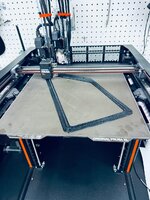
Lastly, a good friend of mine is an amazing custom upholsterer. He sent me this to print for a car he's working on. Too big for his X1C.
IMG_5199.jpeg

Prusa definitely did not impress me on the customer support side when I first got the XL. With that said, I've been really happy with the XL. The print quality, the dual toolhead, and definitely the big work envelope.
 

Xti04

Well-known member
Joined
Nov 11, 2016
Messages
2,286
Had not seen an iron worker until a few years ago. Grind hard plumbing Co on you tube used one all the time to build all kinds of brackets and stuff like that. A perfect tool for that job. Love to see the progress and added efficiency from having the right tool for the job!
 
OP
S

slodat

ALLIANCE MEMBER
Joined
Feb 6, 2010
Messages
3,679
Location
Central-ish, WA
Nice usage of the Ironworker! Just curious....without the ironworker, would you have burned them out or run them on the mill?

Printed part a surround for a speaker grille or an accent panel of some type?
Thank you, Logan! Great question. These were essentially zero lead time parts. I found out about them last week, at my cutoff for ordering material in time for it to get here and meet the shipping deadline. I asked the engineer what the material was, and he said 7ga 2" rectangular flat bar. So, I called my supplier and asked for it. They could get 1/4" so I went with that. If I would have had a minute to think about it, I would have ordered plate so I could just cut it on the plasma. Normally, I want to use all the automation I can. In this case, I was working with flat bar. Cutting the parts to length on the plasma is a PITA. There's no material for lead in and lead out. I can do it, but it can be really fussy getting it setup. Hope that makes sense. The copper and aluminum bus can't be cut with the plasma and get reasonable results. So, the ironworker.

Yes, it's the frame of a speaker grill.
 
OP
S

slodat

ALLIANCE MEMBER
Joined
Feb 6, 2010
Messages
3,679
Location
Central-ish, WA
Had not seen an iron worker until a few years ago. Grind hard plumbing Co on you tube used one all the time to build all kinds of brackets and stuff like that. A perfect tool for that job. Love to see the progress and added efficiency from having the right tool for the job!
The ironworker definitely has its place in a steel fabrication operation. It's a great addition to the shop. Thank you for following the journey and contributing to the conversation!
 
OP
S

slodat

ALLIANCE MEMBER
Joined
Feb 6, 2010
Messages
3,679
Location
Central-ish, WA
I've been contemplating ways to increase my part density and cycle time since I started making parts one operation at a time. I did a lot of reading and so on trying to sort out the right thing for my production parts. One of the challenges is the VMC only has 25.9" of X travel. Several parts are setup to use 11-12" stock, and one part is almost 12" long. I finally settled on the Pierson Workholding pro pallet system. They offer a 10x16" pallet. I can turn the long part and run it on the Y axis in this setup. Having 12" of material in the jaws of a vise is a recipe for lots of fun issues. The pallet will work great with that length on the Y.

In the end, I gain a lot switching the parts that I can to the pallets. Some parts will still be done in vises because it's the best/only way I have to make them. Those parts are long cycle times, so it's not as big of a concern. The longer cycle times mean I can work on other stuff while the parts are running.

I'll say this is a long time coming. I've been slowly working up to being able to handle the CAD and CAM for this as well. Definitely no easy feat compared to where I started. I did a rough model of the table at home tonight. I'll update the model with some measurements in the morning. This model will be included in all the CAM files. My favorite part is the WCS origin will not change! It's the center of the diamond point for X/Y and the top of the ground pad for Z. Everything will be built off that.

The table with the pallet bases.
1709190190702.png

The first pallet with the OP1 work holding in progress. There is stock on the right, and an open pocket on the left.
1709190251962.png

The whole getup with stock in both pockets.
1709190144406.png

The next step is bringing in the parts for OP2 on the bottom.
 

GeddyT

ALLIANCE MEMBER
Joined
Jun 17, 2015
Messages
1,239
Location
Bellingham, WA
Do you have to machine the actual pallets yourself? A better way to ask, if you have the time (because I've been seeing things like this in just about every YouTube video I watch and wondering if I'm missing out): What's the complete workflow from nothing to making chips?
 

zanyad

ALLIANCE MEMBER
Joined
Apr 26, 2018
Messages
2,756
Location
NE Ohio
Neat! I looked into getting a pallet workholding system maybe 7-8 years ago, never pulled the trigger.
My favorite part is the WCS origin will not change! It's the center of the diamond point for X/Y and the top of the ground pad for Z. Everything will be built off that.
I thought the full round pin is x-y location and diamond pin is rotational?
 
OP
S

slodat

ALLIANCE MEMBER
Joined
Feb 6, 2010
Messages
3,679
Location
Central-ish, WA
Do you have to machine the actual pallets yourself? A better way to ask, if you have the time (because I've been seeing things like this in just about every YouTube video I watch and wondering if I'm missing out): What's the complete workflow from nothing to making chips?
This is how I plan to do things. Being self taught I’m continuously learning the hard way (from experience?). That’s my disclaimer. It’s important to note: a lot of folks have duplicates of the same pallet so one can be unloaded/reloaded while the other runs. Initially I don’t plan to have duplicates. For now it’s about density, longer cycle times, and moving as many parts to the VMC as I’m able to. It’s enclosed, has flood coolant, more tools, and everything is faster/more powerful. The longer cycles will have less time per part. Once I have a feel for where demand is, I can see about duplicate pallets to keep the spindle turning.

I have four parts that can use the same OP1 workholding. Three or four should be able to use the OP2. Not sure about the fourth yet. If this works the way I’m hoping I’ll have multiples of these most likely.

This is what I see the workflow being today for a given part. Design and then machine pallet. Prove out the CAM for the parts. Run all the OP1/OP2 that I’m able to in pallets in the VMC. That’s the overview. Obviously there’s a lot in there. I’ve found work holding to be the most time consuming and most difficult machining I’ve done so far. There’s just a ton of fiddling. As I learn lessons, there’s less.

I plan to buy pallets. It’s a no brainer to me: they come ready to use. I bought several of Pierson’s largest 10x16. Mostly because my parts are not tiny and I’m trying to use as much of the work envelope as I can.

Back to making the pallets. I’m doing my best to leverage all of Fusion’s features that can and hopefully will make this modular and easier. I have all the fixture clamps and their associated pockets modeled. I can then drop them in a new pallet setup and pattern. It looks like this is a good approach. I’ve accepted I could and may very well scrap a pallet or two. Or part of it’s useful area.

Here's how I've approached this so far.. First I modeled the machine table. Then I brought in Pierson's step file of the PPS base and pallet. I made an assembly of the table with the bases in the location that gives them the most equal travel. That's saved as a separate file in Fusion.

I saw a video with a cool trick for making the Mitee Bite clamp pockets. Essentially, you make a negative of the pocket and add it to a file with the clamp. Then you can drop that into a new design and pattern it around. It's going well so far. What I've come up with is a folder of setup items that are the fixturing components:

1709232625450.png

Then the CAM Fusion file starts looking like this:
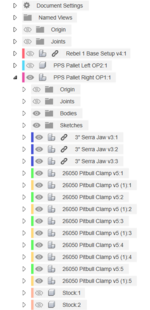
1709232697654.png

Once I have the 3" Serra Jaw file sorted out, I'll break the link. Then I can do anything job specific and it not change the base configuration. Also, when you use combine with a linked component you don't have the option to not save the tools. This adds clutter to the design in my opinion. So, I break the link for that reason as well.

This is the pitbull clamp and associated pocket as a component:
1709232826984.png

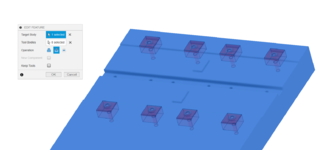
And a wireframe to help illustrate what I'm doing:
1709232918047.png

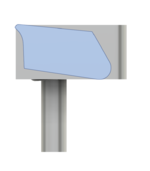
I want the clamp to be able to be low on the stock, and the stock is in a pocket below the top plane of the pallet. Having the pocket modeled to the top edge of the clamp makes it easy when I go to combine the pocket with the pallet to cut the pocket it out - when I want the pocket lower in the pallet. Hope that makes sense.
1709233045111.png

This gives an idea of what I'm getting at:
1709233135213.png

This is very much a work in progress in its infancy. I am going to use Mitee Bite's backer strips for the Pitbull clamps. This adds 0.025" to the pocket depth and back wall.

1709233427308.png

I don't have that fully modeled yet, and I will. Also, it's obvious the Serra strip on the left of the part isn't making contact. I need to make some adjustments there.

So, once these "setup" component models are dialed in, modeling the pallet should go pretty quick in theory. I haven't started OP2 yet. I plan to use the Uniforce clamps for OP2.

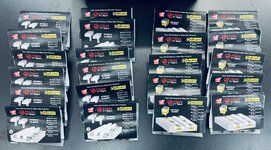
Again, I can't recommend Haas tooling highly enough! They only cary a few of the Mitee Bite items. Their pricing is really good in general. They offer 5% off for being in their club thing. It also gets you free overnight shipping. They also offer 10% off for buying any mix of 10 clamping fixture items. And, I had a 20% off coupon. These all stack. All told, I got just over 1/3 off on the order. Placed it yesterday, and it's already here this morning.
IMG_5355.jpeg

I had to source the backer plates and some Talon grips elsewhere. I also ordered some of the previously mentioned Serra strips from the manufacturer, Anderson Manufacturing. I can't recommend these enough for OP1 stuff. I use their jaws in the vises for all OP1 work and they've never let me down. And, they only need 0.06" to hold on to.

Feel free to ask any questions. Typing this up has helped me identify several things I need to address. Happy to share what I'm learning.

edit: went ahead and modeled the backer plate.
1709235608471.png
 
Last edited:
OP
S

slodat

ALLIANCE MEMBER
Joined
Feb 6, 2010
Messages
3,679
Location
Central-ish, WA
Thanks for going all out on the explanation! That all makes a lot of sense now. Once again, I'm envious of your cool tools...
Like I said, it's dual purpose. Explaining what I'm doing reveals things I need to address.

Spent some time with my CAD consultant. I was surprised to find out my approach isn't full of bad practices that will have follow on effects down the line. The power of parametric modeling can be a huge curse when a person doesn't know how to leverage it. So far, so good. It has taken years to get to this point. And I know I'm still going to scrap a pallet and some parts! :ROFLMAO:
 

Finallygotit

ALLIANCE MEMBER
Joined
Jul 6, 2013
Messages
4,077
Location
Tucson, AZ
I know full well how parametric modeling can be a curse. It can be great but later on when we had to "new and improve" a product, more often than not, we had to either start all over or significantly rebuild the model.

Man that was a pain and a time ****!

:beer:
 
OP
S

slodat

ALLIANCE MEMBER
Joined
Feb 6, 2010
Messages
3,679
Location
Central-ish, WA
I know full well how parametric modeling can be a curse. It can be great but later on when we had to "new and improve" a product, more often than not, we had to either start all over or significantly rebuild the model.

Man that was a pain and a time ****!

:beer:
I have had to start from the beginning or close to it a lot over the years I’ve been working with parametric models. As time goes on I’ve learned what I feel are best practices for me. This go round it’s going well. Rolling back to a certain point isn’t as hard and onerous as it once was.
 

GeddyT

ALLIANCE MEMBER
Joined
Jun 17, 2015
Messages
1,239
Location
Bellingham, WA
I know full well how parametric modeling can be a curse. It can be great but later on when we had to "new and improve" a product, more often than not, we had to either start all over or significantly rebuild the model.

Man that was a pain and a time ****!

:beer:

Yeah, but with modeling that's not parametric, you'd have to completely rebuild the model every time.

I learned parametric modeling a couple decades and change ago, and it was a rough transition at first. I was coming from 3DStudioMAX, which was 100% destructive modeling, to what at the time was called Pro/Engineer (Creo now?). It was a shock to the system at first, having to model in a way that was completely constrained, but I quickly learned that--for manufacturing models, at least--I wouldn't have it any other way.

My one criticism of Fusion360 is that it's not parametric enough, which is why I wasted money on a year of Solidworks. The workflow for model changes of having to roll back the timeline and edit sketches is annoying. Everything feature is referenced and constrained, so you should be able to grab any dimension on the 3D model and change it as long as the change doesn't conflict with a prior constraint (making edges that were constrained to parallel not parallel, for instance).

The skill in parametric modeling is designing in a way that later changes don't break the model. Choosing the right references and dependencies: "If later I decide this part needs to be longer, do I want this hole to move as well or do I want it to stay in the center?"

For the cost and the free/functional bundled CAM, I've learned to live with Fusion's shortcomings and use it exclusively at this point instead of bouncing back and forth between Solidworks and Fusion, but I still wish it were more parametric. I guess the long story short is: It could be worse! We could be using paper and pencil.
 
OP
S

slodat

ALLIANCE MEMBER
Joined
Feb 6, 2010
Messages
3,679
Location
Central-ish, WA
Good points! I work with an engineering team that does everything in Creo. It looks cumbersome. I've not used Solidworks. At this point, I'm very happy with Fusion for CAM and CAD. I have no intention of looking elsewhere. When it comes to using any software, I try to look at it like other tools. Meaning I try to work within its limits and best practices. I try.

When it comes to pulling a dimension, this may not work the way it does in Solidworks, but I'm able to modify my designs these days. It took some time to learn best practices. For example, I never use the move tool. I use joints for every position and component relationship. I also use user parameters where it makes sense. This is an example from the pallet project.

At first I didn't have any parameters. As things went along, I realized I wanted to be able to adjust the position of the pitbull clamps as I sorted out the design. This is when I started making user parameters.

1709319923924.png

This evolved in to me wanting the stock pockets to be built from user parameters. Specifically, the amount of crush depth into the SerraJaws. The parameters:

1709319841139.png

In that table you can see the equations I'm using for the stock spacing. Those parameters are used in the only sketch in the whole model:

1709319768108.png

It's the first thing I did in the model. This is how I kept the pitbull clamps parametric and easy to change.. There's a top and bottom clamp. Each has a joint using the parameters described above. The pallet side of that joint is the center of the line that is the stock edge. The PitbullX is the offset from that point. PitbullXspacing is the distance to the next pitbull to the right. I use one rectangular pattern to make the two far right instances:

1709320397346.png

There's a midplane in the center of the pallet:
1709320493032.png

The four pitbull components are then mirrored on that plane:
1709320554091.png

THEN, the combine is used to cut the pitbull pockets into the pallet:
1709320613098.png

This is the power of doing it this way.. Let's say the stock is actually 2.02. I change that parameter and everything moves. Or I do a small test pallet and find out I want the pitbulls .02 higher or lower.. Or I want a similar pallet, but for a 4" x 5" part.

1709321128784.png

Obviously, once I have all my pitbull spacing sorted out, I won't be changing those going forward. Having the ability to adjust via the parameter table is huge in the development process. Also, This is a real world thing I will be doing. What I haven't done yet is the rest of the pallet! :ROFLMAO:

Edited to add: this is how the section view looks now. The "crush" depth of the SerraJaw is a parameter.

1709321799241.png
 
Last edited:
To avoid these ads, REGISTER NOW!
Top Bottom