Do you have a link to the other type you use that isn't as filament heavy?
Actually, this brings up another good point which I forgot in my post, which is that it's good to pick one or two baseplate styles and stick to that. While the 42mm grid is standard, the thickness of baseplates isn't, so if you print six different kinds of baseplates, you can't necessarily mix and match them in one drawer.
At this time my favorite baseplates are one of these:
For very thin baseplates or where you have a ton of drawer space to fill, I like these. They come in stacked models, so you can print multiple baseplates in a single print. You have to peel them apart and they don't look as pretty but if you only care about function this is the easiest way I found to quickly fill out many square feet of drawer space:
If you want to make a baseplate to exactly fit a specific drawer/space, this generator will provide a model that breaks down into parts that fit on your printer and then snap together to form a single finished plate. They are also pretty thin and light on filament.
Parametric gridfinity generator. Generate custom gridfinity bins and baseplates, openGrid components, multiboard, and honeycomb storage wall then download the STL or place an order to purchase.
gridfinity.perplexinglabs.com
These are also good if you don't want to do the snap-together thing:
Parametric gridfinity generator. Generate custom gridfinity bins and baseplates, openGrid components, multiboard, and honeycomb storage wall then download the STL or place an order to purchase.
gridfinity.perplexinglabs.com
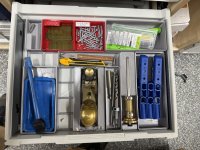
At this point, my preferred approach for gridding out a large number of drawers is mostly to use a mix of standard-size plates, e.g. 5x5 + 2x5, all printed with no spacers or anything, using a lightweight base without screws or anything. If you fill it with bins, you will probably have enough overlaps to not need to worry about connecting the grids together. If the drawers are steel, then you can put magnets in some/all of the bins (they're cheap and most of the generators have options to include magnet holes), and the magnets will hold things down well enough.
I like being able to use the stacked print models because printing baseplates is the most annoying part of Gridfinity, and the stacked plates makes that easy. If you do try them, start with a 2-layer, then a 4-layer, don't just put an 8-layer stack on and go to bed until you know what your printer likes and will do reliably (AMHIK). And I like doing everything with standard size plates because you can reuse them in different ways more easily. I do have a few drawers where having things work like one single plate is better for specific reasons but that is much more of a special case.
I am looking for software that would be learner/user friendly and am open to recommendations, if you have one (free is best, cheap is better,
The PerplexingLabs generator I linked above has a lot of good options for basic bins. There is also a generator plugin available for Fusion that will generate a variety of different bin and base configurations. I suspect there is one for Onshape too though I am less familiar with that since I switched to Fusion years ago.
Both Fusion and Onshape have free versions of their CAD available for personal use. Personally, I think if you are someone who likes building stuff from scratch, there is a ton of value in learning even fairly basic 3D modeling. If you have a 3D printer it opens the door to being able to make exactly what you want or need versus trying to find a design someone else made that you like.
How did you decide between Honeycomb Board vs Multi-Board?
Given a choice between multiple standards that solve the same problem, I always tell people to choose the one that's most popular unless the less common one has some advantage you absolutely need.



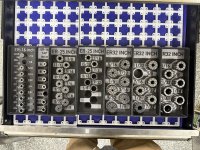
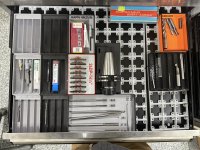

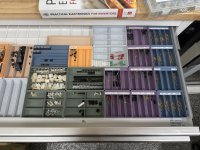
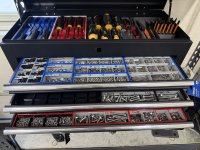

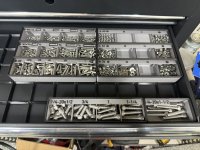


 ).
).

 - I have to figure out how many of which sizes I need, and then it's a $#@!load of parts to print... I'm much less of a car guy I think than most here so my wrench drawer gets opened maybe once a week. So it's not yet made it to the top of the to-do list...