To avoid these ads, REGISTER NOW!

Gridfinity Tool Storage

Bucko

Well-known member
Joined
Aug 23, 2021
Messages
679
Kay, that is a great link - thanks for posting!

I found a video from someone reviewing: it This FREE AI Tool Auto-Generates Gridfinity Bins! Looks like another good tool in the aresenal of organization. The company behind this also offers foam shadoboxes which is a great option for larger tools.

I am about 6 months into having a 3d printer and its crazy the stuff you didn't know you needed to make.
I am not very computer friendly so the fusion is currently beyond my level but this program has been amazing.
I will say to those interested in getting a printer make sure to budget a good chunk if money for other supplies like filament of course but also storage bins, dessicant, more filament, printer parts like build plates, more filament, hot ends (print nozzles), and more filament.
 
To avoid these ads, REGISTER NOW!

lovetap

Well-known member
Joined
Sep 23, 2021
Messages
248
Location
the last frontier
1766620962607.jpeg
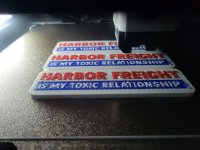
I caught the bug while trying to organize all the misc hardware spread across multiple bins. Which precipitated dusting off the Mini so I can run two printers. Been a good use for all the remnant spools, accidentally found it makes nice accent rings on the top.
Now it's costing me in cabinet plywood to build drawers for everything..

What has been the favorite "economical" bins, as in uses less filament? I've been printing the gridfinity "lites" but there is a jump between 3 and 6 units high.
 
Last edited:
OP
R

rdoty

ALLIANCE MEMBER
Joined
Feb 7, 2018
Messages
637
Location
Massachusetts
1766620962607.jpeg
I caught the bug while trying to organize all the misc hardware spread across multiple bins. Which precipitated dusting off the Mini so I can run two printers. Been a good use for all the remnant spools, accidentally found it makes nice accent rings on the top.
Now it's costing me in cabinet plywood to build drawers for everything..

What has been the favorite "economical" bins, as in uses less filament? I've been printing the gridfinity "lites" but there is a jump between 3 and 6 units high.

Welcome to the dark side!

Are you using stock designs or a Gridfinity generator? Do you use CAD at all?

The biggest part of the answer is that it depends on what you need... My default height for tool storage is 3U. For special cases I will use the shortest height that works. For tool storage you can save filament by using a smaller infill ratio - I usually use 15%.

The biggest filament savings I've seen was from trimming down the base grid. These are stout by default. I changed the settings to the thinnest possible in the Gridfinity generator since all the baseplates are doing in my application is aligning the bins in a drawer.

Bin storage depends on the context. Most of what I've done for bins has been to fit into Harbor Freight storage cases - so these are custom bins, not Gridfinity.

If you are doing Gridfinity bins in a drawer I would make the height just a little less than the depth of the drawer to maximize storage in the bin. Bin walls are thin and don't require much filament.

Another choice would be making stacking bins - which Gridfinity is designed for. I've avoided this as I want to see what I have without moving anything. But there are cases where this is a great approach.

Got any pictures of your storage bins in use?
 

sansbury

Well-known member
Joined
Oct 7, 2023
Messages
105
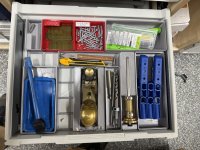
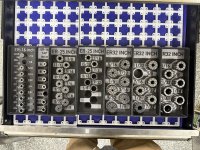
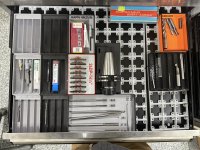
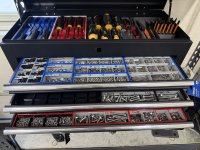
As promised here is some more of my Gridfinity madness. All of these drawers are works in progress, and a mix of standard, found online, and custom-drawn models to fit specific stuff.

Miscellaneous woodworking tools

IMG_2378.jpg
IMG_2377.jpg

Assorted measuring tools from my main machine shop chest - most of these were found online except for the 12" caliper one that I drew.

IMG_2379.jpg

These were all models I created. There are a lot of ER collet organizers out there, but I didn't like any of them. I wanted them to be labeled so they would be easier to find, and they are stackable in case they ever get moved to a deeper drawer. The labels on these are in layers so they aren't too much of a pain to print on a single-color printer. This is showing the silver/black galaxy PLA color scheme I've kind of started to settle on.

IMG_2381.jpg

Starting on the cutting tools and toolholders... probably another few spools of filament to burn covering all of this. I've been kind of settling on just having a bunch of basic bins for stuff like endmills, and am using silver for aluminum-specific and black for steel-specific tools.

IMG_2380.jpg
 

sansbury

Well-known member
Joined
Oct 7, 2023
Messages
105
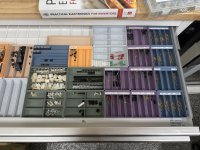
Next up is my electronics bench. This has a ton of colors going on, but as I started it later I had a better idea going in what I wanted to do with it. All of the bins in here are done with Polymaker matte PLA so they have a consistent appearance. I considered trying to incorporate labels into some of the parts bins, but I wasn't sure if I would stick with this sorting system, so I decided to go simpler.

The printed-on labels are nice but can take a lot of time to model. These drawers can hold bins up to 5U deep, so I printed the bins at 3U in case I want to add another layer beneath them for bulk storage. This size also is easier to pick parts out of. Pretty much all of these are just generic bins though I did some very fancy ones for my scope probes. Another good trick I've found is that when you are putting the bins into steel drawers, you can often hold everything in place with magnets in the bins only. This works well if you use a thinner baseplate and no drawer liner like you see here. The combined magnetic force on all the bins holds everything in place pretty well.

IMG_2383.jpg

IMG_2382.jpg

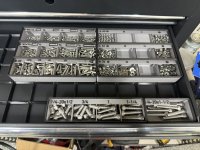
Last but definitely not least, this is where I went fully mad and decided I wantedneeded to have all my small hardware neatly sorted. I'd rather not think of how many hours I spent modeling these up but it makes me cackle like a mad scientist every time I open these drawers.

IMG_2372.jpg

If you look more closely one of the things you will see is that most of these bins incorporate features to assist in sorting parts. These took an inordinate amount of time to design in and I changed them multiple times as I continued printing bins. Some of this is to accommodate different sizes (4-40 vs. M8) and some of it was figuring what looked/worked better. At this point I've decided I'm going to try leaving this alone for a while and seeing how they work before trying to come up with a unified/consistent system, at which point I will probably try to make something worth publishing and sharing.

IMG_2373.jpg

IMG_2375.jpg

This one was a particularly complex example, because it contains 22 different sizes of set screw in a ~3x5" space about 1-1/2" tall when you stack them. This one doesn't have part-ID features on it because I had a moment of sanity and realized I would probably spend more time designing that than sorting SAE set screws for the rest of my life, even if I live to 100.

IMG_2376.jpg
 

Model A Fan

Well-known member
Joined
Dec 1, 2011
Messages
1,210
Location
NW Washington
@sansbury very nice designs and layouts. I get what you mean by having a consistent color pattern through the boxes. I see you use two different grid patterns, one is the type I have (magnet inserts) which I like due to the rigidity but it takes roughly 70g filament to do a 6x5 pattern grid. Do you have a link to the other type you use that isn't as filament heavy? I am limited on my editing as I don't have Fusion or similar; just Bambu Studio currently. I am looking for software that would be learner/user friendly and am open to recommendations, if you have one (free is best, cheap is better, I have limited time due to life/work/kids being massive distractions from my 3D printing obsession 😅🤣).

I already had a set of socket holders (magnetic base, plastic standard ones where you drop the socket into a hole, not Gridfinity based) and built out my ratchet/socket adjacent tools from there. Anything in metric is in a blue tray, anything SAE is in a red tray, ratchets are in Bambu Bright Green (chartreuse), Torx is in gray/black, screwdrivers will be in orange or yellow, so on and so forth. I think you can color code stuff but expand the coloring based on what the tool is and keep it tidy and not looking like Lucky Charms.

Thank you for showing your printed pieces, they look great, and its nice to see someone who also has a somewhat obsessive nature able to use these to scratch that itch. I just printed a bunch of wrench holders using some cheap filament off Amazon and they printed well. The pattern I used is off MakerWorld and the guy designed snap in labels for sizing which was really nice.

Here's the Gridfinity base I've been using:


Labels:


Here's the wrench holder set I used. It puts double holes in the top for some reason but the uploader's photos don't reflect that. Scroll to the comments to see someone's printed in red that shows the holes:


This guy's profile is really great for getting started on sockets and wrenches, etc.


How did you decide between Honeycomb Board vs Multi-Board? Multi-Board is all aligned due to the grid layout vs honeycomb being offset due to the way the hexagons are aligned.
 

sansbury

Well-known member
Joined
Oct 7, 2023
Messages
105
Do you have a link to the other type you use that isn't as filament heavy?
Actually, this brings up another good point which I forgot in my post, which is that it's good to pick one or two baseplate styles and stick to that. While the 42mm grid is standard, the thickness of baseplates isn't, so if you print six different kinds of baseplates, you can't necessarily mix and match them in one drawer.

At this time my favorite baseplates are one of these:

For very thin baseplates or where you have a ton of drawer space to fill, I like these. They come in stacked models, so you can print multiple baseplates in a single print. You have to peel them apart and they don't look as pretty but if you only care about function this is the easiest way I found to quickly fill out many square feet of drawer space:


If you want to make a baseplate to exactly fit a specific drawer/space, this generator will provide a model that breaks down into parts that fit on your printer and then snap together to form a single finished plate. They are also pretty thin and light on filament.


These are also good if you don't want to do the snap-together thing:

At this point, my preferred approach for gridding out a large number of drawers is mostly to use a mix of standard-size plates, e.g. 5x5 + 2x5, all printed with no spacers or anything, using a lightweight base without screws or anything. If you fill it with bins, you will probably have enough overlaps to not need to worry about connecting the grids together. If the drawers are steel, then you can put magnets in some/all of the bins (they're cheap and most of the generators have options to include magnet holes), and the magnets will hold things down well enough.

I like being able to use the stacked print models because printing baseplates is the most annoying part of Gridfinity, and the stacked plates makes that easy. If you do try them, start with a 2-layer, then a 4-layer, don't just put an 8-layer stack on and go to bed until you know what your printer likes and will do reliably (AMHIK). And I like doing everything with standard size plates because you can reuse them in different ways more easily. I do have a few drawers where having things work like one single plate is better for specific reasons but that is much more of a special case.

I am looking for software that would be learner/user friendly and am open to recommendations, if you have one (free is best, cheap is better,

The PerplexingLabs generator I linked above has a lot of good options for basic bins. There is also a generator plugin available for Fusion that will generate a variety of different bin and base configurations. I suspect there is one for Onshape too though I am less familiar with that since I switched to Fusion years ago.

Both Fusion and Onshape have free versions of their CAD available for personal use. Personally, I think if you are someone who likes building stuff from scratch, there is a ton of value in learning even fairly basic 3D modeling. If you have a 3D printer it opens the door to being able to make exactly what you want or need versus trying to find a design someone else made that you like.

How did you decide between Honeycomb Board vs Multi-Board?
Given a choice between multiple standards that solve the same problem, I always tell people to choose the one that's most popular unless the less common one has some advantage you absolutely need.
 

sansbury

Well-known member
Joined
Oct 7, 2023
Messages
105
Here's the wrench holder set I used. It puts double holes in the top for some reason but the uploader's photos don't reflect that. Scroll to the comments to see someone's printed in red that shows the holes:
Yeah, I have had those downloaded for about six months now, but I keep putting it off :ROFLMAO: - I have to figure out how many of which sizes I need, and then it's a $#@!load of parts to print... I'm much less of a car guy I think than most here so my wrench drawer gets opened maybe once a week. So it's not yet made it to the top of the to-do list...
 

rmack898

Well-known member
Joined
Jan 23, 2007
Messages
3,144
Location
Honu Grove NE Florida
[ if you have one (free is best, cheap is better, I have limited time due to life/work/kids being massive distractions from my 3D printing obsession 😅🤣).
Freecad is what I have been using in my shop. I use it mostly for 2D on my plasma table but it is a fully functional 3D CAD program.


I've been printing nothing but 6x6 grids so far. I have a bunch of Vidmars to fill so this will be a long term project for me.
 
OP
R

rdoty

ALLIANCE MEMBER
Joined
Feb 7, 2018
Messages
637
Location
Massachusetts
Owning a printer makes you seek out problems that don't need solutions but that you can solve with a printed design
So very, very true. I can't decide if a 3D printer plus CAD software is a lifestyle or an addiction...

I refuse to think of the number of times I've done the <stare into infinity><Yeah, I can make that> dance.
 
Last edited:

sansbury

Well-known member
Joined
Oct 7, 2023
Messages
105
So very, very true. I can't decide if a 3D printer plus CAD software is a lifestyle or an addiction
The answer to your question is “yes.”

I've been printing nothing but 6x6 grids so far.
Worst part of Gridfinity. The stacked baseplates I posted above make it a bit more tolerable.

Some people seem to have had luck doing laser cut plates as the angles seem non-critical. I did also see some posts where a guy had a custom router bit made with the profile so he could cut them in 6mm ply on a router table. I have a 2x4’ router so if I do another big chest I might go that way.
 

Model A Fan

Well-known member
Joined
Dec 1, 2011
Messages
1,210
Location
NW Washington
Yeah, I have had those downloaded for about six months now, but I keep putting it off :ROFLMAO: - I have to figure out how many of which sizes I need, and then it's a $#@!load of parts to print... I'm much less of a car guy I think than most here so my wrench drawer gets opened maybe once a week. So it's not yet made it to the top of the to-do list...
I printed all my metric and SAE "blocks" and started in on the stacked grids you posted (thank you very much by the way!). I had been printing those grids with the magnet holes but they take 70g of filament per 6x5 and the stacked grids (4 high and 5x4 grid) take 100g (25g each). Much more economical for something like this that won't see lots of movement.

The easiest thing to do on the wrench holders is to count how many wrenches you have, measure their thickness at both ends right before the box or open end, and then correspond that with the parts on the file and clone them. It took 3hrs or so per metric and SAE sets, but I just print them when I go to bed and voila they're ready in the morning for my kids to pull off and lose around the house. 🤣😅

Thanks for all the guidance and advice, its great to have someone else who has a somewhat perfectionist personality in this regard. My wife says I'm too meticulous and precise. Kinda like Henry Ford when he couldn't make a car because he was too exact. "The enemy of good is perfection."

My newest print: 😇

20260103_222437.jpg
 

sansbury

Well-known member
Joined
Oct 7, 2023
Messages
105
My newest print:
LOL. I wish I could say the same. I do CNC machining so my average HF trip might pay for a single CAT40 toolholder… I already own two dozen of those and keep finding reasons I need three or four more. Then there’s the tools that go in them 😳

The thing that keeps me from doing the wrench drawer is just the overhead if counting and measuring everything. I have two printers so I can crank parts out pretty fast if I have a few beds’ worth of stuff mapped out. Maybe I’ll give it another go today.
 

Grant Gunderson

Well-known member
Joined
May 17, 2013
Messages
2,318
Location
Bellingham, WA
I’m planning on making the plunge for brother 3D printer realm in the next couple of months. I’ve been resisting the urge to pickup a 3D printer as I know soon as I get one I’ll justify needing a second or third to speed up production. The modularity of Gridfinity is my main justification to pick up a printer, but the idea of using it for outfitting 20+ Vidmar / Lista cabinets is overwhelming and I know once I do get one I’ll want to do the rest.

So am I crazy to get an H2C (kids really want to play with a laser cutter) and then a couple cheaper P2S or cheaper H2 series printers for production of gridfinty pieces? Thinking same bed size for all makes sense. I see most of my gridfinity stuff being two colors.

I’m curious with the relatively low price of 3D scanners these days, does anyone have a good and effecient workflow for scanning more complex tools into a generated gridfinity layout? It would save a ton of time to not have to manually model each tool.

also curious as to why the 42mm grid system of Gridfinity? That number seems arbitrary When Festool / euro cabinets are based on a 32mm system and 42mm doesn’t seem to go cleanly into most commercial tool drawers either. Would I be crazy to change that to a dimension that’s divisible by all of my drawers or is that insanity.
 

zman

Well-known member
Joined
Apr 3, 2006
Messages
154
Location
Raleigh NC
So am I crazy to get an H2C (kids really want to play with a laser cutter) and then a couple cheaper P2S or cheaper H2 series printers for production of gridfinty pieces? Thinking same bed size for all makes sense. I see most of my gridfinity stuff being two colors.

I wouldn't do the Laser Cutter in there. It creates a mess that needs to be kept clean for the 3D printing to keep working well. For the price of the laser add on you can also get a cheap useable laser cutter.
 

sansbury

Well-known member
Joined
Oct 7, 2023
Messages
105
also curious as to why the 42mm grid system of Gridfinity?
Because Zack Freedman is a massive **** and 42 is the answer to everything. It’s a stupid answer, but at least entertaining.

Most of the Gridfinity generators allow you to change the grid size, but I wouldn’t do it. It locks you in to only using things you design yourself and I feel like sooner or later you’ll regret that.
 

Firebrick43

Well-known member
Joined
May 12, 2015
Messages
13,992
Location
West central Indiana
Because Zack Freedman is a massive **** and 42 is the answer to everything. It’s a stupid answer, but at least entertaining.

Most of the Gridfinity generators allow you to change the grid size, but I wouldn’t do it. It locks you in to only using things you design yourself and I feel like sooner or later you’ll regret that.
Massive **** would be a step up for him. He is serious mental issues.
 
To avoid these ads, REGISTER NOW!

mike93lx

ALLIANCE MEMBER
Joined
Dec 9, 2013
Messages
37,403
Location
Richmond, VA
I’m curious with the relatively low price of 3D scanners these days, does anyone have a good and effecient workflow for scanning more complex tools into a generated gridfinity layout? It would save a ton of time to not have to manually model each tool.
You need a 3d model for it? Or will 2d suffice?

Take a picture with a ruler in frame. Import it to fusion and outline it.
 

Model A Fan

Well-known member
Joined
Dec 1, 2011
Messages
1,210
Location
NW Washington
I’m planning on making the plunge for brother 3D printer realm in the next couple of months. I’ve been resisting the urge to pickup a 3D printer as I know soon as I get one I’ll justify needing a second or third to speed up production. The modularity of Gridfinity is my main justification to pick up a printer, but the idea of using it for outfitting 20+ Vidmar / Lista cabinets is overwhelming and I know once I do get one I’ll want to do the rest.

So am I crazy to get an H2C (kids really want to play with a laser cutter) and then a couple cheaper P2S or cheaper H2 series printers for production of gridfinty pieces? Thinking same bed size for all makes sense. I see most of my gridfinity stuff being two colors.

I’m curious with the relatively low price of 3D scanners these days, does anyone have a good and effecient workflow for scanning more complex tools into a generated gridfinity layout? It would save a ton of time to not have to manually model each tool.

also curious as to why the 42mm grid system of Gridfinity? That number seems arbitrary When Festool / euro cabinets are based on a 32mm system and 42mm doesn’t seem to go cleanly into most commercial tool drawers either. Would I be crazy to change that to a dimension that’s divisible by all of my drawers or is that insanity.
If I were to do this from scratch, I'd probably get the P1S with the AMS 2 Pro again (bought back in October, have had some issues, but nothing that hasn't been overcome yet) for "production". It isn't a fancy touch screen like the P2S, but its also very capable. I've been learning how to use it and have started editing designs made by other people (removing lettering from toolbox labels made by other people is all so far). I don't have any experience with the H series, so I cannot comment on your P2S/H choice. The P1S has been a good "beginner" machine and won't be outgrown by me until I start making my own models, but even then, I'm not sure what the P2S offers besides a touch screen and perhaps being a bit faster (?). I really don't know. What does your research show you? When I bought, the P2S was not available and the H2C was way out of my budget to be able to slip it into my monthly expenses "unnoticed" 😅🤣

I can't speak on the laser engraver option on the printers, but I've heard it makes a lot of mess and a coworker who has one has said its "cool", but nothing more (so it might be a bit underwhelming, I'm not sure). I would stick with the stock/standard grid as anyone else who has designed pieces will use the standard size. Why reinvent the wheel?

There is a guy in the area that is selling a bunch of Lista style cabinets on Facebook marketplace, did you get some from him?
 
OP
R

rdoty

ALLIANCE MEMBER
Joined
Feb 7, 2018
Messages
637
Location
Massachusetts
You need a 3d model for it? Or will 2d suffice?

Take a picture with a ruler in frame. Import it to fusion and outline it.
Use the Fusion Canvas feature. This lets you select a plane or face, import a picture, and scale the picture to an exact size.

If using a Gridfinity solid bin, select the top of the bin for the Canvas plane.

I usually include a 6" steel scale in the picture, blow it up until if fills the screen, and then select both ends and set the scale to 6". This gives you an accurate image on the Canvas.. Trace around the image creating a closed curve. Then offset the curve by however much clearance you want - probably something like 0.060".

Take this curve, extrude it the desired depth, and subtract it from the bin. Voila! You have an almost finished bin. You will probably want to add some finger reliefs so you can easily pick up the tool.

With a bit of practice you can zip through this process in surprisingly little time
 
Last edited:

R07AG

Well-known member
Joined
Feb 26, 2024
Messages
52
Location
Wisconsin
You need a 3d model for it? Or will 2d suffice?

Take a picture with a ruler in frame. Import it to fusion and outline it.

Use the Fusion Canvas feature. This lets you select a plane or face, import a picture, and scale the picture to an exact size.

If using a Gridfinity solid bin, select the top of the bin for the Canvas plane.

I usually include a 6" steel scale in the picture, blow it up until if fills the screen, and then select both ends and set the scale to 6". This gives you an accurate image on the Cavnas.. Trace around the image creating a closed curve. Then offset the curve by however much clearance you want - probably something like 0.060".

Take this curve, extrude it the desired depth, and subtract it from the bin. Voila! You have an almost finished bin. You will probably want to add some finger reliefs so you can easily pick up the tool.

With a bit of practice you can zip through this process in surprisingly little time

I haven't used these yet, but I've seen two sites that can automate a lot of that.


Grant Gunderson

Well-known member
Joined
May 17, 2013
Messages
2,318
Location
Bellingham, WA
If I were to do this from scratch, I'd probably get the P1S with the AMS 2 Pro again (bought back in October, have had some issues, but nothing that hasn't been overcome yet) for "production". It isn't a fancy touch screen like the P2S, but its also very capable. I've been learning how to use it and have started editing designs made by other people (removing lettering from toolbox labels made by other people is all so far). I don't have any experience with the H series, so I cannot comment on your P2S/H choice. The P1S has been a good "beginner" machine and won't be outgrown by me until I start making my own models, but even then, I'm not sure what the P2S offers besides a touch screen and perhaps being a bit faster (?). I really don't know. What does your research show you? When I bought, the P2S was not available and the H2C was way out of my budget to be able to slip it into my monthly expenses "unnoticed" 😅🤣

I can't speak on the laser engraver option on the printers, but I've heard it makes a lot of mess and a coworker who has one has said its "cool", but nothing more (so it might be a bit underwhelming, I'm not sure). I would stick with the stock/standard grid as anyone else who has designed pieces will use the standard size. Why reinvent the wheel?

There is a guy in the area that is selling a bunch of Lista style cabinets on Facebook marketplace, did you get some from him?
I'm kinda leaning towards the larger bead size of the H2 series, but still haven't decided. Wont be ordering one for a few months at least, so have some time to research a bit more before making a decision.

I saw those cabinets, but he wants a hell of a lot for them, given the condition. I might reach back out to him next week if he still has them, once things settle down around here. Im swamped at the moment.
 

Model A Fan

Well-known member
Joined
Dec 1, 2011
Messages
1,210
Location
NW Washington
I'm kinda leaning towards the larger bead size of the H2 series, but still haven't decided. Wont be ordering one for a few months at least, so have some time to research a bit more before making a decision.

I saw those cabinets, but he wants a hell of a lot for them, given the condition. I might reach back out to him next week if he still has them, once things settle down around here. Im swamped at the moment.
He said they were $1200+ which was a "that's a no from me dog" moment. I said I wasn't in the same ballpark and he said "the seller would accept an offer"...I'm in the used Harbor Freight budget currently...too much spent on other stuff currently 😅
 

rmack898

Well-known member
Joined
Jan 23, 2007
Messages
3,144
Location
Honu Grove NE Florida
I'm 1/4 of the way through my first vidmar/gridfinity drawer. I'm pretty sure I'm going to run out of filament before I finish the drawer.
This is my first experience 3D printing so I'm pretty much clueless. I bought the A1/AMS lite combo along with a selection of Bambu filaments. I've been using PLA matte for my bins and I like the results. What are my options for non-Bambu matte filaments?
There is so much conflicting info on the web. I'd like to find a good alternative that ships fast although I hate patronizing "the bookstore", I will if I have to.
What do you all suggest?
 

pcrov

Well-known member
Joined
Feb 27, 2023
Messages
375
Location
Ontario, CA
I'm 1/4 of the way through my first vidmar/gridfinity drawer. I'm pretty sure I'm going to run out of filament before I finish the drawer.
This is my first experience 3D printing so I'm pretty much clueless. I bought the A1/AMS lite combo along with a selection of Bambu filaments. I've been using PLA matte for my bins and I like the results. What are my options for non-Bambu matte filaments?
There is so much conflicting info on the web. I'd like to find a good alternative that ships fast although I hate patronizing "the bookstore", I will if I have to.
What do you all suggest?
Elegoo has a nice selection of matte pla colors https://us.elegoo.com/products/pla-matte-filament-1-75mm-colored-1kg. Though they're on the pricier side along with bambu you can sometimes catch a discount either on their site or amazon.

Speaking of which, their 4-packs have a decent deal right now

 
Last edited:
To avoid these ads, REGISTER NOW!
Top Bottom