
You are using an out of date browser. It may not display this or other websites correctly.
You should upgrade or use an alternative browser.
You should upgrade or use an alternative browser.
The Everything 3D Printer Thread
- Thread starter BoilermakerFan
- Start date

Jeff
Well-known member
PC-3M on those aliens as it has a soft tip. The PC-1M are small tips but hard and can cause splattering when crossing the print lines.Those look nice, and way better than using a sharpie, which tends to color bleed on the layer lines. I'm guessing you used something like the PC-1M or PC-3M there?
moab11
Well-known member
Just what I wanted to know, thank you!PC-3M on those aliens as it has a soft tip. The PC-1M are small tips but hard and can cause splattering when crossing the print lines.
moab11
Well-known member
How long would 30 spools last in your farm? I thought I remembered you ordering much larger orders previouslywelp. we wait on ocean freight now. in the meantime
neblinc
Well-known member
If you have a newer iPhone that has built in Lidar you can use that for a start.
Black300zx
Well-known member
What is your planned use of the 3D scan data? I bought a CR-Scan Ferret on black Friday and for $200 (bare wired kit, no wireless) I'm pretty impressed. It really works well for parts with lots of texture such as cast intake/exhaust manifolds. I have aspirations of designing some custom parts for my Z someday, so I've been digitizing the engine accessories piece-by-piece which is giving me really good data to design to someday in the future. If your goal is to scan a part and print a duplicate with minimal CAD effort, it probably won't suit your needs as it does struggle a bit with small, deep features such as mounting holes, casting core-outs, etc. I've had really good success however getting accurate interface geometry to someday design to.anyone running a 3d scanner?
thinking of investing into a mid price point one.
Revopoint MetroX 3D
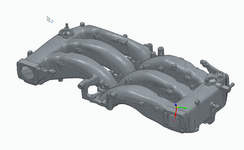
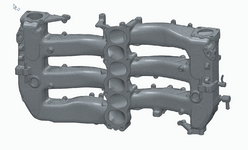
Here's my upper intake plenum. Took me about 30min to get good scan data for all of the areas between the runners. As you can see the bolt holes come through as 2-3mm deep dimples which wouldn't be adequate for printing a copy, but I could add that detail in with some CAD work. What's most important for me is that the relative orientation of all the interface surfaces (Throttle body flanges, coil pack bracket mounting surfaces, lower plenum gasket surface, etc) are all accurate enough to reverse-engineer from which is something that I could never get using basic measuring tools.
Cruzan80
Well-known member
Also how big is your intended scan, and who will be using it? For our HS, they demoed something that looked like a VR headset on a stick, And you used the colors on the back of the screen to see where it needed more detail. How er, it needed to be connected via cable, and if dropped, was 5-figures to repair. Could scan something as large as you wanted, just by moving it around.
We ended up with Matter and Form 3's. Probably about the size of a closed Chromebook, goes on a tripod with an attached turntable. Put your object on it, and set the rotations/scan details. Seems to be working well so far, and can be set up for repeatability (aka, everyone's item is about X size, calibrate once and then scan multiples). Also since the scanner doesn't move, less risk of breakage.
We ended up with Matter and Form 3's. Probably about the size of a closed Chromebook, goes on a tripod with an attached turntable. Put your object on it, and set the rotations/scan details. Seems to be working well so far, and can be set up for repeatability (aka, everyone's item is about X size, calibrate once and then scan multiples). Also since the scanner doesn't move, less risk of breakage.
Black300zx
Well-known member
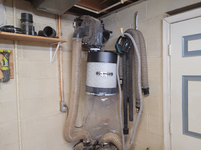
My recent personal printing project has been to print an adaptor to attach a dustrite 600CFM filter to my 1hp HF dust collector to replace the piss-poor leaky bag. The factory outlet fitting was about 1/2" too small in diameter and I had a cobbled together adaptor clamped/siliconed on. While I was at it I also used up a couple partial tubes of RTV sealing up all the leaking crevices.
Prior cobbled together mount:
CAD:

Remounted:

Prior cobbled together mount:
CAD:
Remounted:
Black300zx
Well-known member
FWIW, I haven't used a single bit of spray and most of the parts I've been scanning are painted black. The only thing it's struggled on w/ tracking are fairly featureless parts such as smooth piping, which tracking dots fix pretty well.i like the blue laser ones since they work on black/gloss without needing the spray.
Cruzan80
Well-known member
After winter break, I can get the size of the turntable measured. There are two calibration cards depending on how far away the scanner is. We have done black and gloss, mostly a matter of getting the exposure right, and ambient light matters more for those. For the piece you showed, it should easily fit, would probably prop it up 2-3 different ways, and combine scans, so it could grab the bin section with cutout accurately. The one we have would easily pick up the texturing on it.i like the blue laser ones since they work on black/gloss without needing the spray.
For ours, you can auto-combine scans, or attach reference points to manually orient different scans if needed (sounds similar to tracking dots).
Cruzan80
Well-known member
Super long video walking thru a full scan start to finish (shoe as a model).
Scanning a car engine (never personally done anything this big)
Scanning a car engine (never personally done anything this big)
Black300zx
Well-known member
Here's part of my in-progress CAD assembly of my engine. DS manifold, turbo, turbo inlets/outlets and oil drain pipes. Manifold (red) = raw cast iron. Compressor inlet (cyan) is painted satin black. Compressor outlet (green) is raw cast aluminum. Downpipe (yellow) is polished stainless steel. Oil drain tube (orange) is yellow zinc (?) plated steel. Turbo (purple) is a combination of cast aluminum and cast iron with various plated steel brackets and coolant tubes. Each part scanned individually and assembled in Solid Edge.
The yellow colored patches shown on some part surfaces are the mesh regions that I used to define best-fit reference planes in Solid Edge for creating assembly constraints. No spray used for any of this. The stainless downpipe needed some tracking dots added to help the scan.


The yellow colored patches shown on some part surfaces are the mesh regions that I used to define best-fit reference planes in Solid Edge for creating assembly constraints. No spray used for any of this. The stainless downpipe needed some tracking dots added to help the scan.
sh944
ALLIANCE MEMBER
I’m also very interested in getting a scanner, but my pain threshold is about $300 for one. More than that and I’ll wait. The ones I have seen before that works cost $1,000’s of dollars and I just don’t have a need for that level of performance.
I am looking to capture basic features of mostly small parts (something no bigger than what would fit on a Bambu print bed) and be dimensionally correct (or at least pretty close)of things that I typically want to enhance or modify in some way. If I could start without having to build it all from scratch in CAD, I think it would save a good bit of time.
Would anyone here recommend any of the cheap ones on the market?
I am looking to capture basic features of mostly small parts (something no bigger than what would fit on a Bambu print bed) and be dimensionally correct (or at least pretty close)of things that I typically want to enhance or modify in some way. If I could start without having to build it all from scratch in CAD, I think it would save a good bit of time.
Would anyone here recommend any of the cheap ones on the market?
Cruzan80
Well-known member
No experience with the cheaper scanners, but I will say that OnShape is able to work with both meshes (.stl) and parametric solids in a a CAD environment, at the same time. So if you need to add to an existing print file, or modify it in some way, without rebuilding it entirely as a STEP, that is an option.
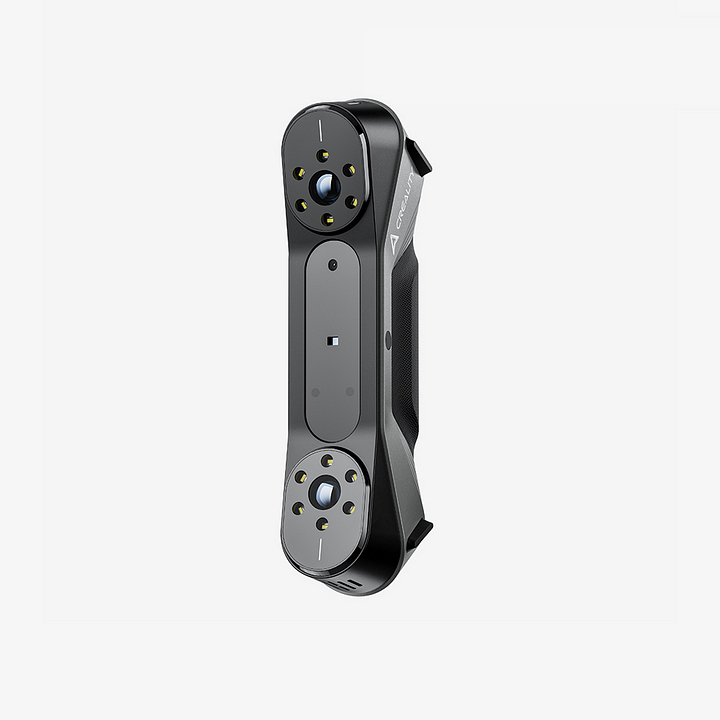
I snagged a CR raptor for 750. its refurb but meh. got a year to return it.
 www.creality.com
CR-Scan Raptor
Creality CR-Scan Raptor delivers ultra-fast scanning with blue laser & NIR hybrid tech, ideal for professional-grade 3D modeling and precision work.
www.creality.com
Black300zx
Well-known member
I contemplated the Raptor before getting the Ferret. Let us know how you like it!I snagged a CR raptor for 750. its refurb but meh. got a year to return it.
CR-Scan Raptor
Creality CR-Scan Raptor delivers ultra-fast scanning with blue laser & NIR hybrid tech, ideal for professional-grade 3D modeling and precision work.
Farmall450
Well-known member
I'm tired of running to the garage or basement for a 10mm, and don't want to pay $10 for a used USA one on feebay.

I've had some issues lately with the feed tube getting caught in the spool, so I have to keep taking off the post-extruder nut. Next print is going to be a sphere w/ a 4mm hole that should prevent that issue from ever occurring again.
I've had some issues lately with the feed tube getting caught in the spool, so I have to keep taking off the post-extruder nut. Next print is going to be a sphere w/ a 4mm hole that should prevent that issue from ever occurring again.
kppolich
Well-known member
Just sold my 2 year old, Trusty as ever Anycubic Vyper bed slinger and now I'm on the hunt for a Bambu Lab X1C + AMS. I think I'll wait until after the holidays and see what pops up on Marketplace.
slodat
ALLIANCE MEMBER
I have the Shining 3D Freescan Combo. Has been really useful on my reverse engineering projects. I have a digital fabrication thread on here with some details of it in use..

I contemplated the Raptor before getting the Ferret. Let us know how you like it!
I got bored the other day at a family gathering and went down the rabbit hole of scanners....somewhere along i took the path of buying one...unsure yet if it leads down a deeper set of bunny tunnels or back to the light.
Ended up with a Creality Otter which is their mid level, ordered direct from Creality as they were cheapest. Also considered the Shinging 3D Einstar which is their entry level but the PC requirements were a lot higher and my CAD machine is a desktop on the 2nd floor which isn't super conducive to scanning larger stuff in the garage. Should ship this week but unknown when it shows up
As we're all honest in this circle of tool and gadget whores anonymous, it's bought as a toy. I don't have any business needs for it or any immediate projects that require it, there are some potential projects i could see trying it out on....but after a couple random projects I'm sure I'll be trying out their person scanning feature to generate printable files of the family
Last edited:
Poolshark314
Well-known member
Just be careful in the fb groups "selling" them. Lots of scammers just reposting other people's photos with too good to be true offersJust sold my 2 year old, Trusty as ever Anycubic Vyper bed slinger and now I'm on the hunt for a Bambu Lab X1C + AMS. I think I'll wait until after the holidays and see what pops up on Marketplace.
Black300zx
Well-known member
Good luck with it, I'm sure you'll be happy with it. My initial tip with the software is it use the setting (small medium large) that corresponds to the smallest features of the part you're scanning. If you are scanning a large part that has small features, the small setting works best in my experience.I got bored the other day at a family gathering and went down the rabbit hole of scanners....somewhere along i took the path of buying one...unsure yet if it leads down a deeper set of bunny tunnels or back to the light.
Ended up with a Creality Otter which is their mid level, ordered direct from Creality as they were cheapest. Also considered the Shinging 3D Einstar which is their entry level but the PC requirements were a lot higher and my CAD machine is a desktop on the 2nd floor which isn't super conducive to scanning larger stuff in the garage. Should ship this week but unknown when it shows up
As we're all honest in this circle of tool and gadget whores anonymous, it's bought as a toy. I don't have any business needs for it or any immediate projects that require it, there are some potential projects i could see trying it out on....but after a couple random projects I'm sure I'll be trying out their person scanning feature to generate printable files of the family
Feel free to message me with any questions
Good luck with it, I'm sure you'll be happy with it. My initial tip with the software is it use the setting (small medium large) that corresponds to the smallest features of the part you're scanning. If you are scanning a large part that has small features, the small setting works best in my experience.
Feel free to message me with any questions
Appreciate the support! Will be posting my progress somewhere here as I get to learning it
draco_1967
Well-known member
I got a big box of accessories from Bambu (hotends/nozzles, build plates, etc.), and they threw in 2 spools of filament! I got a nice dark blue matte PLA and a spool of PA6-GF - a pretty pricey material! I'm excited to try that one out.
Now I just need to be patient for the printer that won't ship for another 2 weeks...
Now I just need to be patient for the printer that won't ship for another 2 weeks...
shakenfake
Well-known member
sold my Ender 3 today. I think I might have under priced it at $55. Oh well, moving on.
youinreverse
Well-known member
I got my P1S last month and kicked my Ender 3 down the road for $30 and felt great about it. I'm loving the P1S and 3d printing feels like magic again.sold my Ender 3 today. I think I might have under priced it at $55. Oh well, moving on.
shakenfake
Well-known member
I’m out of the game for a while. Don’t know when I will pick one up again.I got my P1S last month and kicked my Ender 3 down the road for $30 and felt great about it. I'm loving the P1S and 3d printing feels like magic again.
If you do get back into it keep in mind that Bambu Labs aren't the only good options. On other forums I've seen where people confuse the modern line of Enders (V3 models) with the only Ender 3 and Ender 3Pro. Not the same things Not to mention the K1 and K2 series* (*original K1 had issues but from what I've seen that was solved with the K1C and rolling changes to the K1). Also other brands like Flashforge make good printers.I’m out of the game for a while. Don’t know when I will pick one up again.
Bambu is good but I wouldn't avoid the alternatives.
Farmall450
Well-known member
3D printed a little sphere for my feed tube after it snagged on me during a long print.
Should be gtg now.


Should be gtg now.
shakenfake
Well-known member
I think I like the Bambu the most and some close friends with lots of 3D printing experience have really pushed me towards them.If you do get back into it keep in mind that Bambu Labs aren't the only good options. On other forums I've seen where people confuse the modern line of Enders (V3 models) with the only Ender 3 and Ender 3Pro. Not the same things Not to mention the K1 and K2 series* (*original K1 had issues but from what I've seen that was solved with the K1C and rolling changes to the K1). Also other brands like Flashforge make good printers.
Bambu is good but I wouldn't avoid the alternatives.
Options will be open when I get around to it again but that’s sort of my target right now

Farmall450
Well-known member
No chance the top screws off?HO ho ho....


lilscorpion
Well-known member
I’ve had a 3D printer now for a few weeks so naturally I’ve been printing like mad and decided to catch up on this thread and now it’s about scanners? I now want…You guys are killing me!!I got bored the other day at a family gathering and went down the rabbit hole of scanners....somewhere along i took the path of buying one...unsure yet if it leads down a deeper set of bunny tunnels or back to the light.
Ended up with a Creality Otter which is their mid level, ordered direct from Creality as they were cheapest. Also considered the Shinging 3D Einstar which is their entry level but the PC requirements were a lot higher and my CAD machine is a desktop on the 2nd floor which isn't super conducive to scanning larger stuff in the garage. Should ship this week but unknown when it shows up
As we're all honest in this circle of tool and gadget whores anonymous, it's bought as a toy. I don't have any business needs for it or any immediate projects that require it, there are some potential projects i could see trying it out on....but after a couple random projects I'm sure I'll be trying out their person scanning feature to generate printable files of the family