
You are using an out of date browser. It may not display this or other websites correctly.
You should upgrade or use an alternative browser.
You should upgrade or use an alternative browser.
The Everything 3D Printer Thread
- Thread starter BoilermakerFan
- Start date
Jehannum
Well-known member
going free shipping with these costs. what you guys think?
10$kg for PETG
11$ kg for PLA
$15 silk PLA
in blocks of 12kg. mix and match ok.

PelicanPines
ALLIANCE MEMBER
Cart has 12 spools... perfectly ready to checkout.ok i got it working. I think.
who wants to test it out. no codes. no gimmicks. just multiples of 12 needed. it should block you with this alert:
Cart has 12 spools... perfectly ready to checkout.
i dont shopify code so had to wing it.
PelicanPines
ALLIANCE MEMBER
Now I have 12 more spools... I hope I don't brick my printer...i dont shopify code so had to wing it.
Last edited:
ok i got it working. I think.
who wants to test it out. no codes. no gimmicks. just multiples of 12 needed. it should block you with this alert:

I'm your huckleberry
Jehannum
Well-known member
Well I ordered 12 spools from you. Seemed to work.i dont shopify code so had to wing it.
ptt49er
Well-known member
Got an order in! Just in time to start printing custom key tags for my wife's first grader class!
PelicanPines
ALLIANCE MEMBER
Screw it... I placed my order. All my favorite flavors.
Spire
Well-known member
Looked over the website looking for some shipping information for Alaska... NO ONE ships to Alaska for free. Do you have something in mind for AK and Hawaii shipping? Continental US and Contiguous US?
soloz2
Well-known member
What brand are these spools? If I hadn’t just loaded up on bambu I’d be all over this, but probably need to buy a dryer before anything else. My PETG has been brittle 
Looked over the website looking for some shipping information for Alaska... NO ONE ships to Alaska for free. Do you have something in mind for AK and Hawaii shipping? Continental US and Contiguous US?
message me what you want. i'll get you fixed up.
What brand are these spools? If I hadn’t just loaded up on bambu I’d be all over this, but probably need to buy a dryer before anything else. My PETG has been brittle
factory direct. so the "brand" is yasin.
Jehannum
Well-known member
Things fit! This is a big step forward, but now the issue is getting the cavities to align with the guides in the instrument cluster.

I use con-Fusion or Inventor mostly. Just kept banging on it until I get it to do what I want. One big problem I had with Fusion on first learning it was its default 'parametric history' timeline mode. I always turn that off and use 'direct modeling'. Just have to remember to save frequently.
Last edited:
pcrov
Well-known member

Shake shake shake
Shake shake shake
Shake your spray paint
Shake your spray paint!
bugnut
ALLIANCE MEMBER
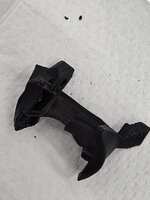
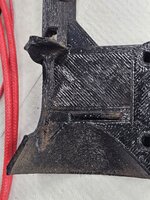
Finished completely disassembling Prusa hotend, learned more than I wanted to know. Placed bits in boiling water let soften and then set to scraping and cleaning. Reassembled on the bench. Then reviewed and ordered parts from Prusa. Ordered the hotend also, even though I checked parts with meter and they say they are working I thought for a C note it was worth having a backup in case of failure.
Attachments


soloz2
Well-known member
Ordered a creality space pi plus. Wanted the x4, but considering I already spent so much just getting a printer recently I opted for the cheaper version. Almost with with the $60 polydryer but wanted to be able to dry more than 1 spool at a time.
pcrov
Well-known member
I have two of them. Great dryer, terrible touchscreen. You gotta kinda touch and hold for it to register. You'll eventually get the feel for it, but it can be pretty annoying until you do.Ordered a creality space pi plus.
PelicanPines
ALLIANCE MEMBER
My wife says the same thing about me...I have two of them. Great dryer, terrible touchscreen. You gotta kinda touch and hold for it to register. You'll eventually get the feel for it, but it can be pretty annoying until you do.
I have the dual Pi dryer'er. I have it sitting next to my printer so it can direct feed. Problem is... the screen has to face the wall for things to not tangle. Need a deeper table ... First world problem.
Jehannum
Well-known member
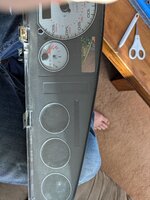
Rev 1: make the clock ring smaller so that the back cover will fit better.
Result was a pretty good success:

Back cover fits on now:

And the screens, warning lamps, and blanking panel fit:
Result was a pretty good success:
Back cover fits on now:
And the screens, warning lamps, and blanking panel fit:
Grant Gunderson
Well-known member
I’ve been resisting picking up a 3d printer for years, as what I used for prototyping in college 20 years ago really tuned me off of them and I’ve seen a whole lot of **** parts done on them ( wrong material, poor design etc) but it seems like the Bambu ones are pretty dialed at this point. I’m mainly interested in doing gridfinity for organizing all of my tooling and have 20 lista style cabinets so I’ll be doing a ton of printing. I realize this will take a long time to complete so will focus on converting one drawer at a time over. Ideally I need something I can trust to hit run and let it do its thing all night and then do the next batch when I arrive in the morning etc.
I really like the idea of doing two toned parts for holding various tools etc the foam bellow is a good example of what I have in mind. Would be nice to do size labels too. Plus with the costs of this much foam 3d printing with a modular system so I don’t have to redo a drawer each time I add more tools is a big plus.

So given I’ll be doing a ton of larger gridfinity stuff and two colored parts, what’s the thought on going H2S vs H2C seems like the C will save material but if I keep parts to only 2 colors is it really that much of a difference?
Also thoughts on the laser module for etching labels vs doing two colored parts? Seems like they could potentially speed production up but I have no idea. My kid really wants one with laser, but he’s been watching too many mark rover videos so I don’t think he fully understands you gotta design the parts first! I would like to lazer etch some sizes in larger fonts on to some of my sockets as my best vision goes to ****.
I do see myself using some of the higher end filaments for building stronger tool holders / custom tooling in the shop too.
I can also see using this to make some custom shaft seals as well…
Not afraid to spend the money on the h2c, but am I better off with 2 h2s machines? With a larger volume to print I’m also concerned about minimizing waited material as material costs do add up. I also am usually a buy it once kind of guy and hate buying something to save a few bucks only to find I need to upgrade later.
I really like the idea of doing two toned parts for holding various tools etc the foam bellow is a good example of what I have in mind. Would be nice to do size labels too. Plus with the costs of this much foam 3d printing with a modular system so I don’t have to redo a drawer each time I add more tools is a big plus.
So given I’ll be doing a ton of larger gridfinity stuff and two colored parts, what’s the thought on going H2S vs H2C seems like the C will save material but if I keep parts to only 2 colors is it really that much of a difference?
Also thoughts on the laser module for etching labels vs doing two colored parts? Seems like they could potentially speed production up but I have no idea. My kid really wants one with laser, but he’s been watching too many mark rover videos so I don’t think he fully understands you gotta design the parts first! I would like to lazer etch some sizes in larger fonts on to some of my sockets as my best vision goes to ****.
I do see myself using some of the higher end filaments for building stronger tool holders / custom tooling in the shop too.
I can also see using this to make some custom shaft seals as well…
Not afraid to spend the money on the h2c, but am I better off with 2 h2s machines? With a larger volume to print I’m also concerned about minimizing waited material as material costs do add up. I also am usually a buy it once kind of guy and hate buying something to save a few bucks only to find I need to upgrade later.
pcrov
Well-known member
$1000 difference buys a lot of material to spend on color changes. The example picture wouldn't even require a multi-material system to make. It's a single color change at a layer boundary. In the slicer you can add a pause after one layer, manually change filament to the second color, then continue on. This isn't wake-up-and-done convenient and I'd use an AMS instead anyway but it helps to think about what goes on in a print.I’m mainly interested in doing gridfinity for organizing all of my tooling and have 20 lista style cabinets so I’ll be doing a ton of printing. I realize this will take a long time to complete so will focus on converting one drawer at a time over. Ideally I need something I can trust to hit run and let it do its thing all night and then do the next batch when I arrive in the morning etc.
I really like the idea of doing two toned parts for holding various tools etc the foam bellow is a good example of what I have in mind. Would be nice to do size labels too. Plus with the costs of this much foam 3d printing with a modular system so I don’t have to redo a drawer each time I add more tools is a big plus.
So given I’ll be doing a ton of larger gridfinity stuff and two colored parts, what’s the thought on going H2S vs H2C seems like the C will save material but if I keep parts to only 2 colors is it really that much of a difference?
As cool as the H2C is you could have a small farm of A1's cranking out gridfinity for the price.Not afraid to spend the money on the h2c, but am I better off with 2 h2s machines? With a larger volume to print I’m also concerned about minimizing waited material as material costs do add up.
I think 3d printing is a good place to deviate from that. You learn a lot by doing, particularly about what you really need; the price differences are more than just a few bucks; and the tech is still advancing rapidly. When you do upgrade it's not like you're throwing the old printer away - it's still got gridfinity to print. Heck, even if you start with the most expensive out there you might want to grab a cheap little second printer just to have something to iterate on designs with while the big boy works on production.I also am usually a buy it once kind of guy and hate buying something to save a few bucks only to find I need to upgrade later.
3D printing is a rabbit hole filled with rabbit holes, gridfinity being one of them. Don't expect to navigate it all ahead of time.
oneleglance
Member
- Joined
- Jun 24, 2021
- Messages
- 11
That is impressive savings for me as I currently buy from Bambu (because I am lazy and like the RFID tags that auto-read in the AMS)going free shipping with these costs. what you guys think?
10$kg for PETG
11$ kg for PLA
$15 silk PLA
in blocks of 12kg. mix and match ok.
PelicanPines
ALLIANCE MEMBER
@Grant Gunderson Think of 3D Printers as individual wrenches. You shouldn't have "Only One". As far as GridFinity Two Color Prints... I used to get two color prints rather nicely on a single spool printer by inserting a "PAUSE" in a specific layer line in the slicer then swapping out the spool for a vibrant color and print the completion of the part. (Just a suggestion)... Having say 3 or 4 printers going sounds like a better solution P1S's even. Don't know Bambus well... go for a minimum 300x300x300 bed. (my suggestion)...
Best of luck with your print farm... Remember ... when you decide to grow tomatoes... you don't plant one plant.
Best of luck with your print farm... Remember ... when you decide to grow tomatoes... you don't plant one plant.
That is impressive savings for me as I currently buy from Bambu (because I am lazy and like the RFID tags that auto-read in the AMS)
we're gona do refills too next round.
Cruzan80
Well-known member
Bambus A/P/X are all 256mm beds, the H2 are 320mm. The H2C would be the top of the line, if you are worried about "filament poop", the H2D could easily do two colors without it (and is cheaper). H2D is dual nozzle, vs the multi-nozzle of the H2C. Almost of the H2 support the vision encoding plate for super-high precision. You can also "trick" the AMS if you need more colors than it has available to load (you can string up to 4x AMS for 16 auto-options, but you can do 5x+ colors on a single AMS with some "tricks").Don't know Bambus well... go for a minimum 300x300x300 bed. (my suggestion)...
For labelling parts, it is the same simple "Pause at Z" to swap, or Bambu's software has a "paint" option where you can select surfaces to make a different color, if you don't want the color in other adjacent levels.
The Pause at Z would mean the bottom layers of the "foam" are all blue, then swaps to black at a certain height (literally think of stacking different color post-it notes). The "paint" option let's the outsides all be black, and just blue on the inside of the cutouts (just depends on how much you care). It will need to swap (in some way)/more for the second option, as each layer will have multiple colors.
IIRC, the laser module occupies the same physical space as the printer hotend, so you have to swap them out manually between jobs. Also, don't know the specifics of lasering on 3-D prints.
Our X1E has handled everything up to the PAHT-CF (High temp CF infused Nylon) without issues (haven't tried TPU). The benefit of a dual nozzle would be for printing with support material, as swaps can get wasteful because since every layer, it has to swap.
For Stian, I would look at getting a A1 Mini for him to play with. I got one for my son (he wanted something he could run w/o help), and then we just printed support holders to rig up 3x spools off of it. He "manually" swaps colors instead of an AMS, but it was $100 for a lightly used one. Happy to continue chatting via PM on business use vs kid use (as I have the school ones that occasionally follow me home over breaks that he uses too).
jayz66ragtop
Well-known member
Well, bit the bullet and ordered up an H2C yesterday with the ultimate package. A lot of the stuff I print is three or four colors and it kills me how much filament is wasted with my X1C. Nothing at all wrong with my X1C, a co-worker showed interest in it and I thought he was going to buy it but he bought a Core One. I'll decided what to do with the X1C once the H2C is here, not really enough space to have them both setup but may rearrange some things.
For those wondering why the H2C and not one of the tool changers. I read and read about all the other brands and their tool vs nozzle changer and kept coming back to the H2C. Because of these reasons:
1. I bought my X1C on the kickstarter and have been very happy with it. It fit exactly what I bought it for, simple to run, minimal fuss
2. All of the tool changing options are not closed chamber (Yes, the INDX will be enclosed) which is a no go since I print ABS
3. I thought about an Core One but read a lot of reviews that brought up build quality issues and alignment issues
4. All of the print head swappers us pogo pins that are side loaded when swapping, this makes me nervous about longevity of those pins
I know there are some down sides to changing the nozzle vs the print head. One big one is time to swap is not that much faster than regular single or dual nozzle printers. That isn't that big of a concern for me since I usually print stuff while I'm sleeping anyway. Some can say the Vortek switcher can be prone to misalignment's which I agree, as long as it's as reliable as my X1C has been I'll be happy.
This picture is one that helped sell me on the H2C

For those wondering why the H2C and not one of the tool changers. I read and read about all the other brands and their tool vs nozzle changer and kept coming back to the H2C. Because of these reasons:
1. I bought my X1C on the kickstarter and have been very happy with it. It fit exactly what I bought it for, simple to run, minimal fuss
2. All of the tool changing options are not closed chamber (Yes, the INDX will be enclosed) which is a no go since I print ABS
3. I thought about an Core One but read a lot of reviews that brought up build quality issues and alignment issues
4. All of the print head swappers us pogo pins that are side loaded when swapping, this makes me nervous about longevity of those pins
I know there are some down sides to changing the nozzle vs the print head. One big one is time to swap is not that much faster than regular single or dual nozzle printers. That isn't that big of a concern for me since I usually print stuff while I'm sleeping anyway. Some can say the Vortek switcher can be prone to misalignment's which I agree, as long as it's as reliable as my X1C has been I'll be happy.
This picture is one that helped sell me on the H2C
pcrov
Well-known member
solutiondissaster.
can only fit 4 printers per shelf on the current shelving we have instead of 5.
print a shelf per printer that mounts on the printer and holds one printer more
boom. infinite capacity.
jayz66ragtop
Well-known member
*best Exzibit impressiondissaster.
can only fit 4 printers per shelf on the current shelving we have instead of 5.
Yo dog, you need a shelf printer for your shelf of printers to print shelf's.
I mean, if you have such an issue I'll gladly take one of your printers off your hands

jayz66ragtop
Well-known member
and just because there is a new printer on the way don't think the X1C is getting retired. Not going to reveal the cool thing I've been working on until it's done but can share something else.
MIL's sewing machine broke and she wanted to order a new piece. Wife looked at it for a bit and I came along, looked at the broken part and asked if she had the rest of the missing parts. Wife knew where this was going, rolled her eyes. MIL asked why I would want the broken parts, I asked if she threw them away and she said yes. She went to get them out of the trash. We agreed to wait until Thanksgiving before ordering a replacement.
Took me two tries... First just because I missed that the pin went through both inner circles. Second try fit like factory but I'm printing a third with six ribs instead of the original four.
Broken part
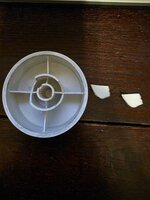
New design, ribbed for...


and another satisfied customer! Well, once MIL gets the machine back.

MIL's sewing machine broke and she wanted to order a new piece. Wife looked at it for a bit and I came along, looked at the broken part and asked if she had the rest of the missing parts. Wife knew where this was going, rolled her eyes. MIL asked why I would want the broken parts, I asked if she threw them away and she said yes. She went to get them out of the trash. We agreed to wait until Thanksgiving before ordering a replacement.
Took me two tries... First just because I missed that the pin went through both inner circles. Second try fit like factory but I'm printing a third with six ribs instead of the original four.
Broken part
New design, ribbed for...
and another satisfied customer! Well, once MIL gets the machine back.