To avoid these ads, REGISTER NOW!

The Everything 3D Printer Thread

jayz66ragtop

Well-known member
Joined
Sep 11, 2009
Messages
1,521
Location
SoCal
People typically worry about the styrene (S) part of ABS but that is overblown. It wouldn't surprise me if that FUD morphed into formaldehyde now. Not that styrene is good for you, but your exposure level is so low it just doesn't matter. The MSDS basically says it smells bad, molten plastic is hot, and don't literally set it on fire and smoke it.

Even at industrial levels guidance boils down to "try not to burn it" and "turn a fan on in case you do."

If your hotend can reach 400°C maybe don't turn it up so high. And crack a window, it stinks.
Agree, I have printed plenty of ABS and the smell is a bit annoying as well as the residue it leaves on the inside of the print but it's easy enough to clean off. I print mostly while I'm asleep and not in the same room so it doesn't really bother me or my wife except when she goes in the space where the printer is after it chugged along all night and may still smell a tiny bit.
 
To avoid these ads, REGISTER NOW!

jayz66ragtop

Well-known member
Joined
Sep 11, 2009
Messages
1,521
Location
SoCal
Two boxes delivered today by UPS. One clearly said AMS Pro on the side of it, the other was some filament I took advantage of the Black Friday sale on. So I have a small portion of the H2C I ordered, now do I hook it up to the X1C or wait for the H2C to arrive?

Going to stay in the box until the H2C arrives.
 

KwikFab

Well-known member
Joined
Jul 27, 2024
Messages
1,165
Location
Central Valley, CA
Awesome!

Re: TPU - Heed the warning and do not run it through the AMS. That is unless you want to learn how to take it apart to flush out all the TPU that broke in it.

That is indeed one reason for making the purchase for the AMS HT! I like that they have a port that bypasses the AMS within it.

That and you can run it shortly after drying is done as an "external spool"

It's just too bad I don't own an X1C, P2S, or anything else that's fancy otherwise I could dry it while printing.
 

kaymccampbell

Well-known member
Joined
Feb 27, 2015
Messages
29,402
Location
Upstate New York
It came out well!

messages_0(12).jpeg

If anyone has a recommendation for a fiber termination kit for the amateur dingbat who wants to DIY SC/APC connectors in his networking cabinet, let me know?
I used to use a liberated AT&T fiber termination kit. You can still find them on FleaBay, thought the chemicals might be a bit dated.
 

jayz66ragtop

Well-known member
Joined
Sep 11, 2009
Messages
1,521
Location
SoCal
That is indeed one reason for making the purchase for the AMS HT! I like that they have a port that bypasses the AMS within it.

That and you can run it shortly after drying is done as an "external spool"

That and you can run it shortly after drying is done as an "external spool"
That's what I plan on doing with the AMS HT that is coming with my H2C.

Probably put both AMS 2 Pro's on the right nozzle and have the AMS HT sitting pretty on the side to dry stuff and for TPU prints. When I first got my X1C I watched a Youtube of a reviewer (had a pre production X1C) run TPU through it so I thought if he can do it I can do it, I'll just set the printer to super low speed and be gentle with it. Nope broke in multiple places and I had to tear apart the AMS to get it all out. Nothing like taking apart your brand new AMS :(

That is indeed one reason for making the purchase for the AMS HT! I like that they have a port that bypasses the AMS within it.
It's just too bad I don't own an X1C, P2S, or anything else that's fancy YET otherwise I could dry it while printing.
FTFY :lol_hitti
 

KwikFab

Well-known member
Joined
Jul 27, 2024
Messages
1,165
Location
Central Valley, CA
That's what I plan on doing with the AMS HT that is coming with my H2C.

Probably put both AMS 2 Pro's on the right nozzle and have the AMS HT sitting pretty on the side to dry stuff and for TPU prints. When I first got my X1C I watched a Youtube of a reviewer (had a pre production X1C) run TPU through it so I thought if he can do it I can do it, I'll just set the printer to super low speed and be gentle with it. Nope broke in multiple places and I had to tear apart the AMS to get it all out. Nothing like taking apart your brand new AMS :(

That is indeed one reason for making the purchase for the AMS HT! I like that they have a port that bypasses the AMS within it.

FTFY :lol_hitti
:ROFLMAO:

Nope, I'm tapped!

While it didn't take me long to make a printer stand, I made it narrow enough to only run a total of two printers.

I do use both, but really only one is running most of the time with the second one sits idle. Main goal is kid toys, followed by stuff for the wife for her classroom, and lastly prototyping.
 

Citation

Well-known member
Joined
Jan 20, 2016
Messages
3,209
Location
Indy
Do you have a reference to support this assertion?
"Hazardous materials, including formaldehyde and particulate matter (PM) are released during the 3DP process by melting the thermoplastic filament and heating the resin at high temperatures6,7,8,9,10,11,12"

There are also some YT videos on the subject. What I've generally read is the issue is very manageable but also not something to dismiss out of hand.
 

rmack898

Well-known member
Joined
Jan 23, 2007
Messages
3,140
Location
Honu Grove NE Florida
Back in the shop today trying to get the A1 to work.
Unplug, reboot, triple check plate, and Z will still not home. The Z moves up and down but fails out every time I try to calibrate.
Also, the AMS lite will not load. All four of the drive motors have a green blinking light but will not load filament from the touch screen control.

I checked the firmware and the display says I have the latest.

I'm about ready to box it up and make it go away.
 

Cruzan80

Well-known member
Joined
Jul 22, 2015
Messages
4,154
Location
Denver, CO
"Hazardous materials, including formaldehyde and particulate matter (PM) are released during the 3DP process by melting the thermoplastic filament and heating the resin at high temperatures6,7,8,9,10,11,12"

There are also some YT videos on the subject. What I've generally read is the issue is very manageable but also not something to dismiss out of hand.
In the intro, found this to be the most relevant on a quick read-thru...

Overall, normal use of one or two validated low emitting 3D printers and materials tended not to pose significant health risks in classrooms, since measured PM and hazardous chemical levels were below indoor recommended levels for most scenarios.
Reading further down, I did see Formaldehyde mentioned, but seemed to increase the farther away from the printer, and had significant outliers as mentioned.

Bolding below is mine. Overall, no significant issues with printing.
The main conclusion: In general, indoor PM2.5 was below 5 µg/m3 and PM10 below 10 µg/m3 at each site and are below the US EPA National Ambient Air Quality Standards (NAAQS) daily criteria (35 µg/m3 for PM2.5 and 150 µg/m3 for PM10) and World Health Organization (WHO) daily air quality guideline criteria (15 µg/m3 for PM2.5 and 45 µg/m3 for PM10) [64,65]. The impact of emitted particles from 3DP on indoor air quality seemed limited due to the emissions were mostly UFPs that did not contribute significantly to PM mass concentrations. However, it should be noted that even the concentrations indoors are well below the ambient standard levels, people spend most of their time indoors.
 

jeepxj

Well-known member
Joined
Mar 2, 2008
Messages
17,829
Back in the shop today trying to get the A1 to work.
Unplug, reboot, triple check plate, and Z will still not home. The Z moves up and down but fails out every time I try to calibrate.
Also, the AMS lite will not load. All four of the drive motors have a green blinking light but will not load filament from the touch screen control.

I checked the firmware and the display says I have the latest.

I'm about ready to box it up and make it go away.

you dont need to load it manually from the AMS. it pulls it in when it calls for it.

the Z thing im guessing its just a beat unit.
 

Citation

Well-known member
Joined
Jan 20, 2016
Messages
3,209
Location
Indy
In the intro, found this to be the most relevant on a quick read-thru...


Reading further down, I did see Formaldehyde mentioned, but seemed to increase the farther away from the printer, and had significant outliers as mentioned.

Bolding below is mine. Overall, no significant issues with printing.
I would assume that is in a classroom with good air circulation. There are several TY videos about this where people did air quality tests in their homes. It's not enough to make me not print in my house (my printer sits next to my desk) but it is enough that I will not do materials other than PLA. My office has effectively no circulation so I worry about these things.

Also, I suspect "validated low emissions" printers are something like the Rase3D models with good built in filtration. They probably aren't thinking about open models or models with very limited filtration.

Like I said, this isn't something that is an automatic show stopper but it is something to think about if you have the printer in your living space (I currently do).
 

rmack898

Well-known member
Joined
Jan 23, 2007
Messages
3,140
Location
Honu Grove NE Florida
Problem resolved.
The usb-c plug keeps coming out of the plastic retainer that is supposed to keep in place. The retainer is a 2-piece unit and once you plug it in, the screw that holds it in place opens up the retainer and the usb plug is pushed back enough to not make contact.
It's a poor design. Only after many tries to ensure that the usb plug was inserted all the way did I see what was happening with the retainer and screw.
 

Cruzan80

Well-known member
Joined
Jul 22, 2015
Messages
4,154
Location
Denver, CO
You do you. However, I don't know of many open printers that are doing tons of ABS. YT videos of home filtration tests and printing are not usually scientifically validated.

The end result was what was in the conclusion. The measurements were at most 1/3 of daily levels (some were as low as 6.7%). So while they may produce various VOC, the levels are not significant.
 

KwikFab

Well-known member
Joined
Jul 27, 2024
Messages
1,165
Location
Central Valley, CA
I didn't mean to stir up a whole thing about harmful outgassing, etc when printing ABS.

Just got my first ABS spool and have yet to use it.

I'd assume though that people wouldn't be running ABS in an open printer; I only intended to use it in my P1S not the A1 Mini. I've got filters both on the inside and out (exterior add-on) so hoping the little ABS I print is alright.
 

jayz66ragtop

Well-known member
Joined
Sep 11, 2009
Messages
1,521
Location
SoCal
I didn't mean to stir up a whole thing about harmful outgassing, etc when printing ABS.

Just got my first ABS spool and have yet to use it.

I'd assume though that people wouldn't be running ABS in an open printer; I only intended to use it in my P1S not the A1 Mini. I've got filters both on the inside and out (exterior add-on) so hoping the little ABS I print is alright.
Agree, this is why I had to have a fully enclosed printer with filtration. No doubt ABS off gases and you can tell when it's printed vs other materials. I can even tell ABS from PLA or PETG just by the smell of the filament, not even when it's warmed up. I had a mystery spool and couldn't remember if it was ABS or PLA so I opened the bag and smelled it, sure enough was Bambu ABS refill on an unmarked Bambu spool (well, it was marked PLA from the original spool which I knew was wrong).

To get ABS to adhere well to the bed you're going to want an enclosed chamber anyway. Even then it can lift and warp if the heat is uneven.
 

PelicanPines

ALLIANCE MEMBER
Joined
Apr 30, 2014
Messages
38,104
Location
New Jersey, USA, Earth, My own reality
Problem resolved.
The usb-c plug keeps coming out of the plastic retainer that is supposed to keep in place. The retainer is a 2-piece unit and once you plug it in, the screw that holds it in place opens up the retainer and the usb plug is pushed back enough to not make contact.
It's a poor design. Only after many tries to ensure that the usb plug was inserted all the way did I see what was happening with the retainer and screw.
Perfect... now design and print a fix for your printer.
 

pcrov

Well-known member
Joined
Feb 27, 2023
Messages
375
Location
Ontario, CA
However, I don't know of many open printers that are doing tons of ABS.

Yeah, big problem printing ABS on open printers is the uneven cooling. Rapid cooling causes the print to warp and will often lose bed adhesion.

I solve this with a cardboard box, but it isn't pretty. Some folk set up in cabinet or small closet which also works.
 

Cruzan80

Well-known member
Joined
Jul 22, 2015
Messages
4,154
Location
Denver, CO
Yes, I think the "argument" is that a cardboard box doesn't have any filtration to stop VOCs from emitting. The research seems to be done with closed systems, possibly/probably due to restricting variables. Even with the A1 Mini I have, I got a cheap mylar tent for PLA so it didn't have issues with the HVAC in my house.
 

Citation

Well-known member
Joined
Jan 20, 2016
Messages
3,209
Location
Indy
In the intro, found this to be the most relevant on a quick read-thru...


Reading further down, I did see Formaldehyde mentioned, but seemed to increase the farther away from the printer, and had significant outliers as mentioned.

Bolding below is mine. Overall, no significant issues with printing.
I would suggest reading this test (one of the ones I linked previously)

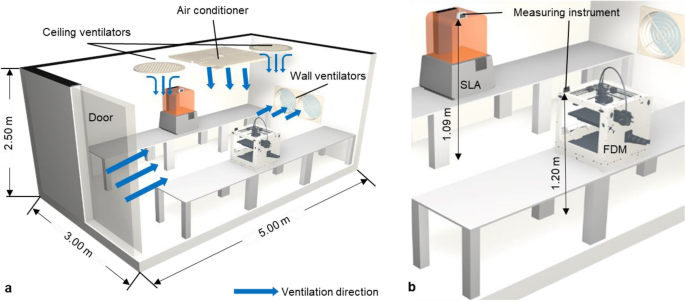
It was done using Ultimaker S5's. Those are open printers. They setup a print room with limited ventilation (a situation similar to my setup) and found:
The measurements of formaldehyde, PM10, and PM2.5 were conducted using test–retest with the PLA, ABS, and TPU of the ME and the Clear, Dental LT, and Flexible 80A of the VP. In tests, the formaldehyde concentration in the 3DP workspace using most ME and VP materials exceeded the WHO recommendation of 100.00 µg/m3 for indoor formaldehyde14.
....

Conclusion

During 3DP without ventilation, formaldehyde was detected in all materials and it exceeded the international standard. However, it was confirmed that the formaldehyde concentration significantly decreased with ventilation performed during test–retest validation. Therefore, installing and operating the ventilation systems in a facility equipped with 3D printers is recommended.

ME is material extrusion (ie FDM printers like the Ender 3 etc). In some of the other studies they were using printers that already had built in air filtration. This study shows a relatively open printer. It basically shows that ventilation is important and that with ventilation things shouldn't be an issue. When setup in a work shop or someplace outside of our living space I don't see these printers as an issue. However, in a living space is something that should be done with awareness. That is why I've mentioned this.
 

Cruzan80

Well-known member
Joined
Jul 22, 2015
Messages
4,154
Location
Denver, CO
The weird part though is that when you look at the actual tables and charts, the resin printers are over the 100 threshold, and almost none of the ME filaments are (TPU being an exception).

The room they are measuring is 9x15, with no other ventilation (closed doors, etc). I would posit that is trying to find an ideal test case, not what most people have going on. The standard deviations for formaldehyde were also +- 50% of the values in some cases, meaning the number could be varying wildly from the average (especially ckmpardd to Pm2.5 and Pm10). The test vs retest for that with ABS was barely inside the min/max ranges as well.


As has been stated above, how many people are printing ABS or other exotic filaments in a small closed room, without any real airflow, on an open bed printer? The report also says it dissapates quickly, especially once any other ventilation occurs.

Not saying that it isn't research, just that it certainly isn't a "smoking gun".

Regardless, I run anything besides PLA thru an enclosed printer with filtration built in.
 
To avoid these ads, REGISTER NOW!

pcrov

Well-known member
Joined
Feb 27, 2023
Messages
375
Location
Ontario, CA
Yes, I think the "argument" is that a cardboard box doesn't have any filtration to stop VOCs from emitting. The research seems to be done with closed systems, possibly/probably due to restricting variables. Even with the A1 Mini I have, I got a cheap mylar tent for PLA so it didn't have issues with the HVAC in my house.
The HVAC in my house is a fan and an open window lol

I dust off the swamp cooler when hot days roll around.
 

KwikFab

Well-known member
Joined
Jul 27, 2024
Messages
1,165
Location
Central Valley, CA
Lengthy read but needing a little bit of assistance.

TLDR - Overture PETG, dried, plate cleaned, semi-inconsistent issue?

Long version - Dried some PETG for over 5-6 hours at 60c in my AMS2 Pro and opted to print some desiccant boxes for it.

I had one small area where there was a slight adhesion issue near the center of the build plate for the initial layer. I'm very particular about keeping the plate clean but, I'll always go back to the basics so I pulled it and washed it with Dawn dish soap. Let it dry thoroughly and placed it back along with wiping it down with Isopropyl alcohol (my standard go to).

Well running the print again caused the same issue but in a different spot, close to center but towards the rear and right.

Pulled the print settings card that Overture provides and I compared the bed and nozzle temps that were running in my prints. Learned yesterday that bed temps can be altered in the Filament settings during the Prepare portion of the slicer.

I upped the bed temp for the initial layer to 85c, and left it at the 70c for all remaining layers (same temps I had run for the above prints). Left the nozzle temps at 245c as the chart calls for 230-250c.

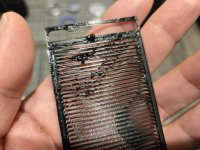
Different results this time as the first layer stuck on perfect all over the build plate, and an issue occurred on two parts on different areas of the build plate. More like, filament didn't stick to the second layer or so (pictures below).

Here are 3 of the parts (from the same program) to show good adhesion on the bottom, and clean layering on top.
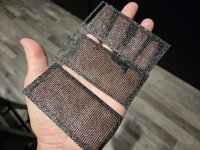
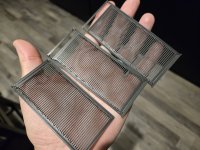
20251129_231903.jpg

20251129_231846.jpg

And the bottom of the ones with issues; you'll see they're intact and adhered to the plate well.

20251129_231647.jpg

20251129_231822.jpg

But the issues arose after the that for these two.
20251129_231642.jpg

20251129_231818.jpg

I concluded that the issue may be that the bed temps should remain 85c both for the initial layer as well as the rest of the program.

We're about 1 hour in and after checking the current print job, I have slightly different results with some items looking perfect and others having an issue for several layers along one wall. And a bit of filament astray on another piece.

Keeping in mind, bed temps are a consistent 85c and nozzle temps are 245c.

20251130_150921.jpg

20251130_150935.jpg

20251130_151012.jpg

Being new to 3D printing, I'm unsure how to visually "read" these results.

Also, the inside of those walls (last picture) look as if the filament was just strung along and not actually adding any strength?
 

KwikFab

Well-known member
Joined
Jul 27, 2024
Messages
1,165
Location
Central Valley, CA
Lengthy read but needing a little bit of assistance.

TLDR - Overture PETG, dried, plate cleaned, semi-inconsistent issue?

Long version - Dried some PETG for over 5-6 hours at 60c in my AMS2 Pro and opted to print some desiccant boxes for it.

I had one small area where there was a slight adhesion issue near the center of the build plate for the initial layer. I'm very particular about keeping the plate clean but, I'll always go back to the basics so I pulled it and washed it with Dawn dish soap. Let it dry thoroughly and placed it back along with wiping it down with Isopropyl alcohol (my standard go to).

Well running the print again caused the same issue but in a different spot, close to center but towards the rear and right.

Pulled the print settings card that Overture provides and I compared the bed and nozzle temps that were running in my prints. Learned yesterday that bed temps can be altered in the Filament settings during the Prepare portion of the slicer.

I upped the bed temp for the initial layer to 85c, and left it at the 70c for all remaining layers (same temps I had run for the above prints). Left the nozzle temps at 245c as the chart calls for 230-250c.

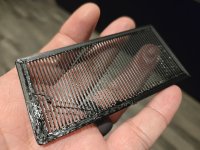
Different results this time as the first layer stuck on perfect all over the build plate, and an issue occurred on two parts on different areas of the build plate. More like, filament didn't stick to the second layer or so (pictures below).

Here are 3 of the parts (from the same program) to show good adhesion on the bottom, and clean layering on top.

20251129_231903.jpg

20251129_231846.jpg

And the bottom of the ones with issues; you'll see they're intact and adhered to the plate well.

20251129_231647.jpg

20251129_231822.jpg

But the issues arose after the that for these two.
20251129_231642.jpg

20251129_231818.jpg

I concluded that the issue may be that the bed temps should remain 85c both for the initial layer as well as the rest of the program.

We're about 1 hour in and after checking the current print job, I have slightly different results with some items looking perfect and others having an issue for several layers along one wall. And a bit of filament astray on another piece.

Keeping in mind, bed temps are a consistent 85c and nozzle temps are 245c.

20251130_150921.jpg

20251130_150935.jpg

20251130_151012.jpg

Being new to 3D printing, I'm unsure how to visually "read" these results.

Also, the inside of those walls (last picture) look as if the filament was just strung along and not actually adding any strength?

The results of the finished print if it helps the experienced members here.

The front.

20251130_180403.jpg

Top surface of a print.

Rear/rear right of the plate.

20251130_180840.jpg

Rear/rear left on another surface.

20251130_180843.jpg

Close-up of that front piece.

20251130_180849.jpg

The right edge/wall of the piece to the rear right of the build plate.

20251130_180902.jpg

The left edge/wall of a piece to the rear left of the build plate.

20251130_180910.jpg

And the edge/wall of the piece front and center of the build plate.20251130_180913.jpg

Keepind in mind the initial layer was indeed flat and those filaments that are splayed outwards are the second and more.

All printed at 245c at the nozzle, and a bed temp of 85c through the whole program.
 

KwikFab

Well-known member
Joined
Jul 27, 2024
Messages
1,165
Location
Central Valley, CA
Any chance you are running right at the limit of your filament or nozzle or hot end?

I'm not sure.

I tried to be as thorough as possible with the information I provided; everything else is based off Bambu's "Generic PETG" profile.

What bothers me is the issue occurs at random, at different areas of the build plate at different layers.

If it's a "me" issue I'd definitely love to fix whatever it is I'm doing.

Using the included nozzle that's 0.4mm stainless steel and textured plate. Did ensure that the same nozzle and plate are shown in my slicer (both with yesterday's prints I postsd above as well as this one that just finished).
 

loganb

ALLIANCE MEMBER
Joined
Dec 29, 2011
Messages
5,494
Location
Omaha, NE
What layer thickness are you using? Assuming .2 or .24 on a .4 nozzle?

The pair of defects in the large flat surface on the back to me look to be collisions with something. A blob, something from the layer(or several layers) below. The infill pattern is "ghosting" or telegraphing a bit thru the top surface, to address that can increase infill or add another top surface or two. In my experience petg doesn't bridge gaps as well as PLA so large flats over Infil often need more layers to be pretty.

The others....not as sure on. I have no evidence to support it...but personally I feel like I get fewer random filament issues running a .6 nozzle, and with that you get the ability to run thicker layers and put down more material if you want...don't have to but you can.
 

pcrov

Well-known member
Joined
Feb 27, 2023
Messages
375
Location
Ontario, CA
It looks like the filament might be getting hung up and curling away as it's coming out the nozzle. Have you seen this while it's printing? You might need to crank up the nozzle temp. Might need to reduce speed. Could also just be a bit of schmutz it's sometimes catching on.

I'd start with cleaning the outside of the nozzle. On the manual control set the nozzle temp to ~250, let it heat up, then wipe it off with a clean rag.

Then run through some calibrations. With temp being a suspect start there and print a temp tower.

Screenshot 2025-11-30 195703.png

The default for PETG starts at 250 and goes down to 230. Increase the high end to 270.

1764562143645.png

(If you get an error about "non-manifold edges" you can repair or ignore it, it doesn't matter here.)

Print the temp tower, use the best looking as your nozzle temp in the filament profile.

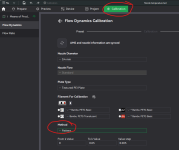
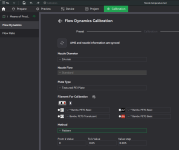
Run Flow Dynamics calibration, selecting the Pattern method:

Screenshot 2025-11-30 201937.png

The Bambu wiki covers this and how to evaluate it pretty well.

With the K factor saved, go to the Device tab and edit the filament to set the just-saved PA profile:

k.gif

Then run Max Volumetric Speed (aka Max flowrate) calibration:
(Another suspect.)

Screenshot 2025-11-30 203450.png


The OrcaSlicer wiki covers it. Set the speed in the filament profile. (You don't have to be running OrcaSlicer. It's based on Bambu Studio and these calibrations exist in both.)

Then optionally run Flow Rate calibration:
(Your extrusion looks generally okay, maybe some over extrusion, but changes above can impact it regardless.)

Screenshot 2025-11-30 203033.png

Again the Bambu wiki explains this well. Save the result to your filament profile.

I don't have experience with Overture PETG, this is just best-guess stuff. The OrcaSlicer wiki calibration guide is my go-to for dialing in a new filament.
 

Attachments

  • 1764562781152.png
    1764562781152.png
    66.4 KB · Views: 15
Last edited:

KwikFab

Well-known member
Joined
Jul 27, 2024
Messages
1,165
Location
Central Valley, CA
It looks like the filament might be getting hung up and curling away as it's coming out the nozzle. Have you seen this while it's printing? You might need to crank up the nozzle temp. Might need to reduce speed. Could also just be a bit of schmutz it's sometimes catching on.

I'd start with cleaning the nozzle. On the manual control set the nozzle temp to ~250, let it heat up, then wipe it off with a clean rag.

Then run through some calibrations. With temp being a suspect start there and print a temp tower.

Screenshot 2025-11-30 195703.png

The default for PETG starts at 250 and goes down to 230. Increase the high end to 270.

1764562143645.png

(If you get an error about "non-manifold edges" you can repair or ignore it, it doesn't matter here.)

Print the temp tower, use the best looking as your nozzle temp in the filament profile.

Run Flow Dynamics calibration, selecting the Pattern method:

Screenshot 2025-11-30 201937.png

The Bambu wiki covers this and how to evaluate it pretty well.

With the K factor saved, go to the Device tab and edit the filament to set the just-saved PA profile:

k.gif

Then run Max Volumetric Speed (aka Max flowrate) calibration:
(Another suspect.)

Screenshot 2025-11-30 203450.png


The OrcaSlicer wiki covers it. Set the speed in the filament profile. (You don't have to be running OrcaSlicer. It's based on Bambu Studio and these calibrations exist in both.)

Then optionally run Flow Rate calibration:
(Your extrusion looks generally okay, maybe some over extrusion, but changes above can impact it regardless.)

Screenshot 2025-11-30 203033.png

Again the Bambu wiki explains this well. Save the result to your filament profile.

I don't have experience with Overture PETG, this is just best-guess stuff. The OrcaSlicer wiki calibration guide is my go-to for dialing in a new filament.

Advice won't fall on deaf ears - wife has been crazy sick so hopefully I can run through all this on Wednesday or so.

Switched back over to PLA to finish printing my lightsaber.
 

jeepxj

Well-known member
Joined
Mar 2, 2008
Messages
17,829
TLDR - Overture PETG, dried, plate cleaned, semi-inconsistent issue?


I have printed tens of thsouands of KG of PETG. for the life of me i cannot get overture PETG to print well.
 

ptt49er

Well-known member
Joined
Jun 28, 2018
Messages
301
Location
Rock Hill, SC
We've had some issues with a couple of rolls of Creality PETG that just wouldn't print well. No matter the settings, we even ran them thru a dryer. Something was just off with the plastic. Pitched those and started with a fresh roll, no issues. Sometimes it's easier/cheaper to cut our losses than trying to figure out what's going on w/ it.
 

Sweetcorn

Well-known member
Joined
Feb 14, 2018
Messages
663
Location
North Central Ohio
95 out of 100 things I print are PETG.
Those issues are add looking, but I've encountered some similar.
I primarily use overture on one printer and it's been great. They were out one time and I ordered a spool of hatchbox PETG to get me through a few days.
I'm sure it was just a bad spool or a setting it didn't like, but that different material was giving me fits somewhat similar to what you are seeing. I switched back to overture (what I was used to) and everything went back to normal.
My point is maybe try another spool before getting too crazy with it. You've made reasonable accommodations to try to solve it your issue. I'd change out that one big variable and see what happens.
 

ptt49er

Well-known member
Joined
Jun 28, 2018
Messages
301
Location
Rock Hill, SC
The oldest boy needed a white elephant gift for a friends group exchange... so we printed this Santa can holder off of Maker World in PETG. Thought it turned out pretty good considering we rushed it by upping the speed to 125%.
Screenshot 2025-12-01 131443.png


Also working on a 1/2 scale T-Rex skull - not even half way there yet...
Screenshot 2025-12-01 131515.png
 

BombShelter

Well-known member
Joined
Nov 16, 2015
Messages
541
Location
State of Hockey
Cool projects and stories!

As far as the safety concerns, and I can only speak anecdotally, I'd vent the machine if possible. I once worked sales for a large plastic fabrication shop that worked with all types of sheet and rod. The shop always gave me a headache if I was in there too long; I don't think there was any ventilation. I was friends with a lot of the employees so when I went back to buy some parts about six years after I left, I was stunned to find how many had died, it was around 12 out of 40 and those 12 worked in the shop, or next to it, in an office. Real nasty deaths like stomach and brain cancer, age wasn't a factor, most were between 40-60.

Sorry to be a downer but there's lots of info on venting the machines online, keep up the great posts.
 

PelicanPines

ALLIANCE MEMBER
Joined
Apr 30, 2014
Messages
38,104
Location
New Jersey, USA, Earth, My own reality
Cool projects and stories!

As far as the safety concerns, and I can only speak anecdotally, I'd vent the machine if possible. I once worked sales for a large plastic fabrication shop that worked with all types of sheet and rod. The shop always gave me a headache if I was in there too long; I don't think there was any ventilation. I was friends with a lot of the employees so when I went back to buy some parts about six years after I left, I was stunned to find how many had died, it was around 12 out of 40 and those 12 worked in the shop, or next to it, in an office. Real nasty deaths like stomach and brain cancer, age wasn't a factor, most were between 40-60.

Sorry to be a downer but there's lots of info on venting the machines online, keep up the great posts.
I had two summer jobs in my yute...
1. Colorite plastic... In their quality control offices. Dust everywhere... Had to quit because of breathing issues.
2. Hospital morgue... Loved the smell of formaldehyde in the morning....
 

Jehannum

Well-known member
Joined
May 3, 2012
Messages
1,347
Location
Albuquerque, NM
I used to use a liberated AT&T fiber termination kit. You can still find them on FleaBay, thought the chemicals might be a bit dated.
I ended up changing my plan after looking at what the installers left in my cabinet and designed some winding davits, because the keystone couplers do the job (that's the AT&T fiber up top, the Vexus fiber in the middle, and soon to be the Comcast RG6 on the bottom):

PXL_20251201_235559142.MP.jpg

@jeepxj got me a hot filament injection too.
PXL_20251201_234537535.jpg

it looks good, I'm just going to whip up some RFID tags and give 'er a go.
PXL_20251201_234722758.MP.jpg
 
To avoid these ads, REGISTER NOW!
Top Bottom