To avoid these ads, REGISTER NOW!

The Everything 3D Printer Thread

AndyL

Well-known member
Joined
Feb 22, 2012
Messages
1,371
Location
Vancouver
IMG_20220508_084134_392-01.jpeg

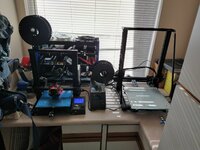
More clamps & hold downs printed. 24v relay added - so grbl now can control that spindle on/off at least. Swapped bad mgn12 bearing, Y still noisy in spots - spent hours tramming the bed; need to dig more into it.

Thinking about it's future home (aka get it off my desk). Looking at that cobalt tool cart - mount electronics under the wood top, maybe small shopvac enclosed in the lower tray?
 
To avoid these ads, REGISTER NOW!

Jehannum

Well-known member
Joined
May 3, 2012
Messages
1,347
Location
Albuquerque, NM
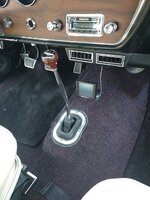
Finally wrapped up the Holley Sniper install in my '67 GTO, and needed somewhere to mount the handheld unit. Normally I'd just stash it in the glovebox, but the Vintage Air's replacement glovebox was too darn small (also it's kind of nice to have a coolant temp reading that isn't pure fiction). So, I went through my stash of old weird stuff, found a ball-mount cell phone holder, and 3D printed an adapter that gave me a nice wide, flat face to glue the sleeve for the handheld unit to, and mount to the original head of the ball mount (where a springloaded arm was formerly mounted to pinch cell phones).

IMG_20211009_170202_01.jpg

I also bought a CR-10 for bigger prints (it helps I found it on clearance for $200). I migrated as much of my TH3D stuff over to it as was applicable for moving from a 24V Ender 3 to a 12V CR-10, and printed up stuff to mount spares to the Ender. I had forgotten what a pain it was to shoehorn automated bed leveling into Creality's babyduino boards, so I'll probably pick up another TH3D/Paquette board here shortly. As it stands, they both run E3D v6 hot ends with tungsten carbide 0.4mm nozzles (Dyze brand) in petsfang mounts with BLtouch bed leveling servos. The CR-10 comes stock with a glass bed, the Ender has one because I've always liked them.

So, now I've got a regular old print farm. I moved it all out of my office (which my wife and I decided to repurpose into an office/guest bedroom) down into the laundry room. It's a good move, as there was a previously unused counter there, and space for shelves to stick all my filament. I also recently converted the house to refrigerated air, so I don't have half the issues printing now that I did when I was running the swamp cooler.

IMG_20220508_082357011_HDR.jpg
 
Last edited:

Jim_No_Garage

Well-known member
Joined
Jan 15, 2011
Messages
3,299
Location
Millington NJ
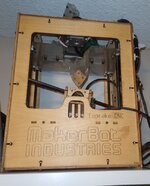
So I have had an Ender 3 V2 for 17 months now and love it. Over the weekend we were scavenging the bulk pickup piles 2 towns over and found this vintage beauty! It's a Creator Flashforge with a dual extruder. It boots and loads the menu at startup.

There was an SD card in the machine - I want to see what's on it to see what the last thing they printed was.

I'm not sure I want to do anything with it but it was too cool to get trashed.


Creator_Flashforge (1).jpegCreator_Flashforge (2).jpeg

If nothing else it has about $20 of metric cap head screws holding it together.

Cheers

Jim
 

Cruzan80

Well-known member
Joined
Jul 22, 2015
Messages
4,155
Location
Denver, CO
Jim, that is what I still run. Works beautifully. If you need advice, let me know. I have torn down most of it at one point or another.

Personally, I am much more a fan of these Core XY designs than the Prusa design with a moving Y buildplate.
 

vwpieces

Well-known member
Joined
Apr 28, 2020
Messages
5,925
Location
Hills, PA
Anyone have any tips on how to do two-tone text? Seems like it might be applicable to the Garage Journal world to label things. For example, I modeled some socket organizers that I want to print black, but have either engraved or embossed text a contrasting color like white that calls out the sizes. I'd rather not mess with a filament change, but wondering if anyone has had success with painting or filling details like that with PLA, and what products you use?
Cura can be set up to stop at a set layer to make a filament change. Actually multiple layers and multiple times.

20220516_190408.jpg
 

jstroede

Well-known member
Joined
Oct 28, 2010
Messages
1,080
Location
Kansas City
Cura can be set up to stop at a set layer to make a filament change. Actually multiple layers and multiple times.

20220516_190408.jpg
Can you explain how to do this in Cura? I am pretty good with basic stuff, but this is the type of thing that goes to the next level.

Thanks.
 

vwpieces

Well-known member
Joined
Apr 28, 2020
Messages
5,925
Location
Hills, PA
Can you explain how to do this in Cura? I am pretty good with basic stuff, but this is the type of thing that goes to the next level.

Thanks.


Same method can be used to change color on raised lettering for name plates etc. Need to babysit the printer though and be ready for the color change.
 
Last edited:

vwpieces

Well-known member
Joined
Apr 28, 2020
Messages
5,925
Location
Hills, PA
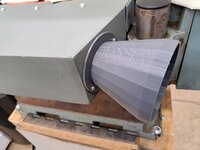
Printed a dust collector attachment for a planer dust collector.
One of the first useful things I made was an adapter to fit the hose to the dust collector on blast cabinet. Some good customizable downloads to make a fitting for anything vac related.
 

nicholam77

Well-known member
Joined
Dec 18, 2016
Messages
2,655
Location
Minneapolis, MN
Cura can be set up to stop at a set layer to make a filament change. Actually multiple layers and multiple times.

Thanks, this is what I ended up doing. "Pause at Layer Height". Not the easiest thing to pull off but after some practice I got some decent results.

IMG_6840.jpg

Here's the whole squad... trays for 3/8" Tekton socket set:

IMG_6839.jpg

IMG_6842.jpg

Another thing I designed and printed recently were some shims for Blum hinge plates (made a cabinet door 3/16" too narrow and needed a quick fix).

IMG_6868.jpg

IMG_6863.jpg

IMG_4755.jpg
 

Jswain

Well-known member
Joined
Apr 26, 2013
Messages
2,449
Location
Calgary, AB
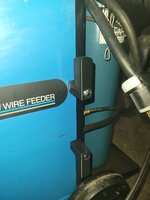
Picked up a new to me millermatic 250 and wasn't a fan of just wrapping the leads around the front handle so made up some lead hangers out of black PETG. All factory holes so I didn't have to break out the drill

Threw in a helmet holder for the bottle, should have made the hooks for it a hair longer, but it fits and works well
 

Attachments

  • 20220519_194636-01.jpeg
    20220519_194636-01.jpeg
    254.8 KB · Views: 91
  • 20220518_211033.jpg
    20220518_211033.jpg
    221 KB · Views: 80
  • 20220519_191508.jpg
    20220519_191508.jpg
    197.9 KB · Views: 76
  • 20220519_194531.jpg
    20220519_194531.jpg
    223 KB · Views: 78

racer8432955

Well-known member
Joined
Jul 7, 2007
Messages
172
I use 3dps at work and at home. At work we do form tooling for light gauge sheet metal. Use PLA, works really well.
At home i have a ender3. Make lots of simple fixtures, etc for making project easier. This is really the wheelhouse for my home application.
I recently had to drill counterstinks into some long aluminum strips. My little hobby mill doesn't have the table travel to do this w/o repositioning / re-indicating from hole to hole. So.... I printed up a quick template to (semi) accurately advance the material, not move the table. Since the most important feature of the hole positions was visual consistency. I didn't need accuracy to be with 10ths or anything. drilled about a hundred holes, much quicker than the tape measure - layout fluid - center punch.....MILL-DRILL GUIDE.jpg
 

Keyblazer

Well-known member
Joined
Jul 30, 2009
Messages
1,471
Location
Irvine, CA
Struggling with my Creality Ender 3 V2.
Suddenly it started printing odd... the prints are.... struggling to describe.
They are soft... I can easily crush them with my hand.
The layers seem rough, and barely attached to one another.

Here is an example..
04B8EE51-DD5F-47D0-8539-ACB64A5C8C16.jpeg
I changed the filament, nozzle, purged the hot end, to no change..

Anyone tell me whats going on?
 

Keyblazer

Well-known member
Joined
Jul 30, 2009
Messages
1,471
Location
Irvine, CA
Thanks,
Belt tension is good, and checked level, no change.
It seems to be an extrusion issue to my mind... I change nozzle temp, and no difference.
 

Cruzan80

Well-known member
Joined
Jul 22, 2015
Messages
4,155
Location
Denver, CO
Take off the front of the extruder, and make sure the gear isnt clogged, so having trouble grabbing? New roll of filament, or middle of am existing roll?
 
To avoid these ads, REGISTER NOW!

gregs

Well-known member
Joined
Mar 16, 2007
Messages
1,579
Did something get changed in your slicing software? It looks like the way supports are printed, very light and easy to break off and remove. The fill rate looks very low as well.
 

Keyblazer

Well-known member
Joined
Jul 30, 2009
Messages
1,471
Location
Irvine, CA
Printing from the same file on the card as I have done previous identical prints, so I dont think its a software issue.

I looked at the gear on the extruder and it looks clear.
Filament hase been on the printer maybe 6 m, so swapped it, same issue.
Noticed when it is printing, the extruder clicks every now and again, like it cant push the filament in.
Marked off 100mm, on the filament, told it to extrude 100mm, and it only did like 20mm instead 100.
Took the nozzle out, ran it in increments of 25mm, and it was off... going like 20mm.
Increased transmission ratio from the stock 93 to 100, and it seemed about right.
Put a new nozzle in, heated to 200c and ran it again for 100mm and it consumed like 20mm... so 80mm too little.
Ran it again at 215c, consumed about 20mm.
The extruder is turning steadily....
Feels like the problem is in the hot end...
Anyone?
 

Keyblazer

Well-known member
Joined
Jul 30, 2009
Messages
1,471
Location
Irvine, CA
Is the new Creality direct drive extruder/hot end kit any good?
Seems like its a complete fix to any possible issues in one box.
Its $39.99 on amazon and I can get it here tomorrow...
 
Last edited:

Jswain

Well-known member
Joined
Apr 26, 2013
Messages
2,449
Location
Calgary, AB
You need to pull out the Bowden tube and make sure it's clear/clean or replace nozzle

If you want a cheap fix for the hotend get an all metal thermal heat break for yours, that will give you essentially a microswiss clone all metal hotend.

Printing PLA you will have to adjust your retract settings, start at 2mm and if you need more increase in .5mm increments to no more then 4mm or you will have clogging issues


Note that if you want to make use of the all metal hot end printing 250c+ you will need upgrade thermistor and over 260c you will need to flash your firmware

Also make sure you are letting the printer stay running and cool preferably fully or at least until where the remaining temp on the hotend wont creep up and make the filament soft inside the Bowden tube
 
Last edited:

draco_1967

Well-known member
Joined
Jan 3, 2021
Messages
205
Location
Utah
That looks like the issue I started having on me E2 V2.

If the metal extrusion gear isn't worn (it is an item you need to replace every so often), then it could be the plastic extruder housing. It cracks and causes the extruder gear tension to be off. There are a few kits on Amazon that have aluminum replacement parts for the extruder housing and include better quality Capricorn tubing.
 

AndyL

Well-known member
Joined
Feb 22, 2012
Messages
1,371
Location
Vancouver
That looks more like hotend than anything else - heat it up remove Bowden with the filament - bet you'll see a raised area about the diameter of the Bowden in the filament when you pull it out. (That's typically what I find)

Usually means you need to cut a 1/4" off the Bowden (use a jig so it's dead straight). Clean up the cooling fins on the hotend, clean the fan, reassemble, make sure Bowden is fully seated (I almost always swap the fitting too at this point)


Saying that looks typical of heatcreep / partial clog.
 

slodat

ALLIANCE MEMBER
Joined
Feb 6, 2010
Messages
3,679
Location
Central-ish, WA
These Fogbuster mounts leave a lot to be desired. Always falling, etc.

EC95F1A0-28BD-40CE-8885-0D16005B6B20.jpeg

James Clough (clough42) did a video some time ago on adapting Loc-Line to the Fogbuster nozzles. I modified his parts so they would bolt up to the mill using existing mounting holes on each side.

39C48C10-A078-4144-9669-B182D3F937B5.jpeg


There's a captive nut on the back side of the mount. This allows the clamp to cinch down tight on the Loc-Line.

0A8C9020-92F0-4C7C-B414-649A0DB32BEF.jpeg

So much better.

AC5867FD-DEB2-4CDE-9A9A-9CAD451BB94F.jpeg

The other side.
4F6389F1-6934-4C68-BDF0-4F42A0540D3A.jpeg.


D606B87D-BB18-40D1-860E-F2A7767ED8D8.jpeg

This is where a 3d printer really shines. They are just crazy useful in the shop, on the shop.
 

Keyblazer

Well-known member
Joined
Jul 30, 2009
Messages
1,471
Location
Irvine, CA
Just bought the direct drive upgrade.
0FDA0F85-C056-4B19-9885-C8DE10713906.jpeg

Installed it yesterday.
Went from this:
3F2ADC68-D712-41DB-A561-146C08FD101A.jpeg

To this in about an hour.
83F0FDDD-147E-4980-8EE8-B680CA8BBEA5.jpeg

It’s working on a big print overnight.
2DB5BA22-A40B-4636-8C17-250C0121DBE0.jpeg

3CC80A34-8A15-4B82-A382-2B9A4DFBC1A6.jpeg
 

Keyblazer

Well-known member
Joined
Jul 30, 2009
Messages
1,471
Location
Irvine, CA
Yes, its looking good!
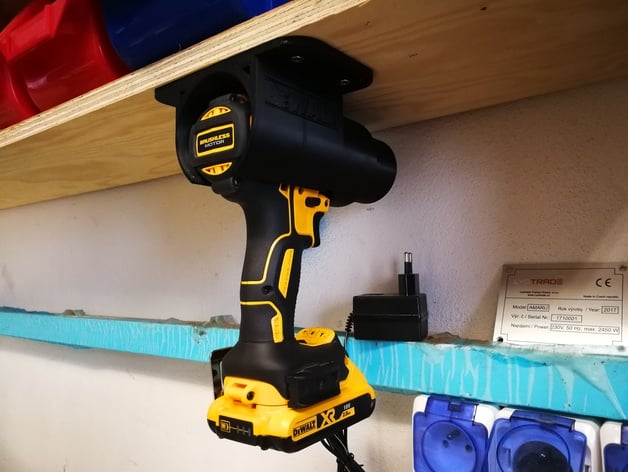
Its the Makita/Dewalt drill holster...
Like this..
 

IndyGarage

Well-known member
Joined
Apr 29, 2010
Messages
9,669
Location
Indy
Just bought the direct drive upgrade.
0FDA0F85-C056-4B19-9885-C8DE10713906.jpeg

Installed it yesterday.
Went from this:
3F2ADC68-D712-41DB-A561-146C08FD101A.jpeg

To this in about an hour.
83F0FDDD-147E-4980-8EE8-B680CA8BBEA5.jpeg

It’s working on a big print overnight.
2DB5BA22-A40B-4636-8C17-250C0121DBE0.jpeg

3CC80A34-8A15-4B82-A382-2B9A4DFBC1A6.jpeg
That print does not look as good as what I get out of my creality ender. I wonder if you have adjusted the rollers on the axes so they roll smooth but do not bind? Each axis has one roller that is on an eccentric so you can tighten or loosen it. You want them to be snug but no drag when they roll.
 

gte718p

Well-known member
Joined
Mar 12, 2009
Messages
3,950
I’m tired of projects to fix my 3d printer. Just order a Ratrig corexy printer today. https://www.ratrig.com/3d-printing-cnc/v-core3default.html


Should be a huge upgrade from my china standard pos Tevo Nerous.
It took a few weeks to get here, but I am 95% if the way through mechanical assembly of the RatRig Vcore 3. Expensive, but I think it will be worth it. It is a tank.

The kit was absolutely worth it. There are a ton of fiddly little pieces and screws. Everything came cut, and the screws were all bagged and labeled.

Instructions for the frame were top notch. I am a little disappointed in the instructions for the extruded though. The official instructions are out of date, and there are a lot of options. Also a lot of little parts that require a specific order to make them work. Still think that it is going to be worth it.

So far I am probably 10 hours into assembly. I probably have another 5 to 10 to get the electronics assembled, installed, and tuned.

I can’t wait to be able to print 400x400 at 200mm/s.


52979f1e-117c-4669-90c3-055f92242515-jpeg.1672217
 

Attachments

  • 52979F1E-117C-4669-90C3-055F92242515.jpeg
    52979F1E-117C-4669-90C3-055F92242515.jpeg
    357.9 KB · Views: 680

Jswain

Well-known member
Joined
Apr 26, 2013
Messages
2,449
Location
Calgary, AB
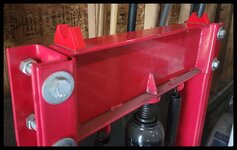
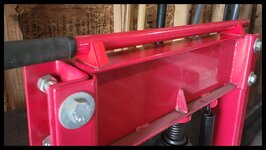
Quick and easy, but solves a problem that was literally a pain in the *** since I bought the shop press many moons ago. Handle always ends up on the floor because there's nowhere to store it
 

Attachments

  • 20220605_124259-01.jpeg
    20220605_124259-01.jpeg
    216.5 KB · Views: 81
  • 20220605_124254-01.jpeg
    20220605_124254-01.jpeg
    200.7 KB · Views: 93

bj383ss

Well-known member
Joined
Sep 29, 2011
Messages
3,166
Location
TX
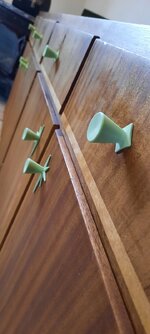
Here's some recent prints of mine. My logo on a custom badge for a new hat and some custom knobs I designed for a new-to-us cabinet we got for our living room. More details on the knobs in the most recent post on my shop thread in my signature.IMG_20220527_230359268_HDR.jpgIMG_20220604_152316_774.jpg20220604_141318.jpg20220604_141126.jpg
That is freaking awesome! The fit perfectly with the style.

Bret
 
To avoid these ads, REGISTER NOW!
Top Bottom