To avoid these ads, REGISTER NOW!

The Everything 3D Printer Thread

4 FN 27

ALLIANCE MEMBER
Joined
Oct 19, 2015
Messages
4,635
Location
Minnesnowta
I am so happy with these. I used red for the contrast color because it's the only color I have in PLA. These are nice. On the build plate fresh out of the printer:

773E8A2B-7D62-4801-83CF-F28E165E0241.jpeg

Imitation is the sincerest form of flattery

Thus I will be copying this!!! Nice work!!! I love the option of embedding things into prints.
 
To avoid these ads, REGISTER NOW!

goingtoarizona

Well-known member
Joined
Apr 5, 2015
Messages
761
Location
Central Valley California
I've played with the idea of buying and building a 3d printer to build some parts I/want for my laundromat. I'd like to make some small boxes that hold the ignitors for my dryers. It's a two piece box that fits together and protects the ignitor from lint and dust. The other part is a bezel that attaches to the front panel surrounding the coin box. The box is about 6X5X2.25 nad the bezel is about 3.5X4.25 and is shaped like a picture frame, but with mounting points coming out of the back side.

I'm not really in the mood to take on another "project". Is this something easy to make from like an iPhone picture? Is anyone out there interested in making some of these?
 

slodat

ALLIANCE MEMBER
Joined
Feb 6, 2010
Messages
3,679
Location
Central-ish, WA
Imitation is the sincerest form of flattery

Thus I will be copying this!!! Nice work!!! I love the option of embedding things into prints.
I love that my idea will live in your shop!!

The drawer labels are working out great! I have a couple hundred to make…
 

bugnut

ALLIANCE MEMBER
Joined
Jul 14, 2012
Messages
3,834
Location
Central Ohio
@slodat You're killing me with the two color drawer labels. I printed some and had to paint the letters, much to tedious for my fat fingers.
Only question is why not print to fit in the aluminum drawer handle so they don't any attachment but slide in?
 

slodat

ALLIANCE MEMBER
Joined
Feb 6, 2010
Messages
3,679
Location
Central-ish, WA
@slodat You're killing me with the two color drawer labels. I printed some and had to paint the letters, much to tedious for my fat fingers.
Only question is why not print to fit in the aluminum drawer handle so they don't any attachment but slide in?
I like the magnets better. This style will work on the HF boxes, Vidmars, and other stuff I have around the shop. I’ve had an idea of what I wanted and this is how they came to life. And, I wanted something bigger than the drawer handle would allow.
 

Black300zx

Well-known member
Joined
Apr 8, 2019
Messages
781
Location
Elkton, Md
I've played with the idea of buying and building a 3d printer to build some parts I/want for my laundromat. I'd like to make some small boxes that hold the ignitors for my dryers. It's a two piece box that fits together and protects the ignitor from lint and dust. The other part is a bezel that attaches to the front panel surrounding the coin box. The box is about 6X5X2.25 nad the bezel is about 3.5X4.25 and is shaped like a picture frame, but with mounting points coming out of the back side.

I'm not really in the mood to take on another "project". Is this something easy to make from like an iPhone picture? Is anyone out there interested in making some of these?
If you're looking at making custom objects like you're describing, you'll need to learn a 3D modelling program. Seems like a lot of people on here used Fusion 360. Google Sketchup is also popular, but not sure if it can natively export .STL files. My suggestion would be to spend some time playing with those programs to see if you can get the hang of it, as that's the hard part (in my opinion).


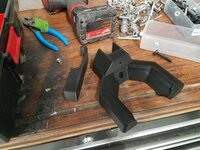
Quick weekend project - designed a custom mounting hook for my M12 rocket light that has the proper interface to snap onto my FastTrack rails. It bugged me that none of the available hooks worked well to hang this tool. Made it a 2pc design to eliminate any supports, and to allow different layer orientations for each part to keep stresses within-layer for better strength.
 

Attachments

  • Screenshot 2023-01-16 082728.jpg
    Screenshot 2023-01-16 082728.jpg
    60.1 KB · Views: 52
  • 20230116_080136.jpg
    20230116_080136.jpg
    789.9 KB · Views: 65
  • 20230116_080648.jpg
    20230116_080648.jpg
    532.4 KB · Views: 68

slodat

ALLIANCE MEMBER
Joined
Feb 6, 2010
Messages
3,679
Location
Central-ish, WA
If you're looking at making custom objects like you're describing, you'll need to learn a 3D modelling program. Seems like a lot of people on here used Fusion 360. Google Sketchup is also popular, but not sure if it can natively export .STL files. My suggestion would be to spend some time playing with those programs to see if you can get the hang of it, as that's the hard part (in my opinion).


Quick weekend project - designed a custom mounting hook for my M12 rocket light that has the proper interface to snap onto my FastTrack rails. It bugged me that none of the available hooks worked well to hang this tool. Made it a 2pc design to eliminate any supports, and to allow different layer orientations for each part to keep stresses within-layer for better strength.
Nice work! That’s a great design.
 

MadeByMiller

Well-known member
Joined
Dec 29, 2018
Messages
1,230
Location
Rapid City, SD
*Here is a post lifted from my Garage Gallery thread - I thought it would be useful to post here as well.*

@nicholam77 and I were discussing first layers/initial Z height over on his thread, and rather than clutter up his stuff I thought I'd post some more details here.

Nick was mentioning the difficulty of establishing a "proper" Z offset for the first layer. Too high and the extrusions will have space between them and not adhere well to the build plate; too low and they extrusions will squish too much into the build plate causing extrusion width to be too large and a raised blobby effect in the print. To try to better illustrate this, I printed the first layer of one of the puzzle trays I posted recently in this thread since they cover a large surface area on the build plate. I did my best to photograph what it will look like when the nozzle is too high, too low, almost right, and just right. Keep in mind, my build plate is quite flat after my recent nylock mod I posted here earlier, but if it's not flat you will have to find a happy medium.

I paused mid print here to try to capture what I'm talking about. The print starts left and is working right. To begin, the offset is good. I then raised the Z height to a point in which there was space between the extrusions and they were barely if even sticking to the build plate. I then lowered the offset back down to a good height, and kept lowering it as it went. You can see the raised blobby ripples get more pronounced as I lower the Z height more and more.
IMG_4641.JPG


Here is a close-up shot of the section where Z was too high:
IMG_4644.JPG


And a close up of the section where it is too low:
IMG_4645.JPG


Here are some low angle shots taken after the entire first layer is complete. It's hard to tell, but after the section with Z offset too low, I raised it back up for about 3/4" where it was almost good, but actually a little too high. After that I lowered it a bit an established a good initial Z height.
IMG_4659.JPG


You can more clearly see where I established my final Z height in the lower left hand corner of this image, right at the apex of the corner where the print gets slightly darker.
IMG_4660.JPG


Here are some shots taken from directly above. Hopefully you can see each transition where the adjustments were made.
IMG_4661.JPG


IMG_4663.JPG


And a close up of the problem areas:
IMG_4662.JPG


IMG_4667.JPG


Here I'm trying to show the section right after the low area where it's almost right - but just a bit too high. You can see some space in-between the extrusions in the lower center-left of the image. I dropped the Z height about .01mm to establish the optimal height.
IMG_4666.JPG


I'll continue on the next post...
 

MadeByMiller

Well-known member
Joined
Dec 29, 2018
Messages
1,230
Location
Rapid City, SD
I peeled the first layer print off of the build plate and backlit it to really emphasize what's happening. You can clearly see the areas where the Z height was too high, causing the extrusions not to squish enough and resultingly, there are gaps. You can also see extra dark areas where the Z height was too low and the extrusions were overlapping each other excessively.
IMG_4670.JPG

IMG_4671.JPG


This is the underside of the print, or what would be down on the build plate. I was trying to show here how you can read your Z height based on the definition of the extrusions. The areas that are too low have almost no definition between the extrusions, except where Z is so low that it is actually scraping off some filament as it's laying it down - this is what is happening in the rippled section.
IMG_4675.JPG


IMG_4676.JPG


Lastly, here is a shot of the top side of the first layer in some harsh overhead lighting:
IMG_4678.JPG


So that's it, hopefully that helps @nicholam77 and anyone else who stumbles across this. I know there are some folks who think that you can set initial Z height by using a slip of paper or something, but it really comes down to just adjusting on the fly and looking for the issues I've tried to show here as it prints. Kind of like tuning a carburetor or focusing a lens, go too far in either direction as you're adjusting so you understand how the adjustments are affecting things.

Thanks for looking!
 

draco_1967

Well-known member
Joined
Jan 3, 2021
Messages
205
Location
Utah
So I spent a couple days scratching my head with some really bad lamination quality on a set of parts. These are replacement slider bushings for the seats on my boat which are no longer available from Grady White. I made myself a set about 3 weeks ago which printed flawlessly with the PLA filament that was included with my Ender3 Max Neo. They fit "good enough" but I wanted to make a few minor refinements before offering sets up to others who need these parts.

I finally realized that my issues started when I switched over to a fresh spool of filament because the original spool didn't have enough left. I switched back to the remainder of the original filament, printed about the first 20% of it, then loaded up a spool of black PLA that I had been using for everything else. Boom - perfect prints again.

The white spool of Overture PLA was brand new in a vacuum sealed container. Did I just somehow get a bad spool of filament? The all white parts have some terrible delamination with laminations literally separating if I gripped them about as firmly as I'd hold a pencil. The white/black hybrid parts started off with a different spool of white PLA and then changed to black. These parts are the quality I'm used to. Both printed with the exact same gcode file.

Same brand, purchased and opened at the same time and stored right next to each other. I'll play around with temps a bit to see if I can't get that spool working right
Even filaments of the same brand can have slightly different optimal temperatures. The white looks like a matte filament, is that right? I had a spool of the matte white Overture PLA that like printing just a little hotter than the glossy filament I had used previously. Try raising the nozzle temp by 5* increments to see where that particular filament likes to print.
 

Black300zx

Well-known member
Joined
Apr 8, 2019
Messages
781
Location
Elkton, Md
Even filaments of the same brand can have slightly different optimal temperatures. The white looks like a matte filament, is that right? I had a spool of the matte white Overture PLA that like printing just a little hotter than the glossy filament I had used previously. Try raising the nozzle temp by 5* increments to see where that particular filament likes to print.
Thanks, good to know. Yes, this is white Overture PLA with a somewhat matte finish. I bumped the temp up from 200 to 215 and the delamination disappeared, but there seems to be a touch of overextrusion now. I know it was a drastic jump, but I figured if a big jump in temp didn't fix it, it was probably a different issue. Time to do a bit of fine tuning and settle somewhere in-between.

My main concern was whether or not it was possible that I just got a bad spool, but that doesn't seem to be the case.
 
Last edited:

Jehannum

Well-known member
Joined
May 3, 2012
Messages
1,347
Location
Albuquerque, NM
Thanks, good to know. Yes, this is white Overture PLA with a somewhat matte finish. I bumped the temp up from 200 to 215 and the delamination disappeared, but there seems to be a touch of overextrusion now. I know it was a drastic jump, but I figured if a big jump in temp didn't fix it, it was probably a different issue. Time to do a bit of fine tuning and settle somewhere in-between.

My main concern was whether or not it was possible that I just got a bad spool, but that doesn't seem to be the case.
There are a couple things I do with each spool of filament that I buy.

first: a temp tower, to help establish what the best temperature to run for that filament is.

next: a stringing test, at a couple three different retraction distances and speeds, to minimize stringing between jumps (enabling z-hops between extrusions helps too).

Finally: a benchy, to bring it all together.

Then, I write up the settings I used on the box so that I won't forget down the road.
 

Black300zx

Well-known member
Joined
Apr 8, 2019
Messages
781
Location
Elkton, Md
There are a couple things I do with each spool of filament that I buy.

first: a temp tower, to help establish what the best temperature to run for that filament is.

next: a stringing test, at a couple three different retraction distances and speeds, to minimize stringing between jumps (enabling z-hops between extrusions helps too).

Finally: a benchy, to bring it all together.

Then, I write up the settings I used on the box so that I won't forget down the road.
Bravo - super helpful information. I've been getting results that are perfectly adequate for my needs so I haven't fussed around too much fine tuning, but that might be this weekend's project :beer:
 

WoodsTruck

Well-known member
Joined
Jan 12, 2013
Messages
1,019
slodat,

My understanding is the printer has to built a purge block as it prints for multi-color. How big of a footprint is the purge block so the extruder can clear out the black prior to printing with white?
 

slodat

ALLIANCE MEMBER
Joined
Feb 6, 2010
Messages
3,679
Location
Central-ish, WA
About 1"x2". I don't have one handy. It's not a big deal to me thus far. The slicer puts it at the rear right of the build plate. I always use auto-arrange and it has worked well for me.
 

Bessy

Well-known member
Joined
Dec 18, 2012
Messages
992
Location
Ontario, Canada
Fired up the 3v2 today and was about to home the z to begin leveling, and the x axis ran itself all the way to the right and wanted to keep going. Fumbled around to the back to hit the power switch (seriously the worst placement, IMO). Turned it off and commenced a manual, unpowered leveling before getting side tracked. Try again Tuesday, I guess.
 
To avoid these ads, REGISTER NOW!

WoodsTruck

Well-known member
Joined
Jan 12, 2013
Messages
1,019
Anyone have any hints on printed threaded parts?
I used one as a negative to create the other and the thread has zero free space. Thinking of upsizing the cap slightly and reprinting. It doesn't need to be water tight.
It is just a siphon plug for emptying plastic motorsport tanks. Main hose will fit through the large hole and then compressed air will be pushed through the secondary side hole to get the siphon action started. Cap is just too tight to run off and on to compress an O-ring to hold tension on the hose.
 

Attachments

  • Sled Siphon 1.JPG
    Sled Siphon 1.JPG
    39.9 KB · Views: 27
  • Sled Siphon 2.JPG
    Sled Siphon 2.JPG
    43 KB · Views: 57

bugnut

ALLIANCE MEMBER
Joined
Jul 14, 2012
Messages
3,834
Location
Central Ohio
@WoodsTruck, might using the scale on your slicer work you could make the male thread slightly small and the female slightly larger. I have not done this with threads but have done so with other parts.
 

txvwnut

Well-known member
Joined
Jan 1, 2015
Messages
7,587
Location
Bedford, Texas
That's pretty much the trick to it. You'll need to print some test parts to figure total shrinkage then adjust size in the CAD program to end up with the finished size you are looking for.
 

purplezr2

Well-known member
Joined
Jun 1, 2010
Messages
5,290
Location
Central MN
Anyone have any hints on printed threaded parts?
I used one as a negative to create the other and the thread has zero free space. Thinking of upsizing the cap slightly and reprinting. It doesn't need to be water tight.
It is just a siphon plug for emptying plastic motorsport tanks. Main hose will fit through the large hole and then compressed air will be pushed through the secondary side hole to get the siphon action started. Cap is just too tight to run off and on to compress an O-ring to hold tension on the hose.


Any concerns with static electric discharge and fuel?
 

zanyad

ALLIANCE MEMBER
Joined
Apr 26, 2018
Messages
2,755
Location
NE Ohio
Anyone have any hints on printed threaded parts?
I used one as a negative to create the other and the thread has zero free space. Thinking of upsizing the cap slightly and reprinting. It doesn't need to be water tight.
It is just a siphon plug for emptying plastic motorsport tanks. Main hose will fit through the large hole and then compressed air will be pushed through the secondary side hole to get the siphon action started. Cap is just too tight to run off and on to compress an O-ring to hold tension on the hose.
Machined threads usually have an allowance for assembly. I've found this thread dimension calculator helpful when specifying threads on drawings. On metal parts I'll usually spec 2A/2B class fit. 3D printed parts will be different, as alluded to earlier by @txvwnut.
 

PCMusicGuy

Well-known member
Joined
Feb 15, 2009
Messages
851
Location
Houston, TX
If you're looking at making custom objects like you're describing, you'll need to learn a 3D modelling program. Seems like a lot of people on here used Fusion 360. Google Sketchup is also popular, but not sure if it can natively export .STL files. My suggestion would be to spend some time playing with those programs to see if you can get the hang of it, as that's the hard part (in my opinion).


Quick weekend project - designed a custom mounting hook for my M12 rocket light that has the proper interface to snap onto my FastTrack rails. It bugged me that none of the available hooks worked well to hang this tool. Made it a 2pc design to eliminate any supports, and to allow different layer orientations for each part to keep stresses within-layer for better strength.
Would you be willing to share or sell the STL? I have the same track system and a rocket light taking up space on my work bench . . .
 

Keyblazer

Well-known member
Joined
Jul 30, 2009
Messages
1,471
Location
Irvine, CA
Been a busy bee.
Bought a Creality Sprite, Direct Drive all metal hot end to put on the Ender 5 plus.
2F4BBF10-C2CB-42D7-8709-4ACDA3CF7F2E.jpeg
253C7293-AA36-4F4A-816F-80E1A26FFE40.jpeg

I knew it didn’t fit on the E5 without mods, because the X belt on the Ender 5 is on the front, and the Sprite is setup for the Ender 3 is a bottom belt.

Original E5 carriage...
1F116265-D6A1-4289-B3F1-D37F72B512C3.jpeg

Sprite carriage for Ender 3.
0DFBDCF7-C79C-4A19-B85B-3435B2E1C2B5.jpeg

Didn’t want to cut up the Sprite mounting plate, as I’ve seen done on YouTube.
Printed the Adaptor I found on Thingyverse, but was not happy with it.
Firstly, its only 1mm thick.... but also the belt slots are 90mm apart, and the original E5 is only 75mm...
So, you have cut the drive belt down to get it tensioned.

Designed my own, from scratch, on Fusion 360, with a 3mm band thru the belt attachment area, and 75mm belt spacing...
Its not perfect, and I might rejig it...
F7744D18-D826-4323-958F-17F8A4CF881D.jpeg

Printed a test piece in PLA.
A4C93274-DD6D-44E9-A586-EA5822AABD57.jpeg

Seems to work well enough to progress.
41876ACB-96D7-48A3-AE24-786E491236D1.jpeg

Sprite Unit fitted.
097250D7-294D-41C3-A1C8-80E96B725790.jpeg


Now I have to get at the wires...
That's for tomorrow!
 
Last edited:

Keyblazer

Well-known member
Joined
Jul 30, 2009
Messages
1,471
Location
Irvine, CA
That was this morning…
Around Midday, the Ender Extender kit arrived for my “Used $120 Ender 3 V2 Project printer” arrived.
2F24AD62-3AC3-4067-967F-616CF8D51CD9.jpeg

Set up a table, and got after it.
Goodness, that 400x400 plate is MASSIVE in comparison!
26B1DD84-5579-454E-844A-0E012B1DFA1D.jpeg

One, shredded Ender 3…
D0BD300D-AC81-40DF-81C4-7385F521438D.jpeg

Took me about 2 hours.
BA5944FF-0909-41E4-B08F-AE9EF989E15E.jpeg

Seemed a good time to add the “Dual Z drive” upgrade.
C9E47AE1-E87B-42DA-9ACB-1F905BD96E07.jpeg

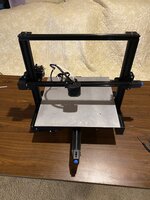
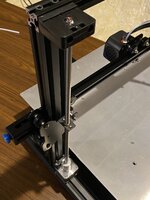
The hardware side is done, but as this unit is getting a special upgrade.

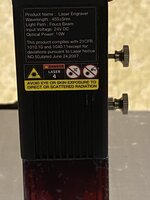
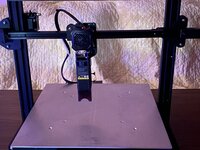
Creality’s 10w laser module.
F8EF79EC-103E-4952-AF9A-1B2B5CA29329.jpeg
3F632AFE-45DB-4331-AAB2-4DE4D7A7550F.jpeg

Test fit looked good.
F82E3BE8-2306-4838-AC01-43387B1896B3.jpeg
21B8E011-B6A7-4EB8-AE7C-E41DB74EED63.jpeg

Gotta figure out the wiring for that too.
 

SteveL

Well-known member
Joined
Jan 14, 2005
Messages
760
Location
St. Louis, MO
So how hard is it for a guy with very little computer knowledge to get in to 3D printers? Would love to have one but afraid that I would struggle with the learning curve for designing items. I can sketch something in 3D easily bit have no clue how to do it with software.
 

kaymccampbell

Well-known member
Joined
Feb 27, 2015
Messages
29,402
Location
Upstate New York
Do you have a project in mind? It's good to have a goal, so you're not just throwing your money away more than you usually do.

If I were in your shoes, I would maybe try TinkerCAD. IIRC it's online, and got a more simple graphical interface. I think it's free.

Get a couple widgets from Thingiverse that are close to what you want to do. Chop them up, bash them together, get a feel for things. If you can get a successful STL file out of it, then you can probably make a go of it.
 

WoodsTruck

Well-known member
Joined
Jan 12, 2013
Messages
1,019
My daughter went to a STEM camp at the local university and had 3D printing class. Seemed easy enough so I bought an Ender 5 for $350. She used TinkerCAD in the class so that is what I have been using so she could get me started. I suppose there are better programs but I have built everything I need so far with the free program.
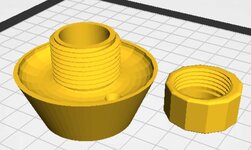
On the screenshot, I was attempting to build a gas cap to use for a siphon hose to drain fuel from the tank. I pulled the actual cap looking image from Thingiverse but wanted something more universal so I went with the wedge shape and started drawing from there. I also have some duplicates that I have cut in half to view the profile.
Once you get the part you want to print, you select it and export as an .stl file and move that into your slicer program. My Creality software came with the printer. Your filament will have temperature settings to get you close for the printer and you can set the fill rate saving filament in solid pieces. Save the file out to the printer and let it go to work.
It takes a little bit to figure out what you want the end product to look like but I find it quite rewarding.
 

Attachments

  • TinkerCAD Desktop.JPG
    TinkerCAD Desktop.JPG
    169.5 KB · Views: 25
  • Slicer screenshot.JPG
    Slicer screenshot.JPG
    157.8 KB · Views: 31

loganb

ALLIANCE MEMBER
Joined
Dec 29, 2011
Messages
5,493
Location
Omaha, NE
So how hard is it for a guy with very little computer knowledge to get in to 3D printers? Would love to have one but afraid that I would struggle with the learning curve for designing items. I can sketch something in 3D easily bit have no clue how to do it with software.

If you find a couple widgets or thingamajigs on thingiverse or printables.com that may be useful to you and you want to get them printed to see how functional they may be for you...check your local library. Many of them have printers available for marginal costs, mine is $1 per print plus a fee for the material used.

Echo the comments that once you get one, making your own models is really needed to get full functionality. Never used TinkerCAD, Fusion360 is another popular one with lots of online training and how to's. Last I saw it was free for hobbists/noncommercial use
 

HPRifleman

Member Emeritus
Joined
Nov 18, 2019
Messages
767
Location
Wayne, IL
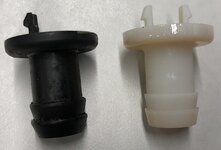
I was removing a vent tube on my truck last week. Sure enough, in the process of pulling on it I broke the ****** that it attached to. A few minutes modeling it in SolidWorks and adding it to a print job I was already running, and now I have a replacement.

Original on the left, printed version on the right.
gj_160.JPG
 

HPRifleman

Member Emeritus
Joined
Nov 18, 2019
Messages
767
Location
Wayne, IL
What did you print it out of, and did you do a post treatment, doesn't even look printed

The printer is a Stratasys Objet 260. It deposits drops of liquid material similar to an inkjet printer and then cures it with UV light. The process repeats layer by layer until you have a part.

There are two build materials in the machine. These are combined in the print head to create what Stratasys calls "digital ABS". The result is a part with properties similar to a non-reinforced engineering plastic. There is also a support material in the machine that is used in lower layers whenever there is an overhang in an upper one. For example, the part was printed in the orientation shown above. So everything below the wide flange was encased in support material that had to be removed. There was also support material under the snap hooks.

Post-processing just consists of removing any support material. This is done mostly by elbow grease and a scraper. Most of it doesn't adhere to the part and comes off pretty easy. The rest is removed using a high pressure water spray.
 

sherrillkelby

Member
Joined
Oct 24, 2015
Messages
13
So how hard is it for a guy with very little computer knowledge to get in to 3D printers? Would love to have one but afraid that I would struggle with the learning curve for designing items. I can sketch something in 3D easily bit have no clue how to do it with software.
I learned CAD way before I bought a printer, mostly from these tutorials by a high school shop teacher:


You'll want to do the ones for Fusion 360, not the architectural software. They provide a nice easy introduction. Alternately, there's thousands of tutorials on Youtube for Fusion 360.

Other than that, operating a 3D printer is a whole separate skill set from designing. There's a mechanical side to it, like making sure things are square, various calibrations, etc, and an electronics side to it. You most likely won't need to mess with the electronics or firmware as a beginner though. Also, printers can range from kit plans you build yourself, to the cheap Chinese ones at the low end, to commercial models. Obviously they also vary in how much tinkering they need to keep running.
 

nicholam77

Well-known member
Joined
Dec 18, 2016
Messages
2,655
Location
Minneapolis, MN
When I jumped in, I found the hundreds of “Fusion360 For Absolute Beginners!” videos to be too fast-paced, not explain the file management, and in general not teach foundational best practices I could apply my own designs.

Except the series by Paul McHorter, Learn Fusion 360 or Die Trying. The videos are longer format, but if you’re an actual beginner, it’s well worth it. It’s also geared towards learning it for the purpose of 3D printing. Highly recommend.


He has an older version of the series, but recently redid it with many more lessons with the current version of Fusion. I’ve been meaning to go back and watch it again as time allows.
 
To avoid these ads, REGISTER NOW!
Top Bottom