So if you've read anything I've previously written, you know I bounce around a lot. Today we're going to cover my latest CNC related obsessive disorder, probing. With any Cartesian device it is really important to know where you are, and with some of them it is also important to know where the thing you are working on is. A simple X & Y laser engraver usually projects an
origin spot to help you align your work object, and will often trace out the boundaries of the design you are burning. Another example is an extrusion type of 3D printer which needs to really accurately know where the bed is. Most beginners get sick of re-leveling the nozzle with a piece of paper time and time again. Fortunately the better 3D printers typically have some form of mechanical or inductive probe that will automatically measure the bed surface before starting the print, helping it maintain an even and properly applied first layer which is critical for bed adhesion. Failure to get that layer to stick or to have uneven extrusion thickness will result in a poor quality or ruined print.
With a CNC, Ideally you need to keep track of more things than you would expect. Obviously the machine needs to know where it is in 3 dimensional space. This is typically done by using limit switches and a homing command to make all the axis move to their
home position, then resetting the machine coordinates to zero. But with a CNC you also need to know the exact location of the raw material you are going to work on. Depending on the material, and how you have it mounted, this can be harder to locate than you might imagine. Unlike an additive printer, we are not just creating the object out of thin air, we have to know exactly where the material we are going to machine is located. And we often have stock that is of the exact final dimensions and we need to make small modifications to it, drilling precisely located holes or slotting it. The machine may know where it is, but getting the workpiece location wrong and it is game over. That's not even counting for the workholding, the expensive vises and clamps that you might destroy due to these errors.
The last variable is the tooling, the end mill or drill or slitting saw. Even though the machine knows where it is when it homes, it doesn't actually know where the edge of tool itself is in relation to the Z axis. This is because we are always changing tools and it is nearly impossible to get every tool to be chucked in the same exact location, with the same exact length protruding from the spindle. They are going to be all different lengths, and even the same tool will be mounted differently every time you use it.

Most entry level CNC systems depend on tools from the manual milling world to help accurately resolve these variables, a precision ground rod, split in two and held together with an internal spring exhibits an almost
magical behaviour when it is rotating and just contacts a surface. It will suddenly displace itself in an easy to recognize and highly repeatable way. By recording the coordinates you are at when this happens, you can map the location of the workpiece into the machine's coordinate system. Some people will use a thin slip of rolling paper in between the end mill and the work, carefully moving the mill closer and closer until the paper is trapped and pulled by the mill's rotation. (This seems dangerous, especially on a mill that has computers controlling it.) To get the height of the material (and also solving the whole "How long is this tool?" length issue) it is common to gently lower the tool until it just touches the top of the workpiece, or even better using a precision ground pin or rod of a known diameter to gently roll in between the endmill and the workpiece. You can lower the tool a little bit at a time until rolling the rod under the end mill just barely touches the edge, thereby ensuring a safe distance so you don't accidentally crash the expensive mill into the workpiece or mar it in any way (don't forget to subtract the rod diameter!).
All of these strategies are proven and workable, but they are also tedious and prone to human error when you are entering these values into the system, you forget to account for the offset or move the probe in the wrong direction crashing it. Better systems use more automated ways of gathering this information. The simplest of these is a conductive loop type of probe that can signal to the machine the exact moment contact is made so the machine can automatically record the position. However this type of device relies on the workpiece being conductive so obviously this only works for a subset of materials, wood and plastics won't work with these. This type can also be used for a tool length probe, but in the case of material probing a common design uses a long tube with a metal ball at the end. The ball is held in place by being connected to a spring inside the tube, pulling it tightly against the lip of the tube. When the ball touches the material, the circuit is completed and the LED's light up. If you move too close, the ball can move off to the side, but it is easy to pull it too far. These devices
can be very accurate, but tend to be inexpensive and less precisely built than the more sophisticated probes and can be very susceptible to damage as the tube can't move. They also have no ability to absorb any forces in the
Z (up and down) direction, limiting their value for Z probing. The machine can be programed to automate the movements required to probe the material or feature location. This is a real time saver, and reduces the chance of Bozo moves that destroy your probes and tools.
The more advanced probing mechanisms are based on the principals of Kinematic fixtures. This is an arrangement of precision shapes (there's more than one way to do it) that despite having a range of motion, are able to self align back to exactly the same location every time. The most common arrangement is used in Renishaw style probes that use a ball and rod arrangement. The advantage of such a system is that it works on non-conductive materials (also helpful as the best probe tips are made from non-conductive ruby balls) and the amount of deflection they can withstand reduces the chances of damage in the case of a crashed probe.

So with that background in place, and despite having several high quality 'physical' style probes, ideally I want to have the system take care of probing and tool height offsets. Not interested in spending tens of thousands of dollars for the commercial devices, I began searching for alternative solutions. There are some well regarded artisan made solutions (from about $300-$800) out there, but as always my location makes the idea of purchasing, importing and getting support from New Zealand, Poland or the Czech republic kind of unpalatable. So I looked for local stuff, hopefully for a reasonable price, at the usual places.
One such local manufacturer is known globally as
BIG Kaiser, but here in Japan as
BIG Daishawa. They make several tiers of tool length probes and material probes, mostly focused on use in manual probing situations. That means most of their units have no direct integration with the control system, they beep or light an LED when they have achieved contact, there is no external trigger output. They make both closed circuit and the more expensive internal contact designs, but both systems use Kinematic style probes to improve accuracy, allow for Z measurements and to extend service life.
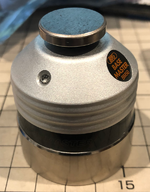
The first thing I bought was a BM-50 which is a closed circuit type of tool offset probe. My rationalization being that there was little chance I would be using non-conductive tooling, so the minor inconvenience of a closed circuit system was unlikely to be much of an issue. What was still an issue was, "How do I get the controller to know when the tool height sensor has triggered?" After receiving the unit, it was clear that these were designed to prevent any kind of repair or modification. Everything was potted, there was no way to pull the voltage off of the LED pins, no non-destructive way to get it apart... so I had to make a phototransistor based signaling circuit that triggers when the LED is lit. The height sensor has 3mm of additional travel, the little plate on the top is spring mounted (and uses a kinematic seat I believe) and is spec'ed to be accurate to within a micron (I confirmed this with my test stand.) But 3mm is not a lot of space, and if the controller didn't get the touch signal for whatever reason (say a small chip of wood or plastic that gets stuck between the plate and the tool) then the automated CNC is going to drive the tool into the little height gage until things break. Bad news. So the interface will actually need an emergency cut off micro switch that will trigger when the plunger is depressed more than a millimeter or two. More on how I will solve that as I build it.
With a tool hight solution well in hand, I went forth and... bought a whole bunch more tool height sensors.

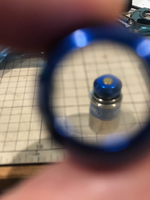
The thing with me is, the more I get to know about something, the less I can just be happy with what I have. That coupled with the knowledge of a "too good to pass up" deal has left me with a total of 4 BIG Daishowa tool height sensors. I have 2 of the BM-50G "Gold" type, which are internal contact types that have a ceramic contact plate. And a little BMM-20 Mini unit, that is so small it comes with a built in magnifying glass, and is also internally triggered. The 3 BM-50's are all the same exact shape, so my custom signalling interface will work on all of them, and the mini is so cute and will be useful on my manual mill and lathe. I'm pretty sure I'm done buying these things, but don't believe me, I lied to you about my vise vice after all.

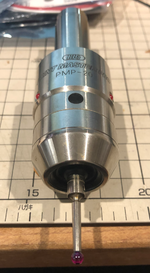
The more sophisticated workpiece probing units were all custom search bookmarked, and I camped all my favorite buying channels. I really wanted a non-conductive type of probe as I intend to work with wood and machinable plastics on my machine. The first
sore member deal that came along was a closed circuit type though, and so I jumped on it as at least a backup plan. A few days later the unit I was actually looking for was posted, it was $300 but new they are $1000 so I figured it was as good as I could hope for. I know I will likely see one or two come up cheaper now that I got this one. I will likely buy more to "average out" the price, that makes sense right? Right? Send help...


 Cheap DIY is in my blood.